The blowfishECB function in core/cipher.cpp in Quassel IRC 0.10.0 allows remote attackers to cause a denial of service (out-of-bounds read) via a malformed string.
Monthly Archives: November 2014
How to turn on WiFi encryption in your router settings
Eavesdropping is a major concern when we talk about the security of home WiFi networks. People around you, your neighbors in the next apartment, or even your own government, can discover anything flowing through your Internet traffic. Your personal data, like passwords and log in credentials, your credit card numbers, and  your photos and videos, are at risk.
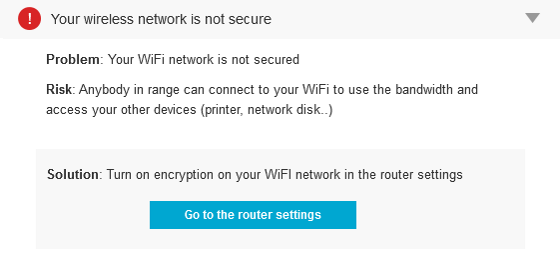
Your WiFi network is not secured
We have written a lot about how to protect our communications using a VPN. To summarize, a Virtual Private Network, or VPN, is an encrypted tunnel where your data travels from your computer to a secure server on the Internet. Avast SecureLine is a VPN that you can use when outside of your home; at cafes, hotels, or airports.
Get your home network secure
But now, it’s time to bring your attention to your home network security. Your router should be correctly set to achieve the highest level of protection. Until you secure your router, you’re vulnerable to people accessing information on your computer, using your Internet service for free, and potentially using your network to commit cybercrimes.
There are basically three levels of security on a home router. These come in types of encryption. They are WEP, WPA and WPA2. These strange acronyms refer to different wireless encryption protocols which protect – in fact, encrypt – the information you send and receive over a wireless network.
WEP (Wired Equivalent Privacy) was the first protocol used in late 90s. It should not be used nowadays as it has serious security weaknesses which are easily hackable by even the most novice hacker. So, the first wise thing to do is move away from WEP. Your router must be quite old if you can’t do that, and you should consider purchasing an updated one, or ordering a new one from your ISP.
WPA (WiFi Protected Access) replaced WEP, but very soon after that, WPA2 replaced WPA. WPA2 implements the latest security standards, especially for data encryption with AES (Advanced Encryption Standard), a strong encryption algorithm.
Using WPA or, better, the WPA2 protocol, means that when any device tries to establish a connection to your wireless network, it will be prompted to enter the security key or password to connect.
Most wireless routers allow you to select WPA2 during the setup process. Unfortunately, the default in many wireless devices is WEP or, even worse – nothing -Â which means anybody in range can connect to your WiFi to use the bandwidth and access your other devices (printer, network disk, etc.).
What to do at home
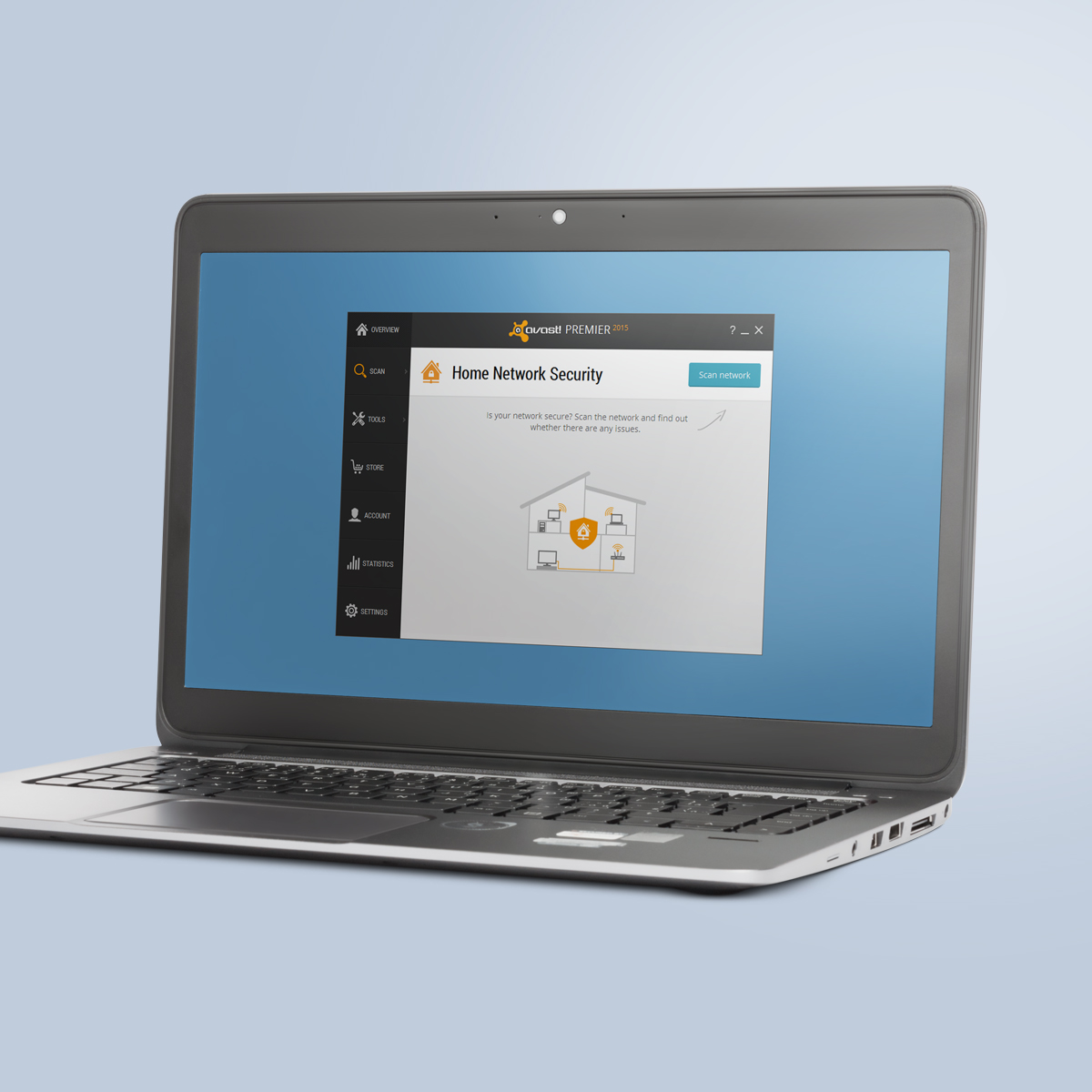
Avast Home Network Security scans for vulnerabilties.
Verify your wireless network router (or other access point) supports WPA2. If necessary, go to your router manufacturer site and search for the latest firmware to be downloaded and applied according to its instructions. Apply compatible WPA2 settings on each WiFi device, choosing the WPA2 encryption and the correct authentication info.
Although encrypting your traffic won’t protect you from rogues, denial-of-service (DNS) attacks or interference, it will ensure secure wireless communication.
Also, change the default password. Make sure the one you use is long and strong, using a mix of numbers, letters and symbols.
Avast 2015 includes a Home Network Security scanner that can help you determine what needs to be done, explain why, and can direct you to the router manufacturer’s website. Read more about it on our blog, Your home network is at risk of cybersecurity attacks.
Avast Software’s security applications for PC, Mac, and Android are trusted by more than 200-million people and businesses. Please follow us on Facebook, Twitter and Google+.
Â
DigiCert Considering Certs for Hidden Services Beyond Facebook
DigiCert explains why it issued a signed certificate to Facebook’s .Onion Tor domain, noting it may offer more hidden services certs in the future.
CEEA-2014:1816 CentOS 6 openssl Enhancement Update
CentOS Errata and Enhancement Advisory 2014:1816

Upstream details at : https://rhn.redhat.com/errata/RHEA-2014-1816.html

The following updated files have been uploaded and are currently
syncing to the mirrors: ( sha256sum Filename )

i386:
6dc08c103490ec2e27ebb9f4f12639577b4d5970b4c5827172efaa4d1bf157b5  openssl-1.0.1e-30.el6_6.4.i686.rpm
8c9256d254a15224ea0e842d5d289a08157629935665892664fdad4b20e501fb  openssl-devel-1.0.1e-30.el6_6.4.i686.rpm
5922d3d09768b5aad5b5adf9930a1bcb018688f64d8811b3a3a5790f106461f6  openssl-perl-1.0.1e-30.el6_6.4.i686.rpm
0d469b3126d34fa740a6c9f1f3c5dc36242fc0b87195dd3c93a05337cf851d91  openssl-static-1.0.1e-30.el6_6.4.i686.rpm

x86_64:
6dc08c103490ec2e27ebb9f4f12639577b4d5970b4c5827172efaa4d1bf157b5  openssl-1.0.1e-30.el6_6.4.i686.rpm
96605324dfda2969d510e99aa0a99dfbe022d1bc9ebbd9e325619cc34c745241  openssl-1.0.1e-30.el6_6.4.x86_64.rpm
8c9256d254a15224ea0e842d5d289a08157629935665892664fdad4b20e501fb  openssl-devel-1.0.1e-30.el6_6.4.i686.rpm
398aff439f00c8a5b4bc788c83f9bde43e22af2b1288ed9317af8b30badaed1e  openssl-devel-1.0.1e-30.el6_6.4.x86_64.rpm
b94a4e1a7a35d0eea2d195c8b007953a77bf58d2ce6c1eb93bbc8113c1156bd1  openssl-perl-1.0.1e-30.el6_6.4.x86_64.rpm
7daff6ba674318e1540c1ec867adea4b4a37fb246ca28e7b455d9e0565af2991  openssl-static-1.0.1e-30.el6_6.4.x86_64.rpm

Source:
ce6b1592602c1f6606ba3be32806d2c8ac59bbe946f8600fe8bc495e2598fbe0  openssl-1.0.1e-30.el6_6.4.src.rpm
CEBA-2014:1814 CentOS 6 iproute BugFix Update
CentOS Errata and Bugfix Advisory 2014:1814

Upstream details at : https://rhn.redhat.com/errata/RHBA-2014-1814.html

The following updated files have been uploaded and are currently
syncing to the mirrors: ( sha256sum Filename )

i386:
11b560b8b12bef924870b17dd0580fe72624e17d692d7206870738a5999abbc6  iproute-2.6.32-33.el6_6.i686.rpm
7a2902c534da8205c23dcfeab8a7c66ebea1007fdc5fe959f15f957b565a9091  iproute-devel-2.6.32-33.el6_6.i686.rpm
406e08646b38829c7dda3d48979647ef0fc7a2cbd26cd77f8f17e3110dfbccf9  iproute-doc-2.6.32-33.el6_6.i686.rpm

x86_64:
4b4d25019d73b11f1c77baadf3ae5f1fd6c9607e7dfaf851cbc86cef6afeb5f6  iproute-2.6.32-33.el6_6.x86_64.rpm
7a2902c534da8205c23dcfeab8a7c66ebea1007fdc5fe959f15f957b565a9091  iproute-devel-2.6.32-33.el6_6.i686.rpm
d9de661b6b6c8fb728cfde0133a292d1effa50fb25681fab5aca85e1efffc2f5  iproute-devel-2.6.32-33.el6_6.x86_64.rpm
5a50e38a3a1d29b7bd19f7818afb2ebee387148ae75f9c772347516b9b8de0ab  iproute-doc-2.6.32-33.el6_6.x86_64.rpm

Source:
4fb505539d7a2d82684e20417b2d1305a24b37d6b743e27843e9f7335e2d73a0  iproute-2.6.32-33.el6_6.src.rpm
CEBA-2014:1813 CentOS 6 curl BugFix Update
CentOS Errata and Bugfix Advisory 2014:1813

Upstream details at : https://rhn.redhat.com/errata/RHBA-2014-1813.html

The following updated files have been uploaded and are currently
syncing to the mirrors: ( sha256sum Filename )

i386:
b0101ae88d4a92e29b7ea147d4a98538a7e55c472496f17c6a0c09baa2513085  curl-7.19.7-40.el6_6.1.i686.rpm
c16c235eb9b9e7e208f2e1020dee2964fe064c5a9d09cf6db5349b29debb3ba6  libcurl-7.19.7-40.el6_6.1.i686.rpm
633c0703a7bccc9ee1dc982b8695c519e1f9acd746f78de625823756221e5fb3  libcurl-devel-7.19.7-40.el6_6.1.i686.rpm

x86_64:
564020c0eb541f0aebc84c62fae5d7216cfea7ba7fcabf4156a1967a6741a456  curl-7.19.7-40.el6_6.1.x86_64.rpm
c16c235eb9b9e7e208f2e1020dee2964fe064c5a9d09cf6db5349b29debb3ba6  libcurl-7.19.7-40.el6_6.1.i686.rpm
057ab32e1c3397a53c23269b639f0846b3be088147664055b5c47ce0a02a1b01  libcurl-7.19.7-40.el6_6.1.x86_64.rpm
633c0703a7bccc9ee1dc982b8695c519e1f9acd746f78de625823756221e5fb3  libcurl-devel-7.19.7-40.el6_6.1.i686.rpm
8e8db49ac12cc7b1ab28651ff0ecdc94944f571a21246a55c4e588ece4a3d972  libcurl-devel-7.19.7-40.el6_6.1.x86_64.rpm

Source:
5b098d7712829a57b79c7d002b5220dc3b0191c9bc61e0f532b7844deb3d436d  curl-7.19.7-40.el6_6.1.src.rpm
CVE-2014-5258
Directory traversal vulnerability in showTempFile.php in webEdition CMS before 6.3.9.0 Beta allows remote authenticated users to read arbitrary files via a .. (dot dot) in the file parameter.
CVE-2014-5451 (modx_revolution)
Cross-site scripting (XSS) vulnerability in manager/templates/default/header.tpl in MODX Revolution 2.3.1-pl and earlier allows remote attackers to inject arbitrary web script or HTML via the “a” parameter to manager/. NOTE: this issue exists because of a CVE-2014-2080 regression.
CVE-2014-6030 (selectsurvey.net)
Multiple SQL injection vulnerabilities in ClassApps SelectSurvey.NET before 4.125.002 allow (1) remote attackers to execute arbitrary SQL commands via the SurveyID parameter to survey/ReviewReadOnlySurvey.aspx or (2) remote authenticated users to execute arbitrary SQL commands via the SurveyID parameter to survey/UploadImagePopupToDb.aspx.
Citrix NetScaler SOAP Handler Remote Code Execution
This Metasploit module exploits a memory corruption vulnerability on the Citrix NetScaler Appliance. The vulnerability exists in the SOAP handler, accessible through the web interface. A malicious SOAP requests can force the handler to connect to a malicious NetScaler config server. This malicious config server can send a specially crafted response in order to trigger a memory corruption and overwrite data in the stack, to finally execute arbitrary code with the privileges of the web server running the SOAP handler. This Metasploit module has been tested successfully on the NetScaler Virtual Appliance 450010.