Multiple stored/reflecting XSS- and SQLi-vulnerabilities and unrestricted file-upload in ferretCMS v. 1.0.4-alpha

Posted by Steffen Rösemann on Jan 22

Advisory:
Advisory ID: SROEADV-2015-10
Author: Steffen Rösemann
Affected Software: ferretCMS v. 1.0.4-alpha
Vendor URL: https://github.com/JRogaishio/ferretCMS
Vendor Status: vendor will patch eventually
CVE-ID: –

Tested on:

– Firefox 35, Iceweasel 31
– Mac OS X 10.10, Kali Linux 1.0.9a

==========================
Vulnerability Description:
==========================

The content management system ferretCMS v.1.0.4, which is currently in
alpha…

IT Hot Topics 2015 Call for Papers

Posted by Squirrel Herder Productions on Jan 22

Carolina Advanced Digital, Inc. <http://www.cadincweb.com/> has opened the
CFP <http://cfp.hottopicsconference.com> for their 13th annual IT HotTopics
Conference
<http://www.cvent.com/events/it-hot-topics-conference/event-summary-78f9e7c592844307b345397bc2cb1a09.aspx>
and
Golf Torney, at the stunning Grandover Resort and Spa, in Greensboro, North
Carolina, U.S.A.

Conference: May 6th & 7th

CFP:…

CVE-2014-9558 SmartCMS Multiple SQL Injection Security Vulnerabilities

Posted by Jing Wang on Jan 22

*CVE-2014-9558 SmartCMS Multiple SQL Injection Security Vulnerabilities*

Exploit Title: Smartwebsites SmartCMS v.2 Multiple SQL Injection Security
Vulnerabilities
Product: SmartCMS v.2
Vendor: Smartwebsites
Vulnerable Versions: v.2
Tested Version: v.2
Advisory Publication: Jan 22, 2015
Latest Update: Jan 22, 2015
Vulnerability Type: Improper Neutralization of Special Elements used in an
SQL Command (‘SQL Injection’) (CWE-89)
CVE Reference:…

CVE-2014-9557 SmartCMS Multiple XSS (Cross-Site Scripting) Security Vulnerabilities

Posted by Jing Wang on Jan 22

*CVE-2014-9557 SmartCMS Multiple XSS (Cross-Site Scripting) Security
Vulnerabilities*

Exploit Title: Smartwebsites SmartCMS v.2 Multiple XSS Security
Vulnerabilities
Product: SmartCMS v.2
Vendor: Smartwebsites
Vulnerable Versions: v.2
Tested Version: v.2
Advisory Publication: Jan 22, 2015
Latest Update: Jan 22, 2015
Vulnerability Type: Cross-Site Scripting [CWE-79]
CVE Reference: CVE-2014-9557
Credit: Wang Jing [MAS, Nanyang Technological…

Alibaba Taobao, AliExpress, Tmall, Online Electronic Shopping Website XSS & Open Redirect Security Vulnerabilities

Posted by Jing Wang on Jan 22

*Alibaba Taobao, AliExpress, Tmall, Online Electronic Shopping Website XSS
& Open Redirect Security Vulnerabilities*

*Domains Basic:*
Alibaba Taobao, AliExpress, Tmall are the top three online shopping
websites belonging to Alibaba.

Vulnerability Discover:
Wang Jing, Division of Mathematical Sciences (MAS), School of Physical and
Mathematical Sciences (SPMS), Nanyang Technological University (NTU),
Singapore….

Re: full name disclosure information leak in google drive

Posted by forgottenpassword on Jan 22

You can use the “forgot password” feature on a google account to find
out someone’s full name.

Test it out for yourself:

https://www.google.com/accounts/recovery/
Select “I don’t know my password”
Enter bonsaiviking () gmail com (or another gmail address)

https://sites.google.com/site/bughunteruniversity/nonvuln/discover-your-name-based-on-e-mail-address

Dan

USAA mobile app gives away personal data; fix released

Posted by David Longenecker on Jan 22

The USAA Mobile app for Android, prior to version 7.10.1 (released 19
January), contains an information disclosure vulnerability. I have
submitted a CVE-Assign request for this issue but do not yet have a CVE
assigned. The issue is demonstrated with sanitized screen captures at
http://dnlongen.blogspot.com/CVE-2015-USAA

By design, the USAA Mobile app for Android allows users to select whether
to log out immediately upon task-switching (i.e….

CESA-2015:0074 Important CentOS 6 jasper SecurityUpdate

CentOS Errata and Security Advisory 2015:0074 Important

Upstream details at : https://rhn.redhat.com/errata/RHSA-2015-0074.html

The following updated files have been uploaded and are currently 
syncing to the mirrors: ( sha256sum Filename ) 

i386:
02f67d2e5b95c3deac8b8fe531bd0ed1a64b84565c54f6a6a8751bbbca7b6d8f  jasper-1.900.1-16.el6_6.3.i686.rpm
16d4410c882cc8170de29dfe23eb2e157e3c28dbe5171c91adf797d33ea2ffe8  jasper-devel-1.900.1-16.el6_6.3.i686.rpm
867485f066f16b8d4067771a01f6f8c60dda135f27c5a6441b2089d8e9255533  jasper-libs-1.900.1-16.el6_6.3.i686.rpm
a66de49b3222920f133dffba8a0e29ed3088cbb9789e213dff39fa49fc24ee26  jasper-utils-1.900.1-16.el6_6.3.i686.rpm

x86_64:
1c5deb1cb8023125cf8e4e9b925b587b8192add3b2a1067e31cb057b961e795e  jasper-1.900.1-16.el6_6.3.x86_64.rpm
16d4410c882cc8170de29dfe23eb2e157e3c28dbe5171c91adf797d33ea2ffe8  jasper-devel-1.900.1-16.el6_6.3.i686.rpm
03b77c531aa6a9d8faaa3582903a9f8c0925efd1e08acc955e12d95566754bf6  jasper-devel-1.900.1-16.el6_6.3.x86_64.rpm
867485f066f16b8d4067771a01f6f8c60dda135f27c5a6441b2089d8e9255533  jasper-libs-1.900.1-16.el6_6.3.i686.rpm
f97f6af75d7ac6140e4f126e4e34b8e5b2eba7a0c6ed65694cecaaf88100d806  jasper-libs-1.900.1-16.el6_6.3.x86_64.rpm
206e28a1040407e452f65cfcc02db518c5737455c620c2e5ef87703ddfa4559d  jasper-utils-1.900.1-16.el6_6.3.x86_64.rpm

Source:
28ef9fb9cc889fc9f43cd360125de42994829a92c5ede0b3d82dc9e0159f4605  jasper-1.900.1-16.el6_6.3.src.rpm


Do Not Disturb: How to disable messages, popups, and alerts in Avast

Make Avast quiet when you are playing games or giving presentations.

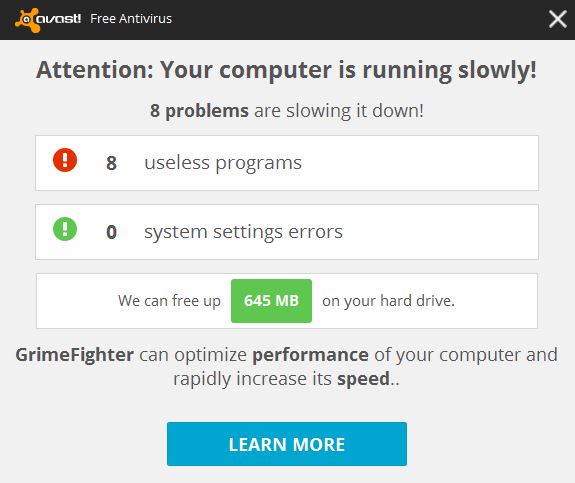
We know you love Avast, but when you are giving a presentation to the big boss, or concentrating on playing an important game, it may not be the best time for a popup that says your computer is running slowly to appear. That’s why we made it easy for you to silence Avast.

Avast silent/gaming mode for presentations

This is NOT a good time for an Avast notification to appear. Learn how to silence Avast when you need to.

Silent/gaming mode

Activate the Silent/gaming mode when don’t want to be interrupted. This will cause Avast to run in silent mode when a full-screen application is running. This means your games or other full-screen applications will not be interrupted with annoying popups or other messages.

Turn this mode on quickly by clicking on the orange Avast icon located in your computer’s system tray. Right-click on the Avast icon and a short menu will appear. Click on Silent/gaming mode to turn it on.

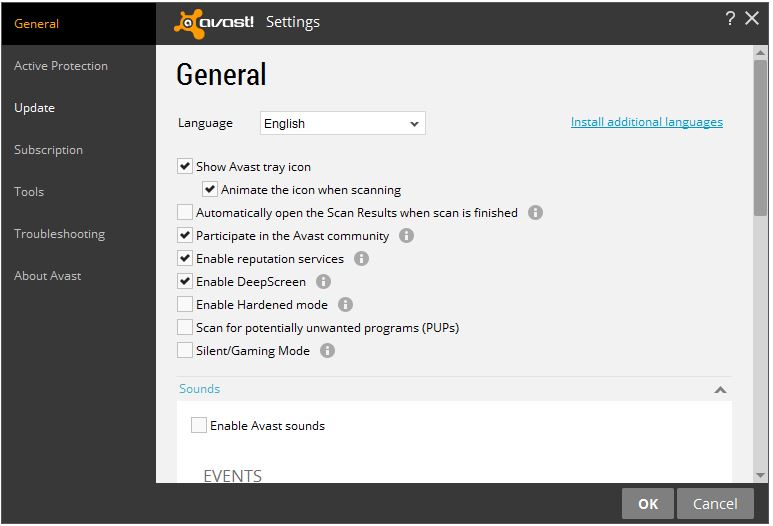
You can also access this option within the main user interface. Go to Settings>General and check the box for Silent/gaming mode. This will disable messages, popups, and alerts in Avast.
Avast sounds

Turn off sounds

Silence notifications: Open the Avast user interface. Click Settings>General>Sounds and uncheck the Enable Avast sounds box. You can also uncheck the Voiceovers within the Sounds settings.

Choose the notifications you want to silence: Avast has six “events” that have notifications associated with them.. These events are Threat detected, Suspicious item detected (we suggest you keep these two on), Potentially unwanted program (PUP) detected, Scan complete, Automatic update, and Firewall query. You have the option to uncheck these boxes as well.

Turn off popups

Occasionally, we offer our users great products like GrimeFighter but we understand if you don’t need to see the notifications anymore. Our customers who have a paid-for version of Avast, have an option for you to turn those off completely.

Once again, open the Avast user interface and go to Settings>General. Scroll down a bit, and you’ll find a heading called Popups. Expand that and you’ll see all kinds of options. You can discontinue seeing all popups, but you might miss a warning or alert, so we don’t suggest that. Instead, you can tweak the duration (how many seconds the popup appears) of the different types of popups. It’s all laid out for you, so you can adjust all you want.

Users of our free product have the option to change the duration of the popups.

Turn off GrimeFighter

GrimeFighter is a standalone optimization tool that cleans and speeds up your system by removing bloatware, trialware, adware, and other unwanted ‘Grime’ so that your computer is running in its most optimal state. If you have an old laptop like I do, you may have seen a popup similar to this.
popup example 2

Instead of turning it totally off, we suggest that you modify the settings. For example, you can tell GrimeFighter to notify you only if it finds a certain amount of issues or after a specific amount of time, say, once a month.

But if you want to turn off GrimeFighter pop-ups, then open your Avast interface and go to Settings>Tools>GrimeFighter and click the Customize button. Uncheck the box that says Always test this computer for Grime. You can also turn off GrimeFighter completely in Settings>Tools. Move the slider to the OFF position.

Turn off Software Updater

Software Updater is an extremely useful feature because it notifies you about outdated software that needs your attention. You can, however, check for outdated software manually by opening the user interface. So if you want to disable the notices, then go to Settings>Tools>Software Updater and click on Customize. Uncheck the option Notifications (popups) enabled.

You can also turn off Software Updater completely in Settings>Tools. Move the slider to the OFF position.