
SA-CONTRIB-2015-060 – Custom Sitemap – Cross Site Request Forgery (CSRF) – Unsupported

Description

The Custom Sitemap module enables you to add custom sitemaps to a site.

The module doesn’t sufficiently protect some URLs against CSRF. A malicious user could trick an administrator into deleting sitemaps by getting their browser to make a request to a specially-crafted URL.

CVE identifier(s) issued

  • A CVE identifier will be requested, and added upon issuance, in accordance with Drupal Security Team processes.

Versions affected

All versions of Custom Sitemap module.

Drupal core is not affected. If you do not use the contributed Custom Sitemap module, there is nothing you need to do.

Solution

If you use the Custom Sitemap module you should uninstall it.

Also see the Custom Sitemap project page.

Reported by

Fixed by

Not applicable.

Coordinated by

Contact and More Information

The Drupal security team can be reached at security at drupal.org or via the contact form at https://www.drupal.org/contact.

Learn more about the Drupal Security team and their policies, writing secure code for Drupal, and securing your site.

Follow the Drupal Security Team on Twitter at https://twitter.com/drupalsecurity

Drupal version: 

SA-CONTRIB-2015-059 – Spider Video Player – Multiple vulnerabilities – Unsupported

Description

Spider Video Player module enables you to add HTML5 and Flash videos to your site.

The module doesn’t sufficiently check user input when deleting files. A malicious user could delete arbitrary files by making a request to a specially-crafted URL. This vulnerability is mitigated by the fact that the attacker must have a role with the permission “access Spider Video Player administration”.

Additionally, the module doesn’t sufficiently protect some URLs against CSRF. A malicious user could trick an administrator into deleting videos by getting their browser to make a request to a specially-crafted URL.

CVE identifier(s) issued

  • A CVE identifier will be requested, and added upon issuance, in accordance with Drupal Security Team processes.

Versions affected

All versions of Spider Video Player module.

Drupal core is not affected. If you do not use the contributed Spider Video Player module, there is nothing you need to do.

Solution

If you use the Spider Video Player module you should uninstall it.

Also see the Spider Video Player project page.

Reported by

Fixed by

Not applicable.

Coordinated by

Contact and More Information

The Drupal security team can be reached at security at drupal.org or via the contact form at https://www.drupal.org/contact.

Learn more about the Drupal Security team and their policies, writing secure code for Drupal, and securing your site.

Follow the Drupal Security Team on Twitter at https://twitter.com/drupalsecurity

Drupal version: 

SA-CONTRIB-2015-058 – Spider Catalog – Cross Site Request Forgery (CSRF) – Unsupported

Description

Spider Catalog module enables you to build product catalogs.

The module doesn’t sufficiently protect some URLs against CSRF. A malicious user can cause an administrator to delete products, ratings and categories by getting their browser to make a request to a specially-crafted URL.

CVE identifier(s) issued

  • A CVE identifier will be requested, and added upon issuance, in accordance with Drupal Security Team processes.

Versions affected

All versions of Spider Catalog module.

Drupal core is not affected. If you do not use the contributed Spider Catalog module, there is nothing you need to do.

Solution

If you use the Spider Catalog module you should uninstall it.

Also see the Spider Catalog project page.

Reported by

Fixed by

Not applicable.

Coordinated by

Contact and More Information

The Drupal security team can be reached at security at drupal.org or via the contact form at https://www.drupal.org/contact.

Learn more about the Drupal Security team and their policies, writing secure code for Drupal, and securing your site.

Follow the Drupal Security Team on Twitter at https://twitter.com/drupalsecurity

Drupal version: 

SA-CONTRIB-2015-057 – Spider Contacts – Multiple vulnerabilities – Unsupported

Description

Spider Contacts module provides a user-friendly way to manage and display contacts.

The module doesn’t use Drupal’s Database API properly, not sanitizing user input on SQL queries and thereby exposing a SQL Injection vulnerability. This vulnerability is mitigated by the fact that the attacker must have a role with the permission “access Spider Contacts category administration”.

Additionally, the module doesn’t sufficiently protect some URLs against CSRF. A malicious user could trick an administrator into deleting contact categories by getting their browser to make a request to a specially-crafted URL.

CVE identifier(s) issued

  • A CVE identifier will be requested, and added upon issuance, in accordance with Drupal Security Team processes.

Versions affected

All versions of Spider Contacts module.

Drupal core is not affected. If you do not use the contributed Spider Contacts module, there is nothing you need to do.

Solution

If you use the Spider Contacts module you should uninstall it.

Also see the Spider Contacts project page.

Reported by

Fixed by

Not applicable.

Coordinated by

Contact and More Information

The Drupal security team can be reached at security at drupal.org or via the contact form at https://www.drupal.org/contact.

Learn more about the Drupal Security team and their policies, writing secure code for Drupal, and securing your site.

Follow the Drupal Security Team on Twitter at https://twitter.com/drupalsecurity

Drupal version: 

SA-CONTRIB-2015-056 – inLinks Integration – Cross Site Scripting (XSS) – Unsupported

Description

inLinks Integration module enables you to use inLinks product from Text Link Ads third-party service.

The module doesn’t sufficiently sanitize user input in some path arguments, thereby exposing a Cross Site Scripting vulnerability.

CVE identifier(s) issued

  • A CVE identifier will be requested, and added upon issuance, in accordance with Drupal Security Team processes.

Versions affected

All versions of inLinks Integration module.

Drupal core is not affected. If you do not use the contributed inLinks Integration module, there is nothing you need to do.

Solution

If you use the inLinks Integration module you should uninstall it.

Also see the inLinks Integration project page.

Reported by

Fixed by

Not applicable.

Coordinated by

Contact and More Information

The Drupal security team can be reached at security at drupal.org or via the contact form at https://www.drupal.org/contact.

Learn more about the Drupal Security team and their policies, writing secure code for Drupal, and securing your site.

Follow the Drupal Security Team on Twitter at https://twitter.com/drupalsecurity

Drupal version: 

SA-CONTRIB-2015-055 – Services single sign-on server helper – Open Redirect – Unsupported

Description

Services single sign-on server helper module provides functionality to facilitate account information editing on a remote SSO site.

The module doesn’t validate some user supplied URLs in parameters used for page redirection. An attacker could trick users to visit malicious sites without realizing it.

CVE identifier(s) issued

  • A CVE identifier will be requested, and added upon issuance, in accordance with Drupal Security Team processes.

Versions affected

All versions of Services single sign-on server helper module.

Drupal core is not affected. If you do not use the contributed Services single sign-on server helper module, there is nothing you need to do.

Solution

If you use the Services single sign-on server helper module you should uninstall it.

Also see the Services single sign-on server helper project page.

Reported by

Fixed by

Not applicable.

Coordinated by

Contact and More Information

The Drupal security team can be reached at security at drupal.org or via the contact form at https://www.drupal.org/contact.

Learn more about the Drupal Security team and their policies, writing secure code for Drupal, and securing your site.

Follow the Drupal Security Team on Twitter at https://twitter.com/drupalsecurity

Drupal version: 

SA-CONTRIB-2015-054 – SMS Framework – Cross Site Scripting (XSS)

Description

SMS Framework module enables you to send and receive SMS messages from and into Drupal.

The module doesn’t sufficiently sanitize user supplied text in message previews, thereby exposing a reflected Cross Site Scripting vulnerability. An attacker could exploit this vulnerability by getting the victim to visit a specially-crafted URL.

This vulnerability is mitigated by the fact that the “Send to phone” submodule must be enabled.

CVE identifier(s) issued

  • A CVE identifier will be requested, and added upon issuance, in accordance with Drupal Security Team processes.

Versions affected

  • SMS Framework 6.x-1.x versions prior to 6.x-1.1.

Drupal core is not affected. If you do not use the contributed SMS Framework module, there is nothing you need to do.

Solution

Install the latest version:

Also see the SMS Framework project page.

Reported by

Fixed by

Coordinated by

Contact and More Information

The Drupal security team can be reached at security at drupal.org or via the contact form at https://www.drupal.org/contact.

Learn more about the Drupal Security team and their policies, writing secure code for Drupal, and securing your site.

Follow the Drupal Security Team on Twitter at https://twitter.com/drupalsecurity

Drupal version: 

How to secure the files your company stores in the cloud

cloud

Goodbye CD, DVD and pen drive. When you need to share a document with a work colleague or you have to take work home, you no longer need to use physical storage devices: the cloud has everything you need.

Services like Dropbox, Mega or Box have become more popular recently, gradually sending physical storage drives into oblivion.

More specifically, and according to Eurostat, 21 percent of European Union citizens used the cloud as storage space in 2014. In fact, this figure is only the average for EU countries and in some countries, like Denmark and the United Kingdom, the percentage of citizens who use the cloud to store files greatly exceeds 30 percent.
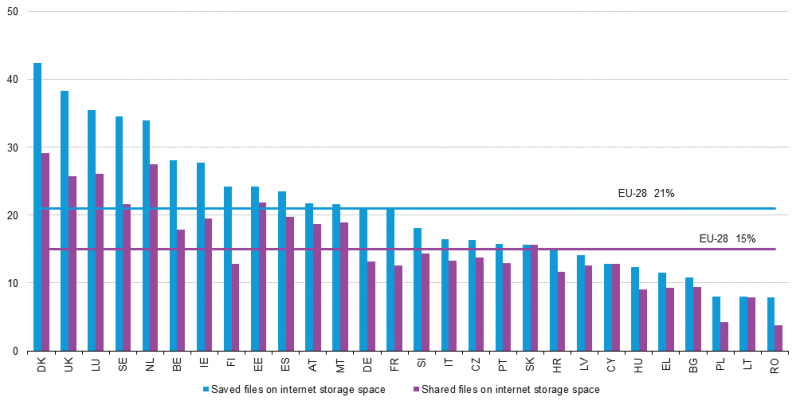
countries in the cloud

There is no doubt that the business world is largely responsible for the growing use of the cloud for storing and sharing files. More convenient than using physical devices and more economical than installing internal servers, the cloud seems to have gotten into our offices too.

The advantages of services like Dropbox are obvious. However, when using virtual storage spaces to store and share your company’s information their security measures could leave much to be desired.

A few months ago, a vulnerability was discovered in Dropbox that disclosed personal files, and at the end of 2014, 7 million passwords for this service were leaked. If the fact that confidential corporate information is one of the main targets of cyber-criminals is added to these serious security flaws, the conclusion is obvious: your company’s files are not completely secure in the cloud.

However, your company does not need to steer clear of these services from fear that a cyber-criminal will steal its document, but you will have to take certain precautions before using them. The key is in passwords, file encryption, two-step verification and the best enterprise antivirus solution.

In this case, Panda Cloud Fusion can protect, manage and provide remote support for all the devices in your company’s network anytime and anywhere.

dropbox

Firstly, it is essential to follow the tips on how to create strong passwords, like any other service. You know: letters, numbers, uppercase, lowercase, a symbol or two and if possible, never use the same password as the one you use for your email, Facebook and other services.

As regards file encryption, some virtual storage services store our documents encrypted. Although Dropbox does not, Mega, the cloud platform of the controversial Kim Dotcom, does encrypt your files. However, nothing is perfect. Mega stores on its servers a copy of the key for decrypting your files, so it is not 100% secure either. One of the best options is for you to encrypt your files before uploading them to the cloud using one of the services that allows you to do this.

Finally, some of these services (like Dropbox or Google Drive) allow you to enable two-step verification of your account. This system combines the password that you choose with a password that the service sends to one of your devices (almost always to your phone in a text message or an app). This adds a second layer of security that makes it difficult for someone to access your account.

The cloud is convenient, yes, but you have to pay attention to security.

The post How to secure the files your company stores in the cloud appeared first on MediaCenter Panda Security.

Cisco IPv6 Denial of Service Vulnerability

Original release date: February 25, 2015

Cisco has identified a vulnerability that could allow an unauthenticated, remote attacker to cause a denial of service condition. The vulnerability is due to improper processing of malformed IPv6 packets carrying extension headers. Cisco Network Convergence System 6000 (NCS 6000) and Cisco Carrier Routing System X (CRS-X) running an affected version of Cisco IOS XR Software are affected by this vulnerability.

Users and administrators are encouraged to review the Cisco Advisory and apply the necessary updates.


This product is provided subject to this Notification and this Privacy & Use policy.