Resolved Bugs
1201365 – CVE-2015-2152 xen: HVM qemu unexpectedly enabling emulated VGA graphics backends (XSA 119) [fedora-all]
1200724 – CVE-2015-2152 xen: HVM qemu unexpectedly enabling emulated VGA graphics backends (XSA 119)
1200398 – CVE-2015-2151 xen: hypervisor memory corruption due to x86 emulator flaw (xsa123) [fedora-all]
1196274 – CVE-2015-2151 xen: hypervisor memory corruption due to x86 emulator flaw (xsa123)<br
HVM qemu unexpectedly enabling emulated VGA graphics backends [XSA-119, CVE-2015-2152]
Hypervisor memory corruption due to x86 emulator flaw [XSA-123, CVE-2015-2151]
Information leak via internal x86 system device emulation,
Information leak through version information hypercall
Monthly Archives: March 2015
Fedora 22 Security Update: python-django-1.8-0.6.b2.fc22
1.8b2 snapshot and security fix
Fedora 21 Security Update: xen-4.4.1-15.fc21
Resolved Bugs
1201365 – CVE-2015-2152 xen: HVM qemu unexpectedly enabling emulated VGA graphics backends (XSA 119) [fedora-all]
1200724 – CVE-2015-2152 xen: HVM qemu unexpectedly enabling emulated VGA graphics backends (XSA 119)
1200398 – CVE-2015-2151 xen: hypervisor memory corruption due to x86 emulator flaw (xsa123) [fedora-all]
1196274 – CVE-2015-2151 xen: hypervisor memory corruption due to x86 emulator flaw (xsa123)
1187153 – CVE-2015-1563 xen: vgic: incorrect rate limiting of guest triggered logging on ARM architectures (XSA-118)<br
HVM qemu unexpectedly enabling emulated VGA graphics backends [XSA-119, CVE-2015-2152]
Hypervisor memory corruption due to x86 emulator flaw [XSA-123, CVE-2015-2151]
enable building pngs from fig files which is working again,
fix oxenstored.service preset preuninstall script,
arm: vgic: incorrect rate limiting of guest triggered logging,
Information leak via internal x86 system device emulation,
Information leak through version information hypercall
Fedora 22 Security Update: patch-2.7.5-1.fc22
Fedora 22 Security Update: ImageMagick-6.8.8.10-9.fc22
Resolved Bugs
1158518 – CVE-2014-8354 ImageMagick: out-of-bounds memory access in resize code
1158520 – CVE-2014-8354 ImageMagick: out-of-bounds memory access in resize code [fedora-all]
1158523 – CVE-2014-8355 ImageMagick: out-of-bounds memory access in PCX parser
1195260 – ImageMagick: denial of service flaw in HDR file processing
1195265 – ImageMagick: denial of service flaw in MIFF file processing
1195269 – ImageMagick: denial of service flaw in PDB file processing
1195271 – ImageMagick: denial of service flaw in VICAR file processing
1158524 – CVE-2014-8355 ImageMagick: out-of-bounds memory access in PCX parser [fedora-all]
1195263 – ImageMagick: denial of service flaw in HDR file processing [fedora-all]
1195267 – ImageMagick: denial of service flaw in MIFF file processing [fedora-all]
1195270 – ImageMagick: denial of service flaw in PDB file processing [fedora-all]
1195274 – ImageMagick: denial of service flaw in VICAR file processing [fedora-all]
1168238 – ImageMagick, missing required libraries<br
Security fix for CVE-2014-8354,CVE-2014-8355 and 4 other security issues
Fedora 21 Security Update: ImageMagick-6.8.8.10-6.fc21
Resolved Bugs
1158518 – CVE-2014-8354 ImageMagick: out-of-bounds memory access in resize code
1158520 – CVE-2014-8354 ImageMagick: out-of-bounds memory access in resize code [fedora-all]
1158523 – CVE-2014-8355 ImageMagick: out-of-bounds memory access in PCX parser
1158524 – CVE-2014-8355 ImageMagick: out-of-bounds memory access in PCX parser [fedora-all]
1195260 – ImageMagick: denial of service flaw in HDR file processing
1195263 – ImageMagick: denial of service flaw in HDR file processing [fedora-all]
1195265 – ImageMagick: denial of service flaw in MIFF file processing
1195267 – ImageMagick: denial of service flaw in MIFF file processing [fedora-all]
1195269 – ImageMagick: denial of service flaw in PDB file processing
1195270 – ImageMagick: denial of service flaw in PDB file processing [fedora-all]
1195271 – ImageMagick: denial of service flaw in VICAR file processing
1195274 – ImageMagick: denial of service flaw in VICAR file processing [fedora-all]<br
Security fix for CVE-2014-8354,CVE-2014-8355 and 4 other security issues
Avast at Mobile World Congress 2015
Part of the Avast team was reunited again at the Mobile World Congress, in Barcelona, to show our new apps: Avast Battery Saver, Avast GrimeFighter and Avast SecureMe, and also other popular apps like Avast Mobile Security and Avast SecureLine.
Jude McColgan, president of Mobile, and Filip Chitry, malware analyst, came from our office in Prague with Petra, Jindra, Zdeněk, Jakub, Petr, Juraj and Farid. Daniel Cheng, Head of Worldwide Mobile Sales and Marketing, came from our offices in Hong Kong and Sung Lyong, came from South Korea. I didn’t travel as I’m working at the host city, the beautiful city of Barcelona. Have you ever been in Barcelona? You should try the famous tapas, walk around Las Ramblas and visit La Sagrada Familia. Feel free to ask us for some recommendations on Twitter! 
The Avast team arrived the weekend before the Mobile World Congress in order to build up our beautiful and colorful booth, located at the Hall 5, booth 5K29. After one day of exhausting work, the booth was ready to receive all the visitors and the journalists. The booth was really cool, right? 

Everything started on monday. Tens of thousands of people came to the Mobile World Congress, located in Hospitalet de Llobregat (“What are you talking about? The MWC is in Barcelona!” Well, not really, the MWC is located in the second largest city of Catalonia, Hospitalet, next to Barcelona) where besides learning some security tips from the Avast team and learning about our new apps, the visitors were able to see what’s new on the mobile industry, like new smartphones, new wearables, new tablets, etc…
The following days were really successful. A lot of people came to our booth to meet the team and, of course, our new apps.

Not only visitors, a lot of journalists from all around the world and from different media, from TV channels to tech blogs, came to our booth. Nobody wanted to miss our new apps and our impressive hacking experiment! Everyone was impressed after knowing how, with Avast Battery Saver, you can save up to 7 hours of battery and, of course, after watching our live hacking experiment, where everyone was able to see how important a good security solution is while using a public Wi-Fi.
The whole team was really satisfied with the results achieved at the Mobile World Congress. The feedback received from the visitors was really positive and of course it will help us to improve our top rated security solutions.
Do you want to know what Filip Chitrý, malware analyst at Avast, and Jindra Pistkova, mobile marketing specialist, said about the Mobile World Congress? Watch the following video:
And last but not least, here you have a picture of the team

See you next year at Mobile World Congress 2016!

Will Windows 10 leave enterprises vulnerable to zero-days?
One thing Microsoft has been very public about is Windows 10’s new strategy of releasing patches to update the operating system at different times for consumer and enterprise versions.
The post Will Windows 10 leave enterprises vulnerable to zero-days? appeared first on We Live Security.
Five Useful Ways to Repurpose Your Old PC or Laptop
When you’ve just bought a new computer it can be very easy to neglect your old one. However, even computers more than five year’s old can still be very useful.. Here are some ideas to give you inspiration.
Use it as a home theatre PC:
Instead of having a DVD-player, a Blu-ray player or set-top-box connected to your TV, use your old PC as a home theatre PC (HTPC) hooked up to your TV or projector. You can then enjoy all your content with one single remote control. So much easier!
I recently converted an old laptop into a home cinema PC. Even a 5 year old PC or laptop can easily handle things like Netflix streaming and HD video beautifully – all you need is a remote and a DVI/HDMI adapter + cable!

Put it in your kitchen:
Got an old PC lying around that’s capable of running Windows 8 (which is very likely)? If so, get a touchscreen and put it on your kitchen counter. Download an app like Recipe Keeper or Cocktail flow and use interactive recipes for your next culinarian creation:

Use it as storage:
A “NAS” (Network Allocated Storage) is basically a network drive that you can use to store and access files from everywhere in your home. Simply install a NAS tool like http://www.freenas.org/ on your old PC and hook it up to your router.
Once that’s done, it’ll act as a fileserver that you can, for example, stream movies to any device in your household – or even access it remotely when you’re on the go! Makes life a lot easier and you can save money, given that dedicated NAS aren’t cheap.
Keep on using it and tune it up:
If you didn’t get a new PC or want to give it to someone in your family, you can easily breathe fresh life into your old PC by giving it a proper tune-up.
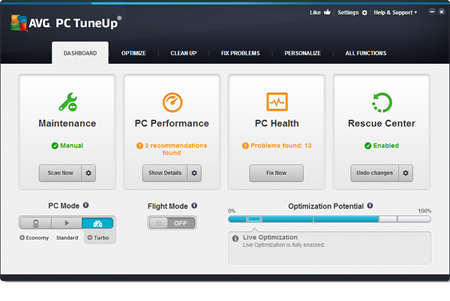
Use our new version of AVG PC TuneUp and follow our three basic tips right here. Plus, last year, we’ve put together an extensive list of tips to clean up and speed your PC, laptop or ultrabook running Windows:
Ultimate PC Optimization Guide Part One
Ultimate PC Optimization Guide Part Two
Ultimate PC Optimization Guide Part Three
Once you’ve run through all of that you’ll be looking at a PC that feels almost like a new one.
Give it away:
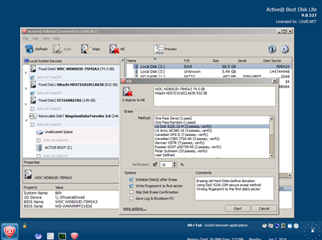
If you can’t sell it online, just give it to charity or a friend who needs it more than you. But don’t forget to wipe it clean using a tool like Active@KillDisk to completely wipe the content of the drive, so nobody will ever recover your data, passwords or worse…

Five Tips for choosing a Cloud Storage Service
Cloud services are incredibly convenient and can also be a great cost saving measure. But you shouldn’t blindly place trust in cloud services without doing some research first.
If you are considering using a cloud service, I would strongly advise finding the answers to the following questions before signing on the dotted line.
Is it for personal or business?
There are plenty of free options, but you need to determine which is the most reliable and secure, especially if your business will depend on it.
What are you storing and why?
The different cloud services that are currently available offer a variety of features and options that may be better suited to a particular need.
What sort of encryption is available?
Does the cloud storage service offer encryption? If the provider is hacked, your data will be vulnerable. So if they don’t offer encryption then you might want to encrypt your vital documents before uploading
Does the service offer extra security?
Where possible use additional security features like two-factor authentication and login notifications to ensure you have the added layer of security to prevent unwanted breaches.
Do you have adequate backups?
Don’t rely on a single backup, especially for your critical files. You should also backup regularly.