AMA on Reddit: Your Questions, Our Answers

First of all we want to thank everyone who participated in voting up posts and asking question. Carlos really enjoyed answering you guys and loved the thoughtful and interesting queries (I specifically remember him saying more than once: “THIS is a good question! I could discuss it for a week.”). While some of them were a bit challenging to answer, he really tried to come up with something to say for every single one.

We are well aware though, that some of you probably didn’t have the time or opportunity to participate. That’s why we’ve decided to give you more time to ask your questions: Drop by whenever you feel like this week and just ask what’s on your mind. Carlos then will revisit the Reddit AMA post at the beginning of next week and answer the rest of the questions!

My favorite question was this one by the way:

Can jet fuel melt steel beams?
I’m not a physicist but despite other rumours (http://i0.kym-cdn.com/photos/images/original/000/920/259/143.jpg ) I’d still say yes. :)

But of course, there were also more than enough serious ones:

To my recollection, there are about 6 mil new malware discovered daily. How do you deal with such high numbers of new malware constantly appearing?
In our company we have many different ways to catch up to that huge quantity of files. The first thing that you need is to have large back-end systems that are able to manage that huge quantity of files together with different AI systems to classify them in a smart way. At the end, there will always remain hundreds of thousands of files that require a deeper (sometimes manual) look in order to improve or expand our AI systems. Yes and as you can imagine, it is an incredible amount of work.

You don’t know what to ask? Just take at the rest of the cool questions and answers from yesterday.

#content .entry-content
.bq{width:100%;border:1px
solid #dde5ed;color:#758fa3;margin-top:0px;margin-bottom:25px}#content .entry-content
.quest{margin:0px;font-weight:bold;font-size:14px;text-shadow:0px 1px 0px #f8fafb;padding:6px
11px;background:#eaeff5;border-top:1px solid #f4f7fa;border-bottom:1px solid #dde5ed}#content .entry-content
.text{line-height:19px;margin:0px;font-style:italic;padding:10px;background:#f8fafd}

The post AMA on Reddit: Your Questions, Our Answers appeared first on Avira Blog.

VENOM, don't get bitten.


QEMU is a generic and open source machine emulator and virtualizer and is incorporated in some Red Hat products as a foundation and hardware emulation layer for running virtual machines under the Xen and KVM hypervisors.

CVE-2015-3456 (aka VENOM) is a security flaw in the QEMU’s Floppy Disk Controller (FDC) emulation. It can be exploited by a malicious guest user with access to the FDC I/O ports by issuing specially crafted FDC commands to the controller. It can result in guest controlled execution of arbitrary code in, and with privileges of, the corresponding QEMU process on the host. Worst case scenario this can be guest to host exit with the root privileges.

This issue affects all x86 and x86-64 based HVM Xen and QEMU/KVM guests, regardless of their machine type, because both PIIX and ICH9 based QEMU machine types create ISA bridge (ICH9 via LPC) and make FDC accessible to the guest. It is also exposed regardless of presence of any floppy related QEMU command line options so even guests without floppy disk explicitly enabled in the libvirt or Xen configuration files are affected.

We believe that code execution is possible but we have not yet seen any working reproducers that would allow this.

This flaw arises because of an unrestricted indexed write access to the fixed size FIFO memory buffer that FDC emulation layer uses to store commands and their parameters. The FIFO buffer is accessed with byte granularity (equivalent of FDC data I/O port write) and the current index is incremented afterwards. After each issued and processed command the FIFO index is reset to 0 so during normal processing the index cannot become out-of-bounds.

For certain commands (such as FD_CMD_READ_ID and FD_CMD_DRIVE_SPECIFICATION_COMMAND) though the index is either not reset for certain period of time (FD_CMD_READ_ID) or there are code paths that don’t reset the index at all (FD_CMD_DRIVE_SPECIFICATION_COMMAND), in which case the subsequent FDC data port writes result in sequential FIFO buffer memory writes that can be out-of-bounds of the allocated memory. The attacker has full control over the values that are stored and also almost fully controls the length of the write. Depending on how the FIFO buffer is defined, he might also have a little control over the index as in the case of Red Hat Enterprise Linux 5 Xen QEMU package, where the index variable is stored after the memory designated for the FIFO buffer.

Depending on the location of the FIFO memory buffer, this can either result in stack or heap overflow. For all of the Red Hat Products using QEMU the FIFO memory buffer is allocated from the heap.

Red Hat has issued security advisories to fix this flaw and instructions for applying the fix are available on the knowledge-base.

Mitigation

The sVirt and seccomp functionalities used to restrict host’s QEMU process privileges and resource access might mitigate the impact of successful exploitation of this issue.  A possible policy-based workaround is to avoid granting untrusted users administrator privileges within guests.

Product

Red Hat Enterprise Linux

Tags

virtualization

VENOM, don’t get bitten.

CC BY-SA CrowdStrike

CC BY-SA CrowdStrike

QEMU is a generic and open source machine emulator and virtualizer and is incorporated in some Red Hat products as a foundation and hardware emulation layer for running virtual machines under the Xen and KVM hypervisors.

CVE-2015-3456 (aka VENOM) is a security flaw in the QEMU’s Floppy Disk Controller (FDC) emulation. It can be exploited by a malicious guest user with access to the FDC I/O ports by issuing specially crafted FDC commands to the controller. It can result in guest controlled execution of arbitrary code in, and with privileges of, the corresponding QEMU process on the host. Worst case scenario this can be guest to host exit with the root privileges.

This issue affects all x86 and x86-64 based HVM Xen and QEMU/KVM guests, regardless of their machine type, because both PIIX and ICH9 based QEMU machine types create ISA bridge (ICH9 via LPC) and make FDC accessible to the guest. It is also exposed regardless of presence of any floppy related QEMU command line options so even guests without floppy disk explicitly enabled in the libvirt or Xen configuration files are affected.

We believe that code execution is possible but we have not yet seen any working reproducers that would allow this.

This flaw arises because of an unrestricted indexed write access to the fixed size FIFO memory buffer that FDC emulation layer uses to store commands and their parameters. The FIFO buffer is accessed with byte granularity (equivalent of FDC data I/O port write) and the current index is incremented afterwards. After each issued and processed command the FIFO index is reset to 0 so during normal processing the index cannot become out-of-bounds.

For certain commands (such as FD_CMD_READ_ID and FD_CMD_DRIVE_SPECIFICATION_COMMAND) though the index is either not reset for certain period of time (FD_CMD_READ_ID) or there are code paths that don’t reset the index at all (FD_CMD_DRIVE_SPECIFICATION_COMMAND), in which case the subsequent FDC data port writes result in sequential FIFO buffer memory writes that can be out-of-bounds of the allocated memory. The attacker has full control over the values that are stored and also almost fully controls the length of the write. Depending on how the FIFO buffer is defined, he might also have a little control over the index as in the case of Red Hat Enterprise Linux 5 Xen QEMU package, where the index variable is stored after the memory designated for the FIFO buffer.

Depending on the location of the FIFO memory buffer, this can either result in stack or heap overflow. For all of the Red Hat Products using QEMU the FIFO memory buffer is allocated from the heap.

Red Hat has issued security advisories to fix this flaw and instructions for applying the fix are available on the knowledge-base.

Mitigation

The sVirt and seccomp functionalities used to restrict host’s QEMU process privileges and resource access might mitigate the impact of successful exploitation of this issue.  A possible policy-based workaround is to avoid granting untrusted users administrator privileges within guests.

Four tips for safer Wi-Fi surfing

Here’s what you can do to stay protected while hopping from hotspot to hotspot—or at home.


Make sure you’re connected to a real network 

You may never have wondered if the coffee houses you walk into really have a network. After all, if your computer’s found a network, they must have one, right? Think again. Hackers can easily create a fake hotspot imitating the name of your favorite coffee house, library or other establishment. Connect to one of these fake hotspots, and then everything you do online would be going through them.

Always confirm the name of the network with the owners before you connect to it.


Use HTTPS encryption 

What a mouthful, right? But it’s really quite simple. Most Internet URLs (the addresses or links that you use to navigate the web) start with the four letters http. This is short for Hypertext Transfer Protocol. Well, some web sites offer to connect with a secure, encrypted version of this protocol, called HTTP Secure (or HTTPS for short). Whenever you connect with a website via this secure method, your data to and from it are encrypted so no one else on the same network can see it.

HTTPS


Most important websites like Google, Facebook and more support HTTPS automatically, but keep an eye out for s in the address, and add it if it doesn’t appear. Some browsers have extensions like HTTPS Everywhere that make sure your browser is always seeking the secure connection.

This kind of encryption only works for what happens in your browser. If you have other applications that connect to the Internet, like a mail client such as Outlook or Apple Mail, you’ll need to make sure they have some form of encryption and that its settings are on.


Adjust your settings for maximum protection 

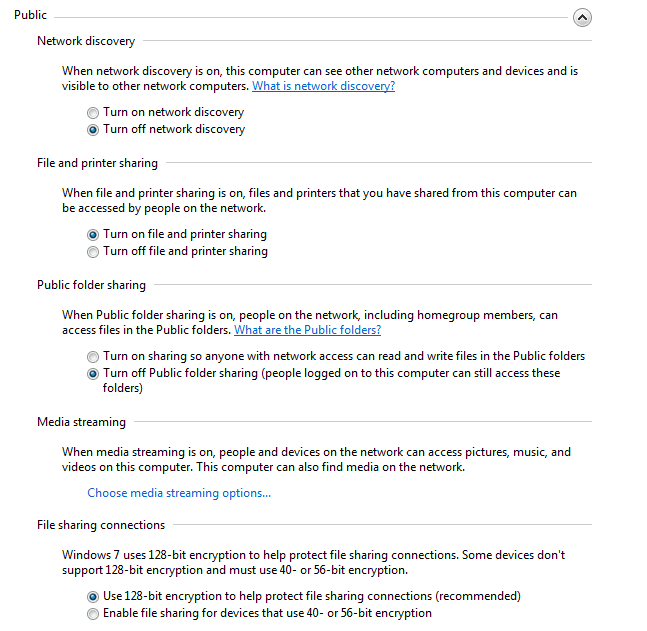
Free Wi-Fi hotspots are high in demand, so you’ll rarely be the only one connected to a network. That means others can reach out through the network and connect to your device if you haven’t changed your sharing and network discovery settings (network discovery lets others find you).

Here’s how you do it:

On Windows: open the start menu (or press the windows key) and type “Manage advanced sharing settings”, then type enter. Make sure that any sharing options are switched off, and that network discovery is also off. Some versions of Windows automatically change these settings for you when you specify you are on a public network vs a home or work one.

Sharing settings


On a Mac:  Open System Preferences and choose Sharing. Make sure all the boxes are unchecked. Head back to the main System Preferences menu, select Security & Privacy and then the Firewall tab. In the Firewall Options, make sure that stealth mode is checked.


Use a clean browser 

You probably have a favorite browser that you use for everything you do online—and that’s exactly why you should use a “clean browser”. Your usual browser is probably set up to give you a lot of handy features like remembering your passwords and keeping cookies from your favorite websites to load them with your personal settings faster. This is all sensitive information worth stealing. A clean browser knows none of that, so there is nothing there for anyone on the same network to steal.


Use a VPN

Virtual Private Networks (VPN) make sure that anything coming in or out of your device is wrapped in strong encryption—not just your browser or email client. This is the safest method of connecting to the Internet when in public. Traditionally used by businesses and governments, VPNs have become affordable for individuals concerned with their security and privacy.

Even with these precautions, however, you should avoid any sensitive browsing like accessing your online bank accounts or making online purchase with your credit card while in public. If it can wait, you should probably do it at home.

How to secure your home network

If you’re looking to protect your home network from strangers, there are really two main things to keep in mind when setting up your Wi-Fi router:

  • Make sure you are using WPA2 encryption.
  • Make sure your password is long.

Our own Michael McKinnon has more on how to protect your network:

Video

Securing your home network

CVE-2015-3065

Adobe Reader and Acrobat 10.x before 10.1.14 and 11.x before 11.0.11 on Windows and OS X allow attackers to bypass intended restrictions on JavaScript API execution via unspecified vectors, a different vulnerability than CVE-2015-3060, CVE-2015-3061, CVE-2015-3062, CVE-2015-3063, CVE-2015-3064, CVE-2015-3066, CVE-2015-3067, CVE-2015-3068, CVE-2015-3069, CVE-2015-3071, CVE-2015-3072, CVE-2015-3073, and CVE-2015-3074.

CVE-2015-3066

Adobe Reader and Acrobat 10.x before 10.1.14 and 11.x before 11.0.11 on Windows and OS X allow attackers to bypass intended restrictions on JavaScript API execution via unspecified vectors, a different vulnerability than CVE-2015-3060, CVE-2015-3061, CVE-2015-3062, CVE-2015-3063, CVE-2015-3064, CVE-2015-3065, CVE-2015-3067, CVE-2015-3068, CVE-2015-3069, CVE-2015-3071, CVE-2015-3072, CVE-2015-3073, and CVE-2015-3074.

CVE-2015-3067

Adobe Reader and Acrobat 10.x before 10.1.14 and 11.x before 11.0.11 on Windows and OS X allow attackers to bypass intended restrictions on JavaScript API execution via unspecified vectors, a different vulnerability than CVE-2015-3060, CVE-2015-3061, CVE-2015-3062, CVE-2015-3063, CVE-2015-3064, CVE-2015-3065, CVE-2015-3066, CVE-2015-3068, CVE-2015-3069, CVE-2015-3071, CVE-2015-3072, CVE-2015-3073, and CVE-2015-3074.

CVE-2015-3068

Adobe Reader and Acrobat 10.x before 10.1.14 and 11.x before 11.0.11 on Windows and OS X allow attackers to bypass intended restrictions on JavaScript API execution via unspecified vectors, a different vulnerability than CVE-2015-3060, CVE-2015-3061, CVE-2015-3062, CVE-2015-3063, CVE-2015-3064, CVE-2015-3065, CVE-2015-3066, CVE-2015-3067, CVE-2015-3069, CVE-2015-3071, CVE-2015-3072, CVE-2015-3073, and CVE-2015-3074.

CVE-2015-3069

Adobe Reader and Acrobat 10.x before 10.1.14 and 11.x before 11.0.11 on Windows and OS X allow attackers to bypass intended restrictions on JavaScript API execution via unspecified vectors, a different vulnerability than CVE-2015-3060, CVE-2015-3061, CVE-2015-3062, CVE-2015-3063, CVE-2015-3064, CVE-2015-3065, CVE-2015-3066, CVE-2015-3067, CVE-2015-3068, CVE-2015-3071, CVE-2015-3072, CVE-2015-3073, and CVE-2015-3074.

CVE-2015-3070

Adobe Reader and Acrobat 10.x before 10.1.14 and 11.x before 11.0.11 on Windows and OS X allow attackers to execute arbitrary code or cause a denial of service (memory corruption) via unspecified vectors, a different vulnerability than CVE-2014-9161, CVE-2015-3046, CVE-2015-3049, CVE-2015-3050, CVE-2015-3051, CVE-2015-3052, CVE-2015-3056, CVE-2015-3057, and CVE-2015-3076.