Ubuntu Security Notice 2679-1 – A flaw was discovered in the user space memory copying for the pipe iovecs in the Linux kernel. An unprivileged local user could exploit this flaw to cause a denial of service (system crash) or potentially escalate their privileges. Daniel Borkmann reported a kernel crash in the Linux kernel’s BPF filter JIT optimization. A local attacker could exploit this flaw to cause a denial of service (system crash). Various other issues were also addressed.
Monthly Archives: July 2015
Ubuntu Security Notice USN-2678-1
Ubuntu Security Notice 2678-1 – A flaw was discovered in the user space memory copying for the pipe iovecs in the Linux kernel. An unprivileged local user could exploit this flaw to cause a denial of service (system crash) or potentially escalate their privileges. Daniel Borkmann reported a kernel crash in the Linux kernel’s BPF filter JIT optimization. A local attacker could exploit this flaw to cause a denial of service (system crash). Various other issues were also addressed.
RHBA-2014:1565-1: xfsdump bug fix update
Red Hat Enterprise Linux: Updated xfsdump packages that fix two bugs are now available for Red Hat
Enterprise Linux 6.
RHBA-2014:1564-1: xfsprogs bug update
Red Hat Enterprise Linux: Updated xfsprogs packages that fix several bugs are now available for Red Hat
Enterprise Linux 6.
WordPress 4.2.3 Security and Maintenance Release
WordPress 4.2.3 is now available. This is a critical security release for all previous versions and we strongly encourage you to update your sites immediately.
WordPress versions 4.2.2 and earlier are affected by a critical cross-site scripting vulnerability, which could allow anonymous users to compromise a site. This was reported by Jon Cave of the WordPress Security Team, and fixed by Robert Chapin.
We also fixed an issue where it was possible for a user with Subscriber permissions to create a draft through Quick Draft. Reported by Netanel Rubin from Check Point Software Technologies.
Our thanks to those who have practiced responsible disclosure of security issues.
WordPress 4.2.3 also contains fixes for 20 bugs from 4.2. For more information, see the release notes or consult the list of changes.
Download WordPress 4.2.3 or venture over to Dashboard → Updates and simply click “Update Now.” Sites that support automatic background updates are already beginning to update to WordPress 4.2.3.
Thanks to everyone who contributed to 4.2.3:
Aaron Jorbin, Andrew Nacin, Andrew Ozz, Boone Gorges, Chris Christoff, Dion Hulse, Dominik Schilling, Ella Iseulde Van Dorpe, Gabriel Pérez, Gary Pendergast, Mike Adams, Robert Chapin, Nikolay Bachiyski, Ross Wintle, and Scott Taylor.
USN-2675-1: LXC vulnerabilities
Ubuntu Security Notice USN-2675-1
22nd July, 2015
lxc vulnerabilities
A security issue affects these releases of Ubuntu and its
derivatives:
- Ubuntu 15.04
- Ubuntu 14.10
- Ubuntu 14.04 LTS
Summary
Several security issues were fixed in LXC.
Software description
- lxc
– Linux Containers userspace tools
Details
Roman Fiedler discovered that LXC had a directory traversal flaw when creating
lock files. A local attacker could exploit this flaw to create an arbitrary
file as the root user. (CVE-2015-1331)
Roman Fiedler discovered that LXC incorrectly trusted the container’s proc
filesystem to set up AppArmor profile changes and SELinux domain transitions. A
local attacker could exploit this flaw to run programs inside the container
that are not confined by AppArmor or SELinux. (CVE-2015-1334)
Update instructions
The problem can be corrected by updating your system to the following
package version:
- Ubuntu 15.04:
-
lxc
1.1.2-0ubuntu3.1
-
liblxc1
1.1.2-0ubuntu3.1
- Ubuntu 14.10:
-
lxc
1.1.0~alpha2-0ubuntu3.3
-
liblxc1
1.1.0~alpha2-0ubuntu3.3
- Ubuntu 14.04 LTS:
-
lxc
1.0.7-0ubuntu0.2
-
liblxc1
1.0.7-0ubuntu0.2
To update your system, please follow these instructions:
https://wiki.ubuntu.com/Security/Upgrades.
In general, a standard system update will make all the necessary changes. You
will need to restart your previously running LXC containers in Ubuntu 15.04 due
to bug that causes containers to be stopped on during lxc package installation
(https://launchpad.net/bugs/1476691).
References
USN-2676-1: NBD vulnerabilities
Ubuntu Security Notice USN-2676-1
22nd July, 2015
nbd vulnerabilities
A security issue affects these releases of Ubuntu and its
derivatives:
- Ubuntu 15.04
- Ubuntu 14.10
- Ubuntu 14.04 LTS
- Ubuntu 12.04 LTS
Summary
Several security issues were fixed in NBD.
Software description
- nbd
– Network Block Device protocol
Details
It was discovered that NBD incorrectly handled IP address matching. A
remote attacker could use this issue with an IP address that has a partial
match and bypass access restrictions. This issue only affected
Ubuntu 12.04 LTS. (CVE-2013-6410)
Tuomas Räsänen discovered that NBD incorrectly handled wrong export names
and closed connections during negotiation. A remote attacker could use this
issue to cause NBD to crash, resulting in a denial of service. This issue
only affected Ubuntu 12.04 LTS. (CVE-2013-7441)
Tuomas Räsänen discovered that NBD incorrectly handled signals. A remote
attacker could use this issue to cause NBD to crash, resulting in a denial
of service. (CVE-2015-0847)
Update instructions
The problem can be corrected by updating your system to the following
package version:
- Ubuntu 15.04:
-
nbd-server
1:3.8-4ubuntu0.1
- Ubuntu 14.10:
-
nbd-server
1:3.8-1ubuntu0.1
- Ubuntu 14.04 LTS:
-
nbd-server
1:3.7-1ubuntu0.1
- Ubuntu 12.04 LTS:
-
nbd-server
1:2.9.25-2ubuntu1.1
To update your system, please follow these instructions:
https://wiki.ubuntu.com/Security/Upgrades.
In general, a standard system update will make all the necessary changes.
References
ThaiWeb CMS 2015Q3 – SQL Injection Web Vulnerability
Posted by Vulnerability Lab on Jul 23
Document Title:
===============
ThaiWeb CMS 2015Q3 – SQL Injection Web Vulnerability
References (Source):
====================
http://www.vulnerability-lab.com/get_content.php?id=1555
Release Date:
=============
2015-07-23
Vulnerability Laboratory ID (VL-ID):
====================================
1555
Common Vulnerability Scoring System:
====================================
8.6
Product & Service Introduction:…
Support Scammers and Self-Justification
Support scammers: old twisters, new twists, and scammer psychology.
The post Support Scammers and Self-Justification appeared first on We Live Security.

5 steps to secure your Facebook account login

Secure your Facebook account against unwanted guests
Social networks have become an integrated part of our lives. Facebook is not just a simple communication channel anymore but an important source of daily news, information about brands, as well as a selling platform. Thanks to mobile apps, we access it everywhere and anytime we want. As active consumers we should take even better care of our security while using the service.
How to set up a secure login for your Facebook account
1. Set up double verification, or so called Login Approvals to achieve your desired security level during the login process. Every time you login into your account, Facebook will send you a newly generated code via SMS to enter to finish login process. Login approval will allow you to better control who can access your account. Detailed instructions how to set it up can be found here.
2. Select so-called trusted contacts. This should be three or four people, who can be contacted by Facebook, in case access to your account is blocked. The selected person will be given an access code, which should be passed to you, so you can restore your account credentials. Therefore choose trusted contacts carefully, so you can easily get in touch in case it’s needed. In order to choose trusted contacts go to Settings -> Security and select friends. If you want to learn more about this setting go here.
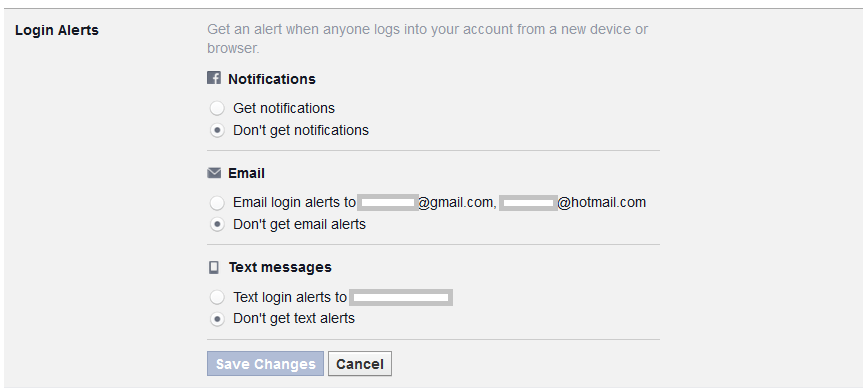
3. Set up Login alerts, to be notified in case Facebook spots a suspicious login attempt to your account; for example from an unknown computer or smartphone. A login alert will be delivered to you as a text message, email, or Facebook notification. You decide which format is the most suitable for you. In case you suspect that someone tried to break into your account, Facebook will help you to reset your password and set up a new one. Just as other safety settings you will find login alerts in the Security section. Detailed instructions can be found here.
4. Protect yourself from Phishing and Spam. Cybercrooks try to take over your personal data and login, by creating URLs which look just like Facebook. Please bear in mind that the social network will never send you an email, requesting your credentials or any other personal or financial data. In case you receive such an email, redirecting you to a webpage deceptively resembling Facebook, never ever submit your data. Learn more about Phishing on Facebook here.
On the other hand, if your friends spam you with suspicious messages, or simply bother you with invitations to the “farm games”, it’s possible that they became victims of a malicious app. It can post on their behalf without their knowledge and spread malware further. You can report it to the social network by clicking on the arrow symbol in the right top corner next to the message. Read more in Spams on Facebook section.
5. Last but not least, secure your Facebook mobile app. If, like other millions of Facebook users, you access the social network on mobile, you should consider installing an application that will block the access to Facebook. This is handy in case your mobile is lost or for simply preventing your friends from joking around and posting something on your behalf, while you leave your smartphone unattended.
Avast Mobile Security protects your Facebook and other social networks or banking apps with a security code for free. Download it for free from Google Store
Stay tuned for more social media security and privacy tips!
Follow Avast on Facebook where we keep you updated on cybersecurity news every day.
