Monthly Archives: July 2015
Laura Poitras Is Suing The US Government
Ex-Exployees Probed On Hack Against Hacking Team
Ashley Madison Hacked: Site For People Who Can't Be Trusted Can't Be Trusted
BGP Security Alerts Coming to Twitter
At Black Hat, researchers from OpenDNS are expected to launch a new Twitter feed called BGP Stream that will send out alerts on possible BGP and DNS hijacking attacks.
How iOS users can stay protected against iScam threat
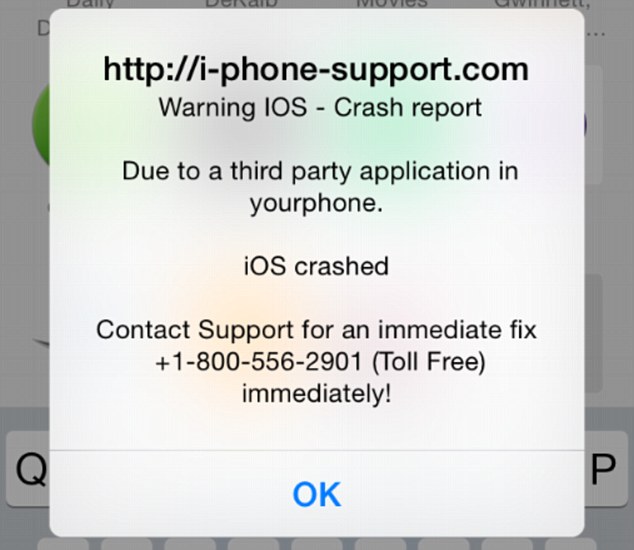
iScam displays a “crash report” to affected users. (Photo via Daily Mail)
It’s a common belief (and myth) that Apple products are invincible against malware. This false line of thinking has recently again been refuted, as iPhone and iPad users have been encountering a ransomware threat that freezes their Internet browsers, rendering their devices unusable. The ploy, commonly known as iScam, urges victims to call a number and pay $80 as a ransom to fix their device. When users visit an infected page while browsing using the Safari application, a message is displayed saying that the device’s iOS has crashed “due to a third party application” in their phone. The users are then directed to contact customer support to fix the issue.
How to clean your system if you’ve been infected by iScam
- Turn on Anti-phishing. This can be done by visiting Settings > Safari and turn on ‘Fraudulent Website Warning’. When turned on, Safari’s Anti-phishing feature will notify you if you visit a suspected phishing site.
- Block cookies. For iOS 8 users, tap Settings > Safari > Block Cookies and choose Always Allow, Allow from websites I visit, Allow from Current Websites Only, or Always Block. In iOS 7 or earlier, choose Never, From third parties and advertisers, or Always.
- Allow JavaScript. Tap Settings > Safari > Advanced and turn JavaScript on.
- Clear your history and cookies from Safari. In iOS 8, tap Settings > Safari > Clear History and Website Data. In iOS 7 or earlier, tap Clear History and tap Clear Cookies and Data. To clear other stored information from Safari, tap Settings > Safari > Advanced > Website Data > Remove All Website Data.
Check out Apple’s support forum for additional tips on how to keep your device safe while using Safari.

Netragard Shutters Controversial Exploit Acquisition Program
Netragard, one of the small number of companies that buys and sells exploits, has shut down its exploit acquisition program in the wake of the HackingTeam breach. Among the revelations in the cache of documents leaked after the attack on HackingTeam was information about Netragard selling an exploit to the Italian maker of intrusion and surveillance […]
Bugtraq: AirDroid ID – Client Side JSONP Callback Vulnerability
AirDroid ID – Client Side JSONP Callback Vulnerability
Bugtraq: [slackware-security] httpd (SSA:2015-198-01)
[slackware-security] httpd (SSA:2015-198-01)
Bugtraq: [slackware-security] php (SSA:2015-198-02)
[slackware-security] php (SSA:2015-198-02)