The REST API in F5 BIG-IQ Cloud, Device, and Security 4.4.0 and 4.5.0 before HF2 and ADC 4.5.0 before HF2, when configured for LDAP remote authentication and the LDAP server allows anonymous BIND operations, allows remote attackers to obtain an authentication token for arbitrary users by guessing an LDAP user account name.
Monthly Archives: July 2015
CVE-2015-5080
The Management Interface in Citrix NetScaler Application Delivery Controller (ADC) and NetScaler Gateway 10.1 before 10.1.132.8, 10.5 before Build 56.15, and 10.5.e before Build 56.1505.e allows remote authenticated users to execute arbitrary shell commands via shell metacharacters in the filter parameter to rapi/ipsec_logs.
CVE-2015-5357
The Juniper EX4600, QFX3500, QFX3600, and QFX5100 switches with Junos 13.2X51-D15 through 13.2X51-D25, 13.2X51 before 13.2X51-D30, and 14.1X53 before 14.1X53-D10 allows remote attackers to cause a denial of service (CPU consumption) via unspecified vectors.
CVE-2015-5360
IPv6 sendd in Juniper Junos 12.1X44 before 12.1X44-D51, 12.1X46 before 12.1X46-D36, 12.1X46 before 12.1X46-D40, 12.1X47 before 12.1X47-D25, 12.3 before 12.3R10, 12.3X48 before 12.3X48-D20, 13.2 before 13.2R8, 13.3 before 13.3R6, 14.1 before 14.1R5, 14.2 before 14.2R3, 15.1 before 15.1R1, and 15.1X49 before 15.1X49-D20, when the “set protocols neighbor-discovery secure security-level default” option is configured, allows remote attackers to cause a denial of service (CPU consumption) via a crafted Secure Neighbor Discovery (SEND) Protocol packet.
CVE-2015-5363
The SRX Network Security Daemon (nsd) in Juniper SRX Series services gateways with Junos 12.1X44 before 12.1X44-D50, 12.1X46 before 12.1X46-D35, 12.1X47 before 12.1X47-D25, and 12.3X48 before 12.3X48-D15 allows remote DNS servers to cause a denial of service (crash) via a crafted DNS response.
phpVibe Stored Cross Site Scripting
phpVibe versions prior to 4.20 suffer from a persistent cross site scripting vulnerability.
Widespread iScam ransomware originates from US servers
iPhone and iPad users who turn on Avast SecureLine VPN while on unsecured Wi-Fi are protected from iScam.
It’s a common belief (and myth) that Apple products are invincible against malware. This false line of thinking has recently again been refuted, as iPhone and iPad users have been encountering a ransomware threat that freezes their Internet browsers, rendering their devices unusable. The ploy, commonly known as iScam, urges victims to call a number and pay $80 as a ransom to fix their device. When users visit an infected page while browsing using the Safari application, a message is displayed saying that the device’s iOS has crashed “due to a third party application” in their phone. The users are then directed to contact customer support to fix the issue.
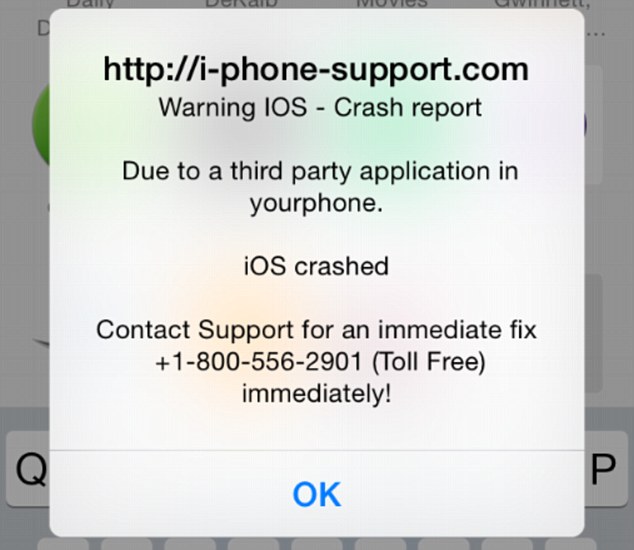
iScam displays a “crash report” to affected users. (Photo via Daily Mail)
In the midst of this vexing threat, Avast’s suite of security applications identifies URLs which contain malicious content. When discovered, these addresses are flagged for malware and then stored in our blacklist database.
While scanning for malicious URLs, we discovered that many of the servers related to iScam are located in the United States. While iScam has affected users located in both the U.S. and U.K., the origins of the threat have remained fairly nebulous up until this point. Here are a few examples of where we’ve discovered malicious servers in the U.S.:
- Scottsdale, Arizona (system-logs.info)
- Concord, North Carolina (pcassists.info)
- Kirkland, Washington (Adbirdie.com)
- Chicago, Illinois (pcsafe.us)
- Los Angeles, California (clevervc.com)
Every cloud has a silver lining – in this case, you can celebrate the fact that you’re protected from iScam using Avast SecureLine VPN. Not only does Avast SecureLine VPN protect you while browsing on unprotected Wi-Fi networks, but it also scans websites to check for malicious content and keep you from becoming affected by them. Once Avast SecureLine VPN is installed onto your iPhone or iPad, it automatically notifies you of the risks of connecting to unsecured Wi-Fi and you have the option of connecting to the secure VPN. Once turned on, Avast SecureLine VPN creates a private ‘tunnel’ for your data to travel through, and all your activities done over the Internet – inbound and outbound through the tunnel — are encrypted. If a website is infected with iScam, Avast SecureLine VPN blocks it, so users will not encounter the scam. For your best protection, Avast SecureLine VPN is available to download in iTunes.
How to clean your system if you’ve been infected by iScam
- Turn on Anti-phishing. This can be done by visiting Settings > Safari and turn on ‘Fraudulent Website Warning’. When turned on, Safari’s Anti-phishing feature will notify you if you visit a suspected phishing site.
- Block cookies. For iOS 8 users, tap Settings > Safari > Block Cookies and choose Always Allow, Allow from websites I visit, Allow from Current Websites Only, or Always Block. In iOS 7 or earlier, choose Never, From third parties and advertisers, or Always.
- Allow JavaScript. Tap Settings > Safari > Advanced and turn JavaScript on.
- Clear your history and cookies from Safari. In iOS 8, tap Settings > Safari > Clear History and Website Data. In iOS 7 or earlier, tap Clear History and tap Clear Cookies and Data. To clear other stored information from Safari, tap Settings > Safari > Advanced > Website Data > Remove All Website Data.
Check out Apple’s support forum for additional tips on how to keep your device safe while using Safari.
