Monthly Archives: August 2015
How to stop pervy pics popping up on your iPhone
Don’t be cyber-flashed by a pervert. Make sure that your iOS device’s AirDrop settings are configured properly to protect your eyes from unpleasantness.
The post How to stop pervy pics popping up on your iPhone appeared first on We Live Security.

5 Reasons Why Windows 10 Needs a Proper Tune Up
While Windows 10 is full of brand new features to help you get the best possible experience, I wanted to take a look under the hood and see if it was vulnerable to the same performance hogs as its predecessor Windows 8.1. I am of course talking about system slow down thanks to program load. YES, as crazy as it sounds, but just by installing programs on your desktop PC or laptop and simply using them you’re slowing it down a bit.
It is not noticeable at first, but the more programs you install, the more this slowdown creeps up on you. But why is that the case? And what can our own tool, AVG PC TuneUp, do about this? This blog has the answers.
Reduce The Daily Slowdown
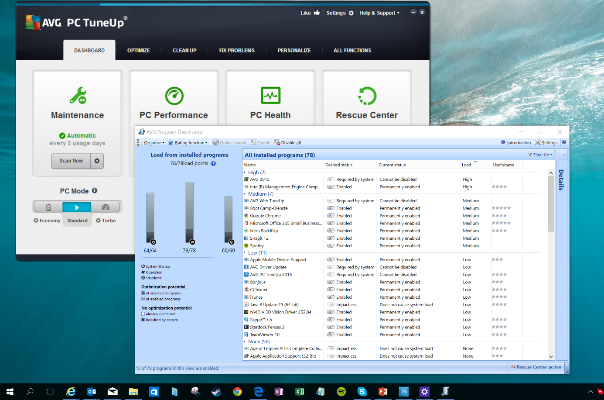
More installed programs equal more processes and services going on in the background. Don’t believe us?
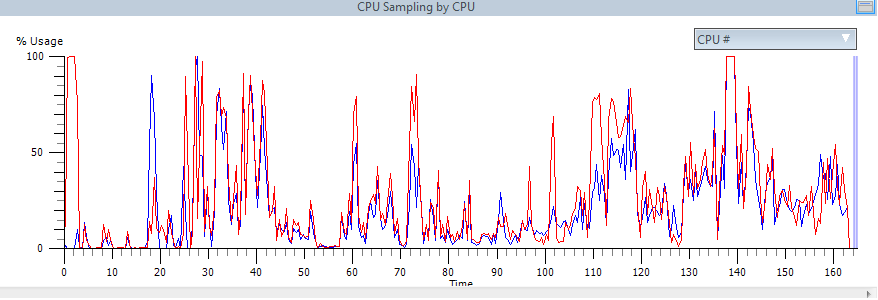
Using a professional analysis tool called Windows Assessment Toolkit, we measured the average resource consumption while working with Microsoft Office both under the load of 150 applications (see benchmarks below for more details) and once the device was optimized with AVG PC TuneUp:
Before (without AVG PC TuneUp)
After (with AVG PC TuneUp)
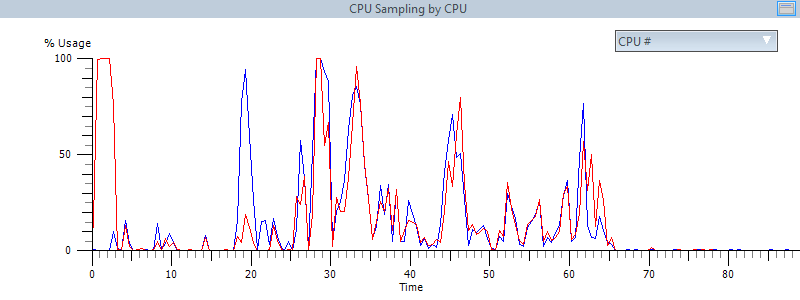
The increased activity doesn’t just have an impact on performance, but on the total lifespan and power consumption, as well. Tools like AVG Program Deactivator, Startup Manager, Uninstall Manager or Turbo Mode help you decrease this activity and make your PC run smooth again.
To Solve Hard Disk Thrashing & Fragmentation
Background applications and 3rd party software can be responsible for a lot of unnecessary hard disk activity, even though you’re not actively using the programs. Of course, this also affects the total lifespan of all hardware components.
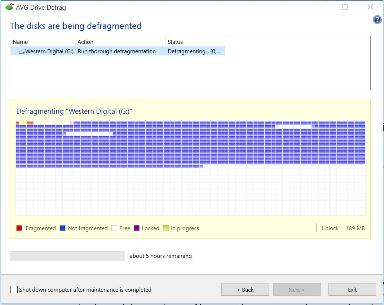
Then there’s the fragmentation phenomenon which occurs daily: Creating, copying, moving and deleting files causes hard disk data to be scattered all over the place which, in turn, reduces overall performance. AVG Drive Defrag restores perfect order to your hard drive while speeding up file access, boot times, and program launches.
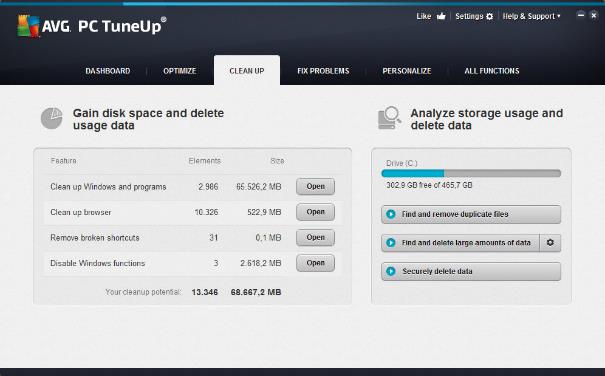
To Free Up Disk Space
Windows® and your programs constantly save log files, “Most Recently Used“ lists and temporary data on your hard disk – but “forget” to delete them. Over time, that leads to critical disk space issues and problems with you applications. AVG Disk Cleaner removes all of these types of files.
To Increase Battery Life & Reduce Power Consumption
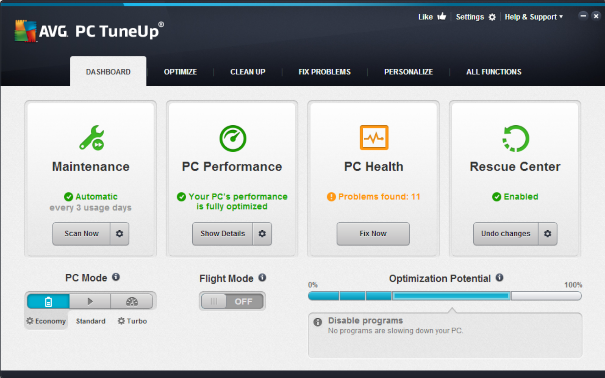
Even Windows 10 doesn’t really turn off unnecessary hardware of your laptop when when you’re on the road or adjust to what you’re doing sufficiently. Our AVG PC TuneUp Economy Mode and Flight Mode result not just in increased battery life, but also reduced power consumption: Work longer and save on your power bills, thanks to an array of power-saving techniques such as smart CPU power control, power saving modes for your devices and the deactivation of power-hungry Windows features.
To Improve Stability
Windows 10 has its weak spots, just like Windows XP, Vista, 7 or 8. One of them is the registry and the way it’s built: Through daily usage of a PC or laptop, the registry could become cluttered with registry errors such as pointers to non-existent startup items, file types, programs, settings or hardware components no longer in use. This could result in some of the following problems:
- Invalid startup entries: These leftover entries may cause startup errors.
- Incorrect file type references: Causing files to be opened by the wrong program.
- Incorrect uninstaller entries: Such entries lead to errors when installing or uninstalling applications.
- Missing fonts: Causes fonts to not show up in programs.
- Invalid ActiveX and COM component pointers: may lead to error messages when running applications.
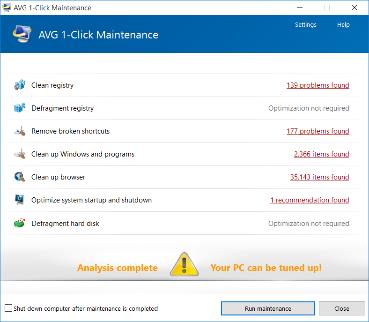
AVG PC TuneUp’s Automatic Maintenance feature and Registry Cleaner fix such issues on a regular basis.


Researchers win Internet Defense Prize for C++ detection tool
Internet Defense Prize goes to researchers from the Georgia Institute of Technology for designing a tool that detects a new class of C++ vulnerabilities.
The post Researchers win Internet Defense Prize for C++ detection tool appeared first on We Live Security.


Introducing the new multiplatform and multi-device solutions in the 2016 Consumer Product range!
The new 2016 Consumer Solutions range by Panda Security is finally available! In an increasingly global and multi-device environment, the 2016 Consumer Solutions range is designed to make the digital world easier and more secure.

The solutions portfolio for protection on all devices includes:
- Panda Gold Protection 2016
- Panda Global Protection 2016
- Panda Internet Security 2016
- Panda Antivirus Pro 2016
- Panda Mobile Security 2016
- Panda Antivirus for Mac 2016
- Panda Free Antivirus 2016
It allows you to shop and browse online safely; protects families against inappropriate content; keeps identities and confidential information safe. The monitoring and optimizing of different devices is now easier than ever with the new Panda products.
Multiplatform and multi-device solutions
All of the products in the new 2016 Consumer Solutions range, from the most basic to the most advanced, offer multiplatform protection, providing service on Windows (including Windows 10 compatibility), Android, Mac and even antitheft for iPhone and iPad.
Mac systems and iOS devices are also becoming victims of attacks and threats. Therefore, the new 2016 Consumer Solutions range includes Panda Antivirus 2016 for Mac, a complete protection against viruses and other Internet threats for Mac users. It offers updates, quarantine and the possibility to analyze your iOS devices from your Mac.
The entire range includes an app for iOS that allows for the remote location of the device in case of loss or theft.
Features of the 2016 Consumer Solutions range
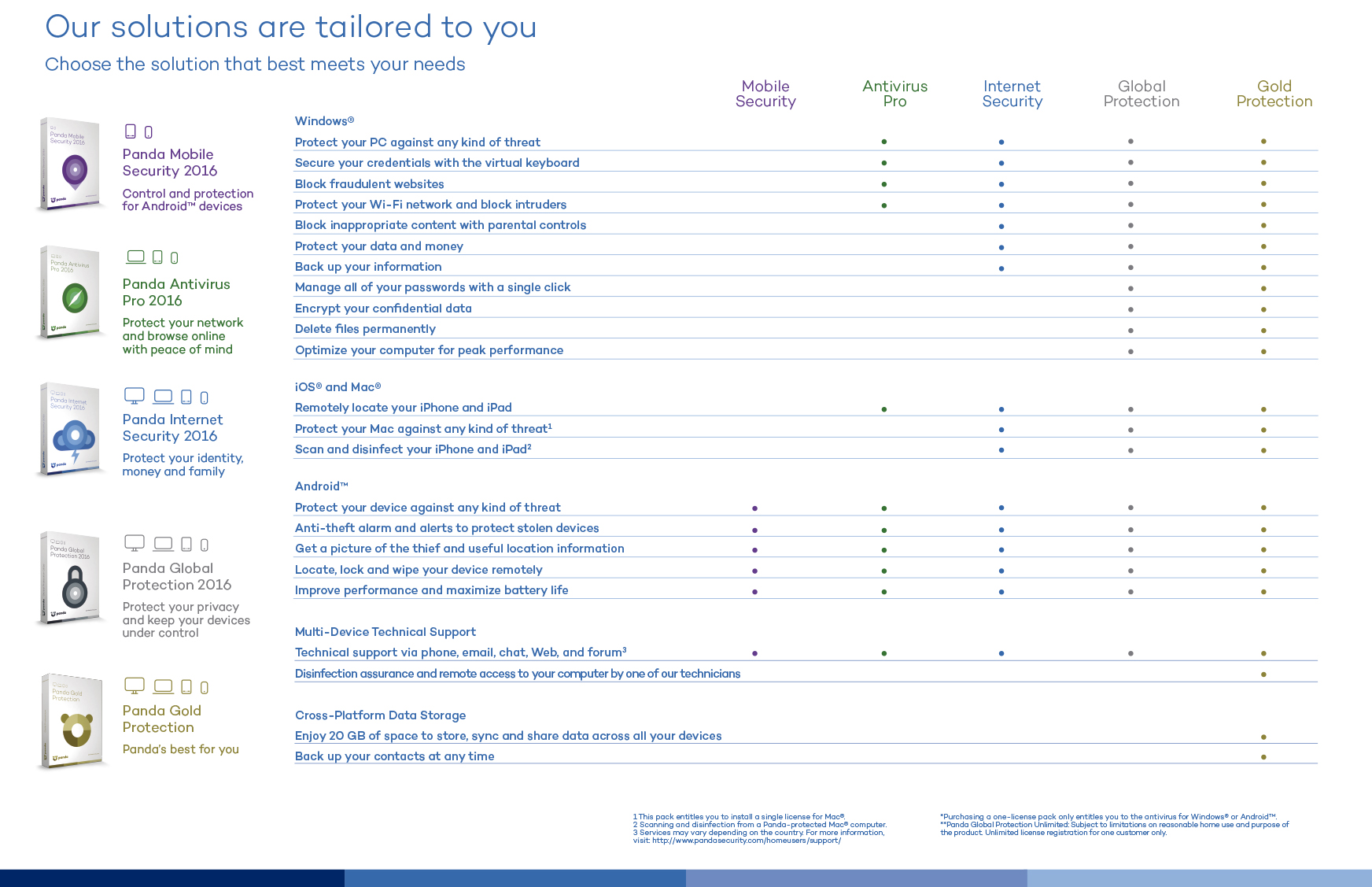
- Data protection (Data Shield) to prevent the stealing of information relating to the devices. In addition Panda Global Protection 2016 and Panda Gold Protection 2016 allow for the safeguarding of files so no one can access them
- Protection of Wi-Fi networks to display the computers on the network and detect intruders. It also allows for network audits to check its safety and potential vulnerabilities, and to block access from unknown computers.
- USB protection, providing immunization and a protective shield to analyze the USB when inserted into the device.
- Improved features such as Parental Control; application control, a highly effective protection against zero-day malware; PC recovery system, safe browsing, and password management and an easier, more intuitive interface (Panda Simplexity).
This is what you can find in the new 2016 Consumer Product range by Panda Security:
The post Introducing the new multiplatform and multi-device solutions in the 2016 Consumer Product range! appeared first on MediaCenter Panda Security.
Zend Framework 2.4.2 / 1.12.13 XXE Injection
Zend Framework versions 2.4.2 and below and 1.12.13 and below suffer from an XML external entity injection vulnerability.
Wireshark Analyzer 1.12.7
Wireshark is a GTK+-based network protocol analyzer that lets you capture and interactively browse the contents of network frames. The goal of the project is to create a commercial-quality analyzer for Unix and Win32 and to give Wireshark features that are missing from closed-source sniffers.
Zend Framework <= 2.4.2 XML eXternal Entity Injection (XXE) on PHP FPM
Posted by Dawid Golunski on Aug 13
=============================================
– Release date: 12.08.2015
– Discovered by: Dawid Golunski
– Severity: High
– CVE-ID: CVE-2015-5161
=============================================
I. VULNERABILITY
————————-
Zend Framework <= 2.4.2 XML eXternal Entity Injection (XXE) on PHP FPM
Zend Framework <= 1.12.13
II. BACKGROUND
————————-
– Zend Framework
“Zend Framework 2 is an open source…
Cisco Unified Communications Manager Multiple Vulnerabilities (VP2015-001)
Posted by Vantage Point Security on Aug 13
Vantage Point Security Advisory 2015-001
========================================
Title: Cisco Unified Communications Manager Multiple Vulnerabilities
Vendor: Cisco
Vendor URL: http://www.cisco.com/
Versions affected: <9.2, <10.5.2, <11.0.1.
Severity: Low to medium
Vendor notified: Yes
Reported: Oct. 2014
Public release: Aug. 13th, 2015
Author: Bernhard Mueller <bernhard[at]vantagepoint[dot]sg>
Summary:
——–
Cisco Unified…
NetRipper Smart Traffic Sniffer
NetRipper is a post exploitation tool targeting Windows systems which uses API hooking in order to intercept network traffic and encryption related functions from a low privileged user, being able to capture both plain-text traffic and encrypted traffic before encryption/after decryption.