Four Quick Windows 10 Privacy Fixes

If you’re upgrading from a previous version of Windows or buying a new Windows 10 device (PC, laptop or tablet), then you’ll want to be aware of a few privacy issues surrounding some of the new Windows 10 features.

These four quick tips can help you rest easy knowing you’ve got more control over your data.

Disable Personalised Ads

In order to serve you more appropriate ads, Windows 10 tracks some of your behavior so that they can better understand your likes and dislikes.

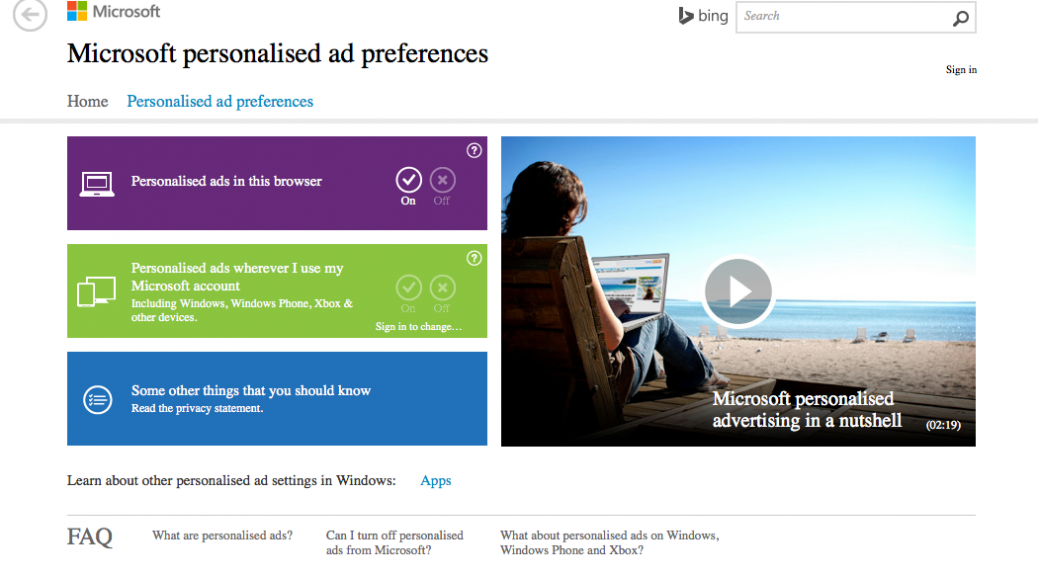
If you don’t want this feature, you can visit this link https://choice.microsoft.com/en-gb/opt-out on your Windows machine to disable Personalised Ads in your Windows Edge browser and wherever they use your Microsoft Account. This will prevent Windows from showing personalised ads and collecting your data across multiple devices.
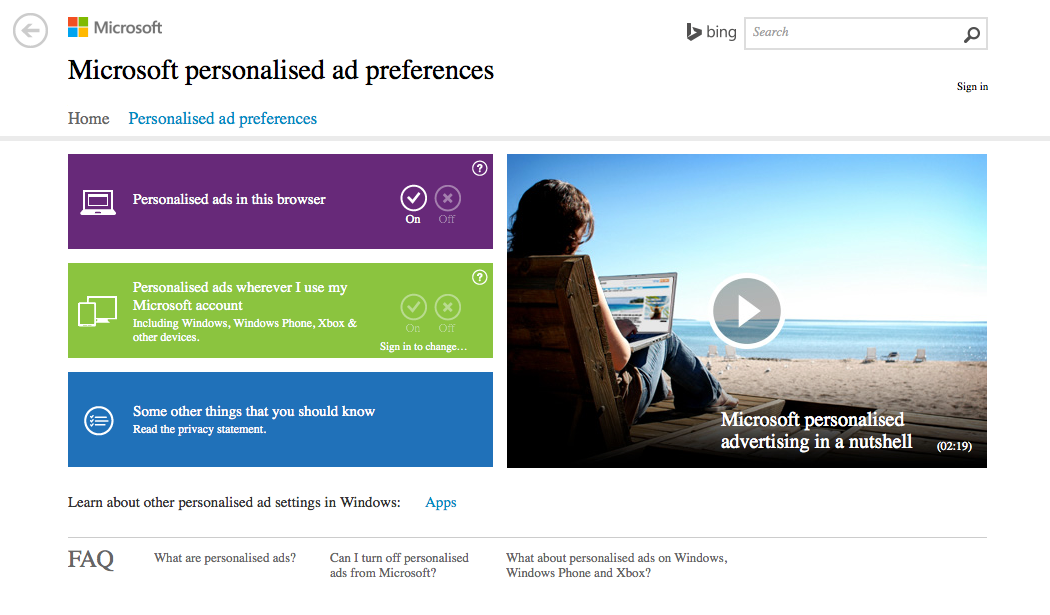
Windows 10 Personalised Ads


Disable Advertiser ID

To prevent third parties from advertising and collecting your data gathered within Windows from Apps you can disable the Advertiser ID.

To do this go to ‘Start menu’, open ‘Settings’, choose the ‘Privacy’ option, then select the ‘General’ tab and turn off the 1st option at the top of the list.
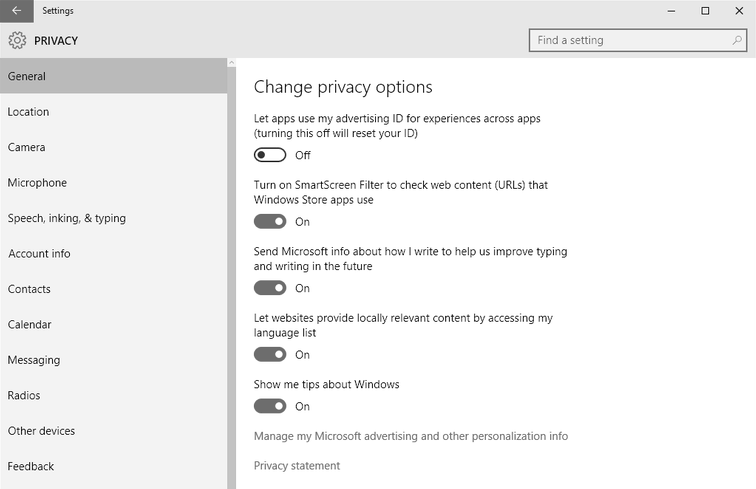
Windows 10 Disable Advertiser ID


Disable Wi-Fi Sense

Windows 10 Wi-Fi Sense essentially wants to help you maintain online connectivity on the go, and help you use less mobile data if you’re on a mobile device.

It does this by crowdsourcing networks with other Windows users. It looks for open networks (unsecured or password free networks) and scans your contacts (Outlook Contacts, Skype Contacts and Facebook friends) networks and lets you share Wi-Fi . I

This has some great advantages like not having worry about managing network access, but it does present some issues:

  • People you barely know could connect to your Wi-Fi network.
  • Any questionable activity on your Wi-Fi internet connection could result in you taking responsibility. This means that you have to trust that people accessing and using your connection are doing the right thing.
  • Your Internet connection could suffer significant slowdowns and increased data usage.
  • Open Wi-Fi networks are insecure, and some are setup specifically for nefarious purposes – a hacker can intercept data via packet sniffing or use a man-in-the-middle attack. You might not know if you’ve connected to one automatically and as such are at risk.
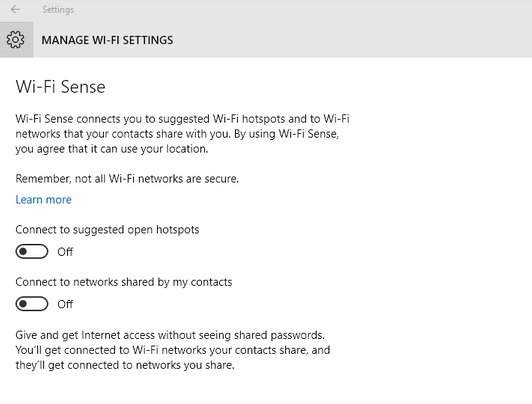
Windows 10 Wi-Fi Sense


If you want to disable the Wi-Fi Sense sharing option then open the Start menu > Settings, Choose the ‘Network & Internet’ option Then click ‘Manage Wi-Fi settings’, and then disable all the options on this page.


Disable location services

If you don’t like the idea of Windows 10 or its apps tracking your movement, then you’ll want to disable location tracking. Open the Start menu, click Settings and choose the ‘Privacy’ option, then select the ‘Location’ tab
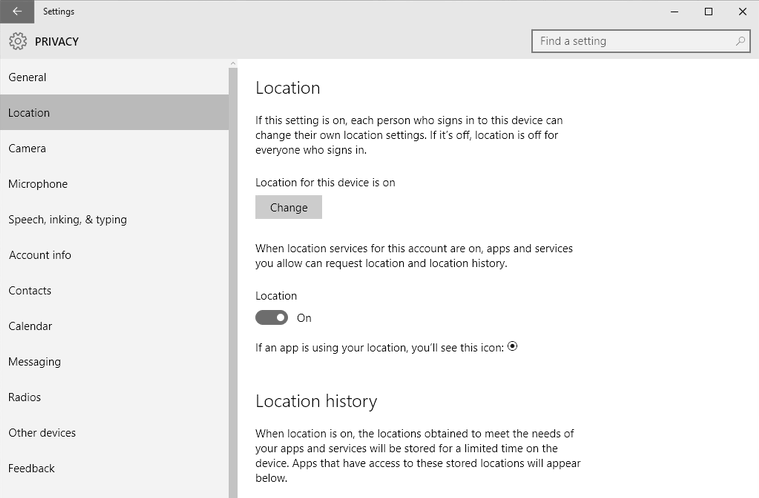
Windows 10 Location Services

You can disable the location services globally or you choose which apps can track location.


We’ve only covered the basics here, but there are additional options available in the Windows 10 privacy settings that you might want to take a look at and customise further, especially if you’re concerned about your privacy.

To go that extra mile and ensure your complete privacy while online, then you can use a Virtual Private Network (VPN) service like hidemyass.com which encrypts your data.

If you would like to chat more about privacy, then please start a conversation with us on Facebook or Twitter. We’d love to hear from you and any tips you might like to share.

Heads-Up Displays: A Driving Solution or Another Distraction?

You may have seen recent reports about the “heads-up displays” (HUDs) technology for cars, where information is projected onto the windshield of the car as you drive. The transparent display provides navigational assistance, speed and other dashboard components, lane change alerts, etc.

The HUD technology was originally developed by the military for fighter pilots, who could see target data and other important information without looking down. But now the technology has entered into the automobile sector and is something we’re going to be hearing a lot more about…

Recently, a startup called Navdy unveiled a link to the auto display and your smartphone information. Other formidable players in this space are Continental and Garmin, among others. Most players have focused to-date on the display of navigational, safety, and instrument information. But it’s clear that with companies such as Navdy, HUD is headed into a more interactive territory.

According to a new market research report published by MarketsandMarkets, the heads-up display space is expected to reach $8.3 billion dollars in five years. (It should be noted this projection isn’t limited to automobiles but also to such other segments as aviation as well. See here.)

Proponents of HUDs believe they will make our roads safer by keeping drivers from fumbling with their smartphones while driving, or even having to look down at their instrument panel. With the projected image on your windshield, the theory goes, you’re able to keep your eyes on the road.

Indeed, on any given day, Distracted.gov estimates over 660,000 vehicles are being driven by someone using a hand-held cell phone. This all too frequently, and often tragically, results in accidents.

A second part of the HUD business proposition may be a pragmatic one: people are going to be using their phones anyway, so this is a better alternative.

But the question is: is it?

Hands-free technology and voice-activation software have equally been touted as benefits for the same reason: users can keep their eyes on the road. Yet, both voice-activation software and hands-free are not panaceas.

In the case of VA technology, it still affects the cognitive part of your brain.  Many of the simple tasks that come with VA technology increase a driver’s cognitive workload. And, depending on the situation, that can be dangerous. Vehicle voice-activated “infotainment” systems that are more complicated or just take longer to navigate created the highest levels of driver distraction and safety risks, according to a recent AAA study.

Hands-free phone technologies also don’t solve the problem of having a conversation, especially an important or emotional one, while driving can be only a little less distracting than juggling a phone. It’s for the same reason: Cognitive distraction.  Many studies back this up, including a groundbreaking one from the National Safety Council.

It would appear that the same question of cognitive distractions applies to new HUD techs.

While we can all appreciate any tools that will make our roads safer— the question is whether turning your windshield into a computer screen is the way to go? For that, we’ll have to wait and see.


Image courtesy of PC Mag

Unicorns: Perhaps Not As Rare As We Thought

So what’s a Unicorn? Here’s the study’s definition: “Many entrepreneurs, and the venture investors who back them, seek to build big, impactful companies valued at a billion dollars or more. We called these companies ‘unicorns’ because what they had achieved seemed very difficult, rare, and relatively unstudied.”

The latest study, the second by the venerable tech startup news site, has some surprises, as well as corroborates what has become conventional wisdom in Silicon Valley.

There’s a lot of data to chew on in the study and you can read the full post here. But parsing through it, there is a lot to learn, whether you’re a start-up, an investor, or just curious about markets.

Here are some of the interesting takeaways that I gleaned.

First, the surprising:


Unicorns are not as rare as we thought

The latest study revels that there are more Unicorns than one might think. There were 84 companies profiled in this year’s study—more than a 100% increase from last year. Granted, a lot of the companies were “paper” Unicorns (companies valued on paper that have not had liquidity events.) But the total value of the companies was $327 Billion and 2.4x the last analysis (“excluding Facebook, which was almost half the value of our last list.”)


Old is the “New” New

As the study maintains, for every wunderkind out there, a seasoned leader or founder (and, perhaps more importantly, a co-founder) may be your best shot at becoming, or finding, a Unicorn.

The study found that companies with educated, tech-experienced, older co-founding teams with a history together have built the most successes in this rarified club. And the co-founding aspect was interesting as well. As the study noted, 86% of the companies had co-founders, or a “super-majority” according to its lingo.

While some of this may be counter-intuitive to the traditional Silicon Valley narrative, it makes sense to me on several levels. An experienced leader can gauge a market, and having a co-founder gives you a chance to bounce ideas off one another, whether it’s reigning in your partner or just having “green-light” time. (I’ve had co-founders in all three of my entrepreneurial ventures.)


In the not so surprising camp:


IoT is gaining impact

This year, the Unicorn study recognized the Consumer Electronics/Internet of Things as its own category. According to the study, five companies, which make up 6% of the list, have raised a combined $266 million on average and are valued at 18x the private capital raised. While it is the smallest of the categories (after E-Commerce, SaaS, Enterprise and “Audience” or ad-driven businesses– ranked by order of value from first to last), to me, this is just another sign that the Internet of Things is ripe for takeoff.


Diversity: Still too Little

This last survey statistic from the study that I’ll share is in diversity, where the numbers fall into the not-so-surprising camp.

While the study determined that 50% of founders or co-founders of Unicorns came from outside the U.S. (from India to Canada) it shows diversity among Unicorns diversity is trending up, but is still low. TechCrunch reports this year the list welcomed two companies with female leaders, compared to no female CEOs on its last list. As well 10% of the co-founders on this year’s list were female, double last year’s survey. Like its average startups counterparts in the valley, 70% of the companies surveyed had no gender diversity at the board level… Please note: the study was unable to track racial or ethnic diversity.

So in terms of diversity, this “rarest of the rare” breed of venture backed tech companies are doing about the same as run of the mill startups and tech companies in Silicon Valley.

Ultimately, when I look at this study, however, I am an encouraged to see that attributes like experience, collaboration, and inclusion, as well as innovation, are being called out as measures of success. These are all values worthy of attention, whether you aspire to be a Unicorn or not.


Title image courtesy of TechCrunch

Camp Google: Inspiring Kids to go Outside

Do you remember your mother or grandmother saying, “It’s a beautiful summer day…what are you doing inside?” Well, online giant Google has heard that message, and wants young children to get offline too, with the help of its Camp Google.

Are the young children in your life starting to act a little restless as we enter the dog days of summer? Although school seems to start earlier than ever, we all know that feeling when waning summer days seem to stretch out longer and longer…Just in time, Google has launched its online summer camp (on July 13), starting with a bevy of science and tech themed adventures. The first was called Ocean Week. This week at camp is Space Week.

I know we’ve written a lot on the topic of kids online, and most of us are worried about the next generation being too connected—and mobile devices turning them into bigger couch potatoes than the previous generation. While it may sound counter-intuitive, Camp Google seems like a great strategy to get that generation (ages 7-10) excited about life and get them out of doors.

The camp explores the outdoors, science, and technology. You don’t even need a Google account to sign up. As Google says, “Camp Google is designed to get kids outside exploring and experimenting with fun science activities.”

And did I mention the camp is free? Sign me up!

There are activities that even sound fun to me: Creating a magnifying glass to explore your backyard? Building crystals? Making a constellation for your bedroom? A levitation device for Space Week?

For budding chefs out there, the current Google Camp Space Week also allows them to participate in a cook off between two junior chefs competing to create a signature dish for astronauts in space. Kids will get a front row seat for all the fun and learn about how space food is made and what’s needed to survive in space.

Exploring a volcano? Google’s got that too, coming July 29t, and with an online escort by a National Park Ranger. Miss a week of camp for a real vacation? Content is there for you to experience the camp after the designated week.

The engineers at Google worked with prestigious educational organizations like Khan Academy and with content experts such as National Geographic Kids, NASA and the National Park Service to develop the excellent content that will get kids to see the potential science has.

The directions and lessons are fun, simple to understand and motivating.

All activities list supplies required (usually basic household items) and also specify when parental supervision that is required as well. With this camp, there are even completion badges too.

To me it seems like the perfect mix of technology and outside awareness with content and interactive engagement really designed to inspire the next generation to pursue science and technology.

I also would like to point out that it seems like a great way to encourage young girls to learn about and explore science and technology in a non-threatening and fun way.

Empowerment, engagement, and exercise…Good job Google!

How SMBs in the UK Handle their Company’s Security

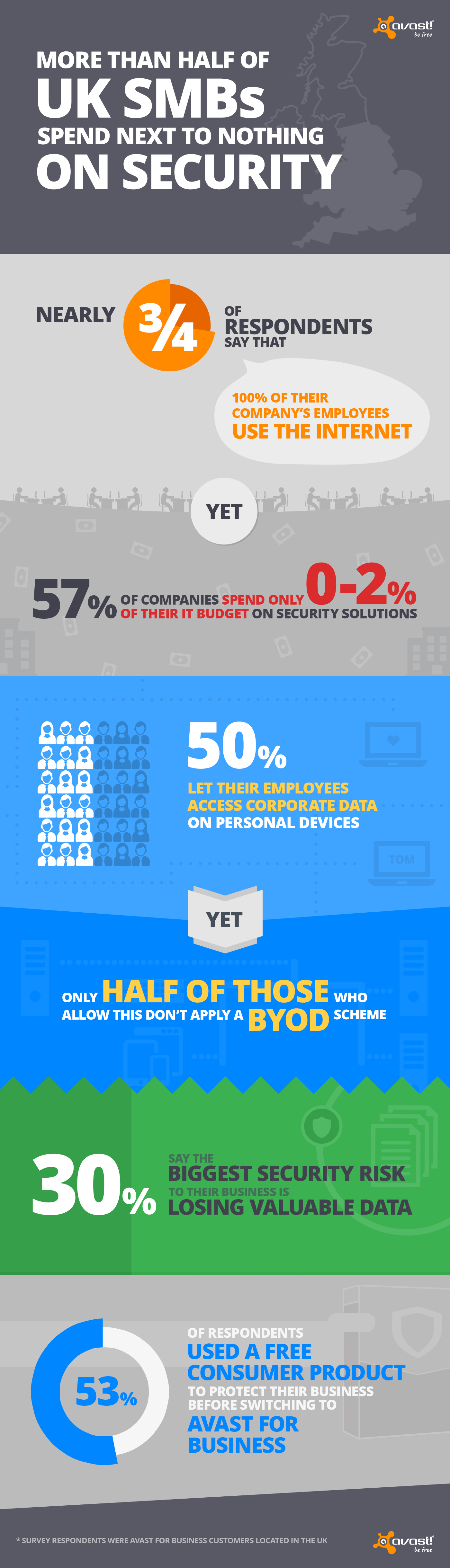
UK Avast for Business INFOGRAPHICIn February, Avast launched the world’s first free, easy to use, cloud-managed security offering, Avast for Business, protecting SMBs from viruses and cyberattacks. We conducted a survey amongst our Avast for Business users in the UK to gain further insight into how local SMBs handle their security.


Nearly three-quarters (73%) of respondents said that 100% of their company’s employees use the Internet. Businesses, whether small or large, retail or non-profit, often have a database of valuable customer data, making them an attractive target for cybercriminals.

Cybercrooks use social engineering to attack businesses, tricking employees via phishing scam to, for example, gain access to a company’s network. Despite the high number of data breaches, 57% of SMBs in the UK invest only 0-2% – little to nothing – of their IT budget on security.

Who handles IT support services for SMBs in the UK?

  • 1 out of 10 said an employee (not a designated IT admin) handles the company’s IT support services
  • Nearly 50% have an in-house technician
  • 1 out of 10 have an external supplier/technician handles the company’s IT support services
  • 28% of SMB business owners handle their company’s IT

BYOD

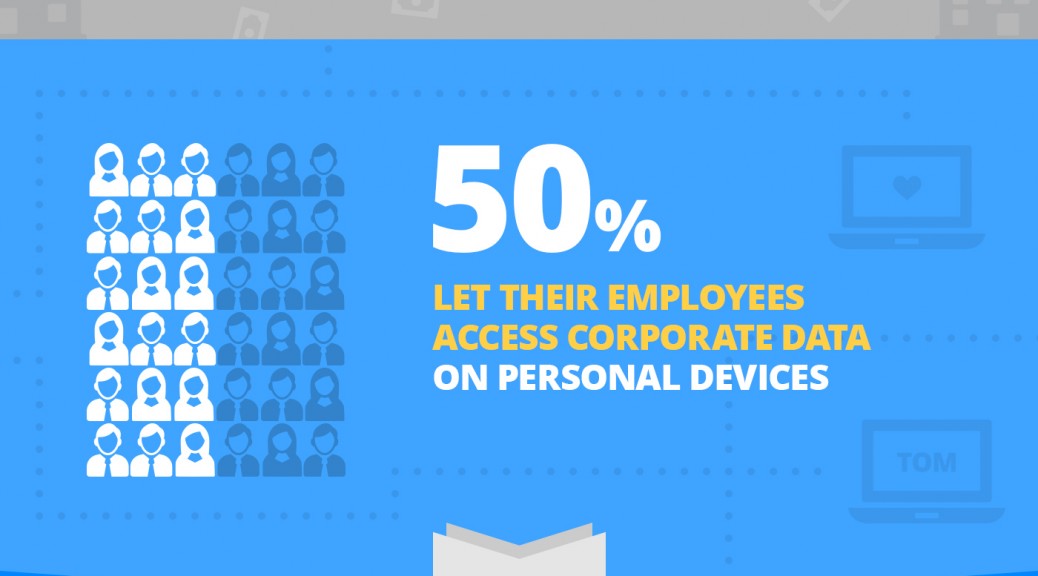
More than half of SMBs in the UK allow their employees to access company data from their personal devices. Bring your own device (BYOD) is a convenient practice SMBs have embraced, as it saves costs and encourages productivity.

However, BYOD can be risky, if not handled properly. Not only can hackers target the device to gain access to sensitive corporate information, but if the device is lost or stolen, the company data stored on it goes with the device. More than half (52%) of SMBs authorize employees to access corporate data on personal devices, yet the majority (54%) doesn’t run a BYOD scheme. 

Threats

Losing valuable and confidential data (31%) is the greatest security risk to UK SMBs along with productivity (23%) and losing customers (16%). We asked our business users if a virus or threat had infected them before switching to Avast for Business. When it came down to it, threats and hacks cost six out of 10 businesses productivity, followed by data loss (19%).

Types of security solutions SMBs used prior to switching to Avast for Business:

  • More than half (55%) used free consumer security solutions
  • 23% used premium business security solutions
  • Nearly one out of ten used premium consumer security solutions
  • Nearly one out of ten either do not know what kind of security solution they used before switching to Avast for Business or did not use any security solution (3%)

If your SMB has a low IT budget or if your business is currently using a consumer security solution, make sure you check out Avast for Business. Avast for Business is FREE and can be downloaded here.


Miguel Bullón, the new Global Retail Director for Panda Security

Panda Security has recently appointed Miguel Bullón as its new Global Retail Director. In his new role, Miguel will be responsible for international business development with an emphasis on the area of consumer products. From now on he will lead the Panda Security retail teams and will report directly to Rado Svicin, Panda Security’s Global Online Sales Director.

Miguel Bullón has a degree in Marketing and Sales from ESIC and has extensive experience in business development with several companies in the ICT sector.

Before joining Panda Security, Miguel held many high-profile posts with Cisco where he oversaw sales in the Mediterranean area. Previous to that, he worked at NetGear, where he was in charge of business development for Spain and Portugal. Before taking on the role of Global Retail Director, Miguel served as International Business Development Executive.

Miguel Bullon

“We are confident that Miguel has both in sales and business development in various multinationals will give the company an added edge. His work in other ICT companies has been outstanding so we are convinced that he will have great success in his new role,” says Diego Navarrete, CEO of Panda Security.

“For me it is a great professional challenge to be part of a great company like Panda Security. It is an honor to lead the area of international consumer sales, not to mention that with such a talented team, I’m sure we will achieve great success,” stated Miguel Bullón.

You can download the photo here.

The post Miguel Bullón, the new Global Retail Director for Panda Security appeared first on MediaCenter Panda Security.