One of the first things you see when reserving your free copy of Windows 10 is that it’s “designed for speed”, promising you faster boot times, resume times and more. But is Windows 10 really that much faster than its direct predecessor? We’ve put it to the test and show you how the new OS fares in multiple scenarios such as boot time, performance while working, smoothness of gaming or battery life.
The Device Tested
In our lab, we started our tests with a rather high-end multimedia notebook – the Asus UX-501.
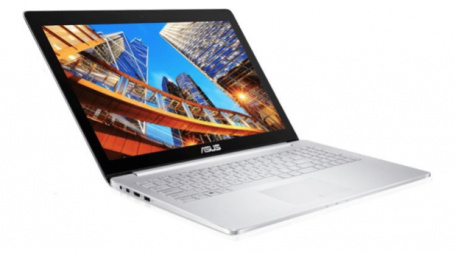
It’s equipped with a Core i7 (which clocks up to 3.6 GHz), 16 GB of RAM, a rather powerful GeForce 960M GTX and a blazing-fast 128 GB SSD. It’s one of the hotter devices of 2015 and should definitely show if and how much Windows 10 was able to speed things up compared to the pre-installed Windows 8.1.
How we tested
To get reproduceable and comparable results of Windows 8.1 versus Windows 10, we clean-installed both versions and installed only the latest drivers as well as our speed testing software, such as PCMark 8. Then we prepared both installs with the following steps:
- Put the devices in a controlled room with 23° celcius and 250 (+/- 50) lux
- Set the power plan to “Balanced”
- Run all scheduled tasks and automated tasks using the “Rundll32.exe advapi32.dll,ProcessIdleTasks” command
- Installed all updates
- Left all Windows optimization features enabled
- Repeated all benchmark tests three times and then averaged the results
So let’s have a look at the tests we performed before and after the upgrade to Windows 10 Build 10240 (final, including the latest updates as of July 27th):
1. PC Startup Time: Windows
For “boot time” tests, we used Microsoft’s “Windows® Performance Toolkit”: These tools are used by software and hardware makers to test the impact of battery life and performance of their products on typical machines.
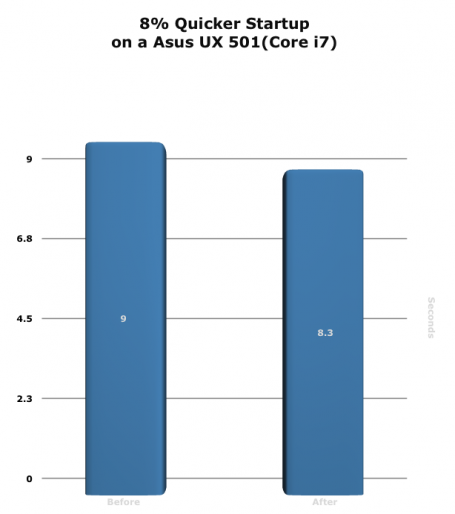
The difference isn’t huge, but it shows that Microsoft is working hard to shave off seven milliseconds of boot time: 9 versus 8,3 seconds isn’t something you feel on such a powerful device, but on a slower PC or laptop this could translate into a far higher benefit.
Winner: Windows 10
2. Internet Explorer Startup Time
During a typical work day, applications get launched and closed all the time. Long loading times aren’t just an annoyance to the user, they could even hinder his ability to work or browse the web properly. This is why we used Windows Assessment Toolkit to measure how long it takes to launch an application, in this example Internet Explorer, down to the millisecond.
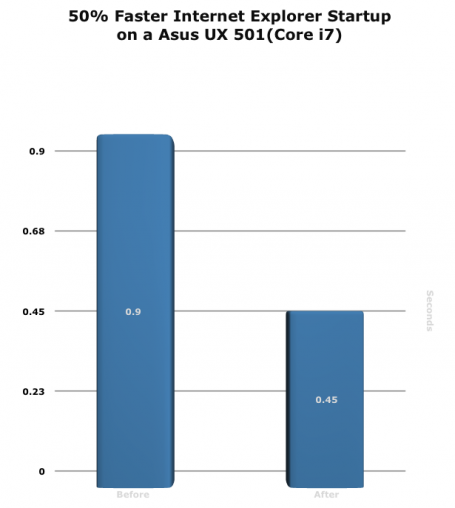
Yet again, a reduction from 0,9 to 0,45 seconds is something only few people would notice – yet it’s more evidence how Microsoft continually improved performance in every aspect and handles application launch just a tad better than before.
Winner: Windows 10
3. Writing, Web Browsing and Video Chat Performance
The next test involved the benchmarking tool PCMark 8 which uses real-life scenarios such as browsing the web, Office 2013, Adobe Creative Suite and other tools to recreate a typical home and business scenario. It measures the exact time it takes to complete tasks down to the millisecond:
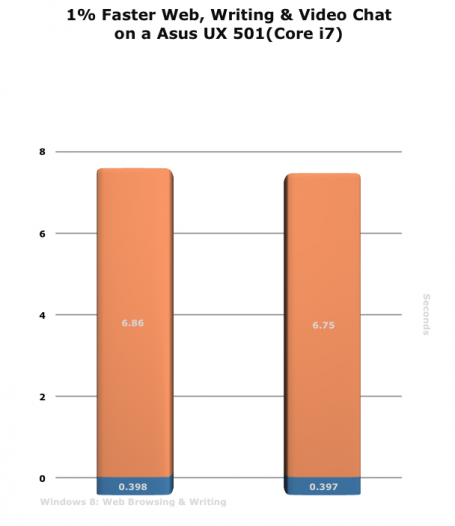
The numbers you see in the graphs represent the time it took to complete the browsing benchmarks. Unfortunately, in this instance, the results really weren’t that different. A 0,11s difference is completely within margin of error and doesn’t have any real-life effect.
Winner: Tie
4. Word, Powerpoint and Excel Performance
The next test involved PCMark running automated actions in Word, PowerPoint and Excel to measure performance, such as converting and calculating a huge Excel file:
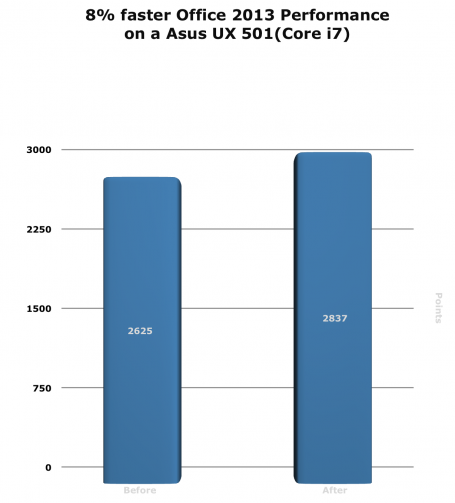
We were impressed: In all test iterations, Windows 10 was able to run 8% faster when working with the Office suite.
Winner: Windows 10
5. Grand Theft Auto V performance
Thanks to the ubiquity of services like Steam and the increased sales of capable PCs or laptops, gaming applications are not just some of the most popular applications pn PCs, but also the most resource-intensive too. This is why we used the top game of 2015 Grand Theft Auto V and its built-in benchmark tool which measures the average FPS (Frames per seconds) for different scenes and scenarios of the game:
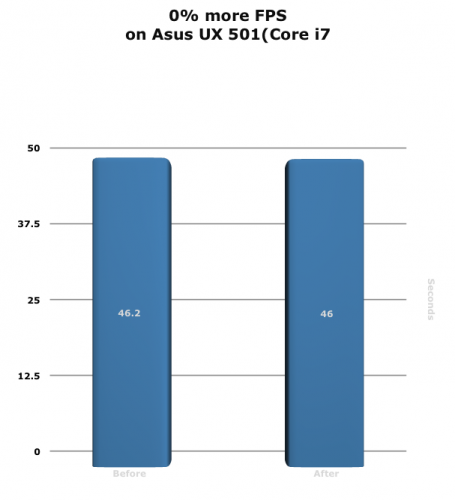
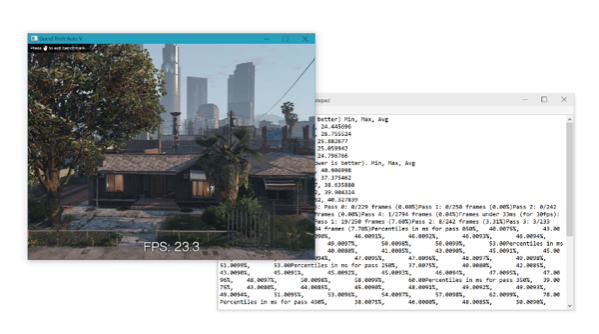
Windows 10 performed slightly slower, but also well within testing tolerance. However, one of the main benefits of Windows 10 is the exclusive implementation of Microsofts graphics platform DirectX 12 which is supposed to speed up games by to 50% – unfortunately, we’re still waiting for such titles so there’s no way to really put this to test.
Winner: Tie
6. Adobe Creative Suite Performance
While the last couple of tests focused more on consumer activities, such as browsing the web or working with Office, particularly IT professionals have a need for snappy performance. One such example is Adobe’s Creative Suite:
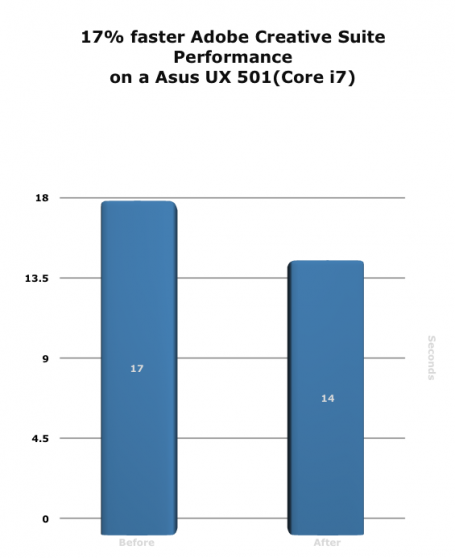
Again, Windows 10 showed better results: Likely due to the improved resource utilization and improved driver support.
Winner: Windows 10
7. Battery Life while Working
Microsoft promised better power management in Windows 10 and that it would save more battery life when on the go. We tested this using PCMark 8s work tests (in loop) until the battery ran dry. The result:
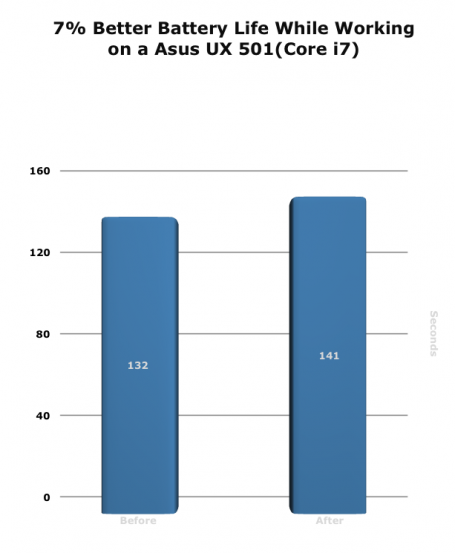
In all three test iterations, Windows 10 managed to run 9 minutes longer. Not a massive improvement, but definitely enjoyable.
Winner: Windows 10
8. Battery Life while gaming
Gaming is the number 1 battery drainer so it doesn’t come as a surprise that our tests were done rather quickly. Unfortunately, even with NVIDIAs latest drivers (as of July 28th), battery life on the 960M while playing GTA V went down rather than up:
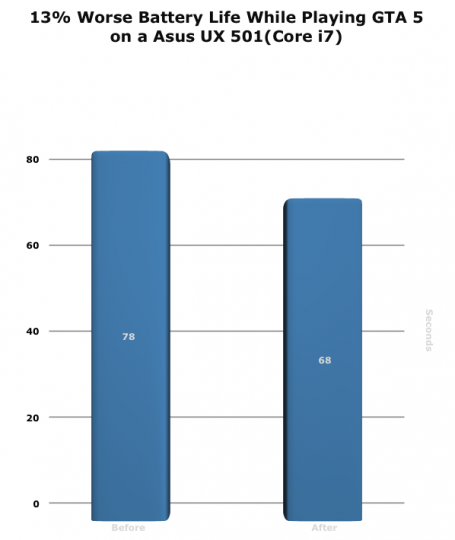
A reduction of 13% in all of our tests. We’re hoping that NVIDIA and Microsoft are working closely on a new driver to fix this issue.
Winner: Windows 8.1
9. Battery Life while watching a movie
It came as a surprise that our movie tests showed some significant improvements for Windows 10. When watching a 1080p video clip in a loop using Windows Media Player under Windows 8.1, the laptop died after 2 hours and 25 minutes. However, when going to Windows 10 it lasted a whopping 3 Hours. Likely that Windows 10 does something in the background to reduce resource usage and just focus the power on the things necessary for movie playback:
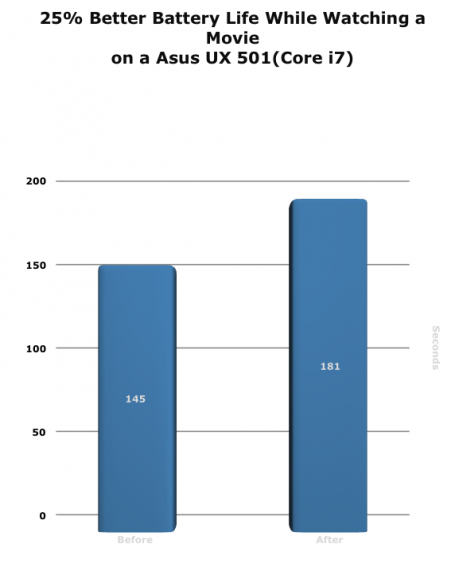
Winner: Windows 10
Verdict
Windows 10 – even in its first release – a tad faster than Windows 8.1. But beware, it doesn’t do magic: some areas only improved marginally, whereas other areas (battery life) really jumped up noticeably.
However, we just tested a clean install of Windows 8.1 versus a clean Windows 10. The areas in which operating systems really suffer from performance is the gradual slowdown that occurs over time and with more and more programs or drivers installed. That’s why, in our next blog, we installed 150+ programs on new Windows 10 devices to see how much the new OS is resistant to this load – and what we, as AVG, can do about it! Stay tuned.