
Android – The rooting story

You have an Android device and the performance is not as good as it was in the first days after you bought it? You want to delete the bloatware applications which are automatically installed from the manufacturer by default but there is no option to do that? If you seek help for problems like these and do some research in the internet, one of the first things to do you will probably read about is “rooting your Android device”.

The post Android – The rooting story appeared first on Avira Blog.

Facebook ads. How to avoid them?

facebook

Have you ever wondered why the advertisements that appear on your Facebook feed offer you the exact product and service that you are supposedly interested in? Have you also stopped to think about what information Candy Crush holds on you, or do you just click play anyway?

Facebook offers you information on your privacy, although it’s like that few users have ever reviewed it. Hardly surprising when you consider that it would take it 76 days to read all of the terms and conditions of the services that we use over the course of a year, according to a study carried out by the Carnegie Mellon University.

It’s likely that lots of workers include information relating to their role in the company on their Facebook profile, so both you and they could benefit from a better level of privacy control on the social media site. Here are a few tips to make it harder for companies to follow your tracks online.

Stop giving away personal information to applications

Every time that you install an application from Facebook it tells you what information you will share with it. In that moment, you can edit the information you wish to share. Seeing as you’ve probably ignored this or have logged into Facebook from the external website, we’ll explain to you how to restrict the details that you give away to the apps.

  • The first thing you have to do is click on the lock in the top right part of the Facebook page. Click on “see more” form the expandable menu and access “settings and privacy tools”.
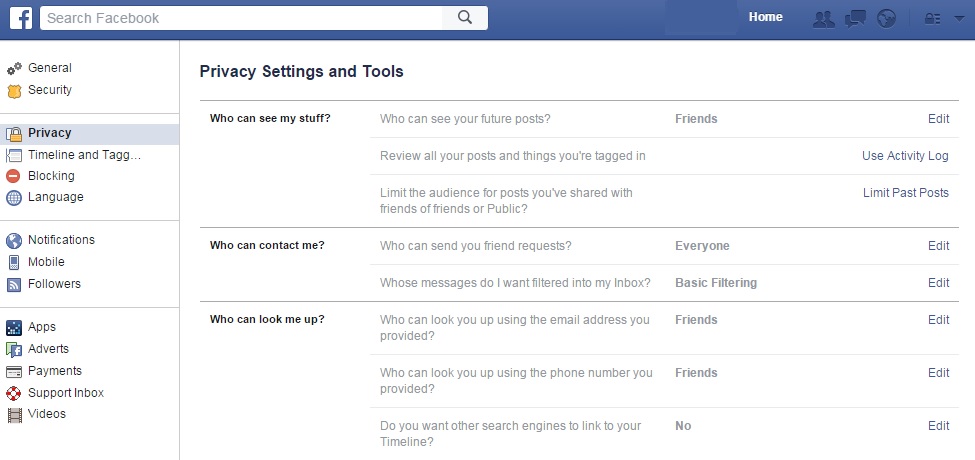
facebook privacy settings

  • Then, search the left column for the button marked “applications” and click on “see all”. We bet you never expected to see so many websites associated with your Facebook page! Now, it’s time to organize it all.
  • You can click beside each application to delete it from your account, or you can click on the pencil icon to edit the information that each app keeps on you. Keep in mind that there may be some details that are obligatory and you can’t keep them hidden.
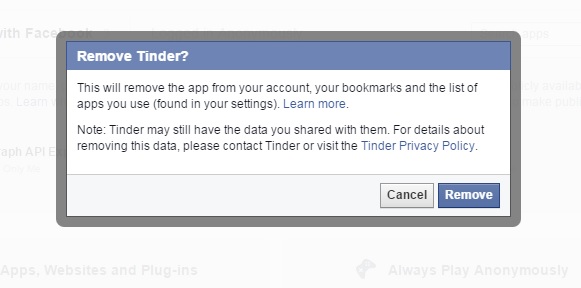
facebook remove

  • When you’ve finished this process, go to the bottom of the page where you’ll find two very interesting options. The first of these is the option to activate “always play anonymously” and the second is to edit the information on Facebook that others can see in the apps that you use by clicking on “applications used by others”.
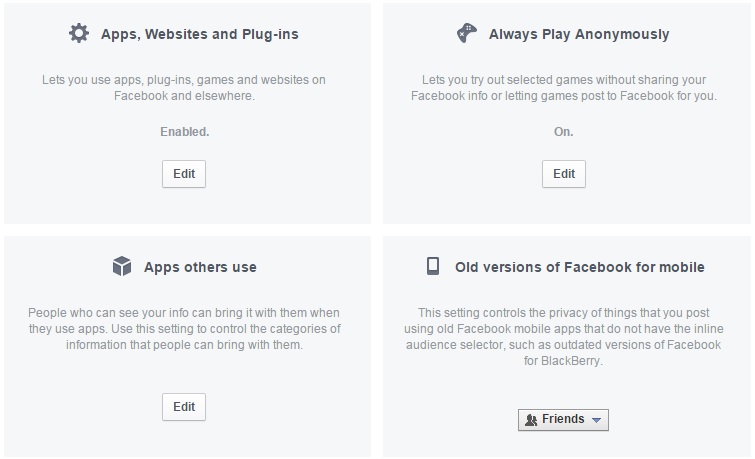
facebook apps

Repel the advertising

If you want to stop Facebook from using your personal information to show you predetermined advertisements, then there are a few ways you can go about it.

  • The first is click on the arrow at the top of the page, beside the lock icon, and access the part for “settings”. In the left column you’ll see “adverts”. From there you can deny Facebook the right to use your actions (for example, things you indicate you like) to offers ads to your friends and that you don’t receive ads based on their preferences either.

To do this, you need to click on the “edit” option for both “other websites” as well as “adverts and friends” in order to change the default setting from “only friends” to “nobody”.
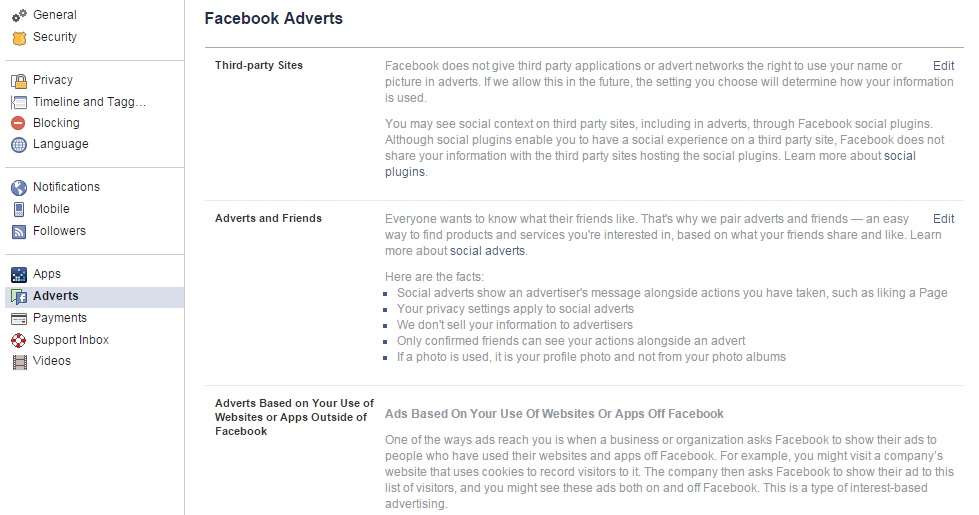
facebook adverts

You can also use other tools to avoid this personalized advertising such as Facebook Disconnect or Adblock Plus. So, if you want to improve your privacy on Facebook and control what businesses can analyze from your information, you know what to do. It is also recommended that you read the policy of the company so as you know what you’re getting yourself into.

The post Facebook ads. How to avoid them? appeared first on MediaCenter Panda Security.

ManageEngine OpManager Remote Code Execution

This Metasploit module exploits a default credential vulnerability in ManageEngine OpManager, where a default hidden account “IntegrationUser” with administrator privileges exists. The account has a default password of “plugin” which can not be reset through the user interface. By log-in and abusing the default administrator’s SQL query functionality, it’s possible to write a WAR payload to disk and trigger an automatic deployment of this payload. This Metasploit module has been tested successfully on OpManager v11.5 and v11.6 for Windows.

Cisco Security Advisory 20150916-pcp

Cisco Security Advisory – A vulnerability in the web framework of Cisco Prime Collaboration Provisioning could allow an authenticated, remote attacker to access higher-privileged functions. An exploit could allow the attacker to access functions some of which should be accessible only to users who have administrative privileges. This includes creating an administrative user.

Cisco Security Advisory 20150916-tps

Cisco Security Advisory – Cisco TelePresence Server contains a buffer overflow vulnerability in the Conference Control Protocol API that could allow an unauthenticated, remote attacker to cause a denial of service (DoS) condition. Cisco has released software updates that address this vulnerability. No workarounds that mitigate this vulnerability are available.

Ubuntu Security Notice USN-2740-1

Ubuntu Security Notice 2740-1 – Atte Kettunen discovered that ICU incorrectly handled certain converter names. If an application using ICU processed crafted data, a remote attacker could possibly cause it to crash. It was discovered that ICU incorrectly handled certain memory operations when processing data. If an application using ICU processed crafted data, a remote attacker could possibly cause it to crash or potentially execute arbitrary code with the privileges of the user invoking the program. Various other issues were also addressed.

Ubuntu Security Notice USN-2742-1

Ubuntu Security Notice 2742-1 – Denis Andzakovic discovered that OpenLDAP incorrectly handled certain BER data. A remote attacker could possibly use this issue to cause OpenLDAP to crash, resulting in a denial of service. Dietrich Clauss discovered that the OpenLDAP package incorrectly shipped with a potentially unsafe default access control configuration. Depending on how the database is configure, this may allow users to impersonate others by modifying attributes such as their Unix user and group numbers. Various other issues were also addressed.

Ubuntu Security Notice USN-2741-1

Ubuntu Security Notice 2741-1 – It was discovered that the Unity Settings Daemon incorrectly allowed removable media to be mounted when the screen is locked. If a vulnerability were discovered in some other desktop component, such as an image library, a local attacker could possibly use this issue to gain access to the session.

Red Hat Security Advisory 2015-1808-01

Red Hat Security Advisory 2015-1808-01 – OpenShift Enterprise by Red Hat is the company’s cloud computing Platform-as-a-Service solution designed for on-premise or private cloud deployments. A command injection flaw was found in the rubygem-openshift-origin- console. A remote, authenticated user permitted to send requests to the Broker could execute arbitrary commands with elevated privileges on the Red Hat OpenShift server. All rubygem-openshift-origin-console users are advised to upgrade to this updated package, which contains a backported patch to correct this issue.