Unspecified vulnerability in the Oracle Identity Manager component in Oracle Fusion Middleware 11.1.1.7, 11.1.2.2, and 11.1.2.3 allows remote attackers to affect integrity via vectors related to OIM Legacy UI.
Monthly Archives: October 2015
Cisco Security Advisory 20151021-ntp
Cisco Security Advisory – Multiple Cisco products incorporate a version of the ntpd package. Versions of this package are affected by one or more vulnerabilities that could allow an unauthenticated, remote attacker to create a denial of service (DoS) condition or modify the time being advertised by a device acting as a network time protocol (NTP) server. On October 21st, 2015, NTP.org released a security advisory detailing 13 issues regarding multiple DoS vulnerabilities, information disclosure vulnerabilities, and logic issues that may result in an attacker gaining the ability to modify an NTP server’s advertised time.
Drupal Core – Overlay – Less Critical – Open Redirect – SA-CORE-2015-004
- Advisory ID: DRUPAL-SA-CORE-2015-004
- Project: Drupal core
- Version: 7.x
- Date: 2015-October-21
- Security risk: 9/25 ( Less Critical) AC:Basic/A:None/CI:None/II:None/E:Theoretical/TD:Default
- Vulnerability: Open Redirect
Description
The Overlay module in Drupal core displays administrative pages as a layer over the current page (using JavaScript), rather than replacing the page in the browser window. The Overlay module does not sufficiently validate URLs prior to displaying their contents, leading to an open redirect vulnerability.
This vulnerability is mitigated by the fact that it can only be used against site users who have the “Access the administrative overlay” permission, and that the Overlay module must be enabled.
An incomplete fix for this issue was released as part of SA-CORE-2015-002.
CVE identifier(s) issued
- A CVE identifier will be requested, and added upon issuance, in accordance with Drupal Security Team processes.
Versions affected
- Drupal core 7.x versions prior to 7.41.
Solution
Install the latest version:
- If you use Drupal 7.x, upgrade to Drupal 7.41
Also see the Drupal core project page.
Reported by
- Samuel Mortenson
- Pere Orga of the Drupal Security Team
Fixed by
- Pere Orga of the Drupal Security Team
- David Rothstein of the Drupal Security Team
Coordinated by
Contact and More Information
The Drupal security team can be reached at security at drupal.org or via the contact form at https://www.drupal.org/contact.
Learn more about the Drupal Security team and their policies, writing secure code for Drupal, and securing your site.
Follow the Drupal Security Team on Twitter at https://twitter.com/drupalsecurity
Drupal version:
Webform CiviCRM Integration – Moderately Critical – Cross Site Scripting (XSS) – SA-CONTRIB-2015-160
- Advisory ID: DRUPAL-SA-CONTRIB-2015-160
- Project: Webform CiviCRM Integration (third-party module)
- Version: 7.x
- Date: 2015-October-21
- Security risk: 12/25 ( Moderately Critical) AC:Basic/A:User/CI:Some/II:Some/E:Theoretical/TD:Uncommon
- Vulnerability: Cross Site Scripting
Description
Webform CiviCRM Integration allows you to add CiviCRM fields to a Drupal Webform.
The module doesn’t sufficiently escape user input.
Some of the vulnerabilities are mitigated by the fact that an attacker must have a role with the permission to edit the webform node plus “access CiviCRM” to define the input prompts, or permission to create events in CiviCRM.
CVE identifier(s) issued
- A CVE identifier will be requested, and added upon issuance, in accordance with Drupal Security Team processes.
Versions affected
- Webform CiviCRM 7.x versions prior to 7.x-4.13.
Drupal core is not affected. If you do not use the contributed Webform CiviCRM Integration module, there is nothing you need to do.
Solution
Install the latest version:
- If you use the Webform CiviCRM module for Drupal 7.x, upgrade to Webform CiviCRM 7.x-4.13
Also see the Webform CiviCRM Integration project page.
Reported by
- Neil Drumm of the Drupal Security Team
Fixed by
- Coleman Watts the module maintainer
- Chris Burgess of the CiviCRM Security Team
Coordinated by
- Greg Knaddison of the Drupal Security Team
Contact and More Information
The Drupal security team can be reached at security at drupal.org or via the contact form at https://www.drupal.org/contact.
Learn more about the Drupal Security team and their policies, writing secure code for Drupal, and securing your site.
Follow the Drupal Security Team on Twitter at https://twitter.com/drupalsecurity
Drupal version:
Fake Chrome browser replaces real thing and serves up unwanted ads

Is something not right with your browser, but you can’t quite figure out what?
Does your Chrome browser seem a little “off”, but you can’t figure out why? Maybe it’s eFast.
Here’s another reason to slow down when installing software, especially free software. A new Potentially Unwanted Program (PUP) disguised as the Google Chrome browser is sneaking onto users computers bundled with legitimate software, hidden deep within the ‘Custom’ or ‘Advanced’ settings that most people skip over. Once installed, eFast, as it has been called, serves up ads and tracks your online activities and sells personally identifiable information to advertisers.
“Read the installer screens to make sure what they actually install,” warns Michal Salat, researcher in the Avast Virus Lab. ” The Next->Next->Next->Done approach is exactly why we deal with PUPs daily. If there isn’t an option not to install some additional software, terminate the installer immediately. Better safe then sorry.”
Researchers at Malwarebytes says that eFast actually installs a new browser rather than hijacking your existing one. If you already have Chrome installed, it will replace it making itself the default browser. The fake browser uses the same source code for the user interface as the real thing making it difficult to tell the difference. It is so tricky that it even replaces shortcuts on your desktop that look similar to Google Chrome.
In addition to all that, eFast hijacks some file associations, so that it can open as many times as possible therefore having the opportunity to show you more ads! If you open a file like JPEG, PDF, or PNG, it will be opened with eFast, resulting in pop-ups, more ads in your searches, and other adware. You can see the list of file associations on Malwarebytes security blog.
How to find out if eFast is on your computer
Open your browser and type in chrome://chrome. The authentic Chrome browser will take you to the ‘About’ section and check if your browser software is up-to-date. It looks like this.
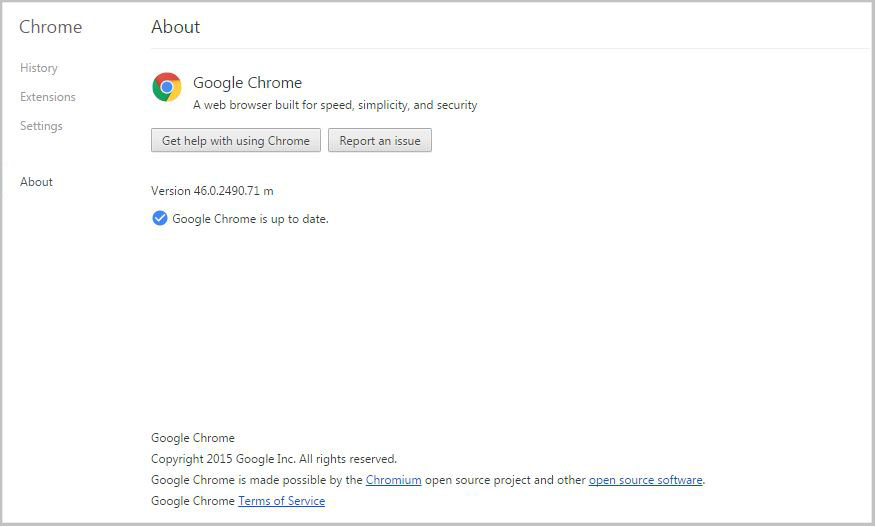
If you have a fake version of Chrome, then you will be taken to a fake About page, get an error, or the link won’t work. In that case, check out the removal instructions on PCrisk.
eFast is classified as a Potentially Unwanted Program, also known as a PUP. PUPs are annoyances like search bars, intrusive adware, etc. that Avast does not detect by default. However, the option can be enabled.
How to turn on PUP detection in Avast
- Open the Avast program and go to settings
- Open Active Protection
- Click Customize next to Web Shield
- Go to Sensitivity and put a check mark beside PUP and suspicious files
Follow Avast on Facebook, Twitter, YouTube, and Google+ where we keep you updated on cybersecurity news every day.

LABjs – Less Critical – Open Redirect – SA-CONTRIB-2015-159
- Advisory ID: DRUPAL-SA-CONTRIB-2015-159
- Project: LABjs (third-party module)
- Version: 7.x
- Date: 2015-October-21
- Security risk: 9/25 ( Less Critical) AC:Basic/A:None/CI:None/II:None/E:Theoretical/TD:Default
- Vulnerability: Open Redirect
Description
The LABjs module integrates LABjs with Drupal for web performance optimization.
The module ships with a modified version of the core Overlay JavaScript file, which is vulnerable to an open redirect attack (see SA-CORE-2015-004).
Only sites with the Overlay module enabled are vulnerable.
An incomplete fix for this issue was released in SA-CONTRIB-2015-124.
CVE identifier(s) issued
- A CVE identifier will be requested, and added upon issuance, in accordance with Drupal Security Team processes.
Versions affected
- LABjs 7.x-1.x versions prior to 7.x-1.8.
Drupal core is not affected. If you do not use the contributed LABjs module, there is nothing you need to do.
Solution
Install the latest version:
- If you use the LABjs module for Drupal 7.x, upgrade to LABjs 7.x-1.8
Also see the LABjs project page.
Reported by
- Pere Orga of the Drupal Security Team
- Samuel Mortenson
Fixed by
- Hai-Nam Nguyen the module maintainer
- Pere Orga of the Drupal Security Team
Coordinated by
Contact and More Information
The Drupal security team can be reached at security at drupal.org or via the contact form at https://www.drupal.org/contact.
Learn more about the Drupal Security team and their policies, writing secure code for Drupal, and securing your site.
Follow the Drupal Security Team on Twitter at https://twitter.com/drupalsecurity
Drupal version:
jQuery Update – Less Critical – Open Redirect – SA-CONTRIB-2015-158
- Advisory ID: DRUPAL-SA-CONTRIB-2015-158
- Project: jQuery Update (third-party module)
- Version: 7.x
- Date: 2015-October-21
- Security risk: 9/25 ( Less Critical) AC:Basic/A:None/CI:None/II:None/E:Theoretical/TD:Default
- Vulnerability: Open Redirect
Description
The jQuery Update module enables you to update jQuery on your site.
The module ships with a modified version of the core Overlay JavaScript file, which is vulnerable to an open redirect attack (see SA-CORE-2015-004).
Only sites with the Overlay module enabled are vulnerable.
An incomplete fix for this issue was released in SA-CONTRIB-2015-123.
CVE identifier(s) issued
- A CVE identifier will be requested, and added upon issuance, in accordance with Drupal Security Team processes.
Versions affected
- jQuery Update 7.x-2.x versions prior to 7.x-2.7
Drupal core is not affected. If you do not use the contributed jQuery Update module, there is nothing you need to do.
Solution
Install the latest version:
- If you use the jQuery Update module 2.x branch, upgrade to jQuery Update 7.x-2.7
Also see the jQuery Update project page.
Reported by
- Samuel Mortenson
- Pere Orga of the Drupal Security Team
Fixed by
- Pere Orga of the Drupal Security Team
- Mark Carver, module maintainer
Coordinated by
Contact and More Information
The Drupal security team can be reached at security at drupal.org or via the contact form at https://www.drupal.org/contact.
Learn more about the Drupal Security team and their policies, writing secure code for Drupal, and securing your site.
Follow the Drupal Security Team on Twitter at https://twitter.com/drupalsecurity
Drupal version: