USN-3002-1: Linux kernel (Wily HWE) vulnerabilities

Ubuntu Security Notice USN-3002-1

10th June, 2016

linux-lts-wily vulnerabilities

A security issue affects these releases of Ubuntu and its
derivatives:

  • Ubuntu 14.04 LTS

Summary

Several security issues were fixed in the kernel.

Software description

  • linux-lts-wily
    – Linux hardware enablement kernel from Wily for Trusty

Details

Justin Yackoski discovered that the Atheros L2 Ethernet Driver in the Linux
kernel incorrectly enables scatter/gather I/O. A remote attacker could use
this to obtain potentially sensitive information from kernel memory.
(CVE-2016-2117)

Jann Horn discovered that eCryptfs improperly attempted to use the mmap()
handler of a lower filesystem that did not implement one, causing a
recursive page fault to occur. A local unprivileged attacker could use to
cause a denial of service (system crash) or possibly execute arbitrary code
with administrative privileges. (CVE-2016-1583)

Jason A. Donenfeld discovered multiple out-of-bounds reads in the OZMO USB
over wifi device drivers in the Linux kernel. A remote attacker could use
this to cause a denial of service (system crash) or obtain potentially
sensitive information from kernel memory. (CVE-2015-4004)

Ralf Spenneberg discovered that the Linux kernel’s GTCO digitizer USB
device driver did not properly validate endpoint descriptors. An attacker
with physical access could use this to cause a denial of service (system
crash). (CVE-2016-2187)

Hector Marco and Ismael Ripoll discovered that the Linux kernel would
improperly disable Address Space Layout Randomization (ASLR) for x86
processes running in 32 bit mode if stack-consumption resource limits were
disabled. A local attacker could use this to make it easier to exploit an
existing vulnerability in a setuid/setgid program. (CVE-2016-3672)

Andrey Konovalov discovered that the CDC Network Control Model USB driver
in the Linux kernel did not cancel work events queued if a later error
occurred, resulting in a use-after-free. An attacker with physical access
could use this to cause a denial of service (system crash). (CVE-2016-3951)

It was discovered that an out-of-bounds write could occur when handling
incoming packets in the USB/IP implementation in the Linux kernel. A remote
attacker could use this to cause a denial of service (system crash) or
possibly execute arbitrary code. (CVE-2016-3955)

Vitaly Kuznetsov discovered that the Linux kernel did not properly suppress
hugetlbfs support in X86 paravirtualized guests. An attacker in the guest
OS could cause a denial of service (guest system crash). (CVE-2016-3961)

Kangjie Lu discovered an information leak in the ANSI/IEEE 802.2 LLC type 2
Support implementations in the Linux kernel. A local attacker could use
this to obtain potentially sensitive information from kernel memory.
(CVE-2016-4485)

Kangjie Lu discovered an information leak in the routing netlink socket
interface (rtnetlink) implementation in the Linux kernel. A local attacker
could use this to obtain potentially sensitive information from kernel
memory. (CVE-2016-4486)

Jann Horn discovered that the InfiniBand interfaces within the Linux kernel
could be coerced into overwriting kernel memory. A local unprivileged
attacker could use this to possibly gain administrative privileges on
systems where InifiniBand related kernel modules are loaded.
(CVE-2016-4565)

It was discovered that in some situations the Linux kernel did not handle
propagated mounts correctly. A local unprivileged attacker could use this
to cause a denial of service (system crash). (CVE-2016-4581)

Update instructions

The problem can be corrected by updating your system to the following
package version:

Ubuntu 14.04 LTS:
linux-image-4.2.0-38-powerpc-e500mc

4.2.0-38.45~14.04.1
linux-image-4.2.0-38-powerpc64-emb

4.2.0-38.45~14.04.1
linux-image-4.2.0-38-powerpc-smp

4.2.0-38.45~14.04.1
linux-image-4.2.0-38-powerpc64-smp

4.2.0-38.45~14.04.1
linux-image-4.2.0-38-lowlatency

4.2.0-38.45~14.04.1
linux-image-4.2.0-38-generic-lpae

4.2.0-38.45~14.04.1
linux-image-4.2.0-38-generic

4.2.0-38.45~14.04.1

To update your system, please follow these instructions:
https://wiki.ubuntu.com/Security/Upgrades.

After a standard system update you need to reboot your computer to make
all the necessary changes.

ATTENTION: Due to an unavoidable ABI change the kernel updates have
been given a new version number, which requires you to recompile and
reinstall all third party kernel modules you might have installed.
Unless you manually uninstalled the standard kernel metapackages
(e.g. linux-generic, linux-generic-lts-RELEASE, linux-virtual,
linux-powerpc), a standard system upgrade will automatically perform
this as well.

References

CVE-2015-4004,

CVE-2016-1583,

CVE-2016-2117,

CVE-2016-2187,

CVE-2016-3672,

CVE-2016-3951,

CVE-2016-3955,

CVE-2016-3961,

CVE-2016-4485,

CVE-2016-4486,

CVE-2016-4565,

CVE-2016-4581

USN-3003-1: Linux kernel vulnerabilities

Ubuntu Security Notice USN-3003-1

10th June, 2016

linux vulnerabilities

A security issue affects these releases of Ubuntu and its
derivatives:

  • Ubuntu 15.10

Summary

Several security issues were fixed in the kernel.

Software description

  • linux
    – Linux kernel

Details

Justin Yackoski discovered that the Atheros L2 Ethernet Driver in the Linux
kernel incorrectly enables scatter/gather I/O. A remote attacker could use
this to obtain potentially sensitive information from kernel memory.
(CVE-2016-2117)

Jann Horn discovered that eCryptfs improperly attempted to use the mmap()
handler of a lower filesystem that did not implement one, causing a
recursive page fault to occur. A local unprivileged attacker could use to
cause a denial of service (system crash) or possibly execute arbitrary code
with administrative privileges. (CVE-2016-1583)

Jason A. Donenfeld discovered multiple out-of-bounds reads in the OZMO USB
over wifi device drivers in the Linux kernel. A remote attacker could use
this to cause a denial of service (system crash) or obtain potentially
sensitive information from kernel memory. (CVE-2015-4004)

Ralf Spenneberg discovered that the Linux kernel’s GTCO digitizer USB
device driver did not properly validate endpoint descriptors. An attacker
with physical access could use this to cause a denial of service (system
crash). (CVE-2016-2187)

Hector Marco and Ismael Ripoll discovered that the Linux kernel would
improperly disable Address Space Layout Randomization (ASLR) for x86
processes running in 32 bit mode if stack-consumption resource limits were
disabled. A local attacker could use this to make it easier to exploit an
existing vulnerability in a setuid/setgid program. (CVE-2016-3672)

Andrey Konovalov discovered that the CDC Network Control Model USB driver
in the Linux kernel did not cancel work events queued if a later error
occurred, resulting in a use-after-free. An attacker with physical access
could use this to cause a denial of service (system crash). (CVE-2016-3951)

It was discovered that an out-of-bounds write could occur when handling
incoming packets in the USB/IP implementation in the Linux kernel. A remote
attacker could use this to cause a denial of service (system crash) or
possibly execute arbitrary code. (CVE-2016-3955)

Vitaly Kuznetsov discovered that the Linux kernel did not properly suppress
hugetlbfs support in X86 paravirtualized guests. An attacker in the guest
OS could cause a denial of service (guest system crash). (CVE-2016-3961)

Kangjie Lu discovered an information leak in the ANSI/IEEE 802.2 LLC type 2
Support implementations in the Linux kernel. A local attacker could use
this to obtain potentially sensitive information from kernel memory.
(CVE-2016-4485)

Kangjie Lu discovered an information leak in the routing netlink socket
interface (rtnetlink) implementation in the Linux kernel. A local attacker
could use this to obtain potentially sensitive information from kernel
memory. (CVE-2016-4486)

Jann Horn discovered that the InfiniBand interfaces within the Linux kernel
could be coerced into overwriting kernel memory. A local unprivileged
attacker could use this to possibly gain administrative privileges on
systems where InifiniBand related kernel modules are loaded.
(CVE-2016-4565)

It was discovered that in some situations the Linux kernel did not handle
propagated mounts correctly. A local unprivileged attacker could use this
to cause a denial of service (system crash). (CVE-2016-4581)

Update instructions

The problem can be corrected by updating your system to the following
package version:

Ubuntu 15.10:
linux-image-4.2.0-38-powerpc-e500mc

4.2.0-38.45
linux-image-4.2.0-38-powerpc64-emb

4.2.0-38.45
linux-image-4.2.0-38-powerpc-smp

4.2.0-38.45
linux-image-4.2.0-38-powerpc64-smp

4.2.0-38.45
linux-image-4.2.0-38-lowlatency

4.2.0-38.45
linux-image-4.2.0-38-generic-lpae

4.2.0-38.45
linux-image-4.2.0-38-generic

4.2.0-38.45

To update your system, please follow these instructions:
https://wiki.ubuntu.com/Security/Upgrades.

After a standard system update you need to reboot your computer to make
all the necessary changes.

ATTENTION: Due to an unavoidable ABI change the kernel updates have
been given a new version number, which requires you to recompile and
reinstall all third party kernel modules you might have installed.
Unless you manually uninstalled the standard kernel metapackages
(e.g. linux-generic, linux-generic-lts-RELEASE, linux-virtual,
linux-powerpc), a standard system upgrade will automatically perform
this as well.
References

CVE-2015-4004,

CVE-2016-1583,

CVE-2016-2117,

CVE-2016-2187,

CVE-2016-3672,

CVE-2016-3951,

CVE-2016-3955,

CVE-2016-3961,

CVE-2016-4485,

CVE-2016-4486,

CVE-2016-4565,

CVE-2016-4581

USN-3004-1: Linux kernel (Raspberry Pi 2) vulnerabilities

Ubuntu Security Notice USN-3004-1

10th June, 2016

linux-raspi2 vulnerabilities

A security issue affects these releases of Ubuntu and its
derivatives:

  • Ubuntu 15.10

Summary

Several security issues were fixed in the kernel.

Software description

  • linux-raspi2
    – Linux kernel for Raspberry Pi 2

Details

Justin Yackoski discovered that the Atheros L2 Ethernet Driver in the Linux
kernel incorrectly enables scatter/gather I/O. A remote attacker could use
this to obtain potentially sensitive information from kernel memory.
(CVE-2016-2117)

Jann Horn discovered that eCryptfs improperly attempted to use the mmap()
handler of a lower filesystem that did not implement one, causing a
recursive page fault to occur. A local unprivileged attacker could use to
cause a denial of service (system crash) or possibly execute arbitrary code
with administrative privileges. (CVE-2016-1583)

Jason A. Donenfeld discovered multiple out-of-bounds reads in the OZMO USB
over wifi device drivers in the Linux kernel. A remote attacker could use
this to cause a denial of service (system crash) or obtain potentially
sensitive information from kernel memory. (CVE-2015-4004)

Ralf Spenneberg discovered that the Linux kernel’s GTCO digitizer USB
device driver did not properly validate endpoint descriptors. An attacker
with physical access could use this to cause a denial of service (system
crash). (CVE-2016-2187)

Hector Marco and Ismael Ripoll discovered that the Linux kernel would
improperly disable Address Space Layout Randomization (ASLR) for x86
processes running in 32 bit mode if stack-consumption resource limits were
disabled. A local attacker could use this to make it easier to exploit an
existing vulnerability in a setuid/setgid program. (CVE-2016-3672)

Andrey Konovalov discovered that the CDC Network Control Model USB driver
in the Linux kernel did not cancel work events queued if a later error
occurred, resulting in a use-after-free. An attacker with physical access
could use this to cause a denial of service (system crash). (CVE-2016-3951)

It was discovered that an out-of-bounds write could occur when handling
incoming packets in the USB/IP implementation in the Linux kernel. A remote
attacker could use this to cause a denial of service (system crash) or
possibly execute arbitrary code. (CVE-2016-3955)

Vitaly Kuznetsov discovered that the Linux kernel did not properly suppress
hugetlbfs support in X86 paravirtualized guests. An attacker in the guest
OS could cause a denial of service (guest system crash). (CVE-2016-3961)

Kangjie Lu discovered an information leak in the ANSI/IEEE 802.2 LLC type 2
Support implementations in the Linux kernel. A local attacker could use
this to obtain potentially sensitive information from kernel memory.
(CVE-2016-4485)

Kangjie Lu discovered an information leak in the routing netlink socket
interface (rtnetlink) implementation in the Linux kernel. A local attacker
could use this to obtain potentially sensitive information from kernel
memory. (CVE-2016-4486)

Jann Horn discovered that the InfiniBand interfaces within the Linux kernel
could be coerced into overwriting kernel memory. A local unprivileged
attacker could use this to possibly gain administrative privileges on
systems where InifiniBand related kernel modules are loaded.
(CVE-2016-4565)

It was discovered that in some situations the Linux kernel did not handle
propagated mounts correctly. A local unprivileged attacker could use this
to cause a denial of service (system crash). (CVE-2016-4581)

Update instructions

The problem can be corrected by updating your system to the following
package version:

Ubuntu 15.10:
linux-image-4.2.0-1031-raspi2

4.2.0-1031.41

To update your system, please follow these instructions:
https://wiki.ubuntu.com/Security/Upgrades.

After a standard system update you need to reboot your computer to make
all the necessary changes.

ATTENTION: Due to an unavoidable ABI change the kernel updates have
been given a new version number, which requires you to recompile and
reinstall all third party kernel modules you might have installed.
Unless you manually uninstalled the standard kernel metapackages
(e.g. linux-generic, linux-generic-lts-RELEASE, linux-virtual,
linux-powerpc), a standard system upgrade will automatically perform
this as well.
References

CVE-2015-4004,

CVE-2016-1583,

CVE-2016-2117,

CVE-2016-2187,

CVE-2016-3672,

CVE-2016-3951,

CVE-2016-3955,

CVE-2016-3961,

CVE-2016-4485,

CVE-2016-4486,

CVE-2016-4565,

CVE-2016-4581

USN-3005-1: Linux kernel (Xenial HWE) vulnerabilities

Ubuntu Security Notice USN-3005-1

10th June, 2016

linux-lts-xenial vulnerabilities

A security issue affects these releases of Ubuntu and its
derivatives:

  • Ubuntu 14.04 LTS

Summary

Several security issues were fixed in the kernel.

Software description

  • linux-lts-xenial
    – Linux hardware enablement kernel from Xenial for Trusty

Details

Justin Yackoski discovered that the Atheros L2 Ethernet Driver in the Linux
kernel incorrectly enables scatter/gather I/O. A remote attacker could use
this to obtain potentially sensitive information from kernel memory.
(CVE-2016-2117)

Jann Horn discovered that eCryptfs improperly attempted to use the mmap()
handler of a lower filesystem that did not implement one, causing a
recursive page fault to occur. A local unprivileged attacker could use to
cause a denial of service (system crash) or possibly execute arbitrary code
with administrative privileges. (CVE-2016-1583)

Multiple race conditions where discovered in the Linux kernel’s ext4 file
system. A local user could exploit this flaw to cause a denial of service
(disk corruption) by writing to a page that is associated with a different
users file after unsynchronized hole punching and page-fault handling.
(CVE-2015-8839)

Ralf Spenneberg discovered that the Linux kernel’s GTCO digitizer USB
device driver did not properly validate endpoint descriptors. An attacker
with physical access could use this to cause a denial of service (system
crash). (CVE-2016-2187)

Vitaly Kuznetsov discovered that the Linux kernel did not properly suppress
hugetlbfs support in X86 paravirtualized guests. An attacker in the guest
OS could cause a denial of service (guest system crash). (CVE-2016-3961)

Kangjie Lu discovered an information leak in the ANSI/IEEE 802.2 LLC type 2
Support implementations in the Linux kernel. A local attacker could use
this to obtain potentially sensitive information from kernel memory.
(CVE-2016-4485)

Kangjie Lu discovered an information leak in the routing netlink socket
interface (rtnetlink) implementation in the Linux kernel. A local attacker
could use this to obtain potentially sensitive information from kernel
memory. (CVE-2016-4486)

Jann Horn discovered that the extended Berkeley Packet Filter (eBPF)
implementation in the Linux kernel could overflow reference counters on
systems with more than 32GB of physical ram and with RLIMIT_MEMLOCK set to
infinite. A local unprivileged attacker could use to create a use-after-
free situation, causing a denial of service (system crash) or possibly gain
administrative privileges. (CVE-2016-4558)

Jann Horn discovered that the InfiniBand interfaces within the Linux kernel
could be coerced into overwriting kernel memory. A local unprivileged
attacker could use this to possibly gain administrative privileges on
systems where InifiniBand related kernel modules are loaded.
(CVE-2016-4565)

It was discovered that in some situations the Linux kernel did not handle
propagated mounts correctly. A local unprivileged attacker could use this
to cause a denial of service (system crash). (CVE-2016-4581)

Update instructions

The problem can be corrected by updating your system to the following
package version:

Ubuntu 14.04 LTS:
linux-image-4.4.0-24-generic

4.4.0-24.43~14.04.1
linux-image-4.4.0-24-powerpc-e500mc

4.4.0-24.43~14.04.1
linux-image-4.4.0-24-powerpc-smp

4.4.0-24.43~14.04.1
linux-image-4.4.0-24-generic-lpae

4.4.0-24.43~14.04.1
linux-image-4.4.0-24-powerpc64-emb

4.4.0-24.43~14.04.1
linux-image-4.4.0-24-powerpc64-smp

4.4.0-24.43~14.04.1
linux-image-4.4.0-24-lowlatency

4.4.0-24.43~14.04.1

To update your system, please follow these instructions:
https://wiki.ubuntu.com/Security/Upgrades.

After a standard system update you need to reboot your computer to make
all the necessary changes.

ATTENTION: Due to an unavoidable ABI change the kernel updates have
been given a new version number, which requires you to recompile and
reinstall all third party kernel modules you might have installed.
Unless you manually uninstalled the standard kernel metapackages
(e.g. linux-generic, linux-generic-lts-RELEASE, linux-virtual,
linux-powerpc), a standard system upgrade will automatically perform
this as well.

References

CVE-2015-8839,

CVE-2016-1583,

CVE-2016-2117,

CVE-2016-2187,

CVE-2016-3961,

CVE-2016-4485,

CVE-2016-4486,

CVE-2016-4558,

CVE-2016-4565,

CVE-2016-4581

USN-3006-1: Linux kernel vulnerabilities

Ubuntu Security Notice USN-3006-1

10th June, 2016

linux vulnerabilities

A security issue affects these releases of Ubuntu and its
derivatives:

  • Ubuntu 16.04 LTS

Summary

Several security issues were fixed in the kernel.

Software description

  • linux
    – Linux kernel

Details

Justin Yackoski discovered that the Atheros L2 Ethernet Driver in the Linux
kernel incorrectly enables scatter/gather I/O. A remote attacker could use
this to obtain potentially sensitive information from kernel memory.
(CVE-2016-2117)

Jann Horn discovered that eCryptfs improperly attempted to use the mmap()
handler of a lower filesystem that did not implement one, causing a
recursive page fault to occur. A local unprivileged attacker could use to
cause a denial of service (system crash) or possibly execute arbitrary code
with administrative privileges. (CVE-2016-1583)

Multiple race conditions where discovered in the Linux kernel’s ext4 file
system. A local user could exploit this flaw to cause a denial of service
(disk corruption) by writing to a page that is associated with a different
users file after unsynchronized hole punching and page-fault handling.
(CVE-2015-8839)

Ralf Spenneberg discovered that the Linux kernel’s GTCO digitizer USB
device driver did not properly validate endpoint descriptors. An attacker
with physical access could use this to cause a denial of service (system
crash). (CVE-2016-2187)

Vitaly Kuznetsov discovered that the Linux kernel did not properly suppress
hugetlbfs support in X86 paravirtualized guests. An attacker in the guest
OS could cause a denial of service (guest system crash). (CVE-2016-3961)

Kangjie Lu discovered an information leak in the ANSI/IEEE 802.2 LLC type 2
Support implementations in the Linux kernel. A local attacker could use
this to obtain potentially sensitive information from kernel memory.
(CVE-2016-4485)

Kangjie Lu discovered an information leak in the routing netlink socket
interface (rtnetlink) implementation in the Linux kernel. A local attacker
could use this to obtain potentially sensitive information from kernel
memory. (CVE-2016-4486)

Jann Horn discovered that the extended Berkeley Packet Filter (eBPF)
implementation in the Linux kernel could overflow reference counters on
systems with more than 32GB of physical ram and with RLIMIT_MEMLOCK set to
infinite. A local unprivileged attacker could use to create a use-after-
free situation, causing a denial of service (system crash) or possibly gain
administrative privileges. (CVE-2016-4558)

Jann Horn discovered that the InfiniBand interfaces within the Linux kernel
could be coerced into overwriting kernel memory. A local unprivileged
attacker could use this to possibly gain administrative privileges on
systems where InifiniBand related kernel modules are loaded.
(CVE-2016-4565)

It was discovered that in some situations the Linux kernel did not handle
propagated mounts correctly. A local unprivileged attacker could use this
to cause a denial of service (system crash). (CVE-2016-4581)

Update instructions

The problem can be corrected by updating your system to the following
package version:

Ubuntu 16.04 LTS:
linux-image-4.4.0-24-generic

4.4.0-24.43
linux-image-4.4.0-24-powerpc-e500mc

4.4.0-24.43
linux-image-4.4.0-24-powerpc64-emb

4.4.0-24.43
linux-image-4.4.0-24-generic-lpae

4.4.0-24.43
linux-image-4.4.0-24-powerpc-smp

4.4.0-24.43
linux-image-4.4.0-24-powerpc64-smp

4.4.0-24.43
linux-image-4.4.0-24-lowlatency

4.4.0-24.43

To update your system, please follow these instructions:
https://wiki.ubuntu.com/Security/Upgrades.

After a standard system update you need to reboot your computer to make
all the necessary changes.

ATTENTION: Due to an unavoidable ABI change the kernel updates have
been given a new version number, which requires you to recompile and
reinstall all third party kernel modules you might have installed.
Unless you manually uninstalled the standard kernel metapackages
(e.g. linux-generic, linux-generic-lts-RELEASE, linux-virtual,
linux-powerpc), a standard system upgrade will automatically perform
this as well.

References

CVE-2015-8839,

CVE-2016-1583,

CVE-2016-2117,

CVE-2016-2187,

CVE-2016-3961,

CVE-2016-4485,

CVE-2016-4486,

CVE-2016-4558,

CVE-2016-4565,

CVE-2016-4581

USN-3007-1: Linux kernel (Raspberry Pi 2) vulnerabilities

Ubuntu Security Notice USN-3007-1

10th June, 2016

linux-raspi2 vulnerabilities

A security issue affects these releases of Ubuntu and its
derivatives:

  • Ubuntu 16.04 LTS

Summary

Several security issues were fixed in the kernel.

Software description

  • linux-raspi2
    – Linux kernel for Raspberry Pi 2

Details

Justin Yackoski discovered that the Atheros L2 Ethernet Driver in the Linux
kernel incorrectly enables scatter/gather I/O. A remote attacker could use
this to obtain potentially sensitive information from kernel memory.
(CVE-2016-2117)

Jann Horn discovered that eCryptfs improperly attempted to use the mmap()
handler of a lower filesystem that did not implement one, causing a
recursive page fault to occur. A local unprivileged attacker could use to
cause a denial of service (system crash) or possibly execute arbitrary code
with administrative privileges. (CVE-2016-1583)

Multiple race conditions where discovered in the Linux kernel’s ext4 file
system. A local user could exploit this flaw to cause a denial of service
(disk corruption) by writing to a page that is associated with a different
users file after unsynchronized hole punching and page-fault handling.
(CVE-2015-8839)

Ralf Spenneberg discovered that the Linux kernel’s GTCO digitizer USB
device driver did not properly validate endpoint descriptors. An attacker
with physical access could use this to cause a denial of service (system
crash). (CVE-2016-2187)

Vitaly Kuznetsov discovered that the Linux kernel did not properly suppress
hugetlbfs support in X86 paravirtualized guests. An attacker in the guest
OS could cause a denial of service (guest system crash). (CVE-2016-3961)

Kangjie Lu discovered an information leak in the ANSI/IEEE 802.2 LLC type 2
Support implementations in the Linux kernel. A local attacker could use
this to obtain potentially sensitive information from kernel memory.
(CVE-2016-4485)

Kangjie Lu discovered an information leak in the routing netlink socket
interface (rtnetlink) implementation in the Linux kernel. A local attacker
could use this to obtain potentially sensitive information from kernel
memory. (CVE-2016-4486)

Jann Horn discovered that the extended Berkeley Packet Filter (eBPF)
implementation in the Linux kernel could overflow reference counters on
systems with more than 32GB of physical ram and with RLIMIT_MEMLOCK set to
infinite. A local unprivileged attacker could use to create a use-after-
free situation, causing a denial of service (system crash) or possibly gain
administrative privileges. (CVE-2016-4558)

Jann Horn discovered that the InfiniBand interfaces within the Linux kernel
could be coerced into overwriting kernel memory. A local unprivileged
attacker could use this to possibly gain administrative privileges on
systems where InifiniBand related kernel modules are loaded.
(CVE-2016-4565)

It was discovered that in some situations the Linux kernel did not handle
propagated mounts correctly. A local unprivileged attacker could use this
to cause a denial of service (system crash). (CVE-2016-4581)

Update instructions

The problem can be corrected by updating your system to the following
package version:

Ubuntu 16.04 LTS:
linux-image-4.4.0-1012-raspi2

4.4.0-1012.16

To update your system, please follow these instructions:
https://wiki.ubuntu.com/Security/Upgrades.

After a standard system update you need to reboot your computer to make
all the necessary changes.

ATTENTION: Due to an unavoidable ABI change the kernel updates have
been given a new version number, which requires you to recompile and
reinstall all third party kernel modules you might have installed.
Unless you manually uninstalled the standard kernel metapackages
(e.g. linux-generic, linux-generic-lts-RELEASE, linux-virtual,
linux-powerpc), a standard system upgrade will automatically perform
this as well.
References

CVE-2015-8839,

CVE-2016-1583,

CVE-2016-2117,

CVE-2016-2187,

CVE-2016-3961,

CVE-2016-4485,

CVE-2016-4486,

CVE-2016-4558,

CVE-2016-4565,

CVE-2016-4581

USN-3008-1: Linux kernel (Qualcomm Snapdragon) vulnerability

Ubuntu Security Notice USN-3008-1

10th June, 2016

linux-snapdragon vulnerability

A security issue affects these releases of Ubuntu and its
derivatives:

  • Ubuntu 16.04 LTS

Summary

The system could be made to crash under certain conditions.

Software description

  • linux-snapdragon
    – Linux kernel for Snapdragon Processors

Details

Jann Horn discovered that eCryptfs improperly attempted to use the mmap()
handler of a lower filesystem that did not implement one, causing a
recursive page fault to occur. A local unprivileged attacker could use to
cause a denial of service (system crash) or possibly execute arbitrary code
with administrative privileges.

Update instructions

The problem can be corrected by updating your system to the following
package version:

Ubuntu 16.04 LTS:
linux-image-4.4.0-1015-snapdragon

4.4.0-1015.18

To update your system, please follow these instructions:
https://wiki.ubuntu.com/Security/Upgrades.

After a standard system update you need to reboot your computer to make
all the necessary changes.

ATTENTION: Due to an unavoidable ABI change the kernel updates have
been given a new version number, which requires you to recompile and
reinstall all third party kernel modules you might have installed.
Unless you manually uninstalled the standard kernel metapackages
(e.g. linux-generic, linux-generic-lts-RELEASE, linux-virtual,
linux-powerpc), a standard system upgrade will automatically perform
this as well.
References

CVE-2016-1583

5 Smartphone Battery Myths Put to The Test

Battery life and proper charging is a science in and of itself, with lots of misinformation out there:  This myth buster helps you treat your smartphone’s battery the right way.

It’s still the number one woe of smartphone users: battery life. Even high-end phones (or laptops for that matter) are still based on technology that hasn’t seen much improvement in decades. That’s why hundreds of articles on “Great Ways To Make Your Battery Live Longer” pepper every corner of the interwebs. But which of the most commonly reported tips are true and which are snake oil?

Let’s find out!

#1 – Completely drain your battery to extend its life

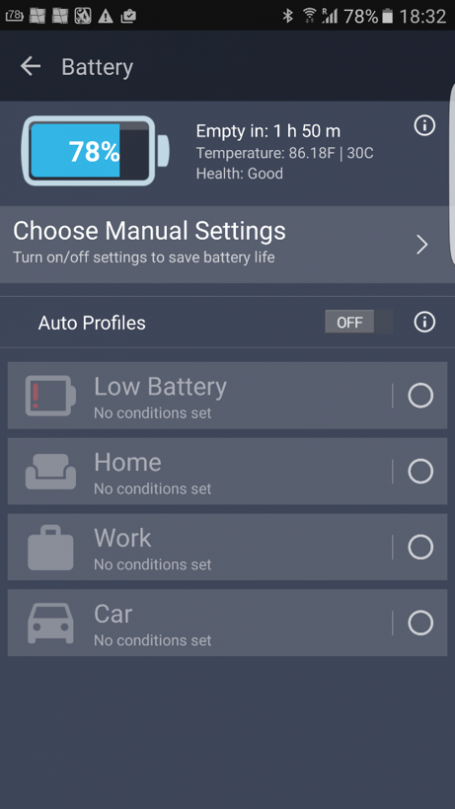
Probably one of the worst battery myths out there applies only if you’re using an 80s or 90s nickel-cadmium battery in your … uhm … 1993 Sony camcorder or Sega GameGear. The ancient rule states that you have to completely drain your battery to 0% before recharging, otherwise the “memory effect” will settle in and reduce your battery life. Well, let’s turn to the truth. Today’s Li-Ion batteries aren’t affected by this rule and don’t “forget” their full capacity just because you plug in your phone at 30%, 50%, or even 97%. If that myth was still true today, both my one-year-old Galaxy S6 and iPhone 6S would probably die in minutes, as I pick them up from their charging cradles about 50 times per day to browse the web, take calls (which can last hours), or watch clips on YouTube.

/var/www/now.avg.com/18.46.0/wp content/uploads/2016/06/avg11

Li-ion batteries do have a fixed set of discharge cycles, usually several thousand, which takes years to hit. Moreover, the cycles work like this: If you discharge your phone to 75% (and charge it back up by 75%) one day and to 25% on the next day, you have completed ONE discharge cycle – not two.

Final verdict: FALSE

#2 – Drain your battery to 0% to calibrate the meter

The myth goes like this: your phone is poor at recognizing the actual charge. So giving it two clear benchmarks of 0% and 100% will ensure your meter is accurate. This is because Li-Ion batteries in your phone and other mobile devices lose a teeny tiny bit of their original charge over time, meaning your operating system isn’t communicating the proper battery charge to you. To make sure it does, you should completely drain your battery and then fully charge it every 2-3 months. The operating system logs this drain and can continue to display the current battery level correctly from 0-100%, even though the actual physical capacity may be reduced to 98%.

/var/www/now.avg.com/18.46.0/wp content/uploads/2016/06/avg12

Hint: our free AVG Cleaner for Android also shows the current battery health, as it compares the original charge capacity to the current capacity.

Final verdict: TRUE

#3 – Only use chargers and cables from your phone’s manufacturer…

…or else your phone will melt down!
…or else your phone won’t charge as quickly!
…or else your phone will become sentient and enslave you first and then all humanity next!

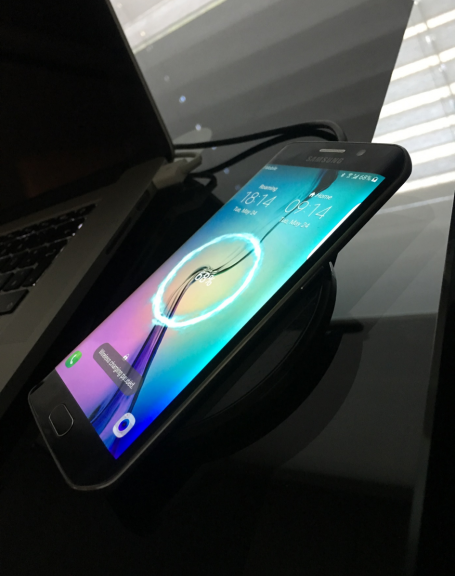
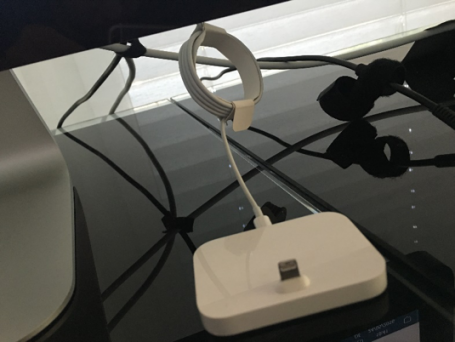
Sigh. I’ve been reading these myths for ages. Some of them were probably started by your handset makers, as they’d rather sell you their (more expensive) cables, chargers, docks, and wireless charging pads. In general, 3rd party chargers are as capable of charging your phone as manufacturer originals. However, don’t be a penny pincher. I can’t count how many $3.99 chargers I’ve bought at airports or random electronic shops in Asia that stopped working after a few weeks. If you want something reliable, go with the original cable that came with your phone or look at Amazon reviews. If a charging cable is made by reputable brand and has hundreds of five-star reviews, it’s probably a safe bet.

One thing to note, though: The new USB-C cables are an odd exception to this rule. There are now multiple implementations between USB-C by OnePlus and the official USB-C specifications. If you use one with the other, you might actually end up damaging your phone’s battery. Have a look at https://plus.google.com/+BensonLeung for reviews and more on the matter.

/var/www/now.avg.com/18.46.0/wp content/uploads/2016/06/avg13
Final verdict: FALSE (unless you’re buying a USB_C cable or a no name one-star review cable from a flea market)

#4 – Unplug your phone at 100%

…or it might overcharge! Or burn up!

A good friend of mine actually unplugged my phone at 100%, claiming it would damage the battery. Even some more reputable tech publications claim this is true. Well, it’s not. Any modern device stops or drastically limits the power flow to your battery once it hits its full capacity and simply powers the device itself. Having said that, I notice that my phone(s) heat up slightly when plugged in, which in turn and over loooong periods of time could arguably have an adverse effect on the hardware. But still, we’re probably talking years until any device fails just because it got a little warmer than usual.

Final verdict: FALSE

#5 – Avoid extreme heat and cold

Speaking of heat, this brings me to another typical battery tip: If you’re using your phone in extreme heat or extreme cold temperatures, it might damage the battery. This one is actually true, as ion flow and chemical stability are affected by severe temperature fluctuations and extremes. Moreover, the speed of the chemical reaction in your Li-ion increases with temperature, creating heat that then further degrades the battery or even damages the phone (luckily, phones have built-in mechanism to prevent this from happening: they shut off).

While excessive cold temperatures usually don’t damage the battery, they can severely reduce your battery life. You might have noticed that your phone dies a lot faster if you’re using it outside in winter time.

Final verdict: True

And here are two bonus myths tested

While not directly tied to the battery itself, many outlets claim that closing apps and turning off features (such as Wi-Fi) prolong battery life. Well, one is true, the other not so much. Closing apps barely has an impact on battery life, as your operating system simply “freezes” apps that aren’t running. Moreover, if you close them, it requires more resources (and thus power) to restart them. However, turning off some hardware features (such as Wi-Fi, Bluetooth, GPS, and 4G) and reducing brightness can noticeably improve battery life.

Final verdict: False (for apps) and True (for hardware feature)

How to Speed Up Boot Time on Your PC or Laptop

No one likes a computer that takes forever to start up. Don’t settle for less when it comes to performance – find out how to improve your boot speed now.

Do you wait ages for your PC or laptop to boot? Then there’s clearly something wrong. We’ll show you the most likely causes and the steps you can take to fix them easily!

Why is your PC slow at startup?
First of all, out of the box, Windows should boot blazingly fast, no matter whether you’re using Windows 7, 8, or 10. It’s what you do with your PC that actually causes it to slow to a crawl over time. The top causes of long boot times include:

  • New drivers. Drivers control devices inside your computer. For example, they’re responsible for making sure that your sound chip plays back your favorite MP3 and that your YouTube clips aren’t just silent movies. If drivers aren’t working properly, they could introduce some serious delays in your PC’s boot time.
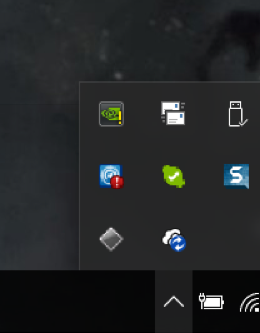
  • Software. The more applications (such as PhotoShop or iTunes) you install, the slower your computer becomes over time. This is caused by 3rd party start-up items or background services that silently launch every time you turn on your computer. Some of these items you can find in your task bar (see below); others are invisible.

/var/www/now.avg.com/18.46.0/wp content/uploads/2016/06/avg2

  • New updates. Many applications check for product updates when you start your PC. Even Microsoft sometimes delivers cumulative updates or even new (Windows 10) builds that can drastically decrease boot time.
  • Malware: Viruses, Trojans, spyware, and other malicious software can make your PC boot up much slower than when you first got it, so make sure you’re running the latest antivirus software.

To figure out what’s causing your PC to boot up slowly, use a Windows tool called Event Viewer. It documents all apps that drastically add to your computer’s boot time. You can then turn off the worst offenders using the Windows startup manager or Task Manager.

All these tools are built in. But using them can be a bit complicated, as you’ll need to jump between them to get what you want. It can be far easier to use a more integrated start-up manager, like the one in AVG PC TuneUp , that shows the impact of all automatically running startup apps and allows you to turn off these resource hogs with a simple click. (Yes, this is a shameless product plug; but our engineers put blood and sweat into this – and we want you to know about it and check out the trial version.)

We’ll cover both methods below.
The do-it-yourself approach

For those who want to get their hands dirty with systems admin tools, figuring out how to speed up boot time can be a great way to better know your PC. Basically, you need to:

Identify slow-boot up times
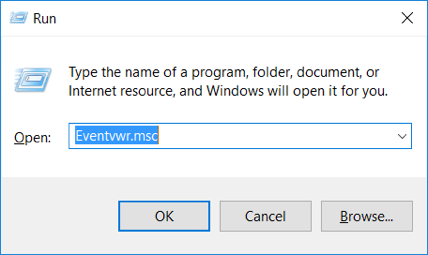
Hold down the WINDOWS key on your keyboard and press R. This will bring up the Run menu:

/var/www/now.avg.com/18.46.0/wp content/uploads/2016/06/avg3

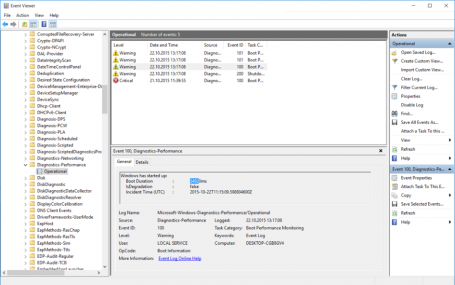
Type in Eventvwr.msc and click OK. Expand the following folders: Applications and Services Logs, Microsoft, Windows, Diagnostics-Performance and Operational.

/var/www/now.avg.com/18.46.0/wp content/uploads/2016/06/avg4

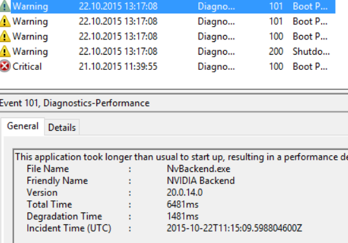
Watch for an event ID called 100. This one shows how long your computer takes to start up. In our example, it is 35 seconds. The 101 IDs then show you which applications slow down your computer. For example:

/var/www/now.avg.com/18.46.0/wp content/uploads/2016/06/avg5

Here we can see that NVIDIA software took 6.5 seconds to load. This is 1.5 seconds longer than on the last boot, so there’s clearly something wrong. NVIDIA drivers just give you access to some advanced graphics options which can be useful for intensive tasks like gaming. In most cases, you won’t need it at startup, so you can safely turn it off by using the built-in startup manager.

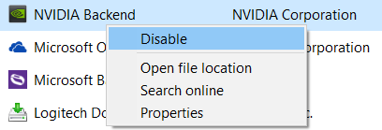
To do that, hold down the WINDOWS key and press R again. This time, type in msconfig, hit ENTER, and go to the Startup tab. Now you can uncheck items or, if you’re running Windows 8 or 10, go to Task Manager and right-click on an item to disable it.

/var/www/now.avg.com/18.46.0/wp content/uploads/2016/06/avg7

As you can see here, there may be dozens of entries that you’d have to manually research to determine if they’re important or not.

The automated (and easier) approach

Using Event Viewer and the old-school “msconfig” tool may work, but it’s far from convenient and user friendly. So it takes time. That’s why we built an easier way to turn off slow moving applications when you boot your PC. It is a core part of our AVG PC TuneUp suite (try the trial version and see for yourself).

1. Once you’re running AVG PC TuneUp, head over to the Speed Up section and look at the total optimization progress bar.

/var/www/now.avg.com/18.46.0/wp content/uploads/2016/06/avg8

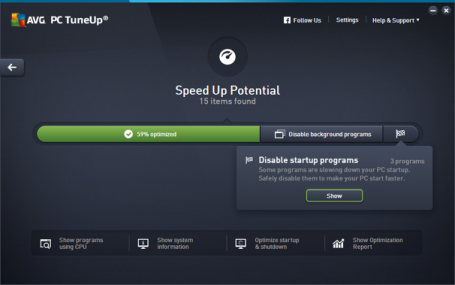
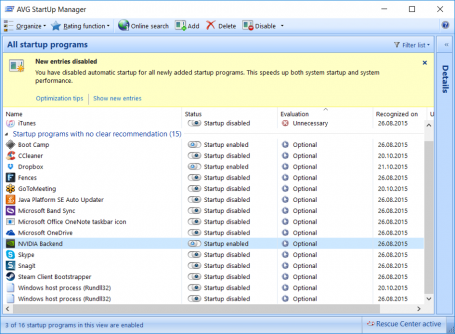
You should see a slice of the bar that says Disable startup programs. Clicking on Show will give you an overview of all startup applications that slow down your computer, including whether they’re actually necessary or optional. Moreover, instead of complicated file names, it shows you full product names, such as Microsoft Office or Skype. It also highlights new applications you may have recently installed.

/var/www/now.avg.com/18.46.0/wp content/uploads/2016/06/avg9

2. Flip off the switches. Easy.

And now some bonus tips

Upgrade to Windows 10

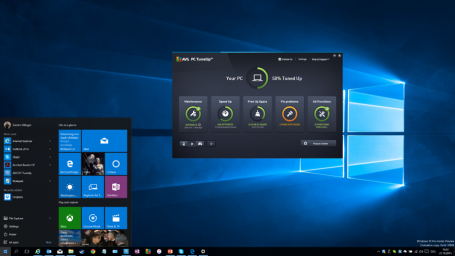
If you’re still running Windows Vista, 7, or 8, we recommend moving to Windows 10. In the new OS has managed to reduce boot times by a few seconds when compared to its predecessors.

/var/www/now.avg.com/18.46.0/wp content/uploads/2016/06/avg10

Install an SSD or move to a laptop with flash storage

If you’re in the market for a new computer, just make sure that it’s got flash-based storage (SSD, solid state drive), and not a traditional mechanical hard disk drive (HDD). Computers with SSD start dramatically faster and retrieve information that is in regular use almost instantly. The difference in boot times between SSDs and traditional hard disks can be night and day; so this is perhaps the biggest thing you can do to reduce your boot time.

These days, price declines mean even some low-end laptops come with an SSD. If you are bold (and tech-savvy), you can also grab an SSD and install it in your PC or laptop yourself. (But that is another post.)

Zuckerberg Twitter hack could have been avoided with better passwords

Avoid having your online accounts hacked like Mark Zuckerberg’s by managing your passwords correctly.

The recent news of celebrity social media accounts, including Mark Zuckerberg’s, being hacked should be seen as an important reminder to how valuable passwords are. Who knows if the cybercriminals that hacked the accounts just tweeted strange things or if they went a step further and read the celebrities’ direct messages or more. 

password_quilt-755842-edited.jpg

Most people create easy passwords like these and never change them