Monthly Archives: December 2016
Guessing Valid Credit Card Numbers In Six Seconds? Priceless
The Flowering Of Voice Control Leads To A Crop Of Security Holes
AVG TuneUp’s New Deep Sleep Mode Tackles Slow PCs
Are you tired of a sluggish PC? The new release of AVG PC TuneUp puts speed, battery & network draining programs to sleep to give you that extra performance boost.
It puts unused programs into a smart sleep mode that reduces their draining impact on PC performance, battery life, network and storage to nearly zero. The update also includes a revamped Disk Cleaner which now detects and removes even more leftover and cache files than before.
Get the latest version right here: Click to Download AVG TuneUp with new Sleep mode
Even in 2016, PCs face one stark reality: the more you use them and the more you install on them, the slower they become. That’s because a lot of programs remain active, even when they’re not being used.
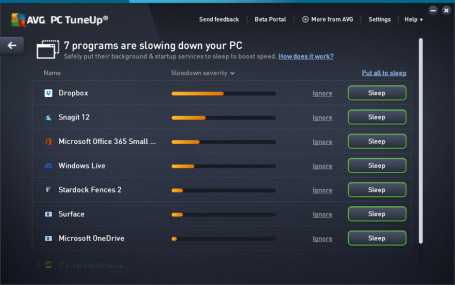
Enhanced Sleep Mode – a quick guide
The new version of AVG TuneUp comes with a significantly improved Sleep Mode, which stops inactive programs from draining your PC, giving you back that fresh out-of-the-box performance.
We have combined our Startup Manager feature – which detects items that automatically run when you turn your computer on – with what we used to call Program Deactivator (now known as Sleep Mode). Sleep Mode now shows a single list of all the applications that are draining your PC’s performance, giving you smarter detection across even more programs.
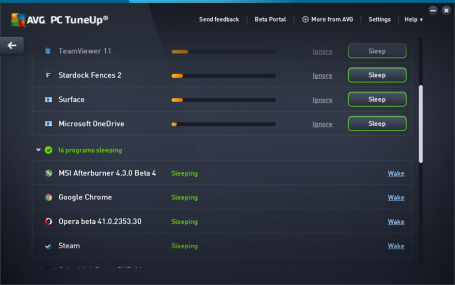
The list shows which applications are draining the most power and with one click, you can select the ones you want to put to sleep. You also have the option to put apps on an ‘Ignore’ list, which is useful for those programs you really want to keep running in the background, such as remote assistance tools or power management apps for laptops. Turning off all other programs running in the background will reduce performance and battery draining; and whenever you need a certain program, AVG TuneUp will turn it back on again as soon as you access it.
The newly enhanced Sleep Mode isn’t the only improvement we’ve made to AVG TuneUp.
Enhanced Disk Cleaner – a quick guide
Most of us will have experienced an issue with disk space. This is often due to applications piling up their leftover cache data, log files, crash reports etc. on your disk. We’ve catered to the latest applications and Windows features to help you to get rid of even more digital junk files on your machine. Here’s what we added to our Enhanced Disk Cleaner:
- Added cleaning for new Microsoft Office versions
- Cleans wasteful Windows Defender leftover files
- Clears the Windows 10 settings sync cache
- Clears the Windows font cache
- Clears the Windows Search cache
- Clears the SnagIt thumbnail cache
- Removes log files from Evernote
- Removes list of recent files from MPC-HC (Media Player Classic)
- Removes list of recent files from Notepad++
- …and much more!
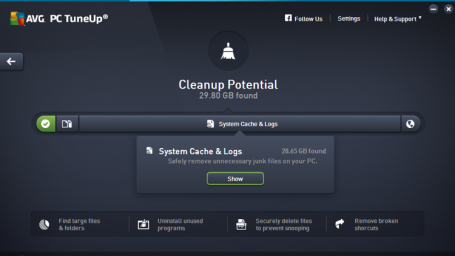
Our Browser Cleaner also removes even more browsing caches, database leftover files, user caches and traces from Windows 10 Edge, Google Chrome and Mozilla Firefox.
…plus a ton of fixes and improvements!
So, what else is new? We’ve looked hard at all your feedback and polished things up. For example, our Live Optimization now smoothly handles whitelisting an application you don’t want de-prioritized. In addition, we’ve revamped our notification system to show you more meaningful messages about our features (such as Program Optimizer, Economy Mode) when you need them.
To check out your new features, launch your AVG TuneUp (it should auto-update) or download AVG TuneUp here.



How to avoid bogging down your own servers

There’s been a lot of talk recently about DDoS (distributed denial-of-service) attacks in the wake of an incident that left thousands of users without internet access as a result of the collapse of the servers at Dyn, a DNS hosting service. Needless to say, we should be aware of this threat, know how it works, and how to defend ourselves against it. Especially now, in the age of the Internet of Things, which has made it easier for cybercriminals to build an army of infected devices to carry out this kind of attack.
Protecting multiple devices in the Internet of Things leaves much to be desired, opening up a broad avenue for attackers to easily gain access to and control over these devices in order to use them as weapons. In a DDoS, all of these involuntary recruits connect to the server at the same time in order to overwhelm it and render it incapable of responding to legitimate requests. It’s as though a mob of people jumped in front of you in the check-out line at the supermarket not with the intention of buying anything themselves, but rather just to block you from doing so.
This danger may be commonplace and companies should, of course, be weary of it, but the truth is that a company’s servers are much more likely to collapse as a result of their own errors than from an external exploit. This has been confirmed by Google’s experts, who, without citing concrete data, warn of the alarming frequency with which this occurs.
A company’s servers are more likely to collapse as a result of their own errors
Researchers at the search engine giant allege that programmers and developers often assume that a traffic load will be correctly and evenly distributed by the system, with no contingency plan in place in case it doesn’t work out that way.
Google gives us this example in the way of an explanation. A good amount of mobile apps establish a connection with their servers in a given increment of time in order to fetch information. If there’s no urgency, many apps connect every 15 minutes. In the event of an error, these apps are programmed to resubmit the petition every 60 seconds so as not to have to wait an additional 15 minutes if something in case something goes wrong on the first attempt.
This system reveals its shortcomings when the server, for whatever reason, is unavailable for a given period of time (not necessarily a long one). When it’s back up and running, it receives not only the usual requests every 15 minutes, but will also receive, all at once, an onslaught of requests that were made every 60 seconds during its time offline.
The outcome? A self-inflicted DDoS attack, which could shut down the app as a result of excessive simultaneous connections. If, on top of that, the server goes back offline following this bottleneck of traffic, the chain of incidents will start all over again.
Tips to avoid DDoS attacks
In order to prevent this from happening, the experts at Google offer some advice:
- First, make it so that the initial 60 second delay doubles with each failed request, so that the second attempt is submitted after 120 seconds, the third after 240 seconds, and so on. That way, the number of requests piled up will be lower when the server returns to normal.
- They also recommend that the app keep count of the number of reconnection attempts that each user has made, so that the most urgent requests are given priority when the server gets back to normal. This way, the requests that have been waiting the longest will be attended to first, while the rest continue waiting. A traffic bottleneck will therefore be averted, along with unwanted downtime caused by a DDoS attack launched against yourself.
The post How to avoid bogging down your own servers appeared first on Panda Security Mediacenter.
kernel-4.8.12-200.fc24
The 4.8.12 stable update contains a number of important fixes across the tree.
kernel-4.8.12-100.fc23
The 4.8.12 stable update contains a number of important fixes across the tree.
kernel-4.8.12-300.fc25
The 4.8.12 stable update contains a number of important fixes across the tree.
Bugtraq: Microsoft Windows Media Center "ehshell.exe" XML External Entity
Microsoft Windows Media Center “ehshell.exe” XML External Entity
Bugtraq: Microsoft MSINFO32.EXE ".NFO" Files XML External Entity
Microsoft MSINFO32.EXE “.NFO” Files XML External Entity