All posts by 007admin

How to protect your identity at school

Summer is in full swing, but school season is right around the corner. Young people are targeted for data theft at 35 times the rate of adults – they are considered an easy target for both digital and physical theft. You can make going back to school an easier transition by ensuring your data and devices are secure both at school and at home. Even if you’ll be using the computers provided by your school’s libraries or labs, there are plenty of steps you can take to make your data safer.

Protecting Your Devices at School

If you’re using your own desktop, laptop or smartphone, there are two things to be concerned with: Physical and information theft. There are a few things you can do to minimize the odds of both types of theft, and mitigate the damage if either does occur.

  • Minimize the target
    Don’t leave your laptop or phone unlocked and unattended, whether you’re at home or in public – these items are easily grabbed when you’re not looking. And when you take your laptop with you in public, it’s best to carry it in a bag that doesn’t advertise what’s inside; laptop sleeves or carriers let people know exactly what you’re carrying.
  • Minimize the damage
    Installing a Tracker App will help you track down your device, should it be lost or stolen. And if the files on your device are encrypted, even if someone gets access to your computer, they won’t be able to profit from your information.
  • Beef up your security
    Physical loss and thefts are not the only ways to lose information on your phone. Malware and phishing are becoming increasingly common on mobile devices, so be sure to protect yourself. To protect yourself from phishing, make sure you’re using different passwords for all your different accounts, and pick a strong password for each. Using a password manager can help make this an easier task. Once you’ve got a good password, protect it: Don’t share it with others and don’t enter your password into sites you’ve visited via links in email or IM. To protect yourself from malware, install apps only from reputable apps stores, and scan those files with an anti-malware product before installing.
  • Be cautious on public Wi-Fi
    You can never be entirely sure who’s sharing the network with you on public Wi-Fi, so be extra careful when you use public Wi-Fi, like at school or at your local coffee shop. Use VPN software so that your web traffic will all be encrypted – it’ll help keep people from electronically eavesdropping on you.

Securing Your Data When Using Communal Machines

There may be times when you may need to use the computers that are provided by the school. You really have no idea who was using that computer last, or what they were doing before you got there, so you should probably assume the worst. It’s best to act as if anything you type or see on the screen can be recorded and act accordingly:

  • Do not use public machines to log into accounts, especially accounts that store financial information (e.g., bank accounts or credit cards).
  • Avoid online shopping, as someone could get not just your login credentials, but your credit card number.
  • If for some reason you do need to log into an account on a public machine, it is essential to change any passwords you may have used, when you get back to your own machine.
  • Browse in Privacy Mode if you can – if not, be sure to clear your browser history and all cookies.

Younger people may feel that their information is of lesser value than more established adults, because they may have smaller bank accounts or less-juicy data, and may not take security as seriously. Ultimately, it doesn’t matter how young you are – your data and identity are valuable to cybercriminals and correcting the problems caused by loss and theft is a pain, no matter your age. Protecting your data now will help you avoid those headaches.

The post How to protect your identity at school appeared first on We Live Security.

Backoff Point-of-Sale Malware Campaign

Original release date: August 22, 2014

US-CERT is aware of Backoff malware compromising a significant number of major enterprise networks as well as small and medium businesses.

US-CERT encourages administrators and operators of Point-of-Sale systems to review the Backoff malware alert to help determine if your network may be affected.

Organizations that believe they have been infected with Backoff are also encouraged to contact their local US Secret Service Field Office.


This product is provided subject to this Notification and this Privacy & Use policy.

Week in security: Nuclear attack, scareware back and traffic-light hack

This week in security news saw two of the scariest targets for hacks ever – nuclear plants and city-wide traffic systems. The stories delivered the goods, too — the traffic-light hack could basically have been carried out by anyone, and paralyze any one of 40 American cities, and America’s  Nuclear Regulatory Commission was successfully attacked three times within the past three years, by unknown attackers, some foreign – and largely using standard phishing emails and similar techniques. It is still unknown who the attackers were.

In terms of novel malware, it was a bit of a dry week (always a good thing) bar the return of scareware  – this time armed with an even more annoying method of making you pay up.

In Cologne, gamers gathered for Gamescom – and ESET’s Aryeh Goretsky took a look at how gaming has evolved, and cybercrime along with it, with discussions of gold-farming, theft of virtual goods, and how gaming companies are now fully awake to the threat of cybercrime.

Hackers get a “green” for go!

Often, when one reads a paper behind a cybercrime story, it’s disappointing – not so in the case of the novel attack against city-wide traffic systems described by University of Michigan researchers, which is genuinely terrifying. Little skill was required – radios are unencrypted, or used default passwords, and control units had known vulnerabilities.

An attacker, like the film’s ‘crew’ on robbery, could control a series of lights to give himself passage through intersections, and then turn them red to slow emergency vehicles in pursuit, according to the BBC’s report.

The researchers at the University of Michigan, who say that networked traffic systems are left vulnerable by unencrypted radio signals and factory-default passwords, and that access to individual lights – or even a city-wide attack, as in the film, is possible, according to Time’s report.

“This paper shows that these types of systems often have safety in mind but may forget the importance of security,” the researchers write. Technology Review points out that Michigan’s system, which networks 100 lights, is far from unique. Similar systems are used in 40 states.

Scareware II: The return

Over the past months, ‘scareware’ – windows that warn users that their machine is infected, then, ironically, persuade them to download malware – has dropped, says Microsoft, as users wise up.

But a new variant, Win32/Defru has a different and simpler approach on how to trick the user and monetize on it. Basically, it prevents the user from using the internet – it displays warning windows instead of sites. Now that really is cruel.

The malware targets 300 websites, and when a user tries to access them, they instead see the following fake message, ““Detected on your computer malicious software that blocks access to certain Internet resources, in order to protect your authentication data from intruders the defender system Windows Security ® was forced to intervene.”

Rogue AV is still found – indeed ESET has been repeatedly ‘honored’ with fake scareware versions of  of its products such as when ESET researchers discovered a Trojan packaged to look like antimalware products,  – but Microsoft reports that in the past 12 months, scareware had fallen out of fashion.

Microsoft researcher Daniel Chipiristeanu says, “Lately we’re seeing a dropping trend in the telemetry for some of the once most-prevalent rogue families,  It’s likely this has happened due to the anti-malware industry’s intense targeting of these rogues in our products, and better end-user awareness and security practices.”

Chipiristeanu says that “education” has played a part – but new gangs have simply moved on to new methods to target victims.

Pay for privacy? Yes we would!

Silent Circle, makers of Blackphone, are not smarting overly from their handset’s humiliation, it seems – and their mission to stop everyone spying on us continues. They have support, it seems - a poll of 2,000 people found that almost all of us believe we are being spied on, and about a third would pay to stop it.

Privacy issues have become an increasing concern outside the security community – in part thanks to revelations of government surveillance, as discussed by ESET researcher Stephen Cobb. Silent Circle carried out the survey in May this year, via OnePoll and found that 88% of UK workers believe their calls and texts are being listened to, versus 72% of Germans – it’s not clear by whom.

Nearly a third – 31% – of Germans would pay for a service which guaranteed their texts and calls were not being listened to. In Britain, 21% would do so. Germany is traditionally more privacy-conscious – services such as Google StreetView are not permitted there.

The scandal over Facebook’s Messenger app – and the overstated responses of many media outlets, served to highlight this. Cosmopolitan writes, “Basically, it can control your whole phone. And, most scarily of all, CALL PEOPLE.” Cosmopolitan had not been previously known for its concern with online privacy.

Nuclear Armageddon: Virtually here

A report released by America’s Nuclear Regulatory Commission highlighted how depressingly ordinary cyber attacks can still be effective against even the highest value targets.

The spear-phishing attacks against the Nuclear authority were hardly hacker whizkid territory, but nonetheless, hundreds fell for them.

CNET reports that one incident led 215 employees of the nuclear agency to “a logon-credential harvesting attempt,” hosted on “a cloud-based Google spreadsheet.” The information was obtained through a specific request by NextGov. A second spearphishing attack targeted specific employees with emails crafted to dupe them into clicking a link which led to malware on Microsoft’s cloud storage site SkyDrive.

The third attack was a spearphishing attack directed at a specific employee. Once his account credentials were obtained, emails were sent to 15 further employees, with malware-laced PDFs.

“It’s still unclear which country originated the attacks, and whether the attackers were acting independently or as a part of a larger state action.

NRC spokesman David McIntyre said that his security team “thwarts” most such attempts.

Conspiracy theorists, start your engines!

Our last story really is the stuff of conspiracy theorist’s dreams: the very next day after Malaysia Airlines Flightt MH370 disappeared, “sophisticated” malware was used to steal documents from government officials working the case.

A mysterious attacker in China purloined “classified documents” in “significant amounts”, details of which remained vague – stoking the fires of conspiracy still further.

The Malaysian Star claims that the attack targeted officials with a PDF document which appeared to be a news report about Flight MH370, and was sent to a group of investigators. Around 30 computers were infected by the malware.

“We received reports from the administrators of the agencies telling us that their network was congested with e-mail going out of their servers,” CyberSecurity Malaysia chief exec Dr Amirudin Abdul Wahab said.

“Those e-mail contained confidential data from the officials’ computers, including the minutes of meetings and classified documents. Some of these were related to the Flight MH370 investigation.”

Business Insider says that the attack occurred one day after the Boeing 777 went missing, and took the form of an .exe file disguised as a PDF (a common office file format).

It’s unclear who the attacker – or attackers – were, but information from infected computers was transmitted to an IP address in China. Officials in Malaysia blocked the transmission, The Star said.


The post Week in security: Nuclear attack, scareware back and traffic-light hack appeared first on We Live Security.

Facebook scams – the ‘classics’ and how to avoid them

Facebook has changed hugely over the years – remember ‘Pokes’? – and today’s sharing machine, with its videos, its news and its scams,  is very different from the bare site Mark Zuckerberg launched.

Naturally, each new ‘feature’ has also brought new privacy worries – and security-conscious users should revisit their profile with our detailed guide to ‘maxing’ privacy on Facebook.

But some things haven’t changed – namely, the Facebook scams. It’s not that cybercriminals are unoriginal – it’s just that there are a few Facebook scams which work again and again, and all the criminals need to do is vary them slightly to keep money rolling in.

ESET Senior Research Fellow David Harley says, “While hoaxes may not seem the most dangerous aspect of online life, the migration of old hoaxes and new variations from email to social media does have some serious implications, as people Like and Share links without checking because they seem to come from likeminded and trusted friends.”

“The more FB friends you have, the more you’ll see these reverberate. You may not worry about political propaganda, but medical hoaxes and semi-scams can be a literal threat to health. “

ESET’s Social Media Scanner offers a quick, free way to check out if that news story on Facebook is true – or a scam. It never hurts to be cautious, though – and here are five classic scammy and spammy posts you should NEVER click.

Facebook scams‘Help, I’ve been mugged abroad’

Your friend or family member has lost their phone – so it makes sense they’d contact you via Facebook for help. Usually the story goes that they have been mugged or are in hospital – but it’s one of THE classic online scams, and one of the common uses cybervillains put hijacked Facebook accounts to. ESET’s Harley offers detailed tips on spotting the scam – known as ‘Londoning’,  due to early versions being used on Americans. Harley quotes a typical text: “I hope you get this on time, I made a trip to Manila(Philippines) and had my bag stolen from me with my passport and personal effects therein. The embassy has just issued me a temporary passport but I have to pay for a ticket and settle my hotel bills with the Manager.”

“I have made contact with my bank but it would take me 3-5 working days to access funds in my account, the bad news is my flight will be leaving very soon but i am having problems settling the hotel bills and the hotel manager won’t let me leave until i settle the bills, I need your help/LOAN financially and I promise to make the refund once i get back home, you are my last resort and hope, Please let me know if i can count on you and i need you to keep checking your email because it’s the only way i can reach you.”

Naturally, people worry – but it’s not your friend. Someone has hijacked their account. Harley offers five steps to take in a post here – starting with “Be suspicious” and “Verify.”

Facebook scams‘See who has been looking at your Facebook profile’

Facebook will NEVER introduce a feature that allows people to see who has looked at their profile – with the number of people who surreptitiously look up old (or potential new) flames it would probably cause World War III.

Beware – it’s a classic scam post, along with variations on real new Facebook features, or fake ones such as turning your profile pink (another bizarrely long-lived scam).

Links offering early access to features such as Facebook’s A Look Back video, or upgrades to Timeline can also be scams, as reported here. The key warning sign is that you are directed outside Facebook – look at the URL.

If Facebook was ‘upgrading’ you, it would do so within Facebook. As soon as you see an external site URL, close the window – and do not install any app. In many cases, scam videos will install a ‘rogue’ Facebook app to spread rapidly via the network – but as reported by We Live Security here, such scams can, in the worst case scenario, lead to tainted sites which infect users with PC malware.

If I get a million Likes….

What’s the harm in “Liking” a page if it’ll get his girlfriend to marry him? Not a huge amount – but you’re still helping scammers earn money. Campaigns such as privacy drives, or “Click This if You Hate Cancer” are also usually just as fake (ESET Senior Research Fellow David Harley offers tips and thoughts on these “chain letters” of Facebook)  – as are pictures where you’re urged to click and see what happens. Likes, of course, are the “currency” of Facebook – so criminals collect them by any means, air or foul. Daylan Pearce, a search-engine expert at Next Digital in Melbourne says pages with 100,000 likes can be sold for $200, according to adverts unearthed by Pearce.

‘Within 3 days a post like this one has 70,000 likes, and someone somewhere is about to make a nice little profit by selling the page to a business wanting some quick wins. The buyer then changes the page details.Instant fanpage with a big following, lots of likes.”

Your “Likes” also remain visible forever – and could serve adverts to your friends. Any pages you have “Liked” are also now searchable in Facebook’s new Graph Search. Visit your Activity Log and make sure you haven’t “Liked” any companies, products or sites you wouldn’t want the world to know about.

The warning from Facebook

“WARNING : Your account is reported to have violated the policies that are considered annoying or insulting Facebook users.system will disable your account within 24 hours if you do not do the reconfirmation.” The fake warning, is of course, a tool as fundamental to scammers as lockpicks are to burglars – witness this report just this week. Some of the bad English in that particular post should alert you to the fact that this is not a communication from Facebook – but it’s good enough to fool you if you’re not fully alert.
It’s a scam and a particularly vicious one at that.

Identified by Facecrooks.com – a great site to stay up to speed with the latest scams – the ‘warning’ scam is easier to fall for because Facebook does block certain posts or behavior – but the warning sign here is that a genuine reprimand would NEVER ask for your password. Why would Facebook need it at that point? Facecrooks writes, “if a user submits their Facebook login credentials, then the scammer will have complete control over their account. They can access their personal information to try and steal their identity, they can send bogus messages to their friends stating that they are in trouble and please send money, they can send links to other scams to all of the victim’s Facebook friends….the opportunities for misuse and exploitation are endless! Similar scareware posts involve Facebook purging drug-related posts – again, a scam.

Facebook scamsThe morbid celebrity-death story

News stories DO spread through Facebook – but so do fakes, or hybrids where a real story is changed to offer one morbid detail. Last week, a video purported to offer a video of Robin Williams making his last phone call, should ring alarm bells – few news sources would play such a video so soon after someone’s death. The scam, which you may see shared by your Facebook friends oblivious to the fact that they are helping fraudsters earn money, claims to be a ghoulish video of Robin Williams making his last phone call before committing suicide earlier this week. Of course, you might be fooled into believing it is genuine. After all, you have just seen one of your Facebook friends share it on their wall.

Multiple scams – including some using fake Facebook profiles – targeted grieving victims of the recent Flight Mh17 tragedy. Alistair MacGibbon of the University of Canberra said that the criminals would hope to make money for referring victims to unscrupulous sites – and that the practice was increasingly common. “Crooks are super-fast these days at picking up on anything that’s remotely topical, and working out how to monetize it from a criminal point of view,” he said. “It’s a really distasteful trend.”.

The too-good-to-be-true ticket offer

Cybercriminals follow the news avidly – hoping to fool users into clicking on malicious links in fake news stories – but the low-hanging fruit is upcoming events. Whether it’s the World Cup or a big concert, people  DO want tickets – and worst of all, some companies offer them through Facebook competitions, which makes the scam more convincing. A recent tickets scam encouraged fans to forward the link to friends to win Rolling Stones tickets. “You’d be making a big mistake if you clicked on the link, as you will be taken to a third-party website which strongly encourages you to share the link via social media, and then coerce others into clicking on it,” writes We Live Security’s Cluley. It is often safer to Google the subject of a link or type a website’s main URL into a browser instead of clicking the link – here, fans would have found that, on the official Stones website, there was no mention of the offer at all.


The post Facebook scams – the ‘classics’ and how to avoid them appeared first on We Live Security.

Secret app takes mere minutes to hack, revealing anyone’s secret via simple vulnerability

Do you trust the internet with your secrets?

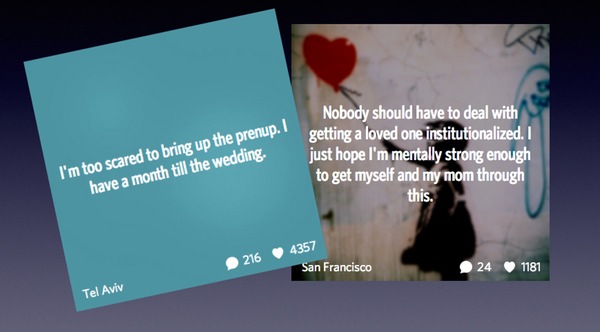
Perhaps you shouldn’t, even if you’re using an app which professes to “deliver anonymously” secrets to your friends, and their circles, without identifying you as the owner of those secrets.

As Wired reports, researchers at Seattle-based Rhino Security Labs discovered a weakness in how the popular Secret app works, giving them a way of reading anybody’s supposedly anonymous postings.

At this point you’re probably imagining that for anyone to hack Secret, a popular app amongst iOS and Android users, would take ninja-like skills and advanced methods.

But in truth researchers found it remarkably easy, and the secrets of users can spill out within just a matter of minutes, as a Rhino Security researcher demonstrated to journalist Kevin Poulsen over lunch:

<blockquote style=”margin: 15px;padding: 15px 15px 5px;border-left: 5px solid #ccc;font-size: 13px;
font-style: normal;font-family: ‘Helvetica Neue’, Helvetica, sans-serif;line-height: 19px;”>

White hat hacker Ben Caudill is halfway through his sandwich when he casually reaches over to his iPhone, swipes the screen a few times, then holds it up to me. “Is that you?” he asks.

It is, but nobody was supposed to know. He’s showing me one of my posts to Secret, the popular anonymous sharing app that lets you confess your darkest secrets to your friends without anyone knowing it’s you. A few minutes ago I gave Caudill my personal e-mail address, and that was all he needed to discover my secret in the middle of a Palo Alto diner, while eating a BLT.

So just how did researchers manage to connect users’ email addresses with secrets they had posted via the Secret app?

Well, it’s breathtakingly simple.

Secret posts

When you create an account on Secret, the app requests access to your address book – so it can identify friends who might also be using the service.

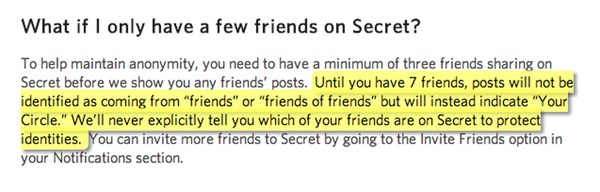
And, as Secret’s FAQ explains, you need at least seven friends before the app will begin to say that a secret has been posted by one of your friends (although, of course, it doesn’t identify which one).

Part of Secret FAQ

<blockquote style=”margin: 15px;padding: 15px 15px 5px;border-left: 5px solid #ccc;font-size: 13px;
font-style: normal;font-family: ‘Helvetica Neue’, Helvetica, sans-serif;line-height: 19px;”>

Until you have 7 friends, posts will not be identified as coming from “friends” or “friends of friends” but will instead indicate “Your Circle.” We’ll never explicitly tell you which of your friends are on Secret to protect identities.

Does that sound reasonable to you?

Well, maybe this will make you think again.

Because what the researchers then did was create seven bogus Secret accounts – something that’s remarkably easy to do as Secret doesn’t require you to confirm your phone number or email address.

And then came the really clever part, as Kevin Poulsen of Wired explains:

<blockquote style=”margin: 15px;padding: 15px 15px 5px;border-left: 5px solid #ccc;font-size: 13px;
font-style: normal;font-family: ‘Helvetica Neue’, Helvetica, sans-serif;line-height: 19px;”>

Next, [Caudill] deleted everything from his iPhone’s contact list, and added the seven fake e-mail addresses as contacts. When he was done, he added one more contact: the e-mail address of the person whose secrets he wanted to unmask — me.

Then he signed up for another new Secret account and synced his contacts. He now had a new, blank Secret feed that followed eight accounts: seven bot accounts created and controlled by him, and mine. Anything that appeared as posted by a “friend” logically belonged to me.

Clever, huh? And, in retrospect, remarkably straightforward.

So all that was required to find out what secrets you had posted was your email address – something that, for most of us, cannot really be considered private or secret.

Secret CEO David Byttow told Wired that the vulnerability has now been closed, and claimed that they had no evidence that the privacy hole had been maliciously exploited.

<blockquote style=”margin: 15px;padding: 15px 15px 5px;border-left: 5px solid #ccc;font-size: 13px;
font-style: normal;font-family: ‘Helvetica Neue’, Helvetica, sans-serif;line-height: 19px;”>

“As near as we can tell this hasn’t been exploited in any meaningful way. But we have to take action to determine that.”

However, it’s worth bearing in mind that an absence of evidence is not evidence of absence. Just because Secret can’t tell if the flaw has been excused to embarrass or blackmail individuals who have posted compromising secrets, doesn’t mean that it hasn’t happened.

Secret appAnd the Secret app’s developers have confirmed that since a bug bounty was introduced in February, a total of 42 security holes have been identified and fixed.

Obviously it’s good that security and privacy vulnerabilities are being fixed, but when it’s your *secrets* which are at stake, wouldn’t you feel happier knowing that the app had been built on more sturdy ground in the first place?

One has to wonder whether Secret’s claims of “refined algorithms” to detect bots and suspicious activity on Secret are really enough to protect its users.

Secret is no stranger to controversy, of course.

Just this week a Brazilian judge has called for the app to be banned from official app stores, claiming that it encourages anonymous bullying.

But, in my mind, the problems lies not so much with the app but with the people who use it.

They clearly haven’t learnt the most basic rules of keeping secrets.

Don’t tell anyone. Don’t write it down. Don’t type it into an app. Never ever post it onto the internet.

As soon as you trust anyone or anything else with a secret, you’re doomed.

The post Secret app takes mere minutes to hack, revealing anyone’s secret via simple vulnerability appeared first on We Live Security.

Two-factor authentication – Extensive protection

“As a user, there is little one can do” is a statement often heard, followed closely by “everything was better offline”. However, there are in fact many possibilities to protect access to your data without having to be a technically gifted user.

The two-factor authentication enables extensive protection without neglecting usability. Its fancy name comes from the way it validates one’s identity: by verifying something s/he knows and something s/he has.

How does this work?

Users have login credentials to a website, usually consisting of an email address and a password. Anyone who tries to log in with this data, would be routed to another page where they must once again verify their identity with the secondary verification method This often is a temporarily valid code sent via SMS to a previously defined number, similarly to the mobile banking TAN procedure. Access to the data is only permitted following successful entry of this code. In the event of a data theft, the thief doesn’t have access to the victim’s cell phone (2nd factor) and the stolen information is thus worthless. The hackers won’t be able to access the account.

Some vendors offer additional ways to complete the extra verification: via hardware tokens (USB crypto devices, SSL certificates, e.a.); QR codes, which are scanned with a smartphone and generate a one-time code, are in the meantime also broadly available. There are thus several possibilities for better safeguarding access without making it complicated and laborious.

We believe that the combination of a virus-free system and strong passwords, changed on a regular basis and used for that sole service, is vital. The two-factor authentication provides an additional major security bonus for one’s own data. Even if your account data has been stolen, your data is worthless for the hacker without the corresponding 2nd authentication method.

All the famous & common services offer two-factor authentication these days and we strongly encourage you to activate them too.

The post Two-factor authentication – Extensive protection appeared first on Avira Blog.

Scareware: It’s back, and now it’s even scarier

‘Scareware’ – fake antivirus programs which attempt to fool the user into downloading malware, by warning him or her of a “threat” on their PC – is back, with a new, even more annoying trick.

V3 reports that the new strain of scareware reverses a “dropping trend” in fake AV with a new way of making money – blocking the user from using the internet until they pay for the ‘product’.

Threatpost says, “Rogue antivirus was once the scourge of the Internet, and while this sort of malware is not entirely extinct, it’s fallen out of favor among criminals as users have become more aware and security products have gotten better at blocking the threat.”

Scareware: Antivirus that isn’t ‘anti’

Rogue AV is still found – indeed ESET has been repeatedly ‘honored’ with fake scareware versions of  of its products – but Microsoft reports that in the past 12 months, scareware had fallen out of fashion.

Variants on the tactic are still used, but the classic scareware warning inciting victims to download AV products that are, in fact, malware, is less common.

On Android, ESET researchers discovered a Trojan packaged to look like antimalware products, “This backdoor trojan, which ESET detects as Android/Spy.Krysanec, was found as a malicious modification of MobileBank (a mobile banking app for Russian Sberbank), 3G Traffic Guard (an app for monitoring data usage) and a few others, including our own ESET Mobile Security.”

Microsoft researcher Daniel Chipiristeanu says, “Lately we’re seeing a dropping trend in the telemetry for some of the once most-prevalent rogue families,  It’s likely this has happened due to the anti-malware industry’s intense targeting of these rogues in our products, and better end-user awareness and security practices.”

Chipiristeanu says that “education” has played a part – but new gangs have simply moved on to new methods to target victims.

Stops you using internet – until you pay

“The big malware “players” are having more trouble in taking advantage of users paying for fake security products, and are moving away from this kind of social engineering, we are seeing other players willing to fill the gapRogue:Win32/Defru has a different and simpler approach on how to trick the user and monetize on it. Basically, it prevents the user from using the internet by showing a fake scan when using different websites.”

The malware targets 300 websites, and when a user tries to access them, they instead see the following fake message, ““Detected on your computer malicious software that blocks access to certain Internet resources, in order to protect your authentication data from intruders the defender system Windows Security ® was forced to intervene.”

Naturally, the ‘cure’ is to pay, Threatpost says. Thus far, the malware largely targets Russian-speakers.

“An unsuspecting user, after receiving this warning more than a few times when browsing, might be inclined to click “Pay Now”. This will lead them to a payment portal called “Payeer” (payeer.com) that will display payment information (see Figure 3). But of course, even if the user pays, the system will not be cleaned,” says Chipiristeanu.

“The user can clean their system by removing the entry value from the “run” registry key, delete the file from disk and delete the added entries from the hosts file. Before paying for a product (either a security product or any other) make a thorough investigation to make sure that it is a legitimate product and it is not fake or a copy of a free one.”

The post Scareware: It’s back, and now it’s even scarier appeared first on We Live Security.

Flight MH370 – did cyber attack steal its secret?

Classified documents relating to the missing Malaysian Airlines Flight MH370 were stolen using a carefully-crafted spear-phishing attack, targeting 30 government officials just one day after the disappearance of the still-missing aircraft.

The Malaysian Star claims that the attack targeted officials with a PDF document which appeared to be a news report about Flight MH370, and was sent to a group of investigators. Around 30 computers were infected by the malware.

“We received reports from the administrators of the agencies telling us that their network was congested with e-mail going out of their servers,” CyberSecurity Malaysia chief exec Dr Amirudin Abdul Wahab said.

Flight MH370: ‘Confidential data’

“Those e-mail contained confidential data from the officials’ computers, including the minutes of meetings and classified documents. Some of these were related to the Flight MH370 investigation.”

Business Insider says that the attack occurred one day after the Boeing 777 went missing, and took the form of an .exe file disguised as a PDF (a common office file format).

It’s unclear who the attacker – or attackers – were, but information from infected computers was transmitted to an IP address in China. Officials in Malaysia blocked the transmission, The Star said.

‘Very sophisticated attack’

Department of Civil Aviation, the National Security Council and Malaysia Airlines were among those targeted by the hacker, the Telegraph reports. The infected machines were shut down, but “significant amounts” of information on Flight MH370 had been stolen.

“This was well-crafted malware that antivirus programs couldn’t detect. It was a very sophisticated attack,” Amirudin said.

CyberSecurity Malaysia suspects the motivation may have been curiosity about supposedly “secret” information held by the Malaysian government on Flight MH370.

“At that time, there were some people accusing the Government of not releasing crucial information,” Amirudin said.“But everything on the investigation had been disclosed.”

The post Flight MH370 – did cyber attack steal its secret? appeared first on We Live Security.

Geotagging: what your photos reveal about where you live

A recent project out of the University of Florida entitled I know where your cat lives highlights how easy it is to identify people’s home address based on the pictures of their cats, uploaded to popular photo sharing platforms such as Instagram or Flickr.

I know where your cat lives

Researchers from the University of Florida located, with an accuracy of 7.8 meters, the exact place where pictures tagged with the word “cat” were shot.

They started by extracting metadata (including the latitude and longitude of where the picture was taken) from a sample of 1 million images, accessible from publicly available APIs from popular photo-sharing websites. The photos were then run through clustering algorithms with the help of a supercomputer. The researchers then created a website, where cat images were superimposed with GoogleMaps, pinpointing their exact location. Well, that’s just purrfect…

I know where your cat will be 24 hours from now

Okay, chances are even you don’t know that (much less your cat). But that’s where the technology is heading. Two years ago, a team from Birmingham University developed an algorithm that successfully detected where a test sample of people were going to be 24 hours in advance… How did they do it? By combining information on where they’d been (think of every time you checked into Foursquare) with the past movements of contacts in their Smartphone’s address book.

How your address finds its way into your pictures

When taking a picture, information is stored in the form of Exif tags. These detail the camera’s model, the image’s resolution in pixels, the time/date the picture was taken… This type of metadata is typically fairly innocuous. However as Smartphones now include in-built GPS, Exif tags frequently include the longitude and latitude as well. This functionality is referred to as Geotagging.

How to disable geotagging on your Smartphones

As your GPS is necessary for certain applications we’re just going how to show you how to remove geotagging when taking pictures.

If you’re an Android user:

  1. Access your phone’s camera application
  2. Select “Store location” on the left hand side, below “color effect”
  3. Switch off the geotagging

If you’re an iPhone user:

  1. Go to settings
  2. Select “Privacy”
  3. Select “Location Services”
  4. Find “Camera app” and switch it off

How to remove geotags from existing pictures

To remove geotags from all your pictures, you can do so with free software.

  • For Windows users:

Try Microsoft Pro Photo Tools version 2. This free tool enables you to easily edit or delete Exif tags from your digital photographs, including the GPS location.

It is also possible on Windows to remove Exif tags manually without installing additional software. For an overview of the process with step-by-step screenshots, please visit: www.technorms.com/38749/remove-personal-exif-information-from-digital-photos

  • For Mac users:

Try SmallImage or ImageOptim. Both tools are free and offer an easy drag-and-drop functionality for removing Exif tags.

Conclusion

Although privacy concerns over metadata is not new, the project I know where your cat lives did a great job of raising awareness for the problem. We recommend that you think carefully about what information you’re going to share (many users contacted the researchers at the university of Florida and asked them to upload their cat’s pictures and location to their map). If you are uncomfortable with sharing your location, please be sure to remove the Exif tags.

P.S. Avira developed a free tool to prevent companies for tracking your web activities. If you would like to learn more, please visit: www.avira.com/en/avira-browser-safety-lp

The post Geotagging: what your photos reveal about where you live appeared first on Avira Blog.

Browse the Internet smart and safely with Avira Browser Safety and SafeSearch

The features are called Avira Browser Safety, (available for Chrome and Firefox) and Avira SafeSearch, and they both work as browser extensions.

Browse the Internet safely…

Why the focus on browsers? These days, as firewall protection has improved significantly, most malware and identity theft no longer come from e-mail attachments but instead come from infected websites exposing visitors to drive-by downloads, code injection, password-stealing Trojans, etc. Even perfectly legitimate sites can be temporarily compromised and website owners usually don’t even know their site has been hacked, so avoiding dodgy sites is no longer a guarantee that you won’t be infected.

Avira Browser Safety and Avira SafeSearch protect you and your privacy by blocking these website-based threats.

The new features work together to guide you to safe websites when you browse the Internet and warn you about harmful websites before you click on the links. They also block trackers and advertising scripts that are trying to profile your browsing activity.

… and smart

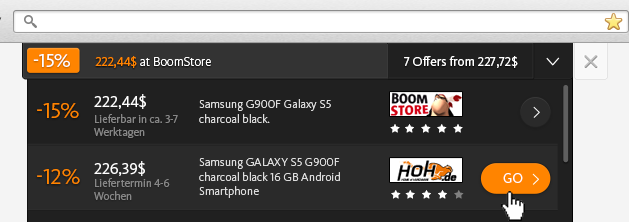
In addition to the security focus, when you are doing online shopping on e-commerce sites, Avira will notify you if the item you are looking at is available at a lower price on other sites.

avira-offers-screenshotThis additional feature makes online shopping safer by directing you to e-commerce sites from our trusted partners—which Avira has checked out for their security and privacy policies. We have researched these merchants for you to make sure they have appropriate data privacy procedures, reasonable return policies, no history of payment complaints, and no aggressive third-party ad networks running on their sites. So you save money, time and avoid potential hassles.

In case anyone might be wondering if Avira needs to track users’ web browsing habits in order to present these shopping offers, the answer is NO. Avira just compares the product SKU that is on your screen at that moment against a list of inventory among our partners. Avira does not permanently track your web habits in any way and you will never receive a re-targeted advertisement because of us, nor will we ever sell your information to anyone.

Avira also earns a commission from these shopping referrals. We use these earnings to help support our 350+ engineers so that we can continue to offer you the world’s best security software (which earned a 100% perfect detection rate as measured by AV-TEST)—all for free.

Of course, if you’d rather not use Avira Browser Safety or Avira SafeSearch you can always turn them off. The rest of our software will keep on protecting you as before.

CONSTANT IMPROVEMENT

The introduction of Avira Browser Safety and Avira SafeSearch represent just the latest step in Avira’s constant improvement.

When we opened our doors in 1986, the definition of computer “security” meant stopping annoying but relatively benign programs that spread via floppy disks! By the late-1990s, security had evolved to include e-mail viruses, and the growing use of the Internet lead to new forms of sending and contracting viruses, worms, Trojans and other malware. Professional spammers and organized crime syndicates took over from ‘recreational’ hackers in the mid-2000s, and introduced some of the first malware that actually stole credit card numbers and collected personal identity information.

To keep up with these changes in the nature of online threats, Avira constantly has to invent new technologies for detecting and disabling malware. You don’t even notice most of these innovations because they work behind the scenes.

The coders and virus hunters at Avira today are proud of the software that we have engineered for you, and we hope you’ll try out Avira Browser Safety (install for Chrome or Firefox) and Avira SafeSearch. Stay tuned for exciting future developments.

The post Browse the Internet smart and safely with Avira Browser Safety and SafeSearch appeared first on Avira Blog.