Category Archives: ESET

ESET

Virus Bulletin, AVAR conferences: a tasty Conference Pair*

It’s that time of year. That is, the time for two of my favourite security conferences: Virus Bulletin and AVAR.

Sadly, I’m unable to attend the 2014 Virus Bulletin conference, taking place in Seattle 24th-26th September, but there’s a healthy sprinkling of ESET researchers on the programme, which now includes information on the seven last-minute presentations.

On Wednesday 24th at 11.30, ESET Canada’s Pierre-Marc Bureau co-presents a paper with Evgeny Sidorov and Konstantin Otrashkevich from the Yandex Safe Search team on Ebury and CDorked. Full disclosure. This is an area ESET research blogging has focused on for quite a while.

Also on Wednesday, at 14.30, ESET Canada researcher Jean-Ian Boutin presents his paper about The evolution of webinjects. And at 17.00, Matias Porolli and Pablo Ramos deliver a presentation about Brazilian malware trends: CPL in the spotlight.

On Thursday 25th at 12.00, it’s the turn of Robert Lipovsky and Anton Cherepanov with their last minute paper on Back in BlackEnergy: 2014 targeted attacks in the Ukraine and Poland.

And among the four reserve papers you’ll find Bootkits: past, present & future, written by ESET’s Eugene Rodionov, Intel’s Aleksandr Matrosov (formerly of ESET), and myself: this is my 15th Virus Bulletin conference paper. 🙂 Because it’s a reserve paper, it’s not in the programme, but if needed, it will be presented by Eugene and Alex. It’s partly based on research for their forthcoming book on bootkits, to which I’m delighted to be making a small contribution.

There are, of course, lots of other presentations I’d love to have heard: here are just a few of those that strike me as being particularly interesting:

This is the first time I’ll have missed a VB since 2007 (I have been to 14 since 1996, though, so I can’t complain too bitterly), and I’ll miss the face-to-face contact with all my friends inside and outside the security industry (not to mention the VB team), but I hope to make the next one in 2015. And I am looking forward to my first AVAR in several years. Again, ESET will be well-represented.

  • Peter Kosinar presents his paper on Stealing the internet, one router at a time
  • Sébastien Duquette presents his paper on Exploitation of CVE-2014-1761 in targeted attack campaigns
  • I’ll be presenting my paper with Sebastian Bortnik on Lemming Aid and Kool Aid: Helping the Communityto help itself through Education

Unfortunately, there are no abstracts to link to at the moment, but there will be plenty of speakers there from other sectors of the security community who can be relied on to deliver good presentations.

*Yes, it’s another fruitful Harley pun.

David Harley
ESET Research Fellow

The post Virus Bulletin, AVAR conferences: a tasty Conference Pair* appeared first on We Live Security.

Chat apps leak: Billion app users from OKCupid to Grindr at risk

Nearly a billion users of a dozen chat apps for Android including popular apps such as Instagram, Oovoo, OKCupid and Grindr could be at risk from eavesdroppers and snoopers after University of New Haven researchers found serious data leakage problems.

With many of the most popular chat apps on Android affected, tech news site CNET calculates that nearly a billion (968 million) users could be putting highly private data in the hands of apps that transmit and store it unencrypted.

Many of the Android apps (the researchers focused on Android rather than iOS, although there is no evidence the iOS apps behave differently), send text wirelessly unencrypted, and store images on servers for weeks without encryption or authentication.

Chat apps leak: 12 Android apps leak text and images

According to CNET’s report, the following apps sent text, images, location maps and video unencrypted – Instagram, OKCupid, OoVoo, Tango, Kik, Nimbuzz, MeetMe, MessageMe, TextMe, Grindr, HeyWire, Hike and TextPlus.

The site notes that not every app sent every form of media unencrypted, but said that all sent at least some forms, from pictures to text in unencrypted forms.

Others stored media such as images on servers unencrypted and without any form of authentication “for weeks”.

‘Sniffer’ software reveals leaks

The researchers used PC ‘sniffer’ software such as Wireshark and Network Miner to monitor the data transmitted by the apps, and found images and text transmitted and stored unencrypted – and potentially at risk from snoopers.

In the series of YouTube videos, one researcher says, “We recorded network traffic in Wireshark, to see if files remained on the server. For Instagram, we found an image stored in their servers, unencrypted and without authentication.”

“Next, we opened up Oovoo and sent the keyword “Sparklehorse,” and it was picked up in Network Miner. Next we had Oovoo send an image. It was also picked up in Network Miner.”

CNET reports that few of the apps had replied to requests for further information, but that Grindr had said, “We monitor and review all reports of security issues regularly. As such, we continue to evaluate and make ongoing changes as necessary to protect our users.”

The post Chat apps leak: Billion app users from OKCupid to Grindr at risk appeared first on We Live Security.

Home Depot credit cards: chain confirms breach, fraud spikes

The world’s largest home improvement chain store, Home Depot, yesterday confirmed a data breach affecting Home Depot credit cards and debit cards used in stores on the American mainland, which may have continued since April.

Reports by security reporter Brian Krebs and others have said that the malware used in the attack was the same used in the Target breach, and that large-scale fraud is being perpetrated with stolen debit cards, with $300,000 withdrawn from one bank in under two hours, using what appeared to be debit card numbers used in Home Depot.

In an official release, the company said that anyone who used a payment card at a Home Depot store since April 2014 may have been affected, and the chain is to offer free identity protection and credit monitoring to customers who used Home Depot credit cards or debit card in-store. Customers who shopped online or in Mexico have not been affected, the chain said in an official release.

Home Depot credit cards: Who is at risk?

Veteran security reporter Brian Krebs said that the news had been accompanied by a spike in debit card fraud, after a vast haul of Home Depot credit card and debit card numbers were sold on an underground forum last week.

Krebs said, “multiple financial institutions contacted by this publication are reporting a steep increase over the past few days in fraudulent ATM withdrawals on customer accounts. Those same crooks also are taking advantage of weak authentication methods in the automated phone systems that many banks use to allow customers to reset the PINs on their cards.”

Home Depot said that there was no evidence PIN numbers had been compromised during the breach, and that, “Home Depot’s investigation is focused on April forward, and the company has taken aggressive steps to address the malware.”

Technology site GigaOm reports that the malware involved in the breach has been reported as being BlackPOS, the same used in the Target breach earlier this year.

“We apologize for the frustration and anxiety this causes our customers, and I want to thank them for their patience and support as we work through this issue,” said Frank Blake, chairman and CEO.

“We owe it to our customers to alert them that we now have enough evidence to confirm that a breach has indeed occurred. It’s important to emphasize that no customers will be responsible for fraudulent charges to their accounts.”

How criminals withdraw cash without needing PINs

GigaOm reports that the chain is to roll out EMV chip-and-PIN technology by the end of the year, offering a secure chip rather than a magnetic stripe which is more easily copied by malware such as BlackPOS.

Krebs said that the current glut of fraud relies on working out a customer’s ZIP code using criminal services which sell such information, starting from the ZIP code of the Home Depot they shopped at.

Krebs writes, “Countless banks in the United States let customers change their PINs with a simple telephone call, using an automated call-in system known as a Voice Response Unit (VRU). A large number of these VRU systems allow the caller to change their PIN provided they pass three out of five security checks. One is that the system checks to see if the call is coming from a phone number on file for that customer. It also requests the following four pieces of information:the 3-digit code (known as a card verification value or CVV/CV2) printed on the back of the debit card; the card’s expiration date; the customer’s date of birth; the last four digits of the customer’s Social Security number.”

Krebs said that this authentication process was weak enough that one large bank told him that a single West Coast bank had lost $300,000 in less than two hours due to debit and credit card fraud perpetrated with cards stolen in the breach.

ESET researcher Lysa Myers says, “Malware attacks on Point of Sale (PoS) systems are coming thick and fast right now.”

Myers offers a detailed guide for businesses concerned that they may be being targeted with POS malware.

The post Home Depot credit cards: chain confirms breach, fraud spikes appeared first on We Live Security.

Private browsing – Americans ‘care deeply’ about privacy

A new Harris survey found that almost all Americans care about online privacy, and 71% said that they ‘care deeply’ about it. The survey found that the service that worries Americans most regarding their privacy is Facebook with 66% of Americans concerned over it, a full 10 percentage points ahead of email (56%) and worries over private browsing (52%).

Worryingly, Americans also voiced concerns about activities governed not by the rules of the open internet, but by employment contracts, such as using social media while at work (16%), and looking up new jobs while at work (9%), according to Help Net Security.

Other technology platforms which worried the adults under survey were search engines (45%) and social photo-sharing apps such as Instagram (35%).

The activities which worried the surveyed adults most were online banking (71%), online shopping (57%), looking up photos of themselves (27%) and browsing pornography according to Business Insider.

Private browsing: What worries us most?

Most of the adults surveyed felt that they should have full rights over their own information online, with 93% believing they should have control over at least some of their private browsing information – and 12% specifying “naked selfies” as an area they would wish to have more control over.

The survey was conducted by WordPress hosting service WP Engine, and found that most web users were concerned about desktop private browsing impacting their privacy.

Mobile apps worried only 30% of those under survey, with online dating apps mentioned by 27% of those surveyed, and instant messaging apps such as WhatsApp mentioned by 23%.

This is despite serious security concerns raised over messaging services such as WhatsApp, recorded by ESET security evangelist Aryeh Goretsky in a detailed blog post. “Security and privacy have gotten off to a slow start in WhatsApp,” Goretsky says.

Private browsing: “Naked selfie” fear

Overall, it was clear that online banking and financial details posed the biggest worries for American web browsers, with a clear majority concerned over the safety of their data.

“With so much personal detail accessible by each other online, it’s more important than ever to be talking about what information is truly respected as private,” said Heather Brunner, CEO of WP Engine.

“99% of Americans say they care about online privacy, so it’s understandably concerning when you consider the sensitivity around some of their data being shared, from bank records to relationship status, in some cases across public platforms.”

The post Private browsing – Americans ‘care deeply’ about privacy appeared first on We Live Security.

Strong password – Chrome now offers ‘pronounceable’ choices

Google Chrome will now recommend pronounceable but strong password choices, according to developer and Chrome “happiness evangelist” Francois Beaufort, who announced the new version of Chrome’s built-in password generator via his Google+ page.

But the security-conscious need not be too concerned – by ‘pronounceable’, the search giant does not exactly mean, “Password1”.

Instead, the example given of a strong password which is also pronounceable is “masOotitaiv6”, which may be MORE pronounceable than the average password generated via an algorithm, but remains fairly secure, and not too easy to say out loud.

Strong password: Say it loud

The Register reports that the new feature is currently being tested in an early developer version of the Chrome browser.

“Give it a try and go to any “sign up” page. As soon as you focus the password field, a nice overlay will suggest you a strong and pronounceable password that will be saved in your chrome passwords,” Beaufort said.

Beautfort continues to say that: “Chromium uses a C library that provides an implementation of FIPS 181 Automated Password Generator.” FIPS 181 is a standard random password generator, used widely on websites, and designed by the NIST (National Institute of Standards and Technology.

The new strong password feature is available to some users running the Canary early “test” version of Chrome, Beaufort says.

As well as pronounceability, the new feature automates the process of auto-generating and saving passwords within Chrome more heavily.

Watch out, LastPass?

The Register comments, “The update is Google’s latest encroachment into the territory of online password management dominated by LastPass and 1Password, who could well feel threatened as Chrome builds in functionality they once offered as third-party value adds.”

A We Live Security guide to generating strong password can be found here, while veteran security writer and researcher Graham Cluley offers some thoughts on the worst pitfalls awaiting those who ignore password advice here.

The post Strong password – Chrome now offers ‘pronounceable’ choices appeared first on We Live Security.

Bank security – Barclays to offer vein-scanner to big accounts

Barclays Bank is to allow remote log-ons using a hi-tech vein-scanning biometric bank security system for large corporate accounts, according to Engineering and Technology magazine. The bank security system, using Hitachi’s VeinHD scanner, will be available to corporate customers from next year.

The bank security scanner uses infrared light to capture an image of the veins of the customer’s index finger, and compares this against a pattern stored on a smart card (similar to the cards used to store details for Chip and PIN transactions).

Biometric finger vein scanning technology for authenticating online banking transactions will be available to Barclays’ corporate customers from next year, according to Reuters.

Bank security: Scanner ‘requires live finger’

The Telegraph reports that the technology will be available to Barclays Corporate Banking clients from next year, and says that the bank emphasized that the biometric scanner was one of the most secure on the market.

The paper says that a bank spokesperson said that the finger to be scanned, “must be attached to a live human body in order for the veins in the finger to be authenticated”.

Engineering and Technology points out that a finger vein pattern is nearly impossible to fake, unlike other common biometric identifiers, where fakes are produced with relative ease.

Hackers have “fooled” the scanners in both Samsung’s Galaxy S5 and iPhone 5S with fake fingerprints made from latex.

‘About the highest security you can get’

“If it had any known issues we would never ask our clients to go down that path. The security in finger vein scanning is about the highest you can get and that’s why we feel so confident in it,”said Ashok Vaswani, chief executive of Barclays personal and corporate banking.

“Biometrics is the way to go in the future. We have no doubt about that, we are committed to it,” Ashwani.told Reuters in an interview. He said that fraudsters were constantly seeking new technologies to steal from the bank.

“You can’t let these guys create a breach in the dam. You’ve got to constantly stay ahead of the game.”

Barclays said it expected strong take-up for the technology from its 30,000 corporate clients.

Reuters describes the scanner as “looking like a mini Star Wars stormtroooper helmet”, and that the pattern is matched with one stored on a smart card, signaling the bank to send an encrypted authorization code to the PC.

TechCrunch points out that vein recognition technology is already used to secure high-value banking transactions in countries such as Japan, but only as a secondary “layer” of security where other methods of authentication are also used.

At 15 payment machines dotted around the Swedish city of Lund, people can buy items using a similar vein scanner, and without a debit or credit card.

Engineering graduate Frederik Leifland says, “I got the idea when I was in line at the supermarket and I saw how complex a process paying is. It takes a lot of time, so I thought there must be an easier and quicker way to pay and that was the start of Quixter.”

In a new interview with science website Humans Invent, Leifland explains how he hopes that his start-up may lead to payments without any authentication device. The pattern of veins in a human hand is unique – Leifland’s system uses infrared scans to identify the unique pattern in a finger.

BioMetrics sales site FindBiometrics says that the technology is relatively new, and currently used in high security institutions, saying, “Vein recognition is a fairly recent technological advance in the field of biometrics. It is used in hospitals, law enforcement, military facilities and other applications that require very high levels of security.”

The post Bank security – Barclays to offer vein-scanner to big accounts appeared first on We Live Security.

TorrentLocker now targets UK with Royal Mail phishing

Three weeks ago, iSIGHT Partners discovered a new Ransomware encrypting victims’ documents. They dubbed this new threat TorrentLocker. TorrentLocker propagates via spam messages containing a link to a phishing page where the user is asked to download and execute “package tracking information”. In August, only Australians were targeted with fake Australian Post package-tracking page.

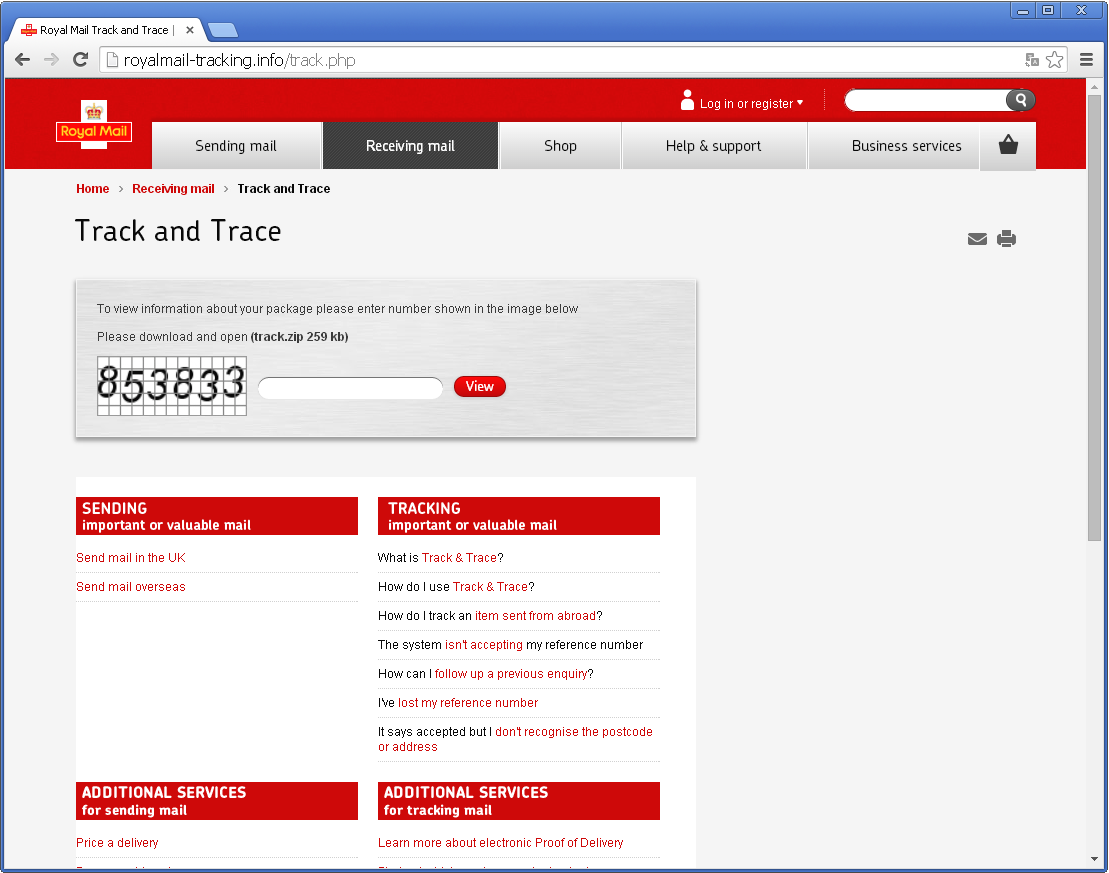
While tracking this new threat, ESET researchers found the malicious gang is targeting new victims. Internet users from the United Kingdom should be aware that fake Royal Mail package-tracking pages are online and distributing TorrentLocker.

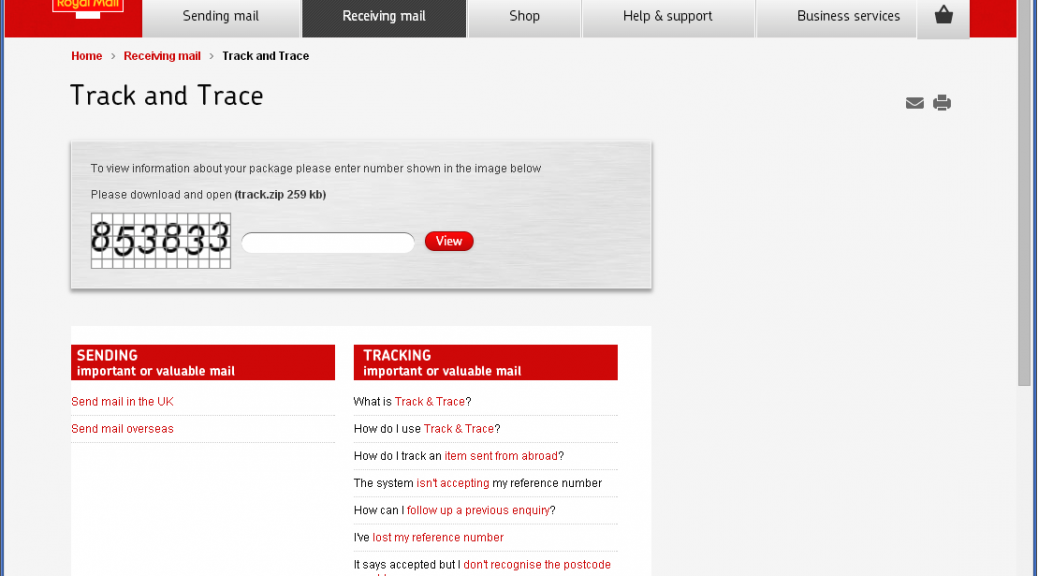
Royal Mail phishing pageRoyal Mail phishing page

The scheme is the same: you type a captcha then click to download a zip file containing the executable payload. It is interesting to note that the fake Royal Mail page will only show if the visitor is from the UK. Filtering seems to be based on the IP address of the request. If the request does not come from a UK IP address, the victim will be redirected to google.com. Three new domains are hosting the fake Royal Mail page:

  • royalmail-tracking.info
  • royalmail-tracking.biz
  • royalmail-tracking.org

royalmail-tracking.info registration informationroyalmail-tracking.info registration information

As you can see, registration date for these domains is September 2nd so this campaign started very recently.

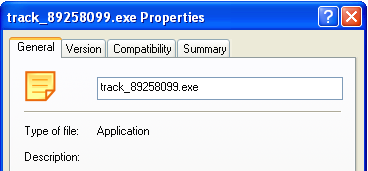
Executable file propertiesExecutable file properties

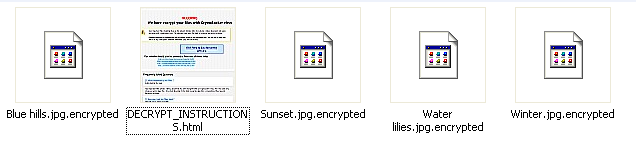
Encrypted files in users' picturesEncrypted files in users’ pictures

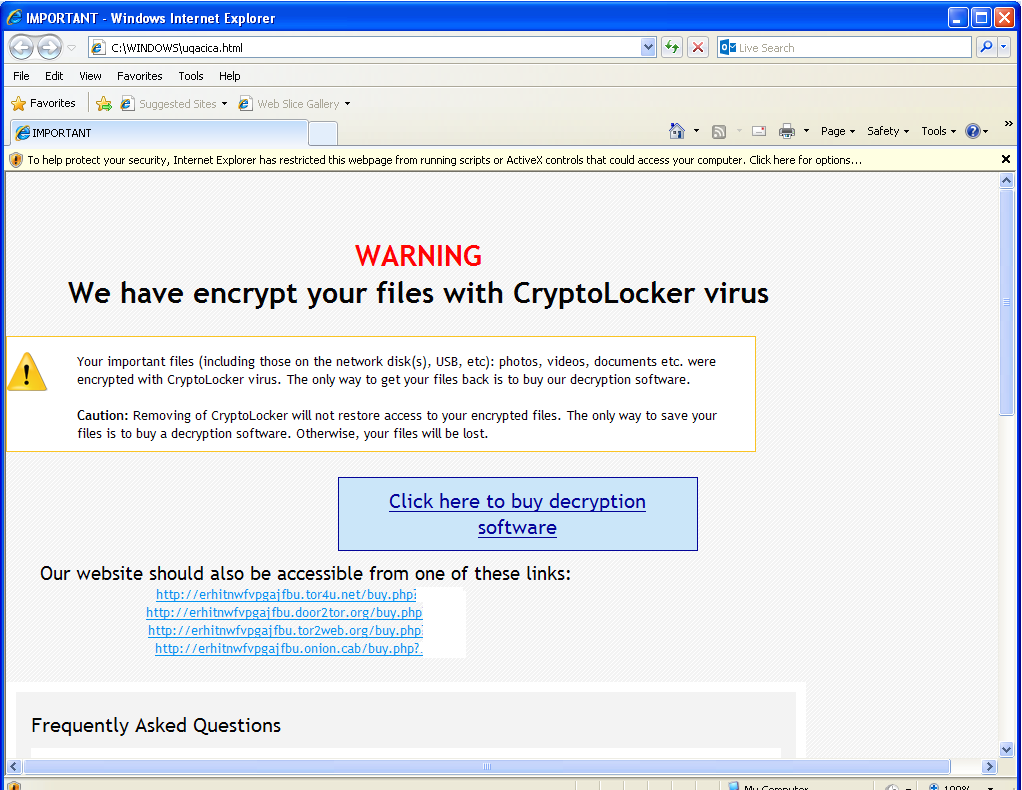
Warning is shown upon execution of the malwareWarning is shown upon execution of the malware

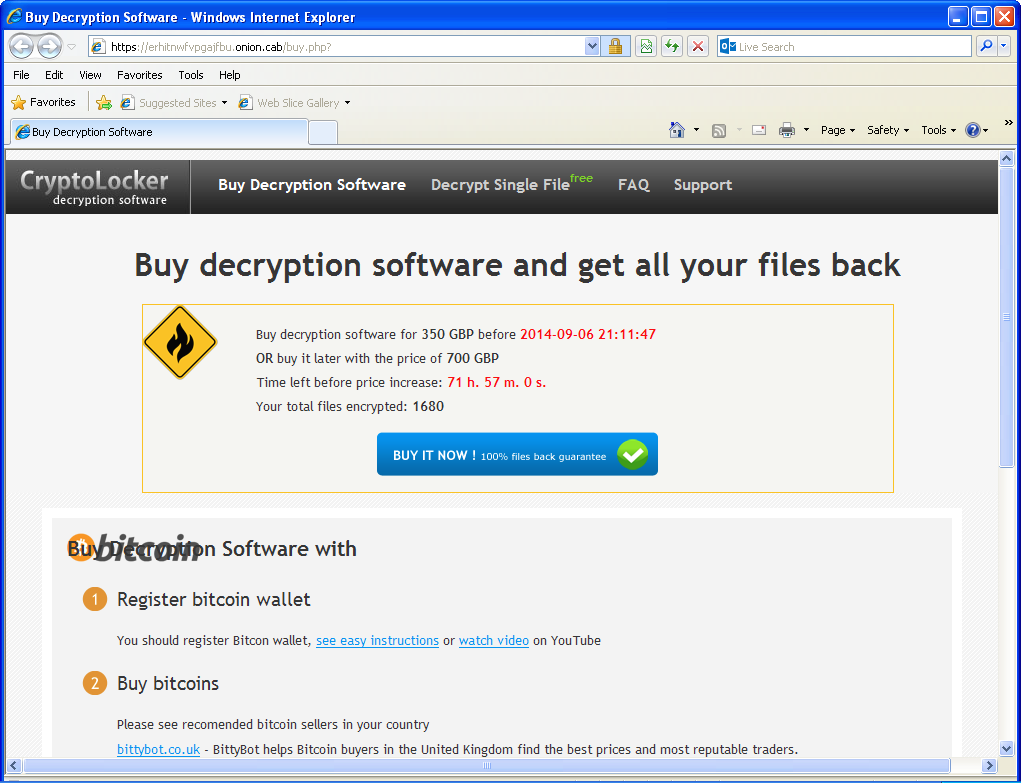
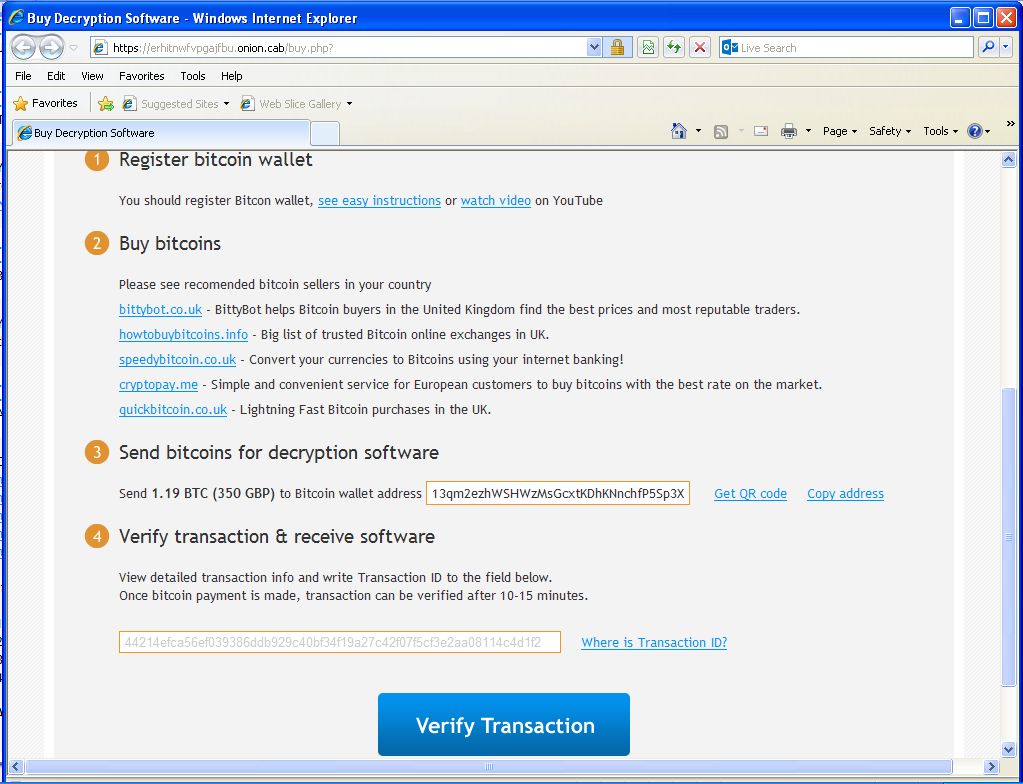
Once installed, victims’ documents are encrypted and they are being asked for a ransom of 350 GBP if paid within 72 hours or 700 GPB otherwise. Payment is done via Bitcoin transaction (1.19 BTC or 2.38 BTC). To hide their infrastructure, the web server is hosted on a .onion host on the Tor network.

To make it is easy for victims to access the web page, TorrentLocker is giving links to Tor2Web nodes so they don’t have to install additional software to reach the .onion website. Interestingly, door2tor.org, the domain name of one of the suggested Tor2Web node, was registered only 2 weeks ago. Perhaps its purpose is only to allow TorrrentLocker’s victims to contact the server selling the decryption software.

"Decryption software" sold on the Tor network“Decryption software” sold on the Tor network

This threat caries the TorrentLocker name because it use the “Bit Torrent Application” Windows registry key to store its settings. It is unrelated to the BitTorrent protocol.

The Bitcoin trail

Bitcoin transaction detailsBitcoin transaction details

As discovered by iSIGHT Partners, the Australian variant they analyzed asked for Bitcoins to be sent to 15aBFwoT5epvRK69Zyq7Z7HMPS7kvBN8Fg. In our case, the Bitcoin address changed to 13qm2ezhWSHWzMsGcxtKDhKNnchfP5Sp3X. If you look at the transactions on both wallets, the Bitcoins are then transferred to 17gH1u6VJwhVD9cWR59jfeinLMzag2GZ43.

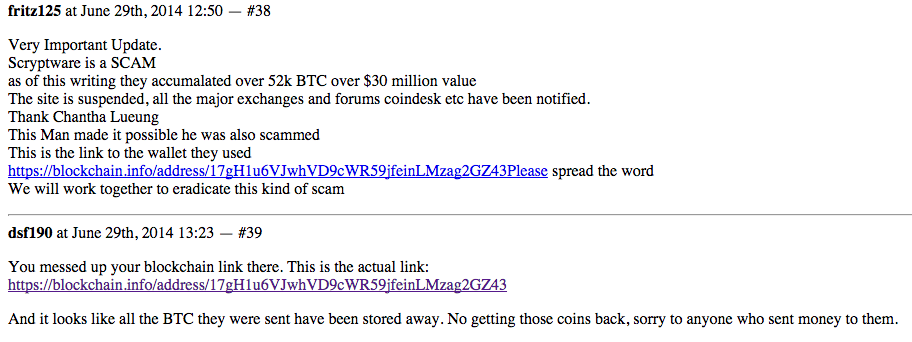
Since March 2014, this Bitcoin wallet has transferred over 82 272 BTC. With 1 BTC currently valued at US$480, the total transactions are roughly equal to 40 millions US$. This wallet has been associated with other scams in the past, including wallet stealing and selling fake mining hardware. We do not know if this account is owner by the TorrentLocker gang or it is some kind of exchange service used by different groups.

Screenshot of a discussion on Hashtalk (now offline, retrieved from Google Cache)Screenshot of a discussion on Hashtalk (now offline, retrieved from Google Cache)

ESET products detect this threat as Win32/Filecoder.NCC or Win32/Injector.

SHA-1 hashes

  • 491C8276667074B502BD98B98C74E4515A32189B (exe)
  • 46A2426D7E062E76D49707B58A5DF28547CBC0F4 (zip)
  • 7C62651C5F4CB1C780C8E9C4692F3BF24208A61E (exe)

References

The post TorrentLocker now targets UK with Royal Mail phishing appeared first on We Live Security.
Now your LinkedIn account can be better protected than ever before

Let’s be honest. LinkedIn doesn’t have the most spotless record when it comes to security and privacy.

In the past, LinkedIn has been hacked (Who can forget when 6.5 million stolen LinkedIn passwords were found on a Russian web server?)

Or maybe you recall hearing about how LinkedIn was scooping up the contents of iOS calendars, including sensitive information such as confidential meeting notes and call-in numbers, and transmitting them unencrypted in plaintext.

Or how about the time that LinkedIn controversially introduced (and then rapidly withdrew) a widget that meddled with the standard iOS Mail app, with the side effect of compromising the entire security of your email inbox, allowing LinkedIn to read every message you sent or received *outside* of the site?

I could go on, but you get the idea – and, anyway, I like to think that companies can learn. And, on this occasion, LinkedIn has done something that should be applauded.

In a blog post published yesterday, LinkedIn explained that it was introducing three new tools which go some way to boosting security, and granting members more control over their data.

First up, you can now check where (if anywhere) else you are currently logged into LinkedIn.

It’s all very well being logged into your LinkedIn account at home, but are you sure you logged off in the office? Alternatively, is it possible that a hacker has stolen your password and is currently messing around with your LinkedIn account on the other side of the world?

Now there’s an easy way to check.

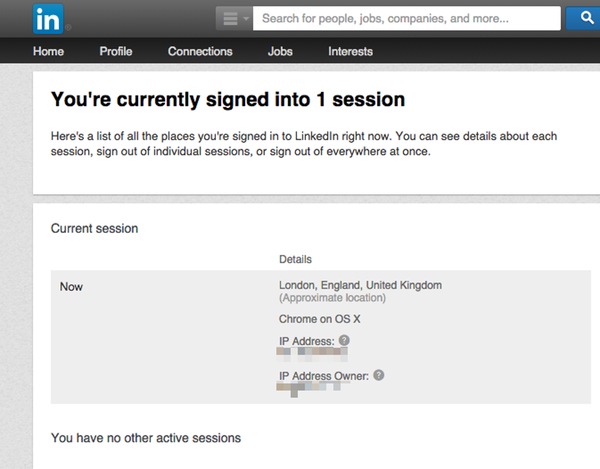
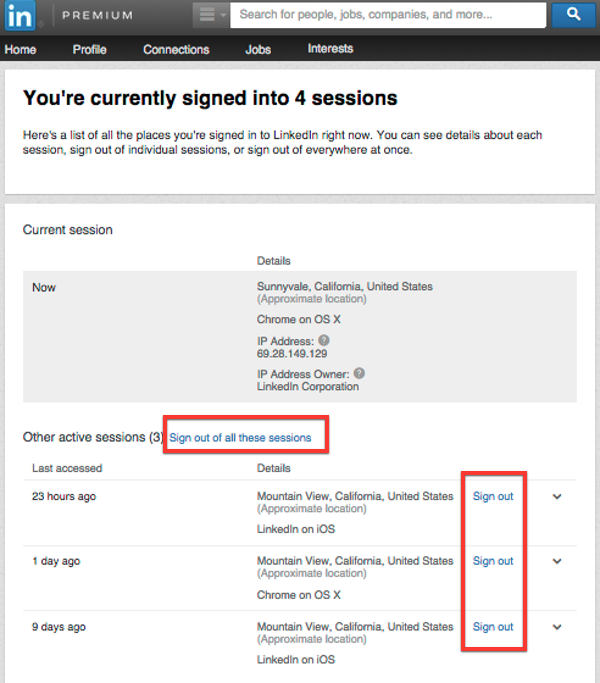
Go to your settings and click on See where you are logged in to view a complete list of the devices that you are signed into the site.

LinkedIn active sessions

In the above screenshot, you can see that I have nothing to fear. There’s only one computer currently logged into my LinkedIn account, and I feel fairly comfortable that that’s me.

But if there had been additional sessions displayed, I would have been able check what browser and operating system is being used in each case, and the approximate location of the activity. Then, if I chose, logging them out remotely is just a mouse click away.

Multiple sessions

And, of course, if the other sessions were at locations or on devices I didn’t recognise then that might be a good time to consider changing my password and enabling LinkedIn’s two-factor authentication.

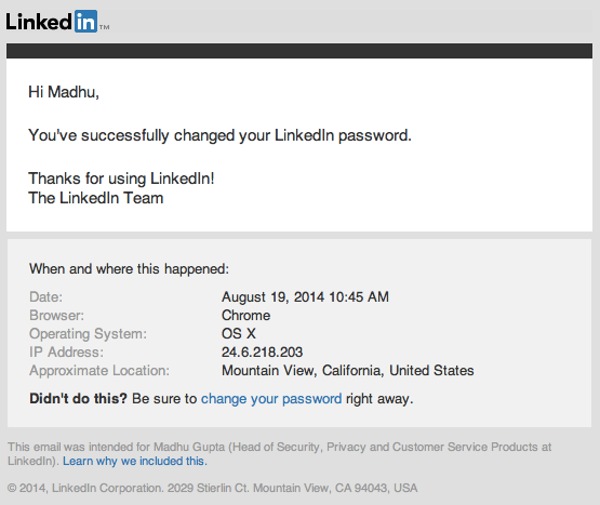
Next up, LinkedIn is offering more information to users in its password change email notifications – telling them, for the first time, when and where an account’s password change occurred.

LinkedIn password change

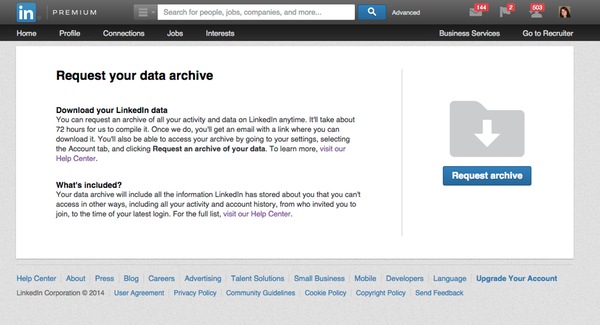
Finally, LinkedIn has taken a leaf out of Facebook and Google’s book and provided a way for users to easily export all of the data that the site stores about you, by requesting your data archive.

Request LinkedIn data archive

Once requested, it takes LinkedIn approximately 72 hours to collate the data that it holds on you, but never fear because you will be sent an email once the data is available for download.

None of these new features can really be considered rocket science, but it’s good to see LinkedIn introduce them and putting more power into the hands of its millions of users, who would feel pretty dreadful if their account was ever compromised.

It’s essential to keep your LinkedIn account out of the hands of fraudsters and internet criminals, precisely because it is the “business social network”.

In the past hackers have taken over accounts and posted poisoned links, and it’s easy to imagine the fraudulent behaviour that could take place if a worker’s colleagues and industry peers believed that it was John Doe communicating with them rather than a malicious attacker.

Of course, there’s no point to these tools if they aren’t actually used in the way that they’re designed.

Read LinkedIn’s blog, ensure that you’re familiar with these new features and the site’s two-factor authentication facility, and you will be better placed to protect both yourself and your fellow workers.

The post Now your LinkedIn account can be better protected than ever before appeared first on We Live Security.