More about the support scammer trend towards finding victims in Spain who aren’t fluent English speakers.
The post Support Scammers: Hoping to Reign in Spain? appeared first on We Live Security.

Antivirus Vendors
More about the support scammer trend towards finding victims in Spain who aren’t fluent English speakers.
The post Support Scammers: Hoping to Reign in Spain? appeared first on We Live Security.

Facebook will hand over users’ information to advertisers to enable them to advertise more effectively on third-party portals. This will be done through the Atlas platform that compiles data from the social network and uses it on external websites.
This way, if you click ‘like’ on a clothing website, you will begin to see adverts for similar products when you visit other pages.
So, with the data gathered from Facebook a history of likes and preferences is compiled which helps advertisers identify potential customers.
Until now, advertising on Facebook was done using cookies that registered your ‘likes’ as you visited other Internet pages. So when you were in Facebook you would be shown adverts in accordance with your preferences.
The aim of this latest methodology is to improve the effectiveness of advertising, and to track people’s preferences on mobile devices, which is what Atlas can do through Facebook.
What do you think? Are we losing privacy with these kinds of initiatives?
More | Android users under attack through malicious ads in Facebook
The post Facebook set to hand over users’ information to third-party advertisers appeared first on MediaCenter Panda Security.
YouTube is one of the most popular websites in the world, but can expose younger viewers to inappropriate content. By following these 5 precautionary measures you can keep your child safe from any content that may be unsuitable.
The post How to keep your child safe on YouTube appeared first on We Live Security.

There could be many benefits of having a connected household, but connecting your appliances to the internet could also put them at risk of being hacked. We provide some useful tips to make sure all of your connected devices are protected.
The post Should I worry about my connected devices? appeared first on We Live Security.

Basic phishing attacks and easily available tools are all that is needed to compromise many industrial control systems, the head of cybersecurity for the U.S. Department of Energy’s Strategic Petroleum Reserve has warned.
The post Phishing attacks ‘enough’ to breach many industrial systems appeared first on We Live Security.

More than three quarters (77%) of Americans aged 65 and older are now using cellphones. While they lag the general population (91%+), it is a significant increase over two years ago, according to recently released studies conducted by the Pew Research Center. Â But a much smaller group (only 18%) of this demographic has made the leap to a smartphone. The older the person, the research suggests, the less likely they have been to make the move to a smartphone.
In support of the findings, many of the seniors that I know tend to own older model cellphones that are either a) turned off, or b) not carried at all or used only under special circumstances (for travel and at insistence of family on special occasions), and c) are not used for more than actual phone calls.
But this is changing fast.
Seniors are showing a larger appetite for and are finding more value in larger format devices like tablets and e-readers. The Pew survey found 27% of seniors now own a tablet, e-reader or both (and that’s more than the public average).
Smartphone adoption should continue among seniors as new devices like the new Samsung Galaxy, Amazon Fire and Apple iPhone 6 continue to get larger and become easier to read and manipulate. In fact, the researchers at Deloitte predict that people 55+ Â (that would include Boomers through seniors) will experience the fastest growth in smartphone adoption in 2014, with 45-50% predicted to own a smartphone by the end of 2014.
Financial considerations for many seniors (especially those on fixed incomes) and confusion about career plans have no doubt led to a lag in smartphone adoption. But needing assistance to learn how to use the new devices and associated apps is one of the largest concerns by seniors (77%) in adopting smartphone technology, according to Pew.
This should be a concern to us in the technology industry. Shouldn’t we be making technology that is inherently simple to adopt? Shouldn’t we be designing apps for that –and, more specifically, with seniors in mind?
AARP thinks so. The organization just introduced a new tablet the RealPad aimed at this market. (I’ll cover this in more detail in my next column.)
During the recent national AARP event in San Diego, where AVG participated, we were concerned to learn that about one-third of the seniors we spoke to admitted that they use no security software on their smartphone or tablet devices. That suggests there is a lot of work to be done to help educate this audience on how to stay safe online.
Security of data is a primary issue when dealing with a smartphone or any smart connected devices – whether it involves sharing photos on social media, emailing or banking. Once online, Pew and others have found that the senior demographic is rapidly embracing social media (46%). In the brief survey of those who stopped by our booth on technology usage (we’ll share more details on this later), email was the most popular online application for the group, followed by banking.
Here are some simple tips for smartphone users to make data safer – applicable to everyone:
I am very excited that more seniors are embracing smartphones and tablets. Â They are great tools to keep connected with family and friends, be active and engaged. Â Now, we in the tech industry must catch up with them and provide the tools to make it more useful and enjoyable!


Many New Yorkers don’t place a particularly high value on their private data – from fingerprints to social security numbers – having proven willing to give away such details in return for a literal, edible cookies.
The post People are willing to trade private data for pistachio cookies appeared first on We Live Security.

AVAST Software is a “champion” and supporter of NCSAM.
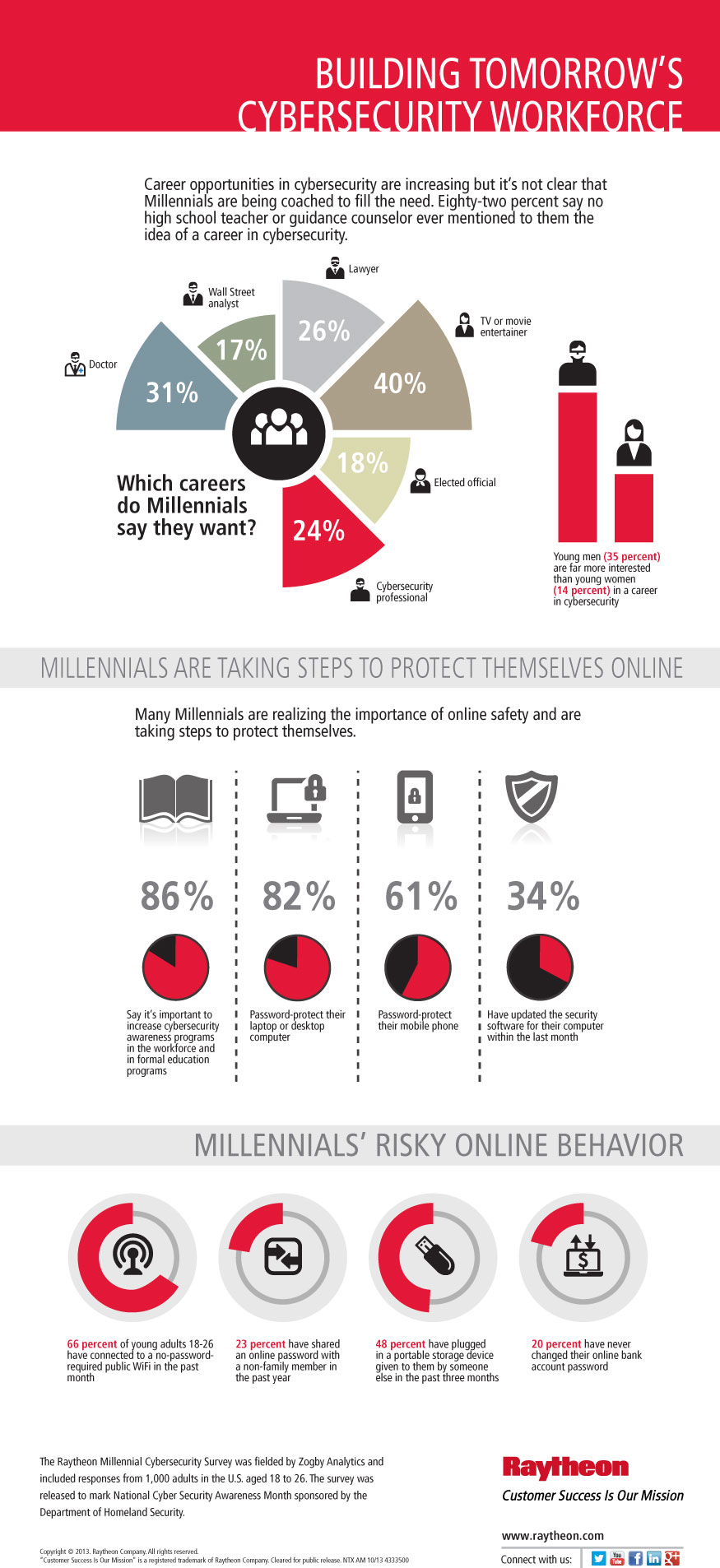
Last October when National Cyber Security Awareness Month (NCSAM) was getting started, it was reported that the incoming workforce of millennials was lax about cyber-risks. They engaged in risky online behavior like:
For this year’s NCSAM, a new survey was done by defense contractor Raytheon in partnership with the U.S. Department of Homeland Security and the National Cyber Security Alliance. It showed that awareness of online safety is rising, with 70% of millennials saying they follow cybersecurity concerns and are up-to-date on the topic. Eighty-seven percent believe they are personally responsible for their online safety.
Millennials are known as the “Facebook generation†or “Digital natives†because they grew up in the “digital age†with internet-connected devices. But just because they were born after the digital age began, doesn’t mean they were any more concerned about security than the so-called digital immigrants who had to replace analog skills with digital. But this year, maybe because of the high profile data breaches that have occurred repeatedly, millennials are concerned about their devices being infected by malware, credit or debit card theft, someone hacking into financial information, or falling victim to online scams or fraud.
While many are aware of the risks – roughly 60% have experienced some sort of online violation – identity theft, a computer virus, or a bad experience on social media – they’re still engaging in some risky behaviors, such as 72% using public WiFi that doesn’t require a password.
Interestingly enough, this increased awareness is also driving interest in a career in cybersecurity with millennials expressing a desire to make the Internet safer and more secure. The problem is that almost two-thirds of the total don’t know or aren’t sure what the “cybersecurity†profession is.
For millennials and everyone else, improving cybersecurity involves absorbing the STOP. THINK. CONNECT. message: Take a few safety precautions, understand the consequences of behaviors, and enjoy the Internet with more peace of mind.
To stay safer and more secure online everyone should:
Thank you for using avast! Antivirus and recommending us to your friends and family. For all the latest news, fun and contest information, please follow us on Facebook, Twitter and Google+. Business owners – check out our business products.
The FBI has opened up its previously in-house malware analyzing tool to the public in order to crowdsource more samples for speedier response, according to The Register.
The post FBI opens malware tool for public “crowdsourcing†appeared first on We Live Security.

In a bid to improve the security of its Chrome browser, Google has announced that it is upping the ‘bounty’ paid to people who successfully find bugs and exploits hidden in the browser up to a maximum of $15,000. This is an impressive increase on the previous cap of $5,000, reports betanews.
The post Found an exploit in Chrome? You could have just earned $15,000 appeared first on We Live Security.
