Category Archives: Antivirus Vendors

Antivirus Vendors

Private browsing – Americans ‘care deeply’ about privacy

A new Harris survey found that almost all Americans care about online privacy, and 71% said that they ‘care deeply’ about it. The survey found that the service that worries Americans most regarding their privacy is Facebook with 66% of Americans concerned over it, a full 10 percentage points ahead of email (56%) and worries over private browsing (52%).

Worryingly, Americans also voiced concerns about activities governed not by the rules of the open internet, but by employment contracts, such as using social media while at work (16%), and looking up new jobs while at work (9%), according to Help Net Security.

Other technology platforms which worried the adults under survey were search engines (45%) and social photo-sharing apps such as Instagram (35%).

The activities which worried the surveyed adults most were online banking (71%), online shopping (57%), looking up photos of themselves (27%) and browsing pornography according to Business Insider.

Private browsing: What worries us most?

Most of the adults surveyed felt that they should have full rights over their own information online, with 93% believing they should have control over at least some of their private browsing information – and 12% specifying “naked selfies” as an area they would wish to have more control over.

The survey was conducted by WordPress hosting service WP Engine, and found that most web users were concerned about desktop private browsing impacting their privacy.

Mobile apps worried only 30% of those under survey, with online dating apps mentioned by 27% of those surveyed, and instant messaging apps such as WhatsApp mentioned by 23%.

This is despite serious security concerns raised over messaging services such as WhatsApp, recorded by ESET security evangelist Aryeh Goretsky in a detailed blog post. “Security and privacy have gotten off to a slow start in WhatsApp,” Goretsky says.

Private browsing: “Naked selfie” fear

Overall, it was clear that online banking and financial details posed the biggest worries for American web browsers, with a clear majority concerned over the safety of their data.

“With so much personal detail accessible by each other online, it’s more important than ever to be talking about what information is truly respected as private,” said Heather Brunner, CEO of WP Engine.

“99% of Americans say they care about online privacy, so it’s understandably concerning when you consider the sensitivity around some of their data being shared, from bank records to relationship status, in some cases across public platforms.”

The post Private browsing – Americans ‘care deeply’ about privacy appeared first on We Live Security.

Strong password – Chrome now offers ‘pronounceable’ choices

Google Chrome will now recommend pronounceable but strong password choices, according to developer and Chrome “happiness evangelist” Francois Beaufort, who announced the new version of Chrome’s built-in password generator via his Google+ page.

But the security-conscious need not be too concerned – by ‘pronounceable’, the search giant does not exactly mean, “Password1”.

Instead, the example given of a strong password which is also pronounceable is “masOotitaiv6”, which may be MORE pronounceable than the average password generated via an algorithm, but remains fairly secure, and not too easy to say out loud.

Strong password: Say it loud

The Register reports that the new feature is currently being tested in an early developer version of the Chrome browser.

“Give it a try and go to any “sign up” page. As soon as you focus the password field, a nice overlay will suggest you a strong and pronounceable password that will be saved in your chrome passwords,” Beaufort said.

Beautfort continues to say that: “Chromium uses a C library that provides an implementation of FIPS 181 Automated Password Generator.” FIPS 181 is a standard random password generator, used widely on websites, and designed by the NIST (National Institute of Standards and Technology.

The new strong password feature is available to some users running the Canary early “test” version of Chrome, Beaufort says.

As well as pronounceability, the new feature automates the process of auto-generating and saving passwords within Chrome more heavily.

Watch out, LastPass?

The Register comments, “The update is Google’s latest encroachment into the territory of online password management dominated by LastPass and 1Password, who could well feel threatened as Chrome builds in functionality they once offered as third-party value adds.”

A We Live Security guide to generating strong password can be found here, while veteran security writer and researcher Graham Cluley offers some thoughts on the worst pitfalls awaiting those who ignore password advice here.

The post Strong password – Chrome now offers ‘pronounceable’ choices appeared first on We Live Security.
A website set up to shame the guilty: the list of companies that don’t protect customers’ data

data company

There is an ever increasing amount of personal data circulating on the Internet, yet the security in place to safeguard this data is not evolving at the same rate. Many applications and Web services jeopardize user information by not employing any encryption system to protect it.

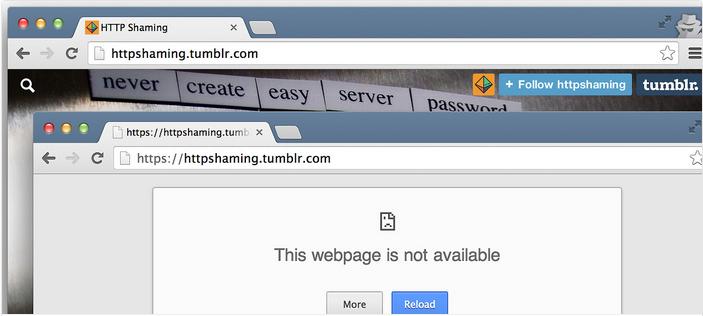
Given this situation, IT engineer Tony Webster has set up a website to draw attention to those who are reckless in their approach to safeguarding data. At HTTP Shaming you can find the names of the ‘guilty’ websites and how they are violating users’ privacy. If they abuse the trust of their users, it’s only fair that the users should know.

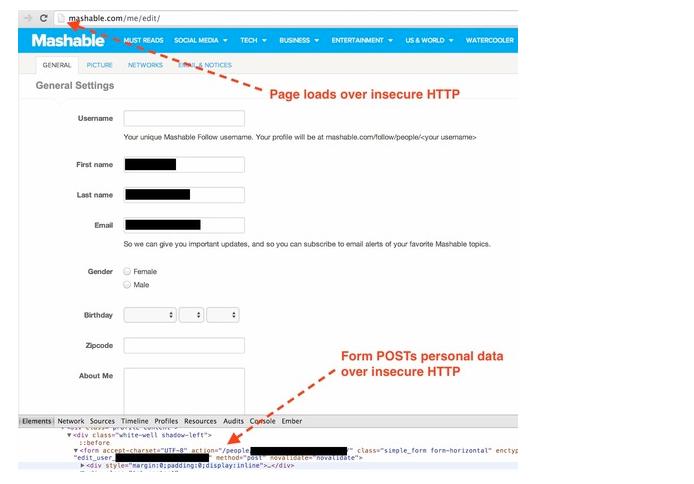
One of the names that appears on the website is Mashable. According to Webster, this news website enables users to connect using their social networks accounts and interact through them. The problem however is that all this activity is happening on an HTTP address, instead of the secure HTTPS internet protocol, which encrypts the information transmitted with the SSL (‘Secure Sockets Layer’) system.

SSL system
An SSL certificate, which guarantees the security of Internet communications, works by assigning keys to files exchanged between a client computer and the server of the company providing the service, so that only the company can access the file content.

If however you use the service offered by Mashable while connected to an open WiFi network, as with many public sites, your email address, alias and passwords could be stolen by cyber-criminals (those you use for Mashable as well as the social networks you use to access the page).

mashable
The TripIt travel planning site, where you can manage bookings, check timetables and flight schedules, and share all of this with other users, is another similar case.

In both the Tripit versions for smartphones and for websites, users are first asked to enter an email address and password. Webster highlighted this site as it does not encrypt the information displayed to others through the calendar feature. As is the case with Mashable, a criminal could discover your full name, phone number, email address and the last four digits of your credit card.

Those responsible for the website have reported this summer that the problem is now fixed and that security measures are now applied to all communications.

Such poor security practices also occur on other e-commerce sites where companies and customers exchange more sensitive information. Research by the IT security consultants High-Tech Bridge showed that 73% of the top 100 online stores don’t use the HTTPS protocol for data they consider less sensitive, and only two of them apply it in all cases.

The same applies to apps running on mobile devices. In a recent study by HP, a group of IT experts analyzed the security measures in place on 2,107 apps and found that 75% of them do not encrypt stored data. Some 18% didn’t even encrypt data exchanged across the Internet.

Webster’s list of shame now has 19 names, many of these put forward by others who wanted to take part in the project. These names include Creative Cloud, VLC and Adobe Flash Player. Even the Tumblr microblogging site, where the HTTP Shaming page is hosted, doesn’t have a secure protocol. In the worst cases, the IT engineer has directly contacted companies to let them know the error of their ways.

tumblr
Webster fails to understand why some companies are subjecting customers to unnecessary risks, as there is no reason not to use HTTPS, which is available to anyone offering services on the Internet.

The post A website set up to shame the guilty: the list of companies that don’t protect customers’ data appeared first on MediaCenter Panda Security.

Read before clicking: Potential app permission risks

Who is allowed to do what – when it comes to the world of apps, this isn’t a straightforward question to answer. Whether you’ve got an iOS, BlackBerry or Android device, apps on all operating systems require your permission to access specific functions like network communications or the camera and microphone. While BlackBerry and Apple review the permissions prior to store approval, Google leaves this task up to the user. If you use an Android tablet or smartphone, you’ll be familiar with the list of app permissions requested prior to installation. You have a choice: Either you agree to all the app’s wishes or you have to do without the app – no ifs or buts.

Of course, many developers handle this situation responsibly, only asking for permissions the app actually needs to do its job. But the temptation to ask for a few more pieces of information than are needed is huge: Details about user preferences can be gleaned and data sold on straight away to make a little bit extra on the side. Free apps in particular are infamous in this respect. A while ago, the example of the Brightest Flashlight was in the media spotlight. While it didn’t require any permissions for it to work, it practically granted itself full access to the smartphone – the developer then sold all the data it harvested.

The app is still listed on the Play Store, it still asks for permission to access everything, and has meanwhile racked up over 50 million downloads.

An app tells you, more or less, everything it wants to know and influence prior to installation. It does this either when you actually download it or right at the bottom in the Play Store under “Permission” and “View details”. All the details of “dangerous” permissions are shown, whereas permission requests deemed less critical are not. To view them, you have to click the “Display all” tab. This can be problematic especially when it comes to updates for installed apps. This is due to a change to the Play Store’s permissions-management system (version 4.8) which saw Google introduce “simplified permissions”. Permissions are now divided into the following 13 groups:

  • In-app purchases
  • Device & app history
  • Cellular data settings
  • Identity
  • Contacts/Calendar
  • Location
  • SMS
  • Phone
  • Photos/Media/Files
  • Camera/Microphone
  • Wi-Fi connection information
  • Device ID & call information
  • Other

If you initially granted permission during installation and another permission has since changed in the same group, you are no longer informed about it. The newly requested permission is granted without so much as a whisper. To some degree the groups are also fairly unclear and this has some really surprising impacts. For instance, the “Phone” group includes the following functions: Directly call telephone numbers (including chargeable numbers), write call log, read call log, reroute outgoing calls, and modify phone state.

If you want to learn more about which app can do what, take a look at “Settings” and then “Application manager” followed by choosing the app’s name and “Permissions”. The free app Permission Viewer makes things a bit easier.

It lists every app (incl. internal system apps) and displays apps’ permission levels using colored bars. That said, knowing about potential weaknesses does not lead to greater security. To do that, you need the help of other apps such as App Guard by Backes SRT. The security company, a spin-off of Saarland University, offers a security and data-protection app for Android smartphones and tablets with Android version 2.3 and later for € 3.99. There’s also a free demo version which can monitor up to four apps. App Guard lets you monitor other apps and make subsequent changes to their permissions. Superfluous permissions can be revoked without needing root access.

By contrast, App Ops Starter is free but it only works on Android versions 4.3 to 4.4.1. The app starts Android’s integrated but hidden “App Ops” mode. It’s also possible to revoke individual permissions from apps without root access. Rooting your device opens up further options to monitor and change access permissions such as by using XPrivacy.

Everyone has to be clear about one thing: people who experiment with permissions can render an app unusable. Less experienced users should stay away from system services; otherwise the entire Android operating system could quickly become unstable.


The post Read before clicking: Potential app permission risks appeared first on Avira Blog.

Your holidays start on the Internet: tips for booking vacations online

Everything is possible online nowadays: reading newspapers, ordering books and clothes, flirting, checking out recipes – and of course booking vacations online. Hotel comparison sites are immensely popular, every airlines offer online booking services, and instead of combing through endless travel-agency brochures, you now simply visit Expedia, Opodo or Travelocity. While it’s all very easy and convenient, it isn’t without its risks. Whether it’s a dodgy low-cost website which goes bust before your vacation starts or a seemingly harmless invoice attached to an email which is infected with a virus – at Avira we find that a little caution goes a long way.

Many problems with online booking stem from legal issues. In some instances, the difference between provider, organizer or contracting party is not clear to the customer. In case of questions and complaints, it is important to know whom to contact. Whether you can even make any claims and how easy that is differs immensely depending on the location of the company you signed the contract with. On top of that, costs often aren’t as transparent as they could and should be, with hidden additional transfer costs or trip-cancellation insurance suddenly selected on the final page before the last confirmation click without it ever being mentioned beforehand.

Low-cost portal or not, no operator offers its services for free. The cheaper the offer, the greater the risk that the small print conceals hidden costs. Free hotel room? Perhaps a minimum stay is involved, or you need to pay service and agency costs. Extremely cheap flight and accommodation? There may be compulsory shopping trips planned involving visits to carpet makers, jewelers, and leather factories.

Internet transactions always involve risks – even if they have become safer over the years. You should always transfer money over an encrypted connection. For that, the online travel agent has to offer a SSL-secured Web session. Operators usually make a specific point of mentioning this at the virtual checkout, but you can also tell the session is encrypted by the little padlock icon or the different color of the Web browser’s address bar. This type of encryption is extremely secure and cannot be cracked without a reasonable amount of effort – effectively meaning no risk is involved.

However, other risks are beyond the user’s control. Hackers often manage to crack the websites of legitimate online travel operators. In 2005 the Japanese tour operator Club Tourism had to admit that hackers had stolen the information of over 90,000 customers. In 2009 a website in the USA which government officials use to book travel was compromised. And only in April 2013 Traveltainment, a subsidiary of the Amadeus Group, had to concede that hackers had broken into its servers and stolen the personal details, including payment information, of an unknown number of customers. This theft caused harm when customers opened their emails containing phishing software which the thieves were able to send as they knew the customers’ email addresses and booking details. A comprehensive security software solution like Avira Antivirus Pro offers protection against such attacks and should therefore be a staple on every computer.

The post Your holidays start on the Internet: tips for booking vacations online appeared first on Avira Blog.