Category Archives: Panda Security

Panda Security

Google to publicly shame websites that aren’t using HTTPS

https

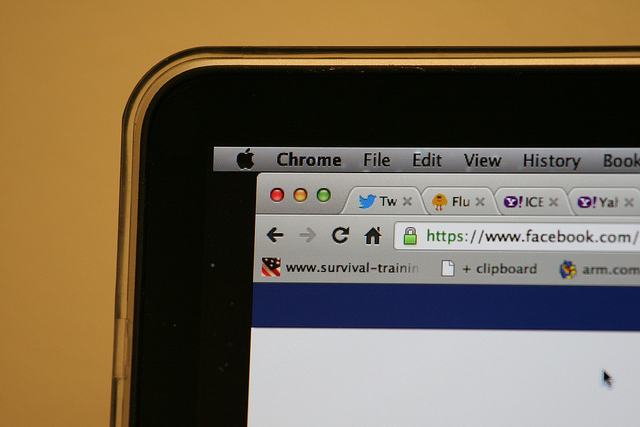
It’s likely that one more than one occasion you’ve noticed the small green lock icon that appears in the address bar when you’re using the Internet. This little icon means that the site you are using is secure as the page is using HTTPS (Hypertext Transfer Protocol Secure).

HTTPS encrypts all communications to protect confidential data on the web, from user names to passwords, messages, or credit card info. In order for this to work correctly, it is essential that banking websites or online stores use the secure version of GTTP.

The HTTPS system also guarantees that anyone using the Internet is able to access the official page of a company as opposed to a false one which has been designed to trick the user and steal their money or info. It also protects that website against third-parties which might try to intercept the connection in order to install a malware.

Google has spent a long time organizing a silent campaign in favor of the use of HTTPS with the hope that eventually all websites will end up using the system, putting an end to the risk of data theft for web users. It’s telling that even the government of the United States is concerned about the use of HTPPS, and requires that all of its web pages be encrypted with the service.

Less than a month ago, Google announced that it would favor the indexation of HTTPS sites that had a HTTP equivalent. What’s more, Google has decided to offer new tools to developers so that they can easily include this protocol. Now it is trying to publicly list the owners of websites that aren’t using this protocol, a project that the security team already debated at its forums in 2014.

secure web

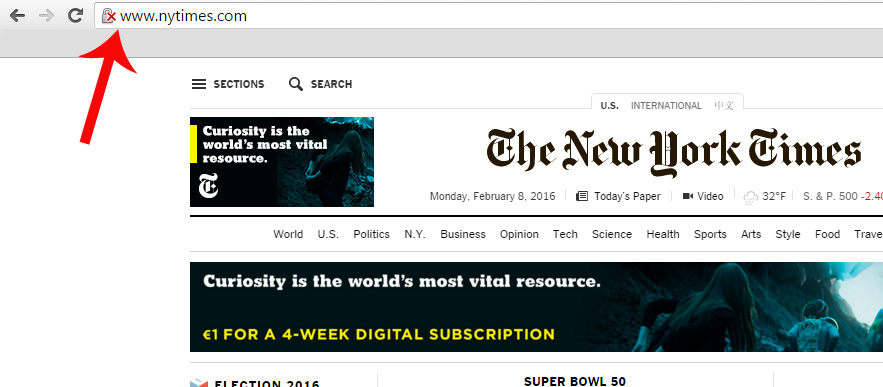
Up to now, on Chrome there was a red X on the gray lock when the browser detected problems with the TSL/SSL certification of the website which guarantees the establishment of secure communications on the Internet, which makes it possible for a third-party to access the user data. It also shows us this warning when the web connection is encrypted, but Chrome has detected a mix of command sequences (a page based on HTTPS loads content based on HTTP), which could allow a third-party to take control of the page.

Google plans to openly display websites that use HTTP protocol by marking them with a red X. Parisa Tabriz, Chrome Security Engineering Manager, tweeted that she planned to highlight these pages: “HTTP, we’re readying to call you out for what you are: UNSAFE!”

A few days ago, at the Usenix Enigma security conference, an expert from CloudFlare showed how users can already decide if they want all pages that use HTTP protocol to appear with the red X symbol. To do this, all you need to do is enter chrome://flags and select “mark non-secure as” and then “mark non-secure origins as non-secure.” In this moment, a gray lock will be added to your address bar, indicating insecure webpages.
unsecure web

A Google employee, who wished to remain anonymous, has confirmed to Motherboard that the intention is that Chrome will include this alert by default and has assured there will be more clues in the near future.

For now, Google has yet to make an official announcement on the matter, so those who wish to know when a webpage isn’t secure need to manually select this option.

So, if we keep in mind that only 1 in 3 users take notice of the current SSL security warnings from Chrome which warn us if someone is trying to steal our confidential information, it’s likely that some will end up ignoring the red X, too. Due to this, it is necessary that we are more aware of the dangers that we face by leaving our data on insecure websites.

The post Google to publicly shame websites that aren’t using HTTPS appeared first on MediaCenter Panda Security.


Football leaks posing a worry to security for the football world

football leaks

In the past few weeks the website Football leaks has been publishing contracts relating to signings and transfers of football players from the world’s top leagues. While some accuse the people behind this page of hacking and document theft, they themselves have assured that they haven’t, in any moment, hacked anyone and that they actually have their own source who provides them with the information.

What’s certain is that when it comes to stealing information from a company, who has it easier than an employee of said company – they have knowledge of the systems, where information is stored, etc. Keep in mind that the majority of security practices are designed to protect a company from an external attacker, via perimeter protection and with an antivirus on the network’s computers.

Football Leaks and EDR protection

However, it isn’t common that they have more advanced security systems such as EDR (Endpoint Detection and Response), which allows them to have total control of what is running on the network, who is accessing certain documents, at what time, and what they end up doing with them. It is obvious that even though they want to invest in security solutions, nobody can guarantee that in no moment will we be compromised.

For this, EDR are the ideal solution – on one hand they offer a greater protection and control as regards what happens on our network, allowing us to know what is happening in real time, and give us valuable information. For example, if we have vulnerable programs – ones that haven’t been updated – that are running. On the other hand it gives us forensic information which allows us to investigate what happened when there is a security breach. This final point is what is really valuable.

Looking back at the case of Football Leaks, where confidential documents have been leaked, we see that these documents are in the possession of the clubs who make the contracts, the players who sign them, and any intermediary. If the clubs had this type of solution, it would be relatively easy to guess who accessed the documents, from where, and if there were any copies made. They could even know if other documents had been compromised.

The value that it offers is clear, however, the majority of companies focus their security spending on preventative measures. This Football Leaks case may just force businesses in this sector (football teams, federations, official organizations, etc.) to go beyond this and adopt the necessary measures to avoid this happening again, as they will have all of the information available should a similar event occur.

These steps aren’t very different to what businesses who already take their security seriously already do, such as banks and energy companies.

The post Football leaks posing a worry to security for the football world appeared first on MediaCenter Panda Security.

How to turn your old mobile into a home security system


broken smartphoneLong live mobile phones. Although smartphones are designed to be little more than ornaments as the years progress, what’s certain is that when we change our device for a newer model we can still get some final use out of the old one before it’s resigned to the bottom of a drawer.

Apart from the long list of ways to reuse an old phone that we have all seen more than once, a startup has proposed that we turn our old smartphones into sophisticated security systems – an application is all it takes to make your home safe thanks to The Olmose App.

app

For now, its creators are looking for financing via the crowdfunding platform Kickstarter. During the month of February they will try to gather the €100,000 necessary for the project to become a reality.

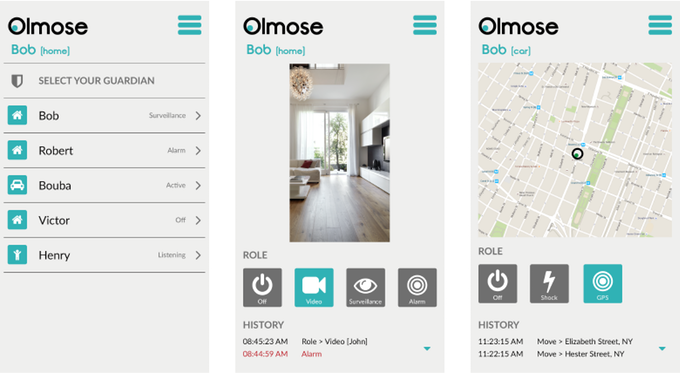
Helped by the support created by Olmose, old mobile phones will become the eyes and ears that keep watch on our homes when we aren’t there. To start, you need to install the app and on the old phone and the new one that you’ll be using daily, which will become the control center.

From there on, the old smartphone will identify any movement or sound which will set off an alarm that you carry in your pocket should an intruder try to enter your house.

dog smartphone

Besides these notifications, the application will record and post all that happens on the phone’s camera to the cloud.

Beyond this antitheft function, the app is also developed for parents who want to monitor their baby and even for those who want to control their cars – all it takes is leaving the old mobile in the car’s glove compartment, with the application activated, and you can find out where the car is if it is stolen.

This service won’t be free, and if the crowdfunding campaign is successful and Olmose manages to save old phones from being obsolete, those who want to use it as a security camera will have to pay around €24 to avail of a lifetime service.

However, by taking part in the crowdfunding campaign a potential user can obtain a license for just €20, which is the minimum contribution that one can give to the Kickstarter project in order to get something in return.

All going well, Olmose will be in app stores around the world in the next few months and will save many an old phone from being left cast aside. That old smartphone still has its uses, and although it may not be as fancy as your new one, it will possible help you out in the event of theft. Long live mobile phones!

The post How to turn your old mobile into a home security system appeared first on MediaCenter Panda Security.
Bargains, cards, and WhatsApp emoticons… the Valentine’s Day scams are here!

san valentin

Saint Valentine’s Day has as many lovers as haters. From those that love to spend the day with their significant other, or even celebrate singledom with friends, to those that hate being told when they should celebrate being in love.

What none of us are free from, however, are the ways in which cybercriminals try to trick us online. These criminals use any opportunity to claim new victims and this time of the year is no different – what may start out as a wonderful date could end up being a marriage from hell!

Valentine’s Day Bargains

Over the course of the next few days we will see online stores promoting special offers just for this occasion. These include an iPhone 6 for just €100, for example. In this case, just keep the old refrain about “there being no such thing as a free lunch” in mind.

WhatsApp Emoticons

We know that nearly everyone is dying to get new emoticons for WhatsApp and cybercriminals use Valentine’s Day to take advantage of this. You might see them trying to offer special, romantic themed emoticons but don’t download them – all you’ll get is malware! Remember to only download from official stores.

Gifts and SPAM for Valentine’s Day

Even though you already know what you’re buying for your partner, you’ll surely receive lots of emails with wonderful suggestions. In most cases it’ll just be spam, but be careful if they come with an attachment as it could contain malware. Delete them and you won’t need to worry about any unwanted gifts!

san valentin spam

Romantic cards filled with malware

It’s pretty likely that you’ll receive an email with a supposed Valentine’s Day greeting. This digital card needs to be downloaded to be viewed… and we’re sure that you won’t be surprised to learn that this is just another way of infecting your computer with malware. So remember, don’t click on links that come from unknown sources.

Phishing for your passwords

Another of the attacks that could be seen over the next few days are the ones that try to get your login details for Facebook and Twitter. These are done by phishing attacks and use the romantic holiday as an excuse to launch attacks. Our advice is to never, ever give out your login details over the Internet.

The post Bargains, cards, and WhatsApp emoticons… the Valentine’s Day scams are here! appeared first on MediaCenter Panda Security.

Google filters thousands of ads to avoid cyberattacks

google chrome

We’re all sick and tired of those pesky banners, pop-ups, and annoying advertisements that try to trick us into giving out our information when trying to surf the Internet. However, if it weren’t for Google, it could actually be a whole lot worse.

Just last year, the search engine monster disabled more than 780,000 advertisements that failed to adhere to the company’s privacy policy. This figure shows that Google is becoming more and more concerned about removing this type of advertising from its pages – in 2014 it blocked 524,000 advertisements, nearly a third less than last year. In fact, the company has claimed that it has more than 1,000 employees working to fight against potentially malicious ads.

As you can imagine, all of this hard work isn’t just done for your personal benefit. The company bases its business model on advertising that it sells to its advertisers, which means keeping the network free from malicious publicity is of their own benefit in the long run.

This means that Google avoids putting its users at risk when using the search engine and at the same time protects the advertisers, who already lose €5.7 million a year because of the infamous network of bots that simulate human behavior.

online fraud

Google has also revealed details about the types of adverts that it has blocked for failing to meet its privacy policy. The pages that violate its medicinal policy, such as drugs that haven’t been approved by the authorities, were the most blocked – Google disabled a total of 12,500 ads that tried to promote alternatives to prescription medicine.

It’s not a coincidence that the company is interested in blocking this type of advertising. In 2011, it paid $500,000,000 (around €346,000,000) to force the closure of an investigation by the United States’ Department of Justice. It was accused of selling ads to online drug companies from Canada but that were based in the US, which was wholly illegal.

Another area that Google cracked down on last year was the proliferation of websites that tried to trick its clients by offering them absurd methods of losing weight (up to 30,000 ads) or those that sold knock-off goods (between 10,000 and 18,000 ads).

It isn’t just worried about users receiving false advertising, but rather it is trying to avoid and stop phishing attacks being spread by malicious pages. Last year alone saw 7,000 pages blocked which were trying to get users to part with their sensitive information, along with 17,000 false advertisements that put our computers in danger.

The company has also disables more than 10,000 pages that offered unwanted software to users that could have caused unusual results which negatively affect the user experience. Google is also working on avoiding the unwanted installation of software that could end up damaging the user’s computer.

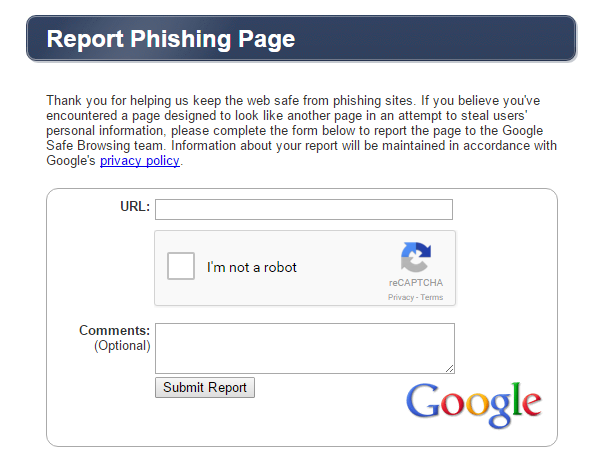
report phishing page

Users can also inform Google of when they detect suspicious advertisements or pages that seem to have been designed to steal information. In fact, any user can make a claim against a phishing page by filling out a simple form.

So, any time that you accidentally download a malicious file without even realizing it, the best option is to have a good antivirus installed which will advise you not to open it. This will help you avoid any potential catastrophes.

The post Google filters thousands of ads to avoid cyberattacks appeared first on MediaCenter Panda Security.
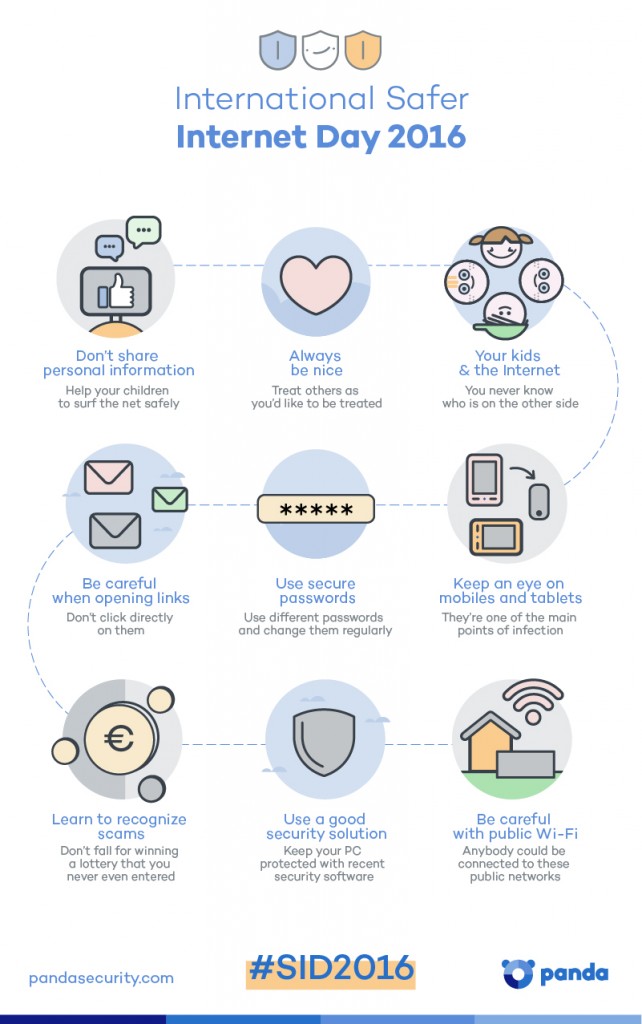
International Safer Day 2016 – Infographic

Panda Security - International Safer Internet Day - Infographic

If you want to share this infographic, here it is the code:

The post International Safer Day 2016 – Infographic appeared first on MediaCenter Panda Security.
Simple tips on how to make every day a Safer Internet Day

safer internet day

Nearly everyone browses the Internet on a daily basis, be they children or adults, and although we work hard on making every day a safe day, it’s never too late to remind ourselves of the possible risks associated with browsing online.

Tomorrow, February 9, is Safer Internet Day and to celebrate it we have compiled 10 tips that you should keep in mind when using the Internet.

Simple tips on how to make every day a Safer Internet Day

  • Never share personal information on social media, instant messaging apps, or chats. You never fully know who is can see these messages so, because of this, don’t accept requests form people you don’t know. Also, try to avoid giving out personal details such as phone numbers, addresses, personal photos, and other private information unless it is someone you know and trust.
  • Always be nice. Treat people online just as you’d like them to treat you. If you see any comments or actions that you don’t like, mention it to your parents, teachers, or someone you trust in – they’ll know what to do. Don’t participate in this kind of behavior, even if you’re not the victim.
  • Say to your children that if they have doubts about surfing the net they should speak to you or another adult figure.
  • Be careful with attachments. If you use instant messaging or email then you will know that it is common to get emails or messages from unknown sources with attachments or links. It’s best not to click on these links, but rather type the address into the address bar. Also, be careful when accessing trailers for films, ads or downloading games.
  • Use secure passwords. Having different passwords for different accounts, which you should be changing frequently, is a great way of protecting yourself from cybercriminals. If you detect something odd, report it immediately!
  • Learn to recognize scams. These online methods of deception are well known, but be suspicious if someone tries to convince you that you’ve won a lottery that you never even entered. Your bank won’t ask you for access codes by email, either. A good antivirus is able to detect these threats and, along with some basic security knowledge and common sense, you can rest assured that you can avoid falling for these traps.
  • Security awareness and parental control are best way to be safe online. It’s important that you know the risks that your kids are exposed to online and that you educate them about what to do in certain situations. A good parental control system will help you to ensure that your kids have a safe and fun experience online.
  • Protect your PC with a reliable security solution. By always keeping your PC protected with a modern security software and you can also ensure the safety of all your family online. If you haven’t got an antivirus installed, try out our free antivirus.
  • Be careful with public Wi-Fi networks. Everyone has used these open networks at some point, be it in a café or a train station. Sometimes it isn’t avoidable, so when you do use them be sure to take extra measures to protect yourself. Always look for the lock symbol in the address bar and avoid carrying out any financial tasks.


The post Simple tips on how to make every day a Safer Internet Day appeared first on MediaCenter Panda Security.

When the boss is the biggest threat to a company’s security

boss

Every company works with valuable information about its business what needs to be kept behind closed doors. The employees with access to this information have to be aware of its importance and their obligation is to keep it safe, but what happens is one of them leaves the company?

As we have already drawn attention to on various occasions, few companies are prepared to face this event and the majority don’t take adequate precautions before and after an employee leaves or is fired. In fact, according to a study by Osterman research, 89% of workers keep the user name and password of their corporate accounts after leaving their jobs, and nearly half admit having used these to access their old accounts.

If this happens with any member of the team, no matter how low-ranked they may be, imagine the potential for problems if an executive is fired – someone who occupies a high-ranked position with access to lots of sensitive information.

The main risk is that the company’s intellectual property could end up in the hands of others, something which, unfortunately, happens all too often. This example explains it better – in 2014 the startup transport collaborative Lyft went to court after its COO left the company to join its main rival, Uber.

He took with him confidential information relating to the business and this serves as an example for all businesses that these situations are real and they need to be prepared for them.

mouse

It might seem like a job for the legal department, but IT security also plays an important role in all of this in two distinct ways: it avoids the theft of intellectual property and, in the worst of cases, gathers evidence to show that such a theft happened in the first place.

When the thief is the boss, however, it is usually a little more complicated. It’s difficult to avoid them having passwords to different services and tools, while also being hard to stop them using their own devices to access them from anywhere they want (especially if it is their job to resolves problems relating to various different departments).

Taking away access as soon as they walk out the door (and getting back the company mobile, tablet, and computer) would be of little use as they’d already have had multiple opportunities to copy valuable information. The best thing to do is remind them of confidentiality clauses in their contracts that they signed when joining the company, and to complete an exhaustive review of their activities during their final weeks.

tie

It’s normal that businesses, especially larger ones, do this before hiring: reviewing previous records, asking for recommendations, rigorous selection processes, etc. However, these measures are hardly ever taken into consideration when someone leaves a company.

With an eye on making this task easier, there is a dedicated software that allows for the monitoring of computers to avoid leaks. Panda Security has developed the ideal solution for large businesses, Adaptive Defense 360, which combats information theft and both external threats (malware, for example) and internal ones (an employee copying files onto a USB from the cloud).

When it comes to a high-ranked employee who decides to switch over to the competition, both prevention and reaction are more difficult. Sometimes the boss can be the biggest danger to a business, even if it isn’t immediately obvious.

The post When the boss is the biggest threat to a company’s security appeared first on MediaCenter Panda Security.

WhatsApp now allows group chats of 256 people

whatsapp groups

Yep, you’ve read that correctly. From now on you can have group chats with up to 256 people at a time. Can you imagine that? All of those people chatting at once… just think of all the notifications you’ll have of you leave your smartphone down for a few minutes!

WhatsApp groups are practically unavoidable if you use the application: there’s usually one for family, another for work colleagues, one for family matters, and even ones for parents of classmates. Everyone uses them and, because of this, the messaging app has continually increased the number of members allowed per group. At first, group chats were limited to just 15 people, later it increased to 50, then 100, and now it can be as many as 256.

Well, if 256 seems like a lot to you, imagine using Telegram – their App sllows for 1,000 users per group. Madness, no?!

How to silence WhatsApp groups

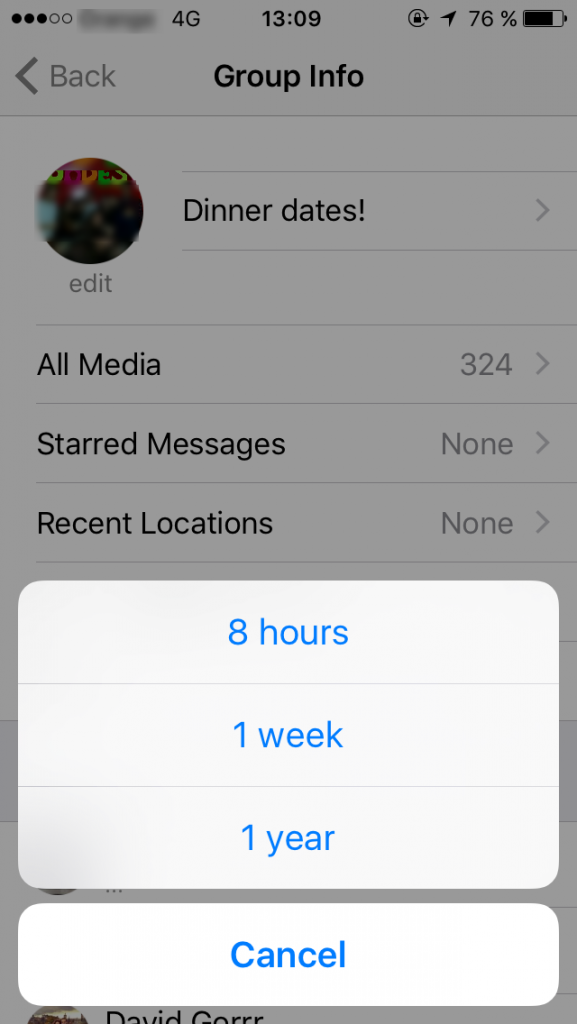
If these chat groups seem a little overwhelming then you know the solution – you can always silence a chat group for a period of either 8 hours, a week, or even a year, depending on how much it bothers you. So, if you do choose to put a chat on silent, just make sure to check on it every so often in case you’re missing out on some juicy gossip!

Don’t forget that it is also easy for all types of tricks and scams to spread through these chat groups, so be sure to control what you send and be suspicious of what you receive. Most of all, if you get shortened links, surveys, or gift cards sent to you, be very sceptic.

mute whatsapp


WhatsApp and its 1 billion users

Just this week saw WhatsApp announce that it now has more than 1 billion active users each month. This figure makes it the leader in the mobile messaging market, far ahead of rivals such as Telegram or Line.

What do you think? Will you be capable of managing a group with so many people?

The post WhatsApp now allows group chats of 256 people appeared first on MediaCenter Panda Security.

Employees’ selfies and the dangers of cybercrime for critical infrastructures

selfie kitchen

When one works in a power plant, a water treatment facility, a gas plant, a recycling center, or any other critical infrastructure for a country, it’s essential to be extra careful about what you post on social media.

It might seem to be common sense, but IT security experts have raised worries over the amount of selfies taken by employees in these centers, which have started to appear across different sites such as Facebook, Twitter, and Instagram.

With the recent blackout which affected more than 80,000 people in Ukraine still fresh in the memory, the proliferation of selfies that could reveal security secrets in these installations could become a problem that needs to be stamped out immediately.

IT systems that could be compromised as a result of worker indiscretion are named SCADA – the initials are taken from Supervision, Control and Acquisition of Data – and they are continually used to manage all types of industrial processes, which means that their security is extremely important.

dangerous selfie

They allow you to obtain information from anywhere, in real-time, about the automated operations in a factory (or a gas station, for example), in such a way that the decision making and remote management of these installations is easy and economically sensible.

On the other hand, however, if a cybercriminal manages to enter the systems, especially if he manages to take control or alter the function of the machines, it could result in unrepairable damage.

Businesses, governments, and professionals from the sector are growing more and more aware of the risk that these infrastructures are exposed to. This is usually because they fear that the weakest link in the chain, which is always a person, could commit a silly mistake with their smartphone.

Just as has been discussed dedicated forums, IT security experts in the industrial sector have been able to locate these selfies, and other things, on Facebook and Instagram in which it is possible to see valuable information on the SCADA systems.

Furthermore, they have also discovered panoramic photos and virtual tours of the control rooms and the critical infrastructures, which are available for anyone to view, on the companies’ websites. This could allow someone with malicious intentions to extract information relating to employees, shift patterns, etc.

In fact, the German security expert Ralph Langner discovered that an image of the Natanz nuclear plant in Iran, distributed by president Ahmadinejad’s own press office, had been used by the creators of Stuxnet malware to attack the country’s nuclear program.

The image, which was happily shared by the Islamic regime, showed a control monitor for the SCADA system that was controlling its new uranium centrifuges. A real treat for their western enemies!

The post Employees’ selfies and the dangers of cybercrime for critical infrastructures appeared first on MediaCenter Panda Security.