Category Archives: Panda Security

Panda Security

US man jailed for massive SMS spam operation – How to avoid becoming a victim

From offering discounted sunglasses (designer label, of course) to gift card for well-known stores, the world of SMS spam is one that continues to trick unwitting victims. You’d think that by now we would all be aware of the scams behind these messages which we receive on our mobile devices, but with these spammers becoming increasingly desperate to make a quick buck, they are using all manner of tactics to dupe their victims.

Luckily, the authorities are taking spam campaigns seriously. Just this week a US judge ordered Phillip Fleitz, a 37-year-old native of Pennsylvania, to 27 months in federal prison for his role in a massive spam campaign.

smartphone

Over the course of nearly 2 years, the spammer sent millions of illegal spam messages to US and international cellphones and computers. With the help of two accomplices, Fleitz managed to earn between $2,000 and $3,000 per month by violating a 2003 law designed to protect cellphone and computer users from unwanted marketing and pornography emails and text messages.

The trio carried out their attacks by operating computer servers from China and using them to infiltrate the personal computers of millions of people worldwide. Naveed Ahmed, one of the accomplices, wrote a program that helped match cellphone numbers with their carriers. That allowed the scammers to bombard the phones with unsolicited messages.

The computer and text-message spam both included internet links. Those who received the text messages were told they had won gift cards that could be accessed by clicking on the links. In reality, those who followed the links were directed to web pages controlled by internet “cost per action” networks – marketing companies that collect email addresses and other personal information. Such companies are legal but using spam to drive traffic to them is not.

So, with this in mind, what can steps can you take if you receive unwanted spam on your cellphone? You’re in luck, as the latest Apple and Android cellphones allow users to block spam with relative ease.

iPhone users

If you have iOS 7 or later installed, open the spam message and click on contact, then on the “i” button that appears. A small contact card, mainly blank, will pop up and all you need to do is scroll down and select “Block this contact”.

To check out all of the numbers and spammers that you have blocked, you can view them in your message settings by scrolling down to Blocked.

Android users

For users of this operating service, blocking spammers is a little trickier but can still be done. First of all, the inbuilt messaging app doesn’t allow you to block anybody, so you’ll need to get an app from the Google Play store (remember to only download apps from official or trusted sources).

The apps available offer different forms of spam-blocking assistance – from ones that allow you to create a blacklist of contacts to others that automatically flag suspicious messages as spam.

If your Android device has been updated to KitKat (you can verify this by clicking on the “About Phone” section of your settings; if it’s 4.3 or above then it’s on KitKat) then you have it a little more complicated again. However, you can install Google Hangouts which not only sends and receives standard SMS messages, but lets you place spammers on a “blocked” list.

The post US man jailed for massive SMS spam operation – How to avoid becoming a victim appeared first on MediaCenter Panda Security.
Facebook strengthens its app for Android, allowing for anonymous browsing with Tor

smartphone facebook

It’s been a while now since Tor became the go-to option for those who wanted to ensure their privacy while browsing online. If you still haven’t heard of it, it’s a network that allows you to browse the Internet anonymously, integrated by nodes all over the planet. Each one of this points is actually a computer belonging to a member of the project, which was launched in 2002.

Every one of the machines that is connected to this network sends information securely – all communications are encrypted and the messages pass through random nodes, which makes it very difficult to intercept them or find their origin.

Luckily for lovers of this system, Facebook has announced that it will add Tor to its Android app, which means that those who use it can surf the social network in a more secure manner.

facebook tor

The first steps towards the integration of Tor were seen in 2014, when Facebook launched its onion address. It was an historic move which allowed Tor users to connect to the platform anonymously. “It provides end-to-end communication, from your browser directly into a Facebook datacenter,” explained Facebook.

Back then, Facebook also mentioned that they would enable a platform with the same .onion extension for those that chose to connect via their mobile device.

In little more than a year, the number of people who use the Tor service on their computer to enter Facebook has exploded. This, along with the numerous petitions that Facebook received requesting new security features, has brought about this enabling of the system for smartphones.

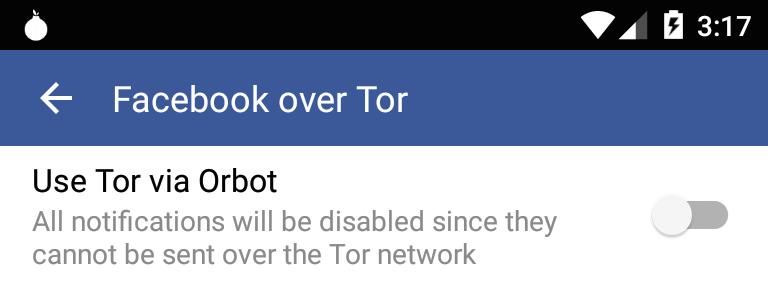
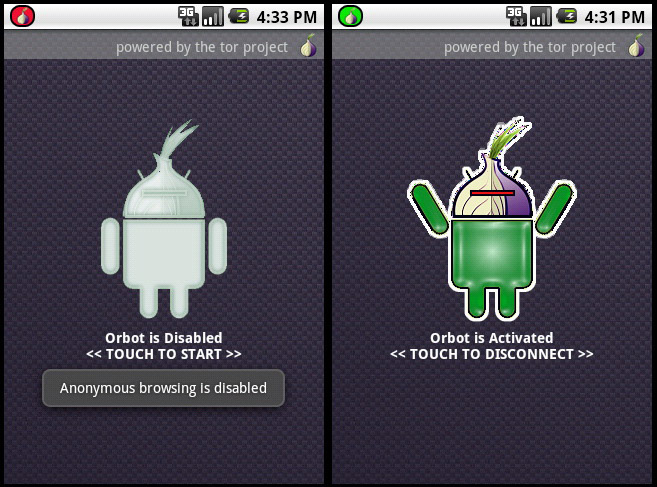
Accessing Tor from a mobile device is done via the Orbot app, which allows the user to send encrypted information via the anonymous network every time that they connect to the Internet on their mobile.

android tor

Therefore, whoever wants to enjoy this new service will have to install Orbot on their device. After that, they must enable access to this tool in the settings of their Facebook application so that it can open via Tor.

“We’re releasing this feature over the next few days to seek feedback which will help us create a great experience for using Facebook over Tor on Android,” claimed Facebook on their website.

The project, as they’ve indicated, started thanks to an intern who worked at Facebook for a summer. The Care and Protection team based in London continued with the initiative, which will soon be available to try out by all of us.

The post Facebook strengthens its app for Android, allowing for anonymous browsing with Tor appeared first on MediaCenter Panda Security.
How can I stop Cryptolocker from accessing my information?

It’s likely that you’ve asked yourself, on more than one occasion, how you can avoid a ransomware from gaining access to your private information and encrypting all of the files and data stored on your devices.

data shield

As we always say, it is fundamental that you keep your operating system updated to avoid any security issues. It’s also wise not to open emails or attachments from unknown sources, and avoid browsing on insecure websites. We also can’t forget the need to have a good antivirus or security solution installed and updated. This can help protect our data.

Our new line of products that include Panda Internet Security 2016, Panda Global Protection 2016, and Panda Protection Service offer an additional security layer against malware that tries to access sensitive user information (to steal, erase or encrypt said information), such as the infamous Cryptolocker. In this case, the encryption is done using a unique, private key for each computer that stores on its servers, thus making it hard to recover the data even if the malware is disinfected and eliminated from the PC.

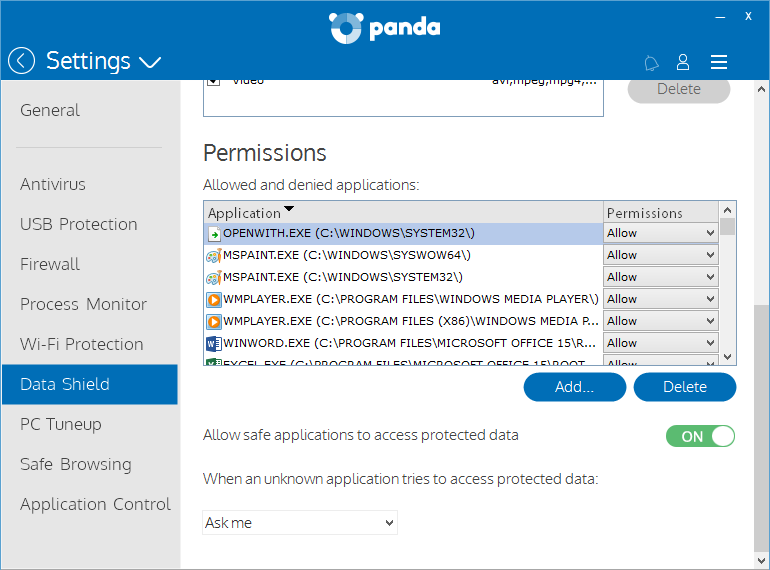
This data protector allows the user to define the location of the data to be protected and to set the access permissions granted to installed programs. This means you can keep your most valuable information safe, even if a ransomware gets into your computer.

The first time you open the interface you will see the assistant that will allow you to activate Data Shield.

datashield

With this feature, you can define which programs can access your files and give permission to application so that they too can access your data.

This option is activated by default and grants access to the files for all applications that Panda considers secure. Furthermore, you can establish which action is carried out when an unknown application accesses sensitive information: Deny or Ask Me.

data

How to stop a Cryptolocker accessing your computer

  • Use common sense.
  • If you receive a message from an unknown source with an attachment, don’t download it.
  • Be careful when browsing the Internet. Avoid downloading programs from suspicious websites.
  • Even if you know the source, take the necessary precautions before opening these files.
  • Neutralize keyloggers. These programs are used by cybercriminals to capture and steal your passwords. Use a virtual keyboard to enter your most sensitive access codes such as those for your bank or email account.
  • Finally, and most importantly, protect yourself with an updated antivirus, separate from your operating system (Windows, Mac, or Android).

We also remind you of the importance of having a good backup system for your most important files. It will help you to minimalize the damage caused not just by malware infections, but also if you have problems with your hardware or other issues with your computer.

The post How can I stop Cryptolocker from accessing my information? appeared first on MediaCenter Panda Security.
How to deal with Internet Explorer’s slow death without putting your computer at risk


At this point, if you are confused by the different versions of Microsoft products that still have updates and those that don’t, it’s perfectly understandable. There has been a lot of back and forth over the past few months, but it is important that you take a few minutes to understand the situation and check that you have the right software so that your computer remains secure.

On January 12, Bill Gates put in motion the end of Windows 8 and all versions of Internet Explorer older than version 11. There are, however, some exceptions and special cases that we will look at in detail later. The reason behind taking these older versions out of circulation is that Microsoft wants to replace them all with its new product, Edge, but it can’t do it overnight, thus it slowly rendering older versions obsolete.

What you need to know is how the changes will affect you if you are a home user or head of IT at a small company. Don’t fear, however, as it’s not as complicated as it may seem.

computer

Internet Explorer for home users

You have a problem if your computer runs on Windows 8, – you will have to update to either 8.1 or 10 – or if you’re using Windows 7 and your version of Internet Explorer is older than version 11.

If you find yourself in the first scenario then the solution is easy. Updating to version 8.1 (which is done via the Windows Store, not Windows Update) and version 10 is free, and when you update the operating system you will no longer need to worry about Internet Explorer – if you opt for version 8.1 you will automatically have the latest version, and if you go with version 10 you’ll have Microsoft’s new browser, Edge, by default.

If your current operating system is Windows 7, it’s possible (although not very likely) that you fall into the second category. You needn’t worry if the latest updates are active on your computer, but it’s never a bad idea to have them just in case.

To carry this out, open Internet Explorer and press ALT + Y on the keyboard. This will bring up the menu bar and you should then click on “Help”, followed by “About Internet Explorer”, so that another screen will pop up where you can test the version that you have installed.

internet explorer

You don’t need to do anything if, as shown in the image, you have Windows 11 installed. If it says that you have any other version, you must update your browser via Windows Update.

The final possibility is that your computer’s operating system is even older, such as Windows Vista or Windows XP. If it is the latter, you should check it out as this version hasn’t been updated since April 2014, so it’s high time you sorted that out.

If you have the controversial Windows Vista then you are the exception to the rule – Microsoft will continue to publish patches for Internet Explorer 9, the final browser to work on this operating system, until April 2017.

laptops

Internet Explorer for businesses

Everything that we’ve said above for home users is also applicable for corporate users, although, unfortunately, there are some cases in which an update to Internet Explorer 11 or Edge isn’t possible.

Some companies stick with outdated versions because the apps that they use daily don’t work with other browsers. If you are in charge of a technical department at one of these companies and it’s not possible to change the tools that you’re working with, then there are a few precautions that you can take to minimize the consequences of not updating.

If you have no other choice but to use an outdated, and insecure, version of Internet Explorer then you need to follow these tips:

  • Install the latest patch available (the one that was published on January 12), which corrects some critical vulnerabilities that allowed for the execution of remote code via the browser.
  • Reduce privileges on computers which will continue to use the old version of Internet Explorer. If they haven’t got administrator permission, then a lot of the attacks that they could face will be rendered useless.
  • Only use the computers with outdated browsers for their apps that can’t be run any other way. Browse and carry out other tasks on different computers.
  • If there is no other computer available, install a second browser (Google Chrome or Mozilla Firefox, for example) on the computer with the outdated software. Set up the firewall so that Internet Explorer can’t access more than the page of the application that needs to be used on it.

By following these steps you will reduce the risk, but you aren’t completely secure – you will still be using a computer that is exposed to all types of threats. A good antivirus solution can protect you from many of them, but it is still essential that you work with updated software.

The post How to deal with Internet Explorer’s slow death without putting your computer at risk appeared first on MediaCenter Panda Security.
How your smartwatch could give your credit card PIN away

apple watch

They’re the latest must-have in the world of wearable devices, but they don’t come without flaws – cybercriminals are eyeing up smartwatches as the next devices to attack.

Keeping in mind that the majority of smartwatches currently on the market are carrying some sort of vulnerability (even the popular Apple Watch has been highlighted as potentially worrying for user privacy), the growth in sales of these devices is music to cybercriminals’ ears.

Your credit card PIN at risk

A vulnerability recently discovered by a student at the University of Copenhagen has set alarms bells ringing. Tony Beltramelli used his thesis to show that a smartwatch is all that is needed for a cybercriminal to discover your credit card’s PIN.

We are all aware of the amount of malicious apps that are available for smartphones, however these new wearable gadgets are also the focus of cybercriminals looking to trick unwitting users with applications designed to steal sensitive information.

Beltramelli, who carried out the test on a Sony SmartWatch 3, managed to extract data from the device’s gyroscope and heart-rate monitor by using one of these malicious apps, and later sent the stolen information to a server.

Just as the student did, a cyberattacker could access the information of these sensors and analyze them until they get something truly valuable – with an accuracy of 73%, the gyroscope and the heart rate monitor can tell us which buttons the user has pressed on a typical ATM keyboard using the hand which the smartwatch is worn on.

On larger keypads, the accuracy is different – the system created by Beltramelli is capable of guessing a PIN in 19% of cases. “This means that an attacker has a wide range of devices available”, explains the student.

This make the sensors a double-edged sword, as not only do they make the watch more useful and appealing, but they could end up costing the owner more than they bargained for.

smartwatch

Beyond following typical security recommendations such as only downloading applications from trusted sources, a possible solution might be that we avoid wearing our smartwatches on the arm of the hand that we usually use to carry out tasks – so all left-handed people should wear it on their right, and vice-versa. This small change could save you a lot of bother further down the line!

The post How your smartwatch could give your credit card PIN away appeared first on MediaCenter Panda Security.

27% of all recorded malware appeared in 2015


pandalabs

PandaLabs, the laboratory of Panda Security, both detected and neutralized more than 84 million new malware samples throughout 2015. This is nine million more than the year previous, according to the corresponding data. The figure means that there were 230,000 new malware samples produced daily over the course of the year.

Last year saw the greatest number of cyberattacks recorded around the world, with a total of 304 million samples, which means that more than a quarter of all malware samples ever recorded were produced in 2015 (27.63%).

It was also a difficult year for certain multinational companies who suffered large scale data theft and interference on their IT systems.

“We predict that the amount of malware created by cybercriminals will continue to grow”, says Luis Corrons, Technical Director of PandaLabs, “we also can’t forget that the creation of millions of Trojans and other threats corresponds to the cybercriminals’ needs to infect as many users as possible in order to get more money”.

Most powerful malware of 2015: Trojans and PUPs.

In 2015 we saw that Trojans, PUPs (Potentially Unwanted Programs) and distinct families of Cryptolocker spread fear among larger businesses worldwide through massive attacks and the theft of thousands of confidential files.

Trojans continued to be the main source of malware (51.45%), comfortable positioned ahead of the rest of the collected samples: viruses (22.79%), followed by worms (13.22%), PUPs (10.71%), and cases of Spyware (1.83%).

Apart from all harmful Trojans, Cryptolocker (a type of ransomware) was the main protagonist of cyberattacks throughout the year. According to Corrons, “Cryptolocker is the best bet for cybercriminals, as it is one of the easiest ways of getting money. Also, it has shown itself to be very effective, especially in the case of businesses that don’t think twice about paying to recover their stolen information”.

Biggest infections caused by Trojans

Among all types of malware that cause large infections worldwide, it was Trojans that had the greatest rate of infection (60.30%), albeit 5% down on the figure from 2014.

PUPs were also particularly harmful, with nearly a third of infections resorting to trick techniques to fully enter the targeted PCs, far ahead of Adware / Spyware (5.19%), worms (2.98%), and viruses (2.55%).

China remains one of the most infected countries in the world

Last year was notable for being the year with the highest rate of infections caused on computers. On a geographic level, China was the country with the most infected computers (57.24%), a figure that was nearly 30% more than in 2014. Taiwan was next, with an infection rate of 49.15%, followed by Turkey (42.52%). These three countries remain at the top of the infection rate rankings, just as they were in 2014 and 2013.

world map

Other countries that registered an infection rate that was above the global average included Colombia (33.17%), Uruguay (32.98%), and Spain (32.15%).

Nordic countries register the lowest rate of infection

According to the information gathered regarding countries with the lowest rates of infection, nine of them were in Europe, with Japan being the only country not located in the continent.

The Nordic countries occupied the top positions: Finland was ahead of the rest, with a rate of 20.32%, followed by Norway (20.51%) and Sweden (20.88).

The post 27% of all recorded malware appeared in 2015 appeared first on MediaCenter Panda Security.
New year, new job – but beware of fake offers looking to scam you

job search

January is traditionally a month of change for most people, be it starting new fitness and diet regimes, promising to travel more, vowing to make better use of their time, or even just giving their house a good clear out. For others, however, the beginning of a new year is a time of dramatic change, with many taking to the internet in search of a new job.

A recent survey carried out in the UK by employment website Indeed found that over 30% of employees were actively looking for new employment as part of their new year goals, while a further 11% of respondents said that finding new work was definitely on their list for 2016. Considering the increase in people scrambling for new career opportunities at this time of the year, it isn’t surprising that some criminals have seen this as a chance to take advantage of unsuspecting victims.

False offers that demand payments

One such example of a false job offer discovered in the United States required the candidate, who having successfully passed the first phase of the selection process, to log onto Yahoo Messenger for another interview. It was during this stage that she was told that to be contracted for the role she would need a number of software programs, but that the company would provide them for her if she passed them on her bank account information.

After becoming suspicious at this point, the potential candidate did some investigating online and discovered that, despite the company existing, scammers were using its name to pull off cybercrimes and that the job offer was in fact bogus.

Another such scam was spotted on Facebook, with cybercriminals yet again using the name of a reputed company to post false job offers. The process was similar to the previous one, with supposed employer requesting that applicants send payment as part of their application.

How to spot bogus job offers

If you are applying for a job offer online, here are a few quick tips to help you spot an offer that might just be too good to be true:

  • Never part with your money! No matter how good the job offer is, nobody should have to give money to a potential employee when being offered a job.
  • Don’t give out bank information during interviews. There is no need for a potential employee to have access to this information for an interview.
  • Try to online use reputed job listing websites. If you are in doubt, double check on the company’s website to see if it is listed there. Many of these scams use the names of legitimate companies to trick people.
  • Be cautious with potential new contacts on LinkedIn, as there has been an increase in fake profiles looking to steal user information.
  • There is only a cellphone supplied for enquiries as opposed to a direct landline.
  • The company is using a free email service for correspondence such as Gmail or Yahoo. Legitimate job related emails should come from corporate accounts.
  • If you are offered a job just on the basis of your CV, be suspicious. Most recruitment processes have a number of stages and an interview is definitely one of them.
  • Be wary of offers for jobs that you never applied for.
  • Finally, be aware of job offers that are too good to be true. If they’re offering you the chance to work from home and earn a huge salary, then it’s more than likely a scam.

By keeping your wits about you when looking for a jobs online, and following the tips above, you can avoid being a victim of identity theft and fraud. Remember, if it looks too good to be true, then it likely is!

The post New year, new job – but beware of fake offers looking to scam you appeared first on MediaCenter Panda Security.

The Nigerian Skype scam is back to try and trick us once again

It’s possibly one of the oldest and least plausible scams out there, but the infamous Nigerian scam is still a popular method used by cybercriminals as they look to that advantage of would-be victims online.

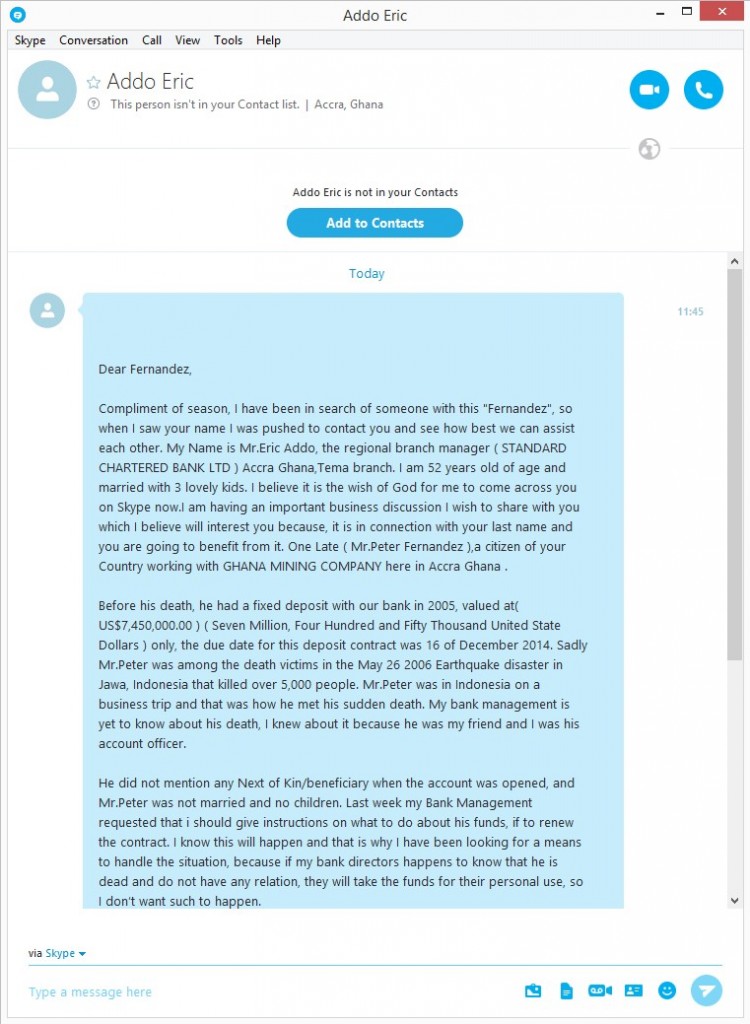
What was once an email-based scam has since taken to Skype, where one of our colleagues recently received the following (and strangely worded) message via the communication service:

skype scam

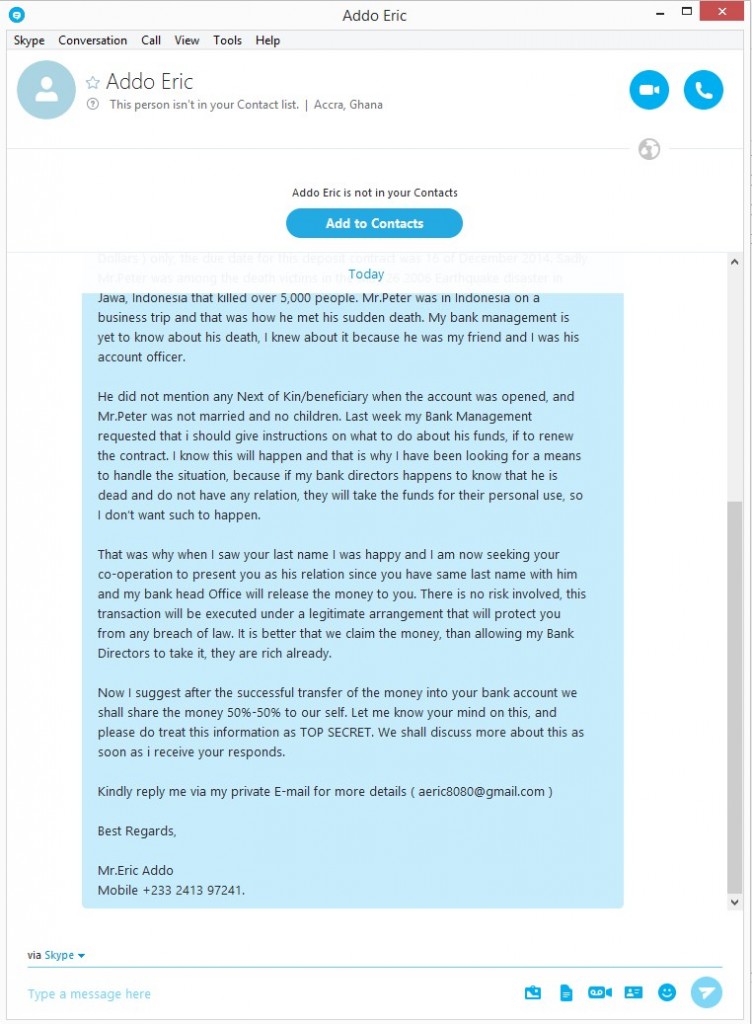
As you can see, they tell you that a victim of an Indonesian earthquake has died, leaving behind a princely sum of $7.5 million in a bank account. Luckily for our colleague, his surname, Fernández, is the same as the victim’s. This is a sufficient a link as needed for the earthquake victim’s friend to get in touch with his generous offer.

skype fraud

What the scammer proposes is that the sum of money stored in the bank account be shared equally between both parties, although the operation must be done under utmost secrecy and without anyone else knowing about it. In order or the deal to be carried out and for more details on how the transfer will be done, our Nigerian friend needs our colleague to get in touch with him.

It’s blatantly obvious that there is no money to be exchanged in all of this, and that there was never any earthquake victim to begin with. These scammers simply contact us with the hope of getting our private information and to try access our bank accounts.

So there you have it – never give out your personal information online and never carry out banking transactions that are related to prizes, inheritances, or lotteries.

The post The Nigerian Skype scam is back to try and trick us once again appeared first on MediaCenter Panda Security.

How to spot if an ATM has been tampered with

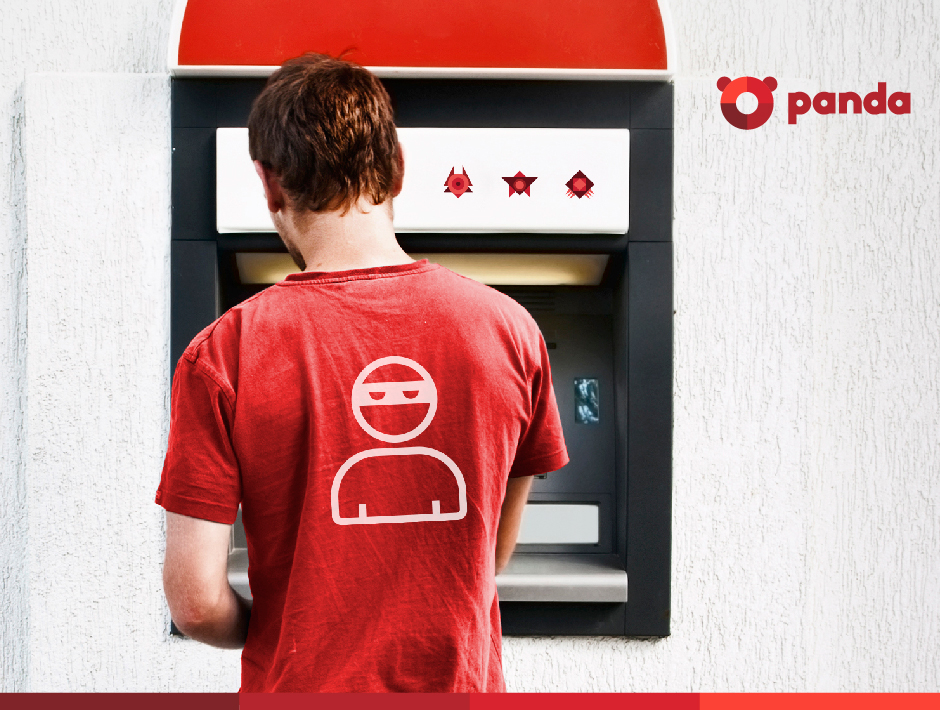
Panda_Security_Ciberdcriminals_atm

After a period of relative calm, ATMs have fallen back under the spotlight of cyberattacks. The change from traditional credit and debit cards (those with the magnetic band) to integrated chip cards, which are more difficult to copy, along with changes to ATMs themselves, has caused a rush among cybercriminals to take advantage of current vulnerabilities before they disappear for good.

As a consequence of this, there has been a marked increase in the number of illicit activities of this sort in recent months. According to FICO, a security company that monitors 65% of all ATMS in the United States, the first four months of 2015 saw the highest number of attacks on cash machines in over twenty years.

The solution to this increase in attacks isn’t to become alarmed and avoid using ATMs, but rather use them with caution and follow a few simple pieces of advice.

Try to guess if an ATM is dodgy

The most common modification technique used with these machines is a method known as skimming, which consists of installing a small device in the slot where the card is inserted which copies the information on the magnetic band. This information is later used to make duplicate cards of to carry out online transactions without the victim knowing.

Knowing that a machine has been tampered with isn’t easy as the skimming devices are usually well hidden. However, there are some things to look out for when checking to see if it is safe to withdraw cash. First of all, take a look at the card slot and the area around it – if you spot any marks or scratches then it’s likely a device has been planted there. Also, check that the little light that usually operates on the card slot is working.

If the light is turned off or you suspect that something is amiss, then we advise you not to use that ATM. Cancel the transaction (if you have already started it) and don’t try to remove the skimmer yourself (advise the staff in the bank instead).

The following video will help you to look for signs of skimming devices:

Hide your PIN

If they’ve managed to get your card information and want to clone it or use it to make online purchases, the cybercriminals will also need your PIN, which they can get in a few different ways. The first, and most obvious way, is by looking over your shoulder while you’re at the machine. This is why it is important that you cover the keypad with your hand when entering your PIN, as it will also avoid your code being picked up by a camera hidden on the machine.

Make sure that you have a PIN that is difficult to guess (don’t use simple combination such as 0000, 1234, 1111, or 999, nor ones based on dates of birth or telephone numbers) and never have it written down. For your own security, it’s best that you just memorize it.

Before taking out cash, take a look around you and see if there are any suspicious looking characters in the area. Never accept any help from a stranger during a transaction, no matter what happens. If your card becomes stuck in the machine, or the cash doesn’t come out, don’t accept any assistance, as it could all be part of a trick set up by the attacker. If you find yourself in this situation, the best thing to do is call the bank and remain at the ATM, turning down any offers of help from strangers.

Panda_Security_Security_ATM

Choose the right ATM

Whenever possible, use an ATM that is inside the bank rather than one that is on the street. Try to avoid bank machines that are located in transport hubs and shopping malls, as these are easy targets for criminals.

According to FICO, attacks on machines placed inside banks have increased by 174%, which is alarming in itself, but pales in comparison to the 317% increase in attacks targeting other bank machines. Wherever there is a lot of light, security cameras, or people passing by, is where it is least likely that the criminals will try to tamper with a machine.

Finally, always keep a copy of your receipt from the ATM and keep a check of movements in your account. If you spot anything suspicious, get in touch with your bank immediately so that they can resolve it. Some banks have a maximum time limit to resolve these problems, so don’t let too much time pass.

The post How to spot if an ATM has been tampered with appeared first on MediaCenter Panda Security.

10 ways to keep your iPhone safe in 2016

iphone-safety-panda-security

It’s not likely to have featured among your list of New Year resolutions, but it is definitely one you should belatedly adhere to (especially if you received one of Apple’s phones this Christmas): making sure your iPhone is safe from harm.

A smartphone is a bountiful source of personal information such as photographs, contacts, and even back details. This means that cybercriminals are increasingly eyeing them up as ways to take advantage of unwary victims. Even though some of the most basic security measures are very easy to follow, many of us forget to implement them, and this leaves us at risk. This is why we’re going to highlight the easiest ways for you to keep the information stored on your iPhone safe from criminals.

1- Secure identification

One good feature of new Apple devices is that you can choose a method of authentication that isn’t a traditional password. The devices come with biometric sensors installed on their screens which recognize fingerprints and allow the user to unlock and access their smartphone.

You can also opt for an access code that is longer and more complex (and harder to guess). Make use of the six digits that are offered – you’ll only need to remember it if the biometric system fails five times or if you haven’t used the device in two days, although it will help to make things harder for cybercriminals.

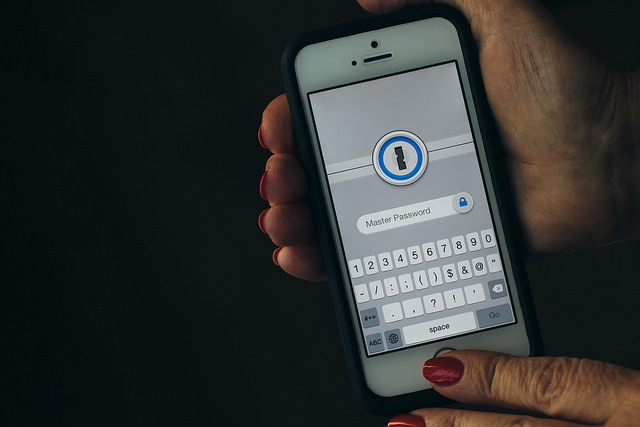
iphone-passoword-panda-security

2- Hide information from the screen

What’s the point in having an authentication system if you leave information available on the screen? It is possible to see WhatsApp messages, emails, and even speak with Siri, all without the need to unblock the screen. If you use the biometric access system then you won’t waste any extra time (in this case, seconds!) in access your notifications, so it’s best that you turn off these unsafe options.

3- Use a two-step verification process

The iPhone currently doesn’t allow for the use of biometric and traditional passwords at the same time, but you can set up your Internet accounts (iCloud, email, banking, etc.) to use a two-step verification process when accessing them.

By doing this, you will have a key and a token, which is basically a code that you will receive to whichever device via text message or your chosen security application, such as Google Authenticator.

iphone-wifi-panda-security

4- Disconnect what you don’t need

If you aren’t using Wi-Fi or Bluetooth then deactivate them. Having them turned on only means that your device will connect to public network which might not be safe, and thus leaves the door open for cybercriminals.

5- Be careful of your online moves

What you get up to online can easily be traced by cybercriminals, even without the need or passwords or the like. You need to make sure that your cookies, browsing history, and other information stored on your browser isn’t available to criminals.  Any browser, even Safari, allows you to surf securely and in your device’s settings you can access the history and erase it, just like passwords that you have saved.

6- Use safe networks

Once you have ensure that your browser is offering you the best security, you need to make sure that the network you choose also does the same. Take care when using public networks and, if you do need to use one, make sure to use a VPN.

7- Set limits for apps

Another area you should keep an eye on is the applications that you are downloading. Make sure they only come from official or trusted sources, and always check what permissions they are asking you for when installing them. If something seems unusual, then don’t allow it.

8- Update regularly

You should update your phone’s operating system every time that your iPhone notifies you. This is a basic security measure, as the updated systems eliminate the risk of detected vulnerabilities causing harm to your device.

9- Manage your accounts well

If you have more than one account synched on your iOS device, keep track of the information that you share between them. It would be even better if you avoided using the same password for both accounts.

10- Make security copies

Even if you have followed all of the previous steps, make sure you are prepared for the worst case scenario. The best way of doing so is to make security copies of all information store don the device. You can also activate the “Find My iPhone” on the iCloud, which will allow you to trace your phone in the event of theft.

The post 10 ways to keep your iPhone safe in 2016 appeared first on MediaCenter Panda Security.