Category Archives: Panda Security

Panda Security

Novena, the computer that doesn’t hold any secrets

novena computer

“Has the computer become a black box, even to experienced electrical engineers? Will we be forever reliant upon large, opaque organizations to build them for us? Absolutely not, we say. And to prove our point, we built our very own laptop, from the circuit boards on up.”

With this statement the creators of Novena have summed up the philosophy behind their unusual project – an open code and open hardware computer. Their objective is to guarantee that the user has total control of its security.

This concept, which is a computer primarily aimed at experts, engineers, and hackers, but also available for any user who wants to take their privacy into their own hands, is available thanks to a successful crowdfunding campaign in which the initial target of $250,000 was surprassed.

“We wanted to be able to inspect and understand as much of the system and its components as we could, so if we came across bugs or other anomalous behavior, we could rely on our wits to figure it out, rather than on the profit-motivated (and often empty) promises of a vendor‘s sales team. As a result, we decided to produce a laptop that was as free as possible of closed-source embedded firmware”, stated those behind the initiative.

For this reason they chose Debian, a division of Linux, as the operating system and went for a type of hardware that was open to being configured freely. This allows the user to download the layouts, documents, and to know in detail how to build or modify the system.

novena pc

The idea is that this community of users can improve the code and each one of the terminal’s components on their own, or even change them for others according to their needs. They can also add them without any problem, which is different to what happens with normal laptop computers, which “are impossible to hack because there is no physical space to place other things”.

“Want to add a pulse oximeter to Novena so you can measure the level of oxygen in the blood running through the capillaries of your finger? Or maybe a barometer so you can monitor your airliner’s cabin pressure? With just a few screws you can mount your customization inside Novena’s laptop case”, claim its creators.

novena wires

Due to this versatility, the computer is pretty different to what we are used to seeing on the market. First of all, it looks different, being quite big and slightly awkward, looking more like a laptop you’d see from the early 2000s. Secondly, it doesn’t perform quite as well as products that run with Windows or Mac OS X, despite being more expensive.

“Admittedly, we did not delude ourselves that we could build a laptop that would be faster, smaller, or cheaper than those of Apple, Dell, or HP,” says Huang. “However, we did set out to build a machine powerful and convenient enough to use every day.”

This is more than enough for the hundreds of people who are more concerned with their security and privacy, as they have already placed their bets on this innovative product as evidenced in the success of the crowdfunding project. Considering the world we live in, following the Edward Snowden’s revelations on cyberespionage, an initiative like this is always welcomed.

“Such transparency is unprecedented,” claim the guys behind Novena. “We hope it will encourage other engineers to follow in our footsteps and help users reclaim their technological independence.”

The post Novena, the computer that doesn’t hold any secrets appeared first on MediaCenter Panda Security.


Universal Children’s Day: 7 Tips to Protect Your Child on the Internet

Universal Childrens Day

Today is Universal Children’s Day, a day set aside for everyone to protect and defend the rights of children. But do we know how to protect children from the dangers involving the Internet and new technologies? It’s important to defend their rights and their innocence in the online world.

The internet is a world known by the children and they must know how to handle it perfectly. Its domain of social networks, search engines, forums… In many instances children have a stronger understanding than that of their parents; therefore they sail along them without excessive parental control. There are many cybercriminals and stalkers who take advantage of this situation to take advantage of children, who are unaware of the dangers they face on almost all occasions.

Pornography, harassment, theft of data and identity… There are many threats facing children online. Through the computer, tablet, online games or mobile phone, children should know how to recognize and react to these situations.

How to Protect a Child’s Online Enviroment

Childrens on Internet

1. Education

It is the cornerstone for training minors, but the dynamic growth of the online world makes it even more essential in this case. However, the little knowledge that parents know about the network causes education to be poor. What is Facebook? What is Tuenti? Should my child chat online with strangers? These are the questions that are asked on several occasions by parents who do not understand this new kind of social environment 2. 0.

Parents must teach their children how to create their online personality, just as they teach them how to behave in real life. There are some values that they should maintain in both worlds: do not to speak with strangers, do not to show an image of you that could be later used against you, do not to give personal details to people you don’t know … Web education and teachers are great the resources that parents who feel lost in this world can use.

2. Control the Hours Spent Online

In today’s work, the social relationships online compete against offline social relationships. All children should learn to disconnect, so they can continue to enjoy a conversation or a real life experience, away from the world 2.0.

3. Show Network Hazards

Sometimes overprotection hinders children from really knowing the threats that face them. Actual cases of harassment, espionage, identity theft, blackmail, etc will happen to those that are less aware threatening situations.

 4. Who Does My Child Talk To?

Parents try to preserve the privacy of their children, but the truth is that you we need to know whose talking and what they’re saying. Just as in real life, a child must know to distrust a stranger who approaches them, they must also learn that these type of people exist and are duplicated within the online world.

 5. Which Photos Should Be Uploaded to the Network?

It’s easy to control the clothing and appearance of children in real life, but do we know what pictures up of them are up on the network? We must remind them of the danger of over-exposure on the Internet. This issue is complicated because in many cases, not even the parents themselves are aware of the consequences of particular photographs up on a social network.

6. Where Does My Child Go Online?

There is certain web content that a minor does not have to see. Since it is impossible to control which pages your child is browsing on the Internet, or what places can be reached via banners and ads, you should install parental control. Through this, the parent may decide which sites are appropriate for their child.

 7. Use Common Sense

Like always, if we teach our children to at least to use common sense, it can used within  2.0 world.

Have you ever faced an online situation complicated with a minor?

The post Universal Children’s Day: 7 Tips to Protect Your Child on the Internet appeared first on MediaCenter Panda Security.
Panda Security reveals cyberattacks aimed at public organizations around the world

PandaLabs, the laboratory of Panda Security, warns in this, its latest quarterly report, that there has been a wave of cyberattacks where the security and information of various governments has been compromised.

A so-called cyberwar between countries has been present in the last few years, however, PandaLabs has detected a growing interest between countries in compromising the security and information of different governments. With that in mind, one of the most important attacks during this period was against the Hacking Team, which controls a multitude of cyberespionage and cyberattack tools for various governments around the world.

“This case is particularly worrying, as they have managed to decrypt the passwords of the most protected of systems”, explains Luis Corrons, technical director of PandaLabs. “The criminals not only wanted to know which clients used the cyberespionage services, which includes intelligence agencies and governments, but also which products they were using”.

This wave of attacks which took place in the third quarter of the year has also seen the Pentagon’s unclassified email system compromised. This was done via a very sophisticated attack which has the hallmarks of having a government behind it. What’s more, the FBI has confirmed that it has detected a growth in interest among terrorists in strategies for launching cyberterrorist attacks against the United States, which appear to be in their planning stages.

More than 21 million new specimens of malware

The PandaLabs quarterly report has also collected information on the number of new malware samples created in this period. Although this time of the year usually sees a drop in new samples, this year there has been 21 million new threats, which is an average of 230,000 per day.

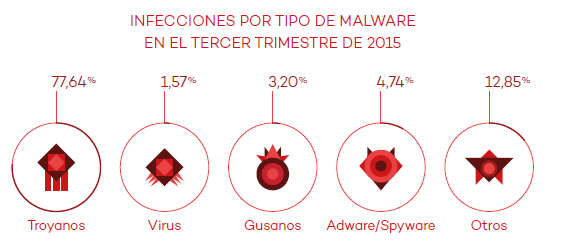
To carry out their attacks, hackers are using Trojans which, with a slight difference, are the most common malware (69.15%) and also cause the most infections (77.64%). They are trailed by traditional viruses (11.34%), and special attention should be given to Potentially Unwanted Programs (PUPs), which are included in the Others category (7.96%).

malware

“Infecting a device that is connected to the Internet with a Trojan is as easy as hiding it in a file that the victim downloads”, states Luis Corrons. “From then on, all of the information on the device, the organizations information, or user passwords are at risk”.

Controlling devices, the most common method

This quarter has confirmed that the Internet of Things now forms part of our digital lives. This also brings new risks and raises the chances of us being victims of an attack. As this Quarterly Report highlights, there are new methods that are being used to put our security at risk.

Attacks continue to be produce don social media and mobile devices, and now we are also seeing the emergence of techniques to compromise the routers of businesses and homes, leaving them under the criminal’s control without the victim even realizing it.

Businesses such as Jeep Cherokee and Land Rover have also seen their vehicles targeted. The latter had to inform its customers of a fault in the software of 65,000 cars which had been on sale since 2013. The fault allows criminals to unlock the doors via the Internet.

China remains the country with the highest infection rate

PandaLabs’ report also shows the infection rates across the world, with a global average of 32.12%. Once again, it is China which is placed at the top of the list, with an infection rate of 45.35%. It is followed by Peru (42.89) and Turkey (40.99).

Other countries that have registered a rate of infection that is higher than the global average include Poland (34.54%), Brazil (34.32%), Slovenia (33.98%), Colombia (33.11%), Spain (32.50%), and Costa Rica (32.22%).

The countries with the lowest infection rates were Norway (20.12%), Sweden (21.33%), and Japan (22.75%).

The complete report is available here. 

The post Panda Security reveals cyberattacks aimed at public organizations around the world appeared first on MediaCenter Panda Security.

Debunking the myths around secure passwords

keyboard

Most websites that we use today generally give you feedback on the passwords that you have created when setting up a new account, rating them either weak or strong. They also advise you to use a mix of upper and lower case letters, along with numbers, to ensure a secure password. However good the advice may be, it doesn’t tell you exactly which order the mix should be in.

By sheer coincidence, it appears that all of us tend to put the upper case letters at the start of the passwords with the numbers taking up the final spaces. This was discovered by a group of security experts who work for Eurecom, an investigation institute based in France.

The results of their study, presented at the last ACM Conference on Computer and Communications Security in Denver, has shown that we are confusing what constitutes a secure password, and that this is putting out privacy at risk.

password

The programs traditionally used by cybercriminals to guess passwords only handled certain combinations until finding the right one.

However, modern methods aren’t based on random guess work. Criminals can now train the software with large lists of passwords – such as the 130 Adobe user passwords that were leaked in 2013 – so as to find the most common combinations. This method allows them to have a greater chance of success in their attacks.

Using this premise as a base, the experts have used a program – similar to the one used by the criminals – to analyze over 10 million passwords. They’ve done this to compile a list of the easiest passwords for criminals to guess.

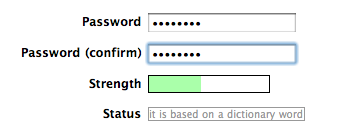
The result is a “predictability index” that they tested on another 32 million passwords to verify its effectiveness. According to the results, the least common passwords were the most secure. This means that it is important to have a long password that includes symbols as opposed to just upper and lower case letters.

password strength

The aim for users from now on should be to create passwords that are not at all predictable, no matter if they include numbers, upper case, or lower case letters. The group behind the study say that passwords should be longer, even adding a few extra words in necessary.

Their investigation should help people to become more aware when creating new login codes which will help to protect their accounts better. Although they can’t guarantee a bulletproof way of creating passwords, they assure us that their method is the safest yet.

On the other hand, the investigators advise that technology companies begin to place less emphasis on passwords as a means of accessing accounts, and that they look at alternative means where possible. There are always new ways of decrypting login details, which makes them ever more ineffective.

The post Debunking the myths around secure passwords appeared first on MediaCenter Panda Security.

WhatsApp calls: Questions over privacy as WhatsApp keeps register of activity

apps smartphone

The undisputed leader in the western world for instant messaging, with over 900 million active users, WhatsApp is synonymous with smartphones and messaging. Despite this, there are constantly new controversies relating to the security of the application and this has led to many doubting the integrity of the service.

From fraud to malicious programs that take advantage of its popularity, to apps that spy on users and other vulnerabilities, there is seemingly no end to the problems which have been raised in a study carried out by investigators at the Cyber Forensic Research & Education Group at the University of New Haven in the United States.

Thanks to developing their own forensic tool, the investigators have managed to decode part of the communication that is established between the servers of WhatsApp and those of the user when there is communication of any sort carried out via the app.

They have discovered that, amongst other things, the popular instant messaging service collects and stores sensitive information about the user and the conversations that they have. None of this appears to be essential to the functioning of the messaging service, so you have to ask why the company does it, and why they haven’t publicly stated this before.

smartphone

The company keeps a record of all calls that we make, who receives them, and their duration. What’s more, the people behind the study believe that encryption keys could also be somehow sent during these communications. Although they haven’t proven it yet, it could be just the tip of the iceberg for new security flaws in the chat service.

The group of experts from the University of New Haven have urged other investigators to use the tool that they have developed in the hope that more security breaches will be unearthed, as there are also fears over similar practices with other messaging services such as Facebook Messenger and Telegram.

Recently we have seen that WhatsApp has taken measures to try and improve the level of security that it offers to its users in order to guarantee their privacy. These steps include the introduction of the famous and controversial double check, specific updates, and a stronger encryption system.

However, to keep the system user-friendly, some recommended security measures aren’t compatible as it would compromise the user experience too much. This difficult balance is what WhatsApp finds itself fighting against as it fights to stake its claim as the largest, and most secure, instant messaging service on the market.

The post WhatsApp calls: Questions over privacy as WhatsApp keeps register of activity appeared first on MediaCenter Panda Security.

The Most Famous Virus in History: Friday the 13th

Friday 13th

Let’s keep remembering and recalling more viruses that have caused the biggest headaches for users.

The virus Jerusalem, also known as Friday the 13th, was created in Israel in 1988 to celebrate the 40th anniversary of the creation of the Jewish state.

To activate the virus, the calendar only had to hit Friday the 13th and all the programs and files that were being used would be infected and eliminated.

There wasn’t a specific method to spread the virus, but that it was done through normal systems like floppies, CD-ROM or attachments in emails.

How It Works?

–  Infects files with extensions of COM, EXE or SYS and increases in size whenever the file is executed

–  It reduces the memory available on the computer

–  Causes your computer system to slow down

–  Every the Friday the 13th the virus is activated, and eliminates computer files that are used that day

How to Fix It?

As always, recommendations for preventing these types of infections are to keep your operating system and antivirus updated.

If you’ve already been infected and suspect that your computer has a virus, we recommend an analysis with Panda Cloud Cleaner to eliminate the infection.

Were you infected by this virus or any of its variants?


More: The Melisa Virus

The post The Most Famous Virus in History: Friday the 13th appeared first on MediaCenter Panda Security.
The Most Famous Virus in History: Friday the 13th

Friday 13th

Let’s keep remembering and recalling more viruses that have caused the biggest headaches for users.

The virus Jerusalem, also known as Friday the 13th, was created in Israel in 1988 to celebrate the 40th anniversary of the creation of the Jewish state.

To activate the virus, the calendar only had to hit Friday the 13th and all the programs and files that were being used would be infected and eliminated.

There wasn’t a specific method to spread the virus, but that it was done through normal systems like floppies, CD-ROM or attachments in emails.

How It Works?

–  Infects files with extensions of COM, EXE or SYS and increases in size whenever the file is executed

–  It reduces the memory available on the computer

–  Causes your computer system to slow down

–  Every the Friday the 13th the virus is activated, and eliminates computer files that are used that day

How to Fix It?

As always, recommendations for preventing these types of infections are to keep your operating system and antivirus updated.

If you’ve already been infected and suspect that your computer has a virus, we recommend an analysis with Panda Cloud Cleaner to eliminate the infection.

Were you infected by this virus or any of its variants?


More: The Melisa Virus

The post The Most Famous Virus in History: Friday the 13th appeared first on MediaCenter Panda Security.

Tor Messenger, the new way of chatting anonymously

tor messenger

WhatsApp, Facebook Messenger, Snapchat, Google Hangouts… the most popular instant messaging services aren’t necessarily the safest, with a low level of protection for personal information and a lack of security for the messages sent within them. Because of this, it’s possible for said information to fall into the hands of others who may have malicious intent.

Without a doubt, these are such widely used services that it is difficult to avoid using them, despite the various problems related to them. What’s more, they are so easy to use and we’re so used to them that it would be more of an effort to start from scratch with an alternative service.

However, now that won’t be necessary as the creators of Tor have unveiled a new chat service that allows you greater security without the need to register with new accounts. The new service will allow you to use, amongst others, Twitter, Yahoo, Facebook Messenger, and Google Hangouts.

tor computer

This new open code software has been designed with privacy as its main goal, but without losing comfort and ease of use which is a characteristic of the popular chat services.

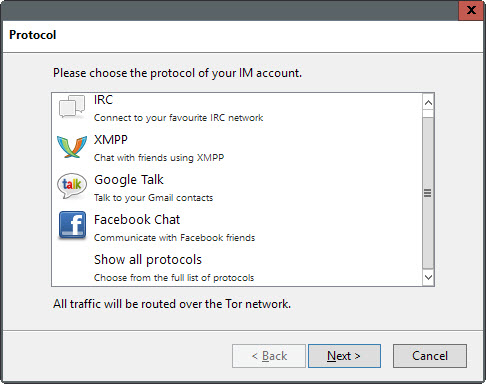
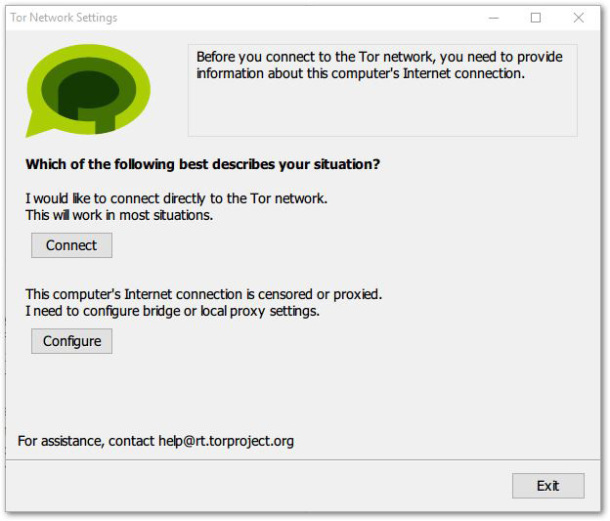
Tor Messenger is already available as a beta version for Windows, Mac, and Linux. Upon entering, the first thing the program does is connect to the Tor network, which can take a few minutes. Once that is completed, all of your messages will be encrypted via Tor’s network.

“It will be impossible to spy on conversations or identify the message partner”, assures one of the program’s creators. To sum it up, you can chat anonymously with your friends on Facebook, Twitter, or Google, and you don’t need to explain to them how the program works. “You can continue communicating once your friends are able and willing to do so”.

tor settings

The tool is still new and needs some tweaking to improve its service, such as the inclusion of certain features in the future like the ability to send and receive messages via Twitter, automatic updates, and the transferring of encrypted files.

The program is based on Instabird, a customer of Mozilla’s chat platform. This allows the user to use various different messaging services at the same time from the same place. The main addition is the anonymity offered by the Tor network, something which despite being offered on other services such as Ricochet and Pond, lacked the convenience of this new service.

Tor chat groups together the best commercial apps and the most secure of solutions, so feel free to chat away knowing that your privacy is protected.

The post Tor Messenger, the new way of chatting anonymously appeared first on MediaCenter Panda Security.

Key Account: How Yahoo hopes to do away with passwords

password

For all we know about creating secure passwords, it’s still a pain that practically every service we use requires one – they’re easy to forget and, if we don’t change them often, a cybercriminal could possibly run amok with them.

So, there are some who believe that traditional text passwords are still necessary, while others think that the future of passwords rests in the hands of emoticons and selfies.

Meanwhile, Yahoo has proposed putting an end to passwords in general, by launching Key Account. As the company explains, this system was borne out of the need to simplify login procedures for users. In fact, with Key Account, it’s now as easy as pushing a button.

The service is already available for Yahoo Mail and allows the user to access the account via their smartphone. All they need to do is click on a button in Key Account and they’ll receive a notification on their smartphone.

This will serve as validation to enter the email account, as it will indicate if the access attempt is legitimate or, on the other hand, if it is suspicious and we suspect that someone is trying to access the account.

yahoo

“It’s safer than a traditional password because once Key Account is activated, even if someone gets hold of the account information, only the user can access it”, explained a spokesperson for the company. So, just like that, the screen of your smartphone has turned itself into a password, and has the ability to block unwarranted access to your account.

Once the smartphone and Key Account are linked there is only one problem and that is if your device is stolen. In this case, Yahoo has established a system that will allow you to verify your identity via email or an SMS that is sent to a different number.

For now, this new method of access is only available on Yahoo’s email platform (from which you can also access Outlook, Hotmail, and AOL) and it’s hoped that by the end of the year Key Account can be used on other services, such as Tumblr.

This is the second attempt that the company has made at making passwords obsolete. In March they created a system of “low demand” and temporary passwords that the user didn’t have to memorize – all they had to do was request it and Yahoo sent it to their phone via SMS. However, it seems that the company has decided to bet on a system that is safer than a text message.

So it seems that traditional passwords are on the way out. With any luck, it won’t be long before we can forget them forever, without compromising our security.

The post Key Account: How Yahoo hopes to do away with passwords appeared first on MediaCenter Panda Security.

6 steps to make your Viber more secure

VIber

Thanks to the advent of smartphones, we no longer have to worry about going over our message limit, or sending the same message to different people. Nowadays there is a large selection of different messaging apps to choose from, which allow you to send as many messages to as many people as you like, including group messages, all for free. Not only that, but you can freely send videos, pictures, and even share your location with others for no cost.

Depending on where you live, the most popular messaging app could be WhatsApp or Kik, Telegram or Voxer. Another extremely popular app is Viber, which has over 100 million active monthly users from a total of 280 million registered users. The messaging tool, which was launched in 2010, is available for both iOS and Android and allows you to have both video and audio chats.

Of course, as with all messaging apps, you need to make sure that what you share is safe and secure, so we’ve put together a few simple steps to ensure your data can’t be accessed.

6 steps to make your Viber more secure

1. Change your online status

This may seem like a rather simple step, but there’s no need for your contacts to know every time you open the app to read an old message. In order to hide your online status in Viber, go to the settings section, select “Privacy” and untick “Share ‘Online’ Status”.

2. Make Viber profile photo hidden from unknown users

Having a profile photo on Viber helps your contacts recognize you quickly and easily, but you can just as easily keep it hidden from unknown users. All you need to do is open “Privacy”, choose “Profile photo” and select “Nobody”.

3. Change the seen option for contacts

If you don’t want your contacts to know when you have seen or read their messages, you can change the option by going to the settings, then “Privacy”, and take the tick off the “Share ‘Using App’ status” line.

4. Use a password to block Viber

If you are unfortunate enough for your smartphone to land itself in the hands of another person, you can ensure they aren’t able to read your private messages by using a password to block access. The app itself doesn’t come with any locking device, but you can easily download a password app that you can use with Viber for free.

5. Don’t save Viber photos in your gallery

All photos that are sent or received via the app are stored automatically in a new folder in your phone’s gallery. So even if you’ve blocked the app, someone can still access your photos. Simply delete the photos immediately (you can still view them within the app) or follow these quick and easy steps:

  • Download a file manager app i.e ASTRO, ES File Manager or Cabinet Beta
  • Navigate to “vibermediaViber Images” directory in your phone.
  • Create a new file “.nomedia” (without quotes) and save it.
6. Hide Using App status

Any games or actions you carry out within the app is viewable by others, so to prevent them seeing what you are doing just go to the settings, then “Privacy”, and take the tick off the “Share ‘Using App’ status” line. Easy as that.

So, now that you have completed these simple steps, you can ensure that whatever you send to your family and friends can remain confidential, and so is all of your activity while using the messaging tool.

The post 6 steps to make your Viber more secure appeared first on MediaCenter Panda Security.