
Category Archives: Panda Security

Panda Security

The goal of early cyber threat detection

malware

The early detection of cyber threats has long been one of the biggest goals for the IT security sector. The rapid evolution of the different types of cyber-attacks has rendered the traditional detection systems helpless to differentiate between, and detect, attack such as advanced persistent threats (APT), which are digital attacks directed at certain systems over a large period of time.

APTs as an example of a problem

Network intrusion detection systems (NIDS) try to discover unauthorized access to certain resources on the network by analyzing the data traffic to detect signs of malicious activity. Until now they have been effective in their defense against traditional cyber threats such as DoS attacks (Denial of Service), Trojans, buffer overflow, etc.

However, the rapid advancement that these new types of threats are generating calls for ever more advanced defense mechanisms. Among these attack are the APTs – large scale attacks that are easily detected during the final stages of attack by observing sudden changes in traffic on the network. That said, the first stages of the attack generate changes in traffic that aren’t so easy to detect.

NIDS have proven to be ineffective in stopping this type of threat, owing to their inability to evaluate planned cyberattacks that encompass coordinated acts, yet appear isolated and innocuous.

Early detection based on productivity

According to the consultancy firm Gartner, “there is a general consensus that advanced attacks are able to evade traditional security controls that are in place in many firms at the moment, and remain undetected on our systems for a long period of time. The threat is real. We are in danger; we’re just not aware of it yet.”

virus

To put an end to these types of complex intrusions there is a need to implement new security policies based on proactive prevention mechanisms that will reduce the waiting time in detecting unknown malware to zero (for example, by using machine learning techniques that monitor the system looking for unusual behavior and blocking it). It isn’t always possible to maximize the detection of said malware without generating false positives, however.

This delay should be a fundamental worry for the cybersecurity sector, and closing the enormous window of opportunity should be its main task – managing to improve real-time detection of digital threats means simplifying the alter filter and improving answer time in order to contain attacks.

Adaptive Defense 360, Panda’s solution

Panda Security has a product specifically designed to close the window of opportunity ion malware, which can open Zero-Day attacks and APTs on your corporate systems. This product is called Adaptive Defense 360.

The technology integrated in it allow for the detection and blocking of malicious software due to real-time monitoring of its behavior. The customer will receive an immediate alert once malware has been detected, and can rest assured that the combination of machine learning algorithms and our expert analysis will rule out false positives.

The post The goal of early cyber threat detection appeared first on MediaCenter Panda Security.
Voice assistants like Siri and Google Now could be vulnerable to attack

siri security

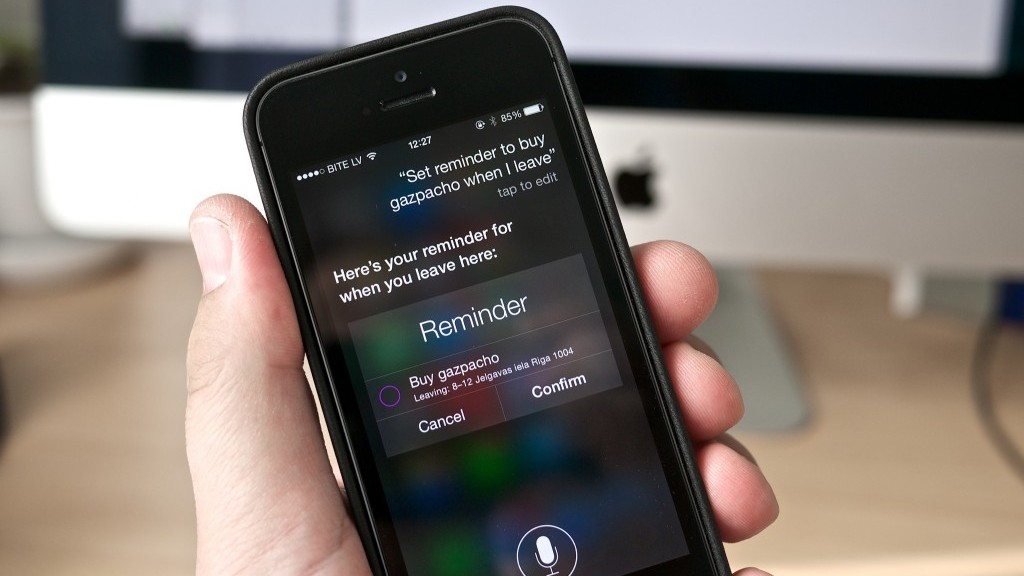
Virtual voice assistants such as Siri and Google Now detect key words when you ask them questions so as to understand and be able to offer you the service that you require. They also have access to the majority of tools built into your phone. For example, Siri is able to search your contact list and tell you where each of your friends is at any given moment. Both Siri and Google Now allow for calls or messages to be sent with a simple and direct command.

But what might happen if it’s not only you that could give the command, and if someone else were able to send orders remotely without even uttering a word?

A group of investigators from the National Agency for Computer Security in France (ANSSI) have discovered that these voice assistants could be tapped into by outside sources. They’re unearthed a method in which it is possible to send them commands from a distance of up to 10 meters.

To complete these tests, the team of investigators used radios waves to communicate with these voice tools without making any sounds. The only things needed are headphones with an in-built microphone.

For short distances (around two meters), the tools needed are even simpler – the group used an open-key program called GNU radio, a USRP radio, an antenna, and a signal amplifier.

The headphones serve as an antenna (for cellphones with a radio you need to connect them in order to listen) and the cable allows the cybercriminals to convert the electromagnetic waves into electric ones.

Once the message is translated and understood, it acts as an audio coming from the microphone: the operating system would recognize it as such and would transmit the instructions to Siri or Google Now.

This way, the cybercriminals are able to make them perform calls, send text messages, or even mark their own number so as the devices become listening tools. What’s more, they could even send the web browser to a page filled with malware and send spam messages or carry out phishing attacks via the email, Facebook, or Twitter accounts.

google now security

“The likelihood of sending signals to devices that accept voice commands could provoke an increase in attacks”, stated the authors of the study, which was published on the digital site IEEE.

Everything that a user can do by using voice commands is an opening for cybercriminals, who could have the chance to communicate with various devices at once. In public spaces such as airports, the attacks could be immense.

This strategy, however, isn’t without limitations. Many Android telephones don’t have Google Now available on a blocked screen, or are configured to only respond to one type of voice. Even though Siri can be accessed via a blocked screen, the latest version (on iPhone 6) is also configurable to only recognize one voice – that of the user.

The post Voice assistants like Siri and Google Now could be vulnerable to attack appeared first on MediaCenter Panda Security.
How to stop your child from downloading inappropriate apps

children online

There can’t be a parent in the world who doesn’t know the beauty of a happy, entertained child. Unfortunately, parents can’t always play the role of the entertainer because keeping a child attentive and interested is not an easy task. So, what can a parent do to keep their little one distracted while they grab a few minutes for themselves? In the past the television was a guaranteed way to keep kids occupied – sit them down on the sofa, switch on some cartoons, and finally get some household chores out of the way while the kids watched their favorite animated characters in delight.

Nowadays, however, with the explosion in tablets and smartphones, there are a whole array of apps for kids to play with. Unfortunately, leaving your electronic device in the hands of a curious and adventurous child could wind up being more trouble than it seems. Due to their nature, children will be intrigued by the device and may end up diverging away from the game or app that you have selected for them, possibly even entering the Apple Store or Google Play store, and downloading some inappropriate content.

What’s even more worrying is that it is also possible to carry out in-app purchases, even in apps aimed at kids. So if you’ve left your purse or wallet lying around, and your child is clever enough to put two and two together, you could wind up with some unexpected charges.

If you aren’t sure on how best to stop your child from downloading inappropriate apps or making in-app purchases, then fear not as we’ve compiled a few tips to ensure that your child won’t have access to content that isn’t suitable for them.

online safety

If you’re an iOS user…

  1. Turn on your restrictions

This may seem obvious, but a lot of people don’t know that the settings of your iOS device allow you to restrict certain activity. All you need to do is enter your settings and hit the tab in the part labelled “General” to turn them. Once activated, you select a special password which will make it impossible to turn the restrictions back off unless the password is entered.

From there you can go through your list of apps and choose which ones you want to put restrictions on by selecting the tab beside the apps. A further step would be to remove your chosen payment method from your Apple account.

  1. Demand a password for purchases

If you don’t want to ban purchases completely, you can also put a limitation that requires a password every time there is a purchase made in the App Store or iTunes Store.

  1. Monitor accounts for teenagers

If you have a child that is over 13 years of age that has their own Apple account, make sure that you only allow them to make purchases with gift cards. If you still don’t trust this method, you can activate the “Ask to Buy” feature if you are using Family Sharing.

If you’re an Android user…

  1. Be aware of authentication processes

Google Play has an authentication process that has a few different options available. First of all, any app that is aimed at children aged 12 or under automatically requires authorization for in-app purchases. However, for other apps you can freely download unless you set up authorization for every purchase or for purchases made every 30 minutes. We highly recommend choosing the former, which you can access via the User Control area.

  1. Have the same restrictions on all devices
    Authentication settings apply only to the device where you add them. If you use your Google Account on more than one device, you must repeat the instructions mentioned above on each device.

So, as you can see all it takes is 10 minutes of having a look at your settings and you can avoid any nasty surprises or unexpected charges. If you’re wondering how else to protect your kids when they’re using the Internet, here are some further tips that will allow them to surf the net safely.

The post How to stop your child from downloading inappropriate apps appeared first on MediaCenter Panda Security.

How to avoid disaster in the event of credit card theft

safe credit card

When it comes to choosing PINs for your credit card and cellphone you’ve done everything right – you avoided the temptation to use the year you were born in for either and both have different codes. However, these precautions could all be for nothing if a cybercriminal gets in the way of your credit card and the sales point.

The standard verification process for payments by debit or credit cards consists of a card with an integrated chip and a PIN. However, a group of investigators from the École Normale Supérieure (ENS) in Paris have just published a report which explains how a group of attackers found a way around this system and managed to steal €600,000 in stolen cards. The good news, fortunately, is that they were arrested not long after.

This group of attackers stole 40 credit cards which, supposedly, should have been useless without knowledge of the card’s PIN. However, the criminals were crafty and modified the cards by adding a second chip inside the card which was impossible to spot by looking at it.

When the card was placed in the POS (Point of Sales Terminal), they took advantage of the EMV’s vulnerabilities and carried out a “man-in-the-middle” attack which allows them to intercept the communications between the card and the system.

In that moment the second chip came into play and allowed them to complete the transaction using any PIN. This turned out to be an easy method that they used more than 7,000 times.

credit card

Despite the investigators saying that the vulnerabilities have been corrected and that the fraudsters arrested, this case highlights the importance of contacting your bank if your wallet is stolen or if you lose your card.

What’s more, the modification of the card isn’t the only way that they can fleece you if the card ends up in their possession. Ross Anderson, professor of Security Engineering at the University of Cambridge, has spent years investigating how attackers could take control of a credit card and has recently summed up some of the paths open to cybercriminals.

Some of the methods that cybercriminals could use include copying the card information from a POS to send to another one, passing the information of a chip and PIN card to a magnetic stripe card, or even manipulating a POS with the aim of intercepting a card during a transaction and sending the information to a cellphone.

So, what can users do now that they know about these vulnerabilities? In reality, there isn’t really a lot that they can as the majority of these frauds take advantage of the weaknesses in the standard POS, which means card makers and banks should be worries about making transactions as safe as possible.

Some recommendations include only paying with card in places you trust, not keeping all of your savings in the same account, and checking your account often to ensure that there are no unusual movements taking place.

credits card

Being aware of the vulnerabilities of credit cards could also help us to choose other alternatives, such as cards that read our fingerprints. This is a method of protection that no cyberattacker can steal from us.

Last year MasterCard unveiled the first card with a fingerprint reader in conjunction with Zwipe, a Norwegian startup. We have also seen large credit card companies say that they will experiment with facial recognition technology for online purchases.

This step could see then end of traditional passwords in the next few years and it could be a solution to the vulnerabilities facing chip and PIN cards. In the meantime, the best thing to do is keep informed of the risks that you face when using your credit card.

The post How to avoid disaster in the event of credit card theft appeared first on MediaCenter Panda Security.

USB Killer: the storage tool that destroys your computer

USB

Despite the increase in the storage of files and documents on cloud-based systems, the humble USB is still playing an integral part in our lives. From offices to homes, this convenient tool is used for quickly and easily transferring files from one device to another.

However, just because they may seem harmless doesn’t mean they can’t give your cause for concern. If you have ever connected your USB to an infected computer it is likely that it has become infected with malware. What’s more, if you thought that a virus was the worst thing that could happen to your USB then you’re mistaken – a USB could, literally, fry your computer.

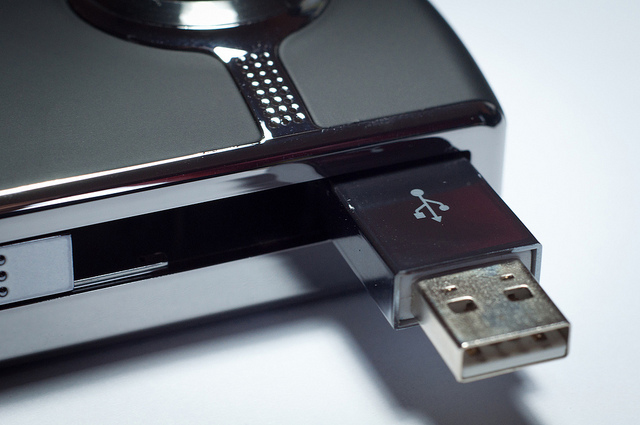
Russian security expert Dark Purple has recently proven this and has developed an updated version of his so-called USB Killer; a USB capable of destroying a laptop but by connecting the two devices.

His first device managed to discharge 110 volts of electricity on the USB port when it was connected, but the new USB Killer 2.0 has managed to increase further the voltage that it can transmit, making it capable of relative destruction. If we consider that a USB port can handle around 5 volts, his invention goes far beyond what it is capable of tolerating, and in just a few seconds the USB Killer can destroy the motherboard.

computer pendrive

In order to achieve this, the USB that he uses has been modified to use a DC-to-DC converter and various condensers. When it is connected, it begin to transmit an electrical current to the condensers, which turn into tension points as a consequence of this powerful charge.

The Dark Purple system not only manages to destroy computers with this method, but also any technological device that has a USB port. It doesn’t matter if it is a laptop, a desktop computer, or a tablet – this USB is designed to destroy the motherboard of any device, regardless of its size.

Although the investigator hasn’t carried out tests on all devices, his demonstration of the USBs power in destroying a Lenovo ThinkPad X60 leaves us with little doubt as to the potential of the USB Killer 2.0. The effects of his demonstration were immediate, with the computer automatically shutting down and it was impossible to restart it.

He has also indicated that the damage is only done to the motherboard, which means that by simply replacing this should be enough to rescue the computer, seeing as the hard drive shouldn’t be affected by the discharge. In any case, if you found the demonstration enjoyable and you want to recreate it yourself, it’s probably best that you don’t do it on your beloved computer.So, why has this security expert become interested in this unusual device? According to himself, he began working on USB Killer 1.0 after a speaking with a work colleague: “He read an article about how a dude in the subway fished out a USB flash drive from the outer pocket of some guy’s bag. The USB drive had “128” written on it. He came home, inserted it into his laptop and burnt half of it down. He wrote “129” on the USB drive and now has it in the outer pocket of his bag”.So, the moral of the story and the lesson that we should take from the USB Killer, is that if we stumble across a USB then we probably should take it and use it as our own.

You never know what they may have stored in them and it’s best not to take the risk, as they could contain dire malware.  If you want to protect your computer or tablet you need to look beyond the programs that you have installed; you also need to be aware of the dangers that come from external sources.

The post USB Killer: the storage tool that destroys your computer appeared first on MediaCenter Panda Security.

Don’t be careless when throwing away your used boarding cards!

boarding cardDespite the need to print off documents having a less important role in our lives in the era of smartphones, there are still some things that we need to print off as there aren’t many other options. This is true of boarding cards, which hold a surprisingly important amount of private information which needs to be kept out of the hands of others if you don’t want to run any risks.

The usual protocol after returning from vacation is to throw out the airline tickets without giving them another thought, assuming that nobody is going to trawl through the garbage looking for an out-of-date ticket. Unfortunately, this is exactly what suspicious characters will do, knowing that these pieces of paper are the key to a whole host of private details and information.

What is even worse, however, is taking a photo of your boarding card and publishing it on Facebook or Twitter, especially if your privacy settings aren’t properly configured. By uploading this seemingly innocent image to make your friends jealous, you are inadvertently sharing your details with any user of the Internet who could use the information captured in the image for their potential benefit.

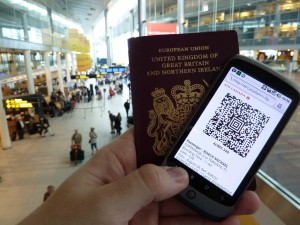
“The barcodes on boarding cards could let anyone discover information about you, your holiday plans, and your frequent flyer account”, according to IT security expert Brian Krebs.

It isn’t always like this, and sometimes the barcode only reveals information such as your name, date of the flight, the related airports, etc. However, in some cases the barcode can turn into a potential goldmine of personal information which can be used to attack your user account in the airline’s website.

The information stored on the barcodes can be extracted by using free access tools and can be interpreted by using step-by-step guides which explain each element.

barcode app

The real danger that’s stored on these boarding cards is the frequent flyer number, which can be used to access your user account on the airline’s website. Knowing the name and surname of a passenger along with their frequent flyer number is “the first step to getting the password”, states Krebs.

Once inside, among other things, you can check out sensitive personal information (telephone numbers or the accompanying passengers) and even change or cancel upcoming flights. The intruder can even change the access requirements by guessing the answer to a security question – something which we have pointed out before as being rather easy to do.

This vulnerability, according to Krebs, “has created a black market for hacked frequent flyer accounts”. If you don’t want to end up being the next victim, the best thing to do is destroy your boarding cards before throwing them in the garbage or, better yet, use the official airline apps and by-pass the paper option altogether.

The post Don’t be careless when throwing away your used boarding cards! appeared first on MediaCenter Panda Security.

How to avoid Efast Browser, the latest adware to hit Chrome

Efast adware browser

Another day, another malware to tackle. It seems that hackers are churning out new ways to trick us on a weekly basis as security researchers have uncovered the latest threat to Internet users. Despite the likes of Google strengthening its security to combat these attacks, the culprits are continuously changing and adapting, and this latest adware has the potential to lead to serious privacy issues and even identity theft.

Named eFast Browser, this new adware seemingly works in the same way as many similar adwares that we’ve seen in the past – it bombards your browser with annoying pop-ups and redirects you to unwanted websites, while tracking your every move online, allowing more frustrating advertisements to be sent your way. What makes eFast Browser unique, however, is that unlike previous adwares which looked to take over your current browser, it actively sets out to replace your browser by deleting Chrome and taking its place. In doing so, it hijacks as many links and file associations as possible and features an icon that bears more than a passing resemblance to the Chrome icon.

The software comes from a company calling itself Clara Labs, which is also behind other similar browsers such as BoBrowser, Tortuga, and Unico. All claim to be legitimate and improve the Internet browsing experience yet none provide the functionality promised. The developers state that eFast Browser is a legitimate chromium-based web browser that largely improves the Internet browsing experience by generating the most relevant search results, displaying special deals or discounts available on shopping websites, etc. However, users need to be aware that adware-type applications such as eFast Browser are solely designed to generate revenue for the developers with little care for the user experience.

adware desktop

The most worrying aspect of this malicious adware is that it gathers information on your browsing which it then shares with third parties. The data that it gathers has the potential to be personally identifiable which, in turn, could lead to problems such as identity theft.

According to PCrisk, the adware tries to get on your computer by burrowing itself into the installers for free software from dubious sources on the web. The experts recommend a two-step process to avoid accidentally installing eFast Browser and other potentially unwanted programs (PUPs) on your computer. You should “never rush when downloading and installing software – use the ‘Custom’ or ‘Advanced’ settings and closely analyze all steps. Furthermore, all additionally-included applications should be cancelled, since bundled software is often classed as rogue, and thus, should never be installed.”

As always, when you are using the Internet it pays to be cautious. By following a few simple steps you can be assured that your online experience won’t turn out to be a frightening one. Cybercriminals are lurking in every part of the web, so always keep your eyes peeled!

The post How to avoid Efast Browser, the latest adware to hit Chrome appeared first on MediaCenter Panda Security.
The coupon scam that’s flooding WhatsApp

whatsapp scams

If you end up getting a WhatsApp that’s offering you a coupon for a discount at the likes of Ikea or McDonald’s then you’re right to be suspicious – none of these companies are giving away coupons and it’s like that  you’re being a victim of a fraud.

In reality, the name of these, and many other companies, are being used for what seems to be a global social engineering campaign which aims to steal information from unsuspecting victims.

It all begins with a link send to one of your contacts which they will pass on to you – relax, your friends aren’t out to scam you, it’s just how it works.

By opening the link, potential victims are taken to what appears to be a questionnaire on behalf of a well-known supermarket or brand. Via this method, the scammers hope to make use of these famous names to trick you – the likes of Zara, Lidl, Starbucks, or H&M.

starbucks whatsapp

According to the information found after opening the link, the corresponding store is looking to expand and is looking for its users to fill out a survey. They ask you to give your name, address, email, and telephone number, which goes directly to the cybercriminals.

All of this information is collected and later used to carry out spam campaigns, but not before signing the victims up to different premium SMS scams. So, the scam doesn’t just involve identity theft, but could also affect your telephone bill and, in the end, your wallet.

Even though these types of phishing scams have been going on for years, the possibility of getting an easy discount and spreading it to friends, thus making it viral, have turned this new way of tricking people into a global phenomenon.

ikea scam

The best way to avoid falling victim to these scams is to be cautious when it comes to sharing your personal information and to always be wary of promotions that you see online, especially if the brands don’t usually do it and even more so if it comes via WhatsApp.

What’s more, there have been times when these coupons and offers have been sent to victims in different languages or in different currencies – so if you get an offer in Spanish but you live in Australia, or they offer you a coupon in dollars but you live in Ireland, common sense should tell you that something isn’t right.

The post The coupon scam that’s flooding WhatsApp appeared first on MediaCenter Panda Security.

Telecoms giant TalkTalk suffers critical data breach

talk talk

When it comes to protecting the private information housed within your company’s network, it’s been proved time and again that no business can afford to overlook the damage that a cyberattack can do. It’s also worth bearing in mind that an attack can originate from anywhere and, sometimes, the culprit can be a surprising one.

Following the news that British phone and broadband provider TalkTalk had suffered a “significant and sustained cyberattack”, it has since been revealed that a 15-year-old boy has been arrested in Northern Ireland in relation to attack.

The cybercrime, which took place last week, has led to the possible compromising of information relating to more than four million customers. The information includes bank account details and sort code numbers, which could have potentially devastating economic repercussions for those affected. Following the news of the attack, shares in TalkTalk fell by 12% and some customers reported that money had already gone missing from their accounts. It has since emerged that the company could face claims amounting to millions of pounds from the victims. The fallout from the attack, and the drop in shares, has seen the company lose around £360m since last Thursday.

While the investigation continues into how the attack was carried out, the company first indicated that it suffered a sustained DDoS attack – a distributed denial of service attack where a website is bombarded with waves of traffic. This was accompanied by an SQL injection, which is a technique where hackers gain access to a database by entering instructions in a web form. This type of attack is very easy to protect against and some industry experts expressed their surprise at an attack of this form being successful considering the advancements of IT security solutions.

This isn’t the first time that TalkTalk has been the target of cybercrime. In less than one year the company has suffered three security breaches and Dido Harding, TalkTalk’s CEO, stated that she believes all firms are at risk of cybercrime, in what is becoming the “crime of our era”.

“This is happening to a huge number of organizations all the time. The awful truth is that every company, every organization in the UK needs to spend more money and put more focus on cybersecurity – it’s the crime of our era.”

Investigations are currently being carried out by the Information Commissions Officer (ICO) and the Metropolitan police, as doubts begin to surface over whether the company was properly protected or not. An ICO spokesperson stated that “organizations do need to make sure they have the appropriate level of security in place to protect the customer information they hold. If they don’t, we will act.”

With this in mind, a cyberattack on your company won’t just affect its reputation and standing in the industry. It also has the potential to be financially damaging and can lead to long-term trust issues with customers, so we recommend avoiding these common errors committed by other companies in the fallout of a data breach.

The post Telecoms giant TalkTalk suffers critical data breach appeared first on MediaCenter Panda Security.
How a drone can hack into your home’s network just by flying over it

drone

Drones can be used to record incredible scenes for movies, to follow thieves from above, to save lives, or to carry out home deliveries at lightning speed. The great benefit that they provide has no limit and, unfortunately, this also opens the doors to various ways to misuse them for malicious gain.

They have since been used to introduce contraband into prisons, to illegally spy, and according to a group of investigators from the Singapore University of Technology and Design, they could also be used to intercept communications between a computer and a printer from above.

This flying robot could circle above a home or office and end up being more dangerous than you could imagine. If you don’t keep an eye on your security, private documents and files that contain information such as passport numbers and addresses could end up in the hands of criminals.

dron flying

To demonstrate that this threat is real and exists, the investigators equipped a drone with a smartphone and developed two apps that were designed to intercept the communications of a printer from outside of the building in which it was running.

The first of these apps, Cybersecurity Patrol, detects vulnerable printers – in fact, it can be used to detect security holes and even close them – and the second, which for obvious reasons remains secret, passes itself off as the machine. Basically, it creates a false access point and pretends to be the printer, tricking the computer into sending the files to it.

In principle, all that you need is a smartphone in order to carry out these attacks, but the drone comes into play when it comes to getting the required distance (a radius of 26 meters, at most) to trick the computer. By flying over a building at this distance, a simply drone could give cybercriminals access to your home or office network.

Beyond the drone, the investigators have also shown that it is possible to use an automatic hoover to introduce the mobile device in search of vulnerable printers.

The aim of the team from the Singapore University of Technology and Design is simply to alert businesses to the danger that an apparently inoffensive printer could pose, and that it is relatively easy for a criminal to gain access to information by using rather simple methods.

“The main point [of the research] was to develop a mechanism to try to patrol the perimeter of the organization and find open printers from outside the organization,” state the experts. “It’s dramatically cheaper than a conventional pen test.”

The study was completed as part of a project on cybersecurity that was sponsored by the Singaporean government and focused on printers because, as was agreed by all involved, they are a weak point that is often overlooked in offices. A lot of wireless printers are sold with an open Wi-Fi connection as default, and a lot of the owners later forget to change this setting, leaving them vulnerable to cybercriminals.

The post How a drone can hack into your home’s network just by flying over it appeared first on MediaCenter Panda Security.