

Category Archives: Panda Security

Panda Security

Social Engineering techniques – What they are and How businesses can avoid them

thief computer

Although it may be tempting to imagine hackers as being shy and socially inept types, whose only human interaction is via their computers, this is an assumption which rarely corresponds to the reality. In fact, in some cases, the social capabilities of hackers have worked greatly in their favor as a method of intrusion.

This technique is called social engineering and consists of tricking and manipulating the victim into committing a human error so as to compromise the security of IT systems.

Social psychology as a method of intrusion

This form of intrusion doesn’t rely on vulnerabilities in the IT system, but rather a social interaction (online, by telephone, or face-to-face) between the attacker and the weak link in the IT security chain – the user. The most successful social engineering techniques are based on the charisma and problem solving capabilities of the hacker, and almost always a deep knowledge of human psychology, of our irrational impulses, and of our feelings of trust, curiosity, attraction, and fear.

For example, the hacker will try to pass itself off as another person (such as a security personnel or a technician) or will pretend to have a role authority so as to coax confidential information from the victim. All of this is done without the victim realizing for one moment they are being duped.

worried woman computer

Kevin Mitnick, one of the most notorious hackers in the 1990s, now works as a digital security consultor and says that social engineering is usually based on four fundamental principles:

  1. “We all want to help”
  2. “The first reaction is to trust in the other person”
  3. “We don’t like to say no”
  4. “Everyone likes to be praised”

An example is that of Chris Nickerson, the founder of Lares, an American security consultancy firm that used social engineering techniques to test the levels of security in businesses by means of “red team tests”. Armed with only information available to the public on the internet and a technician’s shirt from a known tele-operator, Nickerson tries (and usually succeeds) to access the company’s offices and manipulate the workstations in front of all the employees.

Brief classification of techniques

  • Passive – based on observation and behavior analysis, with the aim of reconstructing their daily routine, to create an approximate psychological profile, etc.
  • Non-present – based on requests for information via email or over the phone.
  • Present but not aggressive – this includes actions such as spying on someone’s house or looking for personal documents in the trash.
  • Aggressive and present – Psychological pressure and identity theft.

social engineering

How do I stop my employees from becoming victims?

In their 2003 book, Hacking Linux Exposed, B. Hatch and J. Lee suggested adopting the following attitudes and they are still relevant today:

  • “Train the users” – given that this type of attack is always launched against a person, the best way to avoid it is to ensure that all of your employees are aware of what to look out for when it comes to social engineering tactics.
  • “Be paranoid” – the authors recommend “cultivating a healthy paranoia”, as it is normal that the hackers will be wary of using someone who doesn’t seem to trust them. “They look for the easiest objective”, they added.
  • “Ask them everything” – it’s advisable to always ask the person you are dealing with why it is that they need the information that they request. “The majority of social engineering attacks fail by asking the attacker questions”.
  • “Always check their sources” – if we are suspicious of a request sent my email, we should verify it by calling the person by telephone. If we speak face-to-face with someone we don’t know, we should demand to see some form of ID.
  • “Learn to say no” – when a hacker is applying social engineering tactics, it is normal that he or she does it by straying from the norms of the business or tries to get the victim to do it. Keeping within the set rules is a good form of defense in these cases.
  • Also recommended is that the business has a good EDR platform (to detect and protect against threats) such as Adaptive Defense 360.

This means that if a user falls for a trap and clicks on a link to download an infected application, it is blocked immediately. It will also inform, in real time, to the company’s security team so that they can act as soon as possible.

The post Social Engineering techniques – What they are and How businesses can avoid them appeared first on MediaCenter Panda Security.
PandaLabs detected more than 21 million new threats during the second quarter of 2015, an increase of 43% compared to the same period in 2014

PandaLabs, the laboratory set up by Panda Security, has published its quarterly report where it shows the latest statistics on malware and cyberattacks that have been at the forefront of this year’s second quarter. The creation of new malware samples have broken records in this timeframe.

The world of cybersecurity doesn’t take a moment’s rest and cybercriminals are a constant threat. The number of malware examples continues increasing and shows no sign of stopping, so here we’ll share with you the most important details of this report.

Malware can’t be contained

The creation of new types of malware continues to grow, reaching an average of 230,000 new examples every day during the second quarter of 2015. This represents an increase of 2% compared to the first quarter of the year. The figure is alarming and more than 21 million new threats have been generated during these three months. Compared to the same period last year, where there were 160,000 samples, this shows an increase of 43%.

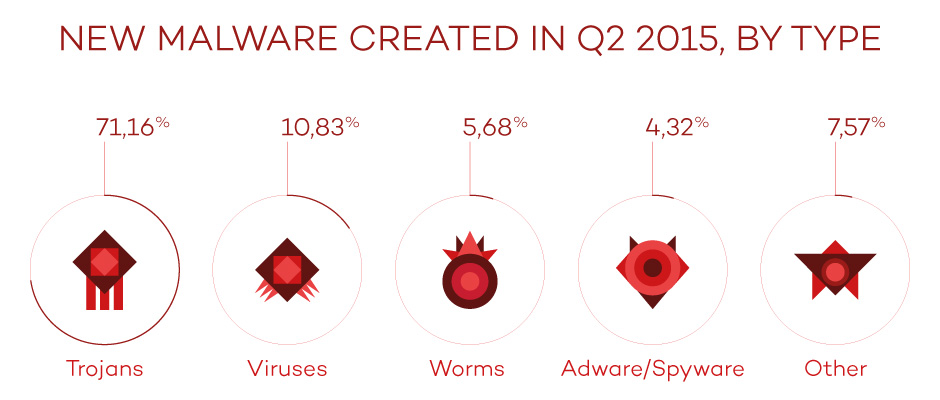
Of the new malware created this quarter, the most popular has been the Trojan, which accounted for 71.16%. This was followed by traditional viruses which made up 10.83%.

new malware

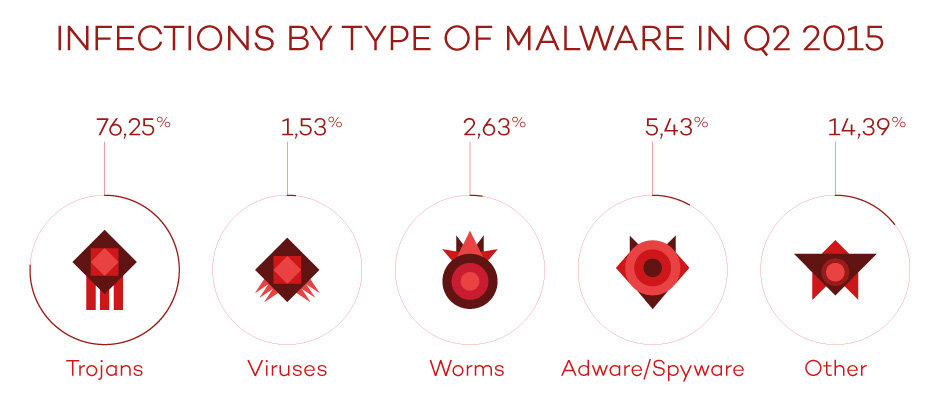
If we analyze the infection by type of malware we can see that, logically, the figures are the same as those for newly created malware, except for the category marked others, whose percentage is higher by a significant margin. Trojans continue to be the main cause of infection, with 76.25% of all users infected by them.

type of infections

Asia and Latin America show a higher rate of infection

China, once again, sits at the top of the chart with 47.53% of all computers infected. It is followed by Peru (43.11%) and Turkey (41.97%), respectively.

On the other hand, the countries with the lowest infection rates were Sweden (21.57%), Norway (22.22%), and Japan (23.57%). It is important to highlight Europe as the region with the lowest rate of infection worldwide, with nine countries on this ranking. As regards Spain, the rate of infection was (36.37%), which places it above the worldwide average.

Cybercrime is the order of the day

Among the main threats that were collected in the study, the use of Cryptolocker was highlighted as being used to infect both private users and businesses.

In the case of private users, cybercriminals have begun to reuse an old technique that was first used over 20 years ago. It consists of infecting the victim via the macros in Office documents, mainly Word. One such example which was discovered by PandaLabs was a Word document containing a blurred image. At the top of the document in bold capital letters there was a message that indicated that the image was blurred for security reasons. If the user wanted access to the information then they had to enable the macros, with an arrow pointing to the button to be pressed. Once enabled, it showed you the clear image while simultaneously infecting you with a type of Cryptolocker.

In this quarter we have seen some of these notable cyberattacks on businesses:

  • Ryanair, the well-known low-cost airline, was the victim of an attack which led to the loss of 5 million dollars.
  • CareFirst BlueCross BlueShield, an American medical insurer, suffered an attack which saw the theft of information relating to over a million clients.
  • AdultFriendFinder, an online dating site, suffered an attack which saw the theft of private user information. The attackers offered the stolen information to the first one to pay them 70 bitcoins, equivalent to $17,000 at the time. Not long after, the complete database was published online.
  • LastPass, a leading password management company, was another victim of information theft.
  • The well-known group Syrian Electronic Army managed to infiltrate the website of the US Navy, publishing propaganda promoting Bashar Al-Assad and his regime in Syria.
  • Ben Rhodes, Assistant to the President of the United States and Deputy National Security Advisor for Strategic Communications and Speechwriting, stated that the White House had fallen victim to an IT attack.

In the second quarter, attacks focused on mobile devices were popular among hackers. WhatsApp is a popular way to attract and try to infect users with a trick called WhatsApp Trendy Blue. It passes itself off as a “new version” of the application with extra features when, in reality, the only thing it does is sign the user up to an expensive billing service.

These are just some of the important cases that we have seen this quarter. More than ever, businesses need to be prepared for this massive avalanche of information theft. They need to reinforce their systems and security solutions, and understand that a simple antivirus is no longer enough to safely protect themselves from an attack. Preventing attacks is the best way to combat them, as the costs associated with an attack put the stability and existence of businesses at risk.

The complete report is available here.

The post PandaLabs detected more than 21 million new threats during the second quarter of 2015, an increase of 43% compared to the same period in 2014 appeared first on MediaCenter Panda Security.

We’ve presented the new #Panda2016 solutions to the media!

simplexity

If you’ve ever tried out on of our products then you’ll know that we protect, and make easy, the day to day life of our customers. The digital world is getting more and more complex, at Panda we work to make the digital life of our users easy and safe – that’s why we are SIMPLEXITY!

In the Retail press conference that we held last Friday in Madrid, we decided to continue with this core idea and show this philosophy to the Spanish media in a very special event in the Espacio Mood.

The Global Retail team presented the new Panda 2016 consumer solutions in a relaxed and intimate environment that surprised those in attendance due to its down to earth feel.

panda 2016 evento presentacion

Miguel Bullón, Panda Security’s Global Retail Director, started the presentation by detailing the latest information on the company’s growth both locally and globally, and the company’s strategy for 2016 which will see Panda bet ever more on internationalization with more affiliates and country partners.

He also highlighted the differential value that Panda’s 2016 solutions offer compared to other options in the market – the Panda guarantee.

Miguel Bullón Panda Security

Next, Hervé Lambert, Global Consumer Operations Manager, and Alberto Añon, Consumer Product Manager, listed the advantages and innovations of the new Panda 2016 solutions. They consist of:

  • Multiplatform security
  • Wi-Fi protection
  • Parental control
  • Antitheft services
  • Smartwatch protection

The most memorable moment of the presentation was, without a doubt, the demo that we did comparing the functionality of Panda with that of the competition. The attendees could verify that Panda used up the least resources compared to the competition!

Hervé Lambert, Global Consumer Operations Manager, and Alberto Añon, Consumer Product Manager

That wasn’t all and, before we finished, the journalists were able to unwind and enjoy a massage, interview Miguel Bullón, and share doubts and impressions in a relaxed manner with all of the members of Panda’s Global retail team.

Well done to everyone!

panda global retail team

The Retail team: RAQUEL RUÍZ, MIGUEL BULLÓN, NATALIA LÓPEZ, ALBERTO AÑÓN Y HERVÉ LAMBERT. They rock!

The post We’ve presented the new #Panda2016 solutions to the media! appeared first on MediaCenter Panda Security.

Panda Security detects record levels of malware created to infect users

PandaLabs, Panda Security’s dedicated detection laboratory, draws attention to the record increase in the creation of new malware samples in its latest Quarterly Report for the second quarter of 2015. The malware detected has been created to infect both businesses and users alike.

In the second quarter of 2015 alone there were an average of 230,000 new malware samples created, which means a total of 21 million new types in these three months. Compared to the same period last year, where there were 160,000 registered samples, there has been an increase of 43%.

This large number of samples is, for the most part, mutations of already known malware. This way, cybercriminals try to stop the antivirus laboratories from detecting the infection.

As regards the types of malware, Trojans continue to be, by a large margin, the most common (71.16%) and are the main source of infection, with 76.25% of users infected by this malware. This quarter also saw the proliferation of PUPs (Potentially Unwanted Programs) which accounted for 14.39% of infections and placed just behind Trojans.

infections type

Cryptolocker, the big threat to businesses and users

Among the main threats that this study collected, the use of Cryptolocker to infect businesses and users was highlighted.

In the case of users, cybercriminals have begun to reuse an old technique to infect users, one which was first seen 20 years ago. It involved infecting users via a macros in Office documents, especially Word. To complete this attack, the criminals included a blurred image which could only been seen if the user activated the macros. Once the user does this, they are infected with Cryptolocker.

Businesses are also at risk from infection by Cryptolocker, such as the example of Ryanair, which lost 5 million dollars via a transfer to a Chinese bank. Other companies that have been victims of information thefts include CareFirst BlueCross BlueShield and the online dating site AdultFriendFinder.

“Cyber hackers are looking at businesses more and more as it is relatively easy for them to steal information”, affirms Luis Corrons, Technical Director of PandaLabs. “Sometimes it’s as simple as introducing a variant of Cryptolocker in a file that is sent to an employee and, once it’s opened, the security of the entire company is at risk”.

This quarter also saw attacks on mobile devices. One of the ways in which hackers have duped their victims is by WhatsApp. Called WhatsApp Trendy Blue. It passes itself off as a “new version” of the application with extra features when, in reality, the only thing it does is sign the user up to an expensive billing service.

In June, PandaLabs detected a phishing campaign directed at Android developers that published their creations on the Google Play store. The trick consisted of stealing password information in order to propagate malware via Google Play.

Asia and Latin America register the highest rates of infection

PandaLabs’ Quarterly Report also collected information on the rate of infection worldwide, according to computer’s protected by Panda’s software. The areas with the highest rate of infection were Asia and Latin America, which placed above the average of rate of infection (33.21%). China was the country with the highest rate of infection (47.53%), followed by Turkey (43.11%) and Peru (41.97%).

On the other end of the scale, Europe and Japan were the areas with the lowest rate of infection. Sweden (21.57%), Norway (22.22%), and Japan (23.57%) are the countries with the lowest infection rates worldwide.

However, some European countries recorded infection rates above the global average such as Spain (36.37%), Poland (38.48%), and Slovenia (38.05%), while in Latin America there were rates of 38.21% and 37.86% in Brazil and Colombia, respectively.

The complete report is available here.

The post Panda Security detects record levels of malware created to infect users appeared first on MediaCenter Panda Security.

All that you need to know about security changes within Windows 10

windows 10 protection

The moment has arrived to make a tough decision: install Windows 10 or stick with the old version until you have no other choice but to update. If you still aren’t sure of what to do and are worried about losing a document or important program, you can wait a while, although sooner or later you’ll have to take the leap. When this moment arrives, be it tomorrow or in a few weeks, we have a few tips to help you protect your PC.

The first characteristic of Microsoft’s new operating system that we should be aware of is that it has been designed like a cloud service. This means that now, whether you like it or not, you will share more information than ever with Microsoft. Fortunately, there are some things that you can configure to minimize the damage if you consider this to be a threat to your security.

Even though some users, after trying the beta version, accused Microsoft of having put a keylogger in its operating system to register the information entered by the users on their keyboards. To put you at ease, there is no such thing on the new Windows 10 system. What a few of the Office 360 programs do (just like Google Drive, or Apple’s Siri), however, is analyze the keystrokes in order to improve, among other things, the orthography. It also registers words if you are dictating texts, to fine tune its voice recognition.

If you aren’t at ease with the multinational knowing your every keystroke and syllable that comes from your mouth, you need to know that this feature (which has caused uproar) can be deactivated. All you need to do is enter “settings” and select the privacy options from there.

Windows 10 features

Another of the characteristics of Windows 10 that has caused much debate amongst those concerned with privacy is the Advertisement ID. It is basically a code, a unique identification number, which works like the cookies of a webpage. Thanks to them, advertisers will be able to tailor ads to our preferences.

Microsoft assures us that this code isn’t linked to the user in any way (not with their name, email account, or any profile that contains personal information).In any case, if you don’t want anyone to know what your likes and dislikes are, you can easily deactivate this feature  in the settings under the part of “General”.

The new localization options that Microsoft has included in the new version of Windows might also be bothersome. Even though your computer doesn’t have GPS, as is the case with smartphones and tablets, keep in mind that, by desactivating it, limits the possibilities of Cortana (Microsoft’s virtual assistant) which takes note of where you are from time to time in order to complete its mission.

This is the same as what happens with Apple’s Siri and Google Now, whereby the tool needs to access a large amount of personal information to answer possible user questions.

panda con windows 10

If, having applied these measures, you still aren’t sure and want your computer be even more protected after installing Windows 10, the best thing that we advise you to do is get a good security solution. Panda’s antivirus protection is compatible with the new Microsoft operating system.

The post All that you need to know about security changes within Windows 10 appeared first on MediaCenter Panda Security.

Why the unblocking system of your Android isn’t secure and how you should change it

unblocking system android

If the most wanted cybercriminal in the US used the name of its cat as its password and a Google study revealed that typical security questions such as “What is your favorite food?” were practically useless, what should we expect of the unblocking system that protects our smartphone from being accessed? Very little, of course…

Just like the obvious passwords and answers, the traces that most of us draw on the screen to unblock our smartphone are usually easy to guess. This has been demonstrated by Marta Løge, an investigator from the Norwegian University of Science and Technology, in a study which shows her findings which and that she presented at the PasswordsCon conference in Las Vegas.

By analyzing nearly 4,000 real user patters, the expert was able to discover a series of inadvisable practices which are repeated all too often. First of all, when choosing a blocking pattern we can draw a trace of up to 9 points (the grid is laid out in 3×3), but the majority of users choose to use less.

The average number of swipes used for the pattern is five, which reduces the number of possible combination to only 9,000. However, it turns out that the majority of users only opt for four swipes (the minimum allowed), which means that the range of patterns that the average user chooses is limited to a little more 1,600, which is clearly not enough.

Length of pattern Number of combinations
4 1624
5 7152
6 26016
7 72912
8 140704
9 140704

This isn’t the only error that we are making as 44% of us start the pattern in the top–left corner of the screen. If that wasn’t worrying enough, 77% of the patterns start in any one of the four corners of the grid. By knowing that the pattern is usually made up of just four points, and that one of them could be in any of the corners, then this considerably reduces the security of the pattern.

Furthermore, it turns out that we are more likely to trace the pattern from left to right and from top to bottom, which makes it even easier to guess.

android bad patterns

There are other important factors to keep in mind besides the number of swipes. The complexity of the sequence is also essential when choosing a pattern. If we go with the numbers in order from 1 to 9, we see that it is more difficult to guess the combination of “2, 1, 3, 6” than it is “1, 2, 3, 6”.

Even though both have just four swipes, the stronger choice features a change in direction (from 2 to 1, and from 1 to 3), while the simpler one displays all of the errors we mentioned earlier – starting from the top left of the screen, going from left to right, and from top to bottom. If this is what you are using to protect your cellphone, change it straight away.

choosing a pattern

It is usually said that the user is the weakest link in the chain when it comes to cybersecurity. As Løge said at PasswordsCon, “the human being is decipherable” and therefore acts in ways that can be guessed easily.  In fact, “we are seeing the same elements in the unblocking patterns as in PIN codes or numerical passwords”, states the investigator.

From now on, if we don’t want to be the link that breaks the chain, leaving our device open to threats, we will have to think outside the box when it comes to creating an unblocking pattern. One last bit of advice – don’t stop swiping until it looks like an abstract painting!

The post Why the unblocking system of your Android isn’t secure and how you should change it appeared first on MediaCenter Panda Security.

Luis Corrons (Panda): “Companies should act as if they’ve already been attacked, if they really want to remain safe”

The director of Pandalabs, the laboratory which Panda Security set up to fight against malware, shares with us the main tips that businesses should follow to be safe in the digital, multi-device, and mobile era.

Panda Security.: There are more and more security hurdles for businesses these days. The volume of malware is increasing and the threats are getting more sophisticated. Ransomware such as Cryptolocker, direct threats and persistent advanced threats are the main risks but there are more. How do you see this complex panorama?

Luis Corrons: It’s true. Businesses are facing ever greater security risks. The advancement of technology is every faster and this means that risks no longer affect us as they did previously – instead of focusing on PCs, we need to keep an eye on mobile devices and tablets, not to mention any other device that employees use to access corporate applications that the company may not be aware of. There are new ways for attacks to enter the business and there will be even more in the future. Wearables, without saying more, could be another entrance point for attacks. If companies aren’t aware of this and don’t take the correct precautions, this could end up being a nightmare from a security perspective.


P.S.: Are they aware of this reality?

L.C.: They are well aware of it, in fact, they have quickly jumped on the bandwagon. However, they aren’t fully aware of the risks nor how to correctly react to it.

luis corrons


P.S.: In your opinion, how should they behave?

L.C.: The first thing that they have to do is identify all of the devices which can access the corporate applications. It could be convenient if they introduce a policy such as BYOD (Bring Your Own Device). Many employees would prefer to use their own device but, in this case, the company will need to inform them that in order to access the corporate systems, there needs to be some controls in place. The business needs to always know which devices are connected and what security measures each one has.

Another key tip is to act as if they’ve already been attacked and that the “baddies” have already gotten in. You should never think that you are completely safe, as there is always the possibility of an attack, this is why it is vital to know what is running on your network at all times.

It’s common for a cybercriminal to attack a small business with the intention of accessing the systems of a larger one.

The problem is that many businesses think “why would they attack us? We’re small and of little interest”. This way of thinking is a mistake and it’s common for a cybercriminal to attack a small business with the intention of accessing the systems of a larger one. Small businesses can be customers of providers for large multinationals and if their systems aren’t secure then this can represent an easy entry point for attackers.  This is what happened with target, the large American supermarket chain, which was attacked in 2013 thanks to a hole in the security system of its air-conditioning provider, which also happened to be a small business. Thanks to this small hole, the cybercriminals were able to infect the POS and steal credit card details of the customers. A small business could put the largest multinational in the world at risk.


P.S.: Suppose that, owing to the lack of resources that they have available, this is why small businesses are the most vulnerable…

L.C.: In reality, every business is at risk of an infection or attack. Obviously the larger the business, the more attractive it is to criminals – they have more computers and distribution points, which means more possibilities to attack. However, they are also the ones which have better protected their systems. Smaller companies, although they have less points of attack, usually leave a lot to be desired when it comes to security as they lack resources or the cost is too high.

Not having updated software is one of the biggest holes in security that there is. The other is lack of knowledge and awareness.


P.S.: Lots of small businesses (and large ones, too) have antiviruses, however, these solutions aren’t enough in the face of new attacks…

L.C.: An antivirus can detect lots of malware but it can’t detect them all, especially new attacks which are more sophisticated and are based on social engineering which tricks the users. So, what is the solution? What can a small business do to ensure its security? The first thing is to have an antivirus and software updated (obviously Windows, which updates itself automatically, but also other software, extensions of Flash, etc.). Not having updated software is one of the biggest holes in security that there is. The other is lack of knowledge and awareness. It’s important to explain to employees the social engineering techniques that are being produced, that they don’t open suspicious files or ones from unknown senders, etc. There’s a lot of information available and courses to learn about Cryptolocker and other types of attacks. If both these holes are sealed up then businesses will be much better off.


P.S.: Panda has created Adaptive Defense to cover the areas where a traditional antivirus can’t reach. Can you tell us more on this solution?

L.C.: It is a solution that controls everything that happens on your network.  It allows the administrators to have total control of all files and applications that are running on the company’s computers or servers, and in the near future it will expand its abilities to mobile devices.

Adaptive Defense monitors everything and if it sees that what is being downloaded is good, it leaves it be (it continues to monitor it, just in case). However, if it spots something unusual it will block the download and, in the case of it being something which we have never seen before, or unknown, it will block it temporarily until it can be classified. The user can also personalize the management of the tool via different parameters, meaning they can see everything clearly with this platform. It also informs you if you are running an up-to-date version of an application or if, for example, an employee is using Dropbox to copy confidential information. Finally, the most important part, it analyzes everything and can be used alongside the antivirus that the company already has, be it a Panda one or not.


P.S.: PC, servers, mobiles… the next area to protect will be the Internet of Things? What with the increase in wearables and the huge number of sensors….

L.C.: Without a doubt, in fact, at Panda we are already working on covering the Internet of Things, it’s our next, big step.

The post Luis Corrons (Panda): “Companies should act as if they’ve already been attacked, if they really want to remain safe” appeared first on MediaCenter Panda Security.
Which chat service should your business use? Different messaging services go head-to-head

foto principal

Instant messaging services have become an essential part of our lives. Not only do we constantly use them to keep in touch with friends and family, but also to chat with work colleagues about business related topics. Nowadays it’s rare not to be part of a work WhatsApp group!

It’s a reality that we can’t ignore, and the idea of companies prohibiting the use of these platforms is unthinkable, but businesses can’t allow for confidential information relating to the organization to be spread around different chat services unsupervised. Professional secrecy, confidentiality agreements, and data protection laws are some of the reasons why this flow of information shouldn’t fall into the hands of third-parties and needs to be controlled.

The best solution for a business lands somewhere in the middle – combine the free and easy-to-use services that the employees use daily, with a secure corporate tool which allows for safe management of information from computers or mobile devices.

However, which of these application should we avoid, and why? An investigation carried out by the Electronic Frontier Foundation (EFF), a non-profit organization which defends, among other things, online user privacy, has the answer.

The study analyzes seven aspects that, according to the EFF, are the most important when it comes to ensuring the confidentiality of a conversation on an instant messaging app. You can see them, in the following order, in the images below:

  • If the messages are encrypted by the sender from the sender to the server, and from the server to the recipient.
  • If the service provider can read the messages.
  • If the user can test to see if the person they are chatting with is really who they say they are.
  • If old messages can be accessed in the event of someone hacking the service.
  • If key parts of the application’s code (especially relating to the encryption) can be consulted. In this case, the EFF considers it to be better if the software is open source.
  • If the cryptographic design of the service (i.e., how the encryption is implemented) is well documented so that it can be reviewed by independent experts.
  • If the tool has been audited during the previous 12 months by the EFF.

Among the most popular instant messaging services, Skype comes out worst after the trials. If your company uses this application for video conferences between different headquarters or offices, it’s best that you look for a better option. It only complies with one of the security requirements demanded by the EFF (that the messages sent are encrypted).

skype EFF

Another popular tool for conference calls, Google Hangouts, also fares poorly according to the organization. It only passes two of their tests – the messages are encrypted (but not encrypted on the Internet’s giant server) and the app has been recently audited. However, it suffers from too many weak points to be considered a viable option for businesses.

google hangouts eff

Although Facebook chat is popular among workers, using it isn’t exactly ideal. According to the report by the EFF, it received the same result as Google Hangouts, passing only two of the tests.

facebook chat eff

The same happens with WhatsApp, the popular messaging service, and Snapchat, a platform favored by youngsters. Although the photos on the latter automatically delete themselves, the service’s security levels leave a lot to be desired.

WhatsApp eff snapchat eff

Apple’s chat service, iMessage, fares better, only failing two of the tests – the user can’t check if the person they’re chatting to is really who they say they are, and the app’s code isn’t available to be reviewed. You need to take a leap of faith if you want to continue using this service.

iMessage eff

The secret chat service provided by Telegram is the safest and most secure of all that we have included in this piece, as it complies with all of the tests set out by the EFF.

However, the normal conversations fail in three areas – the service provider can read messages, there’s no way to verify the identity of the person you are chatting with, and old messages are susceptible to attack if someone gets hold of the encryption codes.

telegram eff

So, that’s the state of play at the moment and if you decide to go with one of the tools mentioned above or your company doesn’t have its own internal alternative, you’re best off choosing one of the more secure ones – if you go with one of the weaker options, keep in mind its weaknesses.

As a general rule, try to avoid sending confidential information by instant messaging, as there are better ways of doing it.

The post Which chat service should your business use? Different messaging services go head-to-head appeared first on MediaCenter Panda Security.

Back to school without any nasty surprises: security advice for your child’s cellphone or tablet

back to school

When September rolls around the focus of all parents, many just back from holidays, inevitably reverts to getting their littles ones prepared for the new academic year. Apart from worrying about buying new text books, getting the uniform fitted, and making sure their child’s schoolbag isn’t damaging their backs, there is a new worry which has reared its head in recent years – if the kids are taking their tablets or cellphone to school, is there any way to strengthen the security of these devices?

Cybercriminals don’t care whether their victim is young or old, and the number of attacks that target schools or institutes is rising each year. Often, the networks available at schools isn’t as secure as we would like and this puts the devices, and the information stored on them, at risk.

To avoid a September filled with headaches, there are some easy tips that you can pass on to your child to ensure they use their tablet or cellphone without any problems:

New computer or cellphone?

If you’ve just bought your child their first laptop, tablet, or smartphone to bring with them to school, make sure to install a complete security solution; one that is trustworthy and offers a guarantee. There’s nothing quite like a good antivirus to avoid any nasty scares.

Fine-tuning

Make sure that the operating system and the programs or applications are correctly updated. The manufacturers usually fix any vulnerabilities that appear but you can only be sure of this if you have the latest version of the software.

children with tablets

Use Wi-Fi with caution

We have already spoken about the risks associated with using public Wi-Fi connections, but in this case it is of utmost importance if the school has an open connection for the students to use. It is better if your child uses their own data, but be sure to brief them on these tips in case they connect to insecure networks.

Be wary of theft and other users

One of the more obvious dangers and one that most commonly happens with younger people. Be sure that your child knows how important it is to always have their cellphone under control and in their presence. Also, smartphones make up 33% of all objects that are stolen, so you can never be too safe.

Strong passwords

If, by chance, the device ends up in the hands of someone else, the final barrier of protection would be the password. Remember that a different password should be used for each device and that passwords should be complex and difficult to guess. A mix of letters, numbers and symbols usually suffices (avoid things like your date of birth or 12345 – they’re far too common and easy to figure out). The same applies to PINs and unblocking codes.

kids studying


Caution with that they share

Even though there are age limits for registering on social media sites and messaging services such as Facebook, WhatsApp or Snapchat, young people still have a huge presence on these communication platforms.  Take a look at the privacy options for your child or show him or her how to do it themselves. Warn them that whatever they share online is there for all to see and that they need to be careful.

Cyber-bullying and sexting

Social media, like most things, can be used for fun or to cause harm. Just like in the playground, there is online bullying and your kids could become victims of unpleasant messages of WhatsApps.

As they get a little older, speak with your children and warn them of the dangers of sharing risqué photos online (you can’t control what their friends do, and kids learn from each other). Being informed is the best way to avoid any problems in this respect.

The post Back to school without any nasty surprises: security advice for your child’s cellphone or tablet appeared first on MediaCenter Panda Security.

The lessons we’ve learnt from the Ashley Madison leak

Ashley Madison

The shockwaves that were caused by the massive leaking of user information from the online dating site Ashley Madison can still be felt. The attack that was inflicted upon the Canadian company has left both users and the general public stunned. As the dust settles there remains one large question still hanging in the air – in whose hands are we leaving our confidential information?

Looking beyond the debates on privacy that have been caused by the Ashley Madison saga, there are a few lessons to be learnt about cybersecurity and massive data theft. The companies themselves must take advantage of this scandal to learn some things and avoid being the protagonists of the next leak:

  • Security is of utmost importance. When you’re managing information belonging to clients at the same level as that of Ashley Madison, it is extremely important that you protect their confidentiality. However, all companies, in one form or another, work with third-party information so there is no gray area here – your company must look for a security tool that adequately protects the information.
  • Make it difficult for the cybercriminals. In the case of Ashley Madison, the information was kept for years and the user IP addresses were directly linked to their email accounts. The management of information is a sensitive job and it should be stored for shorter periods of time and in a more anonymous manner.

big data security

  • Protect your digital empire. It isn’t just third-party information which is at risk, but also your own company’s private data. In fact, a second leak made public the source code of Ashley Madison, which will allow other cybercriminals to search for new weaknesses.
  • Cyber insurance has arrived. The dating website has lost, after the cyberattack, the closest possible to jump into the world market. Its credibility has hit rock bottom and its future is in doubt. In situations like this, companies that could suffer heavy losses after a cyberattack should consider the possibility of having a cyber-insurer, as many US and European companies already do.

In addition to the advice that every company should follow in light of the Ashley Madison incident, employees can take precautions and act accordingly. Thus, one should take extra care to avoid landing your company in a future scandal when registering with a compromising service:

  • Avoid using a corporate email account. Every employee (including directors) should avoid using their company email account to register with an online service. A case like Ashley Madison is sufficient to call into question the name of companies, political parties and institutions that have been affected by the leak.

company email

  • Separate private and work life. Not only is it recommended that employees of your company don’t use their work email for certain personal matters, but it would be even better if they avoided using the office computers. At the end of the day, even if they don’t use the corporate email account, the IP could be identified, just like what happened in the United States Congress – thanks to his clumsiness, an employee has put the name of his employee at the center of the storm.
  • More valuable than gold. Information theft is like the gold rush of the 21st century and it must be treated with extreme care. All employees should be aware of how important it is, even more so following the Ashley Madison scandal. It’s not only their privacy which is at risk, but sooner or later it is inevitable that a third-party’s information could be put at risk – it is something which is inescapable in business.
  • Be wary of everything. For certain things, it is best not to rely too much on the Internet. Each employee can do what they see fit in their private life, but if you use computers and corporate mail accounts, someone should explain to them the dangers of doing so. On the one hand, cybercriminals are always lurking and, secondly, scams are the order of the day. Beyond data theft, not everything was as clear as it seemed with Ashley Madison – there were false accounts to attract customers and a note in the small print which stated the company renounced any responsibility in the event of a leak.

The storm caused by the leaking of information in the Ashley Madison case will pass, but these lessons will remain valid and essential for all companies. Information theft is a real issue and it’s vital to protect yourself, your business, and others.

The post The lessons we’ve learnt from the Ashley Madison leak appeared first on MediaCenter Panda Security.