Category Archives: Panda Security

Panda Security

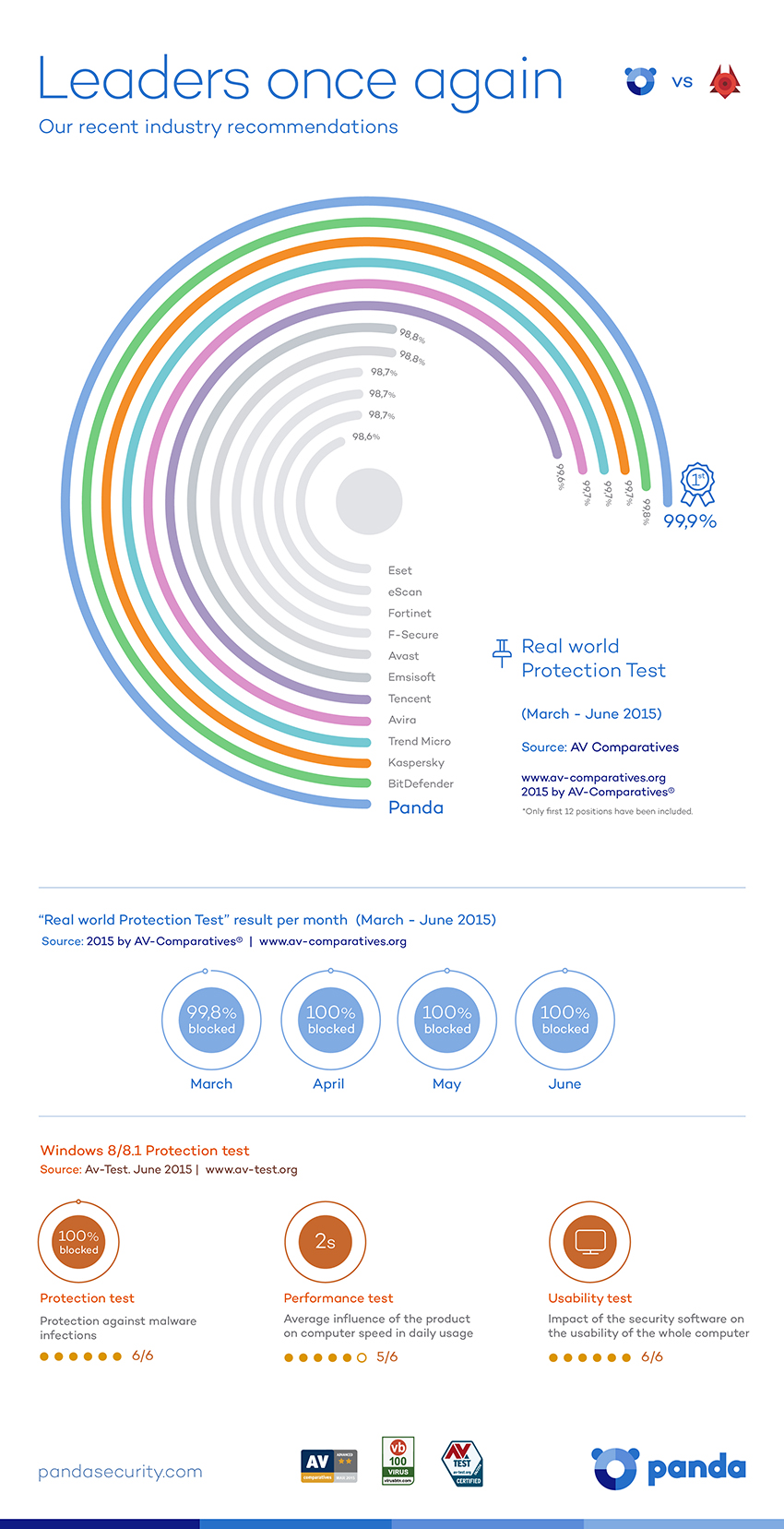
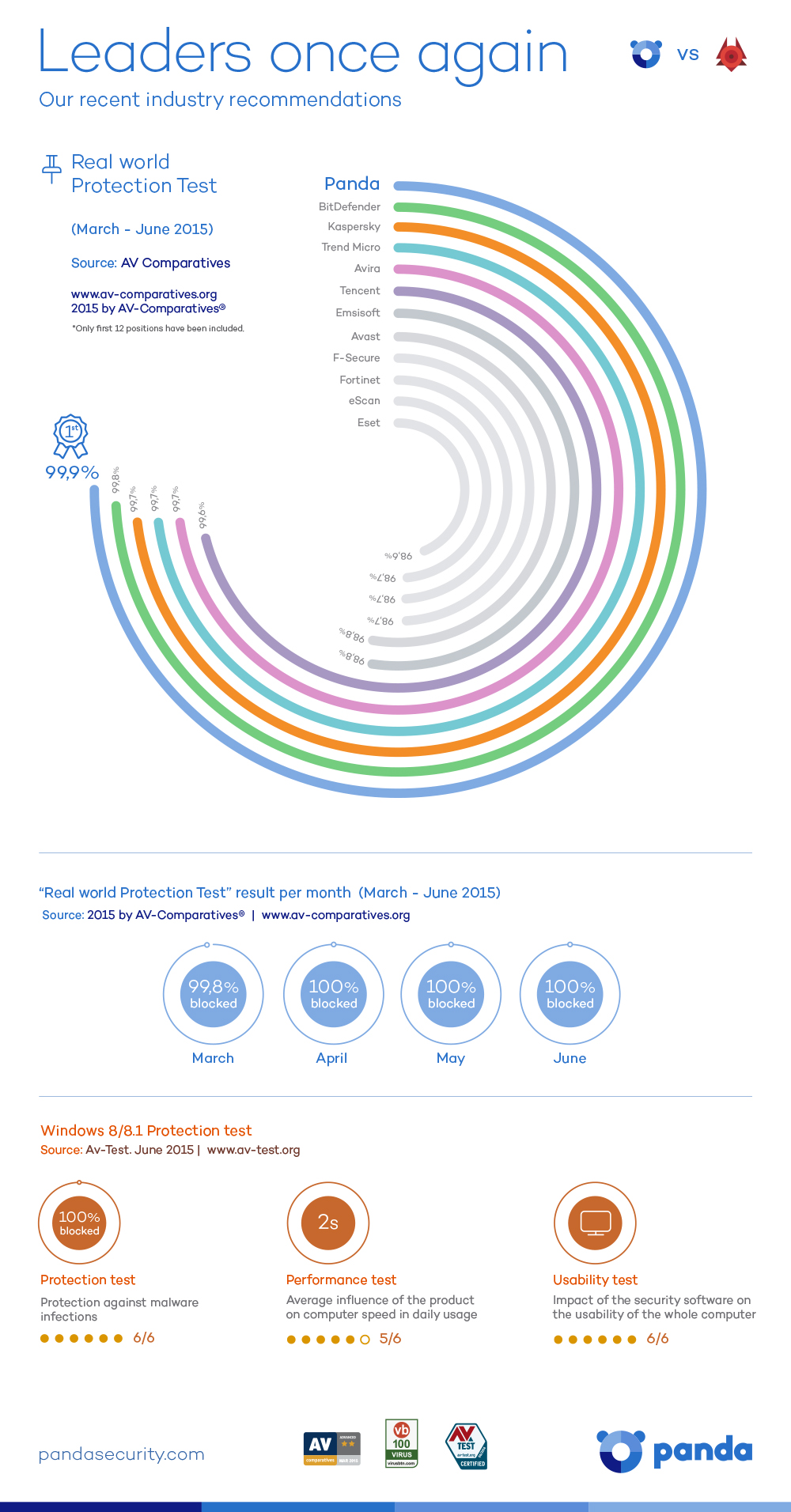
Panda Security detects and blocks 99.9% of threats!

March, April, May and June. During the last four months, Panda Security has obtained the best rate protection in the Real World Protection Test by Av-Comparatives.

It’s possible that you don’t know exactly what this means, so that’s where we come in! The test reflects real conditions in which the security solutions of different companies are analyzed and examined.

It is an independent laboratory, so the conclusions drawn from the tests are really important.

In these tests, Panda participated with our free antivirus, Panda Antivirus Free, and successfully detected and blocked 99% of the threats.

It’s easy for us to say this to you in words, but we think you’ll appreciate it more with this info-graph.

best protection

So, there you have it, if you want the best protection… you need Panda!

If you want to share the info-graph you can do it with this code!

The post Panda Security detects and blocks 99.9% of threats! appeared first on MediaCenter Panda Security.

5 tips for protecting your YouTube account

youtube

Videos, videos, and more videos! The millions of YouTube users are probably unaware of the dangers when surfing the platform looking for the next viral hit. However, this Google service is in the eye-line of many cybercriminals.

Through phishing attacks, they try to obtain passwords to access information such as bank data associated with your YouTube channel. The problem may be even greater if the account you use is owned by the company for which you work.

So, in the event that you have a YouTube channel which you use frequently, take note. Carelessness can end up being very expensive taking some precautions will serve you in the long run.

5 tips to protect your YouTube account

1. Be careful with shortened links

To begin with, be wary of any shortened link that reaches you, no matter where it comes from. While most are safe, some hide nasty surprises, like a malware that is automatically downloaded to your computer to steal information. Before clicking, make sure you know where the link will lead you to.

password

2. Use secure passwords

A key aspect in preventing a phishing attack is to have a strong password. It should include a mix of uppercase, lowercase, numbers, symbols and the maximum number of possible. In addition, it is recommended to change your password every three months if you can. This way you’ll be able to ensure that the cybercriminals are stopped in their tracks.

3. Change your  password frequently

As if it needs to be repeated, but be cautious with your password – do not use the same one you use on other platforms and don’t have it written down. We must tread warily in the digital world, but the physical world can be just as dangerous.

4. Don’t give your information away via email

You shouldn’t trust emails that you receive that request the password with which you access your YouTube account. In fact, if it comes from Google itself, be extra wary – an attack uncovered a few months ago shows that a malicious URL, in the guise of a company link, could make users enter their information without realizing it.

5. Fill out the recovery form on Google

It is important that you fill out the recovery form on your Google account. Although you may not like the idea of ​​giving your phone number to the company, it is a good way to avoid bigger issues if you discover that someone tries to enter your account – you’re the only one who has access to the recovery code on your phone.

In short, common sense and some thoughtfulness when creating your password can save you some massive headaches later. Just check carefully where you enter your personal details and this will stop cybercriminals from getting their hands on it.

The post 5 tips for protecting your YouTube account appeared first on MediaCenter Panda Security.

Google, Facebook and Yahoo join forces to fight against scammers who inflate the clicks on their ads

bots

The online advertising industry has witnessed the emergence of “invisible enemies” that pass themselves off as regular online users – the infamous bots. This network of zombie users has become a serious headache for businesses and this is reflected in recent data. According to a recent study, advertisers worldwide look set to lose $6.3 billion dollars per year (roughly €5.7 million) due to these scammers that try to imitate human behavior.

The investigation also signaled that 23% of all advertising video views and 11% of clicks on advertisements were carried out by botnets. This detail is harmful to the advertisers, as it implies that they are paying in order to artificially inflate page clicks and video views, which results in their campaigns losing credibility.

This worrying situation has forced leading technology companies to come together in the fight against the bots. Google, Facebook and Yahoo have recently joined forces with specialized digital marketing agencies such as Quantcast, Rubicon project and MediaMath. The Trustworthy Accountability Group, a group created by the American Advertising Association and the Interactive Advertising Bureau, has been the main diver behind this initiative to put an end to the fraudsters.

The agreement that they reached can be summed up as follows: there’s strength in numbers. Each of the businesses has its own internal blacklists – databases which contain information relating to suspicious IP addresses. Now, they will combine all of them to create one massive database which will allow them to block the bots.

“The industry is united in this fight and we are going to win the war against fraud”, stated Mike Zaneis, the executive director of the Trustworthy Accountability Group.

The DoubleClick blacklist, a platform for creating and managing the online advertising for Google, filtered 8.9% of web traffic in May. This database will be the most important for this information sharing program that will identify the bots that are designed to evade detection by the IAB/ABC International Spiders & Bots List.

bot

“By pooling our collective efforts and working with industry bodies, we can create strong defenses against those looking to take advantage of our ecosystem. We look forward to working with the TAG Anti-fraud working group to turn this pilot program into an industry-wide tool”, explained Vegard Johnsen, Product Manager Google Ad Traffic Quality, on the company’s online security blog.

A study carried out by Distil Networks estimated that, during 2014, malicious bots appeared in 22.78% of web traffic. This compared to 36.32% of “good” bots while humans only accounted for 40.90%. The harmless bots were able to be identified and this prevented them from carrying out any malicious activities.

Mountain View has detected fraudulent web traffic generated by platforms such as UrlSpirit, which uses Internet Explorer to visit a list of websites that generate up to 500,000 fraudulent requests per month, and HitLeap, a web-sharing service with 1,000 fraudulent advertising requests in the same period.

“By contributing our data-center blacklist to TAG, we hope to help others in the industry protect themselves,” claims Vegard Johnsen of Google. TAG will soon launch a pilot program which will collect a series of general principles, although the actual tool for detecting the online fraudsters isn’t available until the end of the year.

The post Google, Facebook and Yahoo join forces to fight against scammers who inflate the clicks on their ads appeared first on MediaCenter Panda Security.
A problem for Human Resources – some CVs can hold your computer at ransom

mouse

Just like sending greeting cards by post, physically presenting your CV for a prospective job offer is becoming extinct. The digital world in which we live has rendered the act of traditional post as unnecessary – now it is easy, not just for the candidates but also the HR department, to receive CVs by electronic or digital means.

However, this also presents its own risks for your IT security. Cybercriminals are prepared to take advantage of the fact that companies receive hundreds of CVs and like to attach a small extra to theirs in the form of malware.

A group of security experts uncovered a network of cybercriminals that sent malicious programs disguised as curriculums which installed itself on the victim’s computer upon clicking to open the document.

This type of attack is known as ransomware, which is a type of malware which can behave in two ways: it can completely block the computer or impede access to files by encoding them and making them inaccessible. Usually, the attackers demand the victim to pay a certain amount of money to receive a code to unblock the system, which is why they normally target companies as the chances of getting a big payment are higher.


In the chain of emails identified by the experts, the address corresponds to a Yahoo account and the attached document is compressed like a ZIP file. The emails also contain a short text with a greeting from the fake candidate in which they give their name (but never their surname) and notification of its delivery. Another characteristic of the email is the misspelling of words and grammatical errors.

CV

The experts therefore advise that once the compressed file is opened, the malicious file will be seen in .html format, which should serve as a warning as these type of texts are usually sent in PDF or Word documents (although it is also advised against opening them in this format if you aren’t sure of their origin).

Once the receiver clicks to open the document, their search engine will open the address that appears in the code (just like clicking on a link). The fake link redirects the program to a page on the infected server where a sequence of links is played out until an .scr file is downloaded, an executable file of Windows that contains the ransomware.

The reason why these criminals have created these cyber-labyrinths lies in the security systems themselves. The antivirus solutions and anti-spam filters have made them design a method of attack that takes place over a series of stages so as to evade the system’s defenses. This should also serve as a warning – if your computer goes through different steps to open a simple CV, be suspicious.

In the event of this or any other type of ransomware infecting your computer, the first thing you should do is turn it off and disconnect it from the internet so that it can’t spread to the rest of your devices that share that connection. The malicious program might be eliminated but it’s likely that you won’t be able to get your information back, which is why it is highly recommended that you make copies of all of your confidential and important information. It’s best to save it onto a different device and, obviously, do it before suffering an attack.

As regards the ransom that the cybercriminals ask for, don’t think that this will be solved just by handing over the cash – these criminals aren’t known for sticking to their word and nothing can guarantee that they’ll give you the correct code. Anyway, even if they do, what’s to say they won’t try and infect your computer again in the future.

The post A problem for Human Resources – some CVs can hold your computer at ransom appeared first on MediaCenter Panda Security.

More than 50% of malware for Android is aimed at stealing from you. Keep an eye on your pocket!

android

With the barrage of news about Hacking Team, the massive cyber espionage by governments, and the US intelligence raids, it might seem that cybercriminals are taking a different route compared to your average criminal. However, don’t let this fool you as they are all after the same thing which, as the famous song goes, is “money, money, money”.

Wherever there’s money, there are sure to be malware creators. So after the boom in internet shopping people are beginning to reach for their pockets to make payments once again; not with their wallets though, but rather their cellphones.

According to a recent study carried out by IAB, 7 out of 10 Spaniards (more than 19 million internet users) regularly buy online. The percentage of those who make purchases from their cellphones or tablets is steadily increasing and currently accounts for 15% of all purchases. In other countries, such as the United States, the percentage of purchases from mobile devices is even greater.

These online purchases generally require the use of sensitive bank information as you are paying with a card or performing a transfer, but this doesn’t seem to bother consumers. According to a report by ING, nearly half of Europeans now use their smartphone or tablet to carry out bank transactions.

mobile dollars

Slowly but surely tablets and smartphones are replacing the traditional computer for these types of tasks and, as a result, they have become a goldmine for cybercriminals. Financial malware, designed to gain access to your account, is thriving in the darkest corners of the internet.

More than half of all malware designed for Android has been created with stealing money in mind. This was confirmed by a recent study, which named Trojan and ransomware (which hijacks your terminal and requires a payment to unblock it) as the most popular tools deployed by cybercriminals.

It’s interesting to note that it is Android, and not iOS, which is the main target of attack. This is despite iOS taking a far larger profit share of the market. This is because, for the cybercriminals, it is all a matter of volume.

On a global level, Android is a far more popular system and accounts for 78% of the smartphone systems in operation, according to details from the IDC. Meanwhile, iOS only accounts for market share of 18.3%.

The more potential victims there are, the higher the yield for the cybercriminals, as we have seen with the infamous Sypeng and Faketoken cases, which wreaked havoc across the globe. So, if you have already been targeted by them you’re in a tricky situation, as prevention is better than the cure in this case.

An antivirus for Android and following some advice when completing transactions on your mobile device (such as avoiding public WiFi connections and avoiding applications that aren’t on Google Play) will save you a lot of hassle in the future.

The post More than 50% of malware for Android is aimed at stealing from you. Keep an eye on your pocket! appeared first on MediaCenter Panda Security.
The bots on Twitter aren’t harmless – cybercriminals use them to steal your information!

tuit

They are everywhere and are one of the main negatives of Twitter. The bots, an army of fake accounts that has invaded the social media site, can actually pose a serious risk for users.

They reached the height of their infamy thanks to a fight between politicians to see who could get the most followers on Twitter. This showed, rather humorously, that the network of bots is a double-edged sword. On one hand, they allow you to inflate the number of followers that you have, but on the other hand they can also lead to an embarrassing situation if you’re caught with your hand in the cookie jar.

Nevertheless, this is the harmless side to the bots because, in reality, this coordinated network of fake accounts could put the security of other users at risk. This is because in the hands of a cybercriminal, a network of bots could steal your personal information.

Even if they are most famous for spreading spam, the robots on twitter are also a powerful tool that are used for spreading different types of malware. All it takes is a few hundred false accounts and a shortened URL to infect your computer.

spam

That means that a shortened linked that is tweeted by a large groups of these bots could be a trap to steal user information via phishing, or even a Trojan which could gain access to your bank details.

This is how cybercriminals make a profit from creating fake accounts on Twitter. By stealing user information, they can make money by selling the information or, in extreme cases, stealing directly from your bank account.

Careful with shortened links

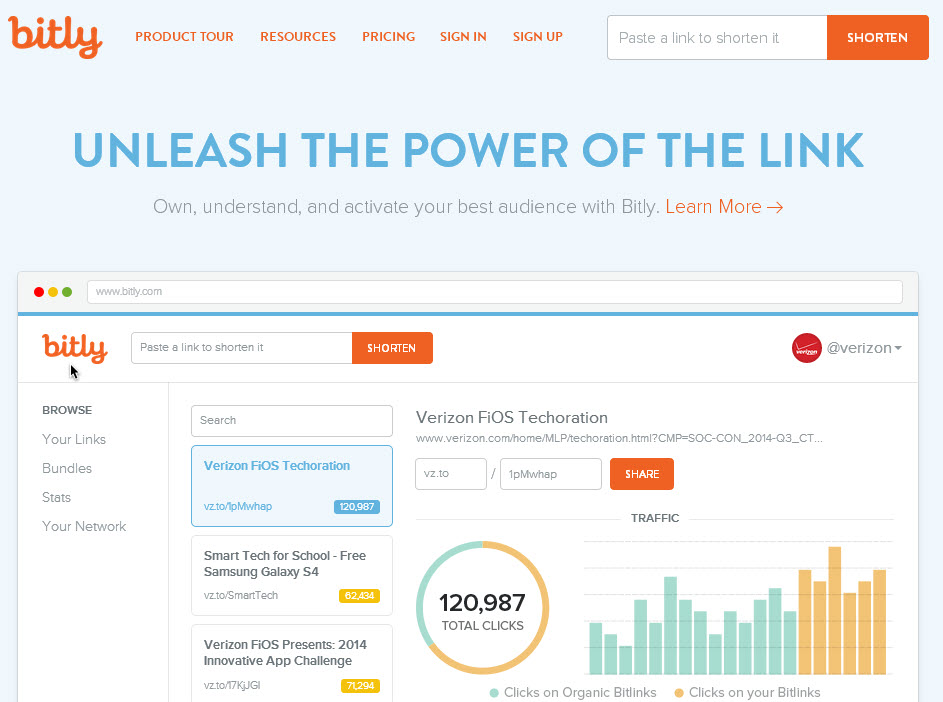
It’s important to remind users to be wary before clicking on a shortened link and to follow some advice to be sure that a link is safe. These include checking to see if it has been tweeted by a trusted account or by taking a look at its statistics and web page by adding the “+” symbol to the URL. This is a quick and easy way to avoid a nasty surprise.

bitly

Apart from being wary of the shortened links that come from unknown sources, users of Twitter should also be careful with hashtags, which are also becoming a way to spread malicious software.

Bots that are created and coordinated by a cybercriminal can take advantage of the tags on twitter to easily spread malware. This means that you need to keep an eye on trending topics as they are the most dangerous – the cybercriminals know that this is an easy way to take advantage of careless users.

It has to be repeated that the spreading of spam is not the worst thing that these bots can do – if they manage to rob from you via Twitter then that is a far more worrying prospect. In order to avoid this scenario, be wary of every Tweet before opening the content that is contains and, where possible, avoid really popular hashtags. You never know which of them has been infiltrated by an army of bots with bad intentions.

The post The bots on Twitter aren’t harmless – cybercriminals use them to steal your information! appeared first on MediaCenter Panda Security.

The bots on Twitter aren’t harmless – cybercriminals use them to steal your information!

tuit

They are everywhere and are one of the main negatives of Twitter. The bots, an army of fake accounts that has invaded the social media site, can actually pose a serious risk for users.

They reached the height of their infamy thanks to a fight between politicians to see who could get the most followers on Twitter. This showed, rather humorously, that the network of bots is a double-edged sword. On one hand, they allow you to inflate the number of followers that you have, but on the other hand they can also lead to an embarrassing situation if you’re caught with your hand in the cookie jar.

Nevertheless, this is the harmless side to the bots because, in reality, this coordinated network of fake accounts could put the security of other users at risk. This is because in the hands of a cybercriminal, a network of bots could steal your personal information.

Even if they are most famous for spreading spam, the robots on twitter are also a powerful tool that are used for spreading different types of malware. All it takes is a few hundred false accounts and a shortened URL to infect your computer.

spam

That means that a shortened linked that is tweeted by a large groups of these bots could be a trap to steal user information via phishing, or even a Trojan which could gain access to your bank details.

This is how cybercriminals make a profit from creating fake accounts on Twitter. By stealing user information, they can make money by selling the information or, in extreme cases, stealing directly from your bank account.

Careful with shortened links

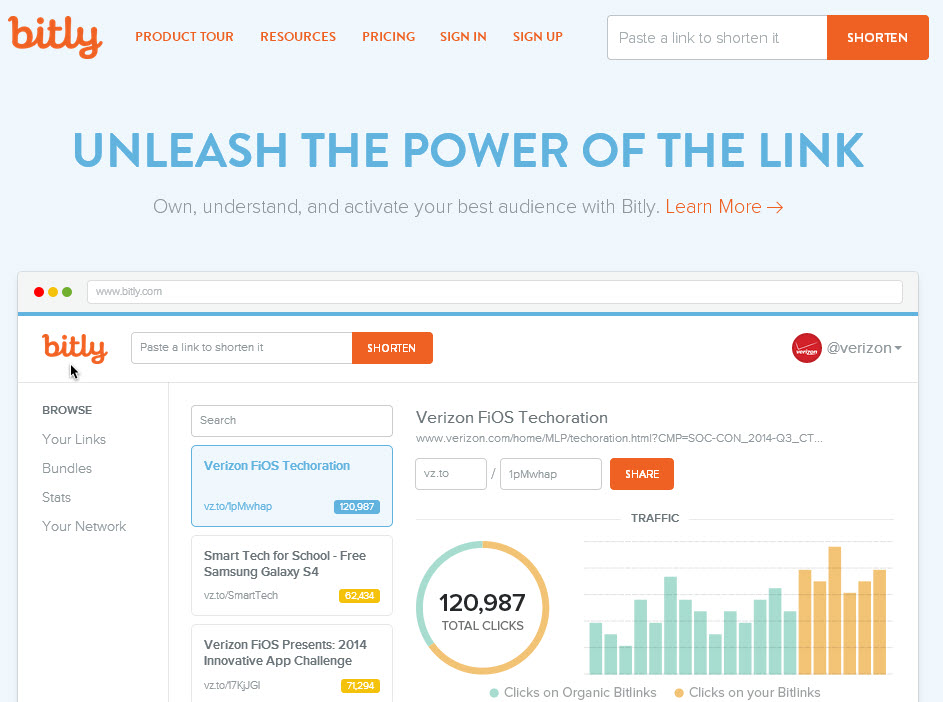
It’s important to remind users to be wary before clicking on a shortened link and to follow some advice to be sure that a link is safe. These include checking to see if it has been tweeted by a trusted account or by taking a look at its statistics and web page by adding the “+” symbol to the URL. This is a quick and easy way to avoid a nasty surprise.

bitly

Apart from being wary of the shortened links that come from unknown sources, users of Twitter should also be careful with hashtags, which are also becoming a way to spread malicious software.

Bots that are created and coordinated by a cybercriminal can take advantage of the tags on twitter to easily spread malware. This means that you need to keep an eye on trending topics as they are the most dangerous – the cybercriminals know that this is an easy way to take advantage of careless users.

It has to be repeated that the spreading of spam is not the worst thing that these bots can do – if they manage to rob from you via Twitter then that is a far more worrying prospect. In order to avoid this scenario, be wary of every Tweet before opening the content that is contains and, where possible, avoid really popular hashtags. You never know which of them has been infiltrated by an army of bots with bad intentions.

The post The bots on Twitter aren’t harmless – cybercriminals use them to steal your information! appeared first on MediaCenter Panda Security.

Panda Security achieves the highest protection ratio for the fourth consecutive month

Panda Security achieved the highest protection ratios in the Real World-Protection Tests conducted by AV- Comparatives in March, April, May and June 2015. This test evaluates the real-life protection capabilities of antivirus software.

panda, protection, virus

Panda Security took part in the review with Panda Free Antivirus, the company’s free solution, which detected and blocked 99.9% of all threats. In simple terms, the test framework replicates the scenario of an everyday user in an everyday online environment, testing antivirus software products against malicious Internet downloads or exploits designed to infect computers automatically by taking advantage of system vulnerabilities. The study, which analyzed more than 20 antivirus solutions, reinforce the great protection capabilities of Panda Security’s free product.

According to Luis Corrons, Technical Director of PandaLabs, Panda Security’s anti-malware laboratory, “We are especially proud of the excellent results obtained in the Real-World Protection Test, not only for taking first place in malware blocking and infection prevention, but because this is one of the most demanding tests when it comes to evaluating the real-life protection capabilities of antivirus software. Unlike other tests that use huge amounts of inactive malware, AV-Comparatives pits antivirus solutions against actual threats commonly found on the Web or on users’ computers. This way, the organization manages to reflect the real protection capabilities provided by the different security solutions”.

The efficiency of a smart engine

Panda Security has been 25 years at the vanguard of technological innovation, developing new technologies such as the XMT Smart Engineering engine, the basis of all of the company’s consumer solutions. With XMT, different technologies interact with each other to achieve new levels of efficiency and greater detection and disinfection power to eradicate all threats.

Year after year, and tests after test, the multinational security vendor keeps demonstrating the outstanding performance of its solutions, recognized by the industry for their superior protection and detection power. This efficiency level is at the heart of the company’s innovating, people-centric and unique service offering.

Click here to download an infographic.

The post Panda Security achieves the highest protection ratio for the fourth consecutive month appeared first on MediaCenter Panda Security.

Panda Security, compatible with Windows 10

Next Wednesday, July 29th, Microsoft will launch Windows 10. This new version has been gaining lots of attention in recent months and there are many people eagerly waiting what is seen as the launch of the summer.

If you are one of those and you have a Panda product, then fear not – Panda Security’s antivirus is completely compatible with Windows 10!

windows10 compatible

All of the products from the 2015 range are compatible with the new version of Windows and, if you have an older version but are thinking about updating your operating system, we recommend that you download your antivirus for Windows 10.

How to download an antivirus for Windows 10

It couldn’t be easier! All you need to do is go to the webpage and download your antivirus for Windows 10 which will keep your computer protected against all types of threats.

So, there you have it. On our end, there’s no problem, so now it’s up to you whether update your computer to Windows 10 or not!

The post Panda Security, compatible with Windows 10 appeared first on MediaCenter Panda Security.

Your company should be in the cloud, but monitor who you trust with its security

information, cloud

Do you know where your corporate information on the cloud actually is? Although most companies already store a great part of their files on the internet (making them available from anywhere and without taking space up on office computers), not all are aware of the data’s journey, where it ends up or how it is protected.

As the number and variety of activities carried out on the network increase, from many aspects of the relationship with the customers to accounts and economic transactions, the consequences of a cyber-attack or a leakage are increased.

Normally, it is an outside company that provides the service – maintains the servers that store the documents by placing them in the shared folder. While they are on their property, the responsibility of the management of sensitive information falls on your own company. To avoid a malware brewing within your systems or that the data ends up being leaked because of a security flaw, the first step is to take certain precautionary measures.

company, service

A good starting point is the creation of a corporate policy to establish a clear strategy. Information is accessible from many kinds of devices (mobile phones, tablets, PCs), both own and third party ones, so the best way of monitoring it is by knowing what it is being shared and with whom.

That is why it is important to classify the different types of documents according to their confidentiality and the levels of privacy they require, and determine how they will be stored in line with these principles.

An example is the Information Security Forum Standard of Good Practice, which is already being used by many corporations globally. The document brings together the main threats and risks, their evolution, and refers to the organizations’ needs to know how to respond to cybercrime, hacktivism activities’ or even espionage.

The information’s nature is also key to choosing the most suitable cloud storage service provider. Not all implement the same security measures. In addition, these companies have access to the files that you deposit in their servers. For this reason, it is advisable to be selective and make sure that they will be able to provide the level of protection required.

servers, store, documents

Another factor to consider is the updating and renewal of the infrastructure provided, as well as the software to manage information flows, since it can affect your own data. Knowing how often it changes and making sure that the contract ensures the confidentiality, integrity and accessibility of the files is crucial.

The level of caution should be enhanced when documents are of special value for the business and the company’s income. For example, in the case of patents or other type of creations with intellectual property rights.

And, finally, what happens if you want to delete all data from their servers? Make sure that you can truly destroy the information, and not only from your computer screens. If privacy concerns us individually, should we not be even more careful with corporate documents?

The post Your company should be in the cloud, but monitor who you trust with its security appeared first on MediaCenter Panda Security.