
Category Archives: Panda Security

Panda Security

Cyber-security is a worry for the health industry, but is it sufficiently protected?

A recent report by the non-governmental organization HIMSS, focused on improvements made in the health sector due to the introduction of information technology, has revealed that the sector is extremely vulnerable to cyber-attacks.

According to the report, two-thirds of those questioned (made up of industry professionals from around the world) confirmed that their organization had suffered a recent data attack. This is an alarming example of how valuable private patient information is to cybercriminals.

ciber-security, attack

Information security continues to be a priority in IT strategies

The concern about the protection of confidential information is of increasing importance to those who work in the industry, and they are working harder to ensure that this information is kept secure and private. This is reflected in the survey as nearly 9 out of 10 stated that cyber-security has taken on a greater importance in their business in the last year.

Lisa Gallagher, vice-president of Technology Solutions at HIMSS, claims that “health organizations need to adapt quicker in order to defend themselves against cyber-attacks”. So, what does this involve? According to Gallagher, this means incorporating new tools and carrying out frequent analysis of its security processes. Fortunately, half of those questioned agreed that their company had undertaken steps to improve its online security, the protection of its endpoints, the loss of personal data, and disaster recovery. Despite the wealth of protection technology available, however, the majority of those questioned have doubts that their company can protect against attacks on its IT infrastructure and private data.

The use of antivirus and antimalware software is the most widespread

In general, according to the report, companies within the health sector use, on average, 11 different types of technology to guarantee their security. Furthermore, over half of these companies have employees dedicated to the management of private information and data.

This is a logical move considering that 42% of those questioned believe that there are new and growing threats that need to be detected and stopped. These threats have, in half of the cases, been detected by internal security systems. Just 17% of those surveyed admitted that security breaches had been detected by an external source, such as a patient whose information had been compromised.

Another important and positive detail that comes from the survey is the increased use of antivirus and antimalware software by companies (87% of those polled confirmed that their business had implemented the software). Not only this, but 80% also stated that their company was increasing its monitoring of online security to detect and investigate security breaches.

health industry

Consequences of attacks

With regards to security incidents, the majority (62%) have stemmed from a disturbance in the IT systems that has not only affected the IT operations, but also health care – albeit in a more limited way.

To have personnel available that are ready to detect and stop the attacks is vital. According to the report, 64% agree that not having skilled professionals on hand is a barrier against combating cyber-attacks.

The majority of those questioned (70%) also agree that phishing attacks, which are more and more frequent, and the spread of malware, are incentives to improve the protection of private information. In order to achieve this, 59% of those surveyed feel that it is important to share information about cyber-attacks with other sectors.

It is important to point out that these attacks aren’t just confined to the health sector. Many other companies have suffered breaches of security including Sony Pictures, which saw information stolen relating to employee salaries, unreleased films, and private mails between directors. Other businesses in the maritime oil industry  have also suffered information theft, which we recently discovered at Panda Security.

Finally, an example of a company from the health sector that has suffered an attack is CareFirst BlueCross BlueShield, which offers medical services in the US states of Virginia, Maryland and Washington D.C. Last year the company found out that private information relating to over a million of its online users could have been compromised in a cyber-attack.

The post Cyber-security is a worry for the health industry, but is it sufficiently protected? appeared first on MediaCenter Panda Security.


Tapjacking – when the danger camouflages itself on Google Play

tapjacking, android

After many attempts, we have finally gotten it into our heads that it is essential that we read the small print before we install any application on our devices. If it mentions anything that strays far from what the app is about (for example, a flashlight that tries to use your GPS) it’s best to ignore it unless you are completely confident in the product.

Just because an application requires a lot of permission to be installed doesn’t mean that there is anything to be concerned about but it should still serve as a caution. Luckily, the majority of people are aware of this and look at the small print in detail, leaving cyber attackers to look for other ways to trap their victims.

One of their more dangerous techniques is known as tapjacking – a weakness in the Android operating system that allows for malicious activity to be hidden under the guise of a regular app. This technique lets malware, which could potentially steal credit card details, disguise itself as an inoffensive videogame application.

danger, mobile, android

In February of this year Google released its Android Security Acknowledgements and included on this list were two investigators – Stephan Huber and Siegfried Rasthofer. They were thanked for their help in detecting the possible security breach and for helping the company to uncover how these attacks were being carried out.

How tapjacking Works

It works in a surprisingly simple way – you download an application and open it, which triggers the installation of a second, this time malicious, application. Then, when you press a button on the seemingly innocent application, you are actually clicking a button on the malicious application that is hidden within it. So, as its name suggests, the trap is in the tap.

So, imagine this scenario. You have downloaded an application and on the main screen there is a button that says “Start Game”. You click it to begin but, unbeknownst to you, this has triggered the downloading of the dangerous malware. On the next screen you continue clicking away, oblivious to the dangers, and without realizing you have accepted the terms and conditions of the dangerous malware that has hidden itself on your cellphone.

In the video below we have a clear example of how this form of attack works – the user clicks on “Start Now” to begin downloading images of adorable kittens and, without realizing, grants permission to the attacker to take screenshots on the device.

VIDEO

How the attack works is a lot easier than it might seem. This is due to the type of pop-up notifications that were developed by the programmers of Android applications. There were developed to give alerts to users – such as the one that appears if the battery is running low – but if they appear in full screen and with a button that doesn’t react to your clicks, then they are in fact a dangerous tool used by cybercriminals.

Apart from installing the malware and tricking you into accepting the terms of installation, the attacker can use tapjacking to steal your passwords or to even carry out actions using your bank details.

They key to protecting yourself from this attack is, yet again, in the permission stage. Even though these dangerous applications don’t request a lot of information before being installed, there is one thing which they all have in common – they will ask for permission to show system alert windows, something which isn’t common in other types of applications. If this happens to you, be wary. Check out reviews and opinions from other users on Google Play and ask yourself whether you trust in the application’s creator.

A good antivirus could also come to your rescue in this situation. Just because you can’t see the danger doesn’t mean it’s not there. Fortunately, our security tools are there to shine the light on it.


The post Tapjacking – when the danger camouflages itself on Google Play appeared first on MediaCenter Panda Security.

Why Adaptive Defense 360?

AD-360

A few days ago we published an interview on why Adaptive Defense was the solution against ransomware like Cryptolocker. Now, however, I’d like to go into further details on why Adaptive Defense 360 isn’t just the present and future for just Panda, but rather for the entire cyber security industry.

Adaptive Defense 360 is the only solution available on the market that offers the full protection of a traditional antivirus, white listing, and protection against advanced threats all in one. In fact, it combines all of the capabilities of two product categories in one – EPP (Endpoint Protection Platform) and EDR (Endpoint Detection and Response).

So, how can we make it stand out, in a way that shows Adaptive Defense to be a unique and essential option, to other products on the market?

Differences between Adaptive Defense 360 and a traditional antivirus

  1. An antivirus lacks proactive detection and doesn’t classify all of the applications. Instead, it just classifies those which it has previously listed as malware while Adaptive Defense classifies all running applications, be they goodware or malware, known or unknown.
  2. An antivirus means a certain level of work for the administrator – management of the quarantine, dealing with false positives, etc. On the other hand, Adaptive Defense is a managed service and these types of tasks are taken care of automatically by Panda.
  3. An antivirus doesn’t offer traceability for the actions taken by a malware, meaning that it doesn’t give any forensic details about the attack. Adaptive Defense, however, offers detailed feedback on every action taken by a threat.

Differences between Adaptive Defense 360 and white listing

  1. The main inconvenience of managing by white listing has always been the amount of time required to look after it. This is time that could be better used by the administrator. With Adaptive Defense this inconvenience is removed and Panda looks after the management of the task.
  2. What’s more, the deployment of these services is extremely complex. With Adaptive Defense it’s more akin to child’s play, thanks to it being a cloud based service with one agent in every endpoint.
  3. Above all, a white list doesn’t protect vulnerable applications, or applications that suddenly begin acting strangely. This is something which Adaptive Defense detects and blocks.

Differences between Adaptive Defense 360 and an Advanced Threat Defense (ATD) such as FireEye, PaloAlto, SourceFire, etc)

  1. An ATD solution doesn’t cover all of the possible vectors of infection, but rather only threats that enter via the internet. This leaves you vulnerable to attacks via the USB port, for example. This doesn’t happen with Adaptive Defense as, due to being at the endpoint, it detects all attacks no matter where they come from.
  2. ATDs monitor threats by sandboxing, which means they do it in controlled settings. This allows a threat to behave in different ways to a normal situation making it harder to catch – Panda Adaptive Defense 360 monitors the endpoint in real-time, meaning that no threat can escape its analysis.
  3. ATDs don’t avoid or block attacks, which is one of their main limitations. Adaptive Defense, however, is capable of automatically detecting and blocking any threat that is found at the endpoint.
  4. Finally, if an ATD finds a threat it needs either a third party solution or a manual intervention to correct it. With Adaptive Defense 360 this is all taken care of automatically and immediately.

When all is said and done, we can see that Adaptive Defense 360 is way ahead of other options available on the market. It excels not only against traditional threats but also with vulnerable applications and advanced threats.

Adaptive Defense 360 continuously analyzes the system’s activity so as to determine how to classify every process being carried out as goodware or malware, without leaving room for doubt, and closes the circle of detection with the solution built in.

Do you want more information?

TRY ADAPTIVE DEFENSE


Paula Quirós. CMO Panda Security

The post Why Adaptive Defense 360? appeared first on MediaCenter Panda Security.
10 tips to stop cybercriminals from ruining your vacation

pc

Now that we’re entering into that time of year when planning your summer getaway is high on the agenda, there are always some things we can do in order to divert burglars’ attention from our vacant houses – don’t leave all the curtains and blinds closed over; ask a neighbor to collect your mail from the mailbox; be sure to leave a light on at night, etc.

However, these traditional forms of protection are now no longer enough. Our lives revolve around technology more than ever now and this also poses a risk during the vacation period, but don’t fear – these are some measures you can take to stop cybercriminals from ruining your summer.

10 tips to stop cybercriminals from ruining your vacation

1 – Don’t shout it from the rooftops

First of all, don’t post on social media about your upcoming vacation. If you really can’t avoid it, then don’t reveal too many details about your plans. This information could be useful for someone with a sinister motive and could leave your home and valuables exposed.

Another thing, make sure you deactivate your GPS. This way you don’t have to worry about it giving away clues of your whereabouts which might avert criminals to the fact that you’re out of town.

2 – Make a copy of everything

If you have decided that you’re going to take your laptop or tablet (or even just your smartphone, from which you can’t be apart!), don’t forget to make a security copy of everything on it and leave that at home.

This isn’t just to protect you against theft, but rather because you never know if you might lose it or have an unfortunate accident. It pays to think ahead!

3 – Protect yourself

Antivirus, firewall… make sure that all of your security measures are fully functioning before you head off on your travels. In the event that you need to connect to public WIFI, you can rest assured knowing that your device is secure.

4 – Avoid public connections

Despite having confirmed that your device is in good health, try to avoid using public WIFI as much as possible. By connecting to public WIFI you run of the risk of any cybercriminal accessing your personal information.

wifi airport

5 – Just stick to your own computer

Unless it is an emergency, try to avoid using computers that aren’t your own. This includes those that are available in your hotel or internet cafes because any information that you enter into them could be compromised. This could put your privacy and security at risk.

6 – Change your passwords

If you have no other choice but to use a public computer, do so with caution. Only use secure webpages, try to use it through a Virtual private Network (VPN) so that the information is coded, and change your passwords as soon as you have finished.

password

7 – Be wary of offers

Summer is a prime time for fraudulent offers. You should err on the side of caution if you see an offer online or receive one to your email account. Check out other reviews on it, check that the webpage is safe, and that all of the facts are real so as to avoid being duped.

8 – Deactivation of your smartphone

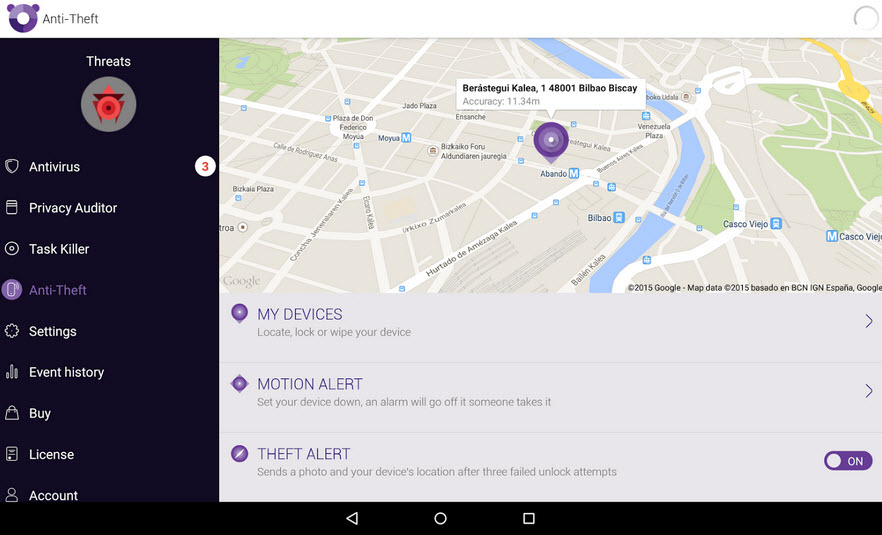
Prepare your cellphone for the worst – if you lose it or it is stolen, you’ll be glad that you activated one of the applications that allows you to locate your phone or deactivate it remotely. Android devices come with this feature built in thanks to the Android Device Manager and also you can usea our antivirus for Android.

find phone

9 – Buy with caution

When completing a purchase online, such as hotel or flight reservation, keep an eye on your personal details. Electronic payment systems and credit cards come with security measures which mean you can shop safely online. However, make sure that unauthorized purchases don’t appear in your account. If you spot anything out of the ordinary, change your passwords and contact your bank.

10 – Be careful with USBs

If, during your vacation, someone shares something with you via a USB on your computer, be sure to scan it with an antivirus first. Not only are there hidden dangers on the internet, but also on USBs, which can hide a nasty surprise.

The post 10 tips to stop cybercriminals from ruining your vacation appeared first on MediaCenter Panda Security.
Panda Security and BQ join forces against cyberattacks on mobile devices

Panda Security announces a collaboration agreement with BQ, Spain’s leading manufacturer of  smartphones and tablets, through which the two companies will join forces to protect mobile device users from the cyber threats they face every day. As a result, Panda Security and BQ’s customers will be able to enjoy the most innovative technology and protection on the market, securing their digital lives through unique and very competitive products.

Through this agreement, BQ will include the security company’s solutions on its devices so that users can activate them quickly and easily. In addition, those interested in purchasing Panda’s services can do so via BQ’s website.

alliance bq and panda

International Agreement

The partnership between BQ and Panda Security, two leading Spanish companies and pioneers in their fields, also extends to countries like Germany, France, Italy, United Kingdom and Sweden. Users in these countries who purchase BQ products can enjoy the guarantee of Panda Security’s protection solutions, for both the consumer and enterprise market: Panda Mobile Security, Panda Global Protection, and Panda Fusion.

“Our goal is to make technology accessible to the world, helping to improve it and providing the best possible user experience. This involves offering excellent features and technical specifications, outstanding customer service and, increasingly, security to devices. And who could be a better partner than Panda Security, the cutting-edge company in digital protection solutions”, says Rodrigo del Prado, Deputy General Manager at BQ.

“This agreement brings together the most competitive mobile technology and the most innovative security solutions, and also reflects the good work of two leading Spanish technology companies. This global partnership with BQ is a step further towards our goal of protecting people’s digital lives in a context characterized by globalization and mobility in multi-device format”, claims Diego Navarrete, CEO at Panda Security.

Minimum Impact, Maximum Security

Designed to provide complete protection with minimum device resource usage, Panda Security’s solutions leverage all of the benefits of cloud-based security to combat all types of digital threats: viruses, hackers, online fraud, identity theft, as well as other known and unknown threats.


The post Panda Security and BQ join forces against cyberattacks on mobile devices appeared first on MediaCenter Panda Security.

Panda Free, the best free antivirus of 2015

PC Magazine has named Panda Free as the best free antivirus of 2015. Ranking ahead of the likes of Bitdefender, Malwarebytes and Avast, Panda’s antivirus has been awarded the Editor’s Choice by this prestigious media outlet.

best free antivirus

The features highlighted include its speed and ease of installation along with its cloud based technology. What’s more, its ability to block malicious URLs was highly rated.

Are you ready to try out the best free antivirus of the year?

DOWNLOAD PANDA FREE

The post Panda Free, the best free antivirus of 2015 appeared first on MediaCenter Panda Security.

If you like videogames, check out these safety steps!  

game boy

The good times are rolling for videogame companies as the sector has witnessed sustained growth in the last few years and, luckily, 2015 doesn’t look like it’s about to break this trend. According to recent estimates by Newzoo, an industry consultant, businesses in the sector are expecting global gaming revenues of $91.5 billion dollars – an increase of 9.4% compared to the previous year.

This rapid growth is in large part thanks to the boom in mobile and tablet gaming, which have registered revenues of $20.6 billion and $9.4 billion, respectively. They have also seen the largest rise increase compared to the previous year – 21% and 27%, respectively – although they still trail video consoles ($25 billion) and computers ($27 billion), which continue to lead the sector.

Despite this all being great news for video gamers, we still have to keep in mind the increasing danger posed by cyber-criminals. In the last few months we have seen some not-so-pleasant attacks which have been of a worrying frequency.

Last summer we saw how a wave of Distribution Denial of Service (DDoS) attacks infiltrated, to name a few, popular platforms such as the Playstation Network, Xbox live, Twitch and Origin. The attacks, which denied users access to online gaming, were repeated again over the festive season. Groups such as Lizard Squad and Anonymous claimed responsibility for accessing, and leaking, as many as 13,000 passwords and credit card details from these platforms.

In January of this year, various users of Origin (Electronic Arts) complained that the service – including the online store – was carrying out charges to their bank accounts for purchases that the users hadn’t authorized. Twitch, Amazon’s well known streaming page, asked its users to change their passwords at the end of March following an attack that could have left log-in details exposed.

videogames

With this in mind, the best thing that any gamer can do is to take precautions when playing online. By following some simple steps you can avoid trouble if your favorite gaming platforms are targeted.

How to play safely

  • Don’t use your personal email address on gaming sites. If you create a new one, or even a disposable account, the hackers won’t be able to access personal information such as your contact list.
  • If you don’t play on buying games or add-ons during, don’t give out your credit card details – it’s an unnecessary risk.
  • Some platforms offer you the possibility of verifying your identity in two steps in order to protect your account. Don’t overlook this invaluable tool.
  • Before entering personal details into the registration form, ensure that it is an official page and not a copy. Phishing attacks are, sadly, rampant and a good way to make sure you’re not being duped is to click on the logos and links to verify their authenticity.
  • Finally, and most importantly, keep your antivirus up to date. Our antivirus software will detect fraudulent pages and the possible malware that will try to install itself on your computer.

By following these tips and using common sense, you can enjoy your favorite games without fear of anything bad happening during your gaming experience. Online security is no joke, so it is important to always play safely.

The post If you like videogames, check out these safety steps!   appeared first on MediaCenter Panda Security.

Your Online Purchases Could be in Danger Thanks to a Breach in Magento’s Security

To the usual misgivings of many Internet users, who are still suspicious about buying over the Internet, we now have to add certain security problems that have damaged the image of e-commerce.

The latest worrying episode has affected the popular management software, Magento – a group of attackers has taken advantage of a crack in its security, broken into the database and stolen personal information related to its users.

buy online safely

Over 100,000 stores worldwide use this tool, among those at risk are eBay (which owns the company), Nike Running and Lenovo. The researchers found that the cybercriminals infected the most sensitive part of the system with a malware – one designed to collect payment data.

The most worrying thing is that the victims didn’t even notice what had happened until they checked movements in their personal accounts. It was then that they realized that someone had stolen their money.

Last April a similar security gap was detected in this online retailer. Then, just as the company learned about this problem, Magento gave its customers a security fix that offset any possible leakage of information.

Far from wanting to make you fear shopping online, cases like this are used to point out the risks we face, and offer some tips to avoid, as much as possible, becoming the victim of a cyberattack when using an e-commerce platform.

6 tips to avoid security breaches in your online shopping

  1. One of the first steps you can take is to make all your online purchases through a payment service. There are many experts who claim that tools such as PayPal, with the incorporated security tools and encryption technology, can shield you from harm. In addition, it is advisable to link the account to a credit card in order to enjoy the protection measures implemented by the banks in their online payment process.
  2. Speaking of credit cards, one of the recommendations from the experts is to only use one card for your online purchases. So, if anything happens you will know which one to cancel to stop cybercriminals from emptying your account. We also recommend checking your balance often to discover any unauthorized movement before it’s too late.

padlock

  1. Another good idea in these cases is to keep, either printed or on the computer, a receipt of each purchase you make through the Internet. That way, if some day you have the misfortune of suffering information theft, you will be able to show those documents to prove the payments you made and those made by an intruder without your consent.
  2. On the other hand, a situation that you should avoid at all costs is to make purchases while using public WiFi. As a general rule, they are not safe – someone with evil intentions and the necessary knowledge could intercept the data from your computer and obtain your passwords or your credit card information. If you must access a public WiFi network, be sure to use a virtual private network (VPN).
  3. Finally, changing the passwords that you use in different online shops every so often could save you from any possible headaches.

The post Your Online Purchases Could be in Danger Thanks to a Breach in Magento’s Security appeared first on MediaCenter Panda Security.
Companies’ business continuity plans must improve

disaster

Disasters and security incidents happen. It is a fact. The problem is that organizations are still planning a response to these situations with little time, despite the fact that most of them have been forced to use a disaster recovery plan in the past 24 months. This is shown in a study by Gartner carried out in several countries highlighting this aspect (how these business continuity plans are managed and how the information security is safeguarded, what is their IT budget to accelerate the service restoration, etc.), which shows some of the most common disaster recovery management mistakes and discusses the key points to avoid them.

Short-sighted companies

In the report, made after interviewing more than 900 companies from six countries (United States, Canada, United Kingdom, Germany, India and Brazil), the consulting firm reveals that 75% of companies surveyed plan business continuity strategy just seven days in advance or even less. A striking fact that is striking when 86% of institutions claim to have had to implement a disaster recovery plan (which includes the recovery of the business, a crisis or incident management, the management of disaster recovery from the IT point of view, the availability of third parties or suppliers etc.) in the past 24 months.

Moreover, according to another report, this time made by Swiss Re, a company in the insurance sector, the number of natural and man-made disasters has increased exponentially in the last 40 years. While between 1970 and 1985 there were less than 100 disasters per year on average, between 1986 and 2013 there were 150, 2005 being by far the worst year (with more than 250 incidents that year).

Lack of capacity to determine their plans’ effectiveness

Another error detected by Gartner is the inability of most organizations to establish whether or not the business continuity plan they have defined is effective. Only 35% of the surveyed organizations surveyed dealt with exercises to test the effectiveness of their plan, just 30% used metrics for this purpose and 27% used score cards. At least half rely on audit reports, a practice somewhat weaker than the previous options, says Gartner.

incident management

Recovery Time and budget

As for the recovery time from a disaster, it is also generally high. Seventy six percent of the participants in the survey claimed that their business and their company’s systems are operational in 24 hours. Only 35% indicated that they are able to fix their systems in less than four hours.

The report also showed which sectors are more willing to increase their IT budget to improve their response to disasters. These are the health sector (this is what 71% of the respondents in this segment of the survey believe), communications (63%), transport (56%), banking (54%), and retail (52%). Contrary to these only 36% of the utilities and public sectors interviewees expect to increase the amount for this area in 2015. Furthermore, 9% of the respondents of these last two sectors believe that the IT budget for disaster recovery will be reduced this year.

Monitoring and management tools

Interestingly, as the study denotes, companies that have a greater degree of maturity in managing business continuity plans used software that facilitates this aspect and others such as monitoring certain parameters, from risk management to analysis of the incidents’ impact on the business and the disaster recovery plan management process. In general, 50% of the consulted organizations have acquired some of these tools in the past 12 months. Also gaining ‘market points’, are early warning systems of natural disasters (used by 32% of the companies), climate (24%), geopolitical (23%) and other aspects that may cause disruption of the business.

Extra effort to reduce the applications’ unplanned downtimes

A remarkable and positive aspect of the report is the growing number of IT managers who are starting projects in order to reduce (if not eliminate) the unplanned downtime of applications. According to Gartner, 40% of falls occur due to failures in the application (bugs, performance problems, or changes that cause problems); 50% are due to errors in operations, 20% are due to the hardware (problems on servers, networks…), operating systems, environmental factors (related to overheating, for example) and disasters.

“Statistics show the importance of establishing and maintaining a program focused on reducing, if not minimizing, the duration of unexpected downtimes and its impact on operations”, says the study along these lines.

Recommendations

Finally, from Gartner, they provide some advice to organizations who want to improve their business continuity plans and their disaster recovery policy.

  • Define a longer-term program, at least three years.
  • Use this program to know the largest time frame an organization can support when there has been a disaster or other incident involving a business interruption.
  • Check what insurance is held by the company in the event of a situation like this and act accordingly.
  • Analyze the use of tools that allow monitoring and managing business continuity plans to help standardize the strategy and to provide real time analytics and an x-ray of the operational area that allows managers to make better decisions during a crisis, incident or disaster.

The post Companies’ business continuity plans must improve appeared first on MediaCenter Panda Security.

Public WiFi networks. Are they safe?

free wifi

Airports, hotels… On vacation we also spend the whole day connected to the Internet. WhatsApp has in many countries become an essential tool for personal communication. We all want to be able to check Facebook, post photos on Instagram, tweet something we’ve seen, and answer work emails from wherever we  are… and it’s possible. We mostly do all these things from a smartphone, or perhaps from tablets or (increasingly less) from laptops.

It is quite common to scan for and connect to public WiFi networks which aren’t password-protected and let you connect to the Internet cheaply and simply. In fact, a typical selling-point of many restaurant chains nowadays is that they offer free WiFi connections to customers, and in many places there are public WiFi hotspots provided by local councils.

Even though the price of mobile data connections has dropped considerably (largely thanks to competition and technological advances), and connection speeds continue to increase (GPRS, 3G, HDSPA, 4G…), most users, if they can, still try to avoid using mobile data. The reason is simple: many of the mobile data rates on offer include a limit on data download volume, and once this threshold is exceeded, either the connection speed drops or the charges increase. Moreover, not everywhere has good mobile data coverage, and that directly affects the connection speed. And that’s not to mention the question of data roaming when traveling to other countries, where prices are very often completely prohibitive.

It’s obvious that most of us at one time or another will try to connect to a public WiFi network. Is it safe? What are the risks? Can anyone spy on data sent from my device? Can I get infected if the network is malicious? These are some of the questions that we’ll answer below.

When you connect to the Internet from home or from your office, you know who is responsible for the network and which people can connect to it.  However, on a public network, anyone can be connected, and you have no idea of their intentions. One of the first questions that arises concerns the level of security on any Web page that requires you to enter your login credentials.

wifi airport

How to connect safely to a public WiFi network

Could someone connect to the same network and spy on data communications?

Yes, anyone connected to the network could capture the data traffic sent from your device, and there are simple, free apps available for this purpose.

Does this mean that someone could steal my Facebook username and password?

No. Fortunately, Facebook, along with many other social networks, webmail services, online stores, etc. have secure Web pages. You connect to them via SSL, which you can see on your browser (depending on which one you use) when the padlock icon is displayed next to the page address. This means that all the data sent to this page is encrypted, so even if it is captured by a third-party, it cannot be read.

What about other websites? Could someone see which pages I’m visiting, or access the data I enter on unencrypted site?

Yes. It’s very simple to capture this information, and anyone could see what pages you connect to, what you write on a forum or any other type of unencrypted page.

So as long as the Web page is secure, I’m alright, aren’t I?

Yes, but it must really be secure. Capturing network traffic is just one type of possible attack. If the hotspot has been deliberately set up by an attacker, they could, for example, alter the settings of the WiFi router to take you to the page they want. Imagine you enter www.facebook.com in your browser, yet the page you see is not really Facebook but a copy, so when you enter your username and password you are giving it directly to the attacker. Or, worse still, the page you are taken to contains an exploit which infects your device without you realizing. In any event, the fake page won’t be secure, which should help you detect that it is not the real site.

But is this still the case if I know that the WiFi hotspot is reliable, such as in a shop or restaurant?

Yes. although it is obviously safer, no one can guarantee that the router hasn’t been compromised, or that the DNS configuration hasn’t been changed, which would enable an attack like the one described above where you’re directed to a fake page. In fact in 2014, security holes have been discovered in popular routers which allow them to be hacked so an attacker could easily change the configuration.

This is chaos! Is there any way of protecting myself against these attacks?

Yes. One good way is to use a VPN (Virtual Private Network) service. This ensures all data traffic from your device is encrypted. It doesn’t matter whether the site is secure or not, everything is encrypted. When you are connected to the VPN, the router’s DNS settings are not used in any event, so you’re protected from the types of attack described above.

And what about password-protected WiFi networks? Is there the same risk?

This in effect ensures that only people who know the password can connect to the same WiFi access point, nothing else. In a way, you could say that this reduces risks by reducing the number of people who can connect, although the same kind of attacks can still occur in the same way as on an open network without password protection.

Does this apply to all types of devices or just to computers?

To all kinds: computers, tablets, smartphones or any other device with which you can connect to a network.

And so what about WhatsApp? Can anyone see my chats or the photos and videos that I send?

No. Fortunately that information is now encrypted. Previously it wasn’t, and in fact, an app was developed that allowed you to see people’s chats if you were connected to the same network. This is no longer possible, although there is a way someone could find out your phone number if you are connected to WhatsApp on the same network as them, but that’s the most they can do.

The post Public WiFi networks. Are they safe? appeared first on MediaCenter Panda Security.