Category Archives: Panda Security

Panda Security

Yet another ransomware variant!

Recently we caught what seems to be a new ransomware variant in our nets. The mail contained a file called “Transferencia devuelta pago erroneo” (translated: “Transfer back erroneous payment”) with the .cmd extension and is actually just an executable.

When running the file, you’ll get the following notification:

error in file

Error in file, nothing to see, move on… Right? Not exactly, in the background a new folder on C: called xwintmp is created and new files are being download and executed:

xwintmp 5 new files are created:

  • chuingamshik -> file which contains the word “chuingamshik”, possibly the project’s name
  • filepas.asc -> contains your calculated PGP key and ransom message
  • manager.exe ->payload, dropped by Transferencia devuelta pago erroneo.cmd
  • pgp.exe -> generates your custom PGP key
  • rar.exe -> to encrypt the files

As to not arouse suspicion or to evade sandboxes, the malware then waits for a while using the Windows API “sleep” function and afterwards starts ‘encrypting’ all your files:

manager.exe

I’ve used single quotation marks here since there’s no real encryption going on, but rather the manager.exe file starts archiving (or “RARring” if you will) your files with some parameters and adds a password, using the command line version of WinRAR. The ransom creates a random key, unique per infection process. The seed for the random key is the Windows API “GetCursorPos”. “GetCursorPos” gets the current X and Y coordinate from mouse cursor, and is launched 16 times, making it impossible to guess or recover the key.

It connects to a TOR server where it sends the random key encrypted with PGP and the public key it contains.

Here’s the good news: when the malware is still encrypting your files, you can easily retrieve the password from memory as is also shown in the screenshot above. Starting with 5F0 and ending with 131 is in fact the password used to encrypt the files. You can use for example Process Explorer to determine the command line arguments and extract the password.

As said earlier, the filepas.asc contains your PGP key + a ransom note, which is as follows:

The files are packed in archives with a password.

Unpacked – 300 eur

To unpack the files send two files to email: [email protected]

1) file you are reading now

2) one packed file (no more than 1 megabyte)

In response comes the original file and the instruction for bitcoin transfer

(The original file is proof that it is possible to return all files to their original)

After the transfer bitcoin, you will receive your password to archives.

Also coming program to automatically unpack files

Reply to your letter will come within 24 hours.

If no response comes for more than 24 hours write to reserved e-mail: [email protected]

Do not pay for ransomware, but restore your files using Volume Shadow Copies or straight from a backup.

In case you’re fast enough, you can get the password and restore your files (kill the manager.exe process after copying the password though, or it will keep encrypting your files).

The post Yet another ransomware variant! appeared first on MediaCenter Panda Security.

5 Tips for becoming a hacker

hackerIn the twenty-first century many professions have become virtual. Programmers, designers, Web analysts and community managers are just some of the new professions created by the Internet.

However, there is one that without it this new Internet ecosystem could not survive, although sometimes you might not think so: The hacker who works to detect security flaws and fixes them. They are the guardians of the Internet and for that reason they are well paid for their work.

What do you have to do to become a good hacker? American Eric S. Raymond, who describes himself as “an open source evangelist” and maintains the Jargon File, a dictionary of hacker culture terms, includes a detailed document  on his website that offers some practical tips on how to become a good computer security expert, in response to the barrage of questions he has received about the topic in recent years.

If you think that this could be your ideal job, we summarize some of the tips of this open source guru.

5 Tips for becoming a hacker

  1. Hackers build, not destroy (although many people are not clear on that). If you want to be a hacker, the first thing is to be motivated. Raymond says that it is a fun profession but it takes a lot of effort and learning capacity. Intelligence, practice, dedication, and hard work are just some of the requirements. You have to approach this work as intense play rather than drudgery. This security expert upholds that no problem should ever have to be solved twice; you must always tackle new challenges.
  2. Learn how to program. Developers have to be multilingual and learn all of the latest programming languages. Hackers have to do the same. One of the languages that Raymond recommends learning (and that many companies are currently demanding) is Python. An open source programming language that its creator, Guido van Rossum, started working on in the late 1980s. Java, C++, Ruby and Django are other languages that you should get to know. Raymond has left some instructions on his website, but he warns that they are not easy.programming language
  3. Knowledge of Unix. You have to get past Windows and learn to manage operating systems like Unix or Linux (based on the former). Both are essential in the Internet era and any programmer worth their salt must know them.
  4. Learn how to use the World Wide Web and write HTML. It is vital to know by heart all of the secrets of HTML code. HTML tags, enclosed in ‘greater than’ and ‘less than’ symbols are the vocabulary of the Internet and of programmers. Version five of the standard, HTML 5, published definitively last year, is the latest.
  5. Earn status in the hacker culture. It is essential to speak English in order to take part in the hacker community; a language that is very specific for the most technical terminology. Then, do not simply copy the knowledge of others, take part in the community; write open-source software, help test and debug it, share your knowledge with others or do something for the hacker culture are just a few of his tips.hacker culture

Hackers (and creative people in general) should never be bored or have to drudge at stupid repetitive work, because when this happens it means they aren’t doing what only they can do — solve new problems,” says Raymond.

A hacker must have many skills but this computer security expert shows us that, with all of the opportunities offered by the Internet to learn how it works and the motivation to do something different every day, you can become a good hacker.

Raymond adds that reading science fiction, studying the Zen philosophy, doing martial arts and developing your appreciation of wordplay could be complementary activities. We will leave that for you to choose.

If you have been bitten by the bug, just visit his website, which some kind souls have translated into various languages.

The post 5 Tips for becoming a hacker appeared first on MediaCenter Panda Security.

Cyber Resolutions You’Ve Already Broken

Cyber Resolutions you already broken

Cyber resolutions you’ve already broken

Resolution. I will not reuse passwords

Having different passwords for every website you use increases your safety. A password is only as dependable as the least secure site that has it. You might be attached to  ‘loverboy82’, but time to think of something more original.
Resolution. I will not use passwords a human could guess

It’s the age of social media, and we share a lot more than we think. If your password is a loved one’s name (even with threes instead of ‘e’s), the only thing stopping a hacker is a quick search on your Facebook page – or that of your partner, grandchildren, bowling partner…
Resolution. I will not use passwords a computer could guess

Computers understand word structure and are capable of guessing around one thousand variations a second, so using four random words without spaces, e.g. ‘houseboatchickencannon’, is far more effective, and memorable, than using a one-word password. Thinkofsomethingnowquick.

Resolution. I will not use passwords a monkey could guess

We’re calling time on ‘password’, ‘12345’ and ‘let me in’. The only difference between these passwords and none at all is that these come with the satisfaction of making a hacker waste two minutes of his time.
Resolution. I will not put off updating my anti-virus protection

Think of antivirus as your weapon against online fraud, viruses and worse. “Yeah!” shouts your digital anti-virus warrior. “I’m ready to protect your online safety, as soon as you give me a sword! Um… hello? Anyone?”
Resolution. I will install anti-virus protection on every device that needs it

Sure you already protected the main computer, but is that the only device in the house that you use to go online? Mobile devices and laptops have just as much access to your private information, and they need just as much protection.

Resolution. I will install a parental control on my anti-virus software

Sometimes it seems like kids know more than adults about getting around online, but they certainly don’t know more about staying safe. Parental control gives you the power to keep them that way, monitoring and controlling what they’re exposed to online.

Make your resolutions stay safe.

If you want to share this infographic, here you have the code:

The post Cyber Resolutions You’Ve Already Broken appeared first on MediaCenter Panda Security.
6 tips for safe Web browsing

protected computer

Today, February 10, is Safer Internet Day. Therefore, we want to share with you some tips for safer browsing.

Most of the time, when you browse the Internet, shop online or simply check your bank accounts, all you need is a little common sense and these guidelines to keep all of your devices free from viruses and threats. 

6 tips for safe Web browsing


1. Shop online with caution

When shopping online make sure that the site’s URL is the same as the website you think you are browsing and that the address starts with HTTPS. Do not forget to check the privacy policy.

2. Keep your antivirus updated

Android, Windows, Mac… When browsing the Internet it is essential that your device is secure and updated. There is specialized malware for each of them and therefore, it is vital to have an antivirus software to protect your identity online and that of your family.

3. Use a known Wi-Fi network

It is very convenient to connect to networks in bars, shopping malls or stores but bear in mind that they are not usually very secure. The data packets transmitted over public connections can easily be intercepted by hackers or cyber-criminals.

4. Keep an eye on your inbox

When you receive an email from an unknown sender, do not click on the links or attachments. Similarly, do not respond to these emails providing personal data or login details for different accounts.

5. Talk to your children

Children use smartphones and tablets just as easily as adults and this is good, provided that they know what they should not do. Above all, it is very important for adults to supervise their online activity.

6. Look after the ‘Internet of Things’

There are many Internet-connected home appliances: televisions, microwaves, security systems… The best thing you can do is keep the operating system updated.

And remember that you should put these tips into practice every day of the year, not just today. :)

The post 6 tips for safe Web browsing appeared first on MediaCenter Panda Security.

This is how a browser saves your password (and it is not secure)

navegadores

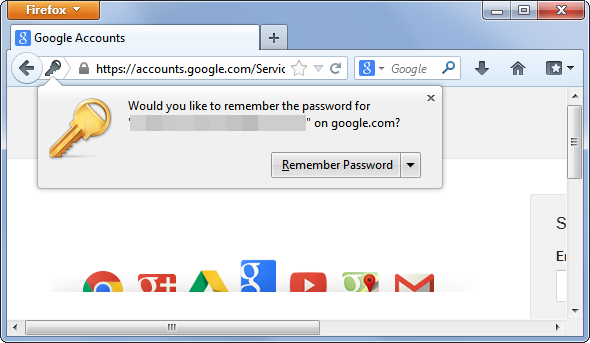
It is much more convenient, of course. You are at work, in front of your computer, and the browser offers to memorize the passwords for the services that you use. Out of laziness, you give it the OK. Now you will not have to enter the passwords for your email, social network or favourite online store every day.

It is not only convenient for you, but in principle it is much more secure. If malware capable of capturing keystrokes (a keylogger) ever lands in your computer, it will not be able to disclose your passwords.

However, asking the browser you use at work to save your passwords could be a disastrous idea.

chrome

One of the weak points of storing passwords in your browser is that, obviously, it saves them somewhere. In addition, remember that you are at work and surrounded by colleagues. One of them could be waiting for you to get up from your workstation without locking your computer in order to carry out the famous David Hasselhoff attack on you (taking advantage that you are not there, someone changes your desktop wallpaper to the ‘Knight Rider’ star with very little on). If they can do this, bear in mind that they could do worse things.

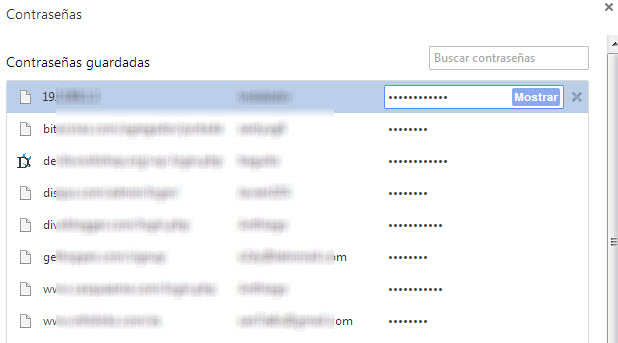
Without going any further, anyone could take advantage of your computer being unlocked to access the password file saved by your browser. It is not difficult, in Chrome you just need to go to chrome://settings/passwords to see the passwords that the browser has saved. A couple of clicks and anyone can find out how to access your mail, social networks, and every site for which you have decided to save the password through the browser.

chrome

However, leaving your computer locked does not guarantee that your passwords cannot be stolen. There are other methods.

There is probably a computer engineer working at your company. Do you get on well with him? If you had to think about the answer and you usually save your passwords in the browser, think twice about it. It is not that he is going to search you, but if he wants to give you a fright, he can.

Passwords stored by browsers are, in one way or another, on your computer. Even though they are encrypted and in a hidden place, with enough knowledge it is not so difficult to access them. The right malware could bring them to the surface.

password

Of course, remember too that not just any password will do. Worrying about where your passwords are stored is not worth much if you use the same one for everything and it is ‘12345’. In this case, there is no need for a cybercriminal to attack your computer or a lapse of yours to allow a colleague to use your computer.

The post This is how a browser saves your password (and it is not secure) appeared first on MediaCenter Panda Security.

Parisa Tabriz. Introducing Google’s ‘Security Princess’

parisa tabriz

Neither do princesses only appear in Disney movies nor is there only room for men in technology. There are various women in the ranks of the Mountain View giant but if we are talking about IT security, one of them stands out in particular. She chose her own nickname: she is Google’s ‘Security Princess‘.

She is Parisa Tabriz, one of the 250 engineers responsible for protecting Google Chrome users and the US company’s infrastructure and systems. Tabriz chose her title before a trip to Japan in which she had to give conferences on her work.

Even the White House has hired her services after suffering a cyberattack last October that affected the institution’s IT systems. At least that is what is said on Tabriz’s CV, where it appeared as a top secret mission. But do not look for ‘top secret’ on the document: she deleted this entry after the mission was made public. However, you can read that in November she collaborated with the US Digital Service.

Parisa Tabriz is part of a team of hackers whose job is to basically think like a criminal. They sniff out software vulnerabilities and bugs that could be used by cybercriminals to access Internet users’ data. They have to find them before they do in order to fix them and prevent attacks.

She earned her engineering degree from the University of Illinois, where she discovered her passion for computing. There she joined a special club: its members met up on Friday nights to discuss the ins and outs of Internet security. At that time, Facebook did not even exist and nobody had heard of the ‘blue bird’.

That group of amateurs was particularly interested in steganography, the practice of concealing messages within another item, such as a text or photograph. It is actually a form of encryption used in Ancient Greece (the word comes from the Greek word ‘στεγανος’, which means concealed, and ‘γραφος’, meaning writing). The group used to conceal the information in images of cats that were sent via email.

Parisa joined Google in 2007 as part of the company’s IT security department. Now she is the leader of a team of 30 hackers who, from the US and Europe, prevent attacks related to the Chrome Internet browser.

As soon as the hackers discover a vulnerability, they fix it quickly, so they are constantly updating the software without users noticing their work. They work in the shadows so that your data and Internet purchases are kept secure.

parisa tabriz google

In 2011, they discovered that the Dutch authority that manages Web security certificates (DigiNotar) had been hacked, affecting hundreds of thousands of Iranian Gmail users. All of the signs pointed to the perpetrator of the attack being the Iranian government and the volume of fraudulent certificates was so high that the agency had to close.

As well as leading the security army, Tabriz is responsible for hiring new experts to regenerate the ranks. One way of finding them is through contests and hackathons. Google organizes meetings in which independent hackers can look for bugs in its programs.

However, they must be careful. Some researchers could benefit from their findings and demand money for the information or even sell it to cybercriminals, who would use it for illicit purposes. Governments also use security holes in certain software to monitor companies and citizens.

Therefore, you have to know everything about the steps and advances in cybersecurity. Tabriz attends hacker conferences and meetings worldwide and gives seminars on her work to other members of the company.

The post Parisa Tabriz. Introducing Google’s ‘Security Princess’ appeared first on MediaCenter Panda Security.

‘The Imitation Game': The greatest milestone in the history of cryptography hits the big screen

alan turingA war hero in a mathematician’s skin. That was Alan Turing. The man considered the father of computer science played a key role during World War II: Historians believe that Turing’s work shortened the war by two years. How? By breaking the Nazi’s Enigma Code, considered an impossible feat until then.

Forced to undergo chemical castration for his sexual orientation and branded a criminal for the same reason, Alan Turing and his role in World War II were almost forgotten until Great Britain, through a letter written by Prime Minster Gordon Brown, apologized in 2009 for how this computing genius was treated.

Now Hollywood is paying homage to Turing with ‘The Imitation Game‘, the movie that premiered in the United States and the United Kingdom in November in which Benedict Cumberbatch, known for his starring role in the series ‘Sherlock’, plays Alan Turing.

The movie, with some inaccuracies, focuses on the fight against Enigma, the machine that the Germans used during World War II to send messages without the allies being able to understand their content in time.

It all happened in Bletchley Park. This estate located an hour from London was the headquarters of the United Kingdom’s Government Code and Cypher School (GC&CS), training an army of cryptographers whose goal was to intercept and decipher the messages that the Nazis were sending at the height of World War II.

bletchley park

One of the leaders of the cryptographers who worked at Bletchley Park was Alan Turing, who joined the GC&CS aged just 26. It was there that Turing developed his own machine, the one that helped break the powerful Enigma Code: it was called ‘the bombe’.

Enigma worked with a system of five rotors that resulted in millions of combinations of coded text. And that is not all, the machine’s settings changed every day and the volume of messages was so large that Bletchley Park had up to 10,000 cryptographers trying to decipher them at the necessary speed.

That was until the bombe arrived. Based on the work done by the Polish intelligence service, in just three months Turing developed a machine capable of deciphering the Germans’ messages using mathematical analysis techniques that determined the most probable position of Enigma’s rotors.

Created in 1940, three years later the bombe was deciphering more than 84,000 Enigma messages a month. The system created by Turing, and Gordon Welchman, thereby accelerated the discovery of the Germans’ movements communicated under the guise of Enigma.

cryptographers

Turing’s work not only shortened the war by two years but it is estimated that no less than fourteen million lives were saved by the discovery made at Bletchley Park.

After this milestone, which made him a war hero, Turing continued striving to become known today as the father of computer science: after World War II came the Turing test, or the first computer chess game. Unfortunately, a tragic and final end and five decades of obscurity also came. Now it is starting to be repaired.

The post ‘The Imitation Game’: The greatest milestone in the history of cryptography hits the big screen appeared first on MediaCenter Panda Security.

When will voice calls be available in WhatsApp?

Whatsapp voice calls

It is highly demanded by many users and it seems that it is now closer than ever. WhatsApp is finalizing the details to add voice calls to its services.

According to some users of the social network Reddit, the instant messaging app is testing this new functionality with some users, who claim that a new interface that allows them to make calls has been activated. According to some of the screenshots sent by these users, the interface consists of three sections: “calls”, “chats” and “contacts”.

Despite the many rumours, so far WhatsApp has not commented on the matter. Will we have to wait long? We will keep you updated!

The post When will voice calls be available in WhatsApp? appeared first on MediaCenter Panda Security.

Be careful with Facebook! A researcher has hacked it using a Word document

Who hasn’t checked their Facebook page from work? In addition to a distraction, it has been proved that this practice is also a risk to the security of the company. A researcher has hacked the platform using a simple Microsoft Word text document.

like facebook

Mohamed Ramadan is an Egyptian hacker who discovered a bug in Facebook last July that is very dangerous for user security but that had simply gone by unnoticed; it could be hacked with a simple Word document.

It was not discovered by chance; for some time, Ramadan had been looking for possible vulnerabilities to demonstrate his potential as an ethical hacker and he had already done so by finding bugs in the Facebook apps for Android, iOS and Windows. The time had come to go one better and try with the company’s websites and servers.

He knew that this was a significant challenge; not only is it one of the technologies that have implemented the most security measures, but for years many security experts have been reporting and patching new holes. The company had even claimed that all of the holes in its servers had been patched. But it was wrong.

After thoroughly researching the topic, the hacker discovered the website Careers at Facebook, where anyone can look for work in the company and upload their CV. So, he decided to give it a go. To start checking (and find out if the platform was secure), he tried uploading a file where CVs are usually uploaded and he noticed that only .pdf or .docx files were admitted.

careers at facebook

Docx files are compressed files and the data they contain can be modified if they are decompressed. So Ramadan took a .docx file and decompressed it (using the 7-zip program) in order to access its code and modify it. More specifically, he changed a line of code to command this Word document to communicate with a twin file hosted on his computer wherever it was.

Despite his good idea, Ramadan was aware that it could fail. It was probable that even if the modified document were sent to the server, the file would not be able to communicate with the twin file on his computer.

So before uploading the modified Word document to the Facebook server, he checked if it were possible to get a result from uploading this document to any other server (more specifically, to one he programmed for the purpose). The result was as expected; a few minutes after performing the test, the external server that he had just created tried to communicate with his computer, so Facebook’s would too, and it did.

“I forced Facebook’s servers to connect to my computer using a simple Word document,” says Ramadan on his page.

With this trick Mohamed Ramadan was able to contact the data belonging to anyone who had uploaded their CV to the Facebook platform, and also their profiles on the social network and the computers that these people normally use.

facebook message

Therefore, any company’s data could be compromised if its employees use Facebook at work from the company’s computers. In this case the page that had the problem was Careers at Facebook and fortunately, it was Ramadan who detected it. However, the vulnerability on this server could have affected many others, according to the expert.

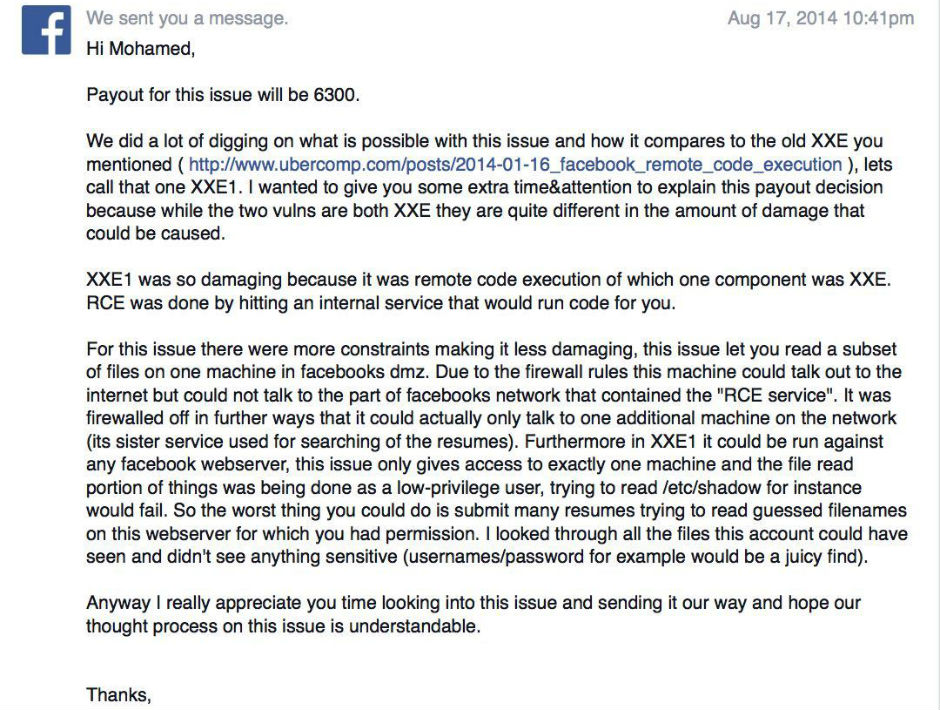
Although the bug has been fixed – and Ramadan has collected a reward of $6300 – its existence shows that compromising Facebook accounts is easier than it seems.

The post Be careful with Facebook! A researcher has hacked it using a Word document appeared first on MediaCenter Panda Security.
Apple ID user? Careful! There is a new phishing attack!

Careful! We have detected a new phishing attack!

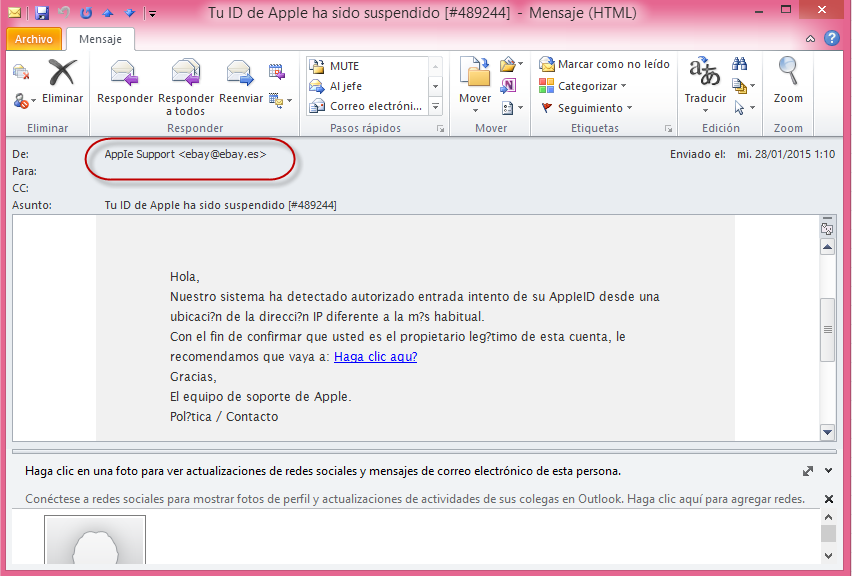
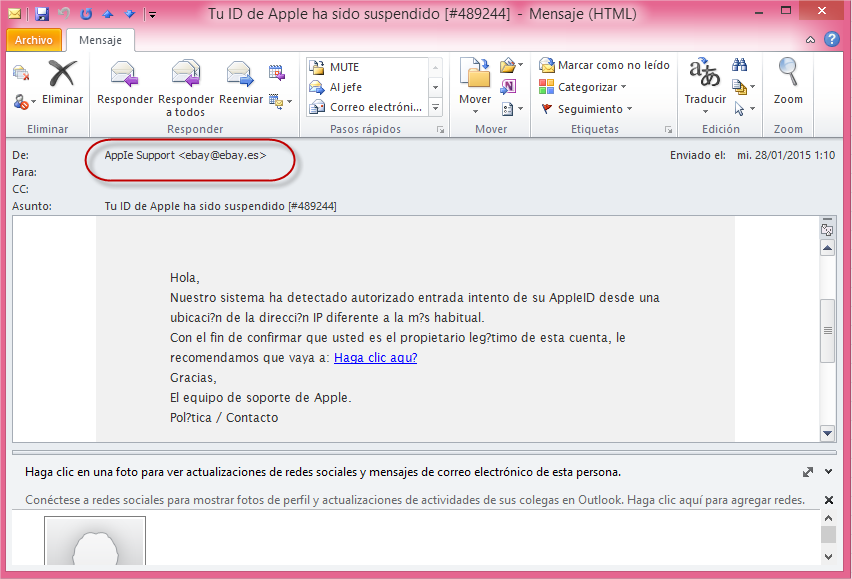
If you receive an email with the Spanish text: “Hola, nuestro sistema ha detectado autorizado entrada intento de su Apple ID…” (“Hello, our system has detected authorized access attempt of your Apple ID…,”) careful, it is phishing!

Below is an example of the email and the first thing that should catch your attention is the sender’s email address: AppIe Support <[email protected]>

phishing apple

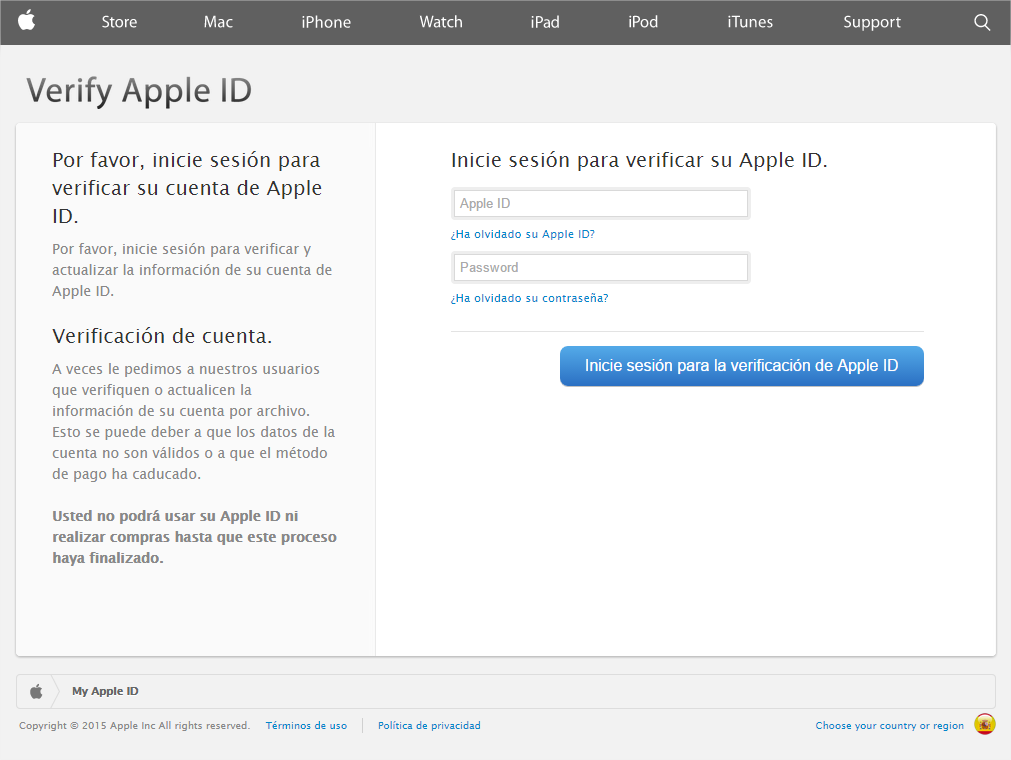
Using the excuse that someone has tried to access your Apple ID account, the cyber-criminals ask you to change your details. When you click on the link, a page opens that is an almost perfect imitation of Apple’s website:

phishing apple email


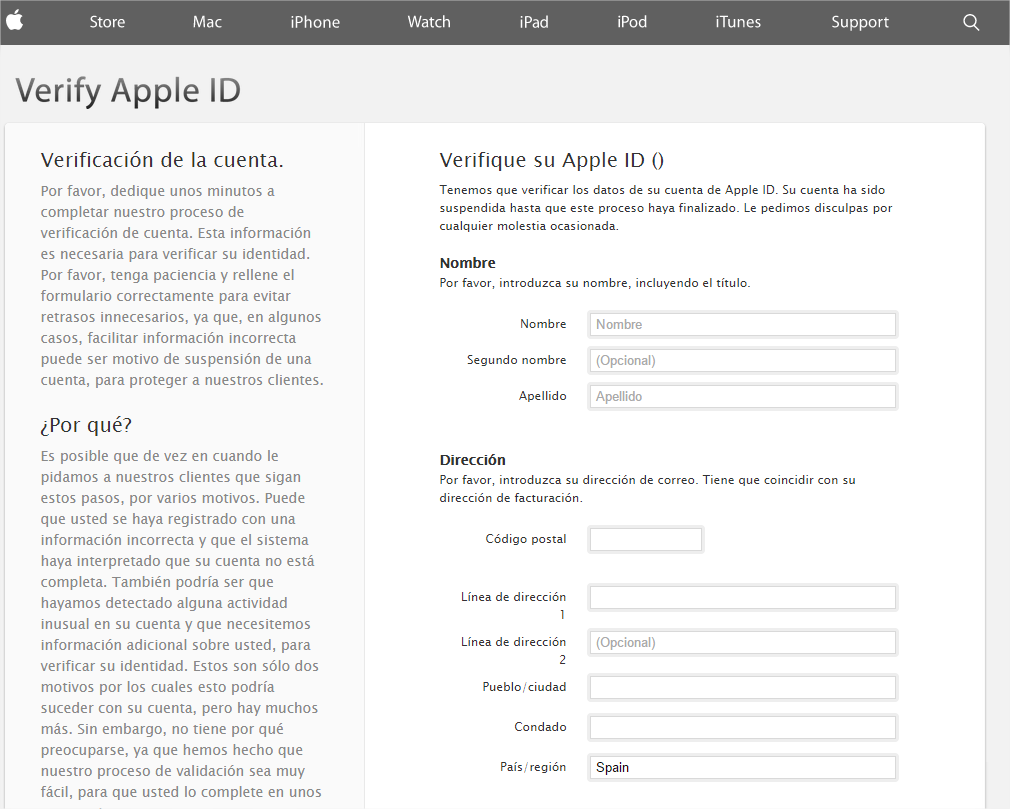
After signing in with your Apple ID login details, the next step is to update your personal details.

phishing apple ID

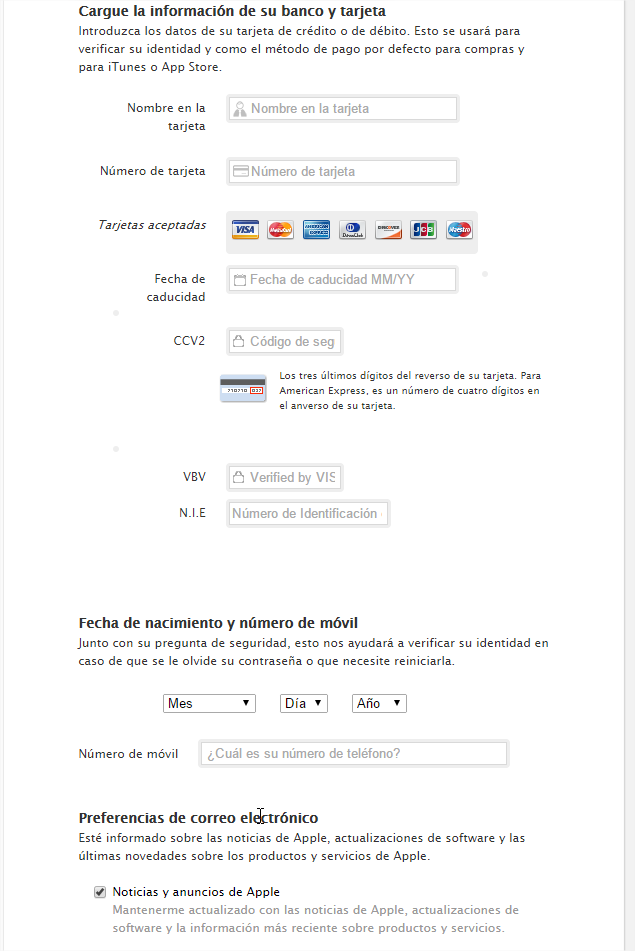
In addition to your name, address or telephone number, it requests your bank and credit card details in order to verify your identity and as the default method of payment for purchases and for iTunes or the App Store.

phishing apple personal details

So, if you fall into the trap and enter all of this data, you will be giving the criminals access to this sensitive information.

As we always say, no company will ever ask you to send your personal details to them via email. If they do, be suspicious! In addition, in this case prevention is better than cure and it is important to have an extra layer of protection by installing one of the antivirus software from our 2015 line.

The post Apple ID user? Careful! There is a new phishing attack! appeared first on MediaCenter Panda Security.