Tag Archives: featured1

How to boost security on your Facebook account with two-step verification

two-step-verification-facebook

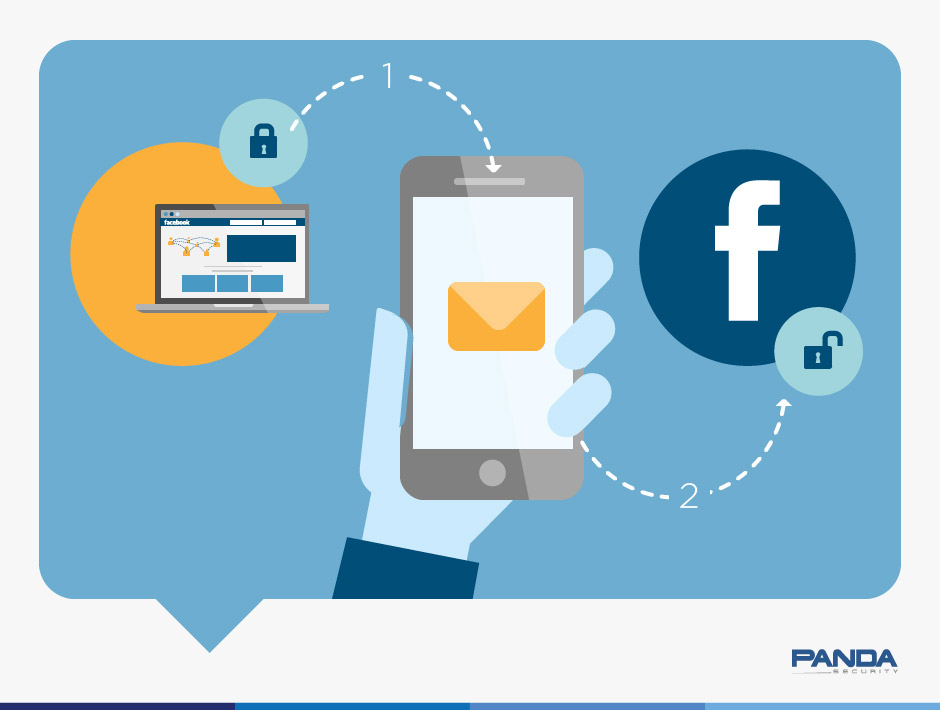
No doubt you’ve heard about two-step verification used on various social networks.

Having this option enabled lets you increase security on your account and helps prevent unauthorized and potentially malicious access.

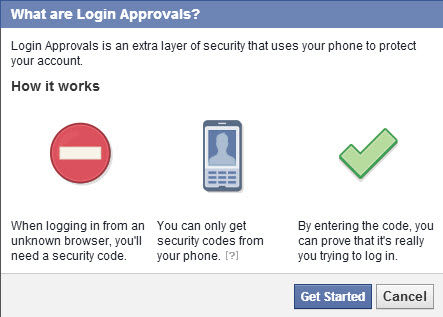
In the case of Facebook, the process is simple, and all you need is your cell phone handy to confirm access from a new device. In Facebook, a new device is one that you haven’t used previously to connect to the platform.

This way, what you have to do is approve logins to prevent others from accessing your account.

Here we explain step-by-step how to enable login approvals.

How to boost security on your Facebook account with two-step verification

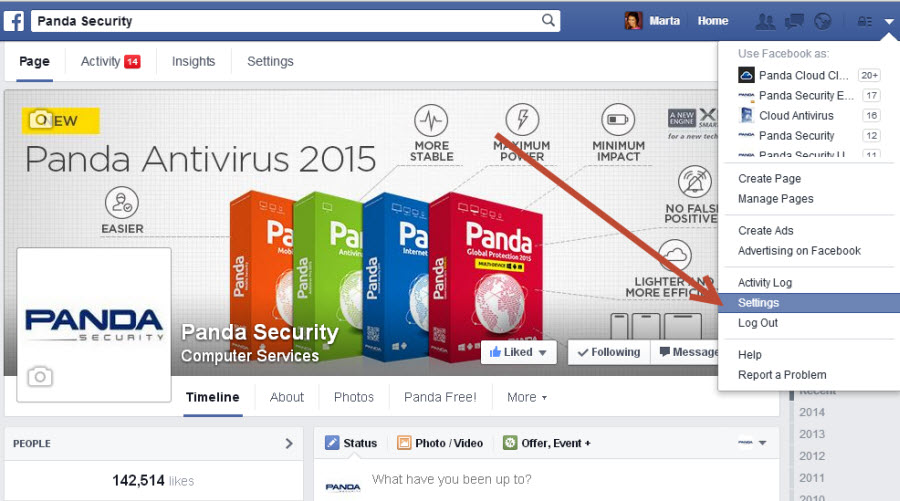
In your Facebook account, go to Settings.

facebook-settings

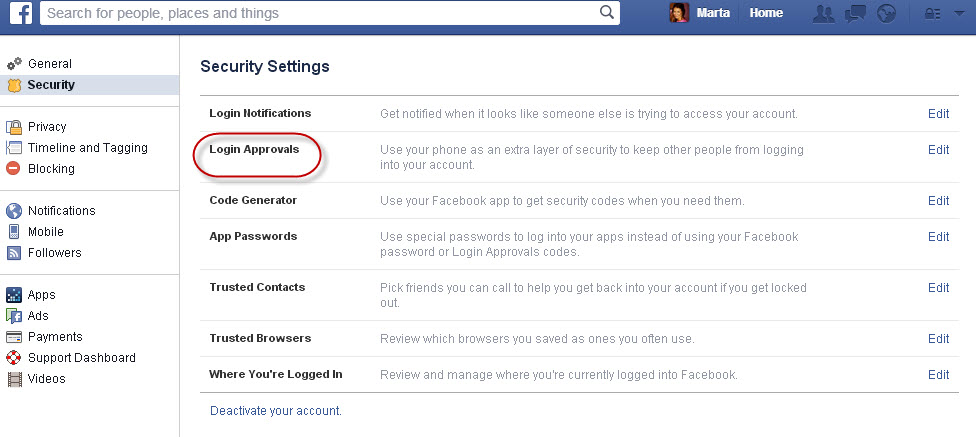
Go into Account Settings and select Security. There you will see “Login Approvals”.

facebook-login

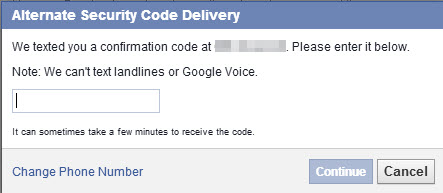
From there click “Require a security code to access my account from unknown browsers”.

facebook-login-approvals

facebook-security-code

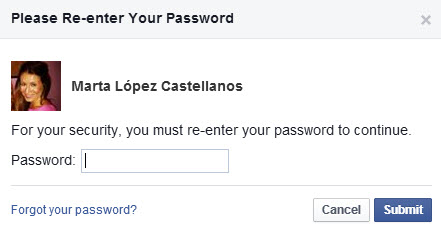
When you enter the code that they send to your phone, you will have to enter your Facebook account password.

facebook-password

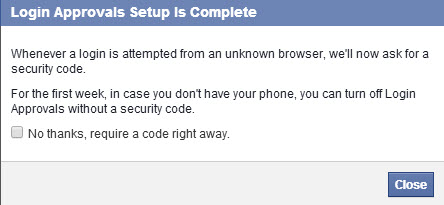
Now you have enabled login approvals.

facebook-complete

Facebook also gives you the option to print security codes in case at some time you don’t have your phone handy. It’s easy, right?

The post How to boost security on your Facebook account with two-step verification appeared first on MediaCenter Panda Security.

Avast 2015 simplifies security for you, your PC, and your home

Blog-Post_2015-Launch-CBack in the old days, when we only had a desktop PC, security was simpler. But now, with multiple devices and an increasing variety of attack methods, keeping everything secure and up-to-date can be a daunting task. Avast 2015 simplifies the task with the best antivirus and anti-malware protection possible, the ability to remove annoying browser toolbars, one-click scanning for malware, updates, network security, and PC performance, and the world’s first home network scanner.

Home network scanner

Avast identified a growing area of insecurity close to home (actually right in your home!): Your home Wi-Fi network. Easily hacked passwords make home routers an effortless entry point for hackers or even free-loading neighbors. Avast 2015 security solutions include the first-ever home network scanner, which will help you prevent hacker attacks on your router and network.

One-click Smart Scan

To help simplify device security for your family, Avast 2015 now allows you to use a one-click smart scan to scan for hacker threats, software that needs to be updated, your home network security, and your PC‘s operating status.

Unique cleanup and updater features

One of the weakest links in people’s security is out-of-date software. Hackers take advantage of old software, but it’s actually one of the simplest areas to defend. With the improved Avast Software Updater, you are notified when there is a patch or update to the software you’re running – regardless of who it’s from.

PUPs (potentially unwanted programs) like toolbars and search resets are not only annoying; they’re dangerous. They collect information distributed to advertisers or anyone willing to pay for it. The improved Avast Browser Cleanup removes annoying toolbars and search settings, allowing you to choose the settings you want and accelerate PC performance.

The Avast 2015 security solution is available in four variations for home use—Avast Free Antivirus, Avast Pro Antivirus, Avast Internet Security, and Avast Premier—and in 45 languages. Avast also provides world-class protection for businesses and mobile devices. Visit www.avast.com to learn more and download.

Avast Software’s security applications for PC, Mac, and Android are trusted by more than 200-million people and businesses. Please follow us on Facebook, Twitter and Google+.


Apple Pay: Apple’s new payment system.

iphone6

On September 9, Tim Cook gave us the lowdown on Apple’s latest innovations, among them, Apple Pay. For those who don’t know, this is an electronic payment system, a type of digital wallet, available for iPhone and Apple Watch and which will first begin to operate with partners such as Mastercard, Visa and American Express in October in the U.S. before  being extended to other countries.

This innovation will allow user to pay for goods in stores as well as through other applications. Many already wonder whether in the not too distant future this type of payment may become commonplace, and if so, whether it will be secure. Having your hard-earned money passed from one online digital application to another without ever physically having your hands on it is still a concept many of us are yet to feel entirely comfortable with. And with good reason, any cyber-criminal that accesses your device could have access to your money.

The experts however, believe that this could be a secure option for the transactions of the future. So what type of security does it use?

ApplePay

Apple Pay security methods

1. Tokens

Apple has explained that transactions with this system will be secure because it uses a method known as ‘tokenization’. This is a system often used by financial institutions because it replaces the traditional digits of credit and debit cards with a complex code (‘token’) generated at random, which only keeps that last four digits from the real number and is transmitted between devices.

The great advantage of these numbers is that on their own they are useless and they are only used once. Every time a payment is made a new number is generated. So even if they are intercepted, they can’t be used for anything. This means there is no trace of the data on the credit cards. Even the stores don’t save this data on their servers. The credit card number isn’t stored anywhere, rather the number is associated with a device ID that is saved on a chip inside the terminal.

The exchange of data required for the transaction is carried out with near-field communication (NFC) wireless technology. This is an open platform whose strong point is that it enables fast wireless communication over distances of less than 20cm. However, there are those who question its security: the data can be intercepted, although this is precisely the reason that there are stronger security measures.

apple-credit-card

2. Touch ID

The transaction is completed with Apple’s Touch ID fingerprint sensor. The user doesn’t have to enter a password: the payment process is completed when the user authorizes it by placing a finger on the iPhone ‘Home’ button.

3. CVV

Yet besides the ‘tokens’ and Touch ID, there’s another layer of security. Whenever a user goes to pay, their mobile device sends a CVV. This is normally the three-digit number found on the back of a credit card but this time it’s a number randomly generated by the payment application. Consequently, the device identifies itself to the receiver, which verifies that the ‘tokens’ have been created on the order of the card owner.

The way the application works is simple: All you need is one of the Apple devices mentioned above and to place it close to the store’s payment terminal.

The process is as follows: when the application is launched, the device connects securely to the payment system and selects a credit card stored on the chip integrated in the phone and whose number is associated to an identifier in the device.

The identifier is combined with the ‘token’ and then the application asks the user to identify themselves through the Touch ID fingerprint scanner. The information is then sent to the bank by the store and the transaction is confirmed. And that’s it. Secure transactions can be as simple as that.

The post Apple Pay: Apple’s new payment system. appeared first on MediaCenter Panda Security.

Avast 2015 protection expands to include your home router

Blog-2015-Launch

Our digital world has expanded from desktop to mobile and now increasingly to the Internet of Things. The gadgets we own and use every day are “smart” – from watches that track our fitness to TVs that know the types of shows we like to watch to digital thermostats that control the temperature in our homes.

This level of connectivity brings its own security risks. To keep our users ahead of the curve, all of Avast 2015 security solutions come with the only home-network security tool designed to identify vulnerable home networks. Our new Avast Home Network Security scans a user’s home network and routers for potential security issues that could allow a hacker attack.

“Security risks have expanded out from the PC to the home network as more devices than ever connect to the Internet via home routers. As a result, home networks have become the hub of personal computing,” said Avast Chief Executive Officer Vince Steckler. “Our research determined that nearly 80% of all home routers in use today are thinly protected by common, easily hacked passwords, making routers an easy entry point to the home network for hackers. Avast 2015 addresses these issues head-on with several important new features.”

Avast Home Network Security scans for misconfigured Wi-Fi networks, exposes weak or default Wi-Fi passwords, vulnerable routers, compromised Internet connections, and enabled, but not protected, IPv6. It also lists all devices on the network so users can make sure only their known devices are connected.

To help our users, we provide guidelines on how to fix vulnerabilities so they can be sure their network is fully protected.

Protection from DNS hijacking

One of the biggest risks users of vulnerable routers face is DNS hijacking. Cybercrooks use malware to redirect you from the site you want to visit, like your online bank, to one that looks like it, but is fake. You log in as usual and the bad guys now have your user name and password.

Avast SecureDNS encrypts Internet traffic between Avast-protected devices and Avast’s DNS server to prevent users from being directed to hijacked sites. Avast offers users SecureDNS as part of our Pro, Internet Security, and Premier products.

Avast 2015 is available now. Download it for your PC or Mac.

Avast Software’s security applications for PC, Mac, and Android are trusted by more than 200-million people and businesses. Please follow us on Facebook, Twitter and Google+.


Six tips to make sure your personal photos don’t end up on the Web like those of Jennifer Lawrence

girl-with-computer

Increasingly, personal and private information is ending up on public view on the Internet. You may not have posted it yourself, you might have just stored it in the cloud, yet some ill-intentioned individual can access and publish it. Photos, videos and other personal data can easily fall into the wrong hands without your permission.

Since last September, more than 100 celebrities have been victims of this type of invasion of privacy. After having uploaded compromising photos to the Apple iCloud, they discovered these images posted on the Web. Someone had accessed and leaked the pictures.

All eyes then turned to Apple. The attack was caused by a security flaw on its mobile devices. A cyber-criminal claimed to have hacked the company’s services to get hold of the images, although the company has rejected this claim on several occasions.

Nevertheless, here we offer six tips to help protect your photos… just in case!

IMAGEN 1C

1. Be careful about what you store in the cloud

If these actresses and models hadn’t uploaded compromising images, it would have been considerably harder for the hackers to get hold of them. Even if you are not a public figure, it’s always a good idea to think about what kind of things you want to store on your phone.

2. Don’t share your account user names or passwords with others

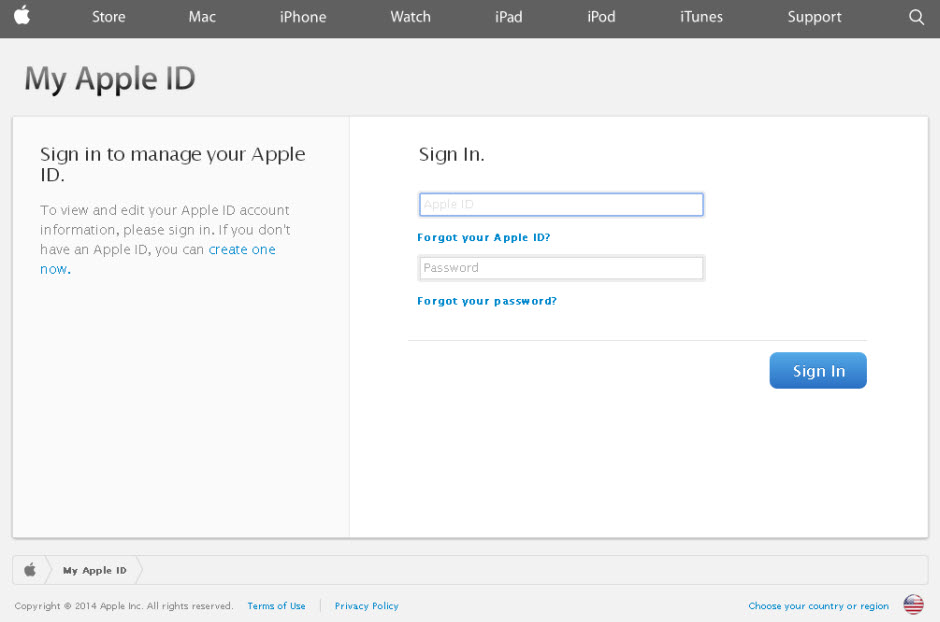
Even though a friend or colleague may have your complete trust, the fewer people who know your credentials, the less chance there is of others finding out. Most online platforms (Facebook, Apple, Google and Yahoo) allow you to boost security with two-factor authentication. If available, it is always a good idea to use it. It basically involves another step in the verification of the user’s identity. This could involve generating a code that the page sends to your phone or another means of contact to verify your identity.

3. Strengthen your passwords to make sure they can’t be guessed by cyber-criminals

One useful tip is for them to contain a mix of numbers, special characters and upper and lower case letters, i.e. make them has complex and varied as possible. The same goes for your Wi-Fi password. It’s also a good idea to change them frequently.

apple-id

4.  With email, it’s wise to have different addresses for different purposes

Use different accounts for professional, personal or financial affairs. If somebody manages to gain access to one, at least all your data won’t be at risk.

5. Take care with your profile on social networks

Check the privacy options from time to time as sometimes they can be changed or the default settings are re-established without notice. And be careful with what you post online.

6. Use a good antivirus

It will not only keep your computer virus-free but will also identity and help keep Internet fraudsters at bay when, for example, you’re shopping online. Find the antivirus that best meets your needs from out 2015 product lineup.

The post Six tips to make sure your personal photos don’t end up on the Web like those of Jennifer Lawrence appeared first on MediaCenter Panda Security.

Ebola scams spread faster than actual disease in panic-striken U.S.

shutterstock_204144223 (2)

Cybercrooks use popular stories in the news to deceive people into giving up confidential information.

The dreaded disease Ebola that is spreading rapidly throughout West Africa made landfall in the US recently, and since then many news agencies have sensationalized the “outbreak” with constant coverage. Panic has grown as politicians raise the public’s fears and medical experts are confusing people with contradictory information. These things all combine to create the perfect atmosphere for scammers.

It’s quite common for cybercrooks to use social engineering techniques to fool people during a big news event, and we have seen an increase in phishing attempts. The United States Computer Emergency Readiness Team (US-CERT) issued an alert today to remind users to protect against email scams and cyber campaigns using the Ebola virus disease as a theme.

“Phishing emails may contain links that direct users to websites which collect personal information such as login credentials, or contain malicious attachments that can infect a system, “ says the advisory.

Users are encouraged to use caution when encountering these types of email messages and take the following preventative measures to protect themselves:

Thank you for using avast! Antivirus and recommending us to your friends and family. For all the latest news, fun and contest information, please follow us on Facebook, Twitter and Google+. Business owners – check out our business products.


iPhone 6. The fingerprint reader security

Being the leading technology brand can have its downsides. And if you don’t believe it, ask Apple. Every time the firm from Cupertino introduces a new product, the same thing happens: there is great anticipation, with seemingly half the world awaiting, long queues of tech disciples… and an army of people looking for bugs in the new devices.

In the end, vulnerabilities emerge and obviously their impact is far greater than with other brands (especially if it is a new device). Apple has already suffered a few embarrassing errors discovered by users. You don’t have to go too far back to see: the aluminum case of the iPhone 6 Plus was said to be too flexible, meaning that the phone can even bend under certain conditions.

A secure iPhone?

While the tech world looked on in amazement at this problem in the new Apple device, a second rather more difficult issue emerged: Apple’s ‘Touch ID’ fingerprint identification system is not entirely secure.
Apple-security

This technology has already been used in iPhone 5s and as with iPhone 6, a few days after the launch an error was discovered: there was a relatively simple way to get past Apple’s fingerprint ID system.

“A fingerprint of the phone user, photographed from a glass surface, was enough to create a fake finger that could unlock an iPhone 5s secured with TouchID,” claimed the European hacker group, Chaos Computer Club, a year ago. This was something that could be performed by anyone with a bit of skill and patience.

So despite the company’s claims that with the new biometric system your fingerprint is one of the strongest passwords in the world, once again such claims might be premature.

History has repeated itself, and this time surprisingly, it has done so quite literally. Even though the Touch ID flaw was discovered a year ago, Apple has launched two new iPhones with the same problem.

This is confirmed by security expert Marc Rogers. “Sadly there has been little in the way of measurable improvement in the sensor between these two devices,” he claims. Although he underlines that the same fake prints that could deceive the Touch ID in iPhone 5s are no longer viable in the latest Apple device.
iPhone-fingerprint

According to Rogers, the difference is that the company has improved the scan resolution to improve the reliability of the system. However, this doesn’t mean that the same technique used to unlock the iPhone 5s couldn’t be used for iPhone 6. The difference is that the fake print would need to be a better quality.

This new flaw in Apple’s security system is serious, and even more so given the launch of Apple Pay, the company’s new mobile device payment system.

Thanks to NFC technology, users of this service can pay for things simply by waving their iPhone at the point of sale (POS) terminal. Indeed, the tool used by Apple to secure the payment service is none other than the Touch ID technology which, as Rogers explains, is easily hacked.

Nevertheless, Rogers does point out that using fingerprints is an effective form of user authentication, though Apple should include two-factor verification to give users complete peace of mind.

What do you think? Would you activate this type of payment?

The post iPhone 6. The fingerprint reader security appeared first on MediaCenter Panda Security.
“Poodle” security hole has a nasty bite

poodles

“Poodle” bites on open WiFi networks with multiple users.

A security hole called Poodle could allow hackers to take over your banking and social media accounts.

Yesterday, Google researchers announced the discovery of a security bug in version 3 of the Secure Sockets Layer protocol (SSLv3). This web technology is used to encrypt traffic between a browser and a web site, and can give hackers access to email, banking, social accounts and other services.

Poodle bites multiple users in unsecure open WiFi networks, like the ones you use at coffee shops, cafes, hotels, and airports.

“To exploit the vulnerability, you must be running javascript, and the attacker has to be on the same network as you—for example, on the same Starbucks Wi-Fi network you’re using,” explained Kim Zetter in a WIRED article.

Avast experts strongly recommend that our users protect themselves when using free WiFi with avast! SecureLine VPN.

Poodle is not considered as serious a threat as this past spring’s Heartbleed bug which took advantage of a vulnerability in OpenSSL, and or last month’s Shellshock bug in Unix Bash software.

SSLv3 is an outdated standard (it’s a decade and a half old), but some browsers, like Internet Explorer 6, and older operating systems, like Windows XP, only use the SSLv3 encryption method. Google’s security team recommends that systems administrators turn off support for SSLv3 to avoid the problem, but warns that this change will break some sites.

Thank you for using avast! Antivirus and recommending us to your friends and family. For all the latest news, fun and contest information, please follow us on Facebook, Twitter and Google+. Business owners – check out our business products.

5 steps to keep your SMB data protected

SMB-security

When Edward Snowden came forward in May 2013, accusing the world’s largest intelligence service of spying on US allies, people, and private companies, it became evident that electronic data is quite vulnerable. This major event even caused Russian and German government officials to consider cataloguing their data, using old-fashioned manual typewriters instead of computers. Should you do the same with your business’ data to protect it?

The only way to keep your data absolutely safe from hackers and spies is to keep it far away from computers and servers, but this approach isn’t realistic. So here are five steps that you can take to protect your small or medium size business’ data:

1)     Configure your computer network properly Regardless of the way your computers are connected in your company, via work group or server, make sure that you have implemented the right configuration. Make sure you haven’t left any gaps for hack attacks, such as software that has not been updated or free network accessibility to suppliers or all company employees.

2)     Install a business-grade antivirusThis one sounds obvious, however, it is important to point out that several SMBs still use personal antivirus to protect their business data. A company that opts to use consumer security products might not get into legal problems (although this is possible), but the major issue here is the security of the data itself. Business antivirus allows an entrepreneur to manage the company’s electronic security remotely instead of being obligated to check   each PC’s security manually. With a administration console, you can check on current problems, their solutions, and in the event of an infection or unauthorized action your console can get real-time alerts.

3)     Educate your employees about online security At AVAST we receive 50,000 samples of new viruses a day. Online security is evolving, which means you need to educate your employees about the dangers of online security and how they can best protect your company’s data on a regular basis. Try to focus on explaining the concept of social engineering to your employees, what the most recent methods of attacks are, and what the latest malware on the market is. The AVAST blog is a great place to find this information.

4)     Keep in mind that humans can fail Remember that although a great part of online security can be automated, it continues to be dependable on human actions, which from time to time can fail. Minimize the risks by training your employees properly and sharing the responsibility for data security with everyone. If a mistake is made, take it as an experience to learn from as a company, rather than cracking down on one person.

5)     Encrypt your most important data Currently, SMB owners have the option to encrypt data, so that in the case of an attack, their files will be protected. Encrypting files turns the information into unreadable code and only those who have the access to the encryption key are able to restore the files to their original state. This process is not simple, which is why it is recommended to encrypt your most important and sensitive files.

In addition to these five steps, make sure you stay up-to-date with the latest data security news. If a company in the same field as yours gets attacked, it can hit your SMB quicker than you may think! Remember, the digital world has neither frontiers nor barriers!

Thank you for using avast! Antivirus and recommending us to your friends and family. For all the latest news, fun and contest information, please follow us on Facebook, Twitter and Google+. Business owners – check out our business products.

Seven million Dropbox passwords may have been compromised

dropbox

Recently, it would appear that there is no Internet service whose users’ data hasn’t been compromised.

Now it’s the turn of Dropbox, the cloud storage service, which has had hundreds of its users’ passwords leaked and it’s claimed that many more could be published. Specifically, up to seven million users’ data may have been hacked, with the consequent threat to the privacy of the users who store their data on the platform.

These claims come from a user of Pastebin, a text sharing site used by hackers and IT security specialists, who boasts to have obtained seven million Dropbox passwords and, supposedly as proof, has published some of them on the site.

On its official blog, Dropbox was quick to deny that its services have been hacked, claiming that the passwords had been stolen from other services and then used to access the file storage platform.

Dropbox urges users not to employ the same password for various services and to enable two-step authentication.

Gmail: Five million passwords stolen

What has happened to Dropbox also happened to Gmail in September, when 5 million passwords were leaked. Neither Dropbox nor Gmail were hacked. The data was taken from other websites.

With this data in their hands, cyber-criminals can try the same password for other services such as Facebook, Dropbox, Gmail or Twitter.

More | How to create strong passwords

The post Seven million Dropbox passwords may have been compromised appeared first on MediaCenter Panda Security.