Tag Archives: featured1

Safer selfies on the way as Instagram plans two-step verification

instagram

More than 400 million selfie lovers can breathe a sigh of relief – Instagram, the social network phenomenon, has revealed that the two-step verification process is soon to be unveiled on its platform.

This means that Instagram accounts will now be better protected by a log-in procedure which should make things harder for cyber-attackers trying to access accounts without permission. With the new two-step procedure, an email address and password will no longer be enough to enter; the user will also need to have the smartphone that the account is linked to.

Facebook, which owns Instagram, already offers the new log-in option, and now the photo platform will boast it, too. Every person that has an account on Instagram can now link it to a telephone number, ensuring an extra layer of security.

So, every time that someone (even the account owner) tries to access the account from a new device, the social media platform will send a code to this telephone number. Without this code it will be impossible to access the account.

instagram filters

This new feature will be rolled out progressively, so soon all users that are worried about their security will be able to enter their telephone number and avoid cyber-attackers accessing their accounts and eliminating photos or using the account for malicious means.

Caution on Instagram

This new security measures comes not long after the platform put its own users’ privacy at risk. When it introduced a new feature, the ability to manage various accounts from the same device, there were serious security issues unearthed.

A bug meant that some users could see notifications belonging to other accounts that shared the device. This highlighted that having the same Instagram account synchronized on different devices meant that different users could see messages, notifications, and even like other photos.

instagram message

Despite this flaw being fixed, what is certain is that internet users must always take care when sharing information and should be aware of their privacy online.

Thus, the two-step verification process on Instagram is a step forward in terms of security and should protect users the same way as Facebook, Microsoft, and Google already do. Even though new verification techniques are being worked on (such as the ones created by a group of investigators at the ETH Information Security Institute in Zurich), at the moment the best way is to use our personal telephone numbers.

However, it’s just as important to have a two-step verification as it is have secure passwords: they should be long, contain numbers; different cases; symbols, and should be different for each account. To be able to manage the large number of passwords needed today, it’s best to have a password manager just like the one offered by Panda via its different protection packs, which allows you to be in control of different passwords at the click of a button.

The post Safer selfies on the way as Instagram plans two-step verification appeared first on MediaCenter Panda Security.


The Dirty Dozen tax scams: Identity theft, phone scams and phishing schemes, oh my!

Scammers target taxpayers as they prepare their tax returns or hire someone to do so.

Scammers target taxpayers as they prepare their tax returns or hire someone to do so.

It’s that time of the year again – tax season is upon us.

Recently, the Internal Revenue Service wrapped up its annual “Dirty Dozen” list of tax scams. This year, identity theft topped the list, but phone scams and phishing schemes also deserve special mentions. It’s important that taxpayers guard against ploys to steal their personal information, scam them out of money or talk them into engaging in questionable behavior with their taxes. While discussing the topic of tax scams, IRS Commissioner John Koskinen said:

“We are working hard to protect taxpayers from identity theft and other scams this filing season. . .Taxpayers have rights and should not be frightened into providing personal information or money to someone over the phone or in an email. We urge taxpayers to help protect themselves from scams — old and new.”

In addition to releasing the “Dirty Dozen” list, the IRS has also renewed a consumer alert for email schemes. This renewal came after seeing an approximate 400 percent surge in phishing and malware incidents so far this tax season.

We encourage taxpayers to review the list in a special section on IRS.gov and be on the lookout for the many different forms of tax scams. Many of these con games peak during filing season as people prepare their tax returns or hire someone to do so.

Taking a closer look at this year’s “Dirty Dozen” scams

Here‘s what you should keep your eyes open for throughout this tax season:

Identity theft: Taxpayers need to watch out for identity theft — especially around tax time. The IRS continues to aggressively pursue the criminals that file fraudulent returns using someone else’s Social Security number. Though the agency is making progress on this front, taxpayers still need to be extremely careful and do everything they can to avoid being victimized.

Phone scams: Phone calls from criminals impersonating IRS agents remain an ongoing threat to taxpayers. The IRS has seen a surge of these phone scams in recent years as scam artists threaten taxpayers with police arrest, deportation and license revocation, among other things.

Phishing: Taxpayers need to be on guard against fake emails or websites looking to steal personal information. The IRS will never send taxpayers an email about a bill or refund out of the blue, so don’t click on one claiming to be from the IRS.

Return preparer fraud: Be on the lookout for unscrupulous return preparers. The vast majority of tax professionals provide honest high-quality service, but there are some dishonest preparers who set up shop each filing season to perpetrate refund fraud, identity theft and other scams that hurt taxpayers.

Offshore tax avoidance: The recent string of successful enforcement actions against offshore tax cheats and the financial organizations that help them shows that it’s a bad bet to hide money and income offshore. Taxpayers are best served by coming in voluntarily and getting caught up on their tax-filing responsibilities.

Inflated refund claims: Be wary of anyone who asks taxpayers to sign a blank return, promises a big refund before looking at their records, or charges fees based on a percentage of the refund. Scam artists use flyers, ads, phony store fronts and word of mouth via trusted community groups to find victims.

Fake charities: Be on guard against groups masquerading as charitable organizations to attract donations from unsuspecting contributors. Contributors should take a few extra minutes to ensure their hard-earned money goes to legitimate and currently eligible charities.

Falsely padding deductions on returns: Taxpayers should avoid the temptation of falsely inflating deductions or expenses on their returns to under pay what they owe or possibly receive larger refunds.

Excessive claims for business credits: Avoid improperly claiming the fuel tax credit, a tax benefit generally not available to most taxpayers. The credit is generally limited to off-highway business use, including use in farming. Taxpayers should also avoid misuse of the research credit.

Falsifying income to claim credits: Don’t invent income to wrongly qualify for tax credits, such as the Earned Income Tax Credit. Taxpayers are sometimes talked into doing this by scam artists. This scam can lead to taxpayers facing big bills to pay back taxes, interest and penalties and in some cases, criminal prosecution.

Abusive tax shelters: Don’t use abusive tax structures to avoid paying taxes. The vast majority of taxpayers pay their fair share, and everyone should be on the lookout for people peddling tax shelters that sound too good to be true. When in doubt, taxpayers should seek an independent opinion regarding complex products they are offered.

Frivolous tax arguments: Don’t use frivolous tax arguments in an effort to avoid paying tax. Promoters of frivolous schemes encourage taxpayers to make unreasonable and outlandish claims even though they are wrong and have been repeatedly thrown out of court. The penalty for filing a frivolous tax return is $5,000.

Proceed with caution while filing taxes

Perpetrators of illegal scams can face significant penalties and interest and possible criminal prosecution. IRS Criminal Investigation works closely with the Department of Justice to shut down scams and prosecute the criminals behind them. Taxpayers should remember that they are legally responsible for what is on their tax return even if it is prepared by someone else. Be sure the preparer is up to the task.

For more information about tax scams, check out the IRS on YouTube.


Follow Avast on FacebookTwitterYouTube, and Google+ where we keep you updated on cybersecurity news every day.

Panda Security launches its Practical Security Guide for avoiding cyberextortion in businesses

avoiding cyberextortion

Security in large companies is one of the most important factors in avoiding extortion on the corporate network by cybercriminals.

This is why Panda Security has launched its Practical Security Guide for avoiding cyberextortion, in which it states that Spanish companies are the ones that suffer the highest rate of data theft in Europe. It also states that in the coming year, Spain will become the European country with the highest rate of cyberattacks. 

Ciberextortion: a limitless threat

In recent years, the massive growth in cyberattacks has led to companies devoting more time and resources to combatting the problem, and finding a security solution that guarantees greater control of their files.

The majority of attacks that use this type of extortion have different origins: 39% come from insecure or fraudulent websites, 23% from programs downloaded from the Internet, and 19% come from infected emails or attached documents.

The cyberextortion process starts by blackmailing the victim so as they pay up, thus avoiding the kidnapping of their files. Once the user agree, the payment is completed with Bitcoins. Later, the victim receives an email with the code to decrypt the data, although many times payment doesn’t guarantee that the company won’t become a victim again in the future. 

Type of malware: How do they affect the companies?

Businesses are considered the main target of this type of malware, as its aim is to cause as much damage as possible:

  • Ramsonware, the most common are Cryptolocker, Cryptowall, and CoinVault, which target the integrity of the file stored on the PC
  • APT (Advanced Persistent Threat) is a system that manages and controls the security of the computer from inside
  • Exploit takes advantage of a security flaw in communication protocols between computers
  • Phising, creates a false URL to steal bank details and identity
  • Trojan, installs different applications that allow hackers to control the computer
  • Worm, is able to infect all computers

Panda Security’s 5 tips for avoiding cyberextortion

  1. Advise your users: keep them up to date with the risks that are associated with not having a good security solution
  2. Set out rules for online use at work: assign a series of rules that control the reputation of websites that access is granted to.
  3. Design a solution to your needs: make sure you have the right solution for your business, and keep it updated.
  4. Establish protocols: control installation and running of software. Also, examine what applications have been installed periodically.
  5. Always update: set out an update policy and block certain applications on your computers.

DOWNLOAD CYBEREXTORTION GUIDE

The post Panda Security launches its Practical Security Guide for avoiding cyberextortion in businesses appeared first on MediaCenter Panda Security.

25 days offline: I’m not insane (yet) – Part III

Keeping my mind occupied without the  Internet is not that difficult… but you need to learn how to live in this situation.


Being offline during my vacation gives me lots of time and no worries

Being offline during my vacation gives me lots of time and no worries

Day 15. About 10 days to go… I have a lot of time and no worries. You should test this offline vacation idea for yourself. I’m reading Fiódor Dostoiévski much faster than when I need to read and answer a lot of emails and messages. Thanks for your comments in the blog (if any), and I hope I’m not being criticized that much in our social media channels.

Day 16-18. The sun is in the sky! What a wonderful time to be in Chile enjoying the country, the museums, the monuments, the beaches and the fields. I’m pretty confident I’ll make it, but you never know. My only online moments are to share these experiences with you. I’m lucky it’s not a harder challenge: Vacationing from all technology. That would be hard. With the ‘Internet of Things’ all round, this type of personal experience could be harder and harder in the future.

I have had time to explore beautiful Chile and talk to the people here

I have had time to explore beautiful Chile and talk to the people here

Day 19. Alive! Man, I’ve learned a lot of Spanish as I need to keep talking with anyone around me. By talking to people, instead of reading about it online,  I’m connected to the world, understanding what is going on, how things are done here in this foreign country. I’m learning a lot and also resting and enjoying life a lot.

Day 20. The computer start doing weird things: The time has changed (of course, this is not that good, old CMOS battery!),  and two paid apps were not recognized and locked access to themselves . I might be offline, but my apps want to phone home!

Day 21-22. I’ve noticed (in a friend’s phone) the first two parts of this article were published. Thanks! Although, by this time, no comments at all… Even my forum friends do not seem to talk that much. Maybe what I am doing is not that special?

Tomorrow I’ll send some new pictures for Deborah to publish in this last part.

Photo16
Photo07
Photo04
Photo03
Photo02
Photo01
I have had time to explore beautiful Chile and talk to the people here
Photo17

Day 23-24. It’s time to restore the computer conditions so I can have Internet again. That means, in my case, restore the automatic online backup services, startup items, some Windows services I’ve got disabled and, of course, Avast Antivirus. Restarting the computer will prepare it for connection tomorrow (I hope).

Day 25. Wo0h00! New life! My computer has been connected again. Wow! A new Avast Antivirus version. I was shocked when I discovered that only 3 of my Windows applications were updated, compared to more than 30 in my smartphone. Man, the world is turning mobile, no doubt. After I update my Windows to Insider Preview 14271 version released some days ago it will be time to read about what I missed and, perhaps, write another blog article.

Thanks for supporting me in this (weird) offline experience. It’s good to be connected again. :-)

Why we should pay more attention to our Download folder

dowload

How many files have you got resting in your computer’s download folder? It’s normal that it gets filled with installation apps form all the different programs that we download from the Internet and then forget to delete. Although this seems harmless at first, what is certain is that it could lead to some serious problems for your computer.

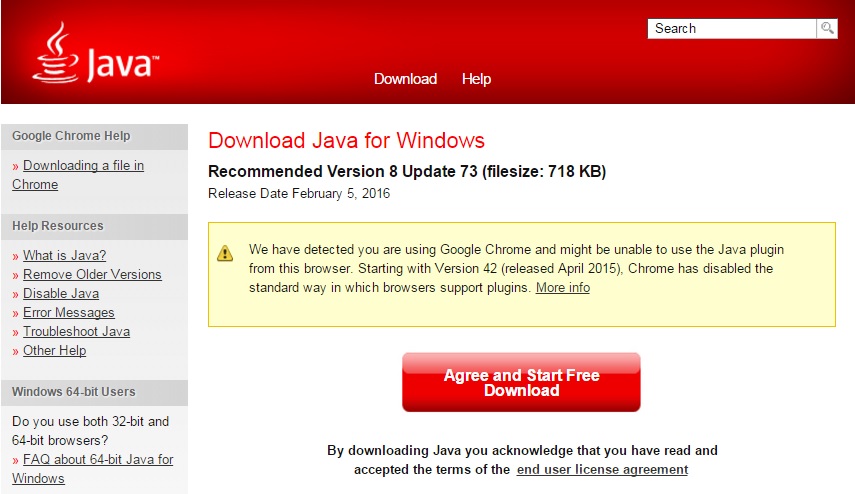
A recently detected vulnerability in the Java installation program, a platform that many applications and websites need to function correctly, has put this seemingly innocuous area at risk.

The Java software needs to update itself periodically with new versions so as to be able to maintain the performance and security of the tools that it helps to run.

Its distributor, Oracle, has warned of a security issue that affects the installation programs of the platform’s 6, 7, and 8 versions. The company has therefore advised its users to delete these programs from the download folder and replace them with new ones if necessary.

The reason given is that the installation software is designed to automatically search and load a set of files that are included in the installation pack (including its own .exe file) and to the  store them in the same folder.

Java

This procedure, which all installation programs carries out, shouldn’t pose a risk to your computer, as the majority of folders where they are stored aren’t vulnerable to attack. However, the “Downloads” directory is able to be modified.

If a cybercriminal manages to add this type of file (named Dynamic Link Library, or DLL), charged with malware, to the folder, the installation program will run it when the user wants to install Java for the first time, or if they manually update the tool by downloading a new installation program.

An added risk is that many browsers are set up to automatically download certain files, even if they don’t run later. Via an infected website, the attacker could use this feature to hide malware in the download folder without the user knowing about it. The files with malicious software would then be read to be executed by the installation program.

Deleting your browsing history would only help to eliminate the websites that you’ve visited, but not the programs that are already stored. Therefore, it is recommended that you delete the documents and software from your download folder every so often.

“Though considered relatively complex to exploit, this vulnerability may result, if successfully exploited, in a complete compromise of the unsuspecting user’s system”, says Eric Maurice, Head of IT Security at Oracle.

The post Why we should pay more attention to our Download folder appeared first on MediaCenter Panda Security.

Google to offer rewards to users who follow its security advice

security

Even though it’s for our own good, we are still struggling to follow classic security recommendations when surfing the Internet. We know how to create a secure password and the best way to avoid IT attacks and theft, but we don’t always put these tips into practice.

To ensure that web users are up-to-date with the latest security measures available, Google has decided to motivate them with a gift: all users who look after the security of their account will receive 2 GBs of storage on Drive.

The initiative, which was launched by the company to celebrate International Safer Internet Day, is actually rather simple:  all anyone needs to do is check the security of their Google account via this website and they’ll get more space on the cloud.

In just a few minutes, users can test the configuration of the two-step verification process, the information necessary to recover the account, and the applications that have permission to access it.

That means that, apart from testing the key elements for a secure account, users will enjoy extra storage space on the cloud. However, it isn’t the only thing that Google has up its sleeve to keep web users safe and interested in their own security.

Locks and question marks

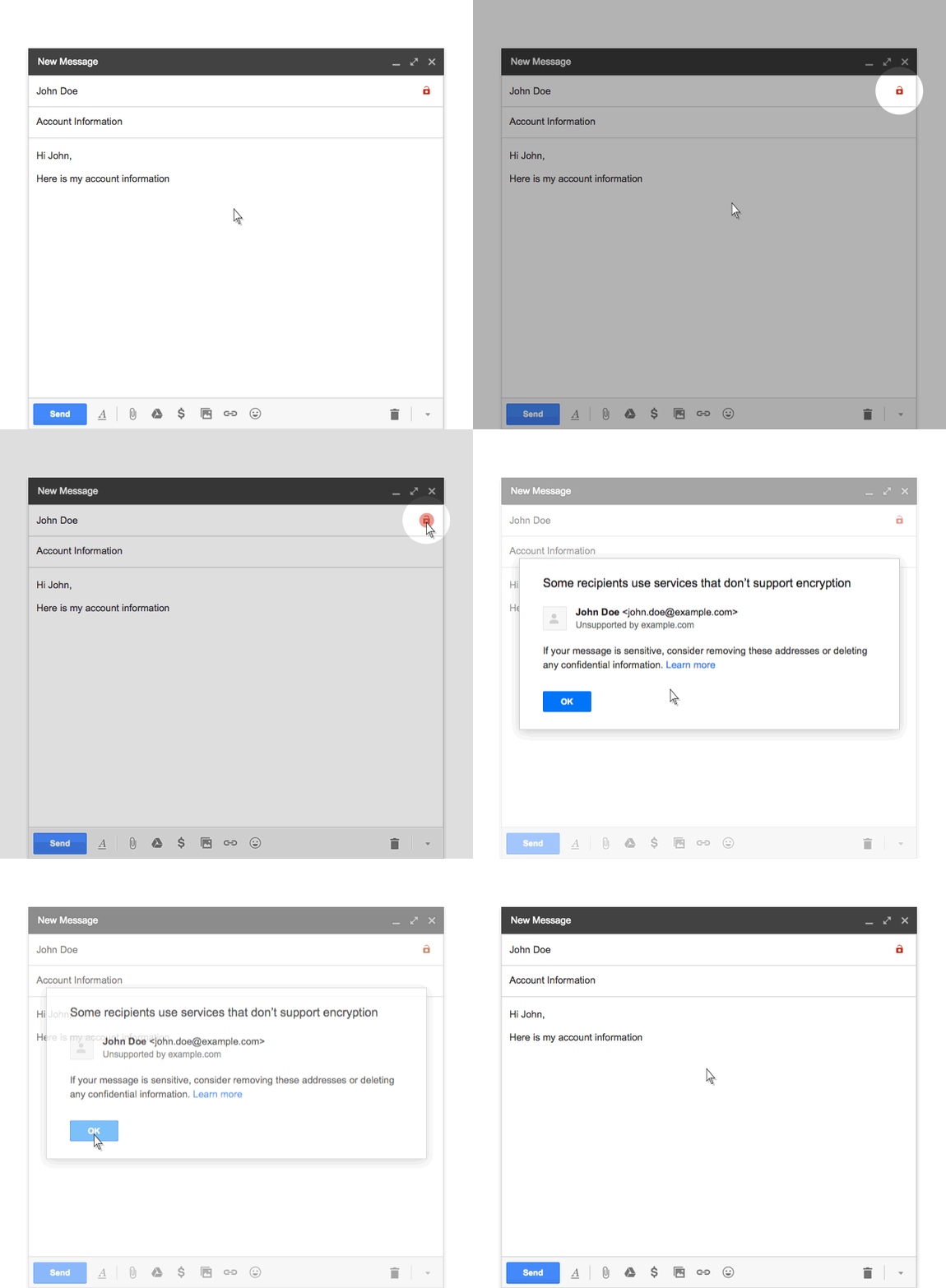
The owners of the popular search engine have decided to be brutal in showing us that not all services are as secure as theirs. As Gmail encrypts the content of sent emails, a small open lock will be shown every time that it isn’t possible to encrypt them, something which will happen when the platform used by the receiver doesn’t permit it.

keylock

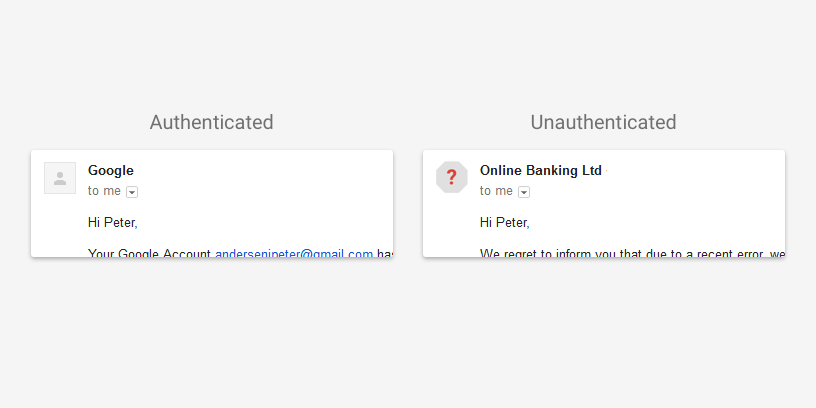
Also, Gmail will now display a question mark in place of the photo that shows who has sent us an email. It will only do this if it isn’t possible to verify the email address of the person we are talking to.

authenticated

However, this doesn’t mean that every email that Gmail users receive with the above features will be dangerous, but just that we should take extra caution before opening them.

What’s certain is that Google wants us to take the security of our data more seriously, and this time it’s going to offer us incentives to do so. Just remember, every little bit helps when it comes to staying safe on the Internet.

The post Google to offer rewards to users who follow its security advice appeared first on MediaCenter Panda Security.

Avast finds personal data on phones sold at pawn shops

Many people sell their used smartphones but fail to ensure their personal data is wiped away.

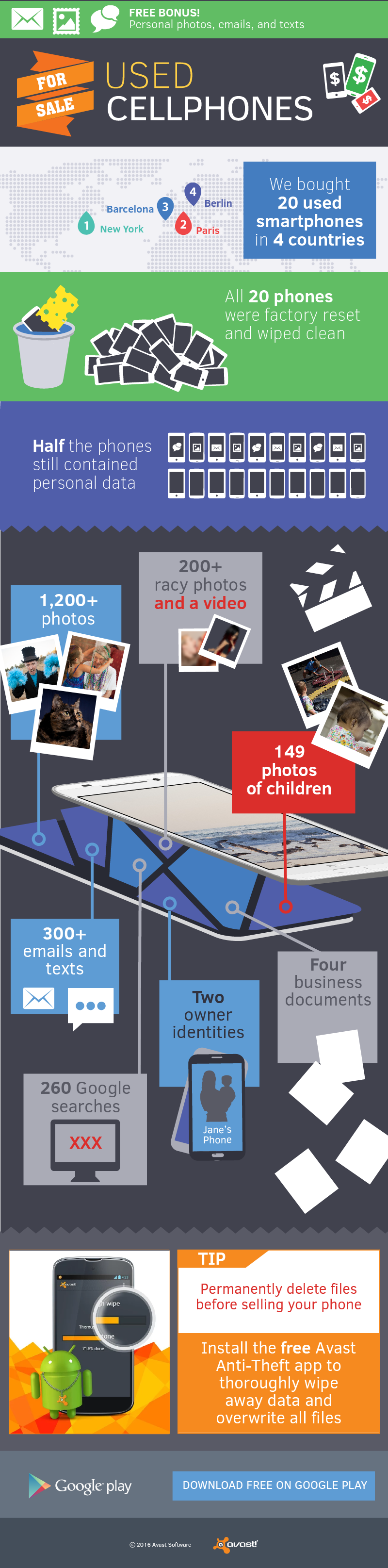
A year and half ago, Avast mobile security researchers bought 20 used phones from online consumer-to-consumer sites, like eBay and Amazon, in the USA. Using easily available recovery software, they were able to access more than 40,000 personal photos, emails, and text messages.

Since then, smartphone technology has progressed and numerous educational articles have been published to inform people about cleaning their phones before selling, so we wanted to see what would happen if we did a similar experiment now. This time, our researchers bought phones from pawn shops: Five devices each in New York, Paris, Barcelona, and Berlin — and again, used widely available free recovery software to detect the data found on the devices.

infograph_used_smartphone_pk_v3

Install Avast Anti-Theft from the Google Play Store for free

Because all the phones in this experiment came from pawn shops, Avast researchers were able to consult with the shop owners prior to purchasing the phones. Each shop owner assured them that the phones had been factory reset and that all data from previous owners was wiped clean. Avast found otherwise. Twelve of the supposedly clean phones were not clean at all.

Avast retrieved more than 2,000 personal photos, emails, text messages, invoices, and one adult video from the phones that the prior owner assumed was deleted. On two of the phones, the previous owners had forgotten to log out of their Gmail accounts, risking having the new owners read or send emails in their name.

Avast researchers were able to recover the following files from the 20 phones:

  • More than 1,200 photos
  • More than 200 photos with adult content
  • 149 photos of children
  • More than 300 emails and text messages
  • More than 260 Google searches, including 170 searches for adult content
  • Two previous owners’ identities
  • Three invoices
  • One working contract
  • One adult video

Why did these phones still have data on them?

Of the phones that were factory reset, 50 percent still contained personal data because the previous owner was running an outdated version of Android that had an improperly functioning factory reset feature.  Some of the previous owners only deleted their files without doing a factory reset. However, this doesn’t mean that the files were removed completely – only the reference to the file was deleted. Other phone owners simply forgot to delete their data or do a factory reset. The possibility that some of these phones were lost and not wiped clean of data before they arrived at the pawn shop also exists.

Scenarios such as these highlight both the responsibility of shop owners to properly wipe and reset phones prior to sale, and also the need for phone owners to utilize anti-theft software in the chance their phone is lost or stolen, in order to remotely wipe the data.

“New Android phones are pretty safe when it comes to the factory reset, but used phones with older Android versions that have a less thorough reset feature are still being sold,” said Gagan Singh, president of mobile at Avast Software.

How to make sure you don’t sell your identity along with your old phone

If you are selling a phone with an older version of Android (version 4.3 is the last one where factory reset did not work properly for some devices), then you cannot depend on the factory reset to ensure your personal data is wiped clean. Deleting files from your Android phone before selling it or giving it away is also not enough. You need to overwrite your files, making them irretrievable. To do so, install Avast Anti-Theft from the Google Play Store for free.

Your mobile device must be connected to your Avast account at https://my.avast.com. Linking your device to your Avast account also allows you to remotely wipe your phone in case it’s stolen or lost.

The final step is to wipe the phone clean, which will delete and overwrite all of your personal data.

Once the app is installed, turn on the WIPE command within the app.

  • Choose WIPE in the Send command column and click Send.
  • Confirm if you really want to delete all your data from the mobile phone.
  • To delete click Send, otherwise click Cancel. Your mobile will be rebooted.
  • The WIPE command will erase all data on your mobile and initiate a factory reset.

Avast at Mobile World Congress

Avast Mobile Security is at Mobile World Congress in Barcelona in Hall 8.1 (App Planet), Booth H65 this week, until February 25. Please stop by if you are around.

Avast free Wi-Fi experiment fools Mobile World Congress attendees

Travelers often connect to free Wi-Fi  to save money

Travelers often connect to free Wi-Fi to save money. image via www.shbarcelona.com

Avast Mobile Security researchers camped out at the Barcelona Airport, threw up a few fake Wi-Fi hotspots, and waited to see who would connect.


That’s already an interesting premise for an experiment, but this was the weekend when attendees of Mobile World Congress, “the world’s biggest and most influential mobile event” were arriving, making this not only interesting but fun!  You would think with such a savvy group that the results would be rather ho-hum, but think again!

Thousands of smartphone users threw caution to the wind and connected to one of Avast’s bogus Wi-Fi hotspots, risking being spied on and hacked by cybercriminals.

How did the Barcelona Airport experiment work?

Avast researchers set up Wi-Fi networks next to the Mobile World Congress registration booth at the Barcelona Airport. The Wi-Fi network names were “Starbucks”, “Airport_Free_Wifi_AENA“ and “MWC Free WiFi” — Wi-Fi names (SSIDs) that are either commonplace or that look like they were set up for the congress visitors.

In just 4 hours, Avast gathered more than 8 million data packets and learned the following about the Mobile World Congress visitors:

  • 50.1 percent had an Apple device, 43.4 percent had an Android device, 6.5 percent had an Windows Phone device
  • 61.7 percent searched information on Google or checked their emails on Gmail
  • 14.9 percent visited Yahoo
  • 2 percent visited Spotify
  • 52.3 percent have the Facebook app installed, 2.4 percent have the Twitter app installed
  • Avast could see the identity of  63.5 percent of the devices and users

“Many individuals recognize that surfing over open Wi-Fi isn’t secure. However, some of these same people aren’t aware that their device might automatically connect to a Wi-Fi network unless they adjust their settings,” said Gagan Singh, president of mobile at Avast.

“With most Mobile World Congress visitors traveling from abroad, it’s not surprising to see that many opt to connect to free Wi-Fi in order to save money, instead of using data roaming services. When taking this route, people should utilize a VPN service that anonymizes their data while connecting to public hotspots to ensure that their connection is secure.”

Protect yourself at home or abroad

Avast SecureLine VPN for Android, available on Google Play, and in the Apple App Store for iOS devices, encrypts connections on unsecured public Wi-Fi and allows users to browse anonymously. The app also lets users choose the server location they would like to connect with, enabling users to access content from their home country that may otherwise be restricted by geo-location.

Pretend you’re a hacker at the Avast booth at MWC16

Visitors to MWC16 can step into a hacker’s shoes and see what data is visible over an unencrypted Wi-Fi network.  Visit Avast in Hall 8.1 (App Planet), Booth no. H65.