Tag Archives: featured1

10 Tips to Prevent Phishing Attacks

phishing bank

As you know, phishing is a technique that involves tricking the user to steal confidential information , passwords, etc, into thinking you are a confidential site.

So far the hackers have used emails to launch this type of attack, but with the widespread use of social media networks and smartphones with internet access, the types of attacking are multiplying.

These emails include a link that takes the user to site known to have a confidential website, but they’re mere mimics with zero confidentiality.

Thus, overconfident users who do not have adequate antivirus protection, could be involved in attacks that are aimed to steal personal data.

And because of the economic crisis which is unfortunately affecting several countries, phishing attacks attracting people with the promise of a great job or an easy way to get money.

The question is … How can we prevent this type of phishing attack? 

10 Tips to Prevent Phishing Attacks

1. Learn to Identify Suspected Phishing Emails

There are some qualities that identify an attack through an email:

  • They duplicate the image of a real company.
  • Copy the name of a company or an actual employee of the company.
  • Include sites that are visually similar to a real business.
  • Promote gifts, or the loss of an existing account.
2. Check the Source of Information From Incoming Mail

Your bank will never ask you to send your passwords or personal information by mail. Never respond to these questions, and if you have the slightest doubt, call your bank directly for clarification.

3. Never Go to Your Bank’s Website by Clicking on Links Included in Emails

Do not click on hyperlinks or links attached in the email, as it might direct you to a fraudulent website.

Type in the URL directly into your browser or use bookmarks / favorites if you want to go faster.

4. Enhance the Security of Your Computer

Common sense and good judgement is as vital as keeping your computer protected with a good antivirus to block this type of attack.

In addition, you should always have the most recent update on your operating system and web browsers.

5. Enter Your Sensitive Data in Secure Websites Only

In order for a site to be ‘safe’, it must begin with ‘https://’ and your browser should show an icon of a closed lock.

6. Periodically Check Your Accounts

It never hurts to check your bank accounts periodically to be aware of any irregularities in your online transactions.

7. Phishing Doesn’t Only Pertain to Online Banking

Most phishing attacks are against banks, but can also use any popular website to steal personal data such as eBay, Facebook, PayPal, etc.

8. Phishing Knows All Languages

Phishing knows no boundaries, and can reach you in any language. In general, they’re poorly written or translated, so this may be another indicator that something is wrong.

If you never you go to the Spanish website of your bank, why should your statements now be in this language?

9. Have the Slightest Doubt, Do Not Risk It

The best way to prevent phishing is to consistently reject any email or news that asks you to provide confidential data.

Delete these emails and call your bank to clarify any doubts.

10. Check Back Frequently to Read About the Evolution of Malware

If you want to keep up to date with the latest malware attacks, recommendations or advice to avoid any danger on the net, etc … you can always read our blog or follow us on Twitter and Facebook . Happy to answer any questions you may have!

The post 10 Tips to Prevent Phishing Attacks appeared first on MediaCenter Panda Security.

Avast to demonstrate mobile security app with Qualcomm at Mobile World Congress 

qualcomm-logo

New machine learning-powered malware detection technology identifies zero-day and transformational malware threats at the processor level.

Avast Software was selected by Qualcomm Technologies, Inc. as the lead mobile security service to integrate Qualcomm® Snapdragon™ Smart Protect, a behavioral analysis-based, anti-malware technology that utilizes technology from the Qualcomm® Zeroth™ Machine Intelligence Platform to detect mobile malware threats to smartphone security and personal privacy in real-time. Qualcomm Technologies and Avast will be demonstrating this mobile security solution at Mobile World Congress next week in Barcelona.

Mobile malware is on the rise 

Avast currently has over two million malicious samples in its mobile threat detection database. Every day, Avast detects 12,000 new, unique mobile malware samples and each quarter about 15% of mobile users worldwide encounter mobile malware.

With the growing use of mobile devices and the valuable data they contain, malware developers increasingly target mobile users. One example of mobile malware is ransomware, which locks a device or the data on it and demands a ransom to unlock the device. Adware is also spreading on mobile. Adware often comes in the form of a gaming or entertainment app that seems harmless, but what users are unaware of is that the adware is using their infected device to click on ads. In 2015, Avast also detected new forms of mobile spyware which intrude on users’ privacy and collect their data. In addition to mobile malware, potential exploits in the Android operating system such as Stagefright put users at risk.

“With threats increasing every day, OEMs and mobile operators need to protect their users in real-time,” said Gagan Singh, president of mobile at Avast. “Snapdragon Smart Protect provides security at the processor level, which is designed to improve customer privacy and protect them from rogue applications, zero day attacks, and ransomware.  We are proud to have worked with Qualcomm Technologies on this effort.”

“Snapdragon Smart Protect is engineered to support real-time, accurate detection of zero-day and transformed mobile malware,” says Sy Choudhury, senior director of product management, Qualcomm Technologies, Inc. “The combination of Qualcomm Technologies’ dynamic, behavior-based malware analysis of Snapdragon Smart Protect and the core malware analysis delivered by Avast enables very powerful and comprehensive security and privacy protection for device users.”

Traditional security software is limited to scanning and monitoring software behavior at the application layer level. Snapdragon Smart Protect utilizes Qualcomm Technologies’ Zeroth machine learning technology to detect and classify a broader range of mobile malware at the processor level to achieve an even higher level of protection. While consumers will benefit from better protection, OEMs and mobile operators will benefit from reducing the risk of data leakage and malware attacks for their users.

Snapdragon Smart Protect is available to handset OEMs now on the Snapdragon 820 processor, and is expected to be supported by additional Snapdragon SoCs later this year. The first commercial devices with Snapdragon Smart Protect are expected in the first half of 2016.

Honey, they’ve hacked the TV: The security callenges facing Smart TVs.

remote control

If Facebook and many more Internet platforms are capable of showing personalized ads on your computer according to your online behavior, why shouldn’t the same be true for our smart TVs? Paul McMillan, a German security expert, has proven that smart TVs are so smart that they can analyze the programs or films that you watch so as to be able to choose ads that might interest you.

McMillan realized this while watching the film Inglorious Basterds on his Samsung device. A few minutes after starting, a pop-up appeared which invited him to join the army.

It isn’t the first time that someone has reported that these intelligent devices display publicity adapted to each user. However, to know their preferences, they need to analyze videos that are watched every day. So will they install a system to recognize the different content being watched?

The German investigator wanted to check if the ad continued to be shown despite changing the origin of the video. He used the same platform (via Amazon), but connected his computer to the television and watched the film from there. The pop-up returned again, meaning that the process depending on Samsung and not on the content provider.

Consumer Reports, which tests and analyzes new products, has already warned that smart televisions use an automatic content recognition system, which monitors videos that are watched, be it from YouTube or on DVD.

The companies could be sending this information to third-parties, which could include consultancy and publicity firms, who are both very interested in creating personalized advertising.

In general, it’s not businesses such as Samsung or LG who do this sneaky surveillance. What they do with user information should appear in their use and privacy policy, although they know that not many people bother to read it, and those that do most likely won’t understand a lot of the jargon. With these documents, companies leave open the possibility to insert ads directed at every type of audience.

However, the audience doesn’t need to accept everything that is thrown at them. Samsung has already faced complaints over its supposed use of voice recognition systems on its TVs to spy on conversations. In its service conditions, it stated that user should be careful with their words, as this and other information was being shared with third-parties.

smart tv

At the start of 2015, Samsung began to show Pepsi pop-ups on applications for streaming videos. The company brushed this off by saying that the ads formed part of a collaboration with Yahoo and that they were optional. The customer could disable the ads in their settings, but Samsung had previously failed to advise anyone of this.

In the case of LG, a British developer discovered that its smart TV collected information about user habits via the “smart ad” function and saved this information on the company’s servers (something which also appears in its terms of use).

Vizio, a manufacturer what operates mainly in the USA, also admitted that its televisions can recognize the content of the screen, which in the future could be used to send “ads in line with your interests”.

All of these firms earn money in exchange for advertising, which in turn allows them to sell their products at a more competitive price. However, their practices have placed security experts around the world on alert.

Nobody has asked their customers, whose only option (until now) seems to be in looking through the TV’s settings to find how to disable the ads. Will there be an ad blocker for smart TVs in the future?

More | Smart TVs have become the new target for cyber criminals

The post Honey, they’ve hacked the TV: The security callenges facing Smart TVs. appeared first on MediaCenter Panda Security.

Avast for Business gets task scheduling for IT admins

The Avast business solutions team is excited to announce the newest update to Avast for Business – Task Scheduling.

All scheduling features are  turned on in the Premium version, for those who manage multiple endpoints

All scheduling features are turned on in the Premium version, for those who manage multiple endpoints

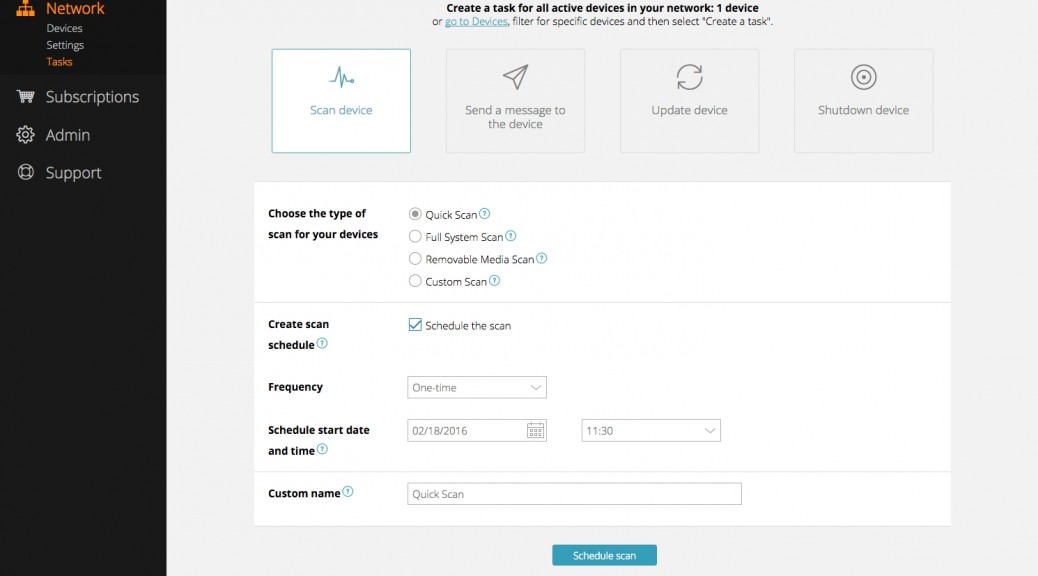
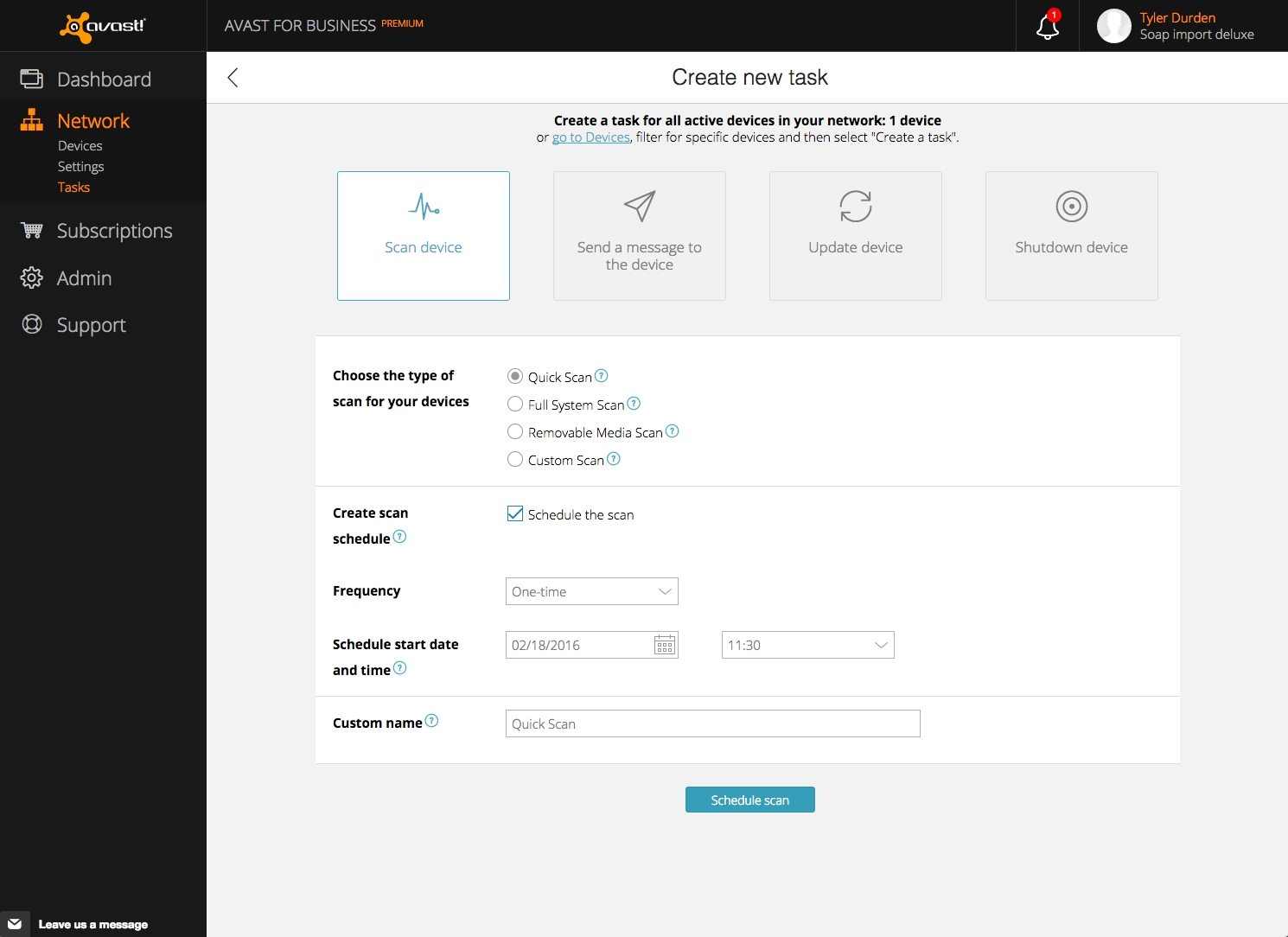
Now Avast for Business users can set the date, time, and frequency for all scans, updates, and system shutdowns. This reduces the impact on your workforce and increases your protection.

“The task scheduler in the Premium version of Avast for Business gives IT managers the ability to plan all their tasks in advance,” explained Martin Svoboda, Avast for Business’s technical product manager. “Even more, they can set up how often tasks will be executed, which means that this feature saves their time!”

Better protection, less disruption

We recommend that IT managers schedule a weekly full-system scan to ensure that your network is safe. You can also schedule scans to run over night or during lunchtime to preserve productivity. Check out these examples:

At a school – All the computers in each classroom, lab, and office need to be turned off at the end of the school day. The old, time-consuming way was to visit each room and manually shut down one-by-one. With Task Scheduling, the administrator can use the Avast for Business web console to create a shutdown task that will execute every day at 6:00 PM. No more walking the hallways at the end of the day; all devices will shut down when you schedule them to.

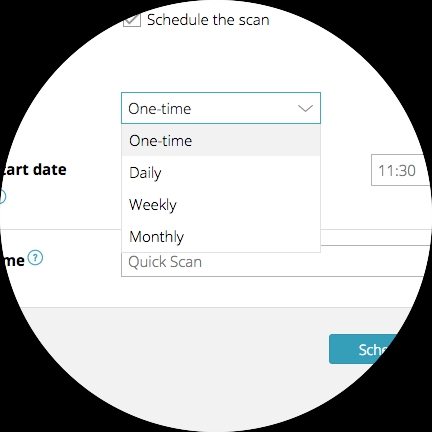
Select how often your task should run

Select how often your task should run


In a company – As the owner of a small company, one of your most important tasks is to keep your customer’s data secure. Many SMBs and non-profits allow BYOD (bring your own device), but employees have valuable data on their devices that you need to make sure stays secure. One click of an infected webpage, and your whole network could be at risk for data leaks and hackers. With task scheduler,  you can create a task which will be executed every day at 12:00 AM and perform a scan on all devices. In case there is an infection, Avast Antivirus can handle it before it reaches the company network.

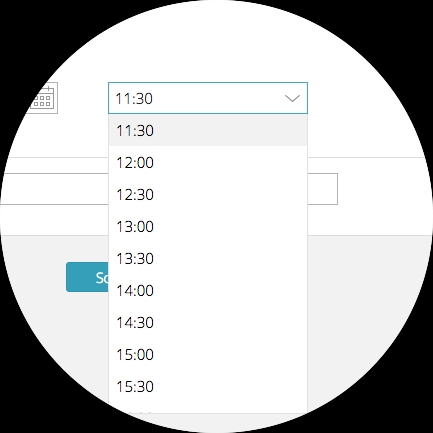
Select the time your task should run

Select the time your task should run


What else is new in Avast for Business 1.9

  • Ability to schedule all types of tasks [Premium only]
  • Ability to schedule recurring tasks [Premium only]
  • Ability to manage exclusions for the Sandbox
  • Ability to manage your Web browser exclusion-settings for the Sandbox
  • Ability to manage Sandbox storage
  • The “Devices awaiting activation” notification now contains up to 20 devices plus a link to the web Console where you can see all awaiting devices

Avast for Business is the first free business-grade security for PCs, Macs, and servers. It’s managed via a web-based portal and available to protect business networks of all sizes. Learn how you can get started with Avast for Business in your company or school.


Follow Avast on FacebookTwitterYouTube, and Google+ where we keep you updated on cybersecurity news every day.


The 5 best online services to sign up to

Few things give us more piece of mind than signing up for a service that you can cancel whenever you want and at no extra cost.

What we all want is to be able to try it out during a certain period and, if we like it, sign up for it fully. If after a few weeks we realize that the service doesn’t offer us what we need, we also want to be able to unsubscribe just as easily as we signed up.

This is why we want to present 5 of the online services that we use the most, although we’re sure you already know of a few of them.

The 5 best online services to sign up to

Netflix

PandaSecurity online services Netflix

You’ve surely heard of Orange is the New Black or House of Cards. Both of these give us a fair idea of what to expect if we sign up to this entertainment service. For a monthly fee you have multimedia content, especially TV series and films. You can try it for free and, later, sign up for a plan that best suits you.

Evernote

PandaSecurity onlines services Evernote

Taking something down on your phone and later forgetting it is there in front of us is something that happens to us all. If you want a solution to these mental lapses then Evernote is the tool for you. You can download it on any device and synchronize it across them. Also, if you want to use it on a more professional basis, it offers a professional version that allows you to scan business cards, edit PDFs, and save emails.

Spotify

PandaSecurity servicios online Spotify

It’s probable that you know the benefits of Spotify and that you’re already a user, but have you tried the Premium version? We recommend that you try out the free monthly trial, although we guarantee that you won’t be able to live without it after! You can download music, listen offline, avoid any ads, and most importantly, all of your music is stored in just one place.

Amazon

PandaSecurity online services amazon

If you’re already using Amazon for all your purchases, then you need to check out Amazon Premium. You can carry out all the purchases that you like and without having to worry about postage charges. As always, you can try it for free for a month and if you are convinced, become one of their millions of VIP customers. One thing, though… be careful with your purchases – with no postal charges, it’s very easy to go overboard on the purchases!

And, as we don’t want to miss out on all this, we invite you to try out our new online service:

Panda Protection Service

With Panda Protection Service you will have the best antivirus protection for an unlimited number of devices (computers, tablets or smartphones) and the advantage of being able to sign up for as long as you want. Forget about yearly subscriptions; Panda Protection Service’s monthly plan gives you total freedom and the first month even comes for free. You can also cancel your subscription whenever you want with no extra cost involved.

PandaSecurity online services panda protection service

Features of Panda Protection Service

  1. Protect your family
  • Control the browser for all your devices (PCs, tablets, mobiles)
  • Block inappropriate content
  • Protect your home network from intruders
  • Keep your photos and personal files private
  • Locate your devices at any time
  • Control the applications downloaded on your mobile devices
  1. Looks after your privacy
  • Keep your personal and banking data safe
  • Enjoy a real-time antivirus protection
  • Protect all your devices that are connected to a Wi-Fi network with instant alerts
  • Manage the passwords to all your accounts and always have them on hand
  • Remotely wipe your device in the event of loss or theft
  1. Optimize your devices
  • Know the location of your devices in real-time
  • Remotely block and delete files
  • Possibility of identifying the thief in event of mobile theft
  • Optimize the performance of your devices (PCs or mobiles) and improve battery life
  • Anti-theft system alerts

Also, as with all of our antiviruses, Panda Protection Service comes with the best security guarantee – should you get infected, we will offer a full refund.

Do you want to try our multiplatform antivirus for free?

The post The 5 best online services to sign up to appeared first on MediaCenter Panda Security.

Surviving my 25 day Offline Holiday

If you’re reading this,  you probably read Part I of my social experiment, 25 Day Offline Holiday: Can a techie do it? I’m trying to live without the Internet for 25 days while I’m on vacation in Chile. Well, not absolutely without. It’s available, but I’ve banned myself from receiving or answering emails or messages, playing with the apps on my phone… that sort of thing.

I am on an Offline Holiday. Can I survive it?

I discovered that I can run without a fitness app tracking my progress

I discovered that I can run without a fitness app tracking my progress

Day 8. Today, while running under the sun and watching the fields, I wondered what Bob would think about my 25-day experiment? Bob is my fellow Avast evangelist and like me, he’s extremely active on the Avast Forum. He makes presentations all over the United States about security, anti-malware, and how to be safe while connected. I guess he’s never recommended Avast to anyone offline. All he must  be doing, while I’m on my offline vacation, is teaching people to be protected, have their antivirus fully updated, and so forth.

And what about David, another Avast evangelist? I wonder if he is solving all the issues on the Avast Forum? Would he survive in England without being connected? What about Asyn? Has he recommended that you read any Avast Blog articles yet? And Polonus? Is he fighting off online malware?

I’m not sure what my friends are doing, as I’ve been offline for over a week now.

Look for yourself: Join the Avast Community Forum and meet real people that can guide you through online security. Tell them I said hello.

Day 9. Nothing new. I’m bored because I can only read the local newspaper. I have a lot of time to watch movies.  My health is very good: I lost some weight. But I don’t know for sure. Maybe it’s wishful thinking since I’m not following my app.

Day 10. I love ice cream and today I have one. Isn’t life beautiful?

As I write this, my thoughts drift back to what I enjoy doing the most when I’ve got an Internet connection – helping people stay secure when they’re online. If you’re connected, you need to be safe.

I can’t imagine connecting  to the internet without the protection of Avast SecureLine in all these cafes offering public Wi-Fi. As I sit here eating my ice cream, and not looking down at my phone, I watch the people.  It’s a pity that I can’t teach all of the guys here that their internet traffic could be eavesdropped on without a proper VPN. Well, Avast Mobile Security team, at least I’m safe since I’m offline. Plenty of work for you…

Here, the sun is in the sky, and I have all day to enjoy myself. OK, now what…?

Day 11-13. Nothing new during these past few days, I mean, nothing interesting enough to be written about here in the Avast blog. As I don’t know if Deborah published Part I, maybe these musings are useless?

I may be offline, but my thoughts are connected to my work with Avast. I miss everyone and hope the Avast team is working hard to protect more than 230 million people round the world. They have one less to protect for another week and a half.

Did you see the picture of the Avast Virus Lab some days ago? Wow, all that malware coming to your devices. But I’m sure if you’re reading this, you are smart enough to protect both your notebook and your mobile devices.

Day 14. Hmmm… I wonder if this blog is useful to anyone? Did anyone comment on part one? Did our social media team receive any comments about my experience on Facebook or Twitter?

The worst part about being offline for the past 14 days, is that I don’t really know what is happening. No feedback. No likes, plus 1s, or retweets. No news is good news, I suppose.


Follow Avast on FacebookTwitterYouTube, and Google+ where we keep you updated on cybersecurity news every day.

In search of the perfect instruction

Knowing the language of common microprocessors is essential for the work of virus analysts across the AV industry.

Each program you run – clean, malicious, no matter – is actually a set of commands (called instructions) specific for particular processors. These instructions can be very simple, e.g. addition of two numbers, but we can see very complex cryptographic functions as well.

As the processor architecture evolves in time, it becomes more and more complicated and understanding or decoding the language is more difficult. It (hypothetically) does not have to be like this, but there’s a hell called backward compatibility.

proc_comic

Sooner or later, popular products such as (the majority of) desktop computers with the x86 processor need some innovative development to meet future requirements. Sometimes the amount of innovation is so vast, that it could easily form a completely new product. That’s the decision point – to be, or not to be – are you going to start a new product line and throw away the old platform, or will you stick with the old solution and keep the backward compatibility by hook or by crook?

Intel actually tried both ways.They admitted that there’s a need to make fundamental changes in the architecture and not limit themselves with the 20 year old shackle of 8086 processor.

So they started with the Itanium series – a completely different processor without the old limits. But the majority of common applications were written/compiled for traditional x86 architecture and Itanium has never made it to the “mainstream”.

To be honest, Itanium’s primary focus is a sphere of enterprise servers and high-end solutions, but it was a chance to make a big change with an impact also to traditional desktop systems. However, it would mean a successive conversion of current users to the new platform, motivating developers to write applications (browsers, media players, office suites…) for that platform, etc. This never happened and Itanium remains a enterprise solution. The x86 ecosystem was, and still is, so strong, that it was a necessity to paste all innovations to the old architecture. If you can’t start a greenfield project, you will always end up finding the lesser of two evils.

What are the drawbacks to Avast virus analysts?

The language of x86 processors is called x86 assembler. If we want to understand it, we must decode it with our x86 disassembler. This is a crucial part of static analysis, emulation, dynamic translation; weapons used by, I would guess, all antivirus engines to fight malware.

Having such a disassembler means having over 16,000 lines of C code and data, including padding and formatting in our case. It could be much shorter, if there were no logical exceptions from the decoding scheme, reusing prefixes for different purposes and giving them completely different meaning, etc. With such circumstances, writing a reliable, fast, and small disassembler is really difficult and with each “paste-to-old-architecture” innovation it gets closer to impossible. It’s going to be either big, slow, or not that reliable by design, because the x86/x64 architecture is so rich and in-homogeneous.

What should be done about x86

Here’s my point. It’s OK to add native support for AES and other cryptographic functions, it’s useful, but this is not the perfect instruction. I would really like to see the disasm instruction. Once the architecture is so complicated and the opcode map so messed up and there’s no way back, why not let Intel engineers deal with it?

We have a saying in Czech Republic, loosely translated: “Let them eat, what they cooked.” It would be so nice if a processor was able to provide us with its own native decoding capability. It would be so nice if we did not have to walk through the whole instruction set reference and find which part was twisted this time to fit new demands along with old shackles. After all, we could have smaller, faster, and the most reliable code (because who’s supposed to know x86/x64 processors better than their architects?).

So, Intel engineers, for the sake of all emulator programmers, will you pick up the gauntlet and implement the perfect instruction? :-)

WhatsApp to advise users if they receive a dangerous file

WhatsApp is set to send a warning to users when they receive a dangerous file. The instant messaging application will introduce this feature during its next few updates, making the sharing of files a bit safer.

Under a new menu, named Documents, users will find a section which is similar to the current one which stores photos and videos that have been exchanged in the conversation. Now, however, there will be text documents, Excel files, presentations, and other office-style documents.

The danger of Excel files

As we’ve said on many occasions before, if you receive an Excel file by email then you should be suspicious. This is why Excel files require the permission of the user to run the file in a trusted mode, and this is exactly what WhatsApp is going to do, too.

whatsapp files

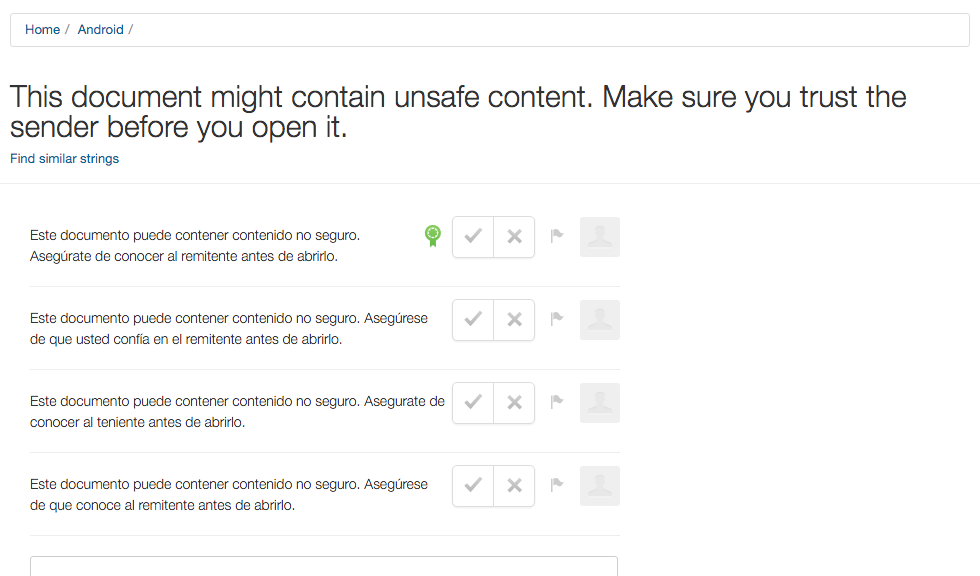
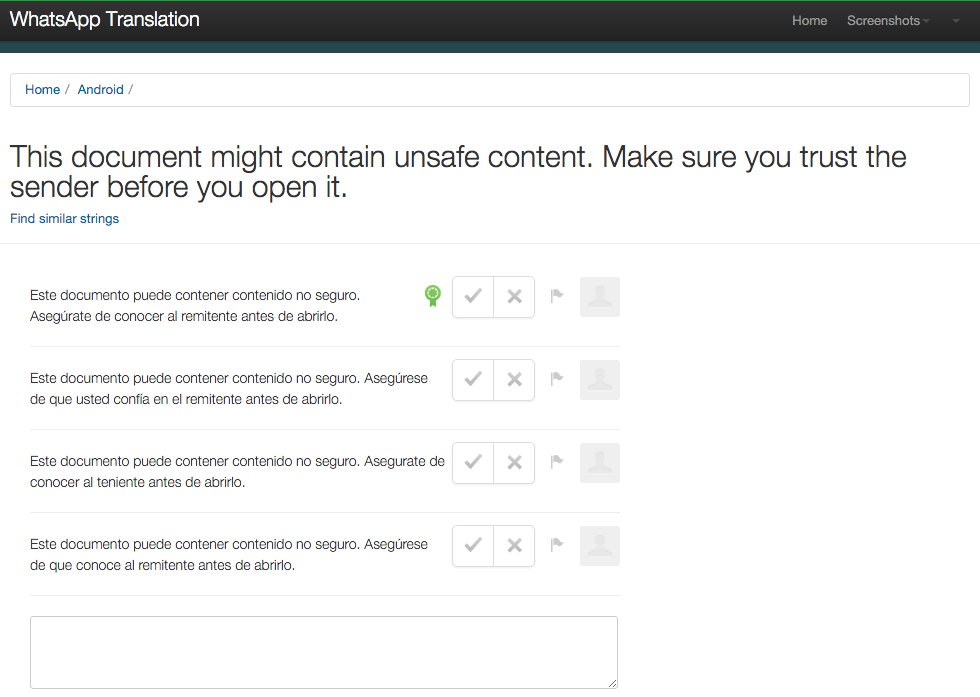
Once again, this piece of information has come from WhatsApp’s translation service. It seems that a security alert will appear before allowing you to run the office document.

By doing this, they hope to avoid the spread of malware via mobile devices. The message will be clear and direct – “This document might contain unsafe content. Make sure you trust the sender before you open it”.

This news confirms what we have always said: be careful with attachments and those that are sent via mobiles. Now, WhatsApp will also help us to remain a little more protected! 😉

The post WhatsApp to advise users if they receive a dangerous file appeared first on MediaCenter Panda Security.

25 Day Offline Holiday: Can a techie do it?

To get away from it all, I decided to take an unplugged vacation. But can I survive it?

Chile's Atacama Desert is the perfect destination for an "Unplugged" holiday

Chile’s Atacama Desert is the perfect destination for an “Unplugged” holiday

The day before I left Brazil for my vacation, a young lady who works with me said, “My vacation concept is different than yours.” She said that her vacation is time to take a break, to disconnect. So she unplugs all her devices and goes offline.

I’ve thought I could do the same while traveling to Chile. I won’t write about the trip itself, but about my Offline Holiday. For sure there are a lot of free Wi-Fi hotspots, and I have Avast SecureLine and Avast Wi-Fi Finder, so I could be secure the entire time. But, that’s not the point.

I just want to see what will happen in my life, and in my body and mind, being 25 days offline.

Day 1. I’m using Windows Preview Pro 11102, my machine is fully updated and Avast Software Updater shows that all the software on my computer is OK. I can’t believe that I will disable Avast!

Yes, as a rule you should keep your protection fully updated and on. But, I ran a full scan before beginning this offline journey and with no connection to the internet, I am not afraid. I am traveling for the first time in this new country, but my favorite apps do not work and I have no internet.  Thankfully, I’ve installed an off-line map and GPS app. This option is showing me the way.

Day 2. I thought it would be easy, like when I stopped smoking 15 years ago. “I can manage it,” I told myself.

I’ve disabled some of my startup items. Why should I start a browser, an online backup, and an email client if I’m offline? I’ve put my smartphone in airplane mode and the battery stays charged all day. Isn’t it good?

My fitness app did work. GPS is there, but without internet it’s not loading. So I’ve moved to my backup fitness app that I tested offline before. Worked. Good. I don’t need anything more.

Day 3. Everything is quiet… So quiet… No smartphone notifications… Not a single message and email, nor my RSS showing any news… Will I make it? “25 days is too much,” I thought. “No, I’ll stay determined!”

I bought a newspaper! Paper! International news shows my country hasn’t changed a lot in a few days. Why worry with getting news all the time? I’m on holiday.

Day 4. I hate to have Windows saying my protection is off, so I disabled the notifications. No problem. Everything is still working. No email. No messages.

I’ve started to enjoy the simple things more. Chile is a fantastic country. I appreciate the food and the fruits (not that I could read about them first on the net) and a lot of fantastic wines.

Day 5. I’m traveling in a very dry part of the country. Who needs an app that notifies you when you need to drink water, I think to myself? I’m drinking a lot of water anyway. The Atacama Desert seems like Mars. Recently I watched a DVD movie called Mars with Matt Damon. In the movie the stranded astronaut has communication with Earth but I’m alone here.

Well, not exactly, I’m surrounded by people and technology, just crazy enough to be doing this social experiment of being offline.

Day 6. I’ve committed a sin today. I had to send some blog articles to Deborah. I promise that I borrowed a phone from a friend of mine, prepared the email, logged into my Gmail account with two-authentication factor – how exciting is to be secure! – and sent them to her. Generally, she thanks me about my hard work. She will do the same now. Nobody will be listening. I am tempted to go further and read tons of emails that have accumulated in my inbox, but I don’t give in. No, I logged out.

Day 7. If you’re reading this post, that means Deborah received my email. I was at a museum and with public Wi-Fi, I just sent this to her. I promise, no other communication. Avast SecureLine gave me protection over this public Wi-Fi, so I logged into my Gmail account and sent her the text using my phone.

 I suppose I’ll continue next week. Or maybe I’ll quit. This is harder than I thought…

Wish me luck and keep yourself connected to our blog with Avast fully updated. Remember: I’m offline, not you. Will I survive?

Google to publicly shame websites that aren’t using HTTPS

https

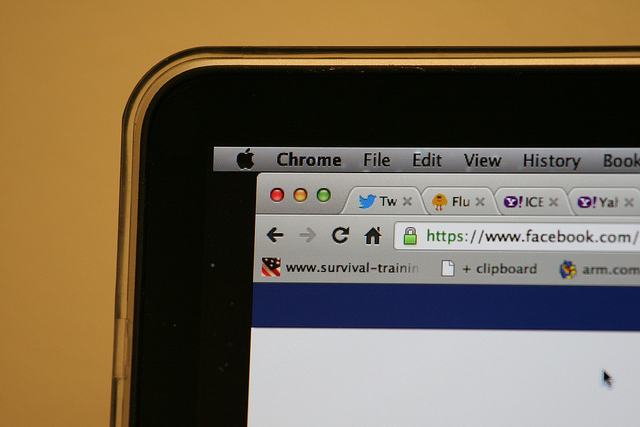
It’s likely that one more than one occasion you’ve noticed the small green lock icon that appears in the address bar when you’re using the Internet. This little icon means that the site you are using is secure as the page is using HTTPS (Hypertext Transfer Protocol Secure).

HTTPS encrypts all communications to protect confidential data on the web, from user names to passwords, messages, or credit card info. In order for this to work correctly, it is essential that banking websites or online stores use the secure version of GTTP.

The HTTPS system also guarantees that anyone using the Internet is able to access the official page of a company as opposed to a false one which has been designed to trick the user and steal their money or info. It also protects that website against third-parties which might try to intercept the connection in order to install a malware.

Google has spent a long time organizing a silent campaign in favor of the use of HTTPS with the hope that eventually all websites will end up using the system, putting an end to the risk of data theft for web users. It’s telling that even the government of the United States is concerned about the use of HTPPS, and requires that all of its web pages be encrypted with the service.

Less than a month ago, Google announced that it would favor the indexation of HTTPS sites that had a HTTP equivalent. What’s more, Google has decided to offer new tools to developers so that they can easily include this protocol. Now it is trying to publicly list the owners of websites that aren’t using this protocol, a project that the security team already debated at its forums in 2014.

secure web

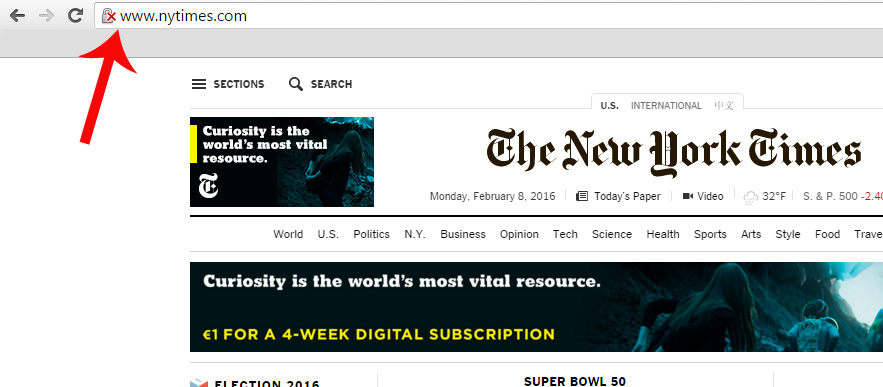
Up to now, on Chrome there was a red X on the gray lock when the browser detected problems with the TSL/SSL certification of the website which guarantees the establishment of secure communications on the Internet, which makes it possible for a third-party to access the user data. It also shows us this warning when the web connection is encrypted, but Chrome has detected a mix of command sequences (a page based on HTTPS loads content based on HTTP), which could allow a third-party to take control of the page.

Google plans to openly display websites that use HTTP protocol by marking them with a red X. Parisa Tabriz, Chrome Security Engineering Manager, tweeted that she planned to highlight these pages: “HTTP, we’re readying to call you out for what you are: UNSAFE!”

A few days ago, at the Usenix Enigma security conference, an expert from CloudFlare showed how users can already decide if they want all pages that use HTTP protocol to appear with the red X symbol. To do this, all you need to do is enter chrome://flags and select “mark non-secure as” and then “mark non-secure origins as non-secure.” In this moment, a gray lock will be added to your address bar, indicating insecure webpages.

unsecure web

A Google employee, who wished to remain anonymous, has confirmed to Motherboard that the intention is that Chrome will include this alert by default and has assured there will be more clues in the near future.

For now, Google has yet to make an official announcement on the matter, so those who wish to know when a webpage isn’t secure need to manually select this option.

So, if we keep in mind that only 1 in 3 users take notice of the current SSL security warnings from Chrome which warn us if someone is trying to steal our confidential information, it’s likely that some will end up ignoring the red X, too. Due to this, it is necessary that we are more aware of the dangers that we face by leaving our data on insecure websites.

The post Google to publicly shame websites that aren’t using HTTPS appeared first on MediaCenter Panda Security.