Tag Archives: featured1

Privacy on the Internet: There is no such thing as a free lunch

This is a reprint of The elusive “P” which appeared in the January 2016 issue of Indian Management.
Indian Management Privacy

There is no such thing as a free lunch, truly.

As we increasingly traverse the virtual realm, we are putting at stake a crucial aspect—our much-treasured privacy.

There is not a lot of privacy on the Internet today. Every place you go – websites, social networks, apps – all know your IP address and where you are located, which they can correlate with your demographics, age, gender, and the websites that you visit. Social networks can even tell advertisers what your political leanings are and which religion you practice, and the Internet knows which books you read, which cosmetics you use, and whether or not you are pregnant, getting married or divorced. At the end of the day, search engine companies and Internet Service Providers know everything about you. With the up-rise of the Internet of Things, Internet-connected devices can dig even deeper into our lives. Our cars remember when we drove where, how fast we went, and what music we were listening to, while our smart watch can tell us more about our health than our doctors can. Privacy is a thing of the past.

A trade-off between convenience and privacy

In our day-to-day usage of the Internet, each of us are either making a conscious or unconscious trade-off between convenience and privacy.

One example of this can be seen in Gmail, the hugely popular email service used by nearly one billion people around the world. Most people will, but others might not recognize that they receive advertisements which are somewhat related to the subject of their emails. This is due to the fact that the subjects of a user’s emails are sent to various advertising engines to come up with relevant content to serve back to the Gmail user. For someone who sent an email with ‘vacation’ in the subject line, this may result in the user receiving ads with flight offers during the following days.

As a consumer searching for different things on the Internet, you are likely making the connection that advertisements that you see are based on the searches you have recently made. This is the result of targeted advertisements, which can simultaneously provide true value and can also cause problems or be embarrassing. For example, if a family shares one computer, certain family members may not want their parents or children knowing about their search history. This becomes difficult to avoid with targeted ads, since the ads displayed are related to search items that were originally intended to be confidential.

Taking this a step further, we also need to start thinking about the advancement of our smart devices. One big enabler of privacy violations is geographic tracking embedded in everyone’s devices — from our smartphones to our cars. As geotracking becomes an everyday feature in cars, people can effortlessly follow their spouse or child while they are driving, keeping track of their speed, location and driving habits. While this could potentially encourage safe driving, it could also have negative effects on those who don’t want to be surveilled. What’s more, the data collected by a car could be sold to insurance companies that will refuse payment in the case that an accident was caused by speeding.

For the most part, people may understand the risks that come along with the development of smart devices. However, when feeding companies with mass amounts of data collected by these devices, users continue to make a conscious trade-off that results in the loss of their personal privacy.

Free software and the lure of fast click-through agreements

One of the reasons why people so easily and willingly give up their privacy is that most of the software they download comes with no price tag attached to it. Back in the 90s, software was sold in stores and was fairly expensive for the average consumer. Now that the majority of software is downloaded online and is distributed largely free of charge, the products come with a price tag of a different kind — the infringement on consumers’ privacy and security. This issue is heightened by the fact that many people don’t take the time to read through their software’s click-through agreements.

The real question is this: What does a user receive in exchange for giving up their privacy? Additionally, are they willing to lose the convenience that software and apps provide if they want to keep their privacy intact?

Certain services of trusted companies can serve very useful purposes, such as free email services, search, text messaging, social networking, health monitoring, or child safety; and targeted advertising by social networks, search engines and other web services is not seen as risky. The more an app or web service knows about you, such as your location, your interests, your contacts, the better they can target you. Some people prefer seeing targeted ads, as the ads displayed become increasingly relevant for them, while others find targeted advertising to be, to a certain extent, an invasion of privacy.

The only way to completely prevent being spied on in today’s day and age would be to not use the Internet nor smart devices and free services that access sensitive data in order to target ads.

There are, however, tools in the market, like browser-add-ons that provide consumers with information on web interactions with social media sites, advertising networks that share data, and the analytics used to improve a website. Clever technology can identify these from either cookies or programming code that is embedded in the website. There are also apps for mobile users helping them understand which data apps can access and which ad networks they serve.

A joint effort needed between industry and politics

Although there are solutions available, it cannot be solely the consumer’s burden to determine how to navigate the trade-off between privacy and convenience. It’s not possible for users to stay 100% informed about what happens to their data, as most companies simply don’t communicate these things to their customer base. To combat this issue, companies should focus on increasing their transparency, making their privacy agreements easy to the average user to understand, and putting significant effort into educating their customers. Politicians will also need to determine just how far companies can legally go with the collection and distribution of user data.

The Nigerian Skype scam is back to try and trick us once again

It’s possibly one of the oldest and least plausible scams out there, but the infamous Nigerian scam is still a popular method used by cybercriminals as they look to that advantage of would-be victims online.

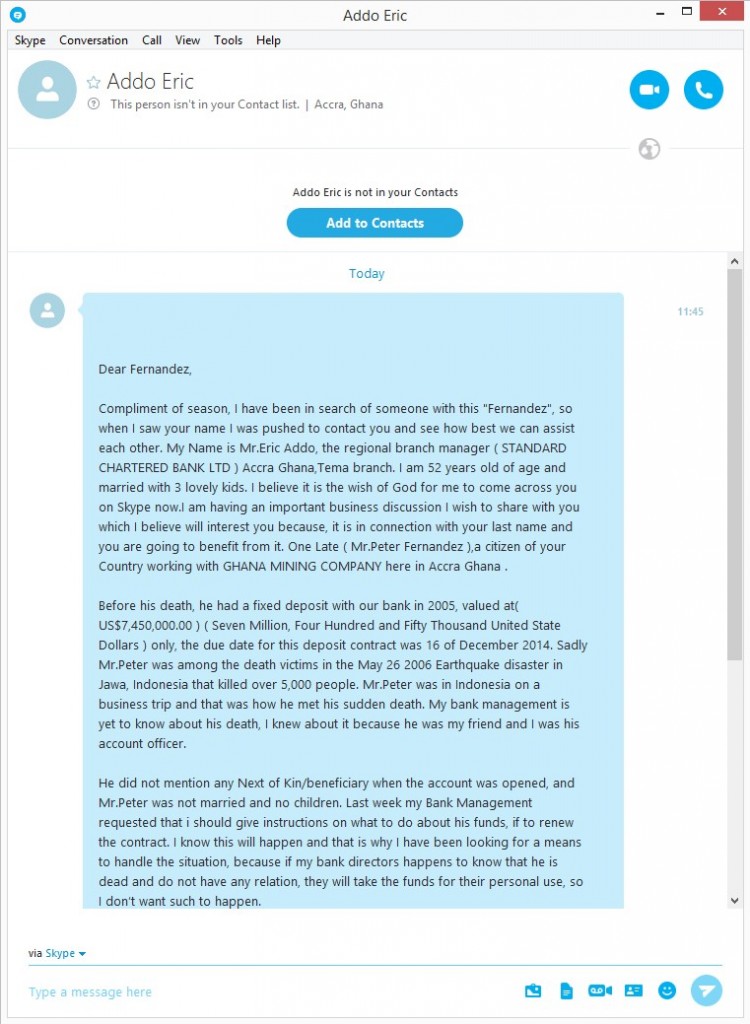
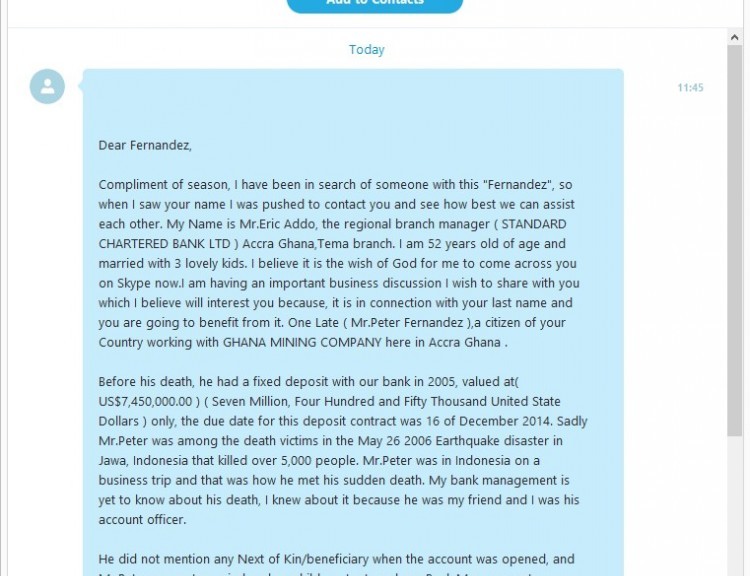
What was once an email-based scam has since taken to Skype, where one of our colleagues recently received the following (and strangely worded) message via the communication service:

skype scam

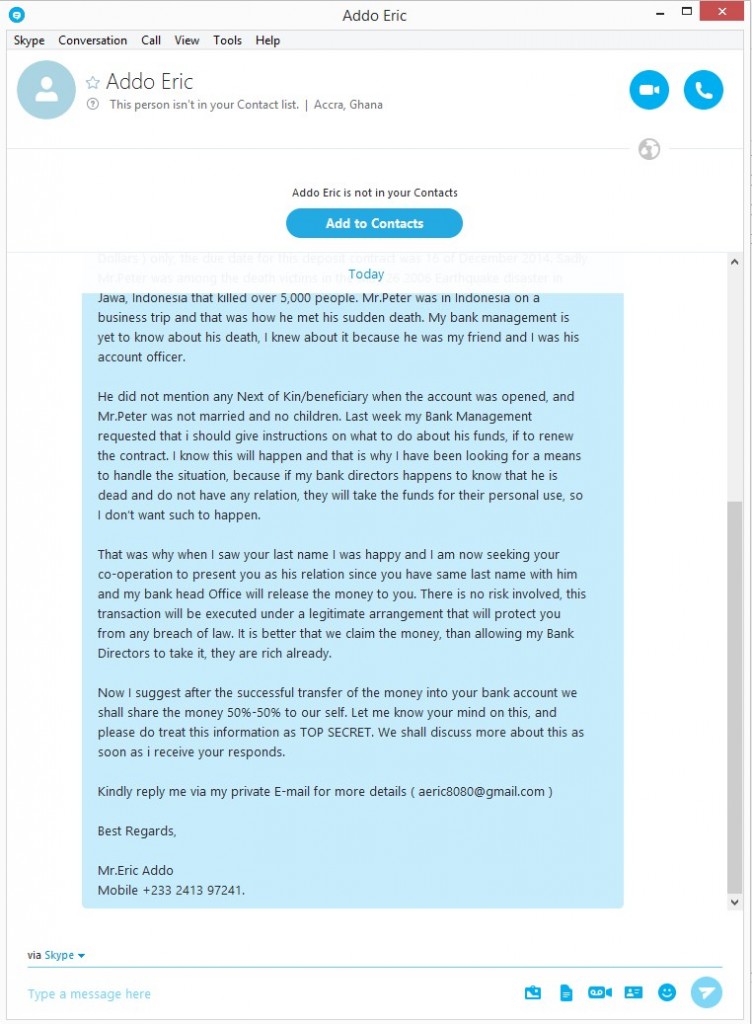
As you can see, they tell you that a victim of an Indonesian earthquake has died, leaving behind a princely sum of $7.5 million in a bank account. Luckily for our colleague, his surname, Fernández, is the same as the victim’s. This is a sufficient a link as needed for the earthquake victim’s friend to get in touch with his generous offer.

skype fraud

What the scammer proposes is that the sum of money stored in the bank account be shared equally between both parties, although the operation must be done under utmost secrecy and without anyone else knowing about it. In order or the deal to be carried out and for more details on how the transfer will be done, our Nigerian friend needs our colleague to get in touch with him.

It’s blatantly obvious that there is no money to be exchanged in all of this, and that there was never any earthquake victim to begin with. These scammers simply contact us with the hope of getting our private information and to try access our bank accounts.

So there you have it – never give out your personal information online and never carry out banking transactions that are related to prizes, inheritances, or lotteries.

The post The Nigerian Skype scam is back to try and trick us once again appeared first on MediaCenter Panda Security.

How to spot if an ATM has been tampered with

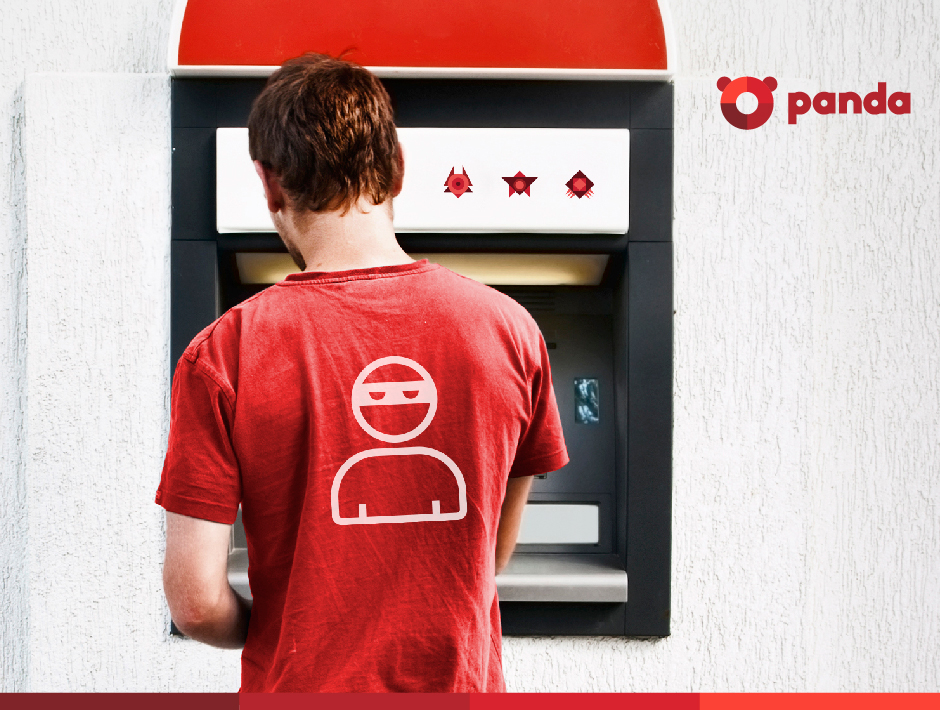
Panda_Security_Ciberdcriminals_atm

After a period of relative calm, ATMs have fallen back under the spotlight of cyberattacks. The change from traditional credit and debit cards (those with the magnetic band) to integrated chip cards, which are more difficult to copy, along with changes to ATMs themselves, has caused a rush among cybercriminals to take advantage of current vulnerabilities before they disappear for good.

As a consequence of this, there has been a marked increase in the number of illicit activities of this sort in recent months. According to FICO, a security company that monitors 65% of all ATMS in the United States, the first four months of 2015 saw the highest number of attacks on cash machines in over twenty years.

The solution to this increase in attacks isn’t to become alarmed and avoid using ATMs, but rather use them with caution and follow a few simple pieces of advice.

Try to guess if an ATM is dodgy

The most common modification technique used with these machines is a method known as skimming, which consists of installing a small device in the slot where the card is inserted which copies the information on the magnetic band. This information is later used to make duplicate cards of to carry out online transactions without the victim knowing.

Knowing that a machine has been tampered with isn’t easy as the skimming devices are usually well hidden. However, there are some things to look out for when checking to see if it is safe to withdraw cash. First of all, take a look at the card slot and the area around it – if you spot any marks or scratches then it’s likely a device has been planted there. Also, check that the little light that usually operates on the card slot is working.

If the light is turned off or you suspect that something is amiss, then we advise you not to use that ATM. Cancel the transaction (if you have already started it) and don’t try to remove the skimmer yourself (advise the staff in the bank instead).

The following video will help you to look for signs of skimming devices:

Hide your PIN

If they’ve managed to get your card information and want to clone it or use it to make online purchases, the cybercriminals will also need your PIN, which they can get in a few different ways. The first, and most obvious way, is by looking over your shoulder while you’re at the machine. This is why it is important that you cover the keypad with your hand when entering your PIN, as it will also avoid your code being picked up by a camera hidden on the machine.

Make sure that you have a PIN that is difficult to guess (don’t use simple combination such as 0000, 1234, 1111, or 999, nor ones based on dates of birth or telephone numbers) and never have it written down. For your own security, it’s best that you just memorize it.

Before taking out cash, take a look around you and see if there are any suspicious looking characters in the area. Never accept any help from a stranger during a transaction, no matter what happens. If your card becomes stuck in the machine, or the cash doesn’t come out, don’t accept any assistance, as it could all be part of a trick set up by the attacker. If you find yourself in this situation, the best thing to do is call the bank and remain at the ATM, turning down any offers of help from strangers.

Panda_Security_Security_ATM

Choose the right ATM

Whenever possible, use an ATM that is inside the bank rather than one that is on the street. Try to avoid bank machines that are located in transport hubs and shopping malls, as these are easy targets for criminals.

According to FICO, attacks on machines placed inside banks have increased by 174%, which is alarming in itself, but pales in comparison to the 317% increase in attacks targeting other bank machines. Wherever there is a lot of light, security cameras, or people passing by, is where it is least likely that the criminals will try to tamper with a machine.

Finally, always keep a copy of your receipt from the ATM and keep a check of movements in your account. If you spot anything suspicious, get in touch with your bank immediately so that they can resolve it. Some banks have a maximum time limit to resolve these problems, so don’t let too much time pass.

The post How to spot if an ATM has been tampered with appeared first on MediaCenter Panda Security.

10 ways to keep your iPhone safe in 2016

iphone-safety-panda-security

It’s not likely to have featured among your list of New Year resolutions, but it is definitely one you should belatedly adhere to (especially if you received one of Apple’s phones this Christmas): making sure your iPhone is safe from harm.

A smartphone is a bountiful source of personal information such as photographs, contacts, and even back details. This means that cybercriminals are increasingly eyeing them up as ways to take advantage of unwary victims. Even though some of the most basic security measures are very easy to follow, many of us forget to implement them, and this leaves us at risk. This is why we’re going to highlight the easiest ways for you to keep the information stored on your iPhone safe from criminals.

1- Secure identification

One good feature of new Apple devices is that you can choose a method of authentication that isn’t a traditional password. The devices come with biometric sensors installed on their screens which recognize fingerprints and allow the user to unlock and access their smartphone.

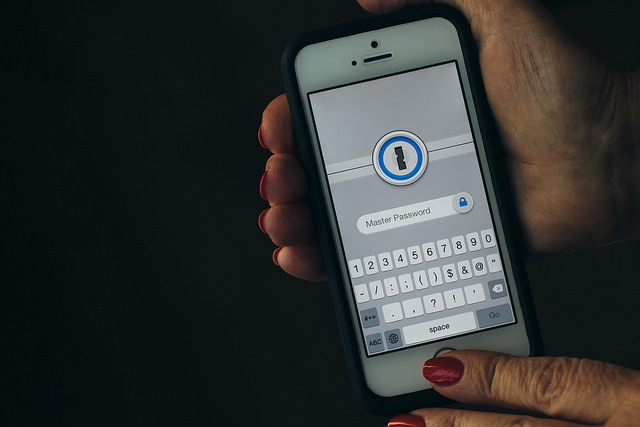
You can also opt for an access code that is longer and more complex (and harder to guess). Make use of the six digits that are offered – you’ll only need to remember it if the biometric system fails five times or if you haven’t used the device in two days, although it will help to make things harder for cybercriminals.

iphone-passoword-panda-security

2- Hide information from the screen

What’s the point in having an authentication system if you leave information available on the screen? It is possible to see WhatsApp messages, emails, and even speak with Siri, all without the need to unblock the screen. If you use the biometric access system then you won’t waste any extra time (in this case, seconds!) in access your notifications, so it’s best that you turn off these unsafe options.

3- Use a two-step verification process

The iPhone currently doesn’t allow for the use of biometric and traditional passwords at the same time, but you can set up your Internet accounts (iCloud, email, banking, etc.) to use a two-step verification process when accessing them.

By doing this, you will have a key and a token, which is basically a code that you will receive to whichever device via text message or your chosen security application, such as Google Authenticator.

iphone-wifi-panda-security

4- Disconnect what you don’t need

If you aren’t using Wi-Fi or Bluetooth then deactivate them. Having them turned on only means that your device will connect to public network which might not be safe, and thus leaves the door open for cybercriminals.

5- Be careful of your online moves

What you get up to online can easily be traced by cybercriminals, even without the need or passwords or the like. You need to make sure that your cookies, browsing history, and other information stored on your browser isn’t available to criminals.  Any browser, even Safari, allows you to surf securely and in your device’s settings you can access the history and erase it, just like passwords that you have saved.

6- Use safe networks

Once you have ensure that your browser is offering you the best security, you need to make sure that the network you choose also does the same. Take care when using public networks and, if you do need to use one, make sure to use a VPN.

7- Set limits for apps

Another area you should keep an eye on is the applications that you are downloading. Make sure they only come from official or trusted sources, and always check what permissions they are asking you for when installing them. If something seems unusual, then don’t allow it.

8- Update regularly

You should update your phone’s operating system every time that your iPhone notifies you. This is a basic security measure, as the updated systems eliminate the risk of detected vulnerabilities causing harm to your device.

9- Manage your accounts well

If you have more than one account synched on your iOS device, keep track of the information that you share between them. It would be even better if you avoided using the same password for both accounts.

10- Make security copies

Even if you have followed all of the previous steps, make sure you are prepared for the worst case scenario. The best way of doing so is to make security copies of all information store don the device. You can also activate the “Find My iPhone” on the iCloud, which will allow you to trace your phone in the event of theft.

The post 10 ways to keep your iPhone safe in 2016 appeared first on MediaCenter Panda Security.

Small and midsize businesses are targeted most often by hackers

“SMBs are not just targets of cybercrime, they are its principal target”

says a U.S. Security and Exchange Commission report from last fall. In fact, the majority of all targeted cyberattacks last year were directed at SMBs.

The New York Times, in its article No Business Too Small to Be Hacked, said that 60% of all online attacks in 2014 targeted small and mid-sized businesses. Of those attacked, more than half (60%) would go out of business within 6 months of a data breach. That’s a lot of broken dreams and heart ache because of a lack of security.

Avast for Business autoshop

Small and mid-sized businesses use Avast for Business to protect from cyberthreats.

Small businesses lack IT expertise and budget

SMBs make attractive targets because they often neglect their security or rely on older consumer security software for protection. Money is always an issue, and sometimes the budget doesn’t allow for an expensive security package.

Just recently, our free, cloud-managed security solution, Avast for Business, passed a milestone – more than 1 million endpoints protected in less than a year. From our relationship with IT admins in sectors as diverse as Education, Non-profits, Retail, IT consulting firms, and SMBs, we have learned that many organizations lack in-house expertise or resources to install costly and complex security solutions.

“All we wanted was a simple security solution that worked, and I knew we didn’t have to pay a fortune for it,” said Tyler Hisel, an IT technician in Ohio.  “Avast was cost saving and had lots of features that I was surprised came free,” he said, “I’ve got to hand it to you, it’s really an impressive product and it being free just makes it better.

How to protect your organization from cyberattacks

  • Install Avast for Business to protect your PCs, Macs, and servers from hackers and data breaches. Avast for Business is easy to deploy and monitor. Our customers tell us that even IT-challenged staff have no issues using our security solution.
  • Create strong passwords. This is an easy piece of advice that many small business people fail to take. We understand that using passwords which are 20 characters with a mix of capital letters, numbers, and symbols is challenging to manage. That’s why Avast has created Avast Passwords, a free password management system which creates strong, unique passwords for each of your accounts. It’s free in all Avast Antivirus programs, and synchronizes across your devices.
  • Train your employees. Many hacks originate from employees clicking on malicious links or websites. Explain the concept of social engineering to your employees, what the most recent methods of attacks are, and the latest malware threats. Follow this blog or Avast on Facebook or Twitter to stay informed.

Avast for Business is available for every business worldwide

Avast for Business is free for every organization worldwide. Visit Avast for Business to learn more and sign up.

Avast for Business: Zero to One Million endpoints protected in less than a year

Avast for Business takes off


Since the launch of Avast for Business, a free, cloud-managed security solution, in February 2015, organizations worldwide have deployed it to protect more than one million PCs, Macs, and servers from cyberattacks and data breaches.

Avast for Business is successful across diverse sectors

Avast for Business is extremely popular with Education, Non-profits, Retail, Healthcare, IT consulting firms, and small business because many organizations lack the IT resources to install costly and complex security solutions. Avast for Business is easily scalable and managed from anywhere. Additionally, Avast for Business starts at a price everyone can afford: Free, making it a natural fit for organizations worldwide.

Education IT admins value easy deployment, management, and the free cost

The sector that has embraced Avast for Business whole-heartedly is Education. IT administrators from universities, school districts, private and charter schools, libraries, and museums all tell us that ease of deployment and management is at the top of their security solution wish list. The fact that it’s also free makes it an easy decision.

Avast for Business is so easy to deploy and monitor, it’s made the administration of our network much smoother,” said Jothan Virgil, an IT Administrator at Alabama State University. The university has a large network managed by multiple IT professionals, with over 1,000 faculty and staff members and more than 5,600 students. Avast for Business now protects all of them from one console.

We had AVG before switching to Avast and we really needed to simplify our security solution,” said Tyler Hisel, an IT technician with the Chillicothe City School District in Ohio. He needed software with easy-to-use centralized management where he could monitor the district’s devices. “All we wanted was a simple security solution that worked, and I knew we didn’t have to pay a fortune for it,” he said, “Avast was cost saving and had lots of features that I was surprised came free,” said Tyler. “I’ve got to hand it to you, it’s really an impressive product and it being free just makes it better.

Non-profits value ease-of-use and the free cost

Monitoring their budget is a priority for non-profits. Avast for Business is free and compared to other antivirus solutions, the optional support costs are nominal. Michael Hensley, Information and Facilities Officer at NeighborImpact, a non-profit human-services agency in central Oregon switched from BitDefender because of the costs.

The savings on software were extremely helpful in budgeting for our hardware upgrade. The extra money allowed us to get hardware in a different category than we otherwise would have been able to afford,” he said.

Hensley’s staff is not tech-savvy, which contributed to significant security issues in the past.

“The fact that [Avast for Business] is cloud-managed is the primary feature that we needed. We have offices and classrooms distributed throughout the area. We are able to monitor all of our computers from the web-console which has shown consistent improvement.”

SMBs and MSPs value prevention, support, and the free cost

Many businesses have budgeted for security, so free software isn’t the priority, but it certainly doesn’t hurt. Scott Quinn from Montana-based Caritas Design, a small husband and wife web-design firm said, “Any savings are huge for us.”

Despite the huge savings, the primary need is simple managementfrom a solution designedto keep our clients and servers in a secure environment,” said Levent Silay, of Login Business Solutions, a Managed Service Provider in Istanbul, Turkey. The advantages of Avast’s cloud-managed business security according to Silay are “the quick and easy installation, the monitoring screen that helps in the visualization of all the computers on the network, the online management that can be utilized from anywhere, and the fact that it’s simple and there is no need for training.

When managing your own business or multiple clients, quick support is essential. Quinn says, “Their support has been amazing on the rare occasions I’ve needed to utilize them. I would, and will, recommend Avast for Business to everyone I encounter.”

Avast for Business is available for every business worldwide

Avast for Business is free for every organization worldwide. Visit Avast for Business to learn more and sign up.

European Court Rules That Work Can Read Your Private Emails & Messages

In a recent judgement the European Court of Human Rights has ruled that it is acceptable for an employer to monitor their network including any employee’s private online communications.

In this case the plaintiff, who claimed a breach of his human rights, had been communicating to his fiancé and brother – on a work computer, during working hours, using a messaging app setup for work purposes. Brought to light during dismissal proceedings these private communications were shown as breach of company policy which banned all members of staff from sending personal messages during working hours.

boss spying

The court in Strasbourg ruled against the sacked staff member saying that it was not “unreasonable that an employer would want to verify that employees were completing their professional tasks during working hours”; similar to recent US rulings that employers have a right to look at the contents of an employee’s computer.

Company Policy

While judgements made by the European Court of Human Rights are binding, in the UK the ruling could be limited to unauthorised use of work devices during working hours for private communication.

Check your employer’s workplace policy as some employers allow for “reasonable personal use” of company systems, such as outside work hours, while others may impose a complete ban.

Your employer must inform you if it intends to monitor emails or internet use, either in your employment contract or workplace communication policy.

If your company operates a Bring Your Own Device (BYOD) policy, it must provide full details on the monitoring of communications when an employee makes use of their own device for work purposes.

Employers should also consider how their policies effect staff motivation and productivity to ensure the best efficacy.

It’s a Private Conversation

While the employers’ ability to either monitor private conversations or impose a complete embargo during working hours may be unpopular – it is completely legal.

If you don’t want your employers reading your personal messages, then only communicate using your own device in your own time.

The post European Court Rules That Work Can Read Your Private Emails & Messages appeared first on MediaCenter Panda Security.

Afraid you might have a virus? Analyze and disinfect your PC for free with Panda Cloud Cleaner!

malware computer

It might be that you’re too trusting and haven’t installed an antivirus on your PC, or that your license has recently expired, or that you have an antivirus but it doesn’t guarantee maximum protection and… maybe you’ve been infected!

If you notice that the performance of your computer has changed, or that simple tasks that previously worked fine are now running incorrectly, it’s likely that some type of malware (virus, Trojan, work, etc.) has installed itself on your PC.

How do I know if my PC is infected?

At Panda Security we make user security our priority, even those who don’t use our antivirus. This is why we offer a free tool that can analyze your PC, determine if it has been infected, and eliminate any type of malware that may be lurking on it.

You can download Panda Cloud Cleaner for free here.

disinfect pc

Why should I use Panda Cloud Cleaner on my PC?

  • It’s a tool that has been specifically designed to eliminate spyware, malware, and all types of viruses. It won’t miss a thing!
  • It’s lightweight and easy-to-use. It will only take a few minutes to download, install and analyze your computer.
  • It updates in real-time thanks to Panda Security’s Collective Intelligence. It learns from each analysis!
  • It continues working in offline mode (without Internet connection), no matter how aggressive the malware may be. You can leave it installed so that it’s there when you need it the most. 

Although it’s a very useful tool, you should keep in mind that Panda Cloud Cleaner isn’t an antivirus. It doesn’t protect you against new attacks, but rather eliminates the malware that is already on your PC. This is why we recommend that you use it in conjunction with an advanced security solution.

The post Afraid you might have a virus? Analyze and disinfect your PC for free with Panda Cloud Cleaner! appeared first on MediaCenter Panda Security.

WhatsApp to allow users to verify messages with a QR code

WhatsApp is set to unveil a new measure that will allow its millions of users to verify the validity of messages with a new encryption system that incorporates the scanning of a QR code.

According to XatakaAndroid, the developers of WhatsApp have leaked different sentences in various languages on the application’s collaborative translation portal, which many have taken as clues about new features that are set to be introduced.

whatsapp qr

This time, “the three leaked sentences mention a point-to-point encryption on WhatsApp, which protects the privacy of messages; the need to scan a QR code to verify that the chat is correctly encrypted, and the how to activate the tool, which will be from the settings menu”.

This means that each use can manually check if their conversations are secure, not because WhatsApp is ramping up its security, but rather that it can help each user to ensure that their privacy isn’t at risk. The only drawback to this feature is that both the sender and receiver must be in the same physical space for it to work.

To carry out this action, user A has to scan a QR code on the device of user B, and vice versa, which could prove to be difficult as if both people are in the same space then it’s unlikely they’ll have a chat over WhatsApp as opposed to face-to-face.

We’re still waiting for the application to confirm this new feature, so we’ll keep you updated when we know!

The post WhatsApp to allow users to verify messages with a QR code appeared first on MediaCenter Panda Security.

Everything you need to know to keep your Android safe in 2016

android

When the start of a New Year rolls around it is common for us to make new promises and resolutions to better ourselves during the coming months, be it hitting the gym more frequently, quitting smoking, or just keeping in touch with friends and family. Unfortunately, despite our best efforts, over time we slowly lose focus and put those goals off until next time.

However, there are some promises that we should keep, and one of them is to be more cautious when it comes to the security of our mobile devices. Seeing as we now use smartphones daily to complete a myriad of tasks, it’s essential to follow some simple steps to keep our beloved Android devices – the most popular operating system worldwide – free from danger.

Unlocking code

By default, your Android device can unlock itself by having a finger placed over the screen. In the event of theft or loss, make sure you have a better barrier of protection to stop others gaining access to the device. You can ensure this by simply setting a PIN or password for your device, once you make sure it’s not too easy to guess. If it seems too much of a hassle to have to introduce a password whenever you want to access your phone, then simply activate Smart Lock, which allows you to leave your Android device unlocked when at work or at home.

Prepare yourself for the worst

If the fateful day in which you lose your phone arrives, you’ll be glad to have been prepared by having Android Device Manager installed. It allows you to know where your phone is, and if it ends up in the hands of someone else, you can remotely block it. You can also remotely delete all information on the device, but before doing that make sure that you have…

Security copies

These are essential if you want to recover all of the information and applications that you had installed in the event of loss or theft, but also if the device breaks or gets infected by malware. Photos, videos, songs, and other files can be backed up to your Google account. For anything else, all you need is…

A good antivirus

It’s the number one security measure and the best barrier that you can put between your mobile and cybercriminals. A complete security solution with quick updates can protect your smartphone from recent and unknown threats. What’s more, as we indicated in the previous point, it will include features that allow you to make security copies and other basic functions that will make your device secure.

good antivirus

Apps from reliable sources

Be sure to only download apps from official stores such as Google Play, Amazon, and the device manufacturer’s website (Samsung, Sony, Motorola, etc.) and keep the option for “unknown origin” deactivated at all times, unless you want to install an app that comes from a secure source. If you do so, remember to deactivate it immediately.

Application verification

Even if you don’t install apps from unknown sources on your smartphone, it’s best to keep the Android application verification activated, which monitors the activity of your device to ensure that any anomaly is detected rapidly. If it comes across anything dangerous, it will recommend that you remove the application immediately.

Keep an eye on permissions

Whenever you install a new app on your device, a list of permissions will appear: access to camera, your list of contacts, Internet, etc. Unfortunately, we usually accept these without taking a good look at what it’s asking us. For example, does your torch really need to consult your GPS to know your location? If something seems unusual, then it’s best to be cautious. Luckily, from Android Marshmallow (6.0) on, a new permissions management system will make it possible to allow or deny each request on a case by case basis.

android smartphone

Encryption

All information on certain Android devices, such as Nexus 6 and 9, is encrypted by default. As for others, from the new version of the Jelly Bean (4.1) operating system on, you can activate it in the security options, making your device that bit more secure.

Two-step verification process

Your Google account is the epicenter of activity on your Android device, therefore keeping it safe is essential if you want to keep your mobile device secure, too. If you haven’t already done so, activate the double verification mechanism which will ask for a code every time that someone tries to access your profile from another device.

Be wary of public Wi-Fi networks

All it takes is €70 and 20 minutes for an attacker to steal your information via an insecure public network. Be careful when connecting to Wi-Fi in cafés, restaurants, libraries, or airports, and never use them for carrying out tasks involving your bank. Also, ensure that you can use a VPN to surf them.

The post Everything you need to know to keep your Android safe in 2016 appeared first on MediaCenter Panda Security.