Tag Archives: featured1

Nonprofit organization upgrades hardware with savings from Avast

NeighborImpact logo

NeighborImpact uses free Avast for Business to manage computers in multiple locations.

Nonprofit organizations operate on extremely tight budgets. Michael Hensley, Information and Facilities Officer at NeighborImpact doesn’t let that stand in the way of his organization’s mission. The Avast team recently spoke with Hensley about his work and how Avast for Business has helped him.

“We are a non-profit human-services agency serving 3 counties in central Oregon.” Hensley said, “Our staff is not very tech-savvy and we’ve had significant issues with that. We needed something simpler.”

Hensley recently switched NeighborImpact to Avast for Business security software and explained what made him choose the new cloud-based solution.

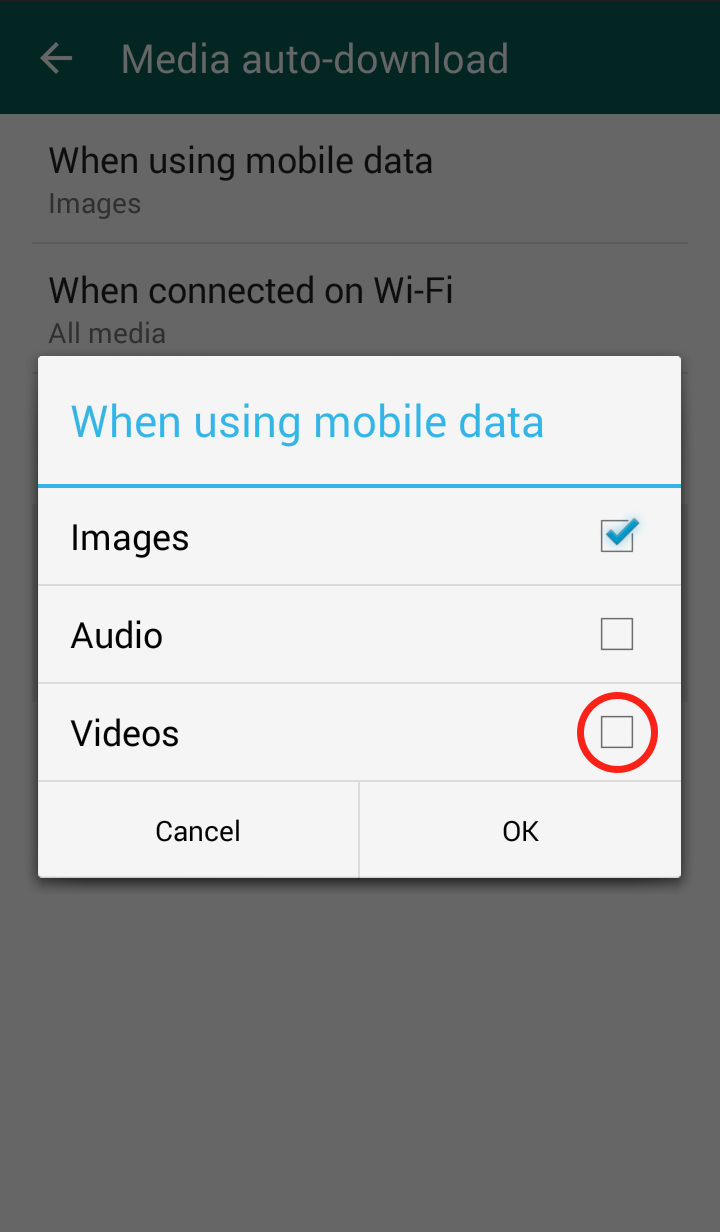
“The fact that it’s cloud-based is the primary feature that we needed. We have offices and classrooms distributed throughout the area. We are able to monitor all of our computers from the web-console which has shown consistent improvement.” Hensley went on to say that “viewing all of our devices from one place is really convenient.”

Hensley said that his nonprofit used to use Bitdefender but switched because it was too expensive.

“I was somewhat familiar with Avast. I knew it was a reputable company that had been around for a while. When I discovered Avast for Business and weighed the options it was the natural choice. It’s simple, cloud-based, and free.”

NeighborImpact was able to save enough of their precious budget by switching to Avast for Business to make a big impact on NeighborImpact’s server upgrade.

“The savings on software were extremely helpful in budgeting for our hardware upgrade. The extra money allowed us to get hardware in a different category than we otherwise would have been able to afford.”


Avast for Business can save your non-profit, company, or school money and time. Sign up on the Avast website.

Free Avast Cleanup app cleans and optimizes Android phones and tablets

Avast Cleanup is a free app for Android

Avast Cleanup is a free app for Android

After a while, your phones and tablets accumulate obsolete files and superfluous data, system caches, gallery thumbnails, and programs. This ‘junk’ slows down your device and eats up precious storage space.

Avast Cleanup identifies and cleans unwanted files from your Android device so it will run like a champ again.

Our new free app, Avast Cleanup & Boost for Android, cleans away all the unwanted files and programs so that your device is running smoothly and quickly with storage space to spare. But don’t take our word for it.

Longtime Avast customer, Thomas M. from North Lanarkshire, Scotland wrote us to tell how pleased he is with Cleanup’s performance. Thomas has used Avast for years, and uses Avast Free Antivirus to protect his home computers.

Thomas M.

Thomas M.

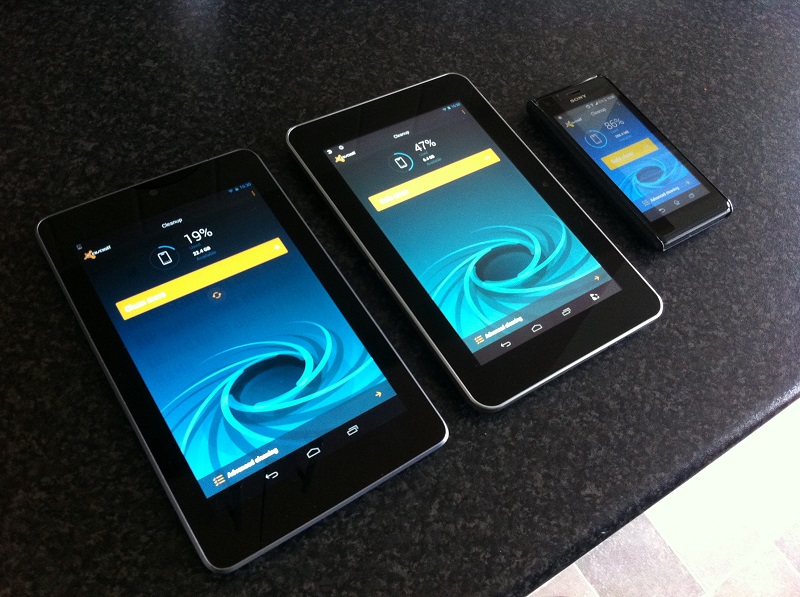
“Having installed Avast Free Antivirus 2015 on two of my PCs and a laptop, which for me is the best yet, I came across the new Avast Cleanup app which I installed on my phone and both my tablets.

I had been having a few performance issues with at least one of my tablets and my phone. After installation and running the application, both run great. The app freed up a nice amount of space and discarded lots of clutter left behind by old apps, etc.

The interface, as well as being intuitive, looks great too. I especially like the spiral animation whilst cleaning is in action. So slick!

I also like the option to store/back-up deleted items to cloud storage (if required), in this case Dropbox being the choice offered.

Nice work, Avast, once again on offering another quality fully functional free product.”

It’s our pleasure, Thomas. Thanks for taking the time to write to us.

Avast Cleanup gets rid of junk files on Thomas M.'s tablets and phone.

Avast Cleanup gets rid of junk files on Thomas M.’s tablets and phone.

How to run a Cleanup scan

Cleanup can disable or remove certain files and programs to optimize your system. Follow these steps and get started now:

  • Install Avast Cleanup & Boost for Android for free from the Google Play store or from the Avast Cleanup website when accessed with your mobile device
  • When the application is running, you can run the basic cleaning by tapping the Safe clean button. The configuration window will appear automatically the first time you run the application.
  • Select Start cleaning to start this process right away or select Configure. The Configure option redirects you to Settings where you can choose the type of files to be deleted.

Learn more about how to use Avast Cleanup on the FAQ.


Follow Avast on FacebookTwitterYouTube, and Google+ where we keep you updated on cybersecurity news every day.

A problem for Human Resources – some CVs can hold your computer at ransom

mouse

Just like sending greeting cards by post, physically presenting your CV for a prospective job offer is becoming extinct. The digital world in which we live has rendered the act of traditional post as unnecessary – now it is easy, not just for the candidates but also the HR department, to receive CVs by electronic or digital means.

However, this also presents its own risks for your IT security. Cybercriminals are prepared to take advantage of the fact that companies receive hundreds of CVs and like to attach a small extra to theirs in the form of malware.

A group of security experts uncovered a network of cybercriminals that sent malicious programs disguised as curriculums which installed itself on the victim’s computer upon clicking to open the document.

This type of attack is known as ransomware, which is a type of malware which can behave in two ways: it can completely block the computer or impede access to files by encoding them and making them inaccessible. Usually, the attackers demand the victim to pay a certain amount of money to receive a code to unblock the system, which is why they normally target companies as the chances of getting a big payment are higher.


In the chain of emails identified by the experts, the address corresponds to a Yahoo account and the attached document is compressed like a ZIP file. The emails also contain a short text with a greeting from the fake candidate in which they give their name (but never their surname) and notification of its delivery. Another characteristic of the email is the misspelling of words and grammatical errors.

CV

The experts therefore advise that once the compressed file is opened, the malicious file will be seen in .html format, which should serve as a warning as these type of texts are usually sent in PDF or Word documents (although it is also advised against opening them in this format if you aren’t sure of their origin).

Once the receiver clicks to open the document, their search engine will open the address that appears in the code (just like clicking on a link). The fake link redirects the program to a page on the infected server where a sequence of links is played out until an .scr file is downloaded, an executable file of Windows that contains the ransomware.

The reason why these criminals have created these cyber-labyrinths lies in the security systems themselves. The antivirus solutions and anti-spam filters have made them design a method of attack that takes place over a series of stages so as to evade the system’s defenses. This should also serve as a warning – if your computer goes through different steps to open a simple CV, be suspicious.

In the event of this or any other type of ransomware infecting your computer, the first thing you should do is turn it off and disconnect it from the internet so that it can’t spread to the rest of your devices that share that connection. The malicious program might be eliminated but it’s likely that you won’t be able to get your information back, which is why it is highly recommended that you make copies of all of your confidential and important information. It’s best to save it onto a different device and, obviously, do it before suffering an attack.

As regards the ransom that the cybercriminals ask for, don’t think that this will be solved just by handing over the cash – these criminals aren’t known for sticking to their word and nothing can guarantee that they’ll give you the correct code. Anyway, even if they do, what’s to say they won’t try and infect your computer again in the future.

The post A problem for Human Resources – some CVs can hold your computer at ransom appeared first on MediaCenter Panda Security.

Mr. Robot Review: br4ve-trave1er.asf

This week’s episode of Mr. Robot was an exciting one for us here at Avast – our product made an appearance on the show! In addition to the exploit Avast blocked, there were many other interesting hacks in this week’s episode, which I discussed with Avast security experts, Filip Chytry and Jiri Sejtko.
Mr_Robot_02

Minute 7:00: Elliot is in his apartment with Isaac and DJ. Something about Vera’s brother, Isaac, bugs Elliot and what does Elliot do when he is bugged by someone? He hacks them!

Stefanie: We see Elliot once again turn to the Linux distribution, Kali, to hack Isaac’s cell phone. He seems to do this within a matter of seconds, how easy is this to do?  Later on, when Elliot visits Vera in prison, we learn what Elliot plans to auto-send information from Isaac’s phone to himself. This seems really intrusive and couldn’t Isaac just get a new phone?

Filip Chytry: This is a more advanced hack and unless Elliot had everything prepped before they entered his apartment, this would taken a lot more time to execute (but this is a TV show, so things sometimes happen faster on TV then they do IRL). The Linux distribution Kali, a popular tool for penetration testing, can be used to plant code on a device. But, Isaac’s phone would have had to be connected to either Elliot’s Wi-Fi network or Elliot could have set up a fake Wi-Fi hotspot using a popular network name like “Starbucks Wi-Fi” or “ATT Wi-Fi”, a Wi-Fi network Isaac’s phone had connected to before and would connect to automatically. Elliot would then use Kali to exploit a vulnerability in Isaac’s phone and plant code to send information from the phone to Elliot’s chosen destination. Since Elliot told Vera about this, Vera could have told Isaac and Isaac could have gotten a new phone, but Isaac was not given a happy end in this episode…

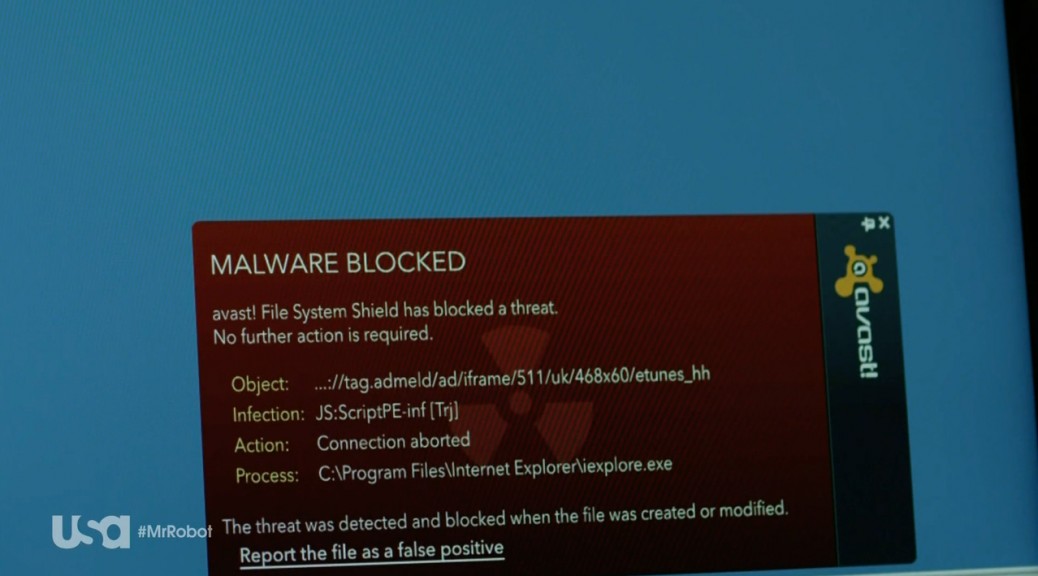
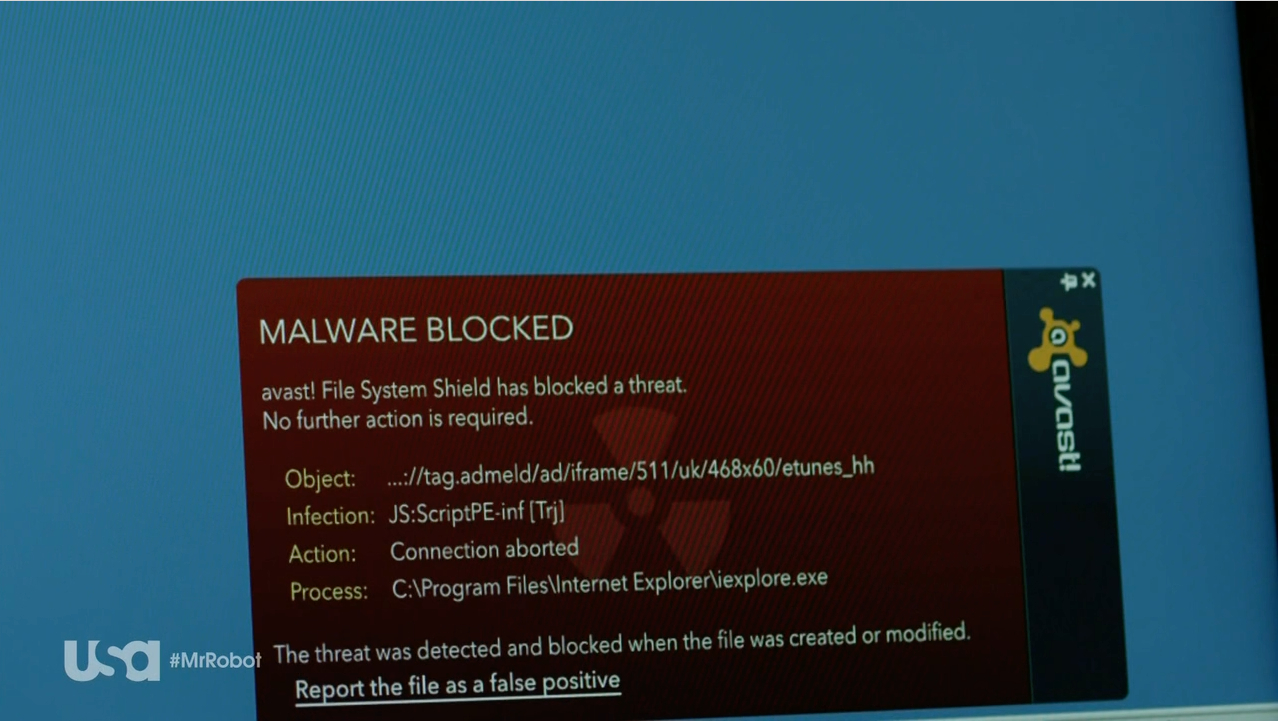
Minute 11:30: Elliott tries to find a way to hack into the prison’s network. Darlene helps him by uploading an exploit onto USB sticks. The USB sticks are branded with E-Corp’s logo, to look trustworthy. She drops the USB sticks on the prison’s parking lot. A police officer takes one of the sticks and inserts it into his work PC. First, a window appears saying “get your free $100 eTunes gift card”, and then a window asking him what his favorite music genre is appears. He clicks through several questions – and then BAM! Avast detects the exploit!

Mr_Robot_03

Stefanie: Watching this scene, we couldn’t be prouder. Avast detects an exploit in Mr. Robot, this is so exciting! Taking a closer look at Avast’s warning pop-up, we can see the exploit was a Trojan: JS:ScriptPE-inf (Trj) Is this actually a Trojan that exists or is this made up?

Jiri: This is a real detection. The detection is triggered by an HTML or Javascript file that contains a URL that Avast blocks, as it includes a malicious file. It is, however, hard to say what the URL contained. I would expect it to be some kind of exploit that tries to exploit a vulnerability on the officer’s machine, in order to execute code that would give Elliot access to the prison network.

Minute 31:38: Elliot runs an undetectable activated signal sniffer that will locate any wireless signal in sight on his phone while it is at the prison’s security desk. When Elliot exits the prison, he checks the data retrieved from the sniffer and is disappointed to see that the prison’s network uses WPA2 encryption.

Stefanie: Elliot mentions that WPA2 is “borderline unhackable” and then he mentions a handshake? Is WPA2 encryption really that secure and what handshake is he referring to?

Filip: WPA stands for Wi-Fi Protected Access and WPA2 is WPA’s successor, which uses AES (Advanced Encryption Standard). WPA is the best encryption currently available for Wi-Fi, so when Elliot says it is border line unhackable, he means it! There is one way WPA2 can be hacked, but, as Elliot mentions, it takes a long time to do. When a client connects to an access point, a four-way handshake happens, encrypting messages to confirm that both parties know the so called PSK (pre-shared key) and PMK (pairwise master key), without revealing them. In order to hack a WPA2 protected network, you have to capture and decrypt the authentication handshake. Capturing the handshake can be easy but the decryption can be difficult, depending on the Wi-Fi network’s password complexity. 

After Elliot gives up on the idea of hacking into the prison’s Wi-Fi, a police car drives by and automatically connects to his smartphone. He says “The mobile feed on the cameras… I don’t need to hack WPA when there is dedicated 4G”. Later, in minute 35:40, we see Elliot hacking a police patrol car. His plan is to connect to the “patrol car’s bluetooth to run the exploit on the PLC”. He is successful and gives the order “at 9:49, all the cell doors should open”.

Stefanie: What’s a PLC?

Jiri: PLC stands for “programmable logic controller”, it’s a computer usually used in industrial environments. The most famous PLC attack vector is probably Stuxnet, which was designed to monitor Siemens machines in Iranian nuclear facilities and manipulate the centrifuge’s rotor speed.

Stefanie: In the case of Mr. Robot, the PLC is used in the prison to control the locks of the cell doors.

Jiri: Yes, PLC-based systems are heavily used in prisons, there are prisons in the U.S., where PLCs control over 900 doors. Security researchers have mentioned concerns about prison PLC systems’ vulnerabilities already years ago and Sam Esmail, the producer and writer of Mr. Robot, cleverly ties these concerns into the story. Potential exploits are also presented in the open source Metasploit Framework, which is a tool for developing and executing exploit code – so basically, every script kiddie can (ab)use it.

Stefanie: Sounds scary. How could a PLC be protected from an exploit?

Jiri: System administrators should make sure that the PLC firmware and controlling software is patched and always updated. They should also use proper network segmentation to prevent access to the PLC network from other local networks – air gaps – like the one in Mr. Robot, where the PLC could be accessed via patrol car’s laptop. Also, physical media like USB flash disks and mobile phones should be restricted from accessing the PLC.

Stefanie: Sounds pretty simple in a way… Has anyone ever broken out of prison by hacking into the prison’s system?

Filip: There are many ways prisoners can use technology to “hack” themselves out of prison. Earlier this year, a criminal imprisoned in a jail near London, managed to escape the prison using social engineering. He set up a fake web domain that resembled the domain of the court responsible for him. He then used this domain in an email he sent to the prison’s custody inbox, including the message that he should be released. His escape was noticed only three days later, when solicitors were supposed to interview him.

The (cyber)criminal was caught again some time later, but this story shows that a jailbreak via “hack” isn’t that unrealistic in today’s world.

Mr. Robot airs on Wednesdays at 9/10 central on USA

via: USA Networks Mr. Robot airs on Wednesdays at 9/10 central on USA

Thank you Jiri and Filip for taking the time to discuss this week’s Mr. Robot hacks!

What did hack did you find most interesting from the episode? Let us know in the comments below :)


More than 50% of malware for Android is aimed at stealing from you. Keep an eye on your pocket!

android

With the barrage of news about Hacking Team, the massive cyber espionage by governments, and the US intelligence raids, it might seem that cybercriminals are taking a different route compared to your average criminal. However, don’t let this fool you as they are all after the same thing which, as the famous song goes, is “money, money, money”.

Wherever there’s money, there are sure to be malware creators. So after the boom in internet shopping people are beginning to reach for their pockets to make payments once again; not with their wallets though, but rather their cellphones.

According to a recent study carried out by IAB, 7 out of 10 Spaniards (more than 19 million internet users) regularly buy online. The percentage of those who make purchases from their cellphones or tablets is steadily increasing and currently accounts for 15% of all purchases. In other countries, such as the United States, the percentage of purchases from mobile devices is even greater.

These online purchases generally require the use of sensitive bank information as you are paying with a card or performing a transfer, but this doesn’t seem to bother consumers. According to a report by ING, nearly half of Europeans now use their smartphone or tablet to carry out bank transactions.

mobile dollars

Slowly but surely tablets and smartphones are replacing the traditional computer for these types of tasks and, as a result, they have become a goldmine for cybercriminals. Financial malware, designed to gain access to your account, is thriving in the darkest corners of the internet.

More than half of all malware designed for Android has been created with stealing money in mind. This was confirmed by a recent study, which named Trojan and ransomware (which hijacks your terminal and requires a payment to unblock it) as the most popular tools deployed by cybercriminals.

It’s interesting to note that it is Android, and not iOS, which is the main target of attack. This is despite iOS taking a far larger profit share of the market. This is because, for the cybercriminals, it is all a matter of volume.

On a global level, Android is a far more popular system and accounts for 78% of the smartphone systems in operation, according to details from the IDC. Meanwhile, iOS only accounts for market share of 18.3%.

The more potential victims there are, the higher the yield for the cybercriminals, as we have seen with the infamous Sypeng and Faketoken cases, which wreaked havoc across the globe. So, if you have already been targeted by them you’re in a tricky situation, as prevention is better than the cure in this case.

An antivirus for Android and following some advice when completing transactions on your mobile device (such as avoiding public WiFi connections and avoiding applications that aren’t on Google Play) will save you a lot of hassle in the future.

The post More than 50% of malware for Android is aimed at stealing from you. Keep an eye on your pocket! appeared first on MediaCenter Panda Security.

Big Brother(s) Could be Watching You Thanks to Stagefright  

Earlier this week, security researchers unveiled a vulnerability that is believed to be the worst Android vulnerability yet discovered. The “Stagefright” bug exposes nearly 1 billion Android devices to malware. The vulnerability was found in “Stagefright”, an Android media library. Hackers can gain access to a device by exploiting the vulnerability and can then access contacts and other data, including photos and videos, and can access the device’s microphone and camera, and thus spy on you by recording sound and taking photos.

All devices running Android versions Froyo 2.2 to Lollipop 5.1.1 are affected, which are used by approximately 95% of all Android devices.

The scary part is that hackers only need your phone number to infect you. The malware is delivered via a multimedia message sent to any messenger app that can process MPEG4 video format – like an Android device’s native messaging app, Google Hangouts and WhatsApp. As these Android messaging apps auto-retrieve videos or audio content, the malicious code is executed without the user even doing anything – the vulnerability does not require the victim to open the message or to click on a link. This is unique, as mobile malware usually requires some action to be taken to infect the device. The malware could also be spread via link, which could be sent via email or shared on social networks, for example. This would, however, require user interaction, as the video would not load without the user opening  a link. This exploit is extremely dangerous, because if abused via MMS, victims are not required to take any action and there are neither apparent nor visible effects. The attacker can execute the code and remove any signs that the device has been compromised, before victims are even aware that their device has been compromised.

A cybercriminal’s and dictator’s dream

Cybercriminals can take advantage of the vulnerability to collectively spy on millions of people – and even execute further malicious code. Repressive governments could abuse the bug to spy on their own people and enemies. The vulnerability, however, could also be used for non-political spying. Hackers can easily spy on people they know, like their spouse or neighbour – all they need to know is their victim’s phone number. Hackers can also steal personal information and use it to blackmail millions of people, or use the data for identity theft. The possible consequences of this vulnerability need to be taken seriously.

Fixes are urgently needed

Now comprehensive fixes need to be provided by the phone’s manufacturers in an over-the-air (OTA) firmware update for Android versions 2.2 and up. Unfortunately, updates for Android devices have historically taken a long time to reach users. Hopefully, manufacturers will respond quicker in this case. On a positive note, Google has already responded. HTC told Time “Google informed HTC of the issue and provided the necessary patches, which HTC began rolling into projects in early July. All projects going forward contain the required fix.”

In the meantime, what can you do to protect yourself?

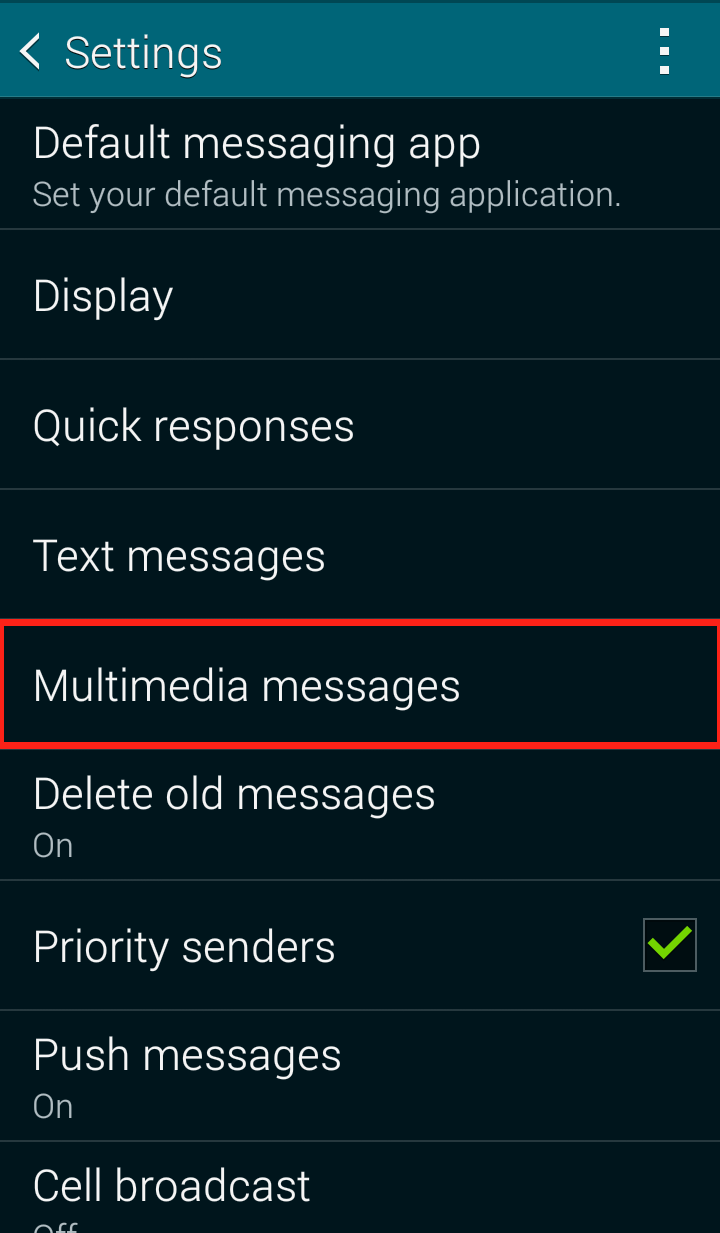
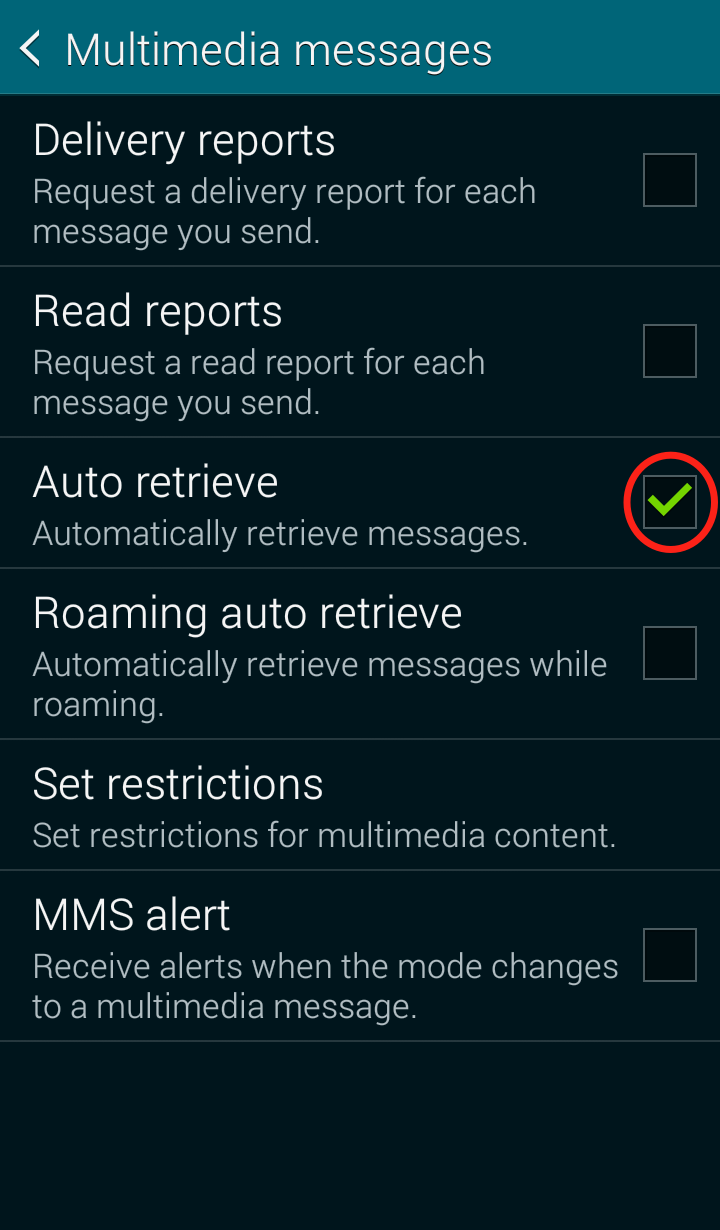
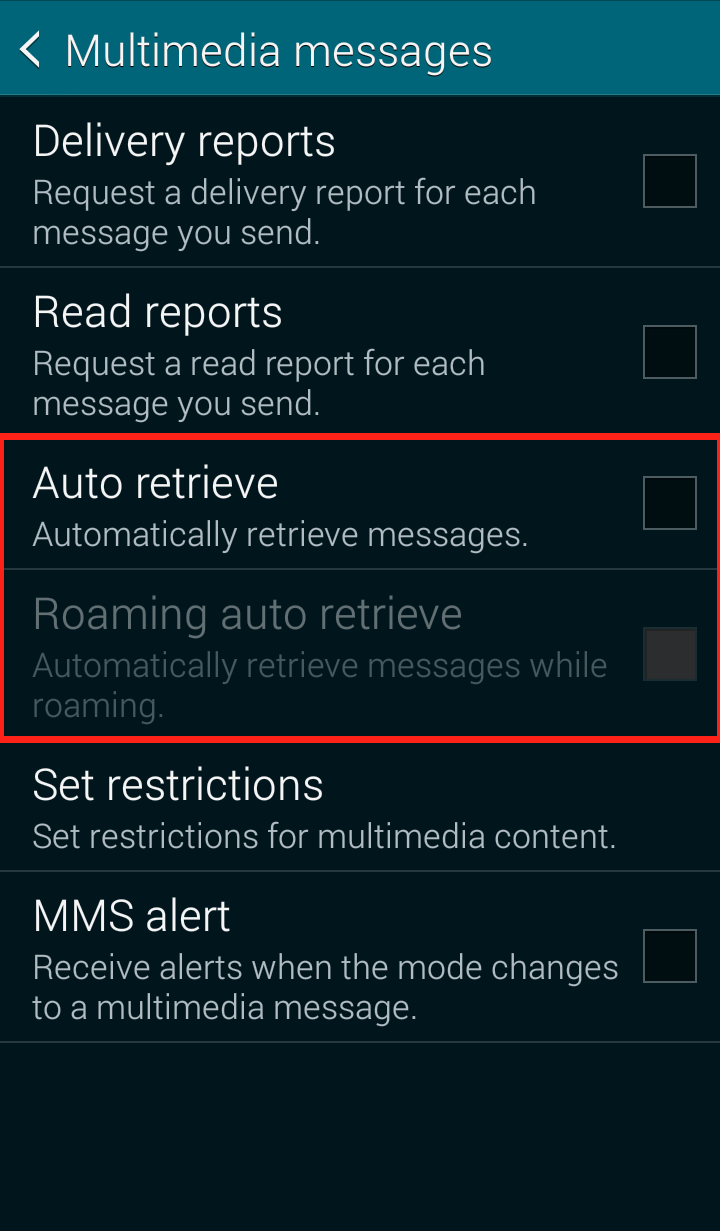
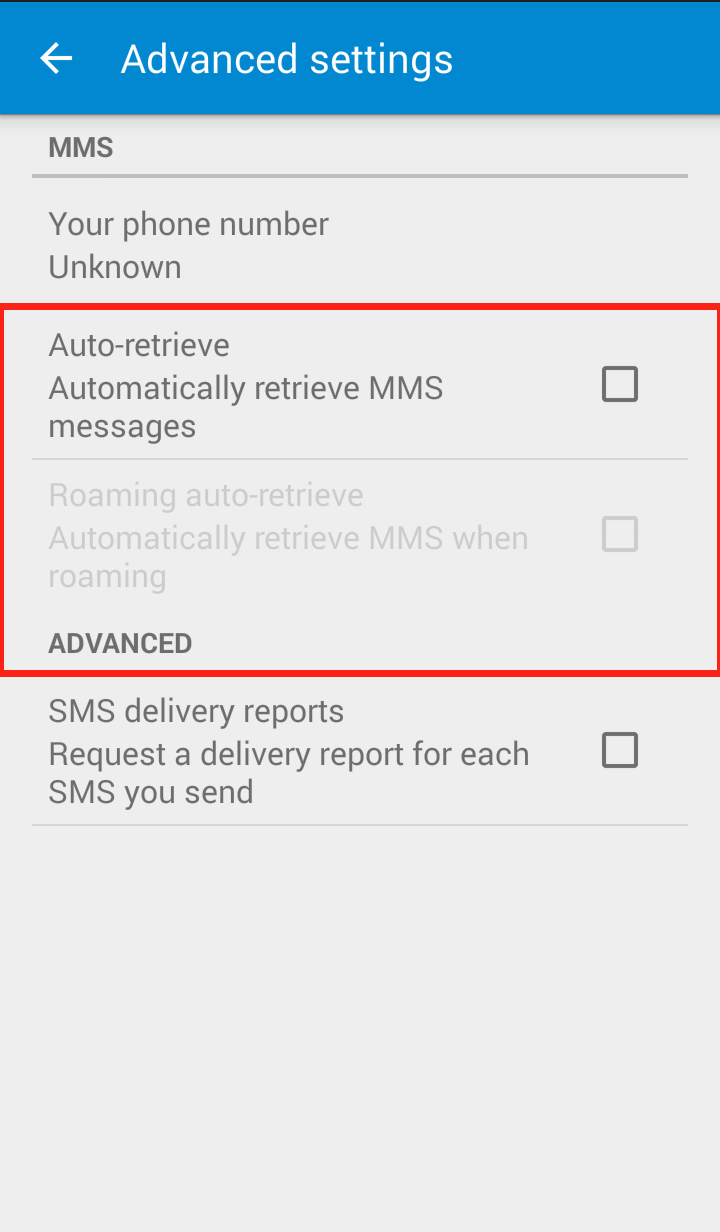
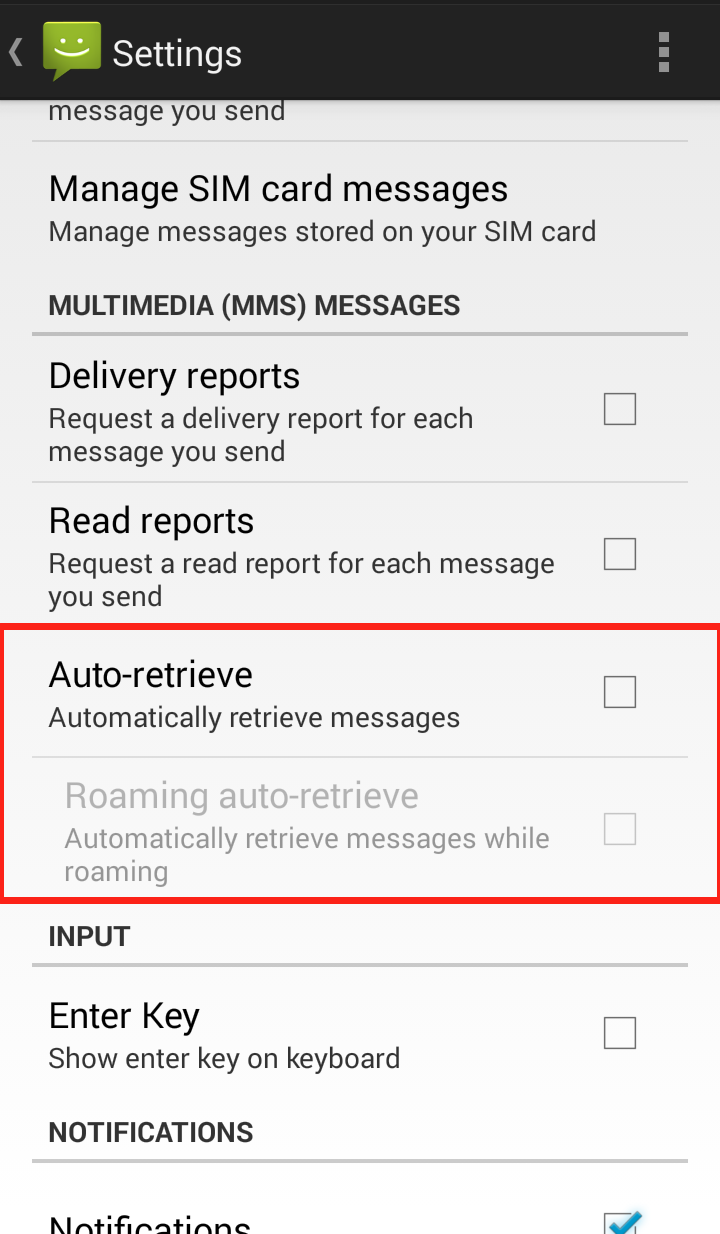
We recommend users disable “auto retrieve MMS” within their default messaging app’s settings, as a precautionary measure for the moment. We have put together step-by-step instructions on how you can disable auto retrieve for MMS in various Android messaging apps:

Messages App:

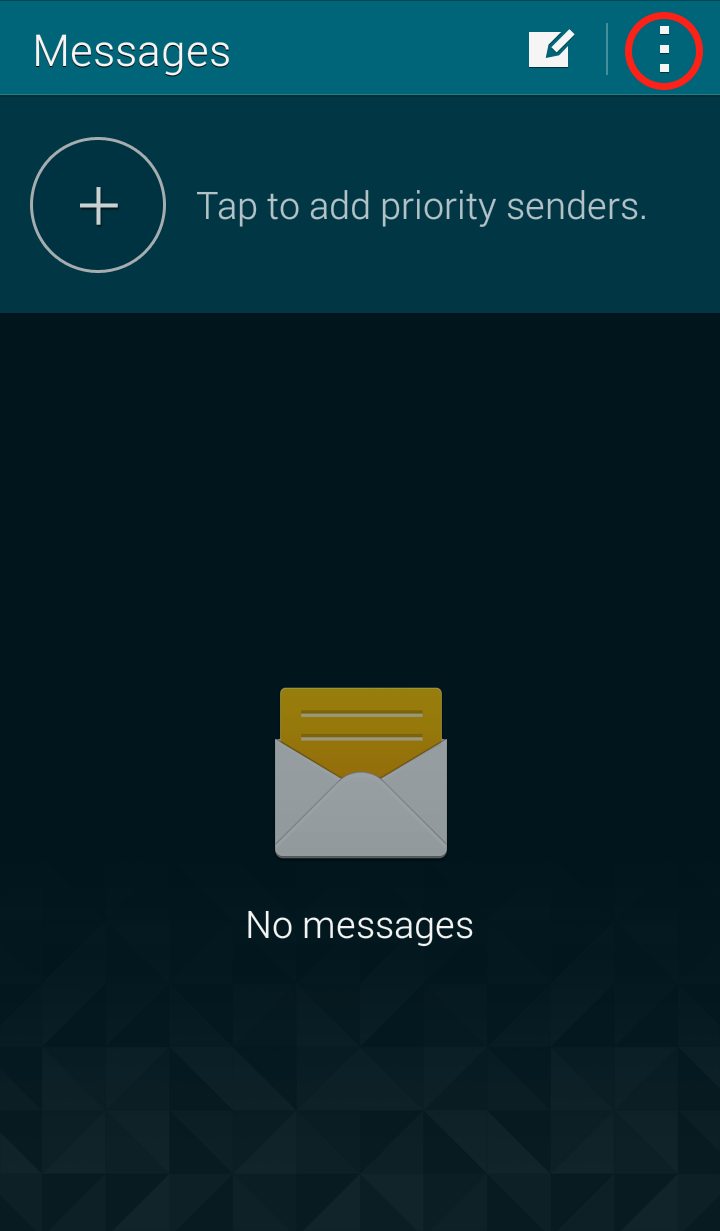
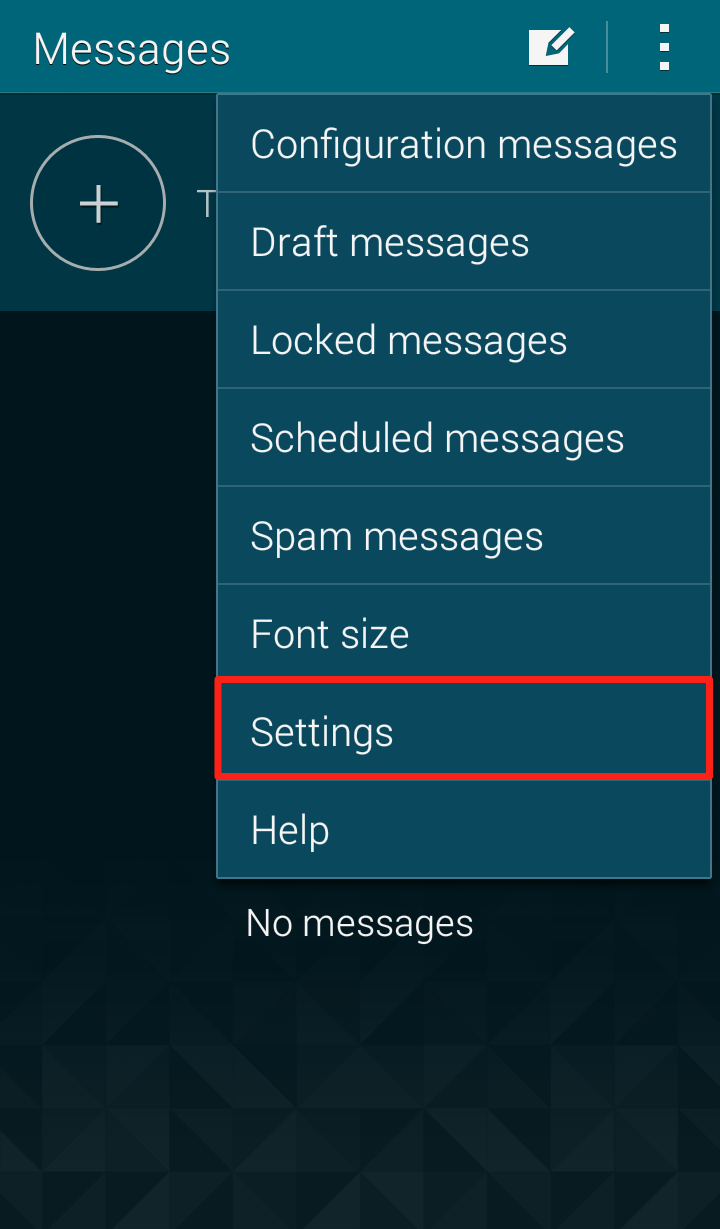
Step 1: Open the Messages app and click on the three dots in the upper right hand corner Messages app Step 2: Click on “Settings” in the dropdown menu Messages Settings Step 3: Click on “Multimedia messages” Messages settings Step 4: Uncheck “Auto retrieve” Messages settings Your Messages “Multimedia messages” settings should now look like this:

Messages settings Google Hangout

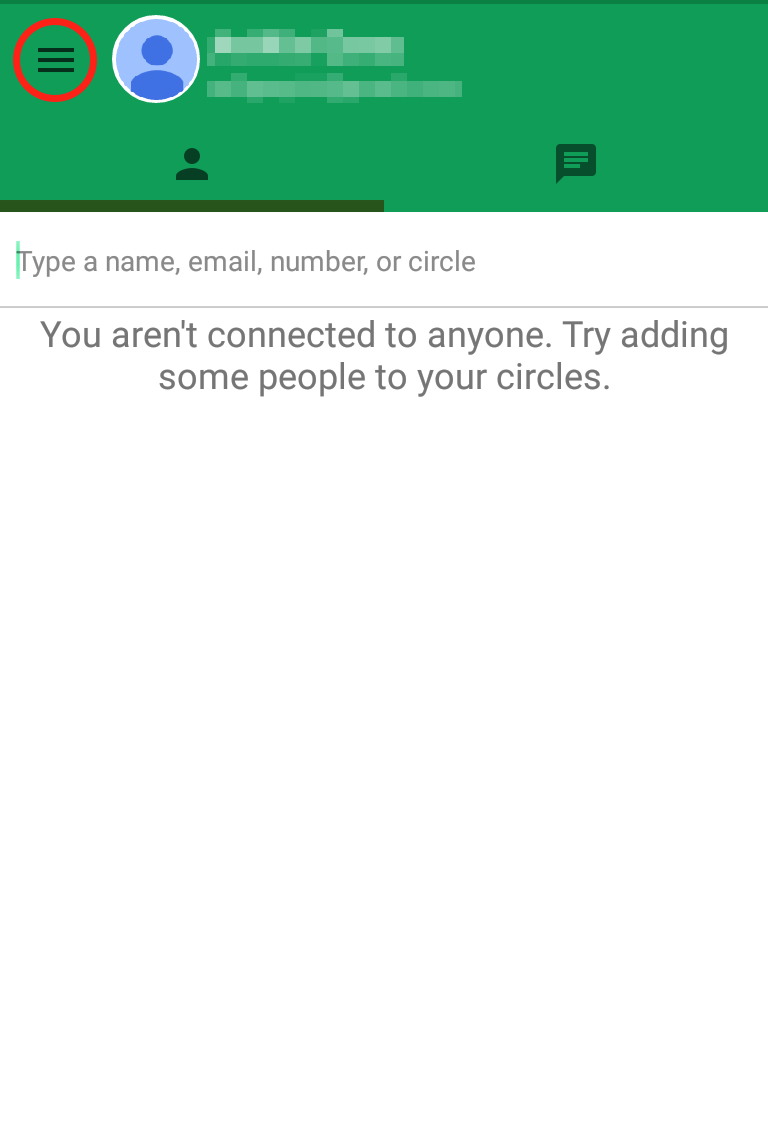
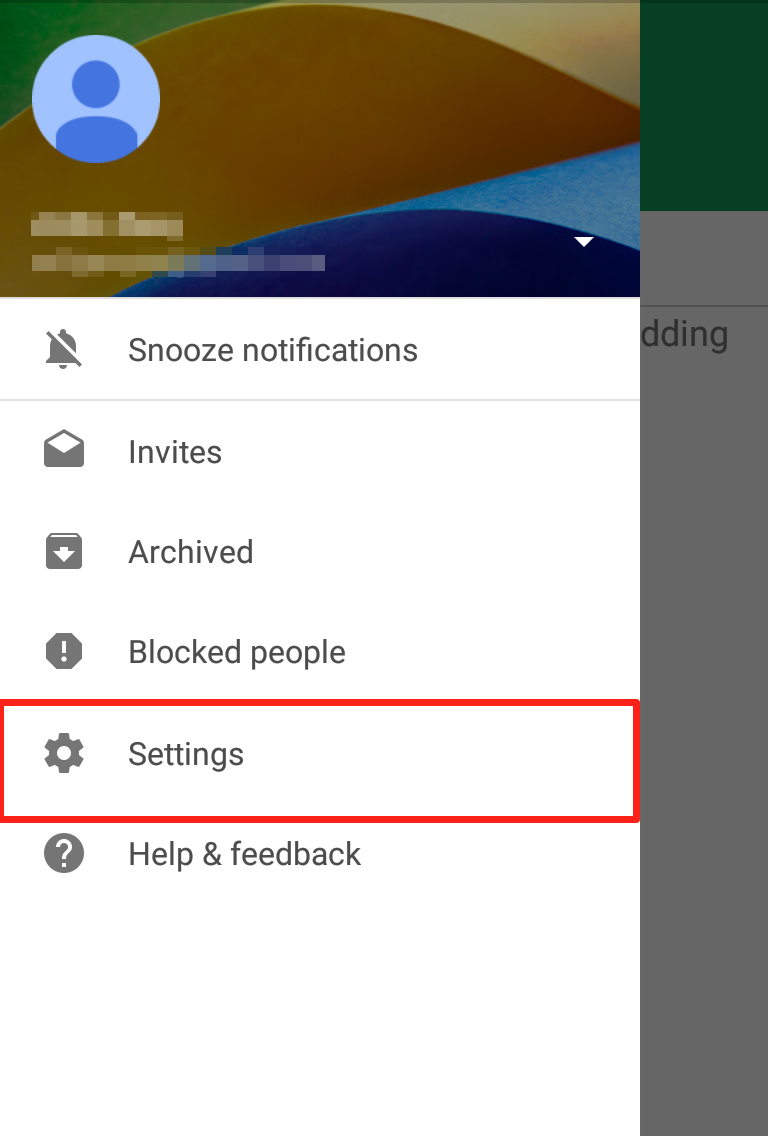
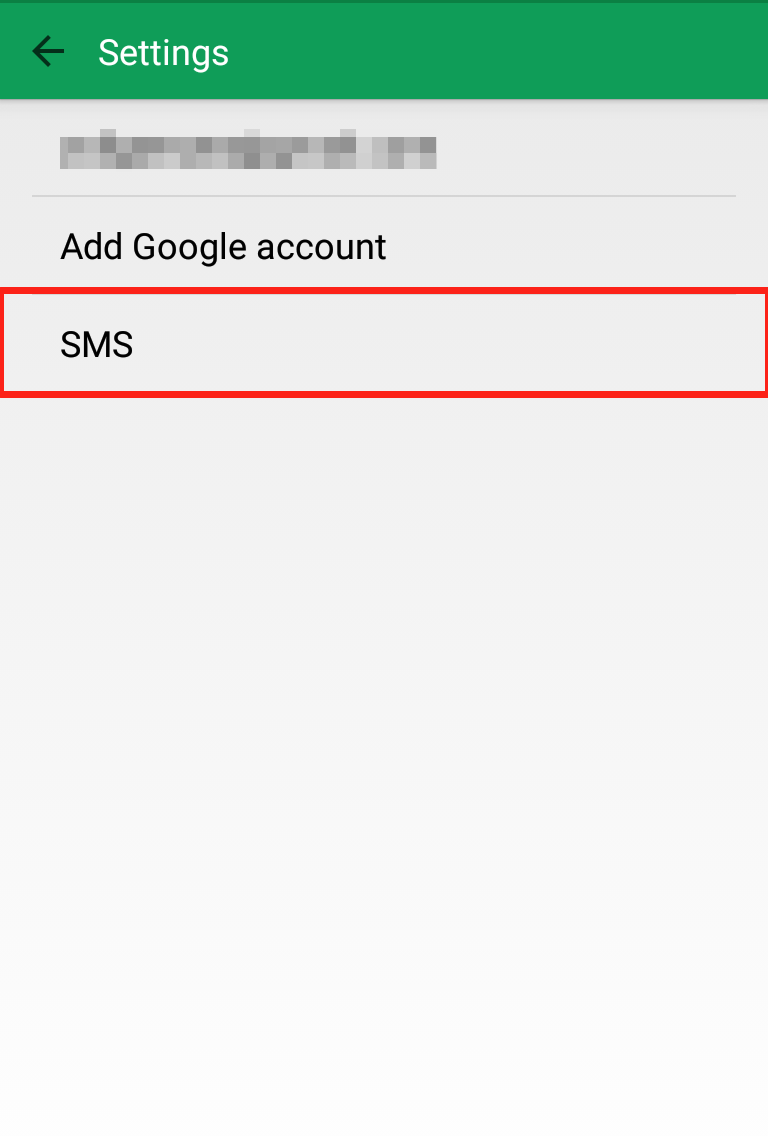
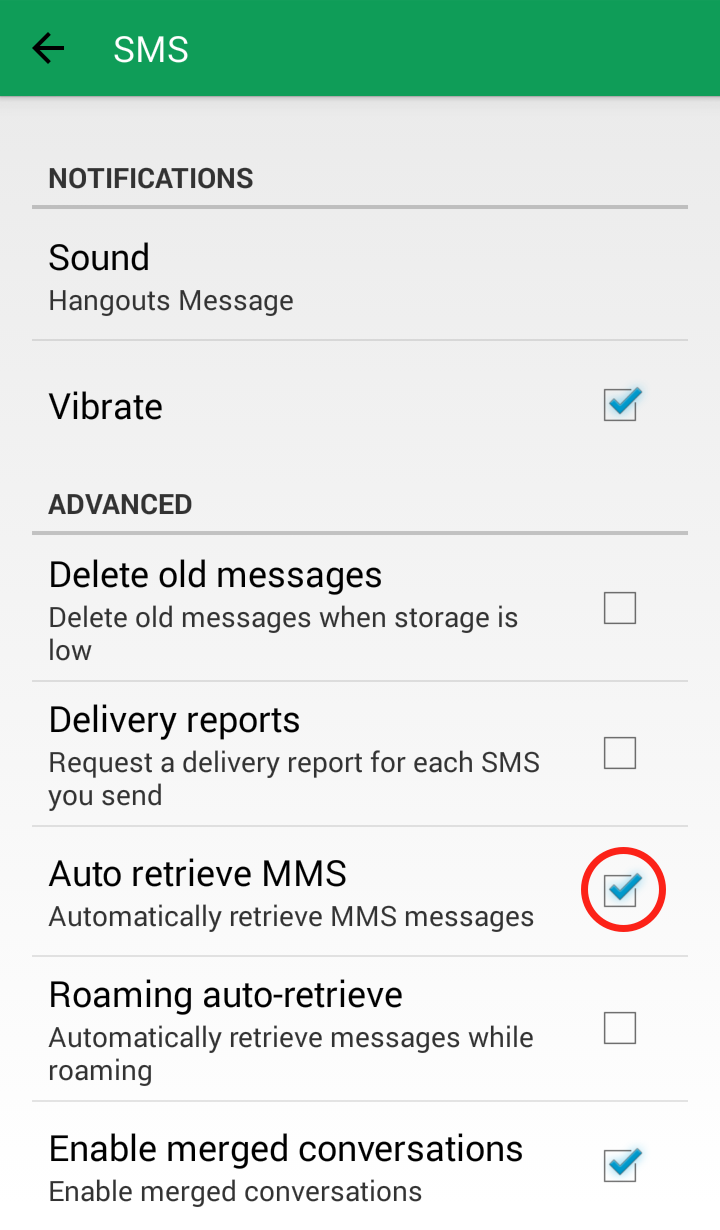
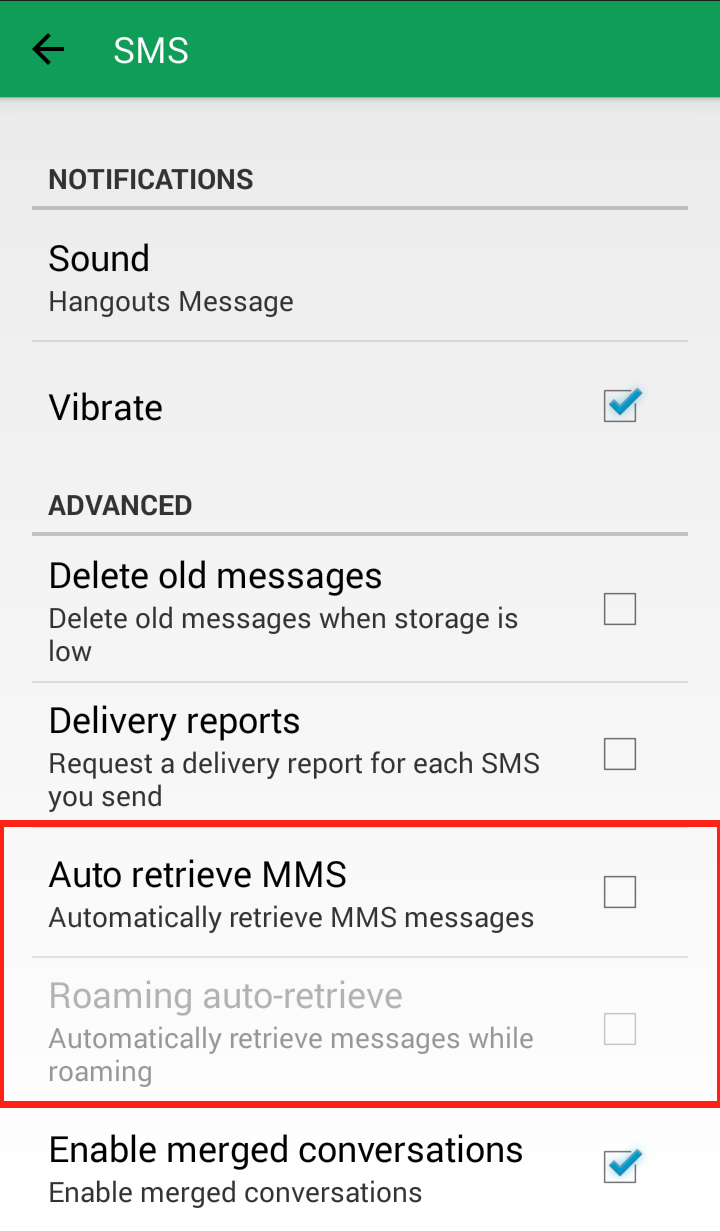
Step 1: Open the Google Hangout app and click on the three lines in the upper left corner Google Hangout settings Step 2: Click on “Settings” Google Hangout SettingsStep 3: Click on “SMS” Google Hangout settings Step 4: Scroll down to “Advanced” and uncheck “Auto retrieve MMS” Google Hangout settings Your Google Hangout “SMS” settings should now look like this: Google Hangout settings

Messenger App:

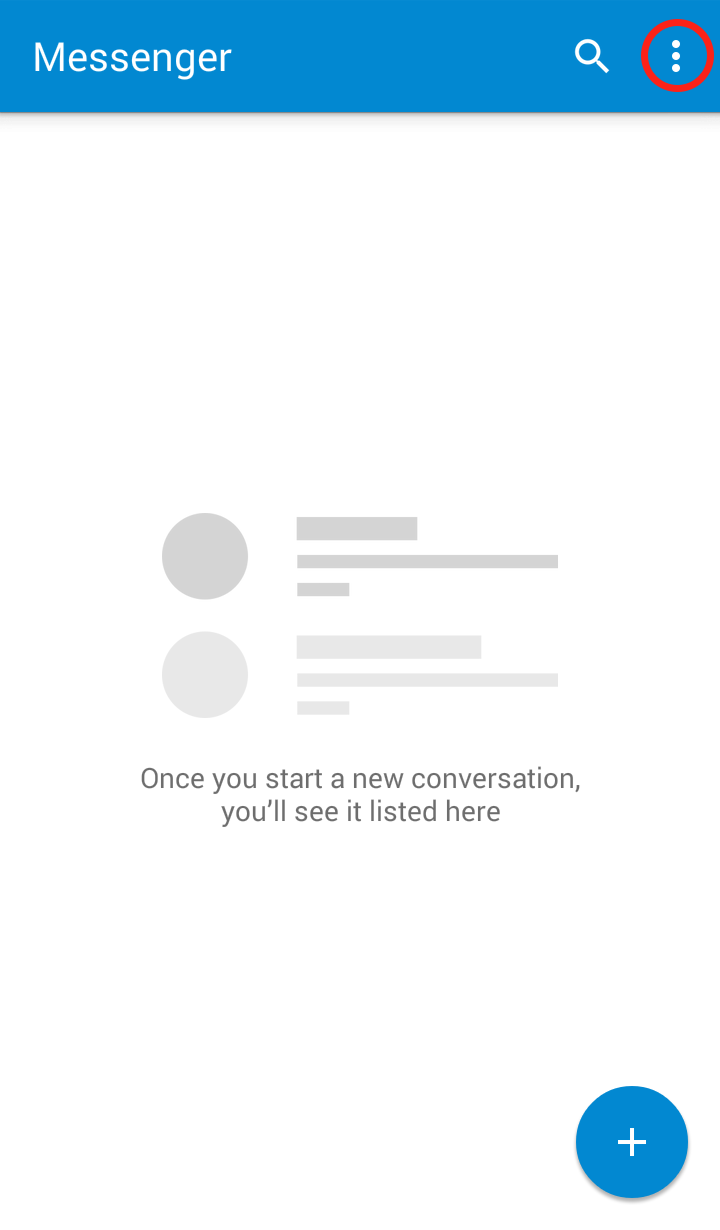
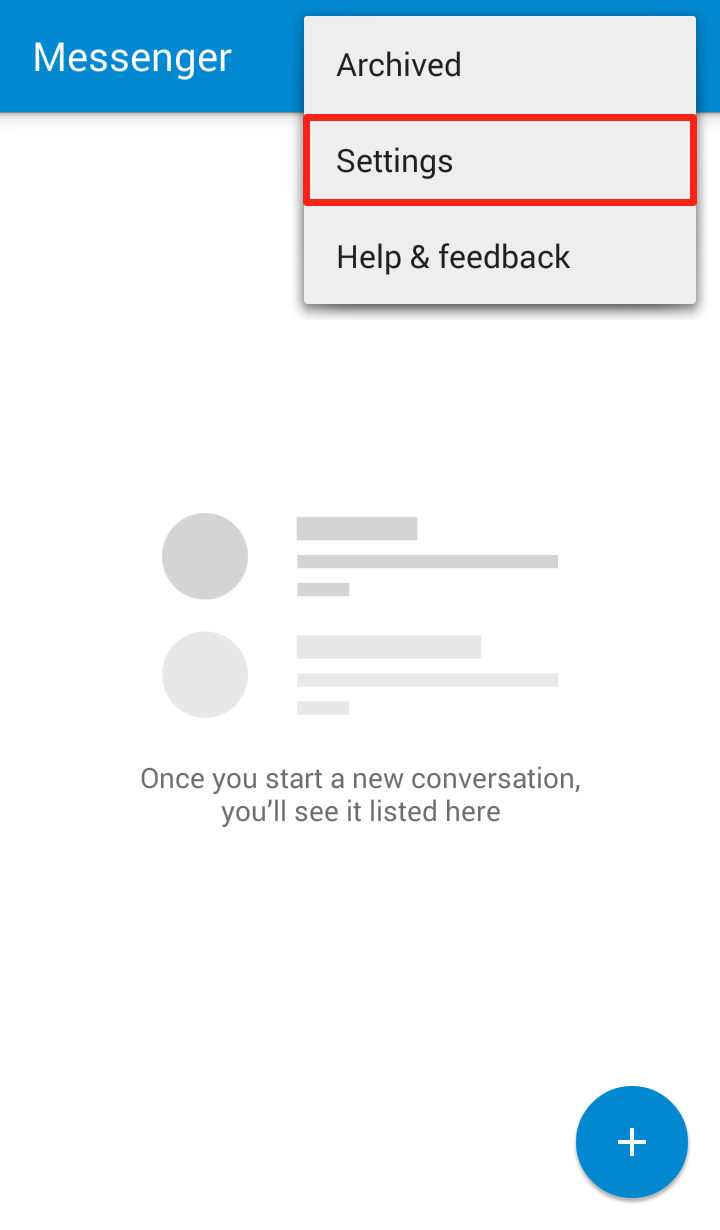
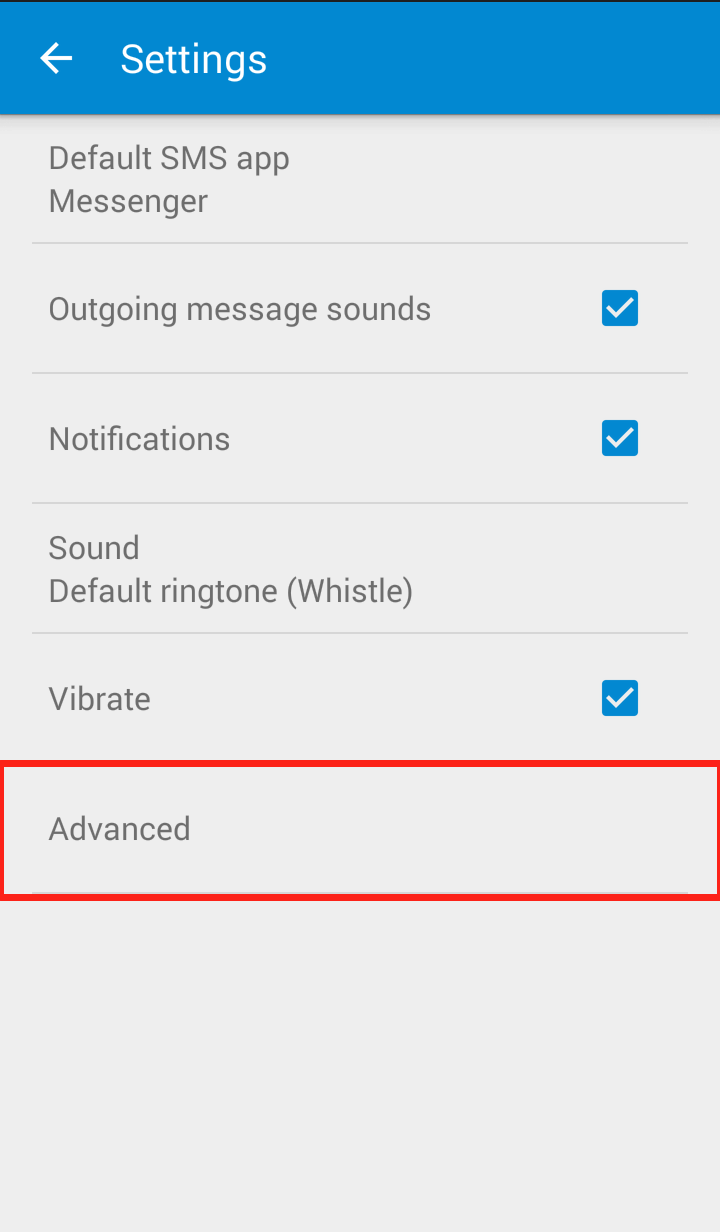
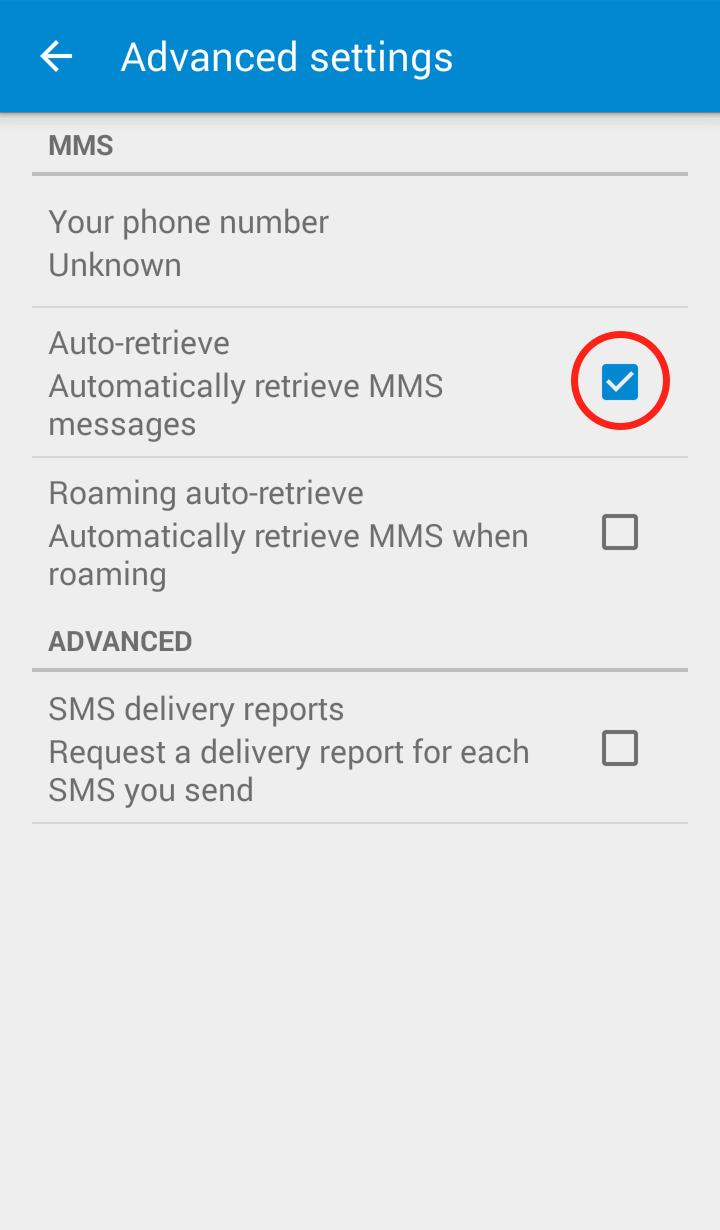
Step 1: Open the Messenger app and click on the three dots in the upper right hand corner Messenger 1 Step 2: Click on “Settings” in the dropdown menu Messenger 2 Step 3: Click on “Advanced” Messenger app settings Step 4: Uncheck “Auto retrieve” Messenger app settings Your Messenger “Advanced Settings” should now look like this: Messenger app settings

Messenger:

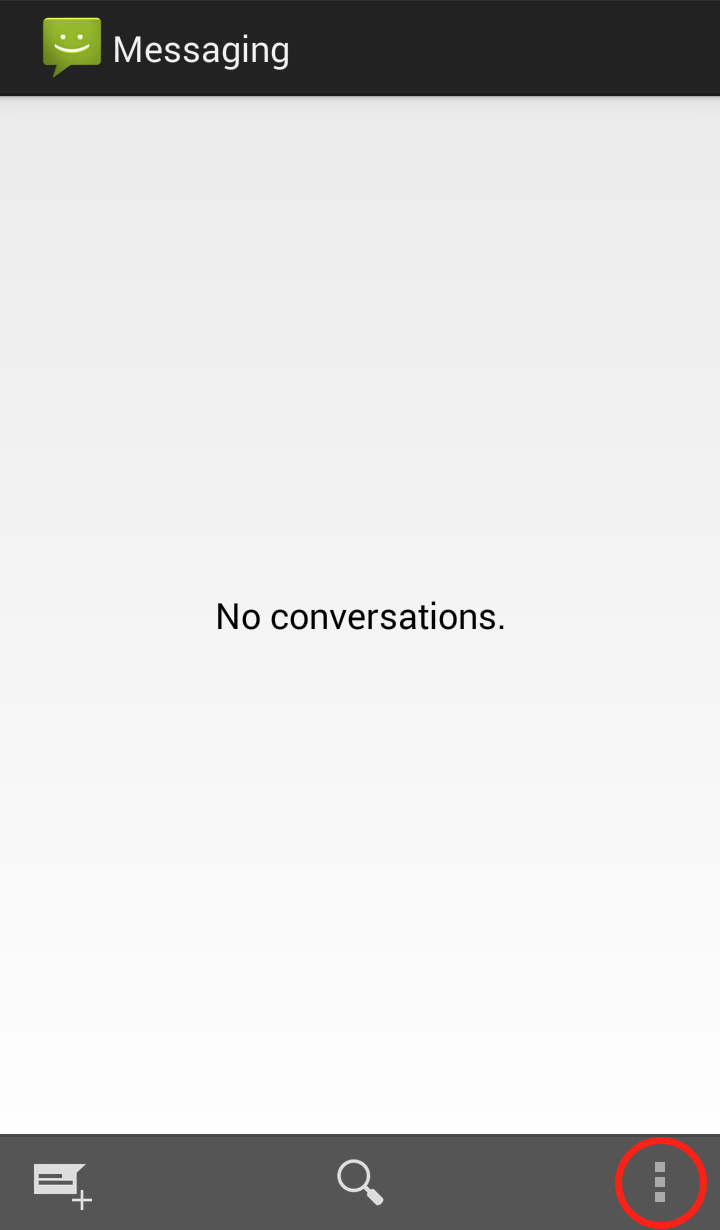
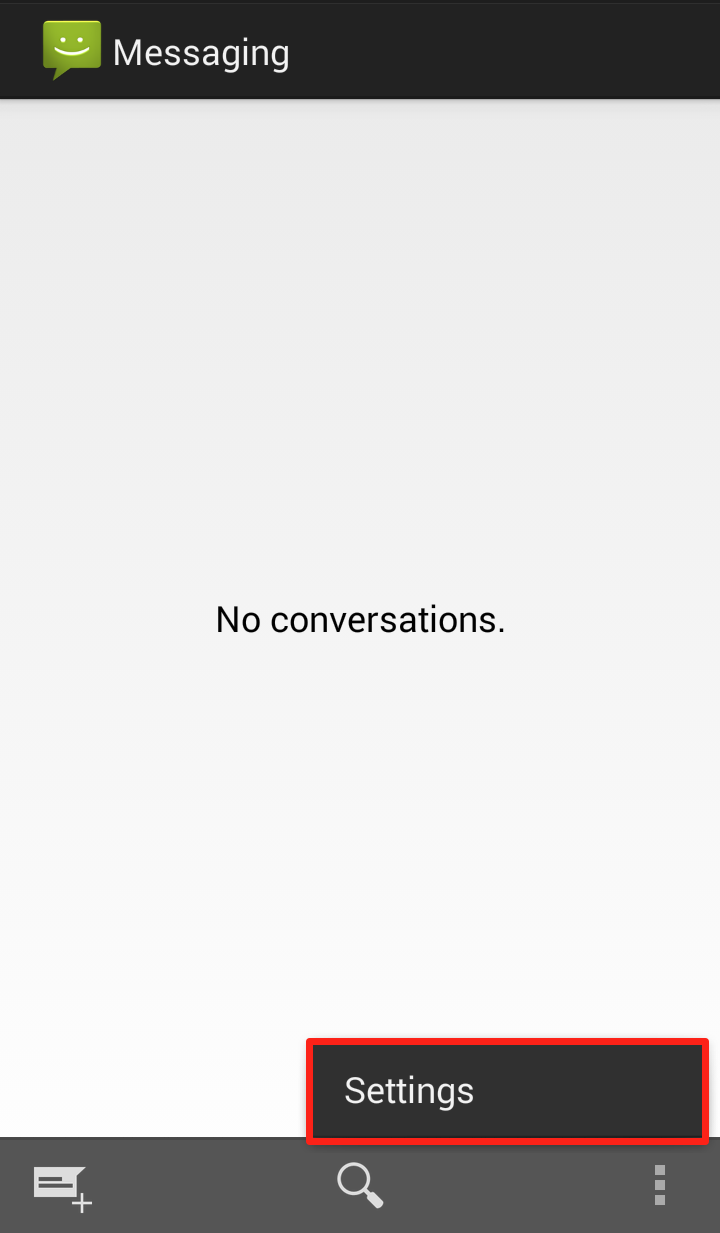
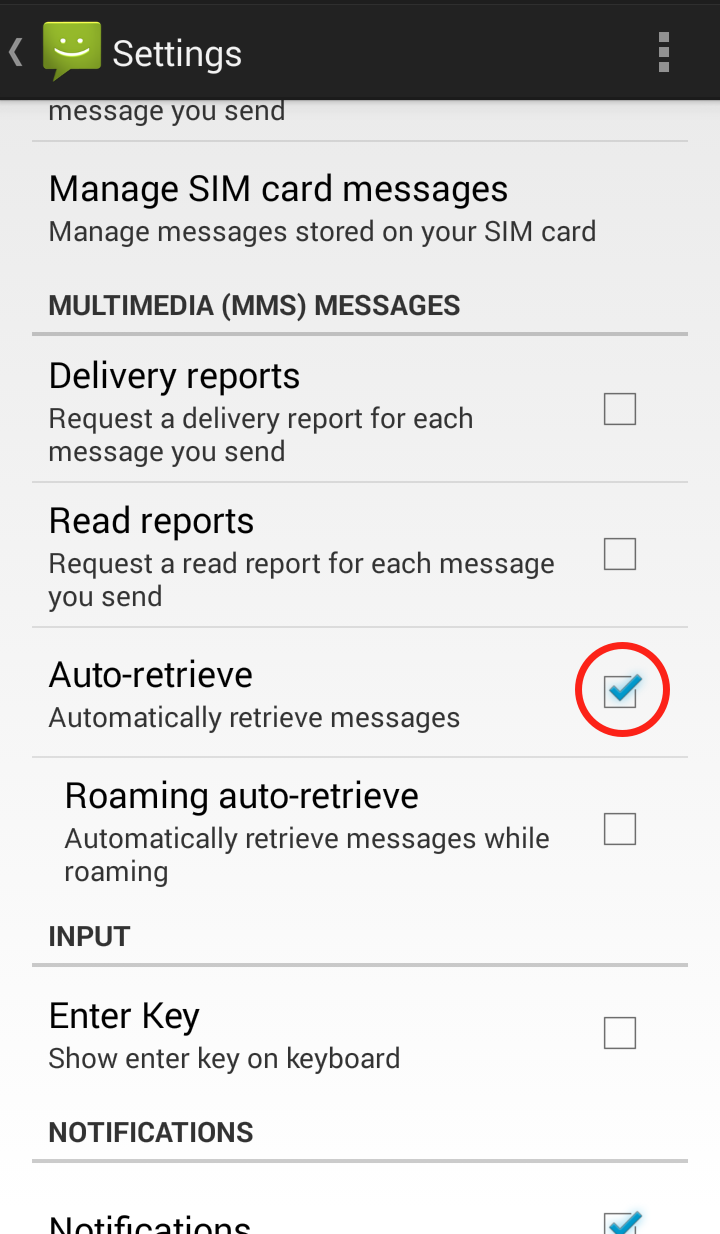
Step 1: Open the Messaging app and click on the three dots in the lower right hand corner Messaging app settings Step 2: Click on “Settings” Messaging app settings Step 3: Scroll down to “Multimedia (MMS) messages” and uncheck “Auto retrieve MMS” Messaging app settings Your Messaging “Settings” should now look like this: Messaging app settings

WhatsApp

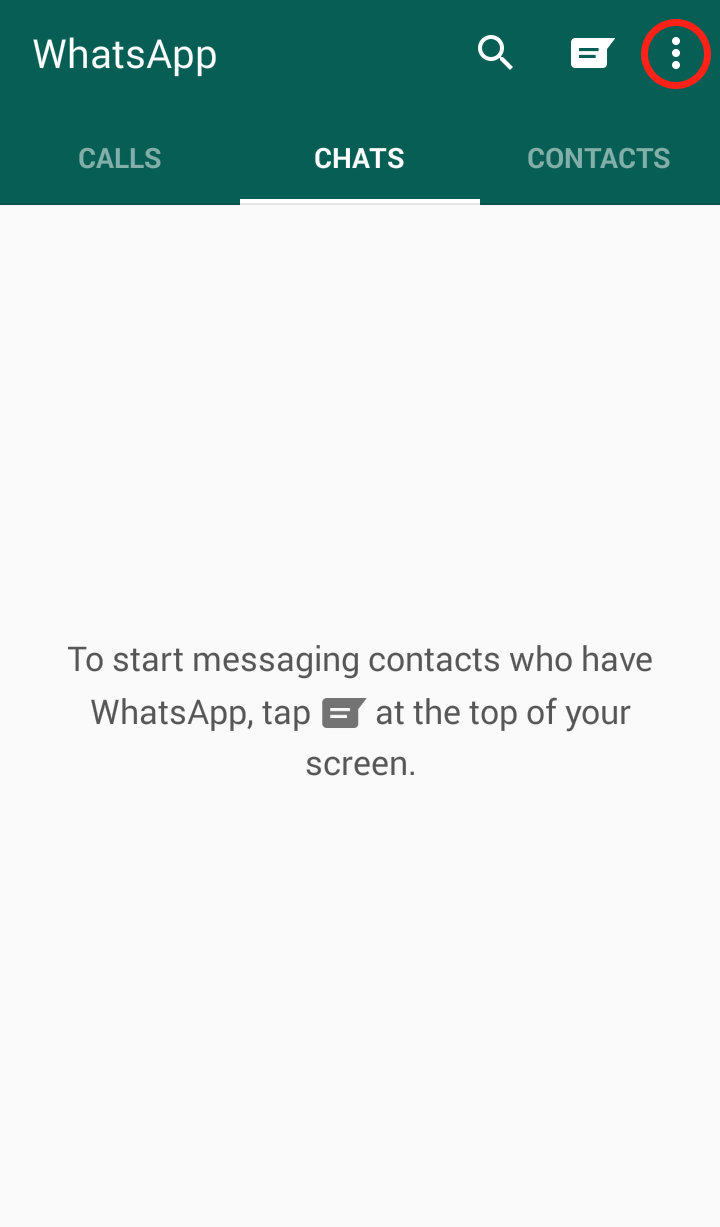
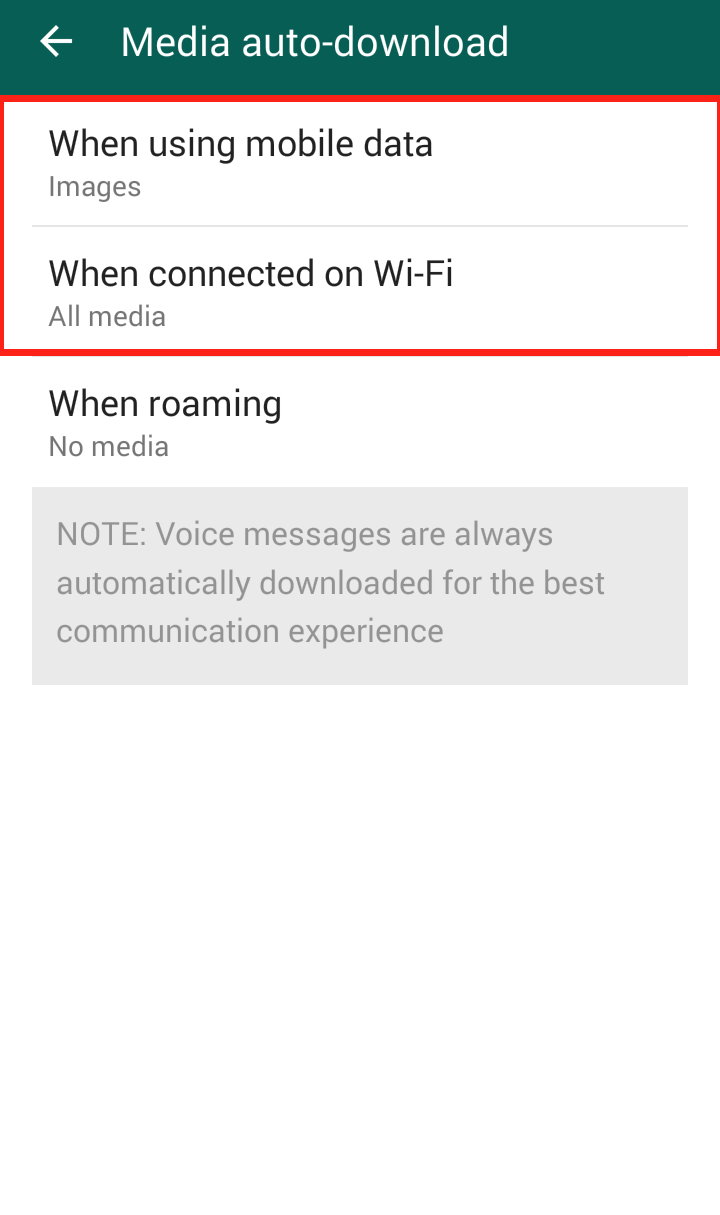
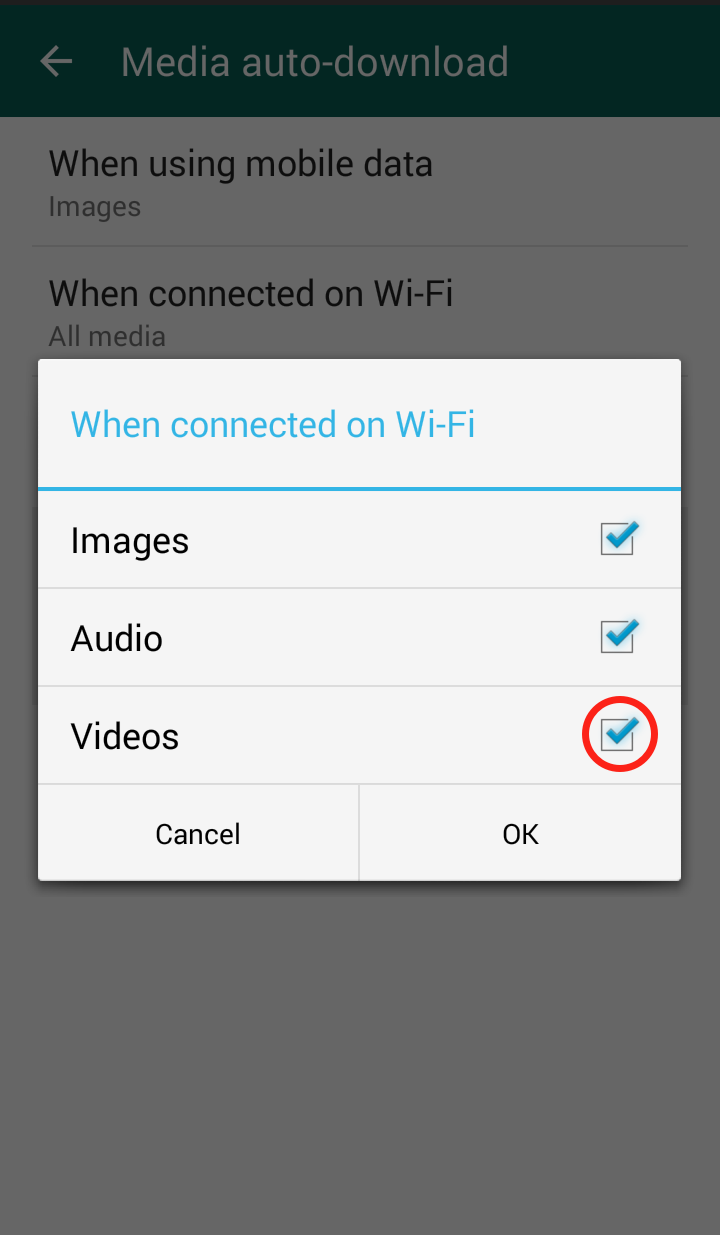
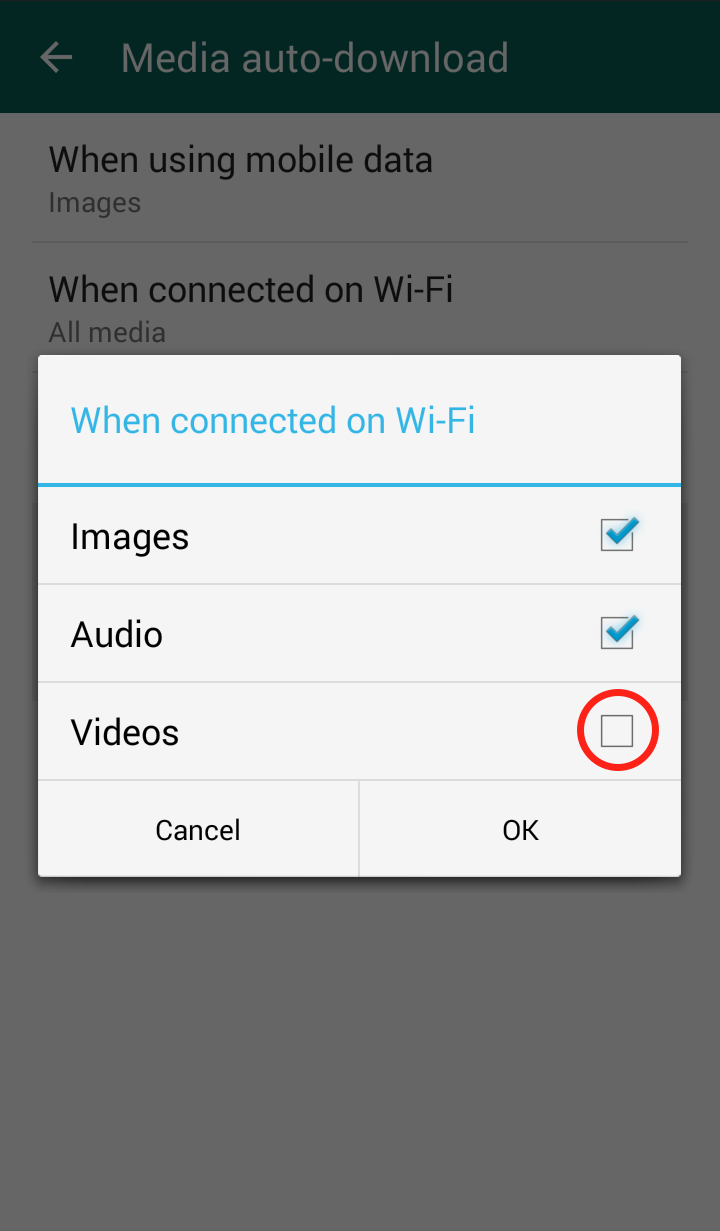
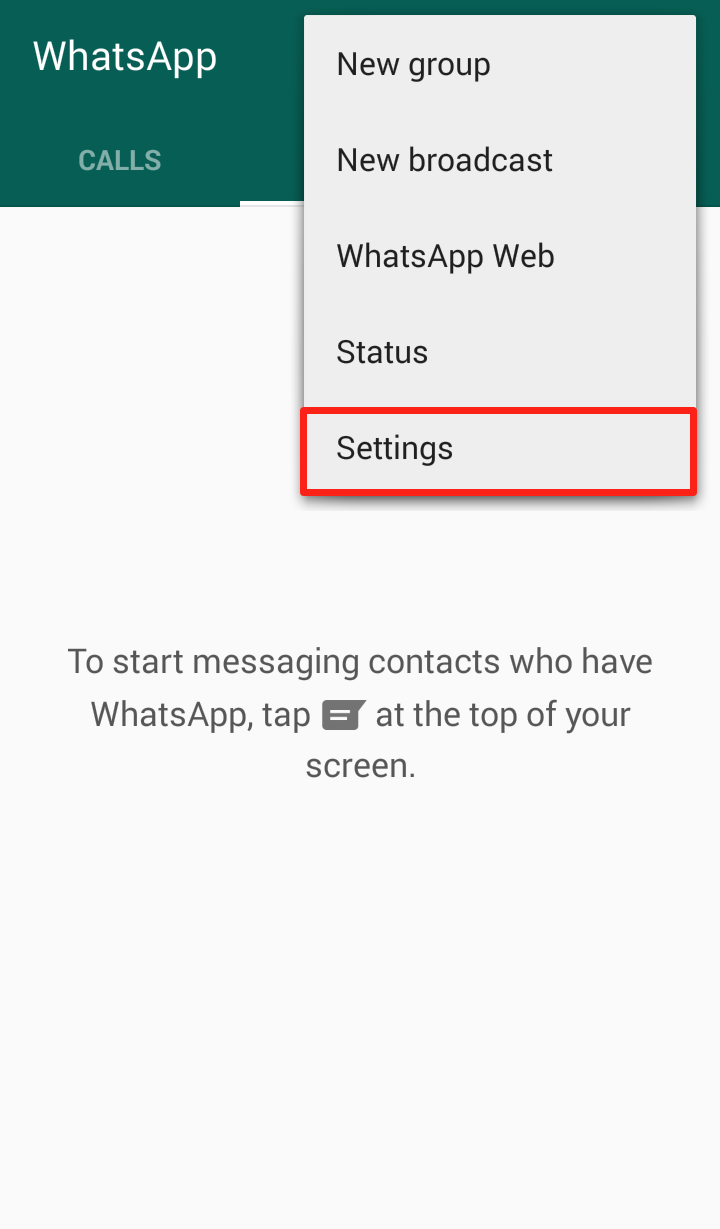
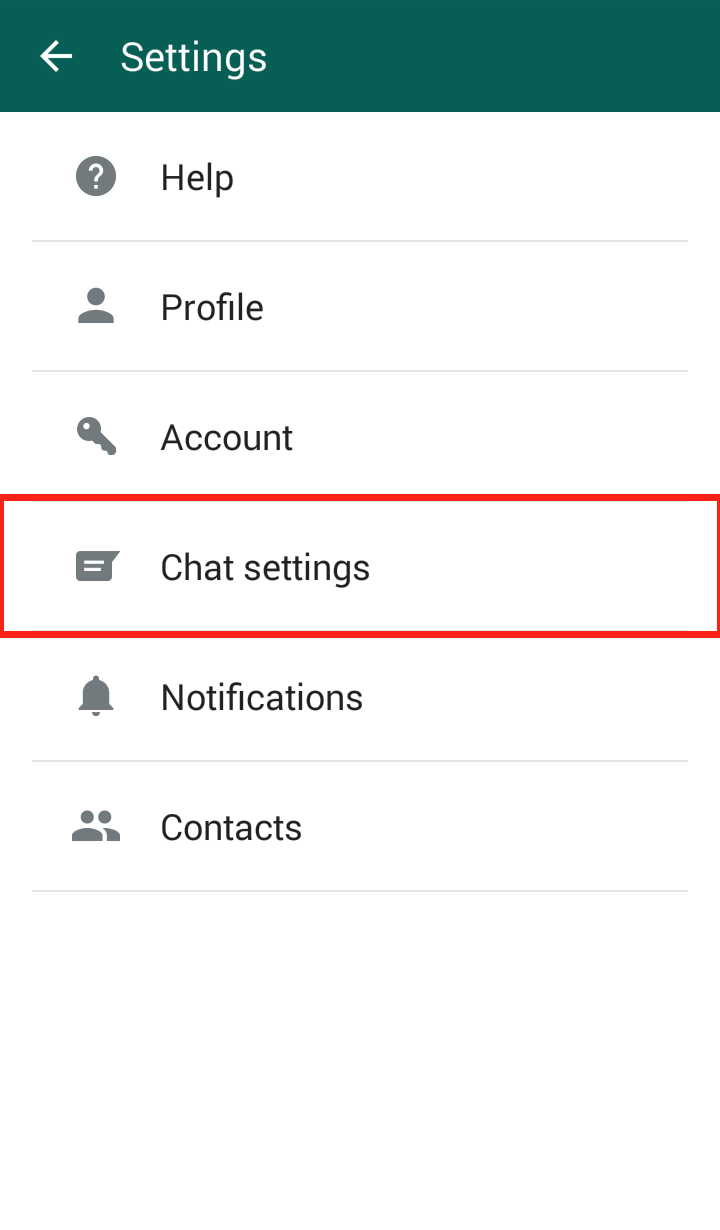
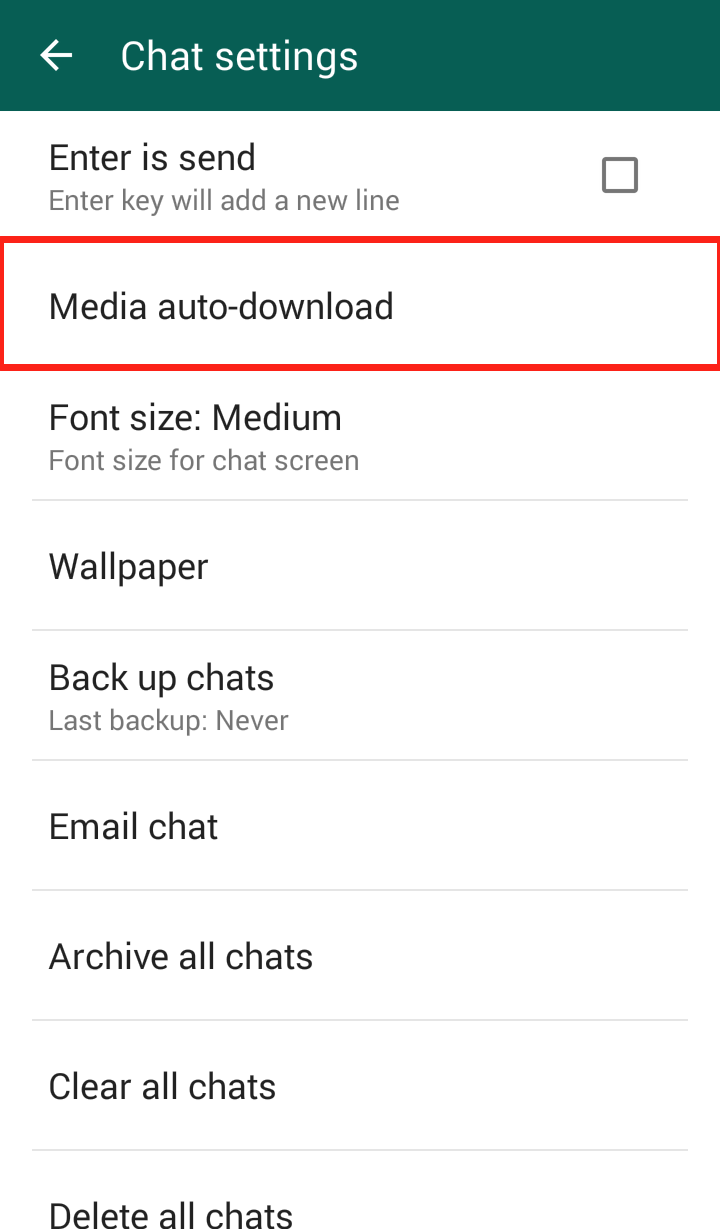
Step 1: Open WhatsApp and click on the three dots in the upper right hand corner WhatsApp settingsStep 2: Click on “Settings” Whatsapp settingsStep 3: Click on “Chat Settings” Whatapp settings Step 4: Click “Media auto-download” Whatsapp settings   Step 5: Click “When using mobile data” and/or “When connected on Wi-Fi” Whatsapp settings Step 6: The “When connected on Wi-Fi” settings are automatically set to download videos, so it is important to uncheck the checkmark Whatsapp settings Step 7: The “When connected on mobile data” settings are NOT automatically set to download videos, but in case you did enable it, you should disable it Whatsapp settings Your WhatsApp “Media auto-download” should now look like this: Whatsapp settings

The bots on Twitter aren’t harmless – cybercriminals use them to steal your information!

tuit

They are everywhere and are one of the main negatives of Twitter. The bots, an army of fake accounts that has invaded the social media site, can actually pose a serious risk for users.

They reached the height of their infamy thanks to a fight between politicians to see who could get the most followers on Twitter. This showed, rather humorously, that the network of bots is a double-edged sword. On one hand, they allow you to inflate the number of followers that you have, but on the other hand they can also lead to an embarrassing situation if you’re caught with your hand in the cookie jar.
Nevertheless, this is the harmless side to the bots because, in reality, this coordinated network of fake accounts could put the security of other users at risk. This is because in the hands of a cybercriminal, a network of bots could steal your personal information.

Even if they are most famous for spreading spam, the robots on twitter are also a powerful tool that are used for spreading different types of malware. All it takes is a few hundred false accounts and a shortened URL to infect your computer.

spam

That means that a shortened linked that is tweeted by a large groups of these bots could be a trap to steal user information via phishing, or even a Trojan which could gain access to your bank details.

This is how cybercriminals make a profit from creating fake accounts on Twitter. By stealing user information, they can make money by selling the information or, in extreme cases, stealing directly from your bank account.
Careful with shortened links

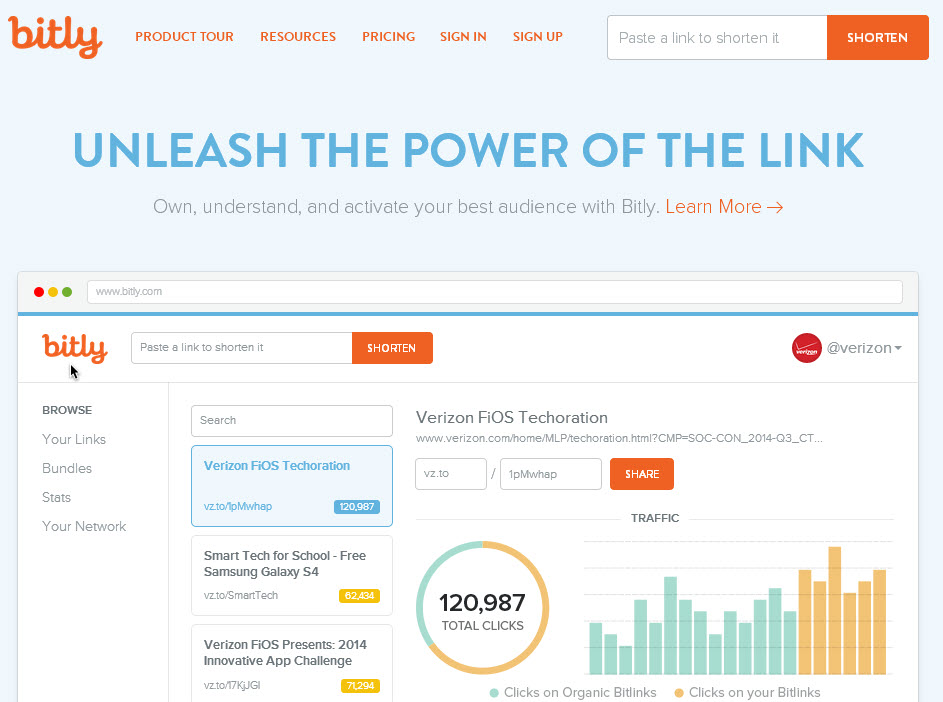
It’s important to remind users to be wary before clicking on a shortened link and to follow some advice to be sure that a link is safe. These include checking to see if it has been tweeted by a trusted account or by taking a look at its statistics and web page by adding the “+” symbol to the URL. This is a quick and easy way to avoid a nasty surprise.
bitly

Apart from being wary of the shortened links that come from unknown sources, users of Twitter should also be careful with hashtags, which are also becoming a way to spread malicious software.

Bots that are created and coordinated by a cybercriminal can take advantage of the tags on twitter to easily spread malware. This means that you need to keep an eye on trending topics as they are the most dangerous – the cybercriminals know that this is an easy way to take advantage of careless users.

It has to be repeated that the spreading of spam is not the worst thing that these bots can do – if they manage to rob from you via Twitter then that is a far more worrying prospect. In order to avoid this scenario, be wary of every Tweet before opening the content that is contains and, where possible, avoid really popular hashtags. You never know which of them has been infiltrated by an army of bots with bad intentions.

The post The bots on Twitter aren’t harmless – cybercriminals use them to steal your information! appeared first on MediaCenter Panda Security.

The bots on Twitter aren’t harmless – cybercriminals use them to steal your information!

tuit

They are everywhere and are one of the main negatives of Twitter. The bots, an army of fake accounts that has invaded the social media site, can actually pose a serious risk for users.

They reached the height of their infamy thanks to a fight between politicians to see who could get the most followers on Twitter. This showed, rather humorously, that the network of bots is a double-edged sword. On one hand, they allow you to inflate the number of followers that you have, but on the other hand they can also lead to an embarrassing situation if you’re caught with your hand in the cookie jar.

Nevertheless, this is the harmless side to the bots because, in reality, this coordinated network of fake accounts could put the security of other users at risk. This is because in the hands of a cybercriminal, a network of bots could steal your personal information.

Even if they are most famous for spreading spam, the robots on twitter are also a powerful tool that are used for spreading different types of malware. All it takes is a few hundred false accounts and a shortened URL to infect your computer.

spam

That means that a shortened linked that is tweeted by a large groups of these bots could be a trap to steal user information via phishing, or even a Trojan which could gain access to your bank details.

This is how cybercriminals make a profit from creating fake accounts on Twitter. By stealing user information, they can make money by selling the information or, in extreme cases, stealing directly from your bank account.

Careful with shortened links

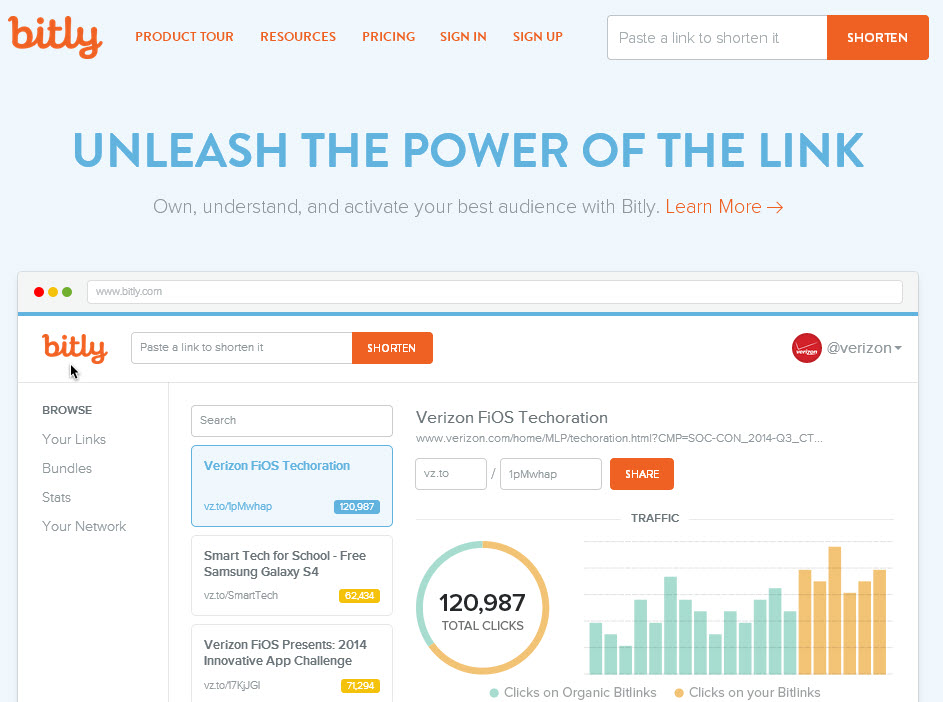
It’s important to remind users to be wary before clicking on a shortened link and to follow some advice to be sure that a link is safe. These include checking to see if it has been tweeted by a trusted account or by taking a look at its statistics and web page by adding the “+” symbol to the URL. This is a quick and easy way to avoid a nasty surprise.

bitly

Apart from being wary of the shortened links that come from unknown sources, users of Twitter should also be careful with hashtags, which are also becoming a way to spread malicious software.

Bots that are created and coordinated by a cybercriminal can take advantage of the tags on twitter to easily spread malware. This means that you need to keep an eye on trending topics as they are the most dangerous – the cybercriminals know that this is an easy way to take advantage of careless users.

It has to be repeated that the spreading of spam is not the worst thing that these bots can do – if they manage to rob from you via Twitter then that is a far more worrying prospect. In order to avoid this scenario, be wary of every Tweet before opening the content that is contains and, where possible, avoid really popular hashtags. You never know which of them has been infiltrated by an army of bots with bad intentions.

The post The bots on Twitter aren’t harmless – cybercriminals use them to steal your information! appeared first on MediaCenter Panda Security.

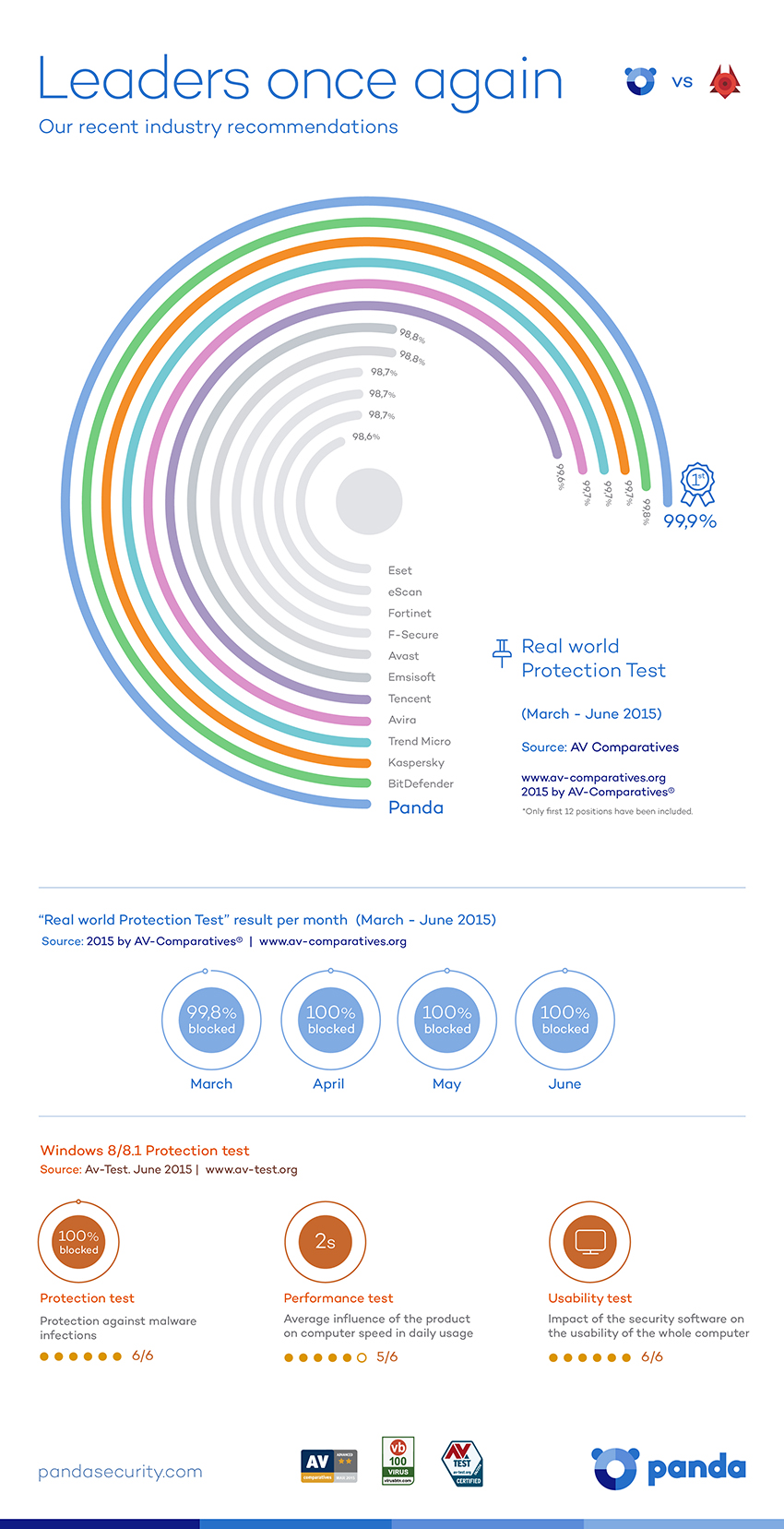
Panda Security achieves the highest protection ratio for the fourth consecutive month

Panda Security achieved the highest protection ratios in the Real World-Protection Tests conducted by AV- Comparatives in March, April, May and June 2015. This test evaluates the real-life protection capabilities of antivirus software.

panda, protection, virus

Panda Security took part in the review with Panda Free Antivirus, the company’s free solution, which detected and blocked 99.9% of all threats. In simple terms, the test framework replicates the scenario of an everyday user in an everyday online environment, testing antivirus software products against malicious Internet downloads or exploits designed to infect computers automatically by taking advantage of system vulnerabilities. The study, which analyzed more than 20 antivirus solutions, reinforce the great protection capabilities of Panda Security’s free product.

According to Luis Corrons, Technical Director of PandaLabs, Panda Security’s anti-malware laboratory, “We are especially proud of the excellent results obtained in the Real-World Protection Test, not only for taking first place in malware blocking and infection prevention, but because this is one of the most demanding tests when it comes to evaluating the real-life protection capabilities of antivirus software. Unlike other tests that use huge amounts of inactive malware, AV-Comparatives pits antivirus solutions against actual threats commonly found on the Web or on users’ computers. This way, the organization manages to reflect the real protection capabilities provided by the different security solutions”.

The efficiency of a smart engine

Panda Security has been 25 years at the vanguard of technological innovation, developing new technologies such as the XMT Smart Engineering engine, the basis of all of the company’s consumer solutions. With XMT, different technologies interact with each other to achieve new levels of efficiency and greater detection and disinfection power to eradicate all threats.

Year after year, and tests after test, the multinational security vendor keeps demonstrating the outstanding performance of its solutions, recognized by the industry for their superior protection and detection power. This efficiency level is at the heart of the company’s innovating, people-centric and unique service offering.

Click here to download an infographic.

The post Panda Security achieves the highest protection ratio for the fourth consecutive month appeared first on MediaCenter Panda Security.

Free software and services your start-up can use

Get your small business up and running with free software.

Getting a new business off the ground is not an easy task and can be quite costly, but there are a lot of free software and services available online that your new or small business can use as an alternative to paid-for products.

Here is a list (in alphabetical order, so no favorites ;-) ) of some you will find useful:

Avast for BusinessAvast for Business – cloud-managed security

Avast not only provides consumers with free security, but we also provide small and medium sized businesses with free cloud-managed protection. Avast for Business is easy to install and can be managed from anywhere and at anytime.

Facebook Page – alternative to building your own website   
If you’re a restaurant owner or a small boutique you could also, either in addition to or instead of hosting your own website, create a Facebook page for your business. You won’t be able to sell items online, but you can add your business’ address and directions, opening hours, a description of your business and post images and status updates to inform your customers of new items on your menu or of new items available for sale in your store.

Fundera_LogoFundera – loans for your business
Fundera is a free service that offers you loan options and lets you choose the one best suited for your small business. All you need to do is fill out a short questionnaire and then you are presented with loan products, lenders and rates and can apply to the lenders that fit you best with only one application.

Hootsuite – social media manager
Using social media is a great way to get the word out about your budding business, and a social media manager is, therefore, very helpful to keep track of your sites and their effectiveness. Hootsuite offers a free starter package where you can add three social media platforms, get basic analytics reports and schedule posts.

weeblyJimdo and Weebly – (subdomain) website hosting
Jimdo and Weebly are both web hosting services that offer free starter packages when you create a website using their subdomain. With Jimdo’s free package you get 500MB of storage space, one password-protected area and mobile versions of your site. Weebly offers unlimited pages and a drag and drop builder. Both services offer the possibility to sell up to five items for free in case you want to use your site for ecommerce. Checkout services are also included for free.

Opeopenchart 1nCart – shopping cart solution
OpenCart is a free and open source shopping cart solution. All you need to do is install OpenCart, select your theme, add your products and you are ready to start selling your products on your website!

OpeopenofficenOffice – office suite
Apache OpenOffice is a great alternative to Microsoft’s Office Suite. OpenOffice is an open source office suite that includes essentials like a Word processor, spreadsheet, multimedia, graphics, database and math software. Best of all, OpenOffice is license-free and can be installed on as many computers as your business needs!

Orange HRM – human resource management software
Orange HRM is a free and open source software for human resource management. It is a full-featured HR management system offering various modules such as system administration, personnel information management, and recruitment.

Producteev – task manager
Producteev is a task manager that offers unlimited users, projects and tasks in its free version so you can ensure that you and your team stay on top of the most important to-dos to get your business up and running!

Suite CRM – customer relationship management
Suite CRM is free, open source software for customer relationship management. It’s based on Sugar CRM and comparable to Salesforce. It gives you a full overview, including products, quotes, contracts, projects, reporting, teams, workflow and much more.

wave-media-logoWave – accounting tools
Wave offers cloud-based invoicing, accounting, payroll and payments for free for businesses with 9 people or less. They finance their services by connecting small business owners with vendors of products and services that offer discounts to Wave users.

Nearly all of the above mentioned products also offer premium services your business can take advantage of as it grows. For now, we wish your business the best of luck and hope this list of free software helps your business. :-)