Tag Archives: featured1

Mr. Robot Review: da3m0ns.mp4

This week’s episode was a little confusing for me – and I’m not only referring to the trippy dream Elliot has while going through his drug withdrawals.

Operation Meltdown

It seems I wasn’t the only one who had questions about the hacks in this week’s episode; Forbes published an interview they did with Michael Bazzell, Mr. Robot’s technical consultant and cyber crime expert explaining the hack attack on E Corp that Elliot comes up with at the beginning of the show.

In the article, Michael Bazzell explains how Elliot plans on destroying E Corp’s data storage facility, using Raspberry Pi. Sounds like a very yummy method – too bad there’s an “e” missing at the end of “pi”! Michael explains that Raspberry Pi is a very small computer that can be accessed via the Internet through its built-in cellular chip. Using this, Elliot wants to control the facility’s climate control system to overheat it, thus melting E Corp’s tape-based back up.

While Forbes focused on the more complex hacks that targeted large corporations like E Corp and Allsafe, I was intrigued by the two physical hacks in the show.

@whoisMrRobot

via USA Networks

Beep Beep

The first “IRL” hack is when two members of FSociety hack a minivan – keep in mind that FSociety does everything in their power to not leave a trail, so they need a stolen car to get to E Corp’s data facility center in order to prevent being caught.

The FSociety guys casually sit on a sidewalk and wait for someone to park and lock their car. Using what looked like an old radio to me but is more likely a transmitter, they were able to send a command to unlock the car – politely thanking “mom” for giving them the opportunity to steal her car. Once inside the car, they connect the car to their laptop using a cable and ran the code to get the car started.

I asked my colleague, senior malware analyst Jaromir Horejsi, what he thought of the hack:

All they needed was the cable and specialized control software for cars. This software can access data from sensors in the car and it can control the car’s behavior. With that, they just had to connect everything together and select their desired actions. – Jaromir Horejsi

FREEZE…Your car keys?

This method of hacking a car seemed a little old school, given that there are now so many cars on the road that are keyless and start with a push of a button. Nick Bilton, technology writer and Disruptions columnist for The New York Times, recently had his car hacked and stolen and  he wrote an interesting column about his experience.

Nick describes how he was standing in his kitchen and watched as two teenagers stole his Toyota Prius. Prii and many other modern cars are keyless and require the fob key to be within a certain range to start. Nick did more research into how it was so easy for the teens to steal his car right in front of his home and found that there are various gadgets on the market that can unlock BMWs, Toyotas and many other keyless cars. These gadgets are radio transmitters that either use brute force to cycle through car key fob codes or simply amplify the distance the car searches for a key fob, as was done in Nick’s case.

The solution Nick found to this problem? Putting his key fob into his freezer, which acts as a Faraday Cage that blocks external electric fields.

Do Not Disturb

En route to E Corp’s data storage facility, Elliot vomits due to his withdrawal symptoms and the FSociety team has to make a stop for him to recuperate. They stop at a hotel and plug a small device into the room’s key card lock port. Within the blink of an eye they have entered the room and made themselves at home.

This made me ask myself: Can someone really enter a hotel room that easily? (I also thought it was rather convenient that they just happen to have this device with them, but I won’t get into that here ;)).

I did some research online and found out that it is very possible to hack one’s way into a hotel room and that this was proven back in 2012 by Cody Brocious. You can find his paper describing how he hacked the Onity HT lock system for hotels here.

However, we are now in year 2015 and times are changing! Now, many major hotel chains, like Hilton and Starwood, are using NFC and Bluetooth keys combined with mobile apps in place of key cards and physical keys.

The security of any application and system depends on its design and proper implementation. Vulnerabilities cannot be avoided. However, it depends on whether these vulnerabilities are exploitable or not. If exploitable, it depends on who discovers them first the good or the bad guys. If discovered, it also depends on how quickly they are mitigated. Customers should not be discouraged from using new technology. Conversely, the more people use new technologies, the higher the chance is that potential problems are discovered and fixed — the same goes for mobile apps that work as hotel room keys. –Jaromir Horejsi, senior malware analyst at Avast

Let us know what you think of this week’s Mr. Robot episode in the comments below and make sure to follow us on Twitter and Facebook for security news updates!

Follow Avast on FacebookTwitter, YouTube, and Google+ where we keep you updated on cybersecurity news every day.

10 tips to stop cybercriminals from ruining your vacation

pc

Now that we’re entering into that time of year when planning your summer getaway is high on the agenda, there are always some things we can do in order to divert burglars’ attention from our vacant houses – don’t leave all the curtains and blinds closed over; ask a neighbor to collect your mail from the mailbox; be sure to leave a light on at night, etc.

However, these traditional forms of protection are now no longer enough. Our lives revolve around technology more than ever now and this also poses a risk during the vacation period, but don’t fear – these are some measures you can take to stop cybercriminals from ruining your summer.

10 tips to stop cybercriminals from ruining your vacation

1 – Don’t shout it from the rooftops

First of all, don’t post on social media about your upcoming vacation. If you really can’t avoid it, then don’t reveal too many details about your plans. This information could be useful for someone with a sinister motive and could leave your home and valuables exposed.

Another thing, make sure you deactivate your GPS. This way you don’t have to worry about it giving away clues of your whereabouts which might avert criminals to the fact that you’re out of town.

2 – Make a copy of everything

If you have decided that you’re going to take your laptop or tablet (or even just your smartphone, from which you can’t be apart!), don’t forget to make a security copy of everything on it and leave that at home.

This isn’t just to protect you against theft, but rather because you never know if you might lose it or have an unfortunate accident. It pays to think ahead!

3 – Protect yourself

Antivirus, firewall… make sure that all of your security measures are fully functioning before you head off on your travels. In the event that you need to connect to public WIFI, you can rest assured knowing that your device is secure.

4 – Avoid public connections

Despite having confirmed that your device is in good health, try to avoid using public WIFI as much as possible. By connecting to public WIFI you run of the risk of any cybercriminal accessing your personal information.

wifi airport

5 – Just stick to your own computer

Unless it is an emergency, try to avoid using computers that aren’t your own. This includes those that are available in your hotel or internet cafes because any information that you enter into them could be compromised. This could put your privacy and security at risk.

6 – Change your passwords

If you have no other choice but to use a public computer, do so with caution. Only use secure webpages, try to use it through a Virtual private Network (VPN) so that the information is coded, and change your passwords as soon as you have finished.

password

7 – Be wary of offers

Summer is a prime time for fraudulent offers. You should err on the side of caution if you see an offer online or receive one to your email account. Check out other reviews on it, check that the webpage is safe, and that all of the facts are real so as to avoid being duped.

8 – Deactivation of your smartphone

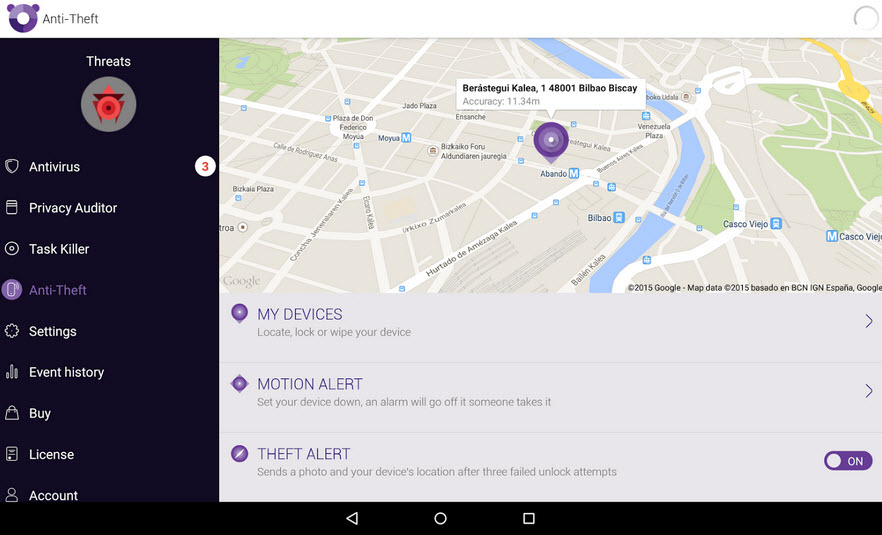
Prepare your cellphone for the worst – if you lose it or it is stolen, you’ll be glad that you activated one of the applications that allows you to locate your phone or deactivate it remotely. Android devices come with this feature built in thanks to the Android Device Manager and also you can usea our antivirus for Android.

find phone

9 – Buy with caution

When completing a purchase online, such as hotel or flight reservation, keep an eye on your personal details. Electronic payment systems and credit cards come with security measures which mean you can shop safely online. However, make sure that unauthorized purchases don’t appear in your account. If you spot anything out of the ordinary, change your passwords and contact your bank.

10 – Be careful with USBs

If, during your vacation, someone shares something with you via a USB on your computer, be sure to scan it with an antivirus first. Not only are there hidden dangers on the internet, but also on USBs, which can hide a nasty surprise.

The post 10 tips to stop cybercriminals from ruining your vacation appeared first on MediaCenter Panda Security.

Panda Security and BQ join forces against cyberattacks on mobile devices

Panda Security announces a collaboration agreement with BQ, Spain’s leading manufacturer of  smartphones and tablets, through which the two companies will join forces to protect mobile device users from the cyber threats they face every day. As a result, Panda Security and BQ’s customers will be able to enjoy the most innovative technology and protection on the market, securing their digital lives through unique and very competitive products.

Through this agreement, BQ will include the security company’s solutions on its devices so that users can activate them quickly and easily. In addition, those interested in purchasing Panda’s services can do so via BQ’s website.

alliance bq and panda

International Agreement

The partnership between BQ and Panda Security, two leading Spanish companies and pioneers in their fields, also extends to countries like Germany, France, Italy, United Kingdom and Sweden. Users in these countries who purchase BQ products can enjoy the guarantee of Panda Security’s protection solutions, for both the consumer and enterprise market: Panda Mobile Security, Panda Global Protection, and Panda Fusion.

“Our goal is to make technology accessible to the world, helping to improve it and providing the best possible user experience. This involves offering excellent features and technical specifications, outstanding customer service and, increasingly, security to devices. And who could be a better partner than Panda Security, the cutting-edge company in digital protection solutions”, says Rodrigo del Prado, Deputy General Manager at BQ.

“This agreement brings together the most competitive mobile technology and the most innovative security solutions, and also reflects the good work of two leading Spanish technology companies. This global partnership with BQ is a step further towards our goal of protecting people’s digital lives in a context characterized by globalization and mobility in multi-device format”, claims Diego Navarrete, CEO at Panda Security.

Minimum Impact, Maximum Security

Designed to provide complete protection with minimum device resource usage, Panda Security’s solutions leverage all of the benefits of cloud-based security to combat all types of digital threats: viruses, hackers, online fraud, identity theft, as well as other known and unknown threats.


The post Panda Security and BQ join forces against cyberattacks on mobile devices appeared first on MediaCenter Panda Security.

Widespread iScam ransomware originates from US servers

iPhone and iPad users who turn on Avast SecureLine VPN while on unsecured Wi-Fi are protected from iScam.

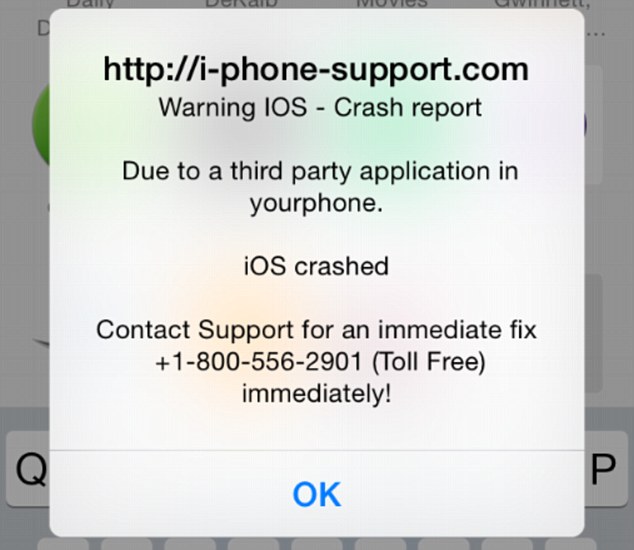
It’s a common belief (and myth) that Apple products are invincible against malware. This false line of thinking has recently again been refuted, as iPhone and iPad users have been encountering a ransomware threat that freezes their Internet browsers, rendering their devices unusable. The ploy, commonly known as iScam, urges victims to call a number and pay $80 as a ransom to fix their device. When users visit an infected page while browsing using the Safari application, a message is displayed saying that the device’s iOS has crashed “due to a third party application” in their phone. The users are then directed to contact customer support to fix the issue.

iScam displays a "crash report" to affected users. (Photo via Daily Mail)

iScam displays a “crash report” to affected users. (Photo via Daily Mail)

In the midst of this vexing threat, Avast’s suite of security applications identifies URLs which contain malicious content. When discovered, these addresses are flagged for malware and then stored in our blacklist database.

While scanning for malicious URLs, we discovered that many of the servers related to iScam are located in the United States. While iScam has affected users located in both the U.S. and U.K., the origins of the threat have remained fairly nebulous up until this point. Here are a few examples of where we’ve discovered malicious servers in the U.S.:

  • Scottsdale, Arizona (system-logs.info)
  • Concord, North Carolina (pcassists.info)
  • Kirkland, Washington (Adbirdie.com)
  • Chicago, Illinois (pcsafe.us)
  • Los Angeles, California (clevervc.com)

Every cloud has a silver lining – in this case, you can celebrate the fact that you’re protected from iScam using Avast SecureLine VPN. Not only does Avast SecureLine VPN protect you while browsing on unprotected Wi-Fi networks, but it also scans websites to check for malicious content and keep you from becoming affected by them. Once Avast SecureLine VPN is installed onto your iPhone or iPad, it automatically notifies you of the risks of connecting to unsecured Wi-Fi and you have the option of connecting to the secure VPN. Once turned on, Avast SecureLine VPN creates a private ‘tunnel’ for your data to travel through, and all your activities done over the Internet – inbound and outbound through the tunnel — are encrypted. If a website is infected with iScam, Avast SecureLine VPN blocks it, so users will not encounter the scam. For your best protection, Avast SecureLine VPN is available to download in iTunes.

How to clean your system if you’ve been infected by iScam

  • Turn on Anti-phishing. This can be done by visiting Settings > Safari and turn on ‘Fraudulent Website Warning’. When turned on, Safari’s Anti-phishing feature will notify you if you visit a suspected phishing site.
  • Block cookies. For iOS 8 users, tap Settings > Safari > Block Cookies and choose Always Allow, Allow from websites I visit, Allow from Current Websites Only, or Always Block. In iOS 7 or earlier, choose Never, From third parties and advertisers, or Always.
  • Allow JavaScript. Tap Settings > Safari > Advanced and turn JavaScript on.
  • Clear your history and cookies from Safari. In iOS 8, tap Settings > Safari > Clear History and Website Data. In iOS 7 or earlier, tap Clear History and tap Clear Cookies and Data. To clear other stored information from Safari, tap Settings > Safari > Advanced > Website Data > Remove All Website Data.

Check out Apple’s support forum for additional tips on how to keep your device safe while using Safari.

Panda Free, the best free antivirus of 2015

PC Magazine has named Panda Free as the best free antivirus of 2015. Ranking ahead of the likes of Bitdefender, Malwarebytes and Avast, Panda’s antivirus has been awarded the Editor’s Choice by this prestigious media outlet.

best free antivirus

The features highlighted include its speed and ease of installation along with its cloud based technology. What’s more, its ability to block malicious URLs was highly rated.

Are you ready to try out the best free antivirus of the year?

DOWNLOAD PANDA FREE

The post Panda Free, the best free antivirus of 2015 appeared first on MediaCenter Panda Security.

More than one in 10 American mobile users is the target of mobile malware

Threat analysts and malware researchers in the Avast Virus Lab detect and neutralize threats as soon as they appear.

Threat analysts and malware researchers in the Avast Virus Lab detect and neutralize threats as soon as they appear.

The Avast Threat Report provides an overview of global threat activity.


Avast malware researchers and Avast customers work 24/7 to protect each other.

Avast protects 230 million people worldwide in more than 186 different countries — we are present in more countries than McDonalds and protect more people than any other antivirus security provider. We stream 250 micro updates a day that protect our users from attacks. This is made possible by the 230 million devices we protect that simultaneously act as de facto sensors. These sensors provide us with information about suspicious files to help detect and neutralize threats as soon as they appear. Once we identify a suspicious file on a single device, it is reported back to the Avast servers and all Avast users around the world are immediately protected. This is called our Community IQ – it not only lets us better protect our users but also gives us valuable insights into the current security landscape.

Top targeted countries

Romania, Turkey and Vietnam were targeted the most in terms of PC threats in Q1 of 2015, with Romanians having a 54% chance of encountering threats. In France, Germany, Brazil, Great Britain and the United States, the chances were much lower; nonetheless, nearly one out of every three PC users encountered threats in these countries.

Percentage of PC threats encountered by country:

  • 41 percent Russia
  • 37 percent Spain
  • 34 percent Brazil and France
  • 29 percent Germany
  • 28 percent United States and Great Britain

Within the mobile sphere, Romania also had a high chance of encountering malware, along with China and Malaysia.China was targeted the most, which is most likely due to the fact that the Google Play Store is blocked in the region and, therefore, mobile users download apps from third-party stores.

The number of users accessing the Internet in China via mobile devices has surpassed the number of users accessing the Internet via PC this year, which also makes them an attractive point of access for cybercriminals on the hunt for a widespread target pool.

Percentage of mobile threats encountered by country:

  • 21 percent Russia
  • 16 percent Spain
  • 12 percent United States
  • 10 percent Brazil
  • 8 percent France and United Kingdom
  • 6 percent Germany

Top detections and exploits

Despite Android being fairly secure, mobile malware did grow dramatically with potentially unwanted programs (PUPs – a cute acronym for a not-so-cute threat), including adware, dominating the top ten Android detections.

On the PC side, the majority of the top ten detections included LNK files. LNK files are used to create shortcuts that typically point to an executable file or script and appear on one’s computer desktop as an icon, tricking users into using malicious shortcuts.

In terms of exploits, two of the biggest vulnerabilities that were exploited targeted Javascript and an HTML parser. The first exploit, targeting Javascript, could lead to a remote code execution in Internet Explorer versions 6 to 10 The second, on the other hand, targeted an HTML parser in Internet Explorer 10, and if successful, the attack could lead to remote code execution. Even if the attack was unsuccessful, it could still cause a denial of service.

Malicious ways

We observed a variety of tricks that cybercriminals use and one interesting, less common technique cybercriminals use is domain rotation. This method regularly creates new domains and subdomains and redirects malicious traffic to them. This is done to avoid blacklisting and capitalizes on the fact that it takes time for antivirus software to find and check these new domains, releasing new detections after they’ve been properly examined. Fortunately, Avast uses advanced algorithms to recognize domain rotations and block infected subdomains.

We also watched ransomware targeting PCs and mobile devices evolve. For example, PC ransomware CryptoWall did not originally use anonymization networks in earlier versions. CryptoWall 2.0 began using TOR to communicate with the command and control (C&C) server and now CryptoWall 3.0 uses I2P (Invisible Internet Project) a lesser-known anonymization network to avoid being blocked. Mobile ransomware Simplocker, on the other hand, reappeared in February 2015 using asymmetrical cryptography, making it impossible to recover encrypted data without accessing the C&C server.

Global Wi-Fi experiment

We not only observe malware threats, but we also ventured out of the office to further explore the security risks of public Wi-Fi. Our mobile security experts traveled to nine cities in the United States (San Francisco, Chicago, New York), Europe (Barcelona, London, Berlin), and Asia (Seoul, Hong Kong, Taipei) to observe public Wi-Fi activity.

Our observations revealed major security flaws in Wi-Fi hotspots and showed how easy it is for hackers to view users’ browsing activity, searches, passwords, videos, emails, and other personal information. While security issues were found in all cities, the experiment showed that users in Asia are more prone to attacks than users in both Europe and the U.S. Users in Berlin and San Francisco were most likely to take the necessary steps to protect their browsing.

Our experiment also shed light on the fact that a significant portion of users browse primarily on unsecured HTTP sites while connected to open Wi-Fi networks. HTTP traffic is not encrypted and is therefore unprotected, meaning that our team was able to view all of the users’ browsing activity, including domain name and page history, searches, personal log information, videos, emails, and comments. Taking this a step further, it was even possible for the Avast researchers to see products that a user browsed on eBay while not being logged in to the site as well as articles that people read on Wikipedia.

We have put together a security report for the first quarter of 2015, which includes a list of top targeted countries, threats, exploits, domain detections and much more. Open the full Avast Threat Report here.

Follow Avast on FacebookTwitter and Google+ where we keep you updated on cybersecurity news every day

If you like videogames, check out these safety steps!  

game boy

The good times are rolling for videogame companies as the sector has witnessed sustained growth in the last few years and, luckily, 2015 doesn’t look like it’s about to break this trend. According to recent estimates by Newzoo, an industry consultant, businesses in the sector are expecting global gaming revenues of $91.5 billion dollars – an increase of 9.4% compared to the previous year.

This rapid growth is in large part thanks to the boom in mobile and tablet gaming, which have registered revenues of $20.6 billion and $9.4 billion, respectively. They have also seen the largest rise increase compared to the previous year – 21% and 27%, respectively – although they still trail video consoles ($25 billion) and computers ($27 billion), which continue to lead the sector.

Despite this all being great news for video gamers, we still have to keep in mind the increasing danger posed by cyber-criminals. In the last few months we have seen some not-so-pleasant attacks which have been of a worrying frequency.

Last summer we saw how a wave of Distribution Denial of Service (DDoS) attacks infiltrated, to name a few, popular platforms such as the Playstation Network, Xbox live, Twitch and Origin. The attacks, which denied users access to online gaming, were repeated again over the festive season. Groups such as Lizard Squad and Anonymous claimed responsibility for accessing, and leaking, as many as 13,000 passwords and credit card details from these platforms.

In January of this year, various users of Origin (Electronic Arts) complained that the service – including the online store – was carrying out charges to their bank accounts for purchases that the users hadn’t authorized. Twitch, Amazon’s well known streaming page, asked its users to change their passwords at the end of March following an attack that could have left log-in details exposed.

videogames

With this in mind, the best thing that any gamer can do is to take precautions when playing online. By following some simple steps you can avoid trouble if your favorite gaming platforms are targeted.

How to play safely

  • Don’t use your personal email address on gaming sites. If you create a new one, or even a disposable account, the hackers won’t be able to access personal information such as your contact list.
  • If you don’t play on buying games or add-ons during, don’t give out your credit card details – it’s an unnecessary risk.
  • Some platforms offer you the possibility of verifying your identity in two steps in order to protect your account. Don’t overlook this invaluable tool.
  • Before entering personal details into the registration form, ensure that it is an official page and not a copy. Phishing attacks are, sadly, rampant and a good way to make sure you’re not being duped is to click on the logos and links to verify their authenticity.
  • Finally, and most importantly, keep your antivirus up to date. Our antivirus software will detect fraudulent pages and the possible malware that will try to install itself on your computer.

By following these tips and using common sense, you can enjoy your favorite games without fear of anything bad happening during your gaming experience. Online security is no joke, so it is important to always play safely.

The post If you like videogames, check out these safety steps!   appeared first on MediaCenter Panda Security.

Do third-party app stores pose a threat to mobile security?

Android Malware

Malware detected on Android

Over time, we’ve noticed the presence of some fairly heated user debates disputing the necessity of security or antivirus apps for Android devices. This could have been sparked by our recent post which argues that you can’t always rely on the security of Google Play or because of the myth that antivirus companies create viruses to sell more software.

Certain security gurus claim that if users stick to downloading and purchasing apps using only the Google Play Store, nothing bad will happen to their devices. However, we found that this line of thinking is not 100% correct, as was demonstrated through the discovery of a rogue Dubsmash app or in the infamous case of apps on Google Play posing as games and infecting millions of users with adware. Despite these findings, there are some users who still feel that they’re safe whenever using Google Play. This feeling of false security could have negative consequences; for example, when your data or financial information is stolen or when you have to resort to resetting your device in order to cleanse it of malware.

So, we know we can’t rely on the Google Play Store all the time, but are third-party stores more secure? Of course not. In this case, how is it still possible that it’s not a problem to use third-party stores? First of all, it’s necessary to point out that there are certain legitimate and clean third-party stores, such as Amazon and FDroid. At the same time, there are tons of shady stores and even more black market .apk files promising to deliver you the latest features of a cracked app.

With these things in mind, how can users navigate the world of third-party stores?

Android's default .apk handler

Android default apk handler

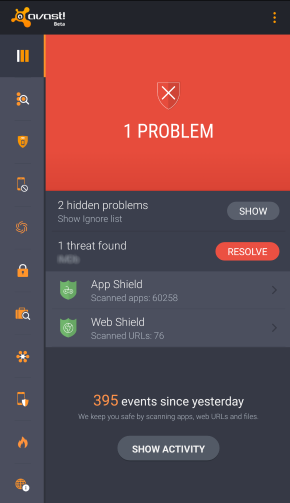
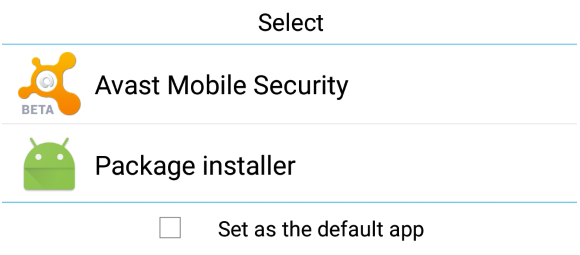
Besides the well known (and default) security options of Android, there is another useful feature that remains more or less unknown by average users: the default app feature. When Android (and also Windows) is about to open a file, it looks into its database to determine which application should be used and launches it. If you set Avast Mobile Security to be run at this preliminary stage of an app’s installation, it will scan the .apk file before it is opened and the installation process has begun. If any mistake or bug is detected, the process is halted and you’ll be given the option to uninstall the app.

If you have already installed Avast in your Android smartphone or tablet and this option is no longer shown, the easiest option will be to uninstall it, reboot and install it again. When the dialog pops up, choose Avast as your default handler for .apk files. As mobile malware reached the one million Android sample mark last year, the Avast database continues to grow exponentially. Avast Mobile Security also performs very well with new and unknown malware, as independent tests show us.

You can be safer and have a complete peace of mind while using third-party stores if you keep Avast Mobile Security running as your default installation package app. Download Avast Mobile Security for free on the Google Play Store.

Your Online Purchases Could be in Danger Thanks to a Breach in Magento’s Security

To the usual misgivings of many Internet users, who are still suspicious about buying over the Internet, we now have to add certain security problems that have damaged the image of e-commerce.

The latest worrying episode has affected the popular management software, Magento – a group of attackers has taken advantage of a crack in its security, broken into the database and stolen personal information related to its users.

buy online safely

Over 100,000 stores worldwide use this tool, among those at risk are eBay (which owns the company), Nike Running and Lenovo. The researchers found that the cybercriminals infected the most sensitive part of the system with a malware – one designed to collect payment data.

The most worrying thing is that the victims didn’t even notice what had happened until they checked movements in their personal accounts. It was then that they realized that someone had stolen their money.

Last April a similar security gap was detected in this online retailer. Then, just as the company learned about this problem, Magento gave its customers a security fix that offset any possible leakage of information.

Far from wanting to make you fear shopping online, cases like this are used to point out the risks we face, and offer some tips to avoid, as much as possible, becoming the victim of a cyberattack when using an e-commerce platform.

6 tips to avoid security breaches in your online shopping

  1. One of the first steps you can take is to make all your online purchases through a payment service. There are many experts who claim that tools such as PayPal, with the incorporated security tools and encryption technology, can shield you from harm. In addition, it is advisable to link the account to a credit card in order to enjoy the protection measures implemented by the banks in their online payment process.
  2. Speaking of credit cards, one of the recommendations from the experts is to only use one card for your online purchases. So, if anything happens you will know which one to cancel to stop cybercriminals from emptying your account. We also recommend checking your balance often to discover any unauthorized movement before it’s too late.

padlock

  1. Another good idea in these cases is to keep, either printed or on the computer, a receipt of each purchase you make through the Internet. That way, if some day you have the misfortune of suffering information theft, you will be able to show those documents to prove the payments you made and those made by an intruder without your consent.
  2. On the other hand, a situation that you should avoid at all costs is to make purchases while using public WiFi. As a general rule, they are not safe – someone with evil intentions and the necessary knowledge could intercept the data from your computer and obtain your passwords or your credit card information. If you must access a public WiFi network, be sure to use a virtual private network (VPN).
  3. Finally, changing the passwords that you use in different online shops every so often could save you from any possible headaches.

The post Your Online Purchases Could be in Danger Thanks to a Breach in Magento’s Security appeared first on MediaCenter Panda Security.

Adobe Flash zero-day vulnerabilities threaten your security

Last Friday, Adobe confirmed two new “critical” zero-day flaws in the Adobe Flash Player browser plugin 18.0.0.204 – and earlier versions – for Windows, Mac OS X, and Linux. Today, a third flaw was found. Adobe Flash Player is a widely distributed multimedia and application player used to enhance the user experience when visiting web pages or reading email messages.

We recommend disabling Flash until the bugs are fixed. 

Three "critical" zero-day flaws in Adobe Flash Player discovered

Three “critical” Flash zero-day flaws in Adobe Flash Player discovered

Security experts say the two flaws were found in stolen files that were dumped earlier this month from Hacking Team, an Italian security firm that sells communication interception and surveillance software to governments around the world. The third one came from the same documents.

“Successful exploitation could cause a crash and potentially allow an attacker to take control of the affected system,” Adobe said in their blog. “Depending on the privileges associated with the user account targeted, an attacker could install programs on the system, alter or delete data, create new accounts with similar user rights, or cause a denial-of-service.”

“Adobe is aware of reports that exploits targeting these vulnerabilities have been published publicly. Adobe expects to make updates available during the week of July 12, 2015,” the blog said.

We recommend you do the following:

  • Remove or disable Flash until Adobe sends out a fix.
  • Once a patch is released by Adobe, update immediately.
  • Run all software as a non-privileged user (one without administrative privileges) to diminish the effects of a successful attack.
  • Avoid visiting websites or following links provided by unknown or untrusted sources.
  • Avoid clicking on links contained in emails or attachments from unknown sources.

To verify the version of Adobe Flash Player installed on your system, access the About Flash Player page, or right-click on content running in Flash Player and select “About Adobe (or Macromedia) Flash Player” from the menu. If you use multiple browsers, perform the check for each browser you have installed on your system.

Affected systems:

  • Adobe Flash Player 18.0.0.203 and earlier for Windows and Macintosh
  • Adobe Flash Player 18.0.0.204 and earlier for Linux installed with Google Chrome
  • Adobe Flash Player Extended Support Release 13.0.0.302 and earlier for Windows and Macintosh
  • Adobe Flash Player Extended Support Release 11.2.202.481 and earlier for Linux