
Tag Archives: Internet Security

The security risks posed by working from home

working from home

It offers greater flexibility for employees and makes them more productive – the work from home revolution, which is being offered by more and more businesses, allows workers to complete their jobs from the comfort of their own home. According to Eurostat, 35% of European businesses currently offer their employees the option of working from home.

Although this percentage is lower in some countries (the EU average is 12%, while in the UK the figure rises to 25%), the trend is clear, and businesses that have yet to embrace it do so for fears over security.

If employees manipulate information from their homes, the companies don’t have any control over the security that is in place, which leads to fears over the loss or theft of data.

The fear is logical as a home environment could be much more vulnerable than a corporate one, where the software of the servers offers greater security guarantees.

The existing risks are, in reality, quite varied and extensive. Data loss can arise in various different forms such as a failure in the system that deletes files that haven’t got a secure copy, the theft of a password, or even the computer itself. This could all result in a thief getting is hands on your company’s confidential information.

That said, working from home doesn’t have to be synonymous with danger. For employers to permit their staff to work from home, they first need to put in place a protocol that establishes rules for working from home or outside of the office.

home office

However, there are some measure that workers can take to avoid any shocks. To start with, the use of remote desktops is a possible solution. With them, it is possible to avoid information theft as they allow the employee to connect directly to the company’s server where the information is stored and where there are automatic security copies made.

Passwords and encryptions

Another key point for making working from home safe is the concern over passwords. The theft of that which the employees uses for accessing the company’s network while working out of the office could end up being disastrous, practically handing a huge amount of data to a cybercriminal.

Beyond the corporate server’s passwords, teleworkers that carry out their tasks from home should keep in mind that, when using services and tools on the cloud, that they follow certain steps in creating secure passwords. These including avoiding the use of the same password over and over, making sure to change it frequently, and using a password manager.

That said, passwords aren’t always enough. Although a remote desktop is useful for avoiding the storage of corporate information on a home computer, sometimes it is unavoidable.

In this case, apart from using a safe password, it is important to encrypt confidential information. This way you can avoid a laptop theft resulting in the theft of information. Encrypting archives via the operating system or encrypting the hard drive removes all of this risk.

One way or another, working from home is growing at an unstoppable rate thanks to technology, but it should mean that security has to suffer – the correct technology offers tools so that information isn’t at risk while workers complete their jobs from home.

The post The security risks posed by working from home appeared first on MediaCenter Panda Security.


Demand grows across the world for cybersecurity experts

people

During the second quarter of 2015 there were 230,000 new malware samples created daily. This is one of the alarming details to emerge from the latest PandaLabs report, the security laboratory of Panda Security, which analyzes cyberattacks carried out during this period. The document also reveals that the threats aren’t just directed at individuals, but also at private businesses.

Some example include Ryanair, which suffered a loss of $5 million, or the online dating site AdultFriendFinder, which saw its users’ sensitive information published online.

Businesses are continually becoming more and more conscious of the danger posed by these attacks, both in economic terms and what it means for their customers. According to a survey carried out by PwC, budgeting for IT security, on a global level, has grown by 24% during the last year.

money

Businesses nowadays can count on a team of experienced and specialized security experts who can help to protect their networks and systems. However, the sheer scale, complexity, and amount of malware that is created by cybercriminals means that, in many cases, IT departments aren’t able to cope with the onslaught.

In the State of Cybersecurity 2015 report, experts from U-Tad analyze the threats that affect businesses, institutions, and individuals. They reflect that, although 37% of companies plan on employing more cybersecurity professionals, 92% of them claim to have problems finding candidates that meet the requirements.

These experts claim that there is a lack of specialized workers in this sector and estimate a shortfall of more than one million people on a global level.

people working

From a business point of view, this information is an opportunity in the cybersecurity market, which will grow from $106 million in 2015 to over $170 million in 2020, according to MarketsandMarkets.

As the U-Tad experts indicate, the sectors most interested in safeguarding their systems against threats are banking, aerospace, and the manufacturing industry. SMEs also need professionals, especially those involved in cloud based storage solutions.

The survey done by U-Tad also reveals another significant statistic – 75% of the organizations surveyed are believed to be exposed to the risked related to the actions of their own employees. Practices such as BYOD (Bring Your Own Device), whose risks we’ve already explained to you, are responsible for this.

In Spain, for example, the National Cybersecurity Institute estimates that there are more than 42,000 professionals working in the IT security sector, and that the demand for workers continues to grow. The organization even offers grants to students, because the only way to cover the demand for professionals is to create specialists that can tackle the goals of the present and future.

The post Demand grows across the world for cybersecurity experts appeared first on MediaCenter Panda Security.

Why Big Data is the new focus for information security

big data

Big Data is the current buzzword in the technology sector, but in fields such as security it is much more than this – businesses are starting to bet strongly on the implementation of tools based on the collection and analyzing of large volumes of data to allow them to detect malicious activity. What started out at a fashionable term has turned into a fundamental part of how we operate.

So, what exactly are the advantages of Big Data? Well, have a think about the current situation in which the use of mobile devices is growing, the Internet of Things has arrived, the number of Internet users is reaching new highs, and quickly you realize that all of this is prompting an increase in the number of accesses, transactions, users, and vulnerabilities for technology systems. This results in a surge in raw data (on the World Wide Web, on databases, or on server logs), which is increasingly more complex and varied, and generated rapidly.

Given these circumstances, we are encouraged to adopt tools that are capable of capturing and processing all of this information, helping to visualize its flow and apply automatic learning techniques that are capable of discovering patterns and detecting anomalies.

Big Data and Machine Learning: looking for a needle in a haystack

A lot of existing cyberattacks have something in common – they are designed to block the noises made by IDS/IPS alters (a medium-sized company could experience tens of thousands of alerts each day), hiding itself among the large amount of information generated by the daily operations of the targeted businesses. The key to detecting these intrusions lies in recognizing this small trail of anomalies, which is like a modern version of finding a needle in a haystack. Luckily, this is exactly what Big Data does.

Faced with the daily wave of alerts, it is inevitable that a human alone would be incapable of detecting, in real-time, unusual concentrations of attack with specific sources, types, or aims. However, where the human fails, algorithms of machine learning (low-level algorithms that don’t follow specific instructions, but rather detect patterns in the data) are able to “learn” normal system activity and detect, in real-time, any unusual activity on the device.

The key for using Big Data for security analysis is based on the promise that while humans are less effective given the increase in the amount of data to analyze, machines can use this information to improve the detection of anomalies, in the same way that surveys are more reliable when they include more people.

Adaptive Defense, Panda’s Big Data based solution

Adaptive Defense, a product recently launched by Panda to put an end to APTs, a new generation malware that traditional antiviruses are incapable of combatting, is an example of how to successfully apply Big Data and Machine Learning to security tools.

Adaptive Defense is capable of continuously analyzing, in real-time, software that tries to run on a system, automatically classifying all of the applications thanks to the Machine Learning algorithms. This allows the user to receive immediate alerts with detailed reports explaining the nature and activity of the malware, and even activating blocking modes that only allow for the running of software classified as goodware.

Keep in mind: Big Data is data, too

Using Big Data as a central tool in cybersecurity strategies beings with it, as we’ve already seen, an extensive list of advantages, but it also generates new worries. If the analysis of these massive volumes of data perfects the detection of malicious activity that is capable of generating leaks, the possibility that this new type of data could cause a leak could have massive legal and trust repercussions than we have ever seen.

The post Why Big Data is the new focus for information security appeared first on MediaCenter Panda Security.

Black Friday and Cyber Monday: How to shop safely online

shopping online

As the year draws to a close, many retailers take the opportunity to slash the prices on goods, allowing us to take advantage of some great offers. With Christmas just around the corner, events such as Black Friday are great ways to get gifts for friends and family at significantly lower prices.

However, the if the idea of being surrounded by hundreds of frantic shoppers, worn out sales assistants, and long queues fills you with dread, then perhaps Cyber Monday is the shopping event for you. This term, which was coined in 2005 and falls on the Monday following Thanksgiving in the USA, was thought up by marketers to promote online shopping, with special deals that aren’t available in-store.

So, now that you don’t have to worry about the stressful experience of going to the store, we’ve put together a few tips to ensure you won’t have any stressful experiences after shopping online. Take a look below and make sure your Cyber Monday is a safe and stress-free one!

Black Friday and Cyber Monday: How to shop safely online

  1. Stick to well-known websites

The first thing you can do to be safe while shopping online is to only use trusted, official websites. Start your shopping by going directly to the store’s website as opposed to using a search engine to find what you need. Also, only continue if you see that the website is secure by checking that the URL begins with HTTP and that the lock symbol is present. 

  1. Only use a secure Wi-Fi connection

This is a fundamental one, yet people continue to ignore it. Public Wi-Fi may be convenient, especially if you are relaxing at a café and spot a bargain online which you can’t resist. However, it’s best to carry out purchases from the safety of your home, where you have control over who else is connected to your network.

  1. Check your statements

Keep up to date with all transactions carried out with your bank account as the sooner you spot something unusual, the quicker and easier it will be to avoid bigger problems. If you spot something suspicious, contact your bank immediately.

  1. Be aware of the returns policy

When shopping online, remember that the returns or exchange policy may be different to that in store. Also, some stores may only offer store credit on reduced goods, so always check before you buy.

  1. Keep your computer updated and protected

Giving out your bank details online involves an element of trust, so the best way to ensure that nobody else gets their hands on you sensitive information is to have a protected and up-to-date computer. Keep your operating system updated and always use a trusted antivirus that best fits your needs.

  1. Be wary of email offers

It’s common to be bombarded with emails offering you great discounts or offers, but treat them with suspicion. Avoid clicking on links sent via email and verify that the offers are valid on the official website instead.

The post Black Friday and Cyber Monday: How to shop safely online appeared first on MediaCenter Panda Security.

AVG at the 21st Internet Identity Workshop

The Internet Identity Workshop (IIW) recently held their 21st Meeting and AVG was one of the sponsors.  Once again hosted at the Computer History Museum in Mountain View, California, this academic conference is focused on finding, probing and exploring the issues related to identity management.

The organizers, Phil Windley (@windley) and Kaliya Hamlin (@IdentityWoman) have managed to keep the IIW event rich with content, and suitably engaging to attract a loyal following of technical people.

The core themes of the conference were around trust, identity, privacy and technology – areas that we at AVG are very passionate about!

While a lot of users are quite proficient with the “sticky note system” for managing their internet identity, passwords and usernames – this conference by contrast is aimed at highly technical and advanced solutions that one day might provide a better and more secure alternative.

Technological advancement is happening quickly in the world of identity, and even a relatively new technology such as OAuth 2.0 is old news at IIW, with this year’s conversation all about the Blockchain – a technology utilized by the well-known cryptocurrency, Bitcoin.

Whereas previous identity recommendations have centered around technologies that look like an unbreakable-black-box, the Blockchain discussion is driven by a general consensus for complete transparency underpinned by cryptography that provides security and integrity.

The notion of using a Blockchain, which is a type of ‘distributed ledger’ offers the possibility of providing a secure history of every transaction – a chain of trust, which also acts as a permanent record of your identity that cannot be removed or tampered with.

This model of establishing trust is quite intuitive and human. We trust people who are trusted by others, and so forth. For example, it’s the way Google search rankings work (pages that link to other pages), and the way that SSL certificates are signed so you can trust your banking website.

“No, I am your father!”, from Darth Vader in Star Wars, just wouldn’t have carried the same element of surprise to Luke if they had access to Blockchain technology!


Debunking the myths around secure passwords

keyboard

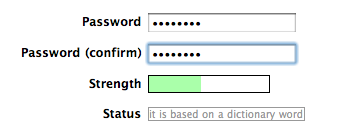
Most websites that we use today generally give you feedback on the passwords that you have created when setting up a new account, rating them either weak or strong. They also advise you to use a mix of upper and lower case letters, along with numbers, to ensure a secure password. However good the advice may be, it doesn’t tell you exactly which order the mix should be in.

By sheer coincidence, it appears that all of us tend to put the upper case letters at the start of the passwords with the numbers taking up the final spaces. This was discovered by a group of security experts who work for Eurecom, an investigation institute based in France.

The results of their study, presented at the last ACM Conference on Computer and Communications Security in Denver, has shown that we are confusing what constitutes a secure password, and that this is putting out privacy at risk.

password

The programs traditionally used by cybercriminals to guess passwords only handled certain combinations until finding the right one.

However, modern methods aren’t based on random guess work. Criminals can now train the software with large lists of passwords – such as the 130 Adobe user passwords that were leaked in 2013 – so as to find the most common combinations. This method allows them to have a greater chance of success in their attacks.

Using this premise as a base, the experts have used a program – similar to the one used by the criminals – to analyze over 10 million passwords. They’ve done this to compile a list of the easiest passwords for criminals to guess.

The result is a “predictability index” that they tested on another 32 million passwords to verify its effectiveness. According to the results, the least common passwords were the most secure. This means that it is important to have a long password that includes symbols as opposed to just upper and lower case letters.

password strength

The aim for users from now on should be to create passwords that are not at all predictable, no matter if they include numbers, upper case, or lower case letters. The group behind the study say that passwords should be longer, even adding a few extra words in necessary.

Their investigation should help people to become more aware when creating new login codes which will help to protect their accounts better. Although they can’t guarantee a bulletproof way of creating passwords, they assure us that their method is the safest yet.

On the other hand, the investigators advise that technology companies begin to place less emphasis on passwords as a means of accessing accounts, and that they look at alternative means where possible. There are always new ways of decrypting login details, which makes them ever more ineffective.

The post Debunking the myths around secure passwords appeared first on MediaCenter Panda Security.

Key Account: How Yahoo hopes to do away with passwords

password

For all we know about creating secure passwords, it’s still a pain that practically every service we use requires one – they’re easy to forget and, if we don’t change them often, a cybercriminal could possibly run amok with them.

So, there are some who believe that traditional text passwords are still necessary, while others think that the future of passwords rests in the hands of emoticons and selfies.

Meanwhile, Yahoo has proposed putting an end to passwords in general, by launching Key Account. As the company explains, this system was borne out of the need to simplify login procedures for users. In fact, with Key Account, it’s now as easy as pushing a button.

The service is already available for Yahoo Mail and allows the user to access the account via their smartphone. All they need to do is click on a button in Key Account and they’ll receive a notification on their smartphone.

This will serve as validation to enter the email account, as it will indicate if the access attempt is legitimate or, on the other hand, if it is suspicious and we suspect that someone is trying to access the account.

yahoo

“It’s safer than a traditional password because once Key Account is activated, even if someone gets hold of the account information, only the user can access it”, explained a spokesperson for the company. So, just like that, the screen of your smartphone has turned itself into a password, and has the ability to block unwarranted access to your account.

Once the smartphone and Key Account are linked there is only one problem and that is if your device is stolen. In this case, Yahoo has established a system that will allow you to verify your identity via email or an SMS that is sent to a different number.

For now, this new method of access is only available on Yahoo’s email platform (from which you can also access Outlook, Hotmail, and AOL) and it’s hoped that by the end of the year Key Account can be used on other services, such as Tumblr.

This is the second attempt that the company has made at making passwords obsolete. In March they created a system of “low demand” and temporary passwords that the user didn’t have to memorize – all they had to do was request it and Yahoo sent it to their phone via SMS. However, it seems that the company has decided to bet on a system that is safer than a text message.

So it seems that traditional passwords are on the way out. With any luck, it won’t be long before we can forget them forever, without compromising our security.

The post Key Account: How Yahoo hopes to do away with passwords appeared first on MediaCenter Panda Security.

The goal of early cyber threat detection

malware

The early detection of cyber threats has long been one of the biggest goals for the IT security sector. The rapid evolution of the different types of cyber-attacks has rendered the traditional detection systems helpless to differentiate between, and detect, attack such as advanced persistent threats (APT), which are digital attacks directed at certain systems over a large period of time.

APTs as an example of a problem

Network intrusion detection systems (NIDS) try to discover unauthorized access to certain resources on the network by analyzing the data traffic to detect signs of malicious activity. Until now they have been effective in their defense against traditional cyber threats such as DoS attacks (Denial of Service), Trojans, buffer overflow, etc.

However, the rapid advancement that these new types of threats are generating calls for ever more advanced defense mechanisms. Among these attack are the APTs – large scale attacks that are easily detected during the final stages of attack by observing sudden changes in traffic on the network. That said, the first stages of the attack generate changes in traffic that aren’t so easy to detect.

NIDS have proven to be ineffective in stopping this type of threat, owing to their inability to evaluate planned cyberattacks that encompass coordinated acts, yet appear isolated and innocuous.

Early detection based on productivity

According to the consultancy firm Gartner, “there is a general consensus that advanced attacks are able to evade traditional security controls that are in place in many firms at the moment, and remain undetected on our systems for a long period of time. The threat is real. We are in danger; we’re just not aware of it yet.”

virus

To put an end to these types of complex intrusions there is a need to implement new security policies based on proactive prevention mechanisms that will reduce the waiting time in detecting unknown malware to zero (for example, by using machine learning techniques that monitor the system looking for unusual behavior and blocking it). It isn’t always possible to maximize the detection of said malware without generating false positives, however.

This delay should be a fundamental worry for the cybersecurity sector, and closing the enormous window of opportunity should be its main task – managing to improve real-time detection of digital threats means simplifying the alter filter and improving answer time in order to contain attacks.

Adaptive Defense 360, Panda’s solution

Panda Security has a product specifically designed to close the window of opportunity ion malware, which can open Zero-Day attacks and APTs on your corporate systems. This product is called Adaptive Defense 360.

The technology integrated in it allow for the detection and blocking of malicious software due to real-time monitoring of its behavior. The customer will receive an immediate alert once malware has been detected, and can rest assured that the combination of machine learning algorithms and our expert analysis will rule out false positives.

The post The goal of early cyber threat detection appeared first on MediaCenter Panda Security.

How to avoid disaster in the event of credit card theft

safe credit card

When it comes to choosing PINs for your credit card and cellphone you’ve done everything right – you avoided the temptation to use the year you were born in for either and both have different codes. However, these precautions could all be for nothing if a cybercriminal gets in the way of your credit card and the sales point.

The standard verification process for payments by debit or credit cards consists of a card with an integrated chip and a PIN. However, a group of investigators from the École Normale Supérieure (ENS) in Paris have just published a report which explains how a group of attackers found a way around this system and managed to steal €600,000 in stolen cards. The good news, fortunately, is that they were arrested not long after.

This group of attackers stole 40 credit cards which, supposedly, should have been useless without knowledge of the card’s PIN. However, the criminals were crafty and modified the cards by adding a second chip inside the card which was impossible to spot by looking at it.

When the card was placed in the POS (Point of Sales Terminal), they took advantage of the EMV’s vulnerabilities and carried out a “man-in-the-middle” attack which allows them to intercept the communications between the card and the system.

In that moment the second chip came into play and allowed them to complete the transaction using any PIN. This turned out to be an easy method that they used more than 7,000 times.

credit card

Despite the investigators saying that the vulnerabilities have been corrected and that the fraudsters arrested, this case highlights the importance of contacting your bank if your wallet is stolen or if you lose your card.

What’s more, the modification of the card isn’t the only way that they can fleece you if the card ends up in their possession. Ross Anderson, professor of Security Engineering at the University of Cambridge, has spent years investigating how attackers could take control of a credit card and has recently summed up some of the paths open to cybercriminals.

Some of the methods that cybercriminals could use include copying the card information from a POS to send to another one, passing the information of a chip and PIN card to a magnetic stripe card, or even manipulating a POS with the aim of intercepting a card during a transaction and sending the information to a cellphone.

So, what can users do now that they know about these vulnerabilities? In reality, there isn’t really a lot that they can as the majority of these frauds take advantage of the weaknesses in the standard POS, which means card makers and banks should be worries about making transactions as safe as possible.

Some recommendations include only paying with card in places you trust, not keeping all of your savings in the same account, and checking your account often to ensure that there are no unusual movements taking place.

credits card

Being aware of the vulnerabilities of credit cards could also help us to choose other alternatives, such as cards that read our fingerprints. This is a method of protection that no cyberattacker can steal from us.

Last year MasterCard unveiled the first card with a fingerprint reader in conjunction with Zwipe, a Norwegian startup. We have also seen large credit card companies say that they will experiment with facial recognition technology for online purchases.

This step could see then end of traditional passwords in the next few years and it could be a solution to the vulnerabilities facing chip and PIN cards. In the meantime, the best thing to do is keep informed of the risks that you face when using your credit card.

The post How to avoid disaster in the event of credit card theft appeared first on MediaCenter Panda Security.

How to avoid Efast Browser, the latest adware to hit Chrome

Efast adware browser

Another day, another malware to tackle. It seems that hackers are churning out new ways to trick us on a weekly basis as security researchers have uncovered the latest threat to Internet users. Despite the likes of Google strengthening its security to combat these attacks, the culprits are continuously changing and adapting, and this latest adware has the potential to lead to serious privacy issues and even identity theft.

Named eFast Browser, this new adware seemingly works in the same way as many similar adwares that we’ve seen in the past – it bombards your browser with annoying pop-ups and redirects you to unwanted websites, while tracking your every move online, allowing more frustrating advertisements to be sent your way. What makes eFast Browser unique, however, is that unlike previous adwares which looked to take over your current browser, it actively sets out to replace your browser by deleting Chrome and taking its place. In doing so, it hijacks as many links and file associations as possible and features an icon that bears more than a passing resemblance to the Chrome icon.

The software comes from a company calling itself Clara Labs, which is also behind other similar browsers such as BoBrowser, Tortuga, and Unico. All claim to be legitimate and improve the Internet browsing experience yet none provide the functionality promised. The developers state that eFast Browser is a legitimate chromium-based web browser that largely improves the Internet browsing experience by generating the most relevant search results, displaying special deals or discounts available on shopping websites, etc. However, users need to be aware that adware-type applications such as eFast Browser are solely designed to generate revenue for the developers with little care for the user experience.

adware desktop

The most worrying aspect of this malicious adware is that it gathers information on your browsing which it then shares with third parties. The data that it gathers has the potential to be personally identifiable which, in turn, could lead to problems such as identity theft.

According to PCrisk, the adware tries to get on your computer by burrowing itself into the installers for free software from dubious sources on the web. The experts recommend a two-step process to avoid accidentally installing eFast Browser and other potentially unwanted programs (PUPs) on your computer. You should “never rush when downloading and installing software – use the ‘Custom’ or ‘Advanced’ settings and closely analyze all steps. Furthermore, all additionally-included applications should be cancelled, since bundled software is often classed as rogue, and thus, should never be installed.”

As always, when you are using the Internet it pays to be cautious. By following a few simple steps you can be assured that your online experience won’t turn out to be a frightening one. Cybercriminals are lurking in every part of the web, so always keep your eyes peeled!

The post How to avoid Efast Browser, the latest adware to hit Chrome appeared first on MediaCenter Panda Security.