Can your next password be found in your browsing history?

Some companies try to help us out and make the login process into mobile phones and other devices easier – the most recent example being Yahoo with its ideas of using you ear and knuckles to do so. It sounds cool, but will it help you getting rid of the good old password altogether? Probably not.

Researchers believe that a very personalized authentication process could help out though. It would be a bit creepy if your smartphone asked you “Which YouTube-Video did you watch yesterday evening”, but at the same time it would also be pretty secure.  Romit Roy Choudhury, an associate professor at the University of Illinois who researched the topic and wrote a paper on it, says: “Whenever there’s something you and your phone share and no one else knows, that’s a secret, and that can be used as a key.”

There are some drawbacks though:

  • We all have horrible memories. To actually work, the event apparently has to be unique enough to jog our memory, and not much older than a day.
  • Good friends might be able to predict some of the answers (and consequently your password).

Overall the results were not bad. The study showed that the password prompt works well enough – users were able to answer three questions correctly 95% of the time.

For more information head over to the article from MIT Technology Review.

The post Can your next password be found in your browsing history? appeared first on Avira Blog.

“Mobilegeddon” – Is Your Website Mobile Friendly?

Starting last week, Google’s search algorithm is now ranking mobile-friendly Websites above others.   Bottom line: “If your site’s pages aren’t mobile-friendly, there may be a significant decrease in mobile traffic from Google Search,” Google itself says.

Why the change? Ultimately, the move reflects how people are using the Internet.   Mobile is being used for everything from searches to banking, and not just while people are on the go. As Google notes, in the US, 94% of people with smartphones search for local information on their phones; 77% of mobile searches occur at home or at work.

The latest data from the Pew Internet Project showed that 64% of American adults own a smartphone. Similarly, comScore reported 60% of Internet traffic is from mobile devices. These numbers are consistent with AVG’s own research conducted with MEF (Mobile Economic Forum) and findings that the move to mobile commerce and content is only going up.

So, what makes a website or page “mobile-friendly”?  Since most of us have experienced unfriendly mobile sites, it’s pretty easy to assess at one glance.

The criteria, which Google spelled out last fall when it began calling out “mobile friendly” sites and setting the stage for the current change, includes:

  • Avoids software that is not common on mobile devices, like Flash
  • Uses text that is readable without zooming
  • Sizes content to the screen so users don’t have to scroll horizontally or zoom
  • Places links far enough apart so that the correct one can be easily tapped. “


You can find more details here.

You also can check to see if your own site is mobile-friendly with the Google Mobile-Friendly Test or check the status of your entire site through the Mobile Usability report in Webmaster Tools.  Be prepared. You may be in for a surprise.

While savvy tech companies have been anticipating Google’s change, the impact will no doubt be felt among small businesses that don’t always have the resources to respond to technology changes quickly. And a change in search ranking is one that can have a huge impact on their business!

Experts are predicting that sites that aren’t mobile friendly will see a dramatic fall-off in page hits and localized searches (i.e., foot traffic). In fact, that’s why analysts have taken to calling the change in rather dramatic terms, such as “Mobilegeddon.”

So what to do if you are a small business owner? You’re website has to go mobile!

Fortunately there are a lot more options available than ever before for easily creating new and mobile friendly websites that don’t require spending a lot of money.  Among some of the most popular website building resources are SquareSpace , Wix  and Weebly. You can see a comparison review of the tools here.

Once your website becomes mobile-friendly, Google says it will automatically re-evaluate your pages.  Google also advises that you can expedite the process by using Fetch as Google with Submit to Index to get a mobile-friendly ranking.

The Google move is another reminder that as the world goes increasingly mobile, it presents new challenges and opportunities. But, it’s not only in the way we present our web pages, but also in many aspects of how we do business – including an evolution of how we secure the data and protect the privacy of our mobile customers.  The latter is a matter of consumer trust, which is paramount for businesses in today’s mobile world and why we at AVG are committed to helping businesses do so.

Man so enraged he shoots his computer!

Last week a man in Colorado sparked police action for shooting his computer eight times after becoming frustrated with it malfunctioning. He was detained for discharging a firearm in the city.

“He was having technology problems, so he took it to the back alley and destroyed it” a police spokesman said.

The article in The Gazette amusingly say that “he got tired of fighting with his computer for the last several months”.

I wonder how many of us would like to seek revenge on our computer or device by taking it outside and destroying it. I recently could have done this to my home printer that for some weird reason would no longer connect as a Google Cloud Printer.

The good news is that keeping your computer running quickly and smoothly is not a difficult task. I’ve outlined five tips below that should help keep you from losing your temper with your device!

  1. Run a full system scan to ensure your machine is clean, simple instructions for this are here.
  2. Ensure that you have up to date Anti-Virus software, not only does it need to be installed but it needs to be active and updated. You can download AVG Free Anti-Virus from our website.
  3. Test the configuration of your security software to ensure it is performing the way you expect it to. A simple way to do this is to run the Security Features Check on the AMTSO website.
  4. Once you’re confident the machine is ‘clean’ then download and install a performance enhancing product, there are many on the market and you need to make sure that you choose one that is not snake oil, you can easily check this           through third party awards and reviews. I, of course, recommend AVG PC TuneUp, you can download a trial version here and also checkout the independent reviews listed there.
  1. Once downloaded and installed there are some automated task that you will be prompted to do, I would recommend supplementing these with the following


Hopefully the above will keep you from resorting to taking up arms and destroying your machine. I do understand the frustration though and I am sure shooting the PC felt good at the time.


Follow me on twitter @tonyatavg

SevDesk v1.1 iOS – Persistent Dashboard Vulnerability

Posted by Vulnerability Lab on Apr 30

Document Title:
===============
SevDesk v1.1 iOS – Persistent Dashboard Vulnerability

References (Source):
====================
http://www.vulnerability-lab.com/get_content.php?id=1311

Release Date:
=============
2015-04-23

Vulnerability Laboratory ID (VL-ID):
====================================
1311

Common Vulnerability Scoring System:
====================================
4.2

Product & Service Introduction:…

A Google search is enough to find your lost or stolen mobile phone

google maps

As much as you look for it you can’t find it. It is not on the table where you usually put it, it is not charging… you start fearing, where is it? Has someone stolen it? Have you lost it? Relax, now Google has the answer to your questions!

A simple search in Google is enough to know where your smartphone is (1m give or take). Avoid uncomfortable situations thanks to the new tool provided by Google, ‘Find my phone’.

google

If you want Google to find your Android device you will have to set it into English. For now this tool is only available in this language.

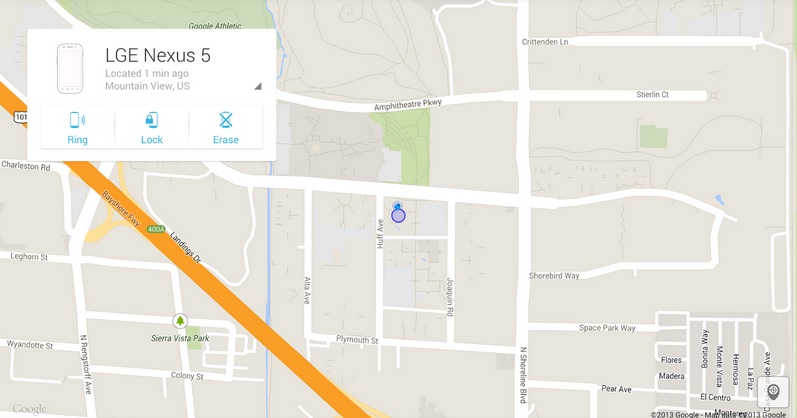
Then you just have to type these three magic words ‘Find my phone’. Google will give you a map with the location of your phone with an accuracy which may vary a few meters, as the service warns.

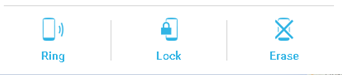
In addition, Google goes a step further and offers several features that users can use depending on their Android device’s location. If you are close to it but still can’t find it, the tools allows you to making it ring, even if it is in silence.

option google

However, if Google pinpoints your smartphone far away from you (because you’ve lost it or it has been stolen), you can use the “Block” option which will block the device and restore all the passwords, or the “Delete” option to delete all the data stored in your device.

These are the same features as the ones in ‘Android Device Manager’. The main innovation of ‘Find my phone’ is that you can know the location of your ‘smartphone’ through Google that now more than ever, has the answers to everything.

In addition to knowing where is your phone these kind of tools can be also used for parental control, allowing parents to know the location of their children thanks to the location of their ‘smartphone’.

To locate your phone with Google’s tracker ‘Find my phone’ or Android Device Manager ‘app’, the Android phone must be on and with the GPS activated. Or connected to a mobile or WiFi network that allow Google to pinpoint, more or less, the location of your phone.

Locate your phone with Panda Mobile Security

If you lose your phone or it gets stolen you can retrieve it with Panda’s Mobile Security geolocation system and anti-theft, our antivirus for Android.

You will be able to track and visualize on a map your Tablet or phone, also block and delete all your data remotely. Prevents others from accessing your most sensitive information.

The post A Google search is enough to find your lost or stolen mobile phone appeared first on MediaCenter Panda Security.