USN-2687-1: Linux kernel (Trusty HWE) vulnerabilities

Ubuntu Security Notice USN-2687-1

28th July, 2015

linux-lts-trusty vulnerabilities

A security issue affects these releases of Ubuntu and its
derivatives:

  • Ubuntu 12.04 LTS

Summary

Several security issues were fixed in the kernel.

Software description

  • linux-lts-trusty
    – Linux hardware enablement kernel from Trusty

Details

Andy Lutomirski discovered a flaw in the Linux kernel’s handling of nested
NMIs (non-maskable interrupts). An unprivileged local user could exploit
this flaw to cause a denial of service (system crash) or potentially
escalate their privileges. (CVE-2015-3290)

Colin King discovered a flaw in the add_key function of the Linux kernel’s
keyring subsystem. A local user could exploit this flaw to cause a denial
of service (memory exhaustion). (CVE-2015-1333)

Andy Lutomirski discovered a flaw that allows user to cause the Linux
kernel to ignore some NMIs (non-maskable interrupts). A local unprivileged
user could exploit this flaw to potentially cause the system to miss
important NMIs resulting in unspecified effects. (CVE-2015-3291)

Andy Lutomirski and Petr Matousek discovered that an NMI (non-maskable
interrupt) that interrupts userspace and encounters an IRET fault is
incorrectly handled by the Linux kernel. An unprivileged local user could
exploit this flaw to cause a denial of service (kernel OOPs), corruption,
or potentially escalate privileges on the system. (CVE-2015-5157)

Update instructions

The problem can be corrected by updating your system to the following
package version:

Ubuntu 12.04 LTS:
linux-image-3.13.0-59-generic

3.13.0-59.98~precise1
linux-image-3.13.0-59-generic-lpae

3.13.0-59.98~precise1

To update your system, please follow these instructions:
https://wiki.ubuntu.com/Security/Upgrades.

After a standard system update you need to reboot your computer to make
all the necessary changes.

ATTENTION: Due to an unavoidable ABI change the kernel updates have
been given a new version number, which requires you to recompile and
reinstall all third party kernel modules you might have installed. If
you use linux-restricted-modules, you have to update that package as
well to get modules which work with the new kernel version. Unless you
manually uninstalled the standard kernel metapackages (e.g. linux-generic,
linux-server, linux-powerpc), a standard system upgrade will automatically
perform this as well.

References

CVE-2015-1333,

CVE-2015-3290,

CVE-2015-3291,

CVE-2015-5157

USN-2688-1: Linux kernel vulnerabilities

Ubuntu Security Notice USN-2688-1

28th July, 2015

linux vulnerabilities

A security issue affects these releases of Ubuntu and its
derivatives:

  • Ubuntu 14.04 LTS

Summary

Several security issues were fixed in the kernel.

Software description

  • linux
    – Linux kernel

Details

Andy Lutomirski discovered a flaw in the Linux kernel’s handling of nested
NMIs (non-maskable interrupts). An unprivileged local user could exploit
this flaw to cause a denial of service (system crash) or potentially
escalate their privileges. (CVE-2015-3290)

Colin King discovered a flaw in the add_key function of the Linux kernel’s
keyring subsystem. A local user could exploit this flaw to cause a denial
of service (memory exhaustion). (CVE-2015-1333)

Andy Lutomirski discovered a flaw that allows user to cause the Linux
kernel to ignore some NMIs (non-maskable interrupts). A local unprivileged
user could exploit this flaw to potentially cause the system to miss
important NMIs resulting in unspecified effects. (CVE-2015-3291)

Andy Lutomirski and Petr Matousek discovered that an NMI (non-maskable
interrupt) that interrupts userspace and encounters an IRET fault is
incorrectly handled by the Linux kernel. An unprivileged local user could
exploit this flaw to cause a denial of service (kernel OOPs), corruption,
or potentially escalate privileges on the system. (CVE-2015-5157)

Update instructions

The problem can be corrected by updating your system to the following
package version:

Ubuntu 14.04 LTS:
linux-image-3.13.0-59-generic

3.13.0-59.98
linux-image-3.13.0-59-powerpc-e500mc

3.13.0-59.98
linux-image-3.13.0-59-lowlatency

3.13.0-59.98
linux-image-3.13.0-59-powerpc-smp

3.13.0-59.98
linux-image-3.13.0-59-powerpc-e500

3.13.0-59.98
linux-image-3.13.0-59-generic-lpae

3.13.0-59.98
linux-image-3.13.0-59-powerpc64-smp

3.13.0-59.98
linux-image-3.13.0-59-powerpc64-emb

3.13.0-59.98

To update your system, please follow these instructions:
https://wiki.ubuntu.com/Security/Upgrades.

After a standard system update you need to reboot your computer to make
all the necessary changes.

ATTENTION: Due to an unavoidable ABI change the kernel updates have
been given a new version number, which requires you to recompile and
reinstall all third party kernel modules you might have installed. If
you use linux-restricted-modules, you have to update that package as
well to get modules which work with the new kernel version. Unless you
manually uninstalled the standard kernel metapackages (e.g. linux-generic,
linux-server, linux-powerpc), a standard system upgrade will automatically
perform this as well.
References

CVE-2015-1333,

CVE-2015-3290,

CVE-2015-3291,

CVE-2015-5157

USN-2689-1: Linux kernel (Utopic HWE) vulnerabilities

Ubuntu Security Notice USN-2689-1

28th July, 2015

linux-lts-utopic vulnerabilities

A security issue affects these releases of Ubuntu and its
derivatives:

  • Ubuntu 14.04 LTS

Summary

Several security issues were fixed in the kernel.

Software description

  • linux-lts-utopic
    – Linux hardware enablement kernel from Utopic

Details

Andy Lutomirski discovered a flaw in the Linux kernel’s handling of nested
NMIs (non-maskable interrupts). An unprivileged local user could exploit
this flaw to cause a denial of service (system crash) or potentially
escalate their privileges. (CVE-2015-3290)

Colin King discovered a flaw in the add_key function of the Linux kernel’s
keyring subsystem. A local user could exploit this flaw to cause a denial
of service (memory exhaustion). (CVE-2015-1333)

Andy Lutomirski discovered a flaw that allows user to cause the Linux
kernel to ignore some NMIs (non-maskable interrupts). A local unprivileged
user could exploit this flaw to potentially cause the system to miss
important NMIs resulting in unspecified effects. (CVE-2015-3291)

Andy Lutomirski and Petr Matousek discovered that an NMI (non-maskable
interrupt) that interrupts userspace and encounters an IRET fault is
incorrectly handled by the Linux kernel. An unprivileged local user could
exploit this flaw to cause a denial of service (kernel OOPs), corruption,
or potentially escalate privileges on the system. (CVE-2015-5157)

Update instructions

The problem can be corrected by updating your system to the following
package version:

Ubuntu 14.04 LTS:
linux-image-3.16.0-45-powerpc64-smp

3.16.0-45.60~14.04.1
linux-image-3.16.0-45-lowlatency

3.16.0-45.60~14.04.1
linux-image-3.16.0-45-generic

3.16.0-45.60~14.04.1
linux-image-3.16.0-45-powerpc-e500mc

3.16.0-45.60~14.04.1
linux-image-3.16.0-45-powerpc64-emb

3.16.0-45.60~14.04.1
linux-image-3.16.0-45-powerpc-smp

3.16.0-45.60~14.04.1
linux-image-3.16.0-45-generic-lpae

3.16.0-45.60~14.04.1

To update your system, please follow these instructions:
https://wiki.ubuntu.com/Security/Upgrades.

After a standard system update you need to reboot your computer to make
all the necessary changes.

ATTENTION: Due to an unavoidable ABI change the kernel updates have
been given a new version number, which requires you to recompile and
reinstall all third party kernel modules you might have installed. If
you use linux-restricted-modules, you have to update that package as
well to get modules which work with the new kernel version. Unless you
manually uninstalled the standard kernel metapackages (e.g. linux-generic,
linux-server, linux-powerpc), a standard system upgrade will automatically
perform this as well.
References

CVE-2015-1333,

CVE-2015-3290,

CVE-2015-3291,

CVE-2015-5157

USN-2690-1: Linux kernel (Vivid HWE) vulnerabilities

Ubuntu Security Notice USN-2690-1

28th July, 2015

linux-lts-vivid vulnerabilities

A security issue affects these releases of Ubuntu and its
derivatives:

  • Ubuntu 14.04 LTS

Summary

Several security issues were fixed in the kernel.

Software description

  • linux-lts-vivid
    – Linux hardware enablement kernel from Vivid

Details

Andy Lutomirski discovered a flaw in the Linux kernel’s handling of nested
NMIs (non-maskable interrupts). An unprivileged local user could exploit
this flaw to cause a denial of service (system crash) or potentially
escalate their privileges. (CVE-2015-3290)

Colin King discovered a flaw in the add_key function of the Linux kernel’s
keyring subsystem. A local user could exploit this flaw to cause a denial
of service (memory exhaustion). (CVE-2015-1333)

Andy Lutomirski discovered a flaw that allows user to cause the Linux
kernel to ignore some NMIs (non-maskable interrupts). A local unprivileged
user could exploit this flaw to potentially cause the system to miss
important NMIs resulting in unspecified effects. (CVE-2015-3291)

Andy Lutomirski and Petr Matousek discovered that an NMI (non-maskable
interrupt) that interrupts userspace and encounters an IRET fault is
incorrectly handled by the Linux kernel. An unprivileged local user could
exploit this flaw to cause a denial of service (kernel OOPs), corruption,
or potentially escalate privileges on the system. (CVE-2015-5157)

Update instructions

The problem can be corrected by updating your system to the following
package version:

Ubuntu 14.04 LTS:
linux-image-3.19.0-25-generic

3.19.0-25.26~14.04.1
linux-image-3.19.0-25-powerpc64-emb

3.19.0-25.26~14.04.1
linux-image-3.19.0-25-lowlatency

3.19.0-25.26~14.04.1
linux-image-3.19.0-25-powerpc64-smp

3.19.0-25.26~14.04.1
linux-image-3.19.0-25-generic-lpae

3.19.0-25.26~14.04.1
linux-image-3.19.0-25-powerpc-smp

3.19.0-25.26~14.04.1
linux-image-3.19.0-25-powerpc-e500mc

3.19.0-25.26~14.04.1

To update your system, please follow these instructions:
https://wiki.ubuntu.com/Security/Upgrades.

After a standard system update you need to reboot your computer to make
all the necessary changes.

ATTENTION: Due to an unavoidable ABI change the kernel updates have
been given a new version number, which requires you to recompile and
reinstall all third party kernel modules you might have installed. If
you use linux-restricted-modules, you have to update that package as
well to get modules which work with the new kernel version. Unless you
manually uninstalled the standard kernel metapackages (e.g. linux-generic,
linux-server, linux-powerpc), a standard system upgrade will automatically
perform this as well.
References

CVE-2015-1333,

CVE-2015-3290,

CVE-2015-3291,

CVE-2015-5157

USN-2691-1: Linux kernel vulnerabilities

Ubuntu Security Notice USN-2691-1

28th July, 2015

linux vulnerabilities

A security issue affects these releases of Ubuntu and its
derivatives:

  • Ubuntu 15.04

Summary

Several security issues were fixed in the kernel.

Software description

  • linux
    – Linux kernel

Details

Andy Lutomirski discovered a flaw in the Linux kernel’s handling of nested
NMIs (non-maskable interrupts). An unprivileged local user could exploit
this flaw to cause a denial of service (system crash) or potentially
escalate their privileges. (CVE-2015-3290)

Colin King discovered a flaw in the add_key function of the Linux kernel’s
keyring subsystem. A local user could exploit this flaw to cause a denial
of service (memory exhaustion). (CVE-2015-1333)

Andy Lutomirski discovered a flaw that allows user to cause the Linux
kernel to ignore some NMIs (non-maskable interrupts). A local unprivileged
user could exploit this flaw to potentially cause the system to miss
important NMIs resulting in unspecified effects. (CVE-2015-3291)

Andy Lutomirski and Petr Matousek discovered that an NMI (non-maskable
interrupt) that interrupts userspace and encounters an IRET fault is
incorrectly handled by the Linux kernel. An unprivileged local user could
exploit this flaw to cause a denial of service (kernel OOPs), corruption,
or potentially escalate privileges on the system. (CVE-2015-5157)

Update instructions

The problem can be corrected by updating your system to the following
package version:

Ubuntu 15.04:
linux-image-3.19.0-25-generic

3.19.0-25.26
linux-image-3.19.0-25-powerpc64-emb

3.19.0-25.26
linux-image-3.19.0-25-lowlatency

3.19.0-25.26
linux-image-3.19.0-25-powerpc64-smp

3.19.0-25.26
linux-image-3.19.0-25-generic-lpae

3.19.0-25.26
linux-image-3.19.0-25-powerpc-smp

3.19.0-25.26
linux-image-3.19.0-25-powerpc-e500mc

3.19.0-25.26

To update your system, please follow these instructions:
https://wiki.ubuntu.com/Security/Upgrades.

After a standard system update you need to reboot your computer to make
all the necessary changes.

ATTENTION: Due to an unavoidable ABI change the kernel updates have
been given a new version number, which requires you to recompile and
reinstall all third party kernel modules you might have installed. If
you use linux-restricted-modules, you have to update that package as
well to get modules which work with the new kernel version. Unless you
manually uninstalled the standard kernel metapackages (e.g. linux-generic,
linux-server, linux-powerpc), a standard system upgrade will automatically
perform this as well.

References

CVE-2015-1333,

CVE-2015-3290,

CVE-2015-3291,

CVE-2015-5157

CESA-2015:1510 Moderate CentOS 7 clutter SecurityUpdate

CentOS Errata and Security Advisory 2015:1510 Moderate

Upstream details at : https://rhn.redhat.com/errata/RHSA-2015-1510.html

The following updated files have been uploaded and are currently 
syncing to the mirrors: ( sha256sum Filename ) 

x86_64:
422da424622a034a70451c8cf418aa35af6b5ee7270ed7917d7d6567cfd3db1b  clutter-1.14.4-12.el7_1.1.i686.rpm
f4bbca8534f0fa1fff3b5ceb525df8b7a63787439daddcbe4e3105143c551804  clutter-1.14.4-12.el7_1.1.x86_64.rpm
de955940935d5530a58439afb7e6ccf6e59607b93c8085a89f911d76c6dd4241  clutter-devel-1.14.4-12.el7_1.1.i686.rpm
269a7293b0dba679ae8ca3a6e926076f8935a1334cb923e86f38d92173ddf0e4  clutter-devel-1.14.4-12.el7_1.1.x86_64.rpm
cb2f6e0a5e1de37806d8db6afbe1c66f712e7bf5e78d5246725cd3a62fe9cf48  clutter-doc-1.14.4-12.el7_1.1.x86_64.rpm

Source:
5a5c7ba92da951a3b9e973efb0635d08b470ebe9de33c19a746d52f9491e9ac7  clutter-1.14.4-12.el7_1.1.src.rpm


Google Timeline knows everywhere you’ve ever been and can show you

When security experts warn us about sharing and publishing our location data, it’s easy to think that they are exaggerating the importance, and really what harm can come from “checking-in”?

I got a nasty shock this week when I found out about Google’s new Timeline feature which it launched last week.

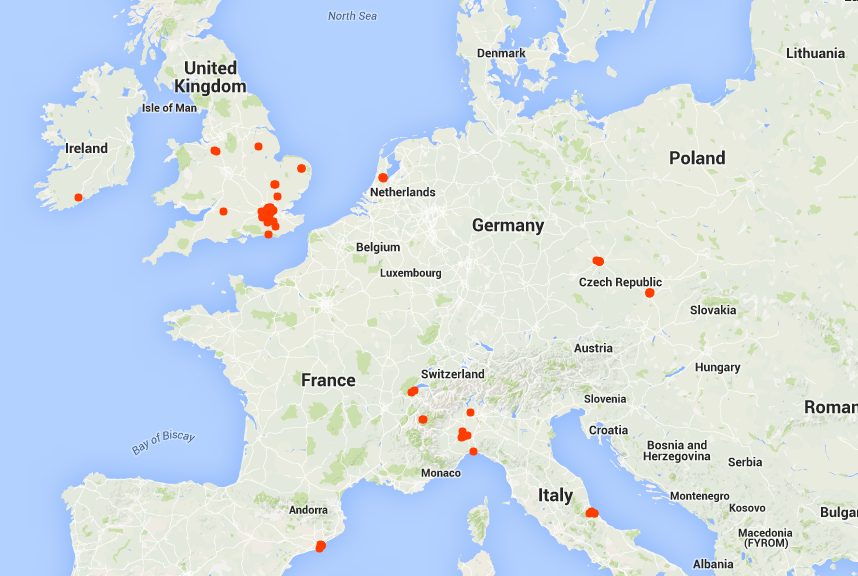
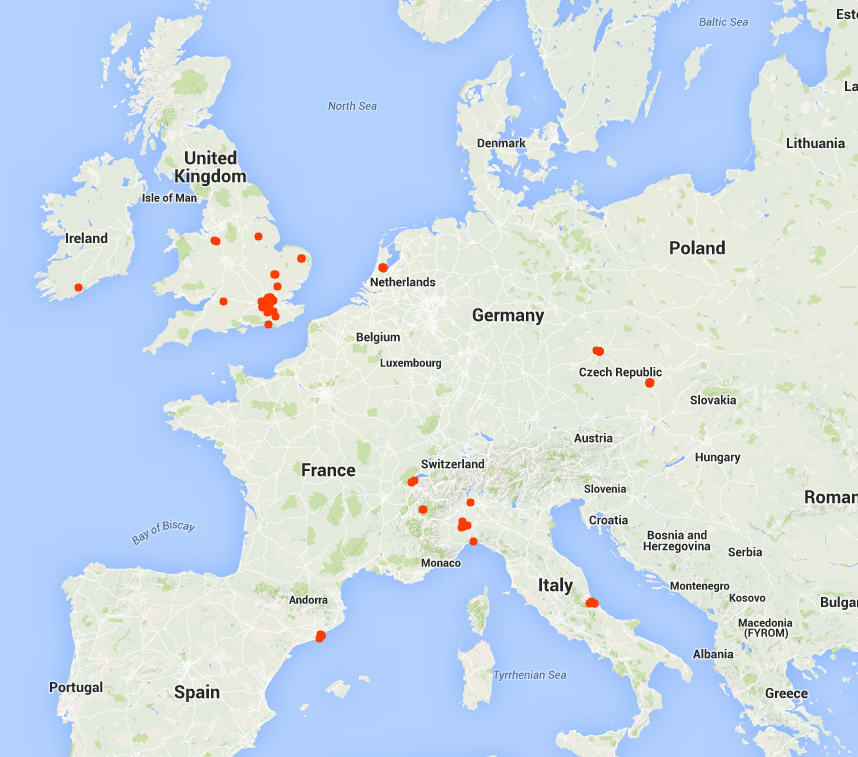
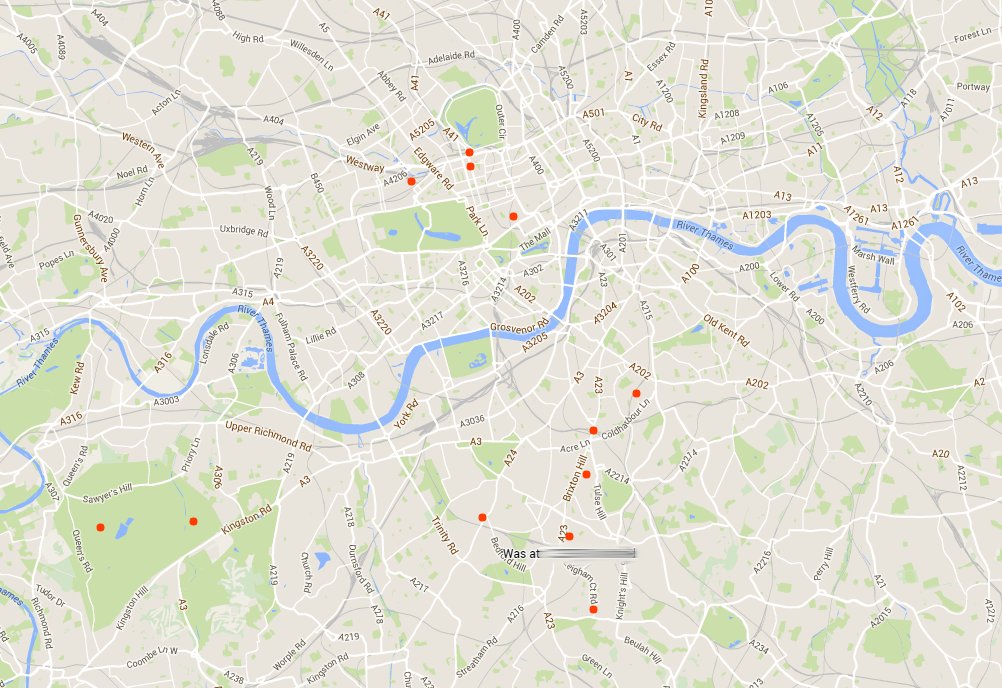
Timeline will dot everywhere you’ve accessed Google Maps and plot it on a map. Mine, for example, looks a bit like this.

Google Timeline


As you can see, a couple of trips around Europe but most dots are in and around London, where I live.

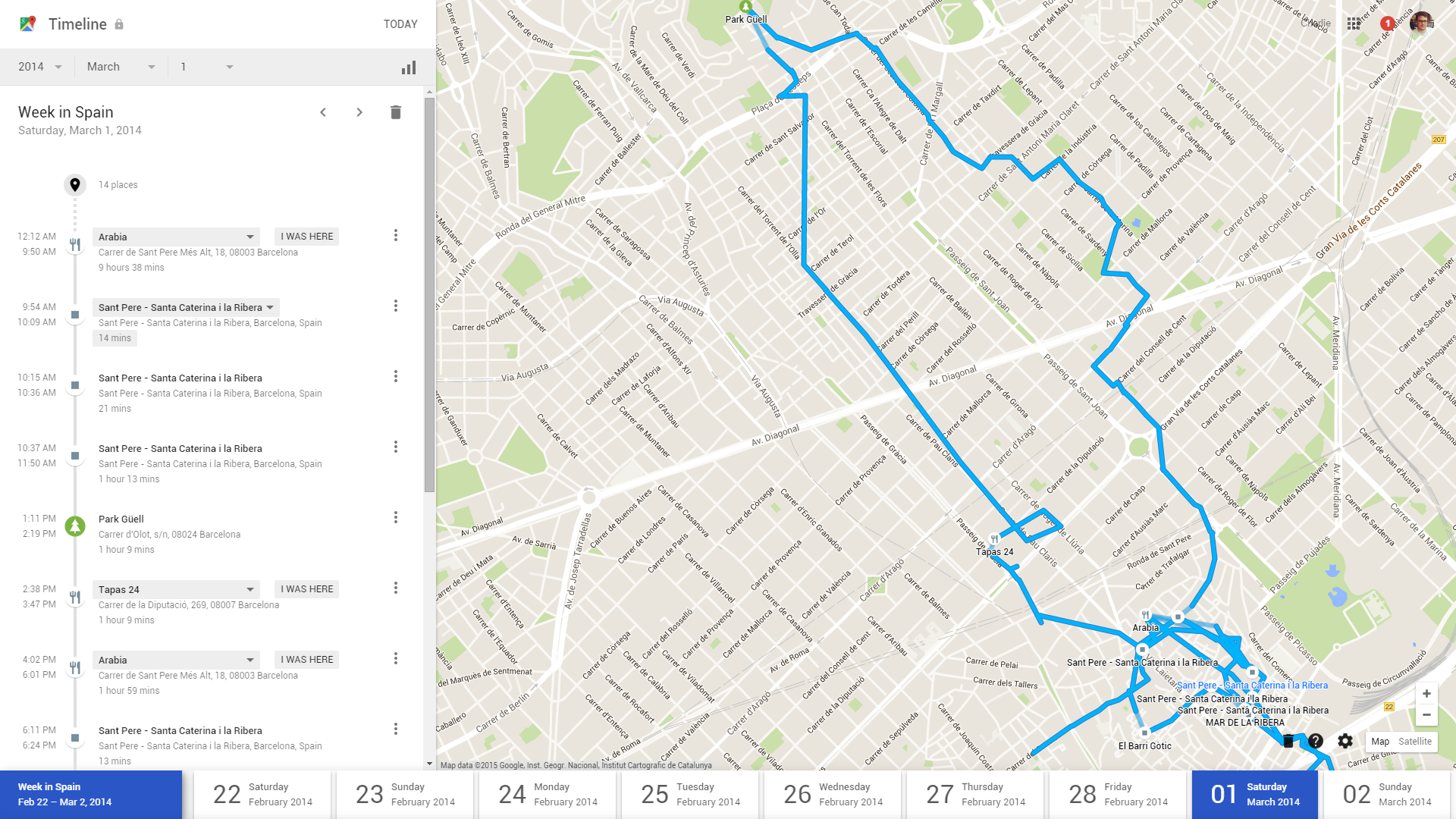
This alone is quite strange to see but it gets creepier. Click on any one of these dots and it opens your journey. Here for example, is my stroll around Barcelona at Mobile World Congress last year.

Timeline 2


This is an exact map of where I went, which roads I took and how long I stayed at each location. Very surreal to see, given that I wasn’t even sure I was actively using my phone to navigate.

Google Timeline allows you to search for your location by date, so if I wanted to know everywhere I went in October 2013, or even on a specific day, I can find out.

Timeline 3


Google Timeline also arranges these journeys for me by calling them useful things like “Day Trip to Cambridge”.

Timeline 4


This is a brand new feature and one that has certainly made me reconsider how much data I leave behind in my everyday life.

Naturally, all of this information is private and only visible to me, but I strongly suggest you access your own Google Timeline and see whether you are comfortable with what information is being stored.


Here’s how to switch it off:

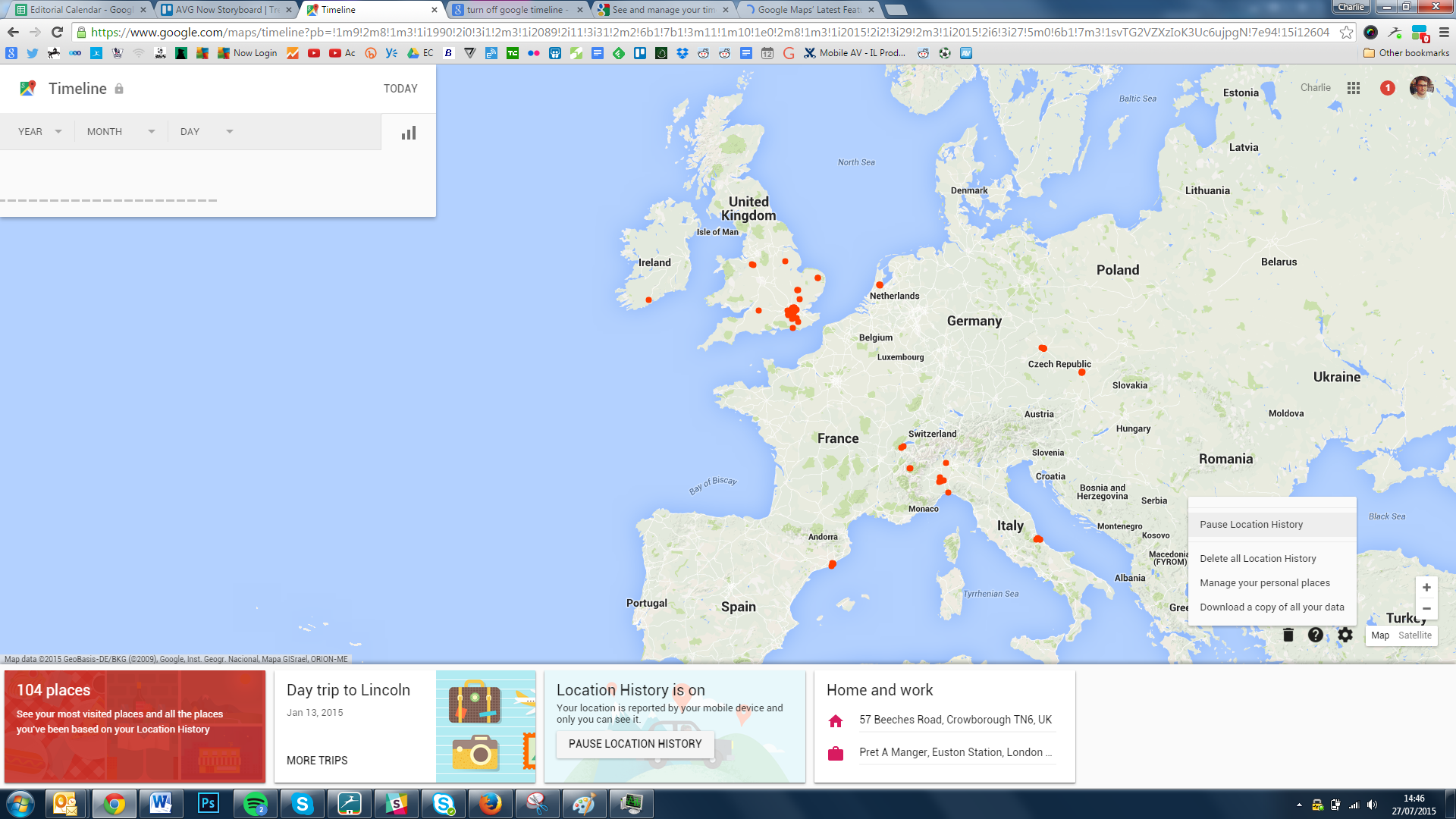
Turning off your location tracking is simple. In Google Timeline, click the cog at the bottom right corner and select Pause Location History.

Timeline 5

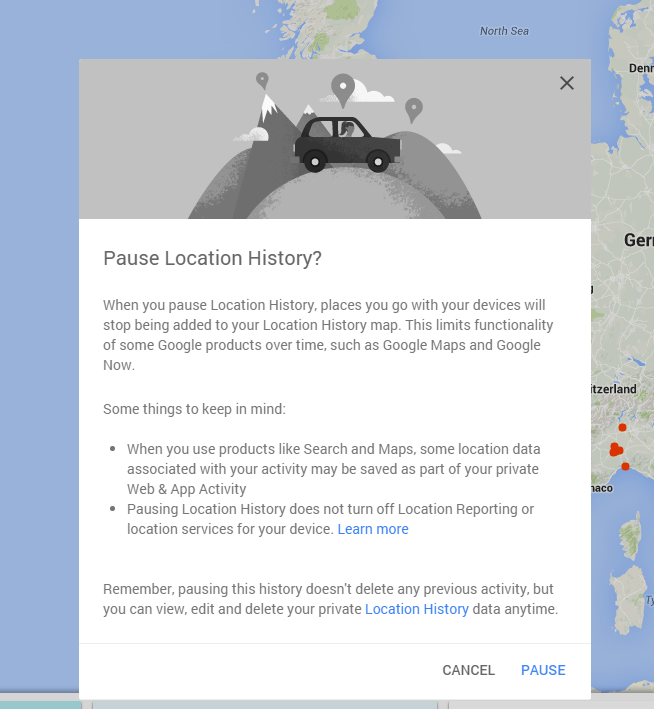
You’ll see the following message

Timeline 6

Click “Pause”.


Within the options, you can also delete all stored location history and even download your history.

SEC Consult SA-20150728-0 :: McAfee Application Control Multiple Vulnerabilities

Posted by SEC Consult Vulnerability Lab on Jul 28

SEC Consult Vulnerability Lab Security Advisory < 20150728-0 >
=======================================================================
title: McAfee Application Control Multiple Vulnerabilities
product: McAfee Application Control
vulnerable version: verified in version 6.1.3.353
fixed version: a fixed version is currently not available
impact: high
homepage:…