Xceedium Xsuite versions 2.3.0 and 2.4.3.0 suffer from command injection, cross site scripting, directory traversal, hard-coded credential, and privilege escalation vulnerabilities.
Monthly Archives: July 2015
NetCracker Resource Management System 8.0 SQL Injection
NetCracker Resource Management System versions 8.0 and below suffer from multiple remote SQL injection vulnerabilities.
NetCracker Resource Management System 8.0 Cross Site Scripting
NetCracker Resource Management System versions 8.0 and below suffer from multiple cross site scripting vulnerabilities.
Microsoft Security Bulletin Revision Increment For July, 2015
This bulletin summary lists one bulletin that has undergone a major revision increment for July, 2015.
Cisco Security Advisory 20150722-tftp
cisco-sa-2015722-tftp.txt – A vulnerability in the TFTP server feature of Cisco IOS and Cisco IOS XE Software could allow an unauthenticated, remote attacker to cause a denial of service (DoS) condition. The TFTP server feature is not enabled by default. Cisco has released software updates that address this vulnerability. Workarounds that mitigate this vulnerability are available.
Red Hat Security Advisory 2015-1485-01
Red Hat Security Advisory 2015-1485-01 – IBM Java SE version 7 Release 1 includes the IBM Java Runtime Environment and the IBM Java Software Development Kit. This update fixes several vulnerabilities in the IBM Java Runtime Environment and the IBM Java Software Development Kit.
Red Hat Security Advisory 2015-1486-01
Red Hat Security Advisory 2015-1486-01 – IBM Java SE version 6 includes the IBM Java Runtime Environment and the IBM Java Software Development Kit. This update fixes several vulnerabilities in the IBM Java Runtime Environment and the IBM Java Software Development Kit.
Google cracks down on ad-injectors
The reality of the web is that not every site is secure. However, most of us get by just fine by sticking to well-known websites from trustworthy companies. Antivirus plays its part by scanning websites and letting you know ahead of time whether or not a site is trustworthy.
While this helps protect against most browser based threats, one area that is commonly exploited is ad-injection. Unlike the bulk of a page’s content, ads tend to be loaded from an external ad server or Content Delivery network (CDN).
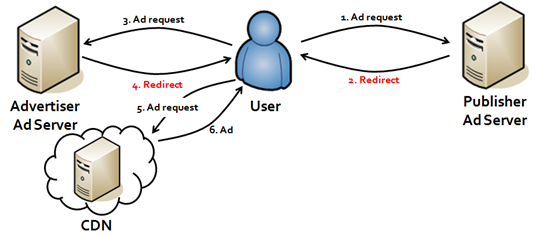
Image source
Attackers have found a way to insert malware into the advertising code, which in some cases can circumvent the web page’s security and serve malicious code to the visitor.
In an effort to combat ad-injection malware, Google’s Safe Browsing team announced that when Chrome detects a possible ad-injection on a site that it will serve its famous “red screen” advising the user that the site is potentially unsafe to visit.
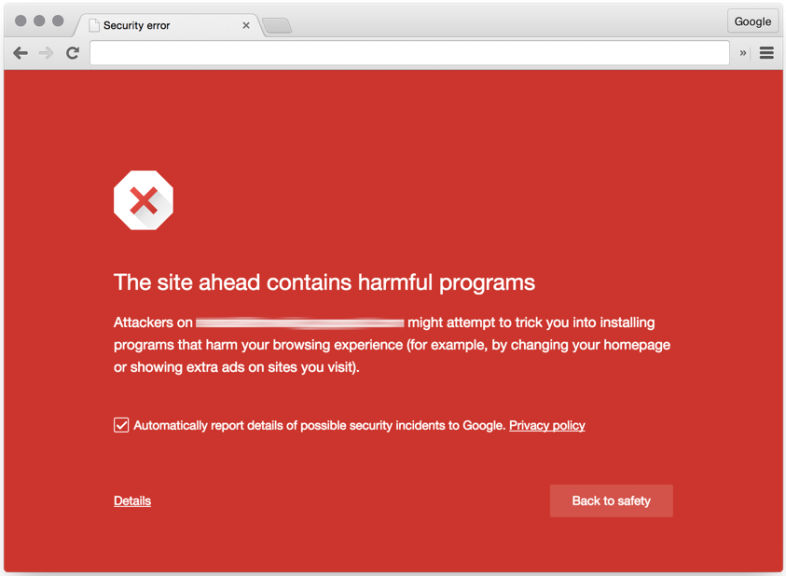
How to activate Google Safe Browsing
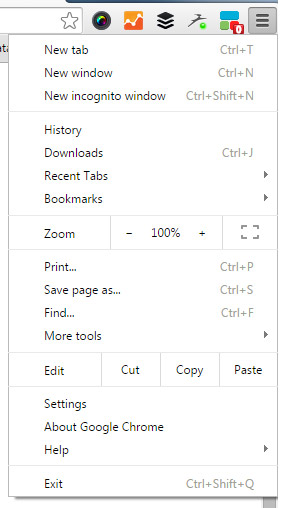
Activating Google Safe Browsing is simple.
In Google Chrome, select the drop down menu in the top right hand corner.
Select “Settings”
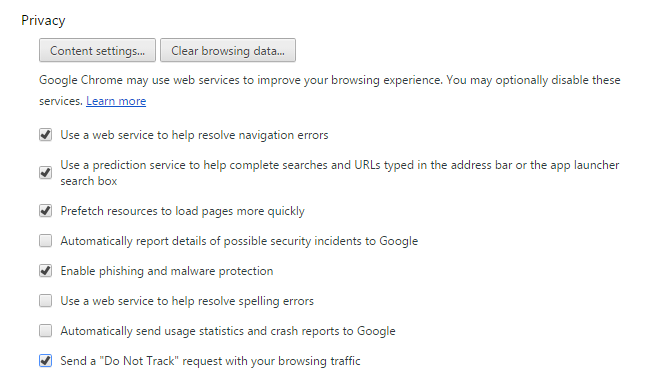
Ensure that the “Enable phishing and malware protection” button is checked.


CEBA-2015:1475 CentOS 7 python-requests BugFixUpdate
CentOS Errata and Bugfix Advisory 2015:1475

Upstream details at : https://rhn.redhat.com/errata/RHBA-2015-1475.html

The following updated files have been uploaded and are currently
syncing to the mirrors: ( sha256sum Filename )

x86_64:
614cc192ffcc0f5763d906845e67afe4851d0e51e42b91caa5cdbb743668a410  python-requests-2.6.0-1.el7_1.noarch.rpm

Source:
2c9cf4ba112090b48c83c1258fe7f651e039829148b498d20ffd0c0b55a63529  python-requests-2.6.0-1.el7_1.src.rpm
CEEA-2015:1473 CentOS 7 python-urllib3Enhancement Update
CentOS Errata and Enhancement Advisory 2015:1473

Upstream details at : https://rhn.redhat.com/errata/RHEA-2015-1473.html

The following updated files have been uploaded and are currently
syncing to the mirrors: ( sha256sum Filename )

x86_64:
b21e62ce993d1f5c86097dc205598fb71a24b096d356c38639b464e1886d3f36  python-urllib3-1.10.2-1.el7_1.noarch.rpm

Source:
9e533d31beb4f5af6dd1a420c449a9f38ef6ad91da30c55e41648d2d79e8ab5a  python-urllib3-1.10.2-1.el7_1.src.rpm