Monthly Archives: August 2015
Hacker's Cut A Corvette's Brakes Via ODB2
Imploding Barrels And Other Highlights From Hackfest Defcon
My Contacts Backup Pro 2.0.1 Command Injection / XSS
My Contacts Backup Pro version 2.0.1 suffers from command injection and cross site scripting vulnerabilities.
Printer Pro 5.4.3 Cross Site Scripting
Printer Pro version 5.4.3 suffers from a cross site scripting vulnerability.
Release for CentOS-6.7 LiveCD and LiveDVD fori386 and x86_64
-----BEGIN PGP SIGNED MESSAGE-----
Hash: SHA1

We are pleased to announce the immediate availability of CentOS-6.7
LiveCD and LiveDVD for the i386 and x86_64 architectures.

Detailed Release Notes are available at
http://wiki.centos.org/Manuals/ReleaseNotes/CentOSLiveDVD6.7
http://wiki.centos.org/Manuals/ReleaseNotes/CentOSLiveCD6.7

+++++++++++++++++++++++
Overview

The CentOS-6.7 LiveDVD and LiveCD are meant to be a Linux environment
suited to be run directly from either Optical media or USB storage
devices. It does not need any persistent storage on a machine, which
also makes it a suitable recovery environment.

The Live media are setup to run as full desktop environments and include
most of the applications used in this role.

+++++++++++++++++++++++
Download

SHA256SUMs :

b13e03dc9768178d749855eb5d33339a6684d669b945f74a1fecb0a61fa248f2
CentOS-6.7-i386-LiveCD.iso

ff73d6cd00f56ba08a607aab707e5000be5cdc67b5c65a7283c37c24f1b88198
CentOS-6.7-i386-LiveDVD.iso

bc8e102f93982b311b1cfd61218113aa08a3b251bf7b4c4468cdbeb5e80dff0a
CentOS-6.7-x86_64-LiveCD.iso

2f320093024cf586ad256d8ae41bef1fe2c03b79f3854d3e4500d9e76e052c09
CentOS-6.7-x86_64-LiveDVD.iso


The CentOS-6.7 Live media images are released to all external mirrors and
available for download now. List of mirrors is available at these urls :
http://isoredirect.centos.org/centos/6/isos/i386/
http://isoredirect.centos.org/centos/6/isos/x86_64/

Due to the size of these DVDs, torrents have also been released and are
being seeded at this time. The torrents are available at:
http://mirror.centos.org/centos/6/isos/x86_64/CentOS-6.7-x86_64-LiveDVD.torrent
http://mirror.centos.org/centos/6/isos/x86_64/CentOS-6.7-x86_64-LiveCD.torrent
http://mirror.centos.org/centos/6/isos/i386/CentOS-6.7-i386-LiveDVD.torrent
http://mirror.centos.org/centos/6/isos/i386/CentOS-6.7-i386-LiveCD.torrent

Once you download the images, its important to verify contents using the
sha256sum utility, against the published sums here.

+++++++++++++++++++++++
Notes

You can now install the Live environment to your hard disk.
Please note that you need more that 512Mb of ram to be able to use
that 'iinstall to hard drive' feature (If you have less than 512Mb of
ram, you can install to disk but in
text-mode, meaning that instead of clicking on the desktop icon, you
have to launch a gnome-terminal and launch the 'liveinst' command from
within the terminal)

There is no upstream Live media product. The Live media produced within
the CentOS Project is based on and around the livemedia tools from the
Fedora Project.

These LiveCD and LiveDVD only contains content found within the primary
CentOS-6 distribution. No package from outside the distribution was
included and
no package has been changed from whats included in the base  distribution.

We appreciate all forms of feedback about these LiveDVD, including
specific application inclusion requests or feature changes in future
releases. The best place to provide this feedback is via the
centos-devel mailing list ( http://lists.centos.org/ ) and feature
requests via the issue tracker ( http://bugs.centos.org/ ).


- --

Fabian Arrotin
The CentOS Project | http://www.centos.org
gpg key: 56BEC54E | twitter: < at >arrfab
-----BEGIN PGP SIGNATURE-----
Version: GnuPG v2.0.22 (GNU/Linux)

iEYEARECAAYFAlXJ8CIACgkQnVkHo1a+xU4mUQCdE/jMS/7Le8yen/8RZ3vRYb6i
+R4An3LbmVQQ9ZIZWSIp41HjYe8wyjRX
=gDx4
-----END PGP SIGNATURE-----
Facebook data security loophole ‘needs to be fixed’
A data security loophole discovered in Facebook needs to be fixed, according to a software engineer.
The post Facebook data security loophole ‘needs to be fixed’ appeared first on We Live Security.

Firefox Under Fire: Anatomy of latest 0-day attack
The recent Firefox attacks are an example of active in-the-wild exploitation of a serious software vulnerability.
The post Firefox Under Fire: Anatomy of latest 0-day attack appeared first on We Live Security.

6 child geniuses destined for a career in cybersecurity
There is a huge shortage of skilled professionals in cybersecurity. We take a look at six young geniuses who may be the future of the industry.
The post 6 child geniuses destined for a career in cybersecurity appeared first on We Live Security.


Three Quick Tips to boost Windows 10 Performance
Windows 10 also brought several new features and settings that can negatively impact performance. It is possible to tweak these features though and mitigate the system slowdown that they cause.
I explored the depths of Windows 10 and have come up with these three quick fixes to help you get your machine get the most out of the new operating system.
Turn off Notifications to conserve Power
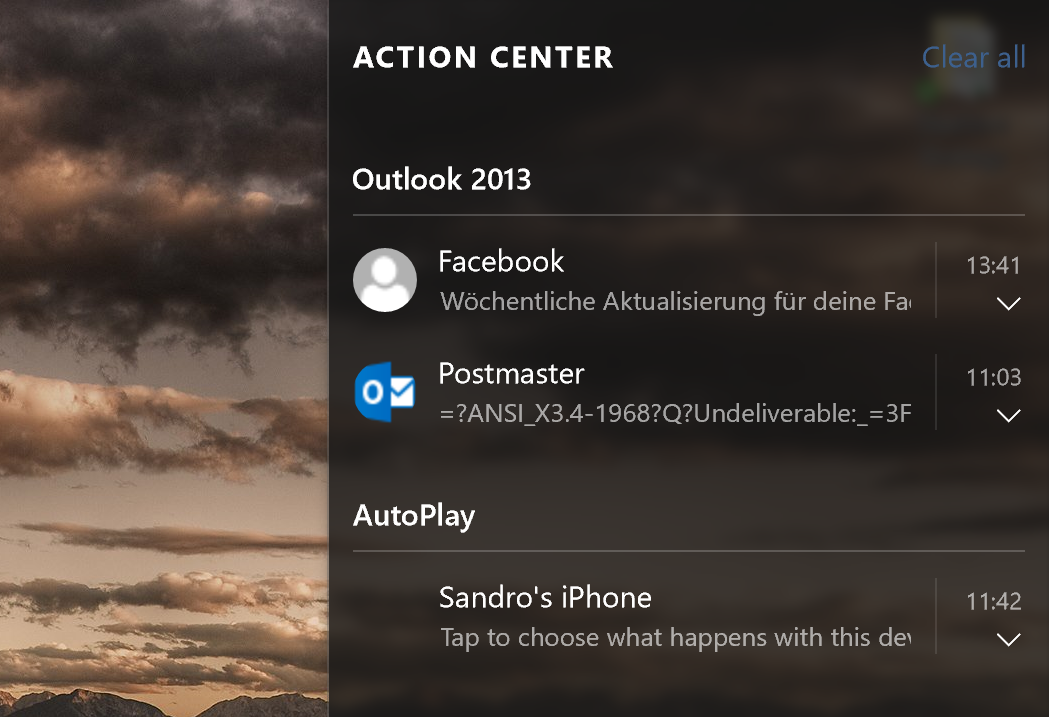
Just like iOS or Android, Windows 10 now sports a notification center which gives you a good overview of new emails, updates, plugged in devices and more. Unfortunately, this area quickly becomes too crowded and can contribute to performance and battery drain as Windows 10 frequently checks all apps for new notifications.
My advice: Limit notifications! The fewer notifications you enable, the less impact it will have on your performance (and battery life on tablets and laptops). To disable them, click on the Start button and click on Settings. Go to System and Notifications and settings.
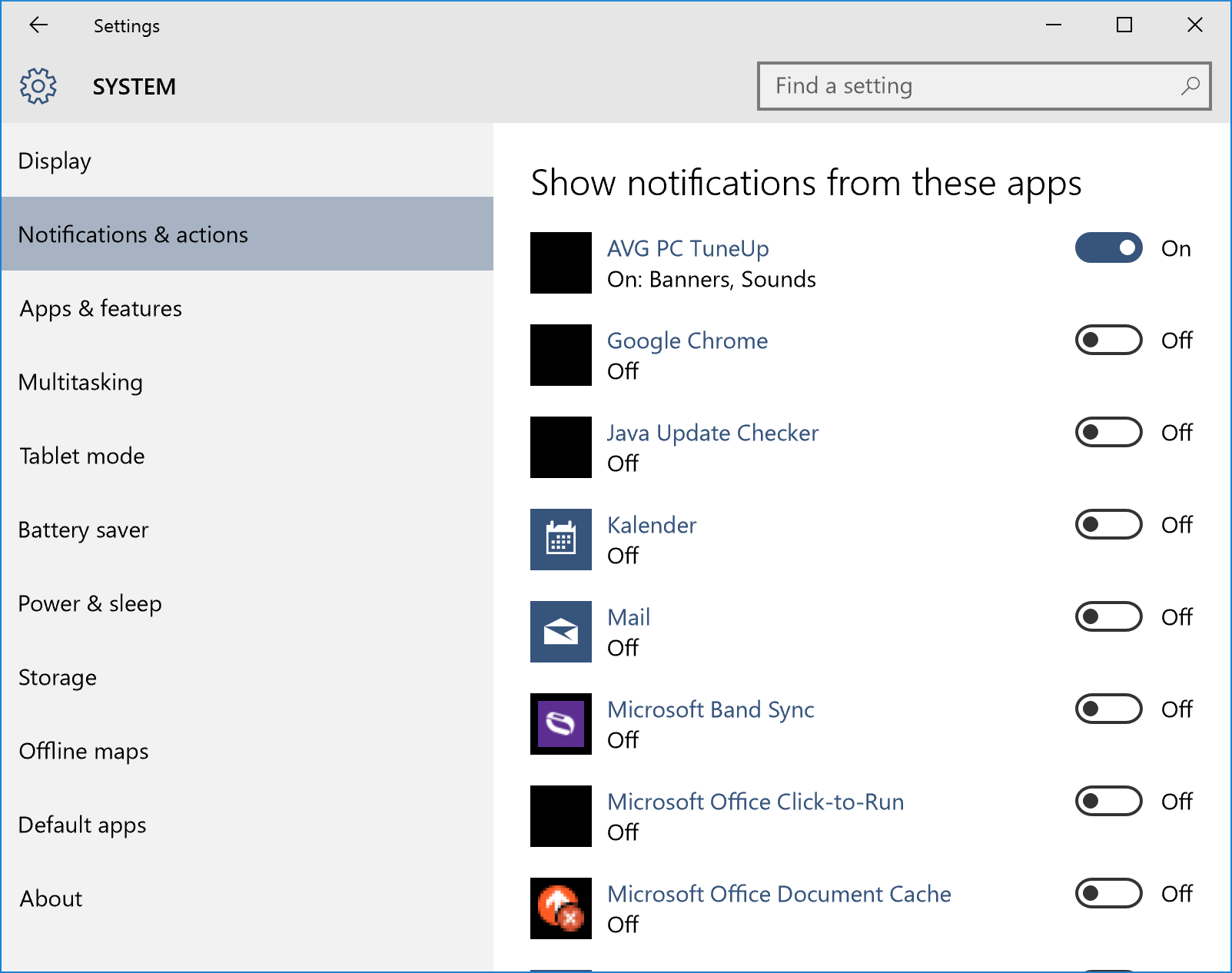
To turn off all notifications, flip the switch on Show app notifications. However, we recommend going through the list and make sure that your favorite applications like AVG PC TuneUp or AVG AntiVirus still keep you posted and updates on threats cleaned.
Turn off Windows Tips
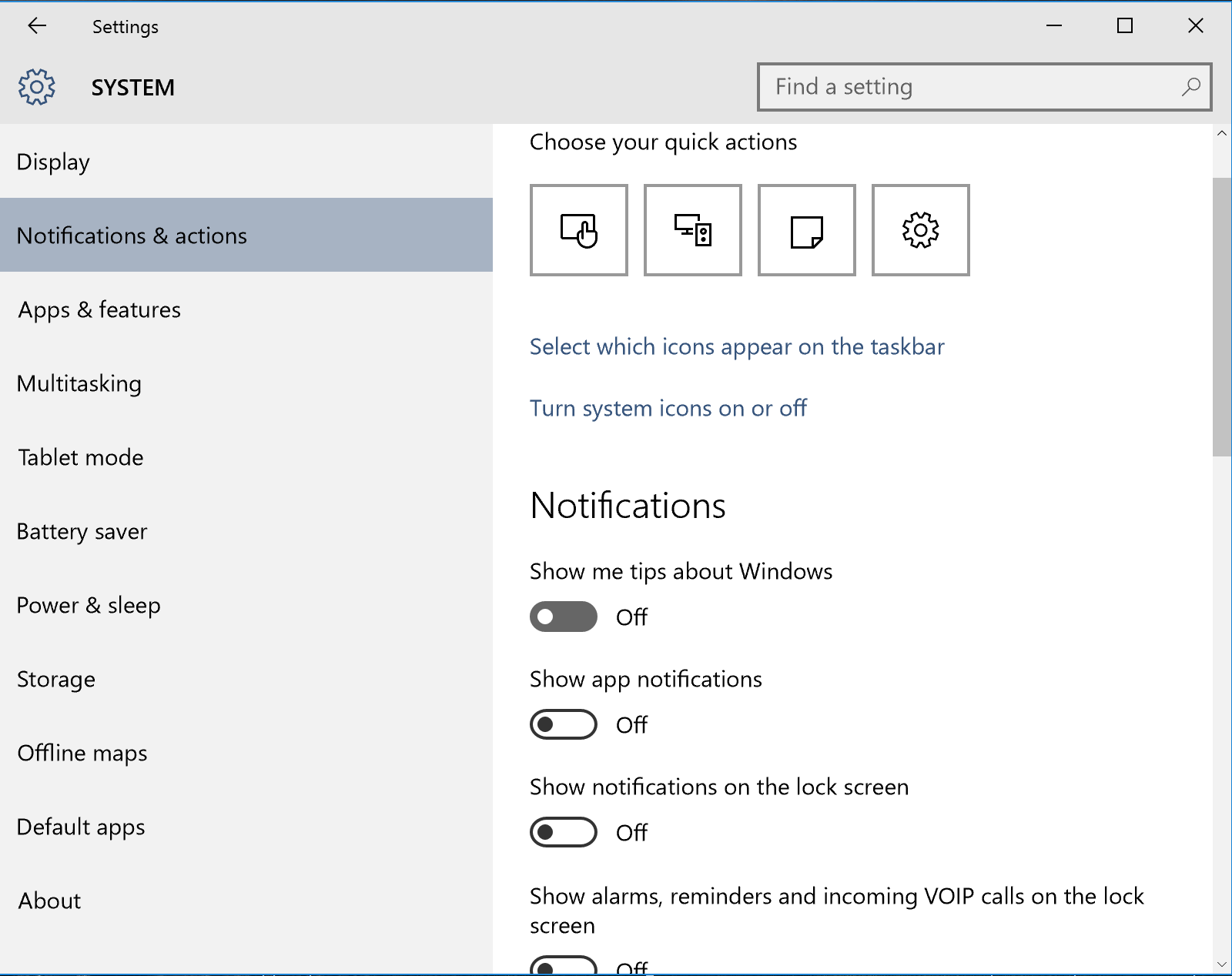
You may have noticed that Windows 10 sometimes shows you tips and tricks for various features, such as how to get apps from the store. The app behind this is called „Show me tips“ which, for some reason, may cause high processor and RAM usage – you’ll notice that if your PC or laptop keeps spinning its fan and is very slow.
While I’m sure that Microsoft is working on a fix for this long-term, here’s how to prevent it from happening right now:
Open up the notification settings as described above and switch off Show me tips about Windows:
This has helped a lot of people so far (see this Reddit thread for more).
Turn off dynamic color adaptation
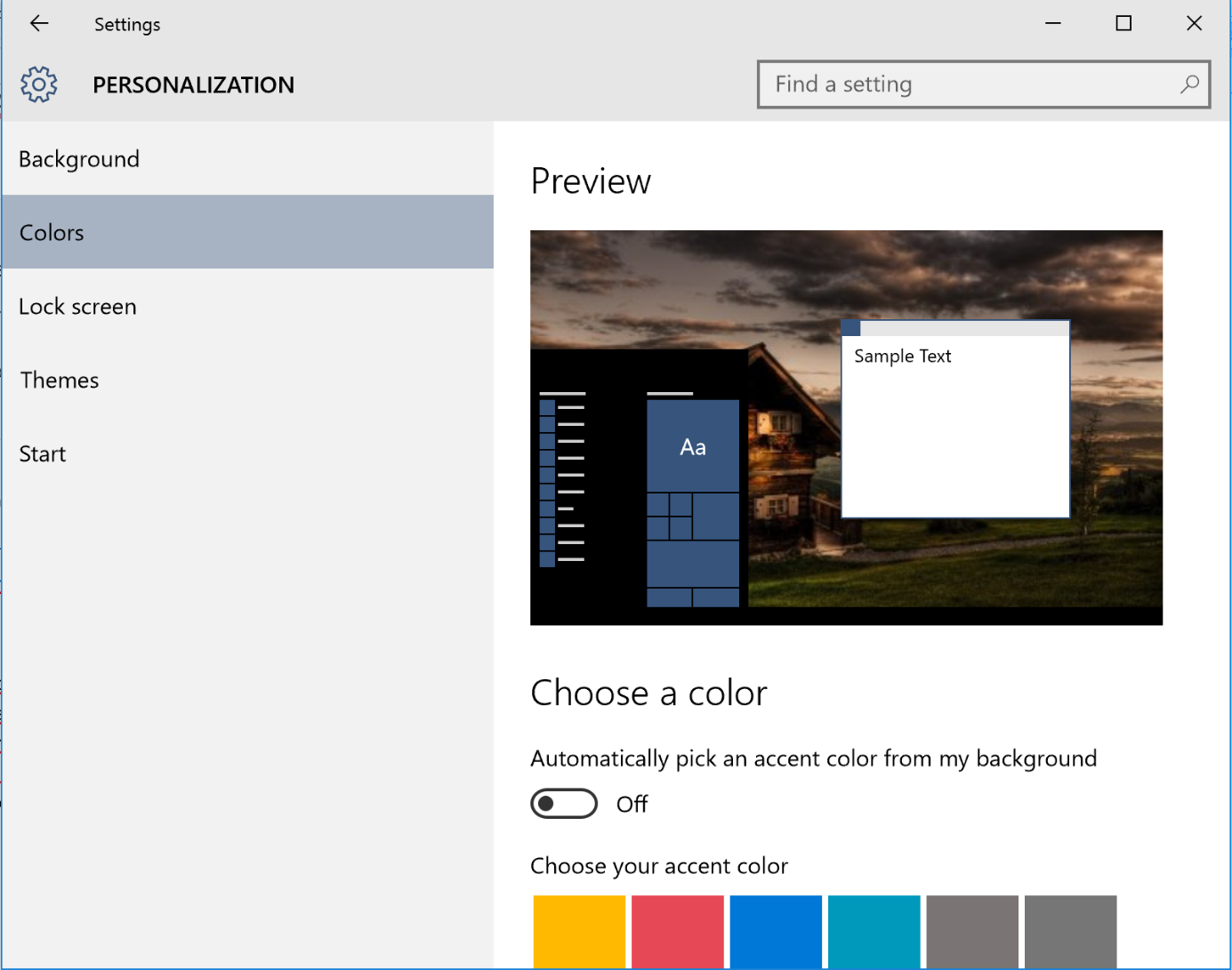
The new Windows user interface tries to automatically adjust the color of the window frame and taskbar to the desktop wallpaper. However, there’s a bug which could increase CPU usage quite drastically and reduce your overall performance when this is enabled.
If you feel your PC is running slow, try the following: go to the Start menu and click on Settings. Next, head over to Personalization. Then go to Colors and switch off Automatically pick an accent color from my background.
Done? Let us know if these three tips helped you improve your performance.

