Monthly Archives: October 2015
Apple Security Advisory 2015-10-21-2
Apple Security Advisory 2015-10-21-2 – watchOS 2.0.1 is now available and addresses arbitrary code execution, heap buffer overflow, and various other vulnerabilities.
Business owners across the world have the same security concerns
“We want to keep our clients and servers in a secure environment.”

Employees at Caritas Design were using different security software making it difficult to manage.
Business owners in every part of the world have the same concerns. Scott Quinn from Montana-based Caritas Design, a small web-design firm run by Scott and his wife Kate, said, “There are lots of viruses out there you need to be protected from. In today’s world we have to protect personal information.”
Echoing that sentiment from clear across the globe is Levent Sılay, a business development executive from Login Business Solutions, a Management Information Systems solution provider based in Istanbul, Turkey. He says their biggest concern is, “to keep our clients and servers in a secure environment.”
Cobbling together a security solution
Both businessmen have tried different solutions in order to create that secure environment. But as many smaller businesses have experienced, the setup was disorganized with people in the company using different solutions simultaneously like McAfee, Symantec, Microsoft Security Essentials, and F-Secure. This cobbling together of security programs meant that management was difficult and disordered. In evaluating better solutions, Silay said, “We wanted a security system which can easily be monitored and managed from a web portal.”
Silay was a long time Avast Free Antivirus user, so once he found out about the free Avast for Business option he didn’t turn back. Quinn had a similar experience. He found Avast Free Antivirus when he was a poor college student. “I was in college looking for the cheapest option, and it had to have boot time scan. So through internet searches, I found Avast.”
Free isn’t always the biggest benefit
Many businesses already have a budget set aside for security, so sometimes free software isn’t the main benefit. Both Quinn and Silay had additional needs. The primary one: “Simple management”.
The advantages of Avast’s cloud-based business security according to Silay are “the quick and easy installation, the monitoring screen that helps in the visualization of all the computers on the network, the online management that can be utilized from anywhere, and the fact that it’s simple and there is no need for training.”
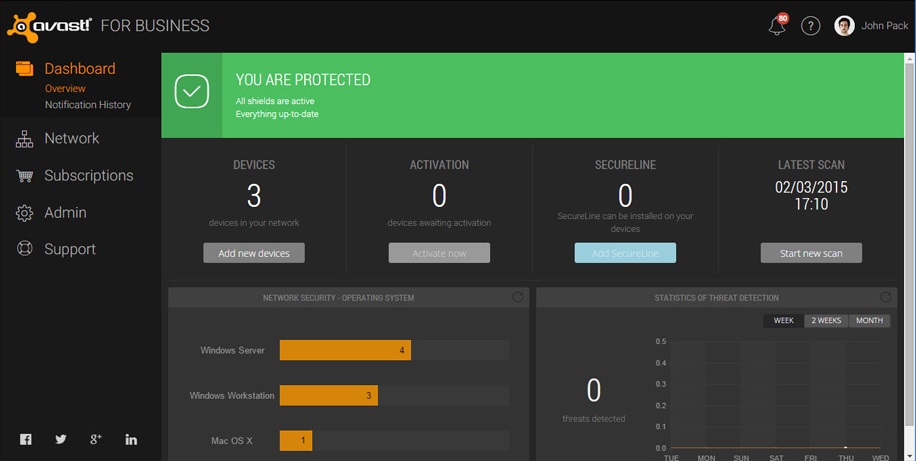
Avast for Business management console
Quinn’s Caritas Design is a startup company, so “Any savings are huge for us.” Because of the years of trust using Avast Free Antivirus, Quinn’s decision was simple. “I’ve been using Avast for my personal and business machines for over 10 years now, and when they released their new online free business portal, I had to sign up.”
“Avast for Business has been outstanding to work with as an enterprise-level solution for my customers,” said Quinn. “I can email silent deployments, manage tasks and scans, and categorize clients by organization or location.”
What’s the catch?
For a free business-grade security solution, the question often comes up about support. Quinn says, “Their support has been amazing on the rare occasions I’ve needed to utilize them. I would, and will, recommend Avast and Avast for Business to everyone I encounter.”
Avast for Business is a free cloud-based security solution available to business owners around the world. Learn more and sign up today.

Apple Security Advisory 2015-10-21-1
Apple Security Advisory 2015-10-21-1 – iOS 9.1 is now available and addresses arbitrary code execution, cookies being overwritten, heap based buffer overflow, and various other vulnerabilities.
Kaspersky Lab Patents New Technology to Enhance Virtual Desktop Infrastructure Security
Is the cloud more secure for you? Only you hold the answer
Thinking of using the cloud, but have doubts whether it’s secure enough? You are not alone. Many enterprises hesitate to fully embrace it, fearing that their sensitive data might get compromised when stored online. But is the risk really high or can it be managed?
The post Is the cloud more secure for you? Only you hold the answer appeared first on We Live Security.

Oracle Quarterly Security Update Patches 154 Vulnerabilities
Oracle patched 154 vulnerabilities in 54 different products as part of its regularly scheduled Critical Patch Update Tuesday.
Sony agrees to $8 million settlement over 2014 data breach
Sony Pictures Entertainment says that it will pay out $8 million to its employees, over a data breach last year. The studio was attacked by cybercriminals over the release of the movie The Interview.
The post Sony agrees to $8 million settlement over 2014 data breach appeared first on We Live Security.

10 easy-to-follow online safety tips for grandparents

Online security has no age limits and we can all protect ourselves from cybercriminals without being experts in the field. All you need to do is adopt the traditional “don’t speak to strangers” advice and apply it to your online habits.
Here we’ll recap ten simple steps that all of the family, including your grandparents, can follow to ensure safety while online.
10 easy-to-follow online safety tips for grandparents
1. Don’t trust every email that you receive
Some cybercriminals can pass themselves off as another person with the aim of stealing your personal information. So, how do you know when you’re being tricked? The easy way to stop this is to avoid conversations with people you don’t know. You should also avoid clicking on links sent by an unknown source and never give your personal information to a website that doesn’t begin with https:// (you’ll see a lock in the browser). Also, your bank will never ask for your email address, so don’t give it away.
2. Be wary of downloading attachments
If you receive an email from an unknown source with an attachment that is either ‘.zip’, ‘.rar’, ‘.exe’, a Word document, or a seemingly innocent photo, don’t download it. These could all contain malware that could infect your computer also be wary of emails from friends, as unwittingly, they could send you malware. It’s best to check with them before opening it, if you weren’t expecting to receive an email from them.
3. Surf the web safely
Don’t just give away your personal information to any website without thinking why they demand it. You should also trust your browser, as if there is anything suspicious it will inform you that the website is potentially dangerous. It’s best to pay attention.
4. Use different passwords and change them frequently
If you want to register yourself on trusted website, be sure to use a password with a mix of letters, numbers, and symbols (although a few websites will ask you for this anyway). Never use the same password for all of your accounts and make sure you change them every so often. Also, don’t send your password to anyone or leave it written down anywhere. It might seem a little extreme, but you need to stop others from accessing your network.

5. Eliminate annoying ads
You never know what an innocent click can do until your browser is filled up with annoying banners, pop-ups, and ads that you don’t want to see. To avoid them, install a blocking service such as Adblock.
6. Be careful of SMS
Cyberattackers are now using this messaging service to carry out attacks, so you should also be wary of what these messages contain. A few months back there was a malware that was spread by this medium which simply asked “is this your photo? – Once the victim clocked on the link, an app was installed onto the device which was able to spy on their contacts.
7. Install an antivirus on all your devices
Leave the experts to worry about your computer or smartphone by letting the antivirus software look after and protect your device from malware. They help to ensure that you are safe when buying online and allow you piece of mind when surfing the net.
8. Exert caution with public Wi-Fi zones
Many is a time that you arrive at the train station, the café, or the hotel and have connected to the Wi-Fi that is offered freely. Although it is convenient, keep in mind that it is a public connection and you should be extra careful about what you do while connected. While browsing, make sure that the lock symbol is present and avoid carrying out bank transactions.
9. Remove your tracks when using other computers
If you log in to a personal email account or another service while using a different computer, be sure to delete all browsing history, including cookies. If you aren’t sure of where to find out how to delete your tracks, follow this simple tutorial from Chrome.
10. Allow updates to your software and operating system
The old saying “better the devil you know” doesn’t really apply to the internet. If your operating system or any of the apps that you have installed is saying that there are updates available, read it carefully and install it. Even if you need to adapt to a few changes, it’s better to have the most up-to-date version as it will be the one that the developers have installed the latest security updates for.
The post 10 easy-to-follow online safety tips for grandparents appeared first on MediaCenter Panda Security.
Happy Back to the Future Day, everyone!
The future is now. At least if you were one of the kids who watched Back to the Future II when it was released in the 80s. Or once it came out on video tape. Or anytime between then and well … now.
The post Happy Back to the Future Day, everyone! appeared first on Avira Blog.