Facebook increases security for users

Don’t ignore Facebook  alerts and take your time to improve your security

Don’t ignore Facebook alerts and take your time to improve your security

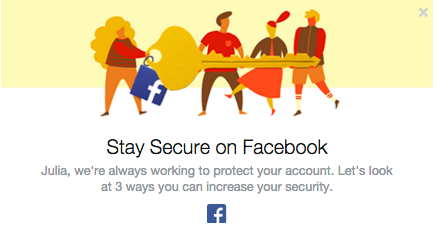
Facebook has become more concerned about its users’ security. The social giant understands that education is the key to providing users with a secure experience. We have already seen the Facebook “dinosaur” guiding us via privacy settings. Now Facebook pops out a short guide to improve the security of our profiles. We strongly recommend not to ignore it and take those steps to ensure that your profile is properly protected.

Step 1. Take control over your login

Don’t ignore Facebook  alerts and take your time to improve your security

Don’t ignore Facebook alerts and take your time to improve your security

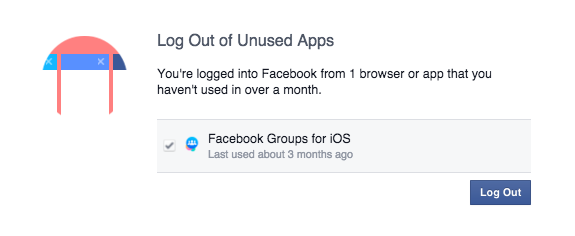
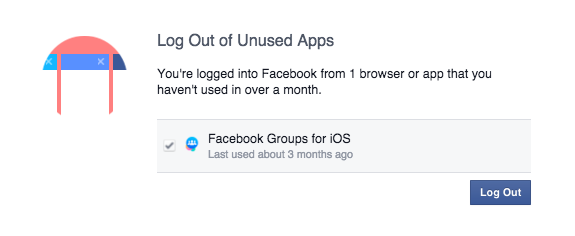
We check our Facebook profile on multiple devices: Our smartphones, tablets and via different apps (Facebook group, messenger, Facebook app). Sometimes we don’t even realize it! ‘Log Out of Unused Apps’ will show you all the apps that you use to log in, but haven’t used for a long period of time. From a security perspective that can create a vulnerable situation. If you don’t use the app, better log out!

We have also a solution for that. If you don’t want to be bother with constant login into your social account, we recommend Avast Passwords available for all your mobile devices for FREE. Check it out for Android and iOS. With one password you can safely log in into your all social apps, without remembering multiple passwords!

Step 2. Set up login alerts

Get login alerts

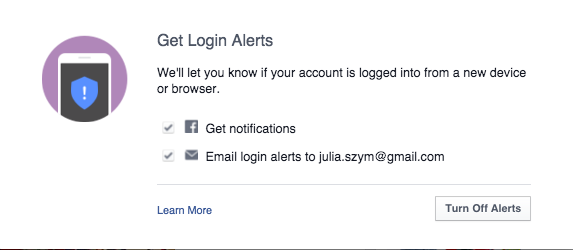
Login alerts will notify you about unauthorized login attempts into your account

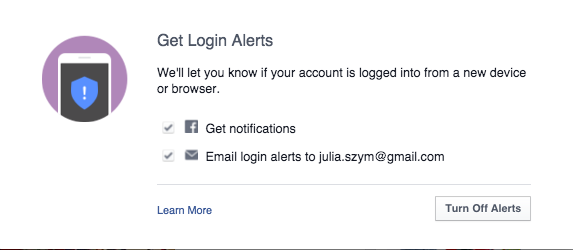
Facebook will let you know when there is an attempt to log into your account via a new device or browser. You can set up both – Facebook notifications as well as email alerts. In this way you have better control over who, when, and where someone tries to login into your profile. You will receive a notification and if it is a hacking attempt, you can block it. We recommend to chose both options, in order to increase your chances to discover a hacker, before he cracks your account.

 Step 3: Protect your Password

Follow Facebook rules to protect your password

Follow Facebook rules to protect your password

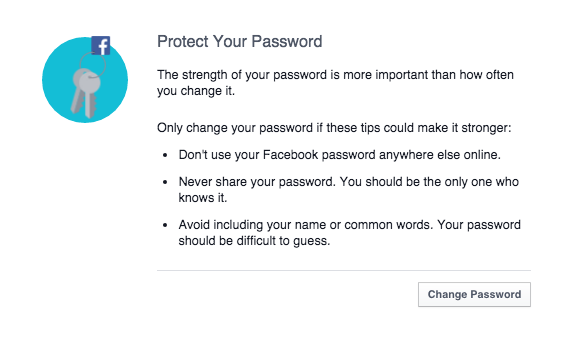
Follow simple security rules:

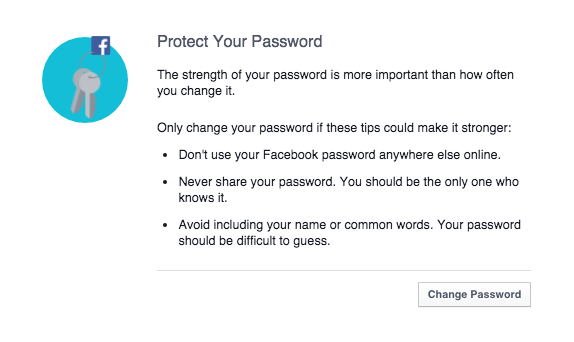
  1. 1. Set up unique password to your account (don’t use the same password to all your social profiles).
  2. 2. Don’t share it with anyone else.
  3. 3. Make sure your password is strong: it should contain small and big characters, numbers and special signs. We recommend minimum 16 characters.
  4. 4. Change passwords regularly and always, if any of your accounts or websites that you use is compromised.
  5. 5. Last but not least, use Password management system, to protect all your accounts requiring logins, not only Facebook. For example the free Avast Passwords.
Secure Facebooking!

Secure Facebooking!


Follow Avast on FacebookTwitterYouTube, and Google+ where we keep you updated on cybersecurity news every day.

Facebook increases security for users

Don’t ignore Facebook  alerts and take your time to improve your security

Don’t ignore Facebook alerts and take your time to improve your security

Facebook has become more concerned about its users’ security. The social giant understands that education is the key to providing users with a secure experience. We have already seen the Facebook “dinosaur” guiding us via privacy settings. Now Facebook pops out a short guide to improve the security of our profiles. We strongly recommend not to ignore it and take those steps to ensure that your profile is properly protected.

Step 1. Take control over your login

Don’t ignore Facebook  alerts and take your time to improve your security

Don’t ignore Facebook alerts and take your time to improve your security

We check our Facebook profile on multiple devices: Our smartphones, tablets and via different apps (Facebook group, messenger, Facebook app). Sometimes we don’t even realize it! ‘Log Out of Unused Apps’ will show you all the apps that you use to log in, but haven’t used for a long period of time. From a security perspective that can create a vulnerable situation. If you don’t use the app, better log out!

We have also a solution for that. If you don’t want to be bother with constant login into your social account, we recommend Avast Passwords available for all your mobile devices for FREE. Check it out for Android and iOS. With one password you can safely log in into your all social apps, without remembering multiple passwords!

Step 2. Set up login alerts

Get login alerts

Login alerts will notify you about unauthorized login attempts into your account

Facebook will let you know when there is an attempt to log into your account via a new device or browser. You can set up both – Facebook notifications as well as email alerts. In this way you have better control over who, when, and where someone tries to login into your profile. You will receive a notification and if it is a hacking attempt, you can block it. We recommend to chose both options, in order to increase your chances to discover a hacker, before he cracks your account.

 Step 3: Protect your Password

Follow Facebook rules to protect your password

Follow Facebook rules to protect your password

Follow simple security rules:

  1. 1. Set up unique password to your account (don’t use the same password to all your social profiles).
  2. 2. Don’t share it with anyone else.
  3. 3. Make sure your password is strong: it should contain small and big characters, numbers and special signs. We recommend minimum 16 characters.
  4. 4. Change passwords regularly and always, if any of your accounts or websites that you use is compromised.
  5. 5. Last but not least, use Password management system, to protect all your accounts requiring logins, not only Facebook. For example the free Avast Passwords.
Secure Facebooking!

Secure Facebooking!


Follow Avast on FacebookTwitterYouTube, and Google+ where we keep you updated on cybersecurity news every day.
Facebook increases security for users

Don’t ignore Facebook  alerts and take your time to improve your security

Don’t ignore Facebook alerts and take your time to improve your security

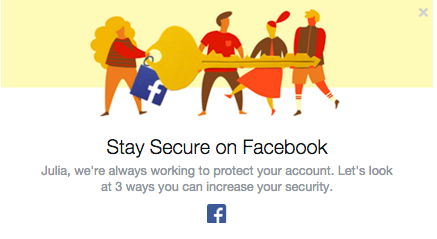
Facebook has become more concerned about its users’ security. The social giant understands that education is the key to providing users with a secure experience. We have already seen the Facebook “dinosaur” guiding us via privacy settings. Now Facebook pops out a short guide to improve the security of our profiles. We strongly recommend not to ignore it and take those steps to ensure that your profile is properly protected.

Step 1. Take control over your login

Don’t ignore Facebook  alerts and take your time to improve your security

Don’t ignore Facebook alerts and take your time to improve your security

We check our Facebook profile on multiple devices: Our smartphones, tablets and via different apps (Facebook group, messenger, Facebook app). Sometimes we don’t even realize it! ‘Log Out of Unused Apps’ will show you all the apps that you use to log in, but haven’t used for a long period of time. From a security perspective that can create a vulnerable situation. If you don’t use the app, better log out!

We have also a solution for that. If you don’t want to be bother with constant login into your social account, we recommend Avast Passwords available for all your mobile devices for FREE. Check it out for Android and iOS. With one password you can safely log in into your all social apps, without remembering multiple passwords!

Step 2. Set up login alerts

Get login alerts

Login alerts will notify you about unauthorized login attempts into your account

Facebook will let you know when there is an attempt to log into your account via a new device or browser. You can set up both – Facebook notifications as well as email alerts. In this way you have better control over who, when, and where someone tries to login into your profile. You will receive a notification and if it is a hacking attempt, you can block it. We recommend to chose both options, in order to increase your chances to discover a hacker, before he cracks your account.

 Step 3: Protect your Password

Follow Facebook rules to protect your password

Follow Facebook rules to protect your password

Follow simple security rules:

  1. 1. Set up unique password to your account (don’t use the same password to all your social profiles).
  2. 2. Don’t share it with anyone else.
  3. 3. Make sure your password is strong: it should contain small and big characters, numbers and special signs. We recommend minimum 16 characters.
  4. 4. Change passwords regularly and always, if any of your accounts or websites that you use is compromised.
  5. 5. Last but not least, use Password management system, to protect all your accounts requiring logins, not only Facebook. For example the free Avast Passwords.
Secure Facebooking!

Secure Facebooking!


Follow Avast on FacebookTwitterYouTube, and Google+ where we keep you updated on cybersecurity news every day.
Facebook increases security for users

Don’t ignore Facebook  alerts and take your time to improve your security

Don’t ignore Facebook alerts and take your time to improve your security

Facebook has become more concerned about its users’ security. The social giant understands that education is the key to providing users with a secure experience. We have already seen the Facebook “dinosaur” guiding us via privacy settings. Now Facebook pops out a short guide to improve the security of our profiles. We strongly recommend not to ignore it and take those steps to ensure that your profile is properly protected.

Step 1. Take control over your login

Don’t ignore Facebook  alerts and take your time to improve your security

Don’t ignore Facebook alerts and take your time to improve your security

We check our Facebook profile on multiple devices: Our smartphones, tablets and via different apps (Facebook group, messenger, Facebook app). Sometimes we don’t even realize it! ‘Log Out of Unused Apps’ will show you all the apps that you use to log in, but haven’t used for a long period of time. From a security perspective that can create a vulnerable situation. If you don’t use the app, better log out!

We have also a solution for that. If you don’t want to be bother with constant login into your social account, we recommend Avast Passwords available for all your mobile devices for FREE. Check it out for Android and iOS. With one password you can safely log in into your all social apps, without remembering multiple passwords!

Step 2. Set up login alerts

Get login alerts

Login alerts will notify you about unauthorized login attempts into your account

Facebook will let you know when there is an attempt to log into your account via a new device or browser. You can set up both – Facebook notifications as well as email alerts. In this way you have better control over who, when, and where someone tries to login into your profile. You will receive a notification and if it is a hacking attempt, you can block it. We recommend to chose both options, in order to increase your chances to discover a hacker, before he cracks your account.

 Step 3: Protect your Password

Follow Facebook rules to protect your password

Follow Facebook rules to protect your password

Follow simple security rules:

  1. 1. Set up unique password to your account (don’t use the same password to all your social profiles).
  2. 2. Don’t share it with anyone else.
  3. 3. Make sure your password is strong: it should contain small and big characters, numbers and special signs. We recommend minimum 16 characters.
  4. 4. Change passwords regularly and always, if any of your accounts or websites that you use is compromised.
  5. 5. Last but not least, use Password management system, to protect all your accounts requiring logins, not only Facebook. For example the free Avast Passwords.
Secure Facebooking!

Secure Facebooking!


Follow Avast on FacebookTwitterYouTube, and Google+ where we keep you updated on cybersecurity news every day.
Facebook increases security for users

Don’t ignore Facebook  alerts and take your time to improve your security

Don’t ignore Facebook alerts and take your time to improve your security

Facebook has become more concerned about its users’ security. The social giant understands that education is the key to providing users with a secure experience. We have already seen the Facebook “dinosaur” guiding us via privacy settings. Now Facebook pops out a short guide to improve the security of our profiles. We strongly recommend not to ignore it and take those steps to ensure that your profile is properly protected.

Step 1. Take control over your login

Don’t ignore Facebook  alerts and take your time to improve your security

Don’t ignore Facebook alerts and take your time to improve your security

We check our Facebook profile on multiple devices: Our smartphones, tablets and via different apps (Facebook group, messenger, Facebook app). Sometimes we don’t even realize it! ‘Log Out of Unused Apps’ will show you all the apps that you use to log in, but haven’t used for a long period of time. From a security perspective that can create a vulnerable situation. If you don’t use the app, better log out!

We have also a solution for that. If you don’t want to be bother with constant login into your social account, we recommend Avast Passwords available for all your mobile devices for FREE. Check it out for Android and iOS. With one password you can safely log in into your all social apps, without remembering multiple passwords!

Step 2. Set up login alerts

Get login alerts

Login alerts will notify you about unauthorized login attempts into your account

Facebook will let you know when there is an attempt to log into your account via a new device or browser. You can set up both – Facebook notifications as well as email alerts. In this way you have better control over who, when, and where someone tries to login into your profile. You will receive a notification and if it is a hacking attempt, you can block it. We recommend to chose both options, in order to increase your chances to discover a hacker, before he cracks your account.

 Step 3: Protect your Password

Follow Facebook rules to protect your password

Follow Facebook rules to protect your password

Follow simple security rules:

  1. 1. Set up unique password to your account (don’t use the same password to all your social profiles).
  2. 2. Don’t share it with anyone else.
  3. 3. Make sure your password is strong: it should contain small and big characters, numbers and special signs. We recommend minimum 16 characters.
  4. 4. Change passwords regularly and always, if any of your accounts or websites that you use is compromised.
  5. 5. Last but not least, use Password management system, to protect all your accounts requiring logins, not only Facebook. For example the free Avast Passwords.
Secure Facebooking!

Secure Facebooking!


Follow Avast on FacebookTwitterYouTube, and Google+ where we keep you updated on cybersecurity news every day.
The Most Famous Virus in History: Friday the 13th

Friday 13th

Let’s keep remembering and recalling more viruses that have caused the biggest headaches for users.

The virus Jerusalem, also known as Friday the 13th, was created in Israel in 1988 to celebrate the 40th anniversary of the creation of the Jewish state.

To activate the virus, the calendar only had to hit Friday the 13th and all the programs and files that were being used would be infected and eliminated.

There wasn’t a specific method to spread the virus, but that it was done through normal systems like floppies, CD-ROM or attachments in emails.

How It Works?

–  Infects files with extensions of COM, EXE or SYS and increases in size whenever the file is executed

–  It reduces the memory available on the computer

–  Causes your computer system to slow down

–  Every the Friday the 13th the virus is activated, and eliminates computer files that are used that day

How to Fix It?

As always, recommendations for preventing these types of infections are to keep your operating system and antivirus updated.

If you’ve already been infected and suspect that your computer has a virus, we recommend an analysis with Panda Cloud Cleaner to eliminate the infection.

Were you infected by this virus or any of its variants?


More: The Melisa Virus

The post The Most Famous Virus in History: Friday the 13th appeared first on MediaCenter Panda Security.

The Most Famous Virus in History: Friday the 13th

Friday 13th

Let’s keep remembering and recalling more viruses that have caused the biggest headaches for users.

The virus Jerusalem, also known as Friday the 13th, was created in Israel in 1988 to celebrate the 40th anniversary of the creation of the Jewish state.

To activate the virus, the calendar only had to hit Friday the 13th and all the programs and files that were being used would be infected and eliminated.

There wasn’t a specific method to spread the virus, but that it was done through normal systems like floppies, CD-ROM or attachments in emails.

How It Works?

–  Infects files with extensions of COM, EXE or SYS and increases in size whenever the file is executed

–  It reduces the memory available on the computer

–  Causes your computer system to slow down

–  Every the Friday the 13th the virus is activated, and eliminates computer files that are used that day

How to Fix It?

As always, recommendations for preventing these types of infections are to keep your operating system and antivirus updated.

If you’ve already been infected and suspect that your computer has a virus, we recommend an analysis with Panda Cloud Cleaner to eliminate the infection.

Were you infected by this virus or any of its variants?


More: The Melisa Virus

The post The Most Famous Virus in History: Friday the 13th appeared first on MediaCenter Panda Security.

CVE-2015-2698

The iakerb_gss_export_sec_context function in lib/gssapi/krb5/iakerb.c in MIT Kerberos 5 (aka krb5) 1.14 pre-release 2015-09-14 improperly accesses a certain pointer, which allows remote authenticated users to cause a denial of service (memory corruption) or possibly have unspecified other impact by interacting with an application that calls the gss_export_sec_context function. NOTE: this vulnerability exists because of an incorrect fix for CVE-2015-2696.

CVE-2015-6045

Use-after-free vulnerability in the CElement object implementation in Microsoft Internet Explorer 11 allows remote attackers to execute arbitrary code or cause a denial of service (memory corruption) via crafted JavaScript that improperly interacts with use of the Cascading Style Sheets (CSS) empty-cells property for a TABLE element, aka “Internet Explorer Memory Corruption Vulnerability.”

CVE-2015-6366

Cisco IOS 15.2(04)M6 and 15.4(03)S lets physical-interface ACLs supersede tunnel-interface ACLs, which allows remote attackers to bypass intended network-traffic restrictions in opportunistic circumstances by using a tunnel, aka Bug ID CSCur01042.