Category Archives: Avast

Avast

Microsoft ends support for older versions of Internet Explorer

Internet Explorer icon

Update from an older Internet Explorer to avoid security risks

After January 12th, only the most current version of Internet Explorer available for a supported operating system will receive technical support and security updates.

People using Internet Explorer 8, 9, and 10 will no longer receive security or technical updates after Tuesday, January 12th. This means that the older versions of Internet Explorer can be exploited by hackers which puts your computer and your data at risk. One last patch will be released January 12th with a reminder to upgrade your browser. If you do not upgrade to Internet Explorer 11, you will begin to receive “End of Life” upgrade notifications urging you to make the switch to Internet Explorer 11. Windows 10 and Windows 8.1 users should upgrade to Internet Explorer 11. Windows 7 users with Internet Explorer 9 or 10 should upgrade to Internet Explorer 11.

Choose a different browser

If you want to stay with a Microsoft product, then you also have the option to switch to Microsoft Edge, their latest, most modern browser, but you must also be using Windows 10.

This is a good opportunity to try another browser like Google Chrome, Firefox, or Opera.  We recommend Google Chrome as an alternative to Internet Explorer because of its security features and automatic updates.

There are plenty of alternative browsers to switch to as well; those that specialize in gaming, privacy, media consumption, and other things. Check out this listing of 10 obscure, highly specialized browsers from PCWorld.

How to check which version of Internet Explorer you are using

  1. 1. Open the browser
  2. 2. Click the gear or Question icon on the top right
  3. 3. Select ‘About Internet Explorer’ and a pop-up will appear with the version of your browser

Follow Avast on FacebookTwitterYouTube and Google+ where we keep you updated on cybersecurity news every day.

Android security updates roll out to fight “Stagefright” type bug

Android Mediaserver vulnerability looks similar to the Stagefright bug.

Android-malware

Android mediaserver malware resembles Stagefright

Android owners may recall the Stagefright bug, the “worst ever Android vulnerability yet discovered”. That malware exposed a billion (that’s nearly every) Android device on the face of the earth to malware.

The latest critical bug has similarities to Stagefright, but exists in Android’s mediaserver. Google warns that an attacker could use the bug to remotely run malware hidden in video or audio.

In an announcement published in the Nexus Security Bulletin for January, Google said it has fixed 12 vulnerabilities affecting Android versions 4.4.4 to 6.0.1. Five are rated as critical security bugs. Partners were notified about and provided updates for the issues on December 7, 2015 or earlier, said the post.

“The most severe of these issues is a Critical security vulnerability that could enable remote code execution on an affected device through multiple methods such as email, web browsing, and MMS when processing media files.”

How to protect yourself from the Android bug

The good news is that Google says, “We have had no reports of active customer exploitation of these newly reported issues.” Because of enhancements in newer versions of the Android platform, exploitation for many issues on Android is made more difficult. Regardless, Google encourages all users to update to the latest version of Android where possible.

  1. 1. Don’t ignore updates from Android – when you receive a notification about an update, accept it, and upgrade to the latest version of Android.
  2. 2. Avoid opening video and audio files you receive via text or email. Delete all messages you get, without opening it first, from any sender you do not recognize.
  3. 3. We recommend users disable “auto retrieve MMS” within their default messaging app’s settings, as a precautionary measure for the moment. You can find detailed directions in the Avast FAQ.
  4. 4. Install Avast Mobile Security on your Android devices.

Follow Avast on Facebook, Twitter, YouTube e Google+ where we keep you updated on cybersecurity news every day.


Notes from the 2016 AT&T Developer Summit

The 2016 AT&T Developer Conference took place on January 2-5 in Las Vegas, Nevada.

The 2016 AT&T Developer Conference took place on January 2-5 in Las Vegas, Nevada.

For nearly 10 years, AT&T has been bringing an annual developer conference to their partners and collaborators. This year, they creatively chose to combine their conference with a hackathon in order to encourage the participation of budding developers and to support young talent in achieving career-related goals.

This year’s conference and hackathon, which took place on January 2-5 in Las Vegas, Nevada, was packed with an array of topics split into six main sessions: devices and wearables, IoT, real-time communications, video, network advances and the connected home.

I’ve put together several of the sessions that stood out to me as especially relevant to the evolution of today’s technology.

Your world, protected and connected // Stephen Vincent

Abstract: Interactive security and home automation systems are evolving to become effortless for end users. Devices like smart thermostats learn the routines and patterns of users to ensure the consumer is returning home to their optimal temperature, thus increasing comfort and lowering home energy costs. Voice command and response systems allow users to speak naturally to their home security and automation system without learning complicated rules or programs. Lawn sprinklers and window blinds can be controlled by weather data indicating rain or shine. A day’s worth of user-generated surveillance video can be reviewed for significant events quickly and at the user’s convenience. Securing the home is a great benefit, but what about securing the personal IoT for the end user when not at home? In this session, we’ll discuss how Digital Life is a key contributor in the latest industry trends. We invite the developer community to join us on our quest to put the connected home to work for the end user.

View the slides from this session here.

Smartphones and beyond :Technologies for devices and IoT // Ginger Chien

Abstract: Smartphones, which will still be dominant in people’s lives for some time to come, have reached a state of maturity. This year’s phones will see mostly incremental advances offering improved capability and performance. Yet the smartphone will play an essential role through its familiar power and presence that will support the rising category of connected IoT devices, whether those be personal, wearable, distributed, or other forms yet to be seen. Join this session to learn about advances in the areas of smartphone and IoT device technology as well as get an idea of what the future of devices may hold.

View the slides from this session here.

Monetizing behavioral data analytics // Carole Le Goff and Dr. Brian Eriksson

Abstract: What can your home discover about your habits? When does a change in behavior at home demand intervention? How does this differ when considering yourself, or your teenager, or your mother across the country? This information can all be learned from home IoT sensor data combined with intelligent analytics, which can help you make a decision about how to act. Unfortunately, there is a wide gap between raw sensor data and actionable information. In this session, we will discuss gleaning behavioral context from this data and initial use cases to monetize this information. We’ll describe the science and challenges behind learning from IoT sensor data from the point of view of marketers and product managers explaining new revenue generating services as well as software engineers and data scientists.

View the slides from this session here.

Best Practices for the Unknown: Wearables, Devices & Things // Bill Weir and Pete Rembiszewski

Abstract: There are exciting new areas to explore in the bold new world of IoT and wearables, but there are also big land mines waiting for developers. Not only will we cover issues such as standards, security, network issues, data overload, and privacy, but also actionable tips, strategies, and techniques that developers can use to mitigate the risks.

View the slides from this session here.


As announced at the AT&T conference, a new tool called AT&T ARO helps users analyze their apps’ performance. Users can utilize the free diagnostic tool to improve their battery life, data usage, and responsiveness.

In addition to these valuable sessions led by highly talented speakers, Kevin Spacey was in attendance as the conference’s celebrity speaker. Spacey delivered a quality talk that emphasized the importance of companies making an effort to support and motivate young developers and IT professionals in their career paths.

This year’s AT&T conference and hackathon was a unique and educational experience. At Avast, we’re already looking forward to next year’s event!


Follow Avast on FacebookTwitterYouTube e Google+ where we keep you updated on cybersecurity news every day.

Internet of Things: What you need to do to protect yourself

The Internet of Things (IoT) join together physical devices that we use every day with information technology.

Make sure your Internet of Things is secure

We can use devices to monitor our health and fitness, our houses, our environment, and our factories and cities.

Using internet-connected devices expands our ability to control and monitor in the real world.  The IoT is literally changing our lives.

The Internet of Things has the potential to fundamentally shift the way we interact with our surroundings. The ability to monitor and manage objects in the physical world electronically makes it possible to bring data-driven decision making to new realms of human activity – to optimize the performance of systems and processes, save time for people and businesses, and improve quality of life.” ~ McKinsey Global Institute study

The potential economic impact of the IoT is astounding  – as much as $11.1 trillion per year by 2025 for IoT applications, projected by the same study.

But is there a downside?

In many people’s minds, surveillance, privacy issues, and data breaches seem to be someone else’s problem. “Should I be concerned about all of this?,” people who have “nothing to hide” think. Recently, we published how the Internet of Things can be hacked and what issues arise from the fact that we’re almost 100% online and connected.

Nowadays, all this technology passes through very well-known and yet problematic points: Our home network security. When our early version of Avast 2015 was released, we published many articles about Home Network Security. During the past year, we gathered lots of proof and conducted social experiments to show that…

Your security is as strong as your network security

To protect your security and privacy, you must assure that your network and communications are safe. Although this seems like rocket science, some basic – but effective – measures can and should be taken. It’s really not rocket science, so even us common folk can follow the steps below to make sure we’re prepared to a secure our IoT life.

  1. 1. Device protection: Install security software on all your connected devices. Avast is a worldwide leader in providing security for Windows, iOS, and Android devices. They can stop malicious actions and make all the difference when you’re online. Your device protection also depends on its own installed software security, thus, keep all your apps and operational system up-to-date.
  2. 2. Network protection: Not all antivirus software provides for proper network protection. If a cybercrook invades one of your devices –most commonly the router – all your network, devices, and data could be compromised. Avast has unique features to allow you to scan your network and find if there is any open door to hackers. 
  3. 3. Security best practices: There are numerous “best” practices, some of which will save you a lot of headaches. The most important is using different passwords for each online service or site and protecting yourself in open or public Wi-Fi networks.  Avast Passwords to manage all your passwords and Avast SecureLine to safely connect you to Wi-Fi, will give you peace of mind.

Avast premium versions include all the protection you need including Home Network Security. You can download and test them for free from the Avast website.


Follow Avast on Facebook, Twitter, YouTube e Google+ where we keep you updated on cybersecurity news every day.

Mutating mobile malware and advanced threats are on the horizon as we approach 2016

Bad guys know that people are moving their computing to mobile, so they are adapting

Bad guys know that people are moving their computing to mobile, so they are adapting

Yesterday, we walked you through a set of our 2016 predictions in regards to home router security, wearables and the Internet of Things. In addition to these important topics, mobile threats are not something that should be ignored as we move into 2016.

“Most people don’t realize that mobile platforms are not really all that safer or immune from attack then desktop platforms,” said Ondřej Vlček, COO of Avast. “Most people use mobile devices in a more naive way then they use a PC because they just don’t understand that this is a full blown computer that requires caution.”

 Hackers have done their homework to prepare for the new year

Over the course of this year, we’ve seen a list of notable mobile threats that jeopardized the privacy and security of individuals. Our own mobile malware analyst, Nikolaos Chrysaidos, has a few ideas about several issues that could crop up in the new year:

  • Android malware that can mutate. This superintelligent family of malware is capable of altering its internal structure with new and improved functions, changing its appearance, and if left unmonitored, spreading on a viral scale. And yes, this concept is just about as scary as it sounds.
  • More security vulnerabilities that can be exploited as a result of fuzzing. This year, there was a good amount of research on fuzzing, making it more and more of a familiar concept to both good and bad guys within the digital world. Fuzzing is a technique that is used to discover security loopholes in software by inputting massive amounts of data, or fuzz, into a system with the intent of overloading and crashing it. Next year, these vulnerabilities could look similar to Stagefright, the unique and dangerous vulnerabillity that, when exploited, left mobile devices vulnerable to spyware.
  • Smarter social engineering techniques. Now that most people know about certain vulnernabilities and their potential consequences, hackers can take advantage of this knowledge and use it to their advantage. For example, a hacker could trick users into installing their malware by telling them that an MMS is waiting for them but can’t be sent via text message due to risks associated with the Stagefright bug. Users are then prompted to click on a malicious download link. Although we could see more of these advancements in 2016, the concept isn’t completely new – this year, an example of this type of technique could be seen within OmniRat spy software.
  • APTs on mobile. In 2016, Advanced Persistent Threats (APTs) could be used to target politicians. This could be accomplished by using spyware (similar to Droidjack or OmniRat) in combination with specific social engineering techniques that could aid hackers in gaining access to powerful and influential individuals.

With this list of potential threats and risks in mind, it becomes clear that our mobile devices hold more value than just our apps and contacts. As hackers‘ techniques grow smarter, it’s important that we do the same in regards to the way that we approach our security.

Protect your Android devices with Avast Mobile Security. That and other apps like our new Wi-Fi Finder and Avast Cleanup & Boost are free from the Google Play Store.


Follow Avast on FacebookTwitterYouTube, and Google+ where we keep you updated on cybersecurity news every day.

In 2016, your home will be a target for hackers

Your home and the devices in it will be a viable target for cybercrooks in 2016.

Back in the good ol’ days of the early 2000s until just a few years ago, all we had to be concerned about was security on our desktop computers and laptop. In the intervening years, mobile devices have become so ubiquitous that hackers have turned their sights on them, especially Android devices.

But starting in 2015, everyone began to realize just how close to home cybersecurity really is. Home networks are the new gateway, and 2016 will be the year that vulnerabilities in the Internet of Things (IoT) and wearable devices combined with weak home router security will lead to personal attacks.

Our internet-connected world will be increasingly difficult to secure

Our internet-connected world will be increasingly difficult to secure

The weak link is your home router

“The security situation with home routers is actually pretty bad,” Ondrej Vlcek, COO of Avast told Fast Company. “Most of the companies do a relatively good job of . . . patching the vulnerabilities, but the problem is that no one updates the firmware in the routers. The user doesn’t at all, and usually the ISP doesn’t either.” He added that we saw the most attacks on routers by far in 2015.

“Right now, attackers are targeting routers en masse,” said Pavel Sramek, an Avast Virus Lab research analyst. “It’s highly probable that they’ll expand their target list to network-attached storage  and “smart” TVs as well, since the security aspect of these devices has been almost completely neglected by their manufacturers so far.”

“Many of the companies and engineers don’t really think about security,” says Vlcek. Data, for example, is often transmitted without any encryption, making it easy to steal or fiddle with.

Since this is the time of year to look forward, I asked several of our Avast Virus Lab research analysts about what to expect in 2016 for home networks, wearable devices, and all the gadgets that make up the Internet of Things.
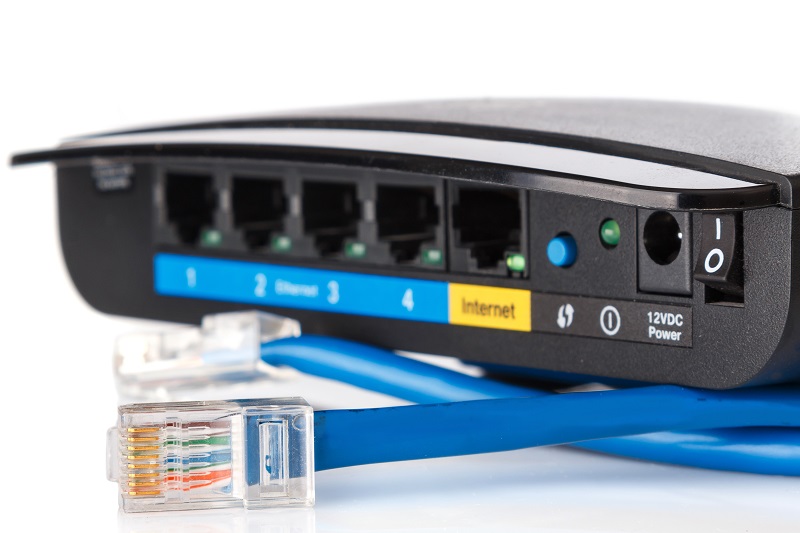
Router and ethernet cable

2015 was the biggest year for router attacks

Is it easy for hackers to break into home networks and is there enough motivation at this time to go to the trouble?

As it stands now, home networks are still not the easiest way for cybercrooks to hack into people’s lives, our team of experts agreed. “Not the easiest way, but too easy to be comfortable with,” said Sramek.

“As more and more devices are becoming smarter and connected to the net, through the Internet of Things, cybercrooks will have more chances to get into the personal home network,” said Sramak’s colleague in the Virus Lab, Nikolaos Chrysaidos.

The motivation is already there too.

“For years, (PC) viruses were the ultimate goal for the bad guy. The goal was to get their hands on users’ data, like credit card information, or to create botnet networks to allow them to send out spam or to do DDoS (distributed denial of service) attacks,” said Vlcek. In a similar manner, cybercrooks have already started to turn internet-connected home devices into “zombies to collect data.”

“The amount of attacks will rise rapidly in 2016,” said Sramek. “Turning IoT devices into zombies is half of their plan. The other is hijacking the network connections of users with devices that are difficult to attack otherwise, like iPhones.”

How do regular people make their home gateways smarter and more secure?
“As a bare minimum, people need an automated vulnerability scanner on a PC in their network, like Avast’s Home Network Security, to check for the most common issues leading to cyberattacks,” said Sramek.

Since we’re still in early days, can threats for IoT devices be eliminated before it gets out of control?

Just like with PC and mobile security, home users can prevent many attacks by applying safe practices and using existing solutions like Avast’s Home Network Security to understand what the vulnerabilities are.

Jaromir Horejsi adds that in addition to educating users about badly configured and insecure home IoT devices, we could use “more secure web browsers, because Firefox, Chrome, and IE are so easy to hack.” He predicts that cybercrooks will create DDoS malware to infect various IoT devices with weak passwords and it will take a combination of home user’s knowing what they’re up against along with manufacturers and ISPs taking more responsibility for safety to overcome the looming threat.

Do you expect to see an increase in attacks through wearable devices?

“In 2015, we have seen many vulnerabilities in wearables. Those vulnerabilities could be used by attackers to extract stored data and use them in personalized social engineering attacks,” said Chrysaidos.

“Today we are seeing a big shift toward social engineering attacks which are ingenious and sophisticated,” said Vlcek. Social engineering uses techniques to trick people into installing malware or adjusting settings that they don’t fully understand.

The biggest target for 2016 is mobile

Phones and tablets are the data collection points for most wearables and Internet of Things devices, so they are targeted for the data they store or the data that passes through them. Mobile devices – smartphones and tablets – are where people are now, and the bad guys know this.

“Bad guys today realize that most people are moving their computing to mobile,” said Vlcek. “They are catching up by coming up with new techniques that gets the job done even without malware.”

“Phones store a lot of personal information nowadays that can be monetized in underground forums. As valuable data exist in our devices those can be treats, and targets, for the cybercrooks,” said Chrysaidos.

Visit our blog tomorrow to read about the upcoming mobile threats for 2016.


Follow Avast on FacebookTwitterYouTube, and Google+ where we keep you updated on cybersecurity news every day.


Mr. Robot was our favorite show of 2015

Back in May, I pulled my new copy of Entertainment Weekly out of the mailbox and flipped through it quickly, as I usually do before sitting down to read the whole thing. An article about an unusual premier of a new TV show called Mr. Robot caught my eye. The cyberthriller’s pilot episode was set to make its debut online and through alternative viewing services like Xfinity On Demand, iTunes, Amazon Instant Video, XBOX, and Google Play almost a month earlier than its USA Network television debut on June 24.

USA Network's Mr. Robot tops all the 'Best TV show of 2015' lists

Mr. Robot tops all the ‘Best TV show of 2015′ lists

The next Monday morning, I shared the news about the show with my colleagues, and we all vowed to watch the new drama about a cybersecurity expert who joins an underground hacker group, as soon as we could. We hoped it would be a more realistic version of the security issues we face today than CSI: Cyber or any number of Hollywood movies. We even contemplated having a weekly viewing party with Avast Virus Lab researchers and getting their comments live, a la Mystery Science Theater 3000, if the show was good.

A twist in the plot

The very next day after the initial discussion, one of my colleagues, and regular blog writer, Stefanie Smith, received an email from a Mr. Robot production staff member asking if we would be interested in having an Avast antivirus product make an appearance on one of the upcoming episodes. At the time, a few weeks before the pilot episode even aired, this was a difficult call – but our decision to be a part of the show, even for a brief moment, proved to be the right one.

Mr. Robot has consistently been named one of 2015’s best TV shows, and it received Golden Globe nominations for Best Series, Best Actor for Rami Malek, and Best Supporting Actor for Christian Slater.

We didn’t watch it together with the Virus Lab guys, but every week after the show, we got their expert opinions about the hacks depicted on Mr. Robot. Here’s some of our favorite moments from season one:

1.     Avast guest stars on Mr. Robot

Mr_Robot_03The show’s protagonist, Elliot, attempts to hack into a prison’s network, and fellow hacker, Darlene, helps him by uploading an exploit onto USB sticks. She drops the sticks on the ground, and a police officer picks one up and foolishly inserts it into his work PC. The idea was to inject a customized payload to compromise and gain access to the prison’s network – and then BAM! Avast detects the exploit!

2.     Operation Meltdown

@whoisMrRobot

via USA Network

Elliot wants to control the Steel Mountain secure data facility’s climate control system to overheat it, thus melting ECorp’s tape-based backup. He uses a complicated gateway-impersonating MiTM (man in the middle) attack, ‘Raspberry Pi’, to accomplish his goal. He eventually connects Raspberry Pi to Steel Mountain’s heating and cooling systems. This 3xpl0its.wmv plot is reminiscent of the point of entry in the real-world Target attack.

3.     “People make the best exploits”

via USA Network

via USA Network

One of cybercrooks most successful methods is social engineering; psychological techniques used to exploit human weaknesses. Throughout the show’s episodes we saw examples of this technique. Even among the more sophisticated hacks, these are the ones that freaked us out the most.

Hackers want your personal information

Elliot uses a password-cracking tool many times on the show. On one occasion, he wants to hack his therapist’s new boyfriend, Michael. He calls Michael pretending to be from his bank’s fraud department, confirming his address and asking him security questions to verify his account: What is his favorite baseball team? His pet’s name? Using the information he gathered combined with a dictionary brute force attack, which systematically checks all possible passwords until the correct one is found, Elliot hacks Michael’s account.

Hackers want to steal company data

In episode d3bug.mkv, one of Elliot’s colleagues, Ollie, received a music CD from a fake rapper that turns out to have malware on it. The infection that resulted gave ‘The Dark Army’ access to Ollie’s laptop webcam which was used to spy on him and his girlfriend, Angela. The hacker tells Ollie he has photos of Angela, and even Angela’s and her dad’s banking information and social security number. He threatens to blackmail Ollie if he does not spread the malware within his employer, Allsafe’s, systems.


4.     Mobile devices are vulnerable

via USA Network

via USA Network

ECorp baddie, Tyrell, uses a backdoor to get into assistant Anwar’s Android device to install an app that could allow remote access. It’s not strictly necessary to root the phone – just gaining physical access to the phone is all he needed. In this episode, Tyrell used an SD card with an application called RooterFrame to gain access, but the actual Android APK is Framaroot.

Elliot needs to remove a hacked server in episode wh1ter0se.m4v, but has to do it by creating an Allsafe service ticket. This request requires his boss, Gideon, to send the ticket, and he uses two-factor authentication to receive a temporary, second code sent to his phone. Elliot asks Darlene to send Gideon’s phone hundreds of MMS files to drain the battery, forcing him to charge it- and leave it in his office unattended. Elliot takes physical possession of the device, gets the security token and logs into Gideon’s account to submit a request to take down the server.

5.     Real-life physical hacks

Elliot picks the bathroom lock. He explains that “the lock-pick is every hacker’s favorite sport. Unlike virtual systems, when you break it you can feel it.”

Avast was the only roadblock that Elliot ran into that he couldn’t beat. You can protect your own PCs, Android devices, and Macs with Avast Antivirus products. Our flagship product, Avast Free Antivirus, was chosen as PCMag’s Editors’ Choice 2016 for the best free antivirus. Visit the Avast website to check out all our security software.

Follow Avast on FacebookTwitterYouTube, and Google+ where we keep you updated on cybersecurity news every day.

Facebook hoax promises giveaway of 4.5 million company shares

When I was checking my Facebook News Feed this morning, I found this message.

Facebook newsfeed hoax

Facebook newsfeed hoax

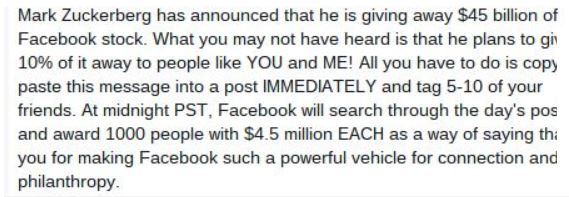
It seems one of my friends was very excited because Facebook founder, Mark Zuckerberg, was scheduled to give away 4.5 million shares of Facebook stock at midnight. To enter this lottery-like giveaway, all you had to do was copy and paste the message to your own news feed. The message, and variations like it, go on to say that the winners will be announced  live on today’s Good Morning America. Other variations look like this,

Facebook newsfeed hoax Metro

Facebook hoax image via metro.co.uk

Like others before it, this viral Facebook message is a hoax. You will not be entered by copying and pasting a message. And Mr. Zuckerberg is not giving away 4.5 billion dollars to 1,000 random Facebook users. If this message makes its way to your News Feed, please do not copy and paste it or share with your friends. The best action is to delete it and maybe go buy yourself a lottery ticket. The odds will be a little better. ;-)

Using surveys to better understand viral stories

Facebook is actually doing something about these hoaxes. Early in December, the Facebook newsroom published a News Feed FYI: Using Surveys to Better Understand Viral Stories. In the article they described how they have started using surveys to improve the news feed experience. Every day they ask thousands of people to rate their experience, share suggestions for improvement, and help them infer what might be an interesting story so they can work their algorithms to take that into account when ranking. Here’s what they say about that,

People also take story surveys where they see two stories that could be in their News Feed and answer which they’d most want to see. We compare their answer to the order we would have put these stories in their News Feed. If the story picked is the one News Feed would have shown higher up, that’s a good sign that things are working well. If the story picked is the one we would have put lower down, this highlights an area for improvement.

So if you receive one of these surveys, make sure you fill it out – your feedback will help to eliminate this type of clutter in everyone’s News Feed. :-)


Follow Avast on FacebookTwitterYouTube, and Google+ where we keep you updated on cybersecurity news every day.

Happy Holidays from Avast!

Merry Christmas! Happy Holidays! Seasons Greetings!

All of us at Avast raise our glass in a toast to all of you, the global community of people who help us keep cyberspace secure. You motivate us everyday, and we wish you the happiest of holidays and a New Year full of joy, peace, and security. Cheers!


Follow Avast on FacebookTwitterYouTube, and Google+ where we keep you updated on cybersecurity news every day.

Find free, safe Wi-Fi hotspots with Avast’s new Wi-Fi Finder app

Avast Wi-Fi Finder helps you automatically connect to the nearest free Wi-Fi in your range

Avast Wi-Fi Finder helps you automatically connect to the nearest free Wi-Fi

Avast Wi-Fi Finder saves your data and roaming fees by locating safe and reliable connections.

Install Avast Wi-Fi Finder now on your Android device.

Everyone loves free Wi-Fi. You can surf the web, check your email or newsfeed, make Skype video calls across the world, or stream games, movies, and music – without eating up your data plan. That’s a great deal! Or is it?

The problem with free Wi-Fi hotspots is they can’t be trusted to be safe and keep your data secure. Cybercrooks can eavesdrop on your conversations and even break in to steal personal information.

When you need to find safe Wi-Fi, use Avast Wi-Fi Finder

Our new mobile app, Avast Wi-Fi Finder, lets you instantly search for available networks on the map or browse through a list. Wherever you are in the world, you can always find a safe connection, because after a successful beta test, we launched the app with nearly 800,000 networks in our database. The more people who use Avast Wi-Fi Finder, the bigger and better that database will become.

Avast Wi-Fi Finder also tests the speed of the network and performs our unique Wi-Fi security check. In case a vulnerability is found, you can easily protect yourself with the integrated app Avast SecureLine VPN (a small fee applies).

Android users: Learn more about Avast Wi-Fi Finder or visit the Google Play Store to download Avast Wi-Fi Finder. You can thank us by leaving +1s and 5-star ratings on the Play Store with a review to help the next person.


Follow Avast on FacebookTwitterYouTube, and Google+ where we keep you updated on cybersecurity news every day.