
Category Archives: Avast

Avast

Top 4 malicious phishing scams to look-out for during the holidays

Cybercrooks take advantage of the busy holiday season to launch scam campaigns.

Cybercrooks take advantage of the busy holiday season to launch scam campaigns.

Be aware that cybercrooks send “special” offers via fake email campaigns during the holiday season.

The holiday season is a time for decorations, cheerful music, shopping, spending time with loved ones, and unfortunately, for cybercriminals hoping you will fall for phishing scams.

“Cybercriminals use the same tactics they always do, but target people more during the holiday season with “special” offers via fake email campaigns. These fake email campaigns can trick people into downloading malware and/or can trick people into giving attackers their personal information”– Jan Sirmer, senior malware analyst at Avast.

We decided to take a look at a few recent examples of malicious emails, more specifically their email subject lines and the email addresses they were sent from. Our goal was to see how cybercriminals are taking advantage of the holiday season.

Here’s what you should look out for:

  1. The Fake Holiday Offer

Whether it be membership offers or special shopping deals, be cautious of the offers you receive around the holidays by email.  Some of them might be too good to be true and are fake or some may come from trustworthy businesses whose email accounts have been hacked.  Here is an example:

‘CHRISTMAS OFFERS.docx’ From: “Nicole*” <[email protected]*

This could be a tempting offer, especially if your upcoming New Year’s resolution is to lose weight. The original email address belongs to an actual business owner, lending credence to the scam. Unfortunately, cybercriminals understand this and misuse business email addresses, such as this, to send out phishing emails to customers, because they know customers trust the business and there is a better chance they will fall for the scam.

  1. The Fake Shipment Updates

Cybercriminals are also aware how important it is to receive online orders on time, so they spoof package delivery services, using emails with subject lines such as:  ‘Your latest DHL invoice: MSE7396821′ from [email protected] and ‘Reminder: Shipment status change for package # 82274150′ from: “USPS 2015″ [email protected] are being sent.

It is always important to pay attention to the email address the email is being sent from, not just the name attached to the email address. You can also check if the email is real by visiting the shipping site directly from your browser to track your order. If the package or invoice number do not appear in the system, then you know the email is a scam and should delete it.

  1. The “Congratulations you won a gift card!” … Not!

Money can get tight around the holidays, so you may be tempted by scams that offer gift cards or cash. Here are some of the scam emails we have seen offering cash for the holidays:

‘Cash Out for the Holidays’ from “U.S. Bank Consumer Finance Wholesale Mortgage” [email protected]

Incoming email ‘Apple Store Gift Card’ From “Apple AppStore” [email protected]

It is safe to say that washbowlsnm531 probably isn’t an Apple employee…

And here are two classic spam emails we have all probably seen before:

‘You WON best buy gift card 500$’ from Best Buy [email protected]

‘AMAZON e-giftcard 100$’ from “Amazone.it” [email protected] 

  1. The holiday e-card! – from your favorite Cyber Criminal

To move away from the shipping and offer scams for a moment, criminals are also taking advantage of people’s excitement over holiday e-cards. We discovered multiple emails claiming to contain a Hallmark e-card from various “Hallmark” email addresses, but we took a closer look and found that most e-card and online gifting services send out greetings from the sender’s email address, not from the company’s email addresses. Hallmark has been targeted by fraudulent emails, like the ones below, so often in the past that they have a dedicated a support page to address the problem.

Scam Holiday e-cards:

‘You’ve received A Hallmark E-Card!’ from [email protected]

‘You have received A Hallmark E-Card!’ from [email protected]

If you receive an email from Hallmark or another online greeting company or gifting service’s claiming you have received an e-card or gift, do not open it or open any attachments or links. Again, these emails should be sent to you with your friend’s email address and if you are not sure, contact the service directly to confirm the email is safe.

How to protect yourself from the Grinches of the cyberworld

Jan Sirmer, senior malware analyst at Avast, shares some tips on how you can protect yourself from the various phishing scams going around during the holiday season:

“It is vital you have antivirus installed on all of your devices (laptops, android phones). Antivirus software, like Avast, will detect and block phishing attacks before they can affect you. You should also make sure all of the software on your devices are up-to-date. Attackers often exploit vulnerabilities, which can be found in outdated software. Finally, you should always be cautious when opening links or attachments in emails. If anything seems off, double check to make sure the email actually came from a trusted source – better to be safe than sorry!

*Name and email address have been changed to protect the business that was hacked


Follow Avast on FacebookTwitterYouTube, and Google+ where we keep you updated on cybersecurity news every day.


Protect your phone while traveling for the holidays

Traveling can be stressful, but even more so during the holiday season. AAA projects that the number of year-end holiday travelers in the U.S. will top 100 million for the first time on record. Nearly one in three Americans will travel this holiday season and more than 100.5 million are expected to travel than 50 miles or more from home.

Avast mobile apps help protect your smartphone when you are traveling

Avast mobile apps help protect your smartphone when you are traveling

The one thing you really want to make sure you protect while you travel is your smartphone. Not only may you have your boarding pass on your smartphone, but more importantly, the hardware is expensive and it most likely contains a plethora of personal data.

There are two main ways your phone could be compromised while traveling, especially during the holidays: physical device loss and network threats.

Have an anti-theft app installed

Airports and train stations will be bustling with people, you may have to dash to catch a flight or make a pit stop during a long car ride. In all of these situations, your phone is at risk –physical risk. Pickpockets prefer to work in high density areas, and it’s easy to lose things like your phone when you’re in a rush.

If you lose your phone, Avast Anti-Theft can help protect your data and help you find your phone.

With Anti-Theft, you can accomplish the following:

  • Remotely locate your phone on a map via GPS, Wi-Fi or mobile network
  • Remotely lock your phone
  • Be notified about a SIM card change — the new number and GPS location will be sent to your pre-selected friend
  • Remotely activate an alarm
  • Remotely wipe your phone
  • Remotely lock your phone’s settings app

Use a VPN when connecting to public Wi-Fi

Besides physical loss, your smartphone can be compromised when using public Wi-Fi. Using software that is readily available on the Internet, anyone can snoop on Wi-Fi traffic if they are connected to the same network as you are. This means they can see the websites you visit and, in some cases, even capture login information, which is why it is vital to use a VPN. VPN stands for virtual private network and serves as a private tunnel that encrypts your data while connected to open Wi-Fi and, thus, protects your data from being intercepted and read.

Avast SecureLine VPN is a great, affordable, one-click VPN. In addition to protecting your data, you can also choose which of the many Avast servers located around the world that you want to connect through. This allows you to circumvent geo-restrictions, so you can view content from your home country while traveling abroad.

Happy holidays and safe travels from Avast!


Follow Avast on FacebookTwitterYouTube, and Google+ where we keep you updated on cybersecurity news every day.

May the force, but not the malware, be with you!

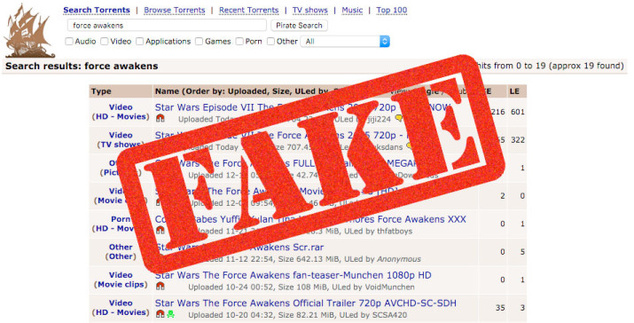
Not very long ago, in a galaxy not far away, a group of cybercriminals decided to take advantage of the Star Wars effect to spread malware among the most impatient fans.

sw-fake-pirate

A lot of people cannot wait to see Star Wars: The Force Awakens, and that’s something cybercrooks know. That’s why a lot of links that theoretically allow the download of the new movie of the popular saga appeared. As many of you can imagine, those links do not include the films, the only thing they include is malware! An idea worthy of Darth Vader!

We can see those links in popular download sites, along with a lot of comments from users that warn about the true purpose of the links: To install malware on users’ devices.

SW-sith

Is easy to avoid falling victim of this type of scam; just avoid clicking on suspicious links and install an antivirus, like Avast 2016, and keep it updated.

As master Yoda said: “Patience you must have, my young Padawan”.

The power of the dark side is very tempting, but do not let cravings take over you. May the Force and Avast be with you!

Images via ADSLZone and Starwars.com


Follow Avast on FacebookTwitterYouTube, and Google+ where we keep you updated on cybersecurity news every day.


Retailer’s apps reveal your Christmas list to the public

By using some retailer’s apps to make your holiday wish list, more people than just Santa Claus can see your list. In fact, it may be accessible to anyone over the Internet!

Santa Claus

America’s most popular retailers collect more information about you via apps than you may be comfortable with.

Recently, the Avast Security Warriors began looking into shopping apps to see what your favorite retailers know about you. They found that these apps, like many other apps out there, collect data and request permissions that are unnecessary for their app to function properly.

Initially, we were curious to see what retailers wanted to know about their customers based on the data they collect. We randomly chose apps from the following retailers: Home Depot, J.C. Penney, Target, Macy’s, Safeway, Walgreens and Walmart. In this blog post, we focus on Target and Walgreens.

You’re making your list and Target is checking it twice!

If you created a Christmas wish list using the Target app, it might be accessible to more people than you want to actually receive gifts from. The Target app keeps a database of users’ wish lists, names, addresses, and email addresses. But your closest family and friends may not be the only ones who know you want a new suitcase for your upcoming cruise!

To our surprise, we discovered that the Target app’s Application Program Interface (API) is easily accessible over the Internet. An API is a set of conditions where if you ask a question it sends the answer. Also, the Target API does not require any authentication. The only thing you need in order to parse all of the data automatically is to figure out how the user ID is generated. Once you have that figured out, all the data is served to you on a silver platter in a JSON file.

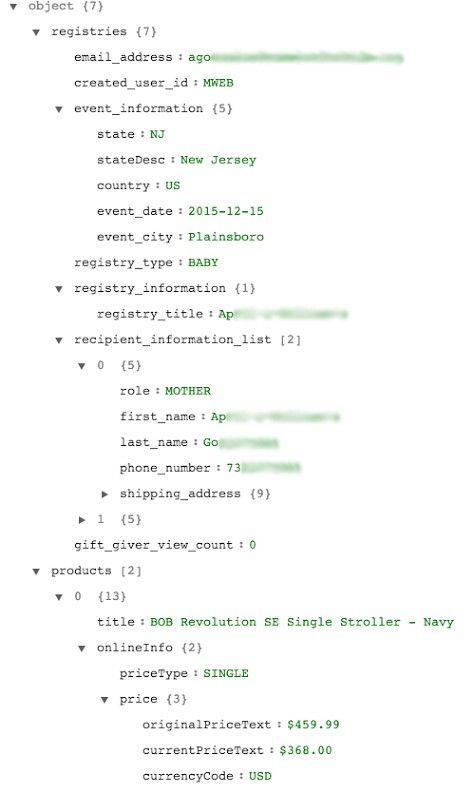
The JSON file we requested from Target’s API contained interesting data, like users’ names, email addresses, shipping addresses, phone numbers, the type of registries, and the items on the registries. We did not store any personal information, but we did aggregate data from 5,000 inputs, enough for statistical analysis.


An example of the data that we were able to obtain via Target’s API

An example of the data that we were able to obtain via Target’s API

Target doesn’t know if you’re naughty or nice, but they do know who you are 

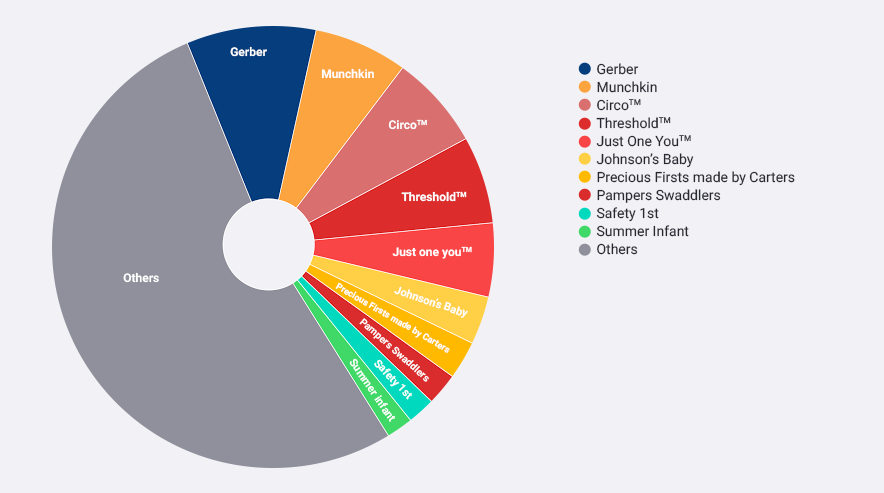
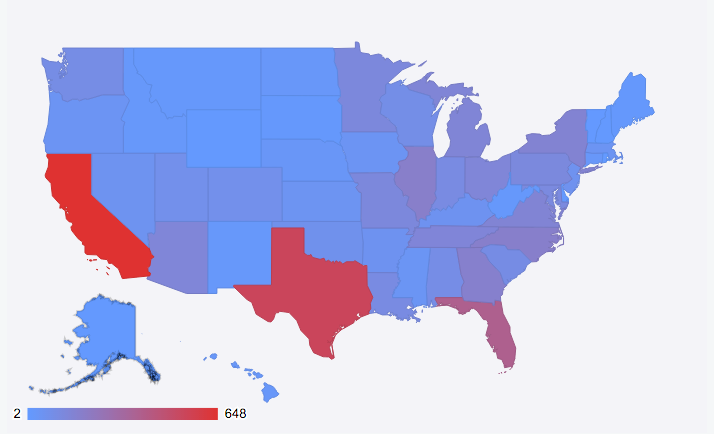
We took the 5,000 random inputs, and out of curiosity, looked at which brands appear on their registry the most, which states the Target app users are from, and what the most common names of people using Target’s app are.

The top 10 brands on Target app users’ registries

The top 10 brands on Target app users’ registries


Map showing where the 5,000 app users are from within the U.S.

Map showing where the 5,000 app users are from within the U.S.

There were more than 1,700 unique names in our sample – these are the top 20 names of Target app users.

Jasmine           162
Jamie               132
Jessica            79
Ashley              67
Jackie              67
Jordan              64
Amanda            58
Jennifer            55
Sarah               45
Jacqueline        41
John                 39
Megan              38
Dominique        36
Heather            34
Amber              33
Jade                 33
Melissa            32
Stephanie         32
Katie                31
Brittany            30

In addition to collecting personal data, the shopping apps we looked at also request a plethora of permissions.

The prize for the most unnecessary permissions requested by a retail app goes to…

Walgreens logoIf you want to choose a shopping app based on the amount of unnecessary permissions it collects then Walgreens is the app for you!

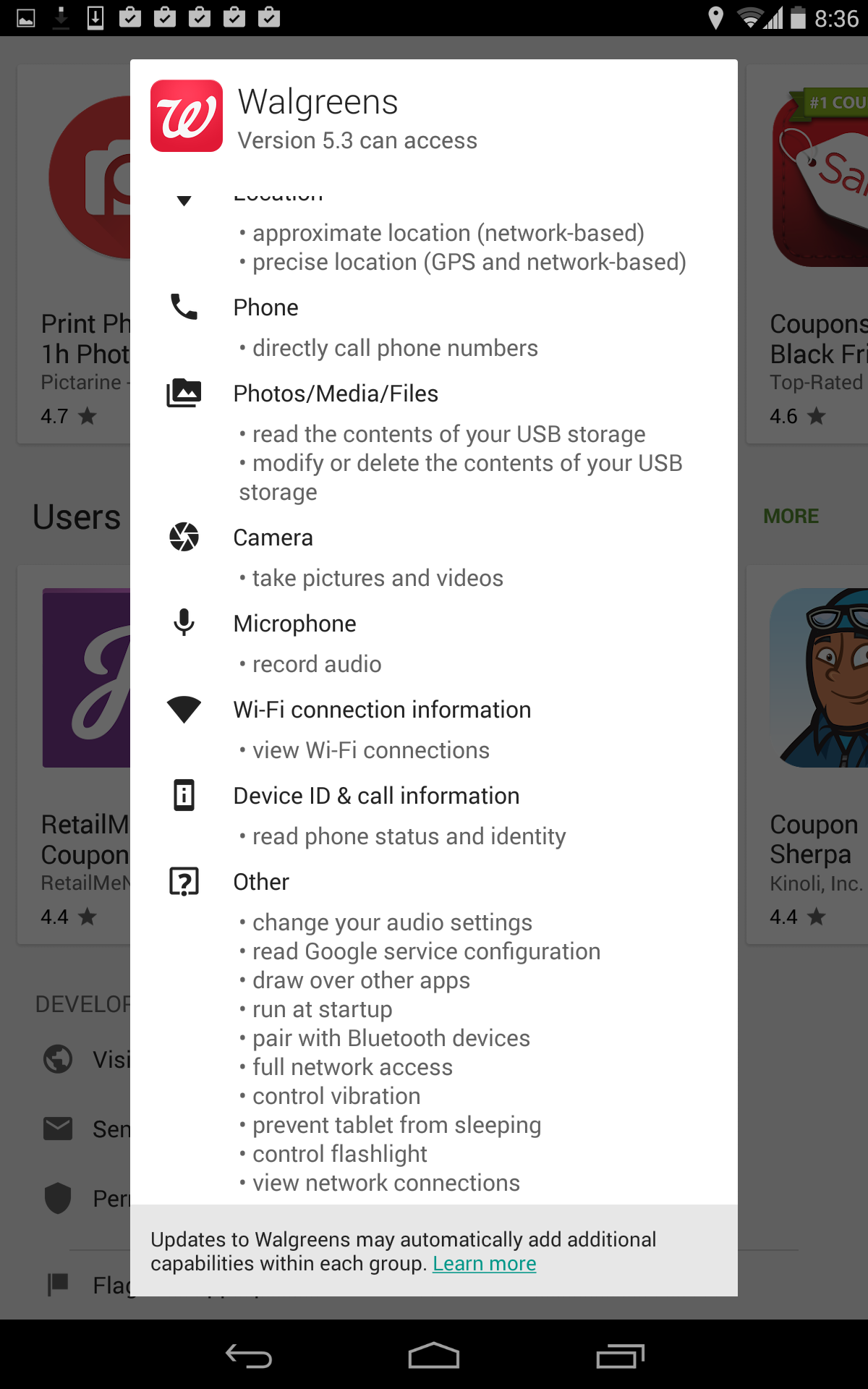
The Walgreens app not only requests permissions that are completely unnecessary for its app to function, but also requests more permissions than any of the other retail apps we looked at – see screenshot below. The Home Depot app came in close second in terms of unnecessary permissions requested.

Walgreens app


The Walgreens app has permission to change your audio settings, pair with blue tooth devices, control your flashlight, and run at startup – completely unnecessary for the app to function properly. On the bright side, these retail apps aren’t the most permission-hungry apps we have ever seen, in fact compared to other apps out there they are decent.

But, now imagine what could happen if this valuable customer data landed in the wrong hands. The ways this data could be misused are far and wide. It is, therefore, important that people are aware of how many permissions they grant the apps they use and understand what data the apps collect.

Stay tuned for more as we investigate the vulnerabilities of mobile apps and the need for mobile security.

Continue reading Retailer’s apps reveal your Christmas list to the public

Digital toy company hack exposes information and risks kids’ privacy

Internet-connected toys gather data on the user and have weak security compared to other computer products.

vtech-innotab

Data stolen from children today can be used to build profiles that will cause trouble for them in the future

Digital devices and toys like cameras, smartwatches, and tablets may be on your child’s Christmas wish list. But more parents are having second thoughts about placing these items under the tree, because Internet-connected toys gather data on the user and have weak security compared to other computer products.

6 million children’s accounts taken by a hacker

This weakness was made very public during the Black Friday shopping bonanza, when a Hong Kong-based digital toy company called VTech lost databases of more than 6 million children and almost 5 million connected parental accounts to a hacker.

By putting the databases together the hacker was able to retrieve personally identifiable information like children’s names, ages, and genders, and even pictures and chat logs were found. Parents’ names, email addresses, secret questions and answers, IP addresses, encrypted passwords, and mailing addresses were also accessed. Supposedly the breach did not include credit card or financial account information exposure.

The hacker responsible for breaking into the VTech databases told Motherboard that his only intention was to expose the company’s inadequate security practices. There has been no indication or evidence that the data has been put up for sale on hacker forums.

“Profiting from database dumps is not something I do,” the hacker told Lorenzo Franceschi-Bicchierai, a staff writer at VICE Motherboard. “I just want issues made aware of and fixed.”

The company has taken several of its sites and services offline after the breach and hired a security company to improve data security.

Do parents have anything to worry about?

Most parents probably have no idea that their children’s data can be compromised, or that there is even anything to worry about. But the danger with stealing even basic pieces of information from a child, is that cybercrooks can begin early to build profiles, setting up the young child for identity theft or other nefarious activities in the future.

“Nowadays it sometimes happens that sophisticated fraudsters use children’s data later on, when they come of age, and establish a credit record or ‘credit footprint’ without the child even knowing it,” Diarmuid Thoma, from security firm Trustev, told ZDNet after the hack was exposed.

The Identity Project, a website which educates people about identity theft, share some potential real-life consequences when a child’s identity gets stolen.

    1. 1. Young adults could be denied the first credit card they apply for because their credit history will show odd behavior.
    2. 2. Their first medical emergency can have incorrect information, because cybercrooks have used it for medical services.
    3. 3. Their DMV records may be tied to criminal activity, which could complicate their license application.
    4. 4. They will be denied a college loan to pay for school.
    5. 5. They will be denied their first apartment and utilities because their credit check fails.

Should parents stop buying internet-connected toys?

With this type of breach made public, parents will now realize the danger that internet-connected toys at home, and even educational technology used at school, may pose to their children in the future because of the lack of security today.

Refraining from purchasing digital items will actually get harder as the Internet of Things universe expands.

We have already become used to sharing personal information in order to get a better experience, so until children’s online protection improves, parents will have to balance the importance of the information they are willing to give up against the benefits of having it used by a company that provides services (think Google or shopping sites) and factor in the level of risk they are willing to tolerate.

image via http://digisns.com/


Follow Avast on FacebookTwitterYouTube, and Google+ where we keep you updated on cybersecurity news every day.
Avast Endpoint Protection and Server Security products now compatible with Windows 10

Image via PCWorld

No one should have to choose between security and the latest technology. At Avast, it’s important to us that we support our valued business customers and create innovative features that keep businesses secure and ahead of the bad guys.

That being so, Avast is happy to announce that our Avast Endpoint Protection and Server Security products are now fully compatible with Windows 10!

How you can get the compatibility update

To get the latest and greatest functionality of these products, you simply need to run the program update. Then, you’re all set to go! After upgrading to the latest version of your program, you can sit back, relax, and enjoy using our award-winning business solutions together with Windows 10.

Visit our website to learn more about Avast business security solutions and the benefits they can bring to your business.


Follow Avast on FacebookTwitterYouTube, and Google+ where we keep you updated on cybersecurity news every day.

Autumn 2015: A season full of Android conferences

David Vávra is our team’s talented Google Developer Expert (GDE) for Android. Throughout this autumn, he attended a collection of valuable Android conferences. In this post, David walks us through his experiences and outlines his most interesting takeaways from the conferences.

Droidcon Stockholm (September 3-4)


Droidcon Stockholm was a two-day event held in Debaser Medis, a classic rock club in Stockholm. As you might imagine, it proved to be an interesting venue for a tech conference! The organization was  a little more “punk” than most other conferences, but the conference was still jam-packed with talks containing strong content and served as a great opportunity to network with fellow industry professionals. Fun fact: Czech beers are quite popular in Stockholm. We visited a place where they served five different Czech beers on tap.

One talk that I found to be especially useful discussed building Android SDKs from Fabric, a platform for mobile developers from Twitter. It was also interesting to take a closer look at Spotify’s automated testing environment in a talk Sustainable test automation. As for me, my presentation at the conference dealt with Android TV development. All the Droidcon talks can be found here.

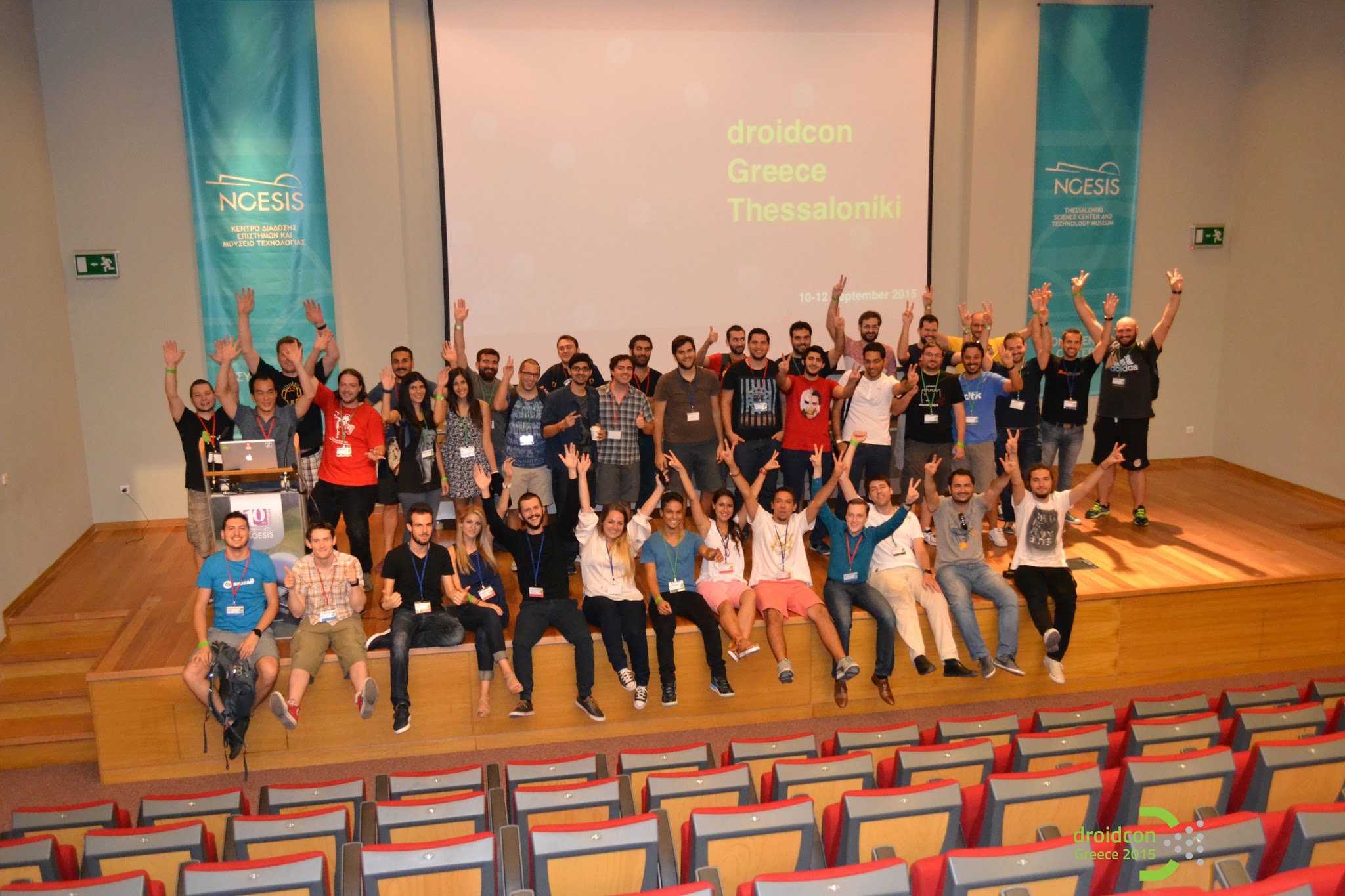
Droidcon Greece (September 11-12)


This year’s Droidcon Greece was the very first Droidcon event in the country. It was organized by the very enthusiastic GDG Thessalonikigroup. Based on the number of attendees present, it was a smaller conference, but I loved it. G(r)eeks (Greek geeks) showed us true Greek hospitality. We had a tour of beautiful Thessaloniki and many parties along the way. Did you know that Greeks usually go to restaurants around 11 p.m. and start eating around midnight? Needless to say, we didn’t sleep much.

All talks were recorded. I suggest watching a talk about Kotlin on Android from Jetbrains — it really shifted my point of view on the language. Java 7 is so outdated now! I also enjoyed a workshop about RxJava from Big Nerd Ranch. You can do the workshop yourself here. It’s an innovative approach to learning a new language — it’s based on tests that all fail in the beginning, and your job is to make them ‘green’. At Droidcon Greece, I delivered a talk about Doze Mode & App Standby in Android M. All talks from the conference can be found here.

Big Android BBQ Amsterdam (November 12-13)


Big Android BBQ is a new conference brand with roots in Texas. It’s primarily supported by Google and is known for a less formal environment (and a real BBQ party!). This autumn, the conference came to Europe for the first time, so I gave it a shot. The conference itself was fine, and the content of the talks was strong. However, I had a few reservations about the organization of the event. There wasn’t sufficient care given to speakers, and we had to organize the speaker’s dinner by ourselves. Additionally, talks were not recorded. Nevertheless, we did have a great time in the end, and Amsterdam is a charming city.

I recommend a talk, Testing it & Loving it, from Marks & Spencer; if you don’t have automated tests yet, this talk will make you start. I also enjoyed  Event Buses: The @channel of Android Architecture from Big Nerd Ranch –it showed fitting examples from real life which illustrate when and when not to use event buses. I gave an updated talk about Doze Mode & App Standby in Android M. All of the talks can be found here.

Google Experts Summit (November 19-20)


gde-summit

The Google Experts Summit is one of the best perks of being a GDE. Google invites us once a year for the summit in Mountain View, California. It’s two days full of deep technical insights with product teams and lot of networking with other experts. The networking was probably the best — I met many exceptional people from all over the world. This year, GDEs were joined by marketing, design and product experts, making it the biggest summit ever with around 200 attendees present.

We had some really interesting sessions based on our expertise. I was part of a focus group in which Google shared some very confidential early prototypes. We were fortunate enough to be able to play with the prototypes and gave feedback directly to Googlers. I’m grateful that Googlers take the GDE program so seriously.

Android Dev Summit (November 23-24)


Android Dev Summit was a blast. I would summarize it as mini Google I/O focused only on Android. The conference was less show, more technical deep dives and direct access to Googlers from Android framework and tools teams. It appropriately took place in the geekiest venue in Silicon Valley — the Computer History Museum.

All the talks from Android Dev Summit are recorded in high quality. The highlight of the event is, of course, the introduction of Android Studio 2.0 with Instant Run, which should drastically speed up the Android development lifecycle. Watch What’s new in Android Studio to get all the details. The best talk for me was probably Android Studio for Experts. It was all live demos of various features in our favorite IDE, which included mostly tips and tricks for underlying IntelliJ IDEA. There are many small frustrations in everyday development, which the IDE elegantly solves. It was great to have direct access to Android celebrities like Chet Haase, Chris Banes, Tor Norbye, Reto Meier, Dianne Hackborn and others. Fireside chats with all of them were both funny and informative,and lots of burning questions were answered. Check out the fireside chat with the framework and tools teams.

I’m grateful that Avast supported me in attending all of these conferences and am looking forward to another conference season!


Follow Avast on FacebookTwitterYouTube, and Google+ where we keep you updated on cybersecurity news every day.

Avast SecureMe app protects iOS users from Wi-Fi hacking


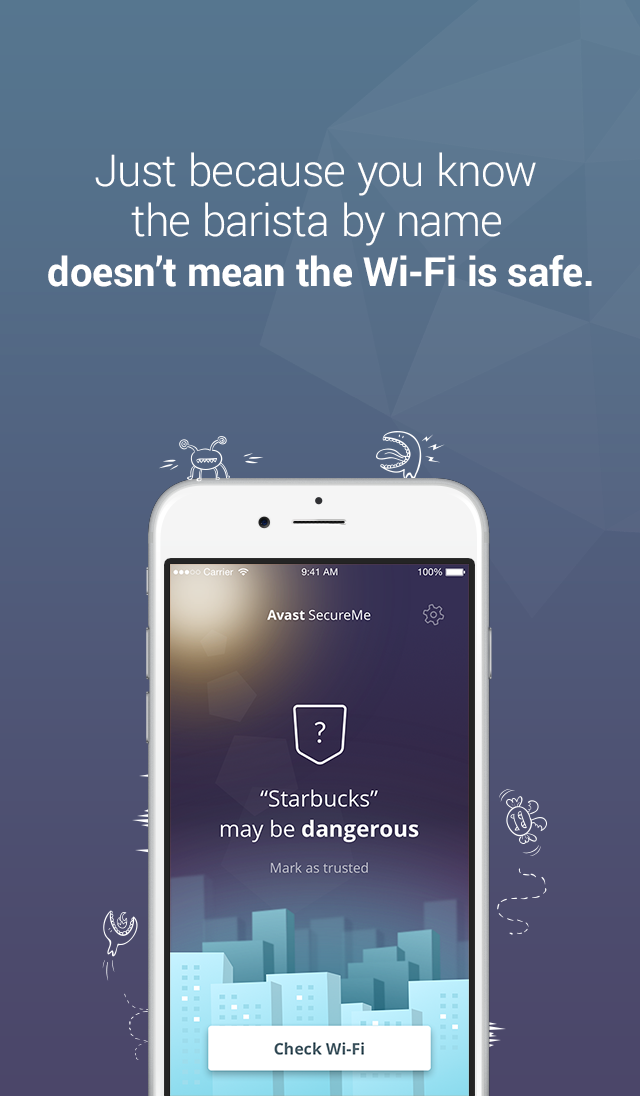
Avast SecureMe is the world’s first application that gives iPhone users a tool to protect their devices and personal data when they connect to Wi-Fi networks. The free app scans Wi-Fi networks and tells users which of them are safe. Since many users use Wi-Fi networks without knowing whether or not they are safe, Avast SecureMe will create a secure connection in order to keep them safe.

The app notifies you upon the discovery of security issues

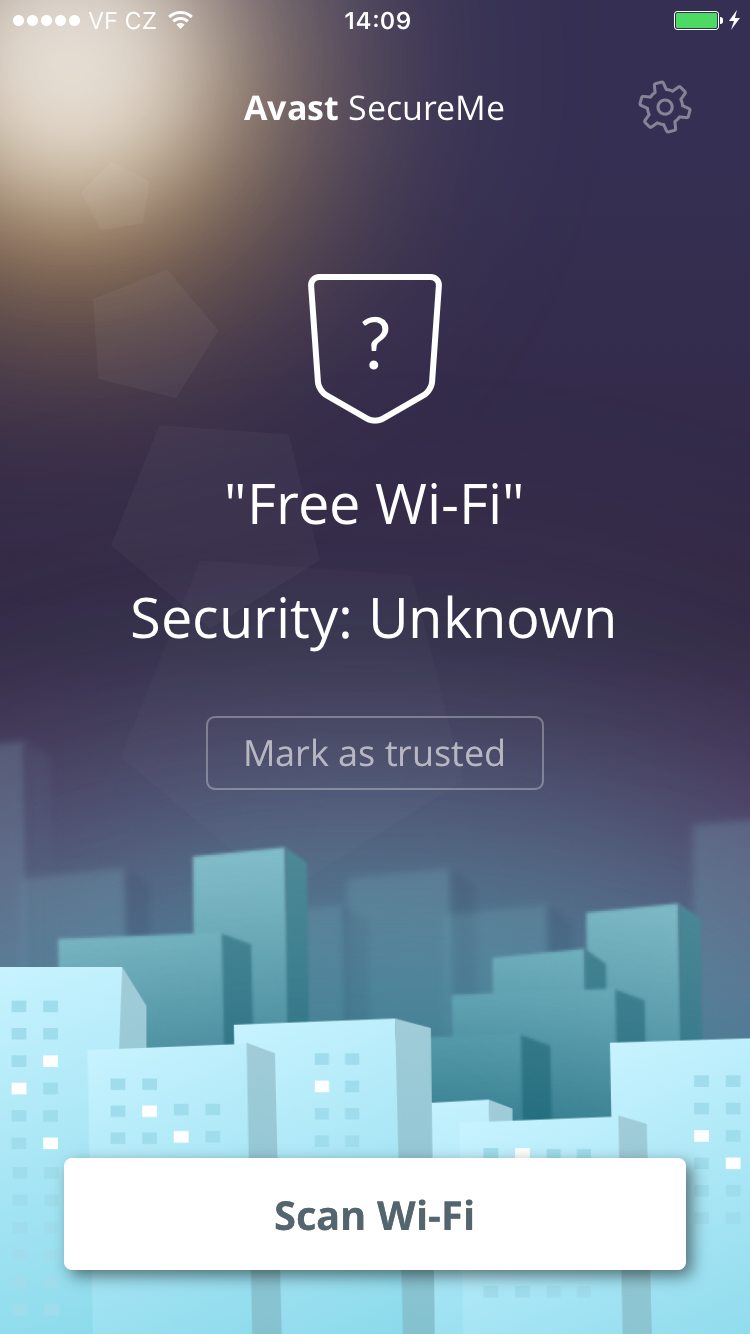
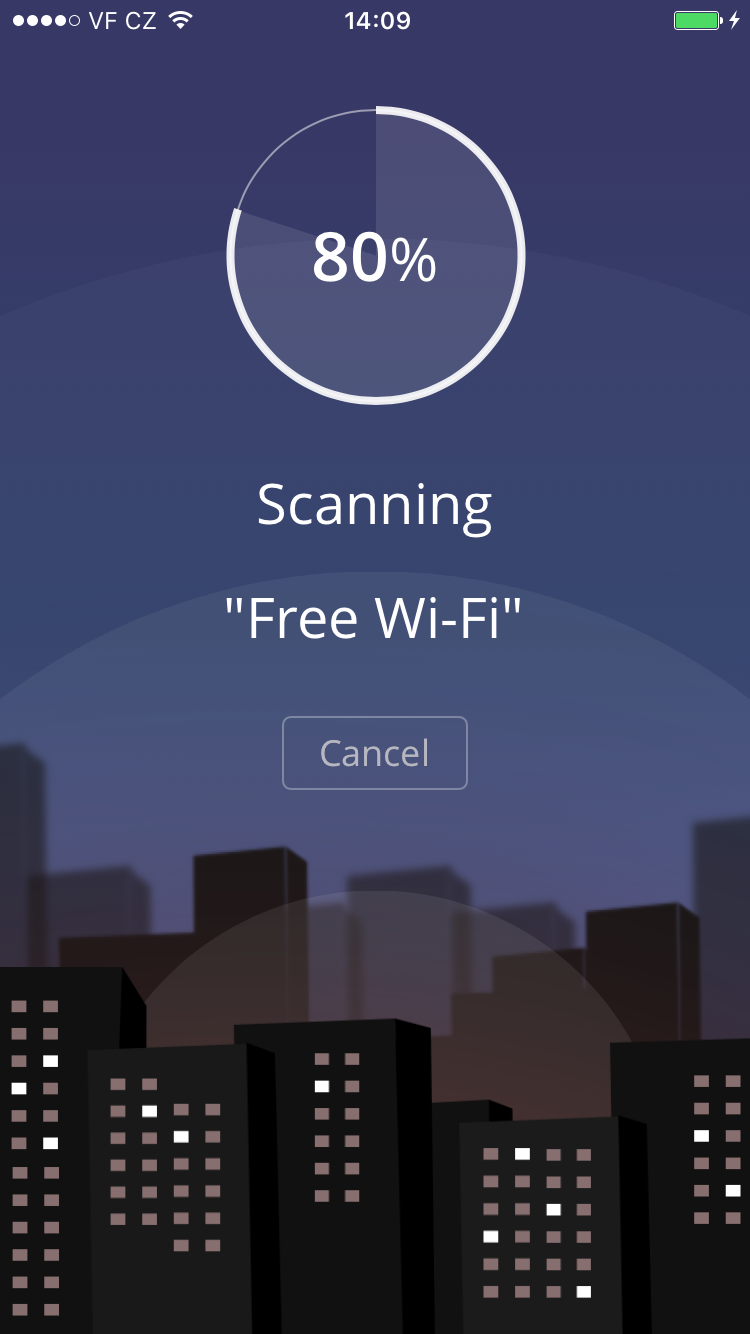
Avast SecureMe includes a feature called Wi-Fi Security. People who use open Wi-Fi in public areas such as airports, hotels, or cafes will find this helpful. This feature’s job is to scan Wi-Fi connections and notify you if any security issues are found, such as routers with weak passwords, unsecured wireless networks, and routers with vulnerabilities that could be exploited by hackers. Users have the option to label Wi-Fi networks that they frequently use as trusted — this way, the app won’t need to check the networks every time.

What’s the risk that my personal data will be stolen?

If you use unsecured Wi-Fi when you log in to a banking site, for example, cybercrooks can capture your login credentials which can lead to identity theft. On unprotected Wi-Fi networks, crooks can also easily view your emails, browsing history, and personal data if you don’t use a secure or encrypted connection like a virtual private network (VPN). For more details on this point, see our recent Wi-Fi hotspot experiment to see how widespread the threat really is.

Avast SecureMe is a simple way to find and choose safe networks.

The Avast SecureMe app includes a VPN to protect your privacy

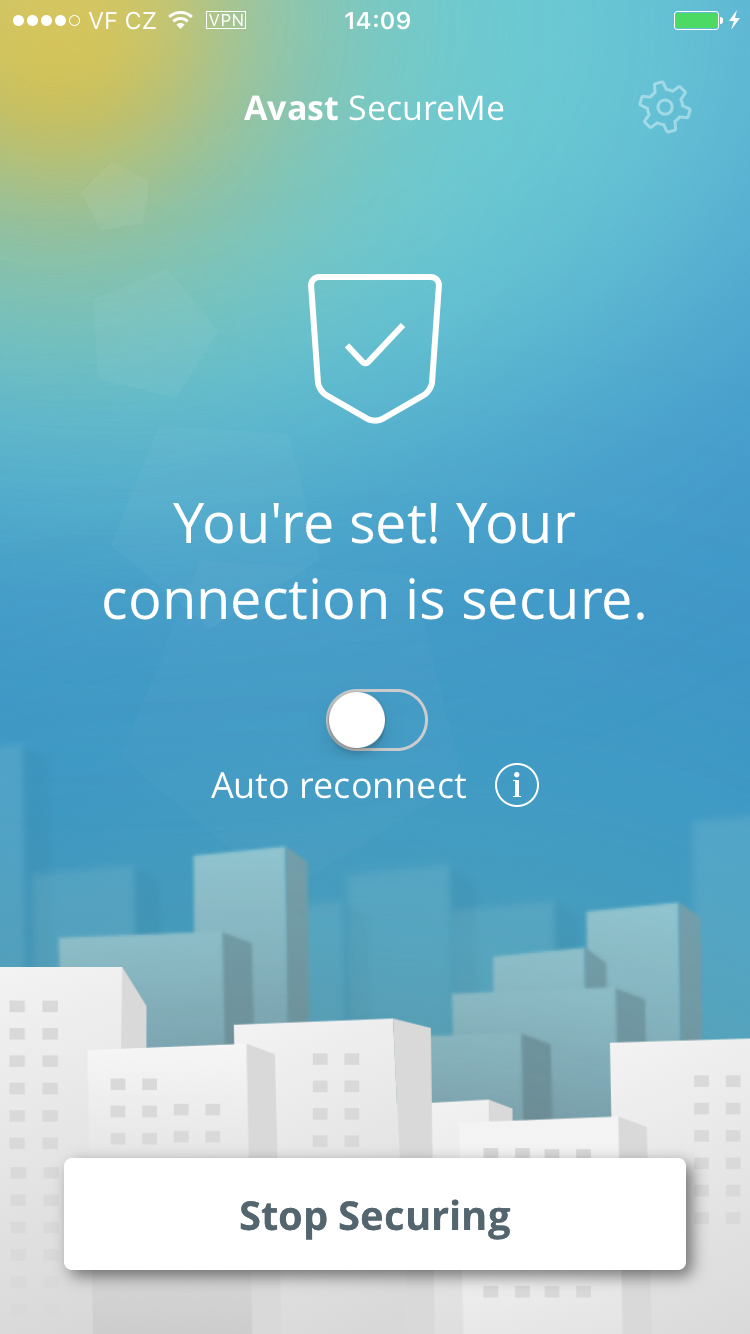
Avast SecureMe features a VPN to secure your connections while you conduct online tasks that you’d like to remain private. This could include checking emails, doing your online banking, and even visiting your favorite social network sites. Avast SecureMe connects to the secure VPN when it detects that you have connected to a public Wi-Fi network, making all transferred data invisible to prying eyes. For convenience, you can disable the protection for Wi-Fi connections you trust, such as your home network.

Try it for yourself! You can download Avast SecureMe free of charge on iTunes.


Follow Avast on FacebookTwitterYouTube, and Google+ where we keep you updated on cybersecurity news every day.

6 ways to protect your credit cards this holiday shopping season

Protect your credit cards from theft and fraud with these simple tips.

At this time of the year, your credit cards see a lot of action – online and at the stores. Credit card fraud takes place every day, but in the holiday shopping season you need to be extra diligent to keep cybercooks from getting hold of your cards and card numbers. Here are six easy tips that even the least tech-savvy among us can follow.

Christmas shopping online

Make it tough for cybercrooks to steal your credit card number

Keep a record of your cards

Some people scan their cards and save the copies on their laptop, others write all the numbers down and keep them in a safe place. Whatever method you choose, keep a record of your account numbers, their expiration dates and the phone number to report fraud.

Watch your accounts closely

When online shopping, it’s safer to use a credit card than a debit card. Credit cards come with consumer protections against fraud that debit cards do not have. Check your account regularly during the season for any strange charges and report the activity as soon as you can. Many companies have toll-free numbers and 24 hour service if you lose your card.

Another good practice is to use a single credit card for your online purchases. It’s easier to manage the account, as well as your holiday gift spending budget, without lots of other miscellaneous charges cluttering the statement.

Don’t use a public computer for shopping

Many web sites use cookies to save information that you input. On a public computer, you could accidentally leave your information accessible to the next user. Hackers could also install keylogger software that records your keystrokes, giving them access to usernames, passwords, and card numbers.

Avoid free Wi-Fi hotspots

It’s tempting to use a store’s free Wi-Fi to do price comparisons when you are out shopping. But you risk losing your personal information to hackers if you log on to an unprotected Wi-Fi. Our Avast research team recently set up some fake Wi-Fi hotspots to see how many people would connect and what kind of information they could collect. In only 7 hours, 264 people connected to the fake Wi-Fi network end generated 512,000 data packets. It’s just too easy for a hacker to have access to your data.

You can safely use a public Wi-Fi hotspot if you first connect to a VPN (Virtual Private Network). Avast SecureLine VPN is an easy way to hide all your online activities from prying eyes. You simply launch the VPN and it will connect to a nearby server and encrypt all data flowing in or out making it invisible to anyone outside.

Beware of phishing attempts

Email phishing attacks increase during the holiday season. Sophisticated cybercrooks design their emails to look like they come from legitimate companies. For example, you may receive a fake email from an online retailer or a shipping company such as UPS, DHL, or FedEx alerting you that your order did not process or cannot be delivered. A typical scenario is that they ask you to follow a link to a website where you can re enter your credit card information.

Do not click links in emails. You run the risk of malware infection, or voluntarily giving your card number to a crook. Instead, go directly to the website or call their customer service department.

Make sure the shopping site is trustworthy

Well known websites like Amazon or or large retailers are most likely safe. But the small, unknown websites could be riskier.

If you use Avast SafePrice extension in your browser, then you can trust the safety and integrity of the online shop, as well as getting the lowest price. Learn more about the extension in Can shopping extensions help you find the best prices?


Follow Avast on FacebookTwitterYouTube, and Google+ where we keep you updated on cybersecurity news every day.

 

How many people connect to unknown Wi-Fi hotspots without even knowing?

An Avast team calling themselves the Security Warriors, comprised of intra-departmental specialists, are running experiments in the streets of San Francisco. They spent a few days setting up the first of them and have already gathered some interesting statistics. In Filip‘s words, here is what they have done so far and what they want to achieve. 

Security Warriors

Filip Chytrý , president of mobile Gagan Singh, Bára Štěpánová, Jaroslav Slaby, and Vladislav Iliushin. Not pictured: Ondrej David

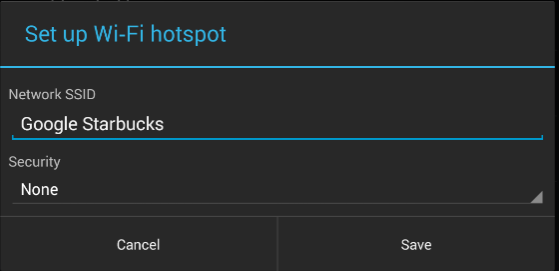
One of our first experiment’s objectives is to analyze people’s behavior by seeing how they have their devices preset in terms of outside communication. We didn’t have to go far to find out – it’s pretty disturbing. Currently, we have a variety of devices prepared for different traffic experiments but now we are using them for one really easy target – to analyze how many people connect to a fake hotspot. We created fake Wi-Fi networks called Xfinity, Google Starbucks, and Starbucks. From what we’ve noticed, Starbucks is one of the most widespread networks here, so it’s pretty easy to get people’s devices to connect to ours.

wifi hotspot

Wi-Fi networks screen


What is the problem we’re trying to point out?

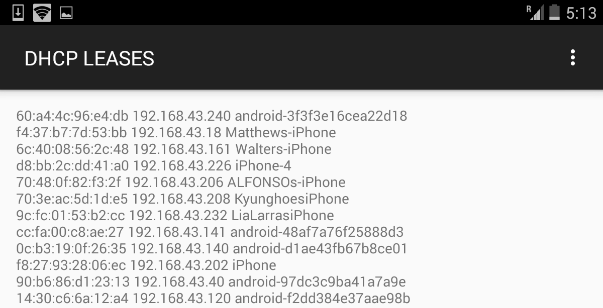
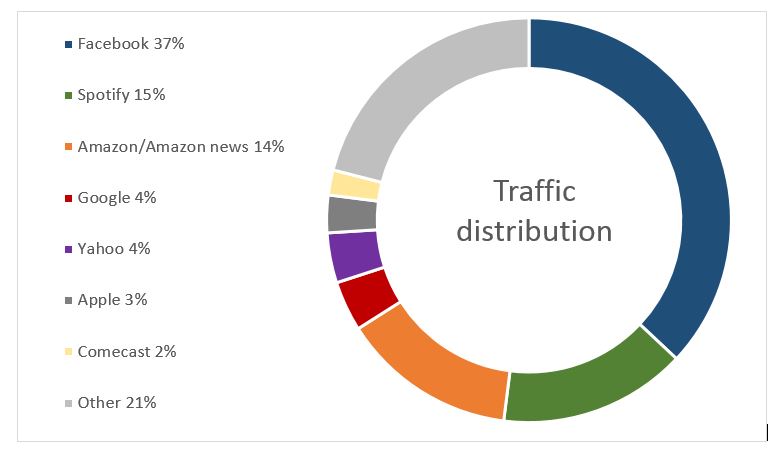
Once your device connects to a known SSID name at your favorite cafe, the next time you visit, it will automatically try to connect to a network with the same name. This common occurrence becomes a problem because it can be misused by a hacker.  Armed with some basic information, a hacker can figure out what you are doing and even which device you have. It is just a matter of time to come up with the right technique to hack into your device. After a day of walking around with my tablet, we gathered some telling statistics. DHCP leases From data we gathered in seven hours, we found that 264 people connected to our fake Wi-Fi networks and generated 512,000 data packets*.
  • 52% connected from an Apple device
  • 42% connected from an Android device
  • 10% connected from a tablet or notebook


traffic distribution

Percentage of traffic distribution generated from those devices

  • 70% of them have the Facebook app installed
  • 30% of them have the Twitter app installed
  • 30% of them accessed a Google-related service
  • 20% browsed a webpage

What is on our tablet?

The device used for this experiment is a pretty simple off-the-shelf Nexus 7 with a rooted LTE modem. We set up fake hotspots and used tools to catch TCP dumps. Later on, we analyzed who was doing what. Nothing hard at all. Our hotspots are movable, so I have one tablet with me at all times with a fake Wi-Fi network called Google Starbucks. If you see that hotspot somewhere in town,  you might want to watch your device more carefully. ;-) Did I mention we did this using only a tablet? We do have a couple of other things up and running, but that‘s something for another blog.

Golden Gate bridge

Traffic flowing over the Golden Gate Bridge

If you want to be involved and aware of how these things work, you can catch up with us in San Francisco. Up until now, we have let the traffic flow as it should and gathered data, but next, we‘ll play a bit with redirection. :-) *A packet is the unit of data that is routed between an origin and a destination on the Internet or any other packet-switched network.


Follow Avast on FacebookTwitterYouTube, and Google+ where we keep you updated on cybersecurity news every day.