Category Archives: AVG

AVG

#ShredFest helping protect against Identity Theft

It’s no secret that personal data and private information left lying about, either in physical or digital form, can be used by thieves to steal your identity.  The problem is that securely destroying old documents, especially if you have boxes and boxes of them, can be time-consuming and frustrating.

And if you don’t destroy your data securely the consequences of being a victim to identity theft can range from outright theft of money, to unexplained debts, leaving you feeling like somebody else has taken over your life.

But thanks to a growing movement called #ShredFest originally from New York, things might get a little easier. It’s a subsidised program designed to provide secure document destruction free-of-charge. You might already have something similar in your local area, sometimes run by local banks and communities once or twice a year – or perhaps this is your opportunity to make-it-happen!

The statistics on Identity theft are nothing short of shocking. In the United States the Federal Trade Commission reports that in 2014 it received 332,646 complaints making ID theft the number one reported crime for the 15th year in a row. 

Stolen identities used in the United States in 2014 were used mostly for Government and benefits related fraud (30%) followed by Credit Card fraud (26%), Phone/Utilities fraud (16%) and Bank fraud (10%).

With the ability for criminals to collude easily on a global scale, it’s not inconceivable that we will see ID theft attempts in the future combine information obtained from the litany of online data breaches (for example, Ashley Madison), along with tidbits obtained through “dumpster diving” right at your own back door.

Fortunately, with a few simple precautions and some dedication to properly destroying the remnants of your online correspondence, and other important paperwork (that you’re no longer required to keep by law), you should be able to reduce the risk of ID theft happening to you.

Destroying Physical Documents

Got boxes of documents that you should be securely destroying? Despite #ShredFest only being available in a small number of locations at the moment, a quick search online reveals many companies that provide shredding services for a small fee.

But weighed up against the risk of ID theft against you at any time, it may well be worth it at any cost; and think of how a quick trip to your local shredding depot with a car-load of documents is not only going to put your mind at ease – but all that storage space you’ll get back at home!

Another alternative is to purchase your own document shredder – something that I have owned for many years and highly recommend – however, those boxes of tax paperwork may still be inescapable, so an annual trip to #ShredFest is likely still needed.

If you do purchase your own shredder, however, consider one that has a “cross-cut” feature (that cuts the paper into smaller pieces) which is considered a little more secure, and also there are models that can shred old CD-ROMS and DVDs which can come in handy.

Shredding Computer Files

Did you know that selecting a file and pressing delete, or simply moving the file to the trash (even after you empty it) isn’t enough to securely remove it?  It’s important to understand how to securely delete digital files on all your devices – not just your PCs, but also Mobile devices.

We’ve covered in the past how easy it is to use features like AVG’s File Shredder which can overwrite your private and personal files multiple times to ensure they cannot be recovered again.

Also if you’re recycling your old PC’s or Mobile devices, including disposing of them permanently, ensure you have taken all reasonable steps to correctly erase the data on them – this sometimes isn’t as easy as a simple factory-reset, particularly with older Android mobile devices.

Lastly, if you have an online email account (such as Gmail, Yahoo or Outlook.com) you’re likely holding on to years worth of old email that could prove to be extremely valuable to an ID thief.  As I suggest in these tips about securing your online email account, make sure you purge all your old and unwanted email too.

Until next time, stay safe out there.

Performance Shootout: Windows 8.1 versus Windows 10

One of the first things you see when reserving your free copy of Windows 10 is that it’s “designed for speed”, promising you faster boot times, resume times and more. But is Windows 10 really that much faster than its direct predecessor? We’ve put it to the test and show you how the new OS fares in multiple scenarios such as boot time, performance while working, smoothness of gaming or battery life.

The Device Tested

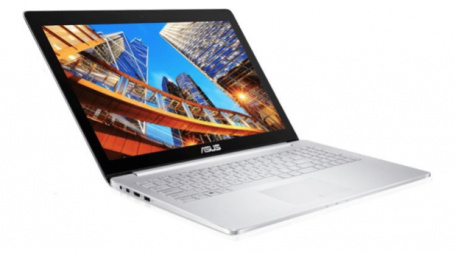
In our lab, we started our tests with a rather high-end multimedia notebook – the Asus UX-501.

Asus UX-501

It’s equipped with a Core i7 (which clocks up to 3.6 GHz), 16 GB of RAM, a rather powerful GeForce 960M GTX and a blazing-fast 128 GB SSD. It’s one of the hotter devices of 2015 and should definitely show if and how much Windows 10 was able to speed things up compared to the pre-installed Windows 8.1.

How we tested

To get reproduceable and comparable results of Windows 8.1 versus Windows 10, we clean-installed both versions and installed only the latest drivers as well as our speed testing software, such as PCMark 8. Then we prepared both installs with the following steps:

  • Put the devices in a controlled room with 23° celcius and 250 (+/- 50) lux
  • Set the power plan to “Balanced”
  • Run all scheduled tasks and automated tasks using the “Rundll32.exe advapi32.dll,ProcessIdleTasks” command
  • Installed all updates
  • Left all Windows optimization features enabled
  • Repeated all benchmark tests three times and then averaged the results

So let’s have a look at the tests we performed before and after the upgrade to Windows 10 Build 10240 (final, including the latest updates as of July 27th):


1. PC Startup Time: Windows 

For “boot time” tests, we used Microsoft’s “Windows® Performance Toolkit”: These tools are used by software and hardware makers to test the impact of battery life and performance of their products on typical machines.


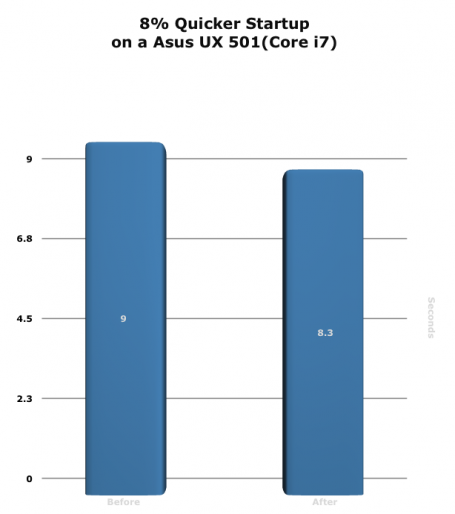
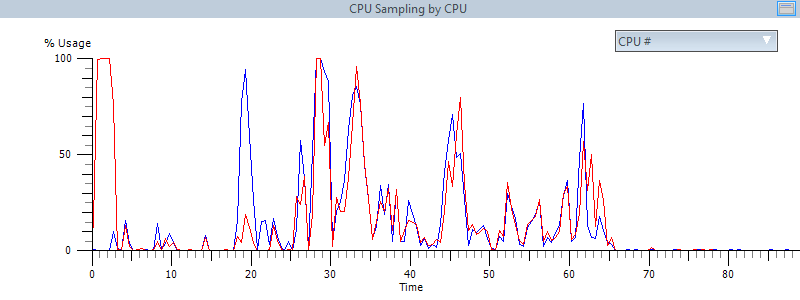
The difference isn’t huge, but it shows that Microsoft is working hard to shave off seven milliseconds of boot time: 9 versus 8,3 seconds isn’t something you feel on such a powerful device, but on a slower PC or laptop this could translate into a far higher benefit.

Winner: Windows 10


2. Internet Explorer Startup Time

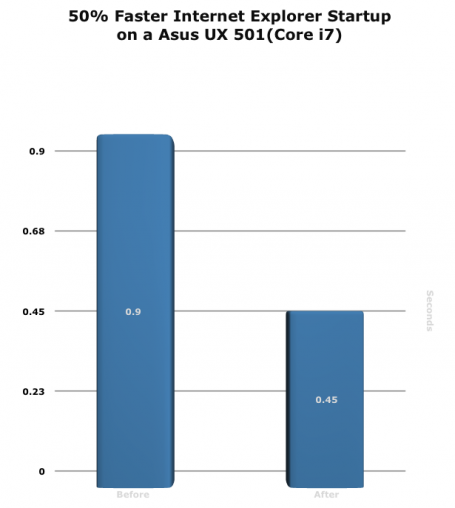
During a typical work day, applications get launched and closed all the time. Long loading times aren’t just an annoyance to the user, they could even hinder his ability to work or browse the web properly. This is why we used Windows Assessment Toolkit to measure how long it takes to launch an application, in this example Internet Explorer, down to the millisecond.

Yet again, a reduction from 0,9 to 0,45 seconds is something only few people would notice – yet it’s more evidence how Microsoft continually improved performance in every aspect and handles application launch just a tad better than before.

Winner: Windows 10


3. Writing, Web Browsing and Video Chat Performance

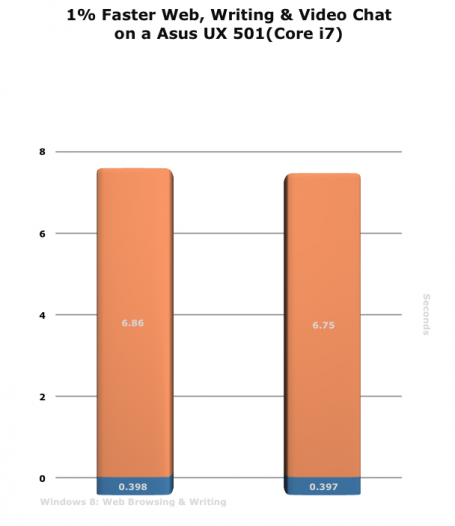
The next test involved the benchmarking tool PCMark 8 which uses real-life scenarios such as browsing the web, Office 2013, Adobe Creative Suite and other tools to recreate a typical home and business scenario. It measures the exact time it takes to complete tasks down to the millisecond:

The numbers you see in the graphs represent the time it took to complete the browsing benchmarks. Unfortunately, in this instance, the results really weren’t that different. A 0,11s difference is completely within margin of error and doesn’t have any real-life effect.

Winner: Tie


4. Word, Powerpoint and Excel Performance

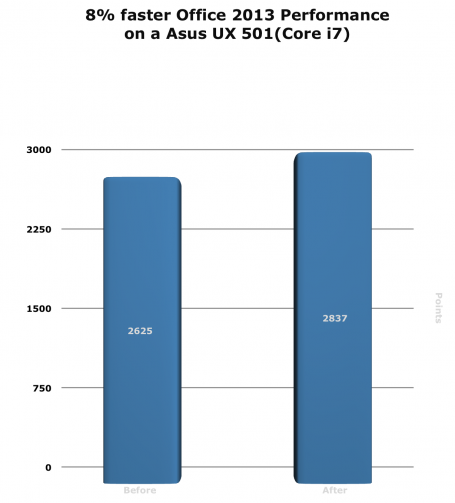
The next test involved PCMark running automated actions in Word, PowerPoint and Excel to measure performance, such as converting and calculating a huge Excel file:

We were impressed: In all test iterations, Windows 10 was able to run 8% faster when working with the Office suite.

Winner: Windows 10


5. Grand Theft Auto V performance

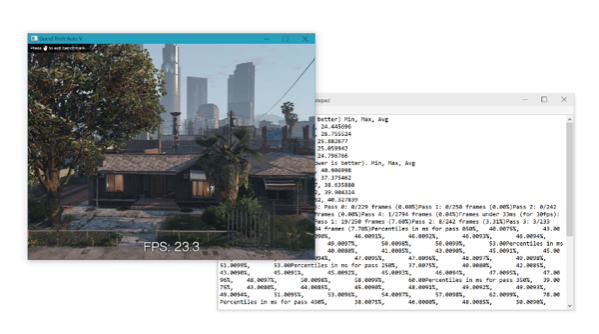
Thanks to the ubiquity of services like Steam and the increased sales of capable PCs or laptops, gaming applications are not just some of the most popular applications pn PCs, but also the most resource-intensive too. This is why we used the top game of 2015 Grand Theft Auto V and its built-in benchmark tool which measures the average FPS (Frames per seconds) for different scenes and scenarios of the game:

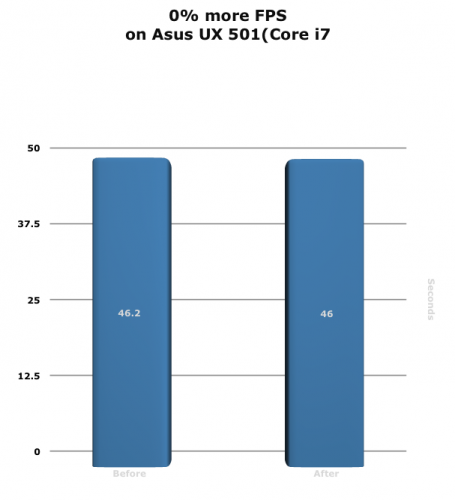
Windows 10 performed slightly slower, but also well within testing tolerance. However, one of the main benefits of Windows 10 is the exclusive implementation of Microsofts graphics platform DirectX 12 which is supposed to speed up games by to 50% – unfortunately, we’re still waiting for such titles so there’s no way to really put this to test.

Winner: Tie


6. Adobe Creative Suite Performance

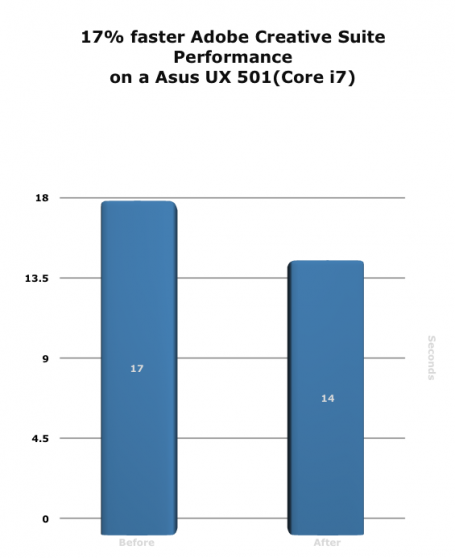
While the last couple of tests focused more on consumer activities, such as browsing the web or working with Office, particularly IT professionals have a need for snappy performance. One such example is Adobe’s Creative Suite:

Again, Windows 10 showed better results: Likely due to the improved resource utilization and improved driver support.

Winner: Windows 10


7. Battery Life while Working

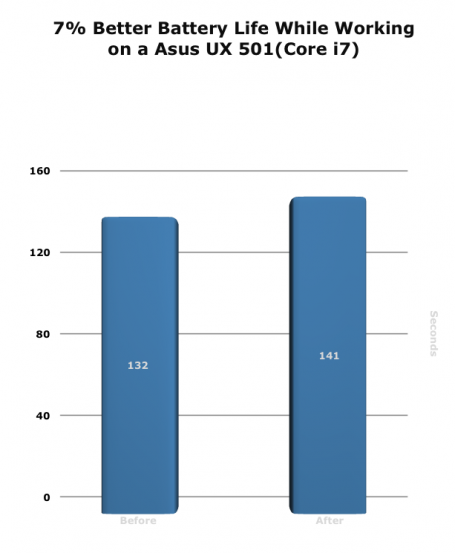
Microsoft promised better power management in Windows 10 and that it would save more battery life when on the go. We tested this using PCMark 8s work tests (in loop) until the battery ran dry. The result:

In all three test iterations, Windows 10 managed to run 9 minutes longer. Not a massive improvement, but definitely enjoyable.

Winner: Windows 10


8. Battery Life while gaming

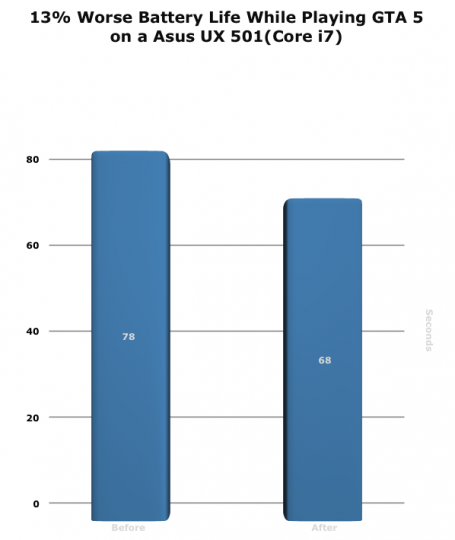
Gaming is the number 1 battery drainer so it doesn’t come as a surprise that our tests were done rather quickly. Unfortunately, even with NVIDIAs latest drivers (as of July 28th), battery life on the 960M while playing GTA V went down rather than up:

A reduction of 13% in all of our tests. We’re hoping that NVIDIA and Microsoft are working closely on a new driver to fix this issue.

Winner: Windows 8.1


9. Battery Life while watching a movie

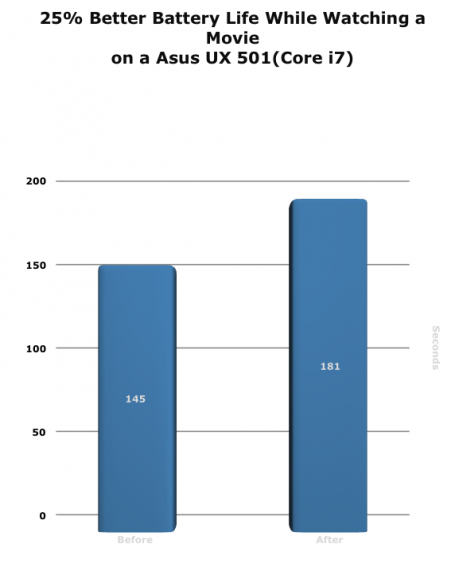
It came as a surprise that our movie tests showed some significant improvements for Windows 10. When watching a 1080p video clip in a loop using Windows Media Player under Windows 8.1, the laptop died after 2 hours and 25 minutes. However, when going to Windows 10 it lasted a whopping 3 Hours. Likely that Windows 10 does something in the background to reduce resource usage and just focus the power on the things necessary for movie playback:

Winner: Windows 10


Verdict

Windows 10 – even in its first release – a tad faster than Windows 8.1. But beware, it doesn’t do magic: some areas only improved marginally, whereas other areas (battery life) really jumped up noticeably.

However, we just tested a clean install of Windows 8.1 versus a clean Windows 10. The areas in which operating systems really suffer from performance is the gradual slowdown that occurs over time and with more and more programs or drivers installed. That’s why, in our next blog, we installed 150+ programs on new Windows 10 devices to see how much the new OS is resistant to this load – and what we, as AVG, can do about it! Stay tuned.

Thomson data breach exposes passenger details

Thomson, a UK based holiday company, apologized to their customers this weekend about a small but rather significant data breach. This comes on the back of much larger breaches such Ashley Madison in the US within the last few weeks.

My attention was grabbed by the depth of what data was breached and also the method in which it was distributed, rather than the quantity of what was mistakenly disclosed. Just 458 people have been effected, all of them UK based.

In a statement, Thomson apologized and said “We are aware of an email that was sent in error, which shared a small number of customers’ information. The error was identified very quickly and the email was recalled, which was successful in a significant number of cases”.

The interesting element to this story is that regardless of the perimeter security that Thomson has in place to avert hackers and cybercriminals, a simple human error of attaching data to an email has caused concern for a number of customers.

The data included in the breach includes: name, home address, telephone number, flight dates, email address and the outstanding balance due. The data was shared with all the people on the list itself, so 458 people have the data.

There are technologies available that allow companies to limit the data that is sent out in emails or other communications. These are termed ‘data leakage prevention’ technologies and I am sure that the Thomson IT team will be evaluating a solution of this type.

In the BBC article that covered this breach the people effected are talking about cancelling holidays and are of course worried about being burgled.

What advice can be offered in this instance? An obvious one is to change the dates of your holiday and insist that Thomson cover the costs. In reality though many people have probably scheduled time off work, and its not easy to change plans. I think if this happened to me, the option I would take is to have someone house sit for me while I am away.

Follow me on Twitter @TonyatAVG

Windows 10 not playing DVDs? Here’s why.

Microsoft has included the DVD Player software for free in Windows 10, but only if you’re upgrading from any of the following versions:

  • Windows 7 Home Premium, Professional or Ultimate
  • Windows 8 or 8.1 with Windows Media Center.

It’s free for a limited time, but Microsoft hasn’t given any indication as to how long that will be. So if you haven’t already upgraded and qualify for the free DVD software, you might want to consider upgrading soon.

It’s important to note that to receive the DVD Player app from Microsoft for free you must upgrade Windows 10 from your existing version of Windows.  A clean install of Windows, despite this being the preference for many people, won’t work.

What if you don’t want the Windows DVD Player app? No problem, there are free and open source alternatives available, such as VLC Media Player

While you’re at it, remember to keep all software on your PC up-to-date and install an antivirus solution like AVG AntiVirus Free to prevent infections against viruses and malware.

If you have any tips for Windows 10 you’d like to share, please let us know via Facebook or Twitter. Until next time, stay safe out there.

Ashley Madison hack – the importance of securing your personal data

I have just read the informative blog written by my colleague Michael McKinnon, detailing the extent of the data breach that AshleyMadison.com suffered earlier this month.

As with all data breaches, the first thing people ask themselves is, “does it affect me and what precautions can I take?”  When a large amount of data is stolen that includes personal details such as credit card numbers and date of birth, you can take measures now to minimize the risk of your data being misused in the future.

What can we do to protect ourselves after a data breach?

  • Ensure your online accounts are not using the email address and a password that could be guessed from personal information, if you are then change the password.
  • Keep a close watch on your credit reports. This will help you identify if someone is using your identity to take a line of credit in your name. Most credit scoring agencies allow you to run a report for free at least once.
  • Spammers may send emails that look like they are coming from valid sources. Make sure to carefully scrutinize these emails – don’t click on links that look suspicious – and if in doubt contact the sending organization directly to ensure it’s an official communication.
  • Avoid using the same email address or profile name across multiple online accounts. For example, have a primary email address used for recovery of forgotten passwords and account information. Have a secondary email address for offline and online retail transactions. Have a third for financial accounts and sensitive information.
  • Set privacy settings.  Lock down access to your personal data on social media sites, these are commonly used by cybercriminals to socially engineer passwords. Try AVG PrivacyFix, it’s a great tool that will assist you with this.
  • Check electronic statements and correspondence.  Receipts for transactions that you don’t recognize could show up in your mail.
  • Use strong passwords and two-factor authentication: See my previous blog post on how to create complex passwords that are easy to remember.
  • Have updated security software.  Updated antivirus software will block access to many phishing sites that ask for your personal data.

Lastly, you may want to consider enlisting an identity monitoring service.  Commercial companies that have been breached often offer this reactively to the victims but understanding where or if your identity is being abused in real-time will give you the ability to manage issues as they happen.

Follow me on Twitter @TonyatAVG

Ashley Madison Hack – what has been leaked?

As with all privacy breaches there are multiple victims here. The customers whose personal data has been leaked, as well as the company trusted to keep it secure; a trust that may never be regained.

However, what makes this case highly significant is the collateral damage that will likely spread beyond just the direct privacy breach.  Family ‘secrets’ are revealed and victims are ‘ousted’ – seemingly at the hands of anonymous hackers with a point to prove.

Another oddity in this case is that AshleyMadison.com charges only men for their subscriptions and message credits, while female users are able to use the site free of charge.  This has resulted in the victims consisting mostly of men, connected by way of their credit card transaction histories, causing an asymmetry rarely seen in data breaches made public.

While the hackers have released the data in what could best be described as a harsh and judgmental way, they do offer some clues about how trustworthy the data may or may not be, “Find someone you know in here? Keep in mind the site is a scam with thousands of fake female profiles.”

On that note, remember that the information obtained and released by hackers in data breaches by their very definition is never verified by the companies who are breached, and so this brings into question the integrity of all the data, regardless of how authentic it might seem.  For example, there may be deliberately false information inserted by the hackers designed to damage reputations or serve another agenda.

Accordingly, as already reported the hackers also provided this disclaimer of sorts, “Chances are your man signed up on the world’s biggest affair site, but never had one.”  In short, make sure you have all the facts before a potentially dangerous and damaging real-life Internet hoax unfolds in your own backyard.

Here’s a summary of the exact data that was breached:

  • Full names and addresses
  • Birthdates
  • Email addresses
  • Credit card transactions
  • GPS Coordinates
  • User Names & Passwords
  • Sexual Preference
  • Height, Weight, physical characteristics
  • Smoking and drinking habits

Lastly, while it may be easy to fall into the trap of victim-blaming and judging based on your own set of moral or ethical standards in this case – as social media opinions begin to rush forth in the coming days and beyond, it’s important to keep sight of the broader picture of what is transpiring.

Today’s breach may well affect nearly 30 million victims, and maybe you don’t know any of them… this time.  Next time, in another context, it could be you.

In the meantime, let’s hope that the active investigation into the perpetrators behind this hack are brought to justice, because as the statement from Avid Life Media rightly asserts, this is an act of criminality.

Until next time, stay safe out there.
Google announces a restructure – it’s now owned by Alphabet

Why the restructure? According to Larry it’s to help them streamline management of their various companies and also stay focused on their initiatives and new opportunities. It’s “ …about businesses prospering through strong leaders and independence.” – Larry Page.

So Search, Youtube, Apps, Maps, Android and Advertising remain under Google and according to their filing with the US Securities and Exchange Commission, “Businesses such as Calico, Nest, and Fiber, as well as its investing arms, such as Google Ventures and Google Capital, and incubator projects, such as Google X, will be managed separately from the Google business.”

For anyone who enjoys innovation in tech, this should come as exciting news – it means Google’s core internet product teams will be even more focused on improving and innovating their internet products; and we might start to see more ambitious and technological milestone projects being developed by Google X and Google Ventures.

Congratulations Google, uh…I mean Alphabet, for moving tech forward. Let’s see what you do next.

5 Reasons Why Windows 10 Needs a Proper Tune Up

While Windows 10 is full of brand new features to help you get the best possible experience, I wanted to take a look under the hood and see if it was vulnerable to the same performance hogs as its predecessor Windows 8.1. I am of course talking about system slow down thanks to program load. YES, as crazy as it sounds, but just by installing programs on your desktop PC or laptop and simply using them you’re slowing it down a bit.

It is not noticeable at first, but the more programs you install, the more this slowdown creeps up on you. But why is that the case? And what can our own tool, AVG PC TuneUp, do about this? This blog has the answers.


Reduce The Daily Slowdown

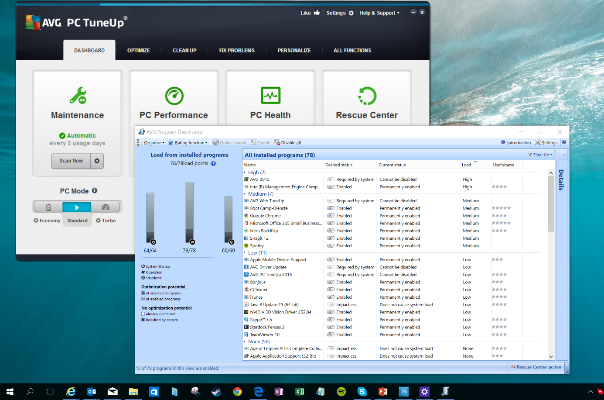
PC TuneUp

More installed programs equal more processes and services going on in the background. Don’t believe us?
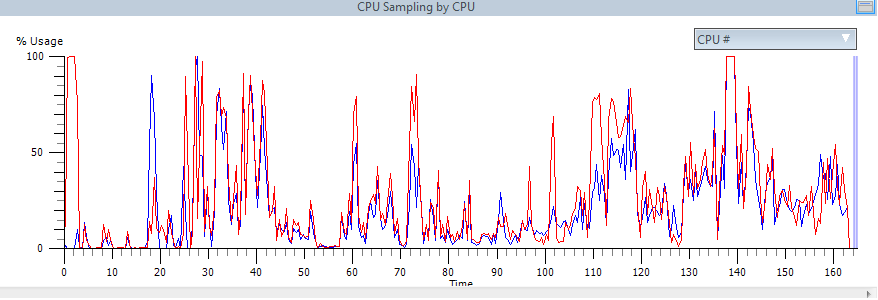
Using a professional analysis tool called Windows Assessment Toolkit, we measured the average resource consumption while working with Microsoft Office both under the load of 150 applications (see benchmarks below for more details) and once the device was optimized with AVG PC TuneUp:

Before (without AVG PC TuneUp)

Before


After (with AVG PC TuneUp)

After


The increased activity doesn’t just have an impact on performance, but on the total lifespan and power consumption, as well. Tools like AVG Program Deactivator, Startup Manager, Uninstall Manager or Turbo Mode help you decrease this activity and make your PC run smooth again.


To Solve Hard Disk Thrashing & Fragmentation

Background applications and 3rd party software can be responsible for a lot of unnecessary hard disk activity, even though you’re not actively using the programs. Of course, this also affects the total lifespan of all hardware components.

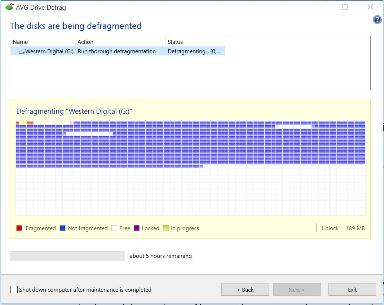
Then there’s the fragmentation phenomenon which occurs daily: Creating, copying, moving and deleting files causes hard disk data to be scattered all over the place which, in turn, reduces overall performance. AVG Drive Defrag restores perfect order to your hard drive while speeding up file access, boot times, and program launches.

Defrag


To Free Up Disk Space

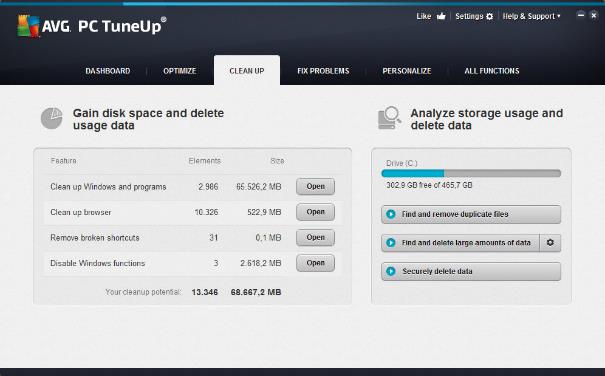
Windows® and your programs constantly save log files, “Most Recently Used“ lists and temporary data on your hard disk – but “forget” to delete them. Over time, that leads to critical disk space issues and problems with you applications. AVG Disk Cleaner removes all of these types of files.

Clean Up


To Increase Battery Life & Reduce Power Consumption

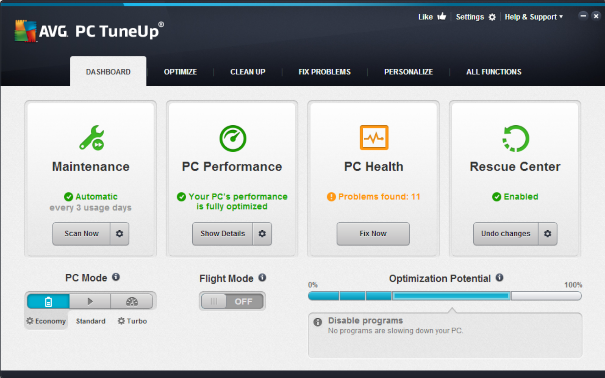
Even Windows 10 doesn’t really turn off unnecessary hardware of your laptop when when you’re on the road or adjust to what you’re doing sufficiently. Our AVG PC TuneUp Economy Mode and Flight Mode result not just in increased battery life, but also reduced power consumption: Work longer and save on your power bills, thanks to an array of power-saving techniques such as smart CPU power control, power saving modes for your devices and the deactivation of power-hungry Windows features.

PC TuneUp


To Improve Stability

Windows 10 has its weak spots, just like Windows XP, Vista, 7 or 8. One of them is the registry and the way it’s built: Through daily usage of a PC or laptop, the registry could become cluttered with registry errors such as pointers to non-existent startup items, file types, programs, settings or hardware components no longer in use. This could result in some of the following problems:

  • Invalid startup entries: These leftover entries may cause startup errors.
  • Incorrect file type references: Causing files to be opened by the wrong program.
  • Incorrect uninstaller entries: Such entries lead to errors when installing or uninstalling applications.
  • Missing fonts: Causes fonts to not show up in programs.
  • Invalid ActiveX and COM component pointers: may lead to error messages when running applications.

1 Click


AVG PC TuneUp’s Automatic Maintenance feature and Registry Cleaner fix such issues on a regular basis.

Creating Smart Homes for Today – and Tomorrow

Need some help imagining what a smart connected home could look like? American retail giant Target recently installed and opened it’s own version in downtown San Francisco’s Metreon center. Its 3,500 square-foot model home is a transparent acrylic house with rooms decorated with acrylic furniture and outfitted with the latest smart connected home products. Target’s “Open House”, as it is called, and store offers both consumers and the curious a way to view and experience smart living.

Interestingly enough, you can’t really call the installation a “home of the future”, because all of the products on display, with the exception of one, are available today!

Walking through the rooms, guests experience vignettes that demonstrate the ways these multiple smart connected devices can work together to create helpful real-life solutions today. Here are a few sample scenarios:

  • The baby wakes up early crying in the nursery: The Mimo baby monitor ($199.99) alerts your phone and soothing music automatically begins piping in from Sonos speakers until you can get there. Soft Hue lights ($199.99 three-pack) gently go on. The Nest Cam ($199) gives you a good view of Junior in distress. The Nest thermostat adjusts for the morning temp. Meanwhile Wemo turns off the humidifier and turns on your coffee pot in the kitchen.
  • In the kitchen: Coffee Smart Optimal Brew ($149.99) is ready and you prepare for a long day by putting on a CrockPot Smart Slow Cooker ($129.99) meal that you can monitor from the office. Your Drop app and kitchen scale ($99.95) gives you the recipe and measures the exact ingredients needed. Meanwhile, your Petnet ($149.99) pet feeder is set to automatically feed the dog just the right amount of food for lunch.
  • In the master bedroom that evening: After weighing in and taking your blood pressure with Withings devices, you’re ready for sleep. Your Jawbone Up3 ($149.99) wearable, after monitoring your activity all day, is now ready to track your ZZZs. Once the Hue lights go off, August Smart Lock ($249.99) automatically locks up. All is well… until a midnight storm rolls through and Quirky alerts you to a leak in the garage…

Most of us are familiar with Nest, which is one of 50 vendors on display. But it is truly pretty amazing to see just how many other smart products are out there – and capable of working together to provide useful solutions in the home today.

Still, the smart home of today is pretty much in the domain of early adopters. While this is changing, for most of us (even in Silicon Valley) it is happening one device at a time. This was reinforced at a recent panel discussion on “The Connected & Smart Home: What It Can Be and How Will We Get There” hosted by the Churchill Club in San Jose, California.

Target Smart Home


So, Target’s idea is really a smart one (no pun intended), because the model helps to demystify connected home products and inspire guests just like me to explore the world of connected home living. Target says it also plans to learn from Open House. Both Target and its partners are getting real-time feedback from the real consumers interacting with their products.

To be sure, there is still a lot that needs to be figured out about the future of the smart connected home by the industry and consumers alike. The industry vision is that all our smart connected devices (that make sense) can be controlled remotely, easily talk to each other (in industry speak “are interoperable”), and provide data that can be analyzed and acted upon and protected, for the betterment our lives.

That there is a lot of work to be done, particularly on interoperability and the data analysis and security front, was also reinforced by the Churchill Club panel that featured some of the top experts in the field from Nest, Intel, Qualcomm, Forrester Research and Accenture.

Today, security is a chief concern to people adopting smart home technology. That’s security as in “home security.” But as we all see more smart connected devices coming into our homes and realize the data is flowing—not only in our homes, but outside of them, data security is only going to become increasingly important to all of us.

Target’s Open House underscores just how fast the future is coming and the need to be ready for it. Hopefully, this will not only be a great starting point to get more consumers interested in the concept of the smart home, but will also get them engaged and thinking ahead about the need to secure all that data being generated in our smart connected homes now and in the future.

Software and Security Information