Category Archives: AVG

AVG

Google Photos: the Faustian bargain of privacy

Unlimited backups of all your photos. For free. Now that’s hard bait to refuse, especially considering how photo-happy we’ve all become since our smartphones have replaced our pocket cameras. But this offer is just the tip of the iceberg in Google’s new app. After all, if you’re going to be uploading thousands upon thousands of photos, you’d expect sorting them would be a pain.

Google’s answer to that seems to be: Don’t. Instead, trust us to deliver the right photos when you use our in-app search bar.


Searching Photos

Google’s new Photos app leverages the search giant’s recent investments in machine learning to “read” your photos and figure out what they’re about without any need for you tag, label or date them.

Looking for photos of that holiday in London? Type “London”, and even without geo-location data enabled, Google’s algorithms will “read” the photos for any landscape it can recognize as coming from Old Foggy.

Type in “dog”, and it will do the same, pulling any photos of dogs it can find in your collection. If you’ve ever tagged a photo of your pet with its name, it will learn that too, and show you photos of “Rex” alone if you ever search for it.

None of this is happening with your input: Google’s engines have just learned to look at your photos, and understand what they’re looking at.

Facial recognition

Another feature you can choose to activate or deactivate, is the system’s ability to sort through faces. When you hit the search bar, you’ll be presented with a series of faces it has pulled out. Tap on one, and most if not all of the photos you have of that person will be presented. If your photo collections go back far enough, the system will sometimes be able to recognize the person as far back as childhood.

While not 100% accurate, it’s damn impressive, very useful, and whole lot of creepy.

Dealing with the Privacy Devil

The story of Faust is a quite apt description: in exchange for incredible powers, Dr. Faust sold his soul to the devil. You can bet that Google is not offering this much free backup storage and amazing machine analysis out of the goodness of its heart.

Just as Gmail made a breakthrough in the email market by offering enormous amounts of free storage in exchange for data-mining your communications to sell against ads, you can put down some good money on Photos going the same way.

While Google has affirmed that they will never sell your photos to third parties or publish them without your consent, that’s most likely not how they intend to use your collections. Instead, they will use them to get to know you better.

However the system manages it, it is somehow labeling your photos so that when you search for a term, it can deliver results against it. It will also be doing it for terms you may never search for.

Happen to be wearing Adidas shoes in a photo? In the future, you can expect Google Photos to make note of that, and the next time you are near a shoe store, don’t be surprised to receive discounted offers from Adidas.

Again, it’s unlikely that Adidas will ever see your photos. It will instead ask Google to target all the relevant users on its behalf.

In many ways, this is nothing new: it’s exactly the way any of Google’s other services work, whether that be Gmail, Google Now, or even the main Google search engine. Indeed it is how nearly all major web companies operate.

But it is taking that data-mining to a new, uncomfortably close-to-home level.

Tech Gifts for Dad 2015

Not surprisingly, nearly two in ten gift-givers this year have said they will be bestowing tech-related gifts on their Dads for the occasion, according to the National Retail Federation. So, what flavor to choose? Here are my six (unscientific) picks:


The Watch

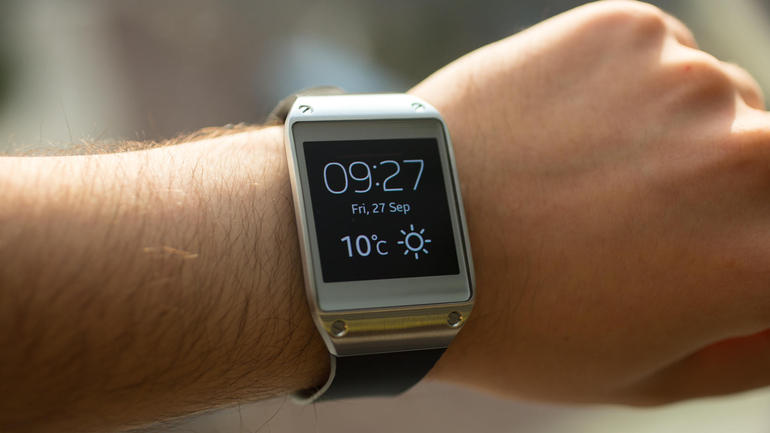
While the Apple Watch might be at the top of the list for the many tech-oriented Dads, the rather hefty price tag ($349-$17K) may put people off. The Apple Watch is also still in its early days and, perhaps, working out the kinks of any new tech entree. Many tech experts are recommending the Samsung Gear as a cheaper alternative.

Samsung Gear


Health & Fitness

For the fitness stalwart Dad who’s not really into tech for “tech sake”, a FitBit may be plenty to motivate him to work out.  But an interesting feature from Spotify, exclusively for runners called Spotify Running, will also figure out your running tempo through your phone and match songs to your pace may be just the ticket. Spotify has combined recommendations based on your listening history, multiple-genre playlists and original running compositions written by some of the world’s foremost DJs and composers – all tuned to your tempo and seamlessly transitioned to ensure you’ll never miss a beat.


“Ahh” Grilling

For the grillmeister, there’s a gift that will make sure Dad never turns out charred hamburgers again…unless he wants them: the Talking Digital Grill Thermometer is a wireless thermometer that can be programmed to grill to one of four levels—rare, medium rare, medium, and well done—and then alert you when the meat is done. Just put the thermometer into meat of choice, and the wireless handset will display how ‘done’ the meat is. It’s wireless, so Dad can mingle with the guests and still be alerted to when everything’s ready. Retail is about $49.00.

Video

Wireless Talking Meat Thermometer


And for a barbecue pioneer, Weber has announced its free app, the Weber Grills App, the all-new and which contains recipes, weekly updates and plus more than 60 grilling guides, tips, and techniques.

But how about the portable grilling briefcase?

While many Dads like to barbecue, many (OK, most of us) don’t like cleaning up afterwards. Here’s a neat device for cleaning: the motorized grill brush with steam cleaning power. ($39.95)

The options are endless!


Cooling Down

What goes better with a barbeque than a cold beverage? For the 60th anniversary of the Coleman Cooler — a staple of BBQs and picnics that most of us can probably remember—Coleman has unveiled a retro-styled cooler sure to please the man in your life. Oh, and it keeps ice cold for three days (good for left-overs). About $200, available at Crate and Barrel.


Travel Organizer

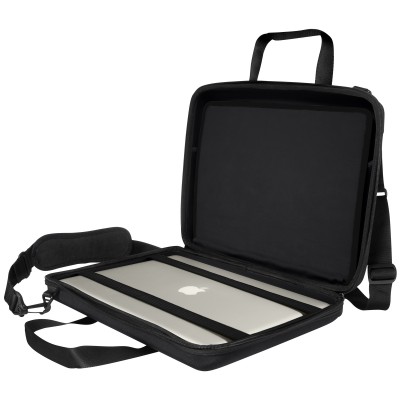
For Dads (or any of us) who travel on business –the hassle of keeping all our gadgets organized is, well… a challenge. Cocoon Innovations’s CPS400 Laptop Case is a shock-absorbent molded case that features its own proprietary organization system—with a rubberized compartment inside the case that holds gadgets firmly in place. It accommodates laptops with up to a 15.4-inch screen and has a detachable/adjustable padded shoulder strap and padded handles.  It’s great for organizing laptop accessories, smartphones and other digital devices and can be customized for each individual’s use. (About $70.00, see more info here.)

Cocoon case


Handyman

If you’re fortunate and your husband, brother or significant other is a Dad who is handy around the house, consider helping out with the Handyman Calculator. Free on the Android platform, this allows the user to calculate materials, track time spent on projects, and save calculations. As they say, measure twice, cut once. This’ll help.  For Apple customers, there’s the Handy Man DIY app ($1.99). These apps will save a lot of time (and money!) on renovation projects that seemed so simple at the start J.


I hope these are a few tech gifts that will allow you and your Dad to enjoy his special day and the summer to come!

The Ultimate Witcher 3 Performance Guide

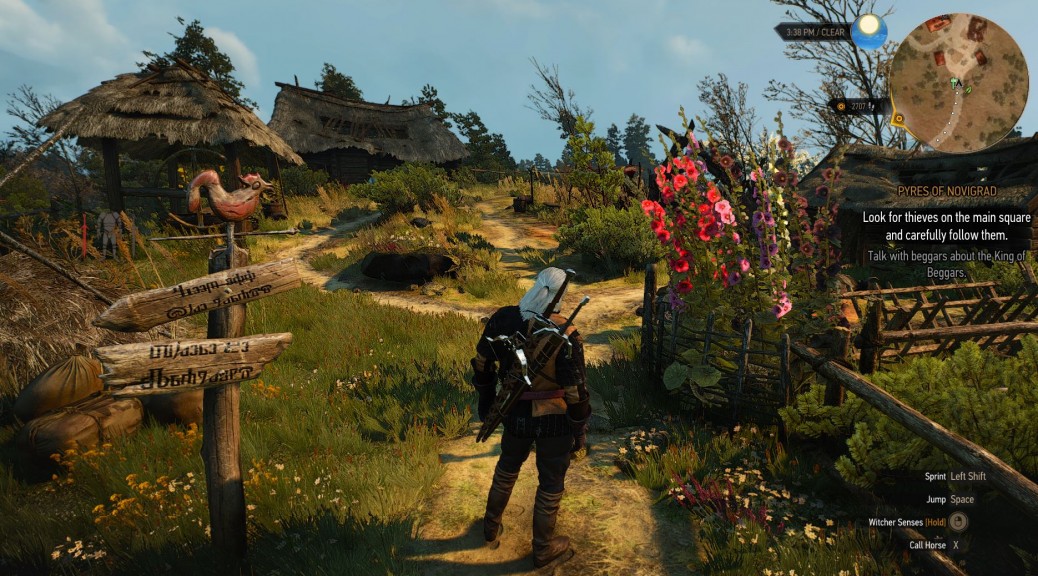
I’ve never touched a Witcher game before but this one really captured me, not just for it’s great storyline or epic scope but how real the forests and the cities look and feel:

Witcher 3

With graphics like these, you need three things: a fine-tuned PC, a decent graphics card and the right settings. In this guide we’ll look at making the Witcher 3 even more beautiful than it already is and also make sure that it runs super smooth on your machine. Ready?

Can your PC run The Witcher 3?

To run The Witcher 3, you need a fairly powerful PC as CD Project RED (the Witcher’s makers) have stated minimum requirements that are quite hefty:

OS: Windows 7 or 8.1

Processor: Intel Core i5-2500k 3.3 GHz or AMD Phenom II X4 940

Memory: 6GB

Video Card: NVIDIA GeForce GTX 660

With this kind of hardware, you’ll be able to play the Witcher 3 at low or medium levels at best. In order to crank up all the details at Full HD, you’re going to need a rig with a far more powerful GPU and more memory:

OS: Windows 7 or 8.1

Processor: Intel Core i7 3770 3.4 GHz or AMD FX-8350 4.0 GHZ

Memory: 16GB

Video Card: NVIDIA GeForce 970 GTX

This is what I’m using and the machine just about manages to produce 50-60fps (frames per second). But no matter whether you got the lower specs or a high-end gaming PC, we’ll show you how to get the highest quality and much smoother framerates.


#1 – Performance 101: 9 Tweaks to Optimize Your PCs and Laptops Performance

Before you start tweaking performance settings for The Witcher 3, I recommend that you follow the 9 essential steps to boost your PC or laptop speed that I published a while ago. This covers the basic steps to get your machine in top shape, including how to:

  • Upgrade your graphics drivers and even use beta drivers
  • Overclock your graphics card (safely!)
  • Use our AVG PC TuneUp to turn off all performance-sapping background activity
  • Defrag your hard disk
  • …and more!

As The Witcher 3 takes its toll on your hardware, you got to be sure that it’s tweaked to its absolute limit before you jump into the game-specific settings.


#2 – Get the NVIDIA & AMD THE WITCHER 3 Drivers

As usual, NVIDIA have prepared a special driver optimized for The Witcher and enables dual GPUs and HairWorks as well as the best possible performance.


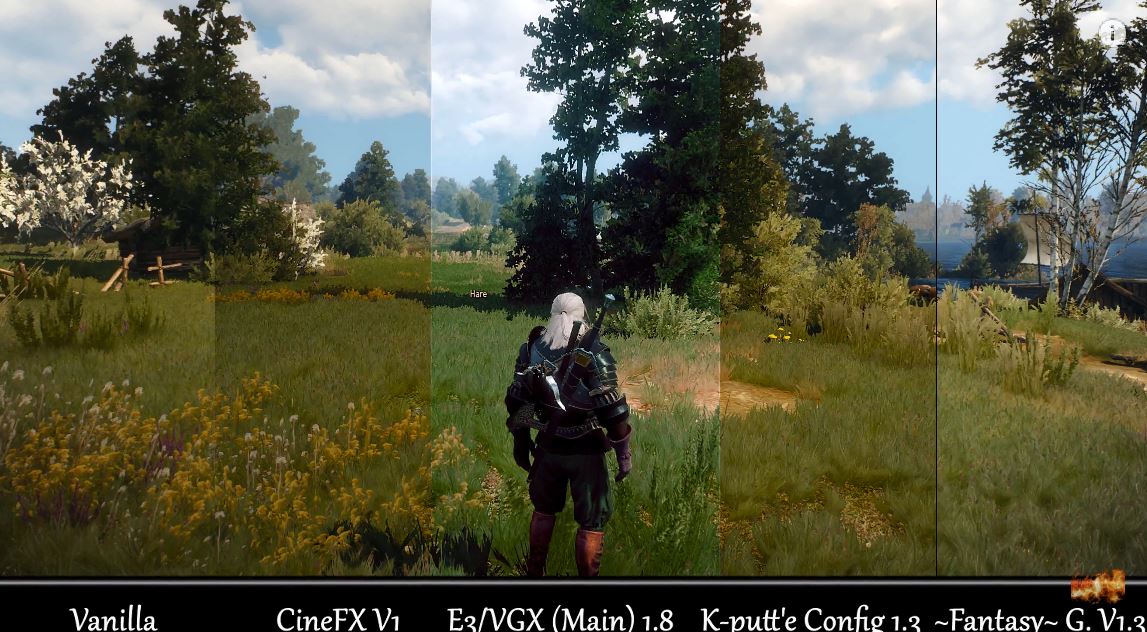
#3 – Use SweetFX to Make The Game Look Gorgeous

The SweetFX tools have long been the first steps to making games look far more beautiful by adding various filters and graphic effects like sharpening and bloom or different anti-aliasing techniques. The thing is: SweetFX simply enables graphical modification, but there are dozens of great different profiles from users from around the world. The ones I’ve tried and can recommend are the following:

Sweetfx


This video should help you get a great understanding of how the various SweetFX settings work.

Video

Witcher Three SweetFX

#3 – Tweak The Graphic Settings

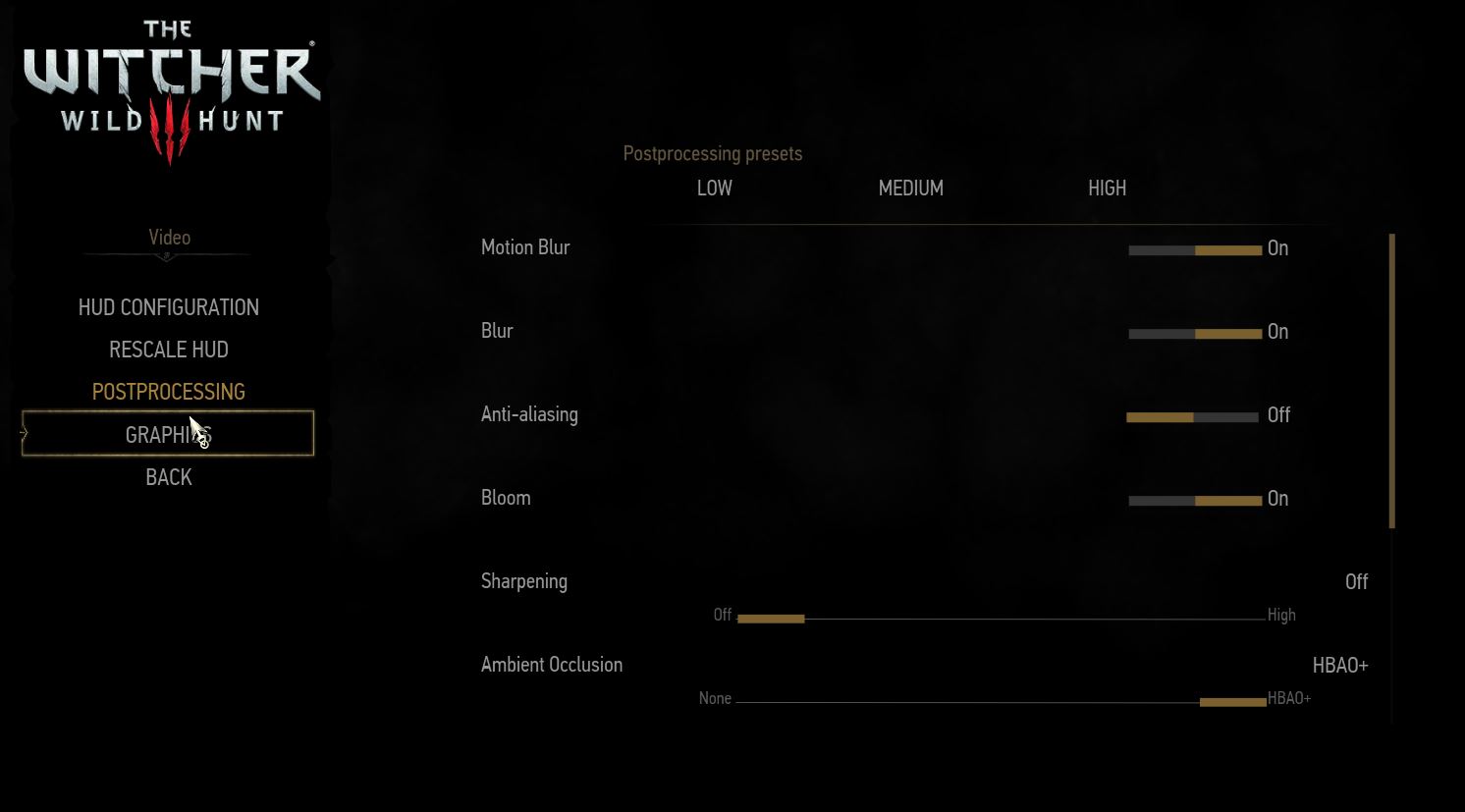
The in-game settings in The Witcher 3 are very straightforward: You’ll find them both under the Options menu and Post-Processing and Graphics. You can chose between presets ranging from Low to Ultra and you should find the ones that really match your computers performance:

Witcher 3 Menu

What I would recommend here is turning off Sharpening or setting it to Low as the Highest setting makes everything look just a bit too crisp and unnatural. The slightly blurry look adds to the immersion and also increases performance. If you’ve got a weaker PC, you should definitely turn off Anti-Aliasing and Ambient Occlusion, as these are the big performance eaters here.

Witcher 3 Menu

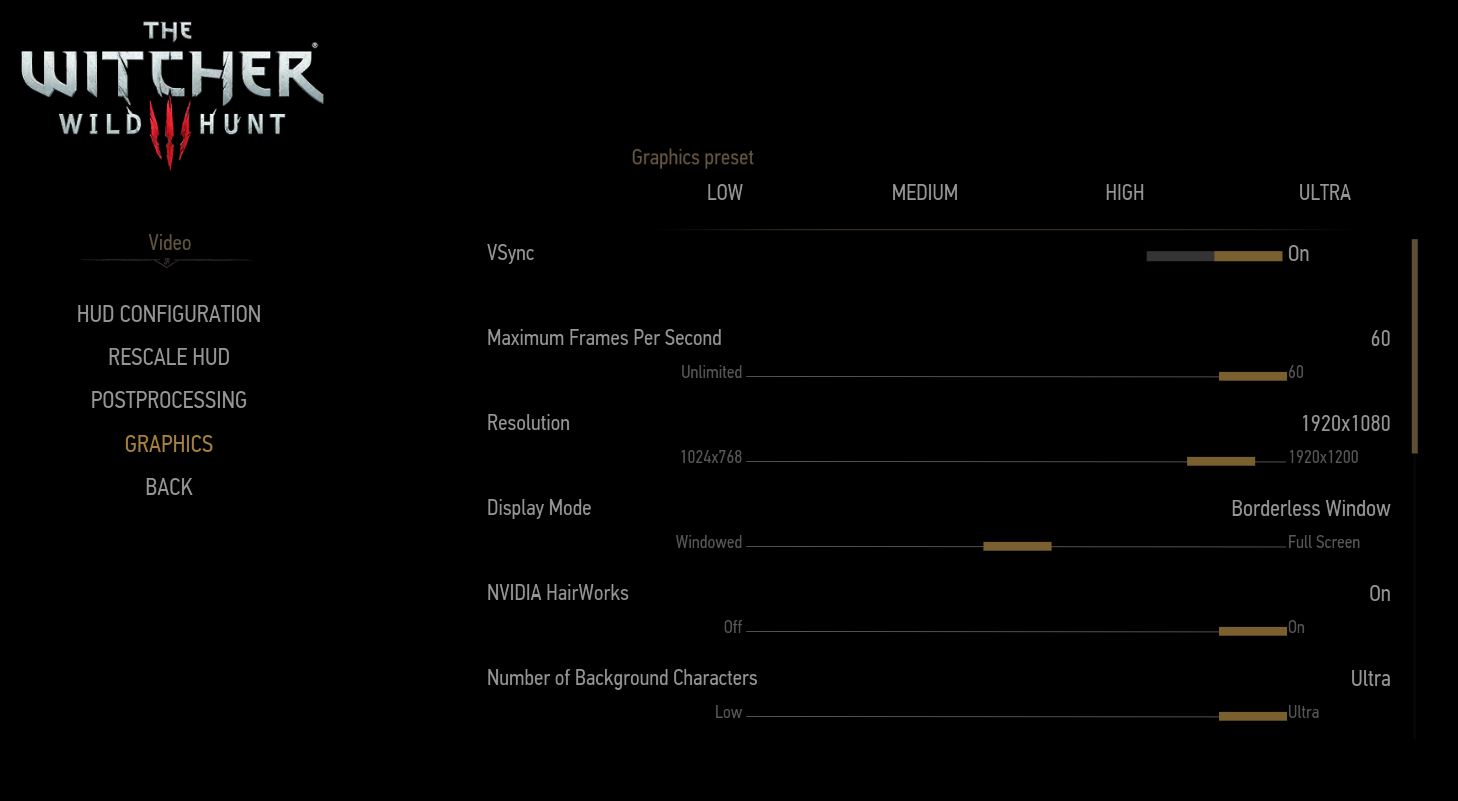
Moving to the Graphics setting, here are some interesting tweaks that made The Witcher 3 run smoother on my gaming PC: First, I switched from Full Screen to Borderless Window. Curiously, that reduced a significant lag when playing The Witcher 3.

The other bit that helped me was turning off Hardware Cursor. Other than that, it’s the usual deal: if the game stutters, try turning down settings one by one. The ones that don’t make everything look awful and still get you a few more fps are Grass Density, Water Quality, and Shadows.

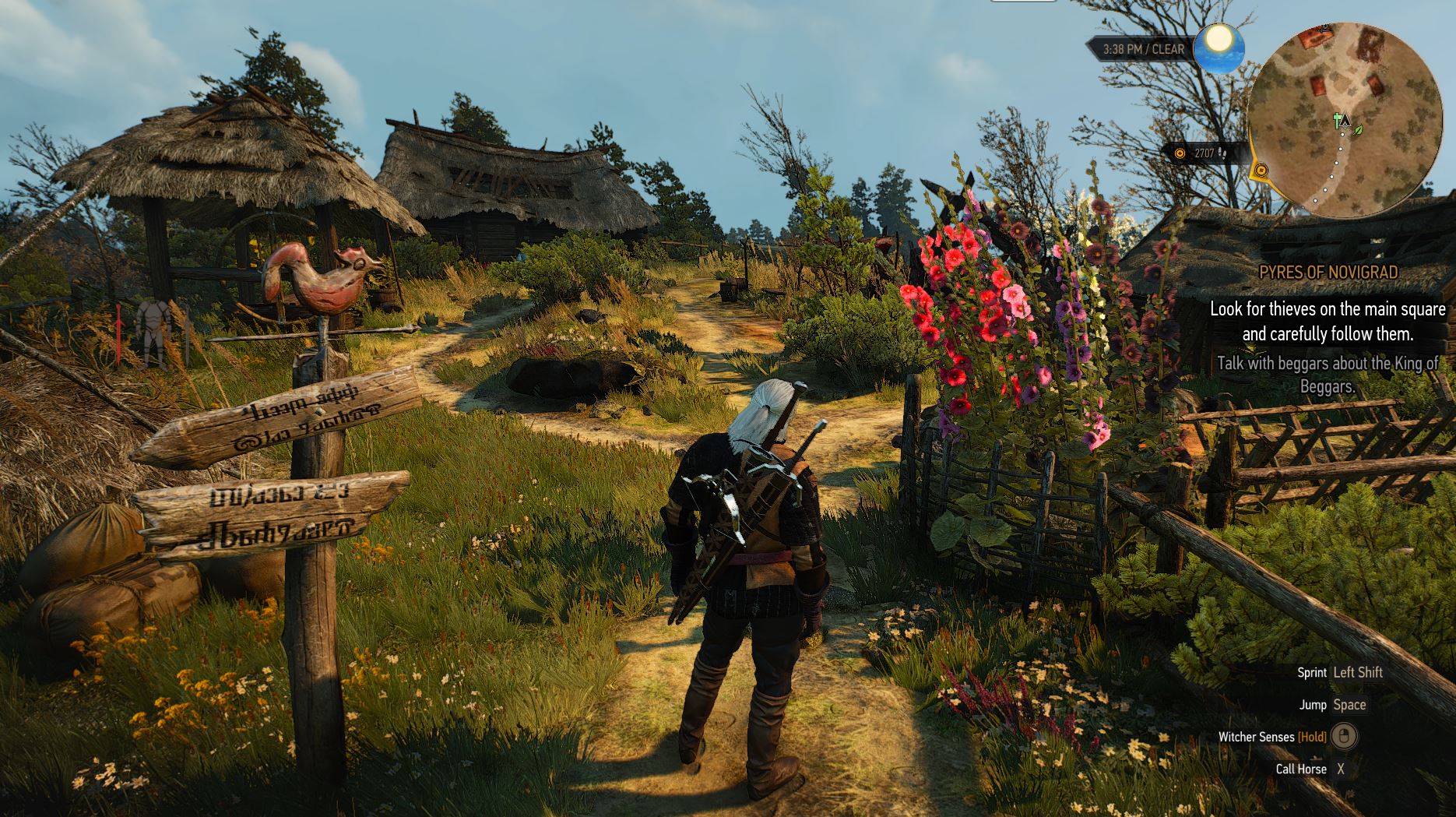
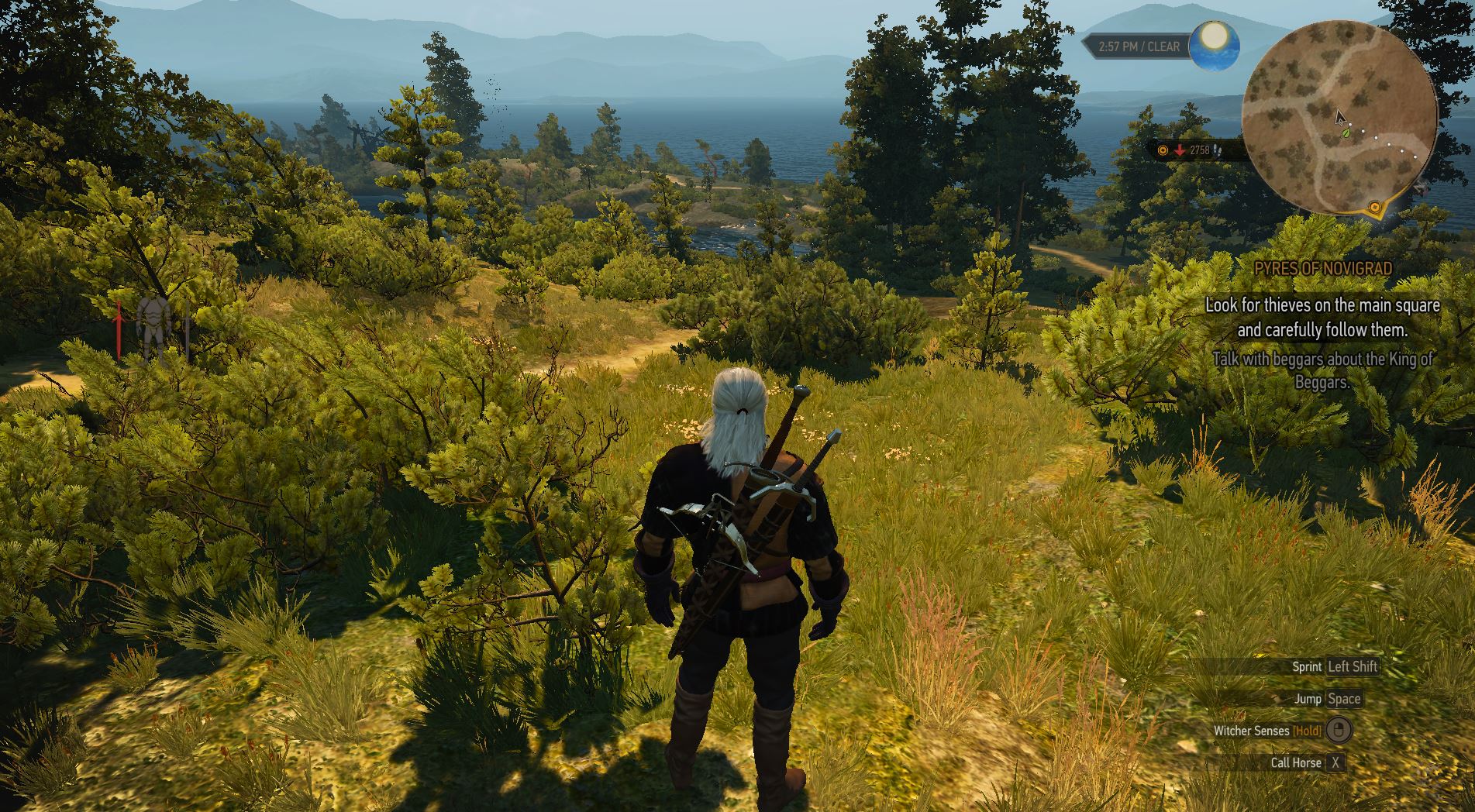
Start lowering these settings first before you lower settings with a more visible effect such as Detail Level or Texture Quality or otherwise your game won’t look as gorgeous as this:

Witcher 3 Graphics

Other than that, a few words on the other options that could help you squeeze out more performance:

  • Ambient Occlusion: HBAO+ should be enabled as it adds better shading and lighting effects to any scene at not too high of performance cost. If you’re really struggling with low frames per second, you should try the less taxing SSAO technique before turning it off (which really impacts the visuals). This comparison video will help you get a sense of the impact:

Video

Witcher 3: Ambient occlusion


  • HairWorks: Hairworks is a NVIDIA specific technique that makes hair on both the protagonist Geralt and monsters look fantastic. If you don’t care about having every single strain of hair perfectly animated, you can save a ton of performance by turning it off.
  • Grass density: Even on my rather powerful gaming PC, turning off grass density had a noticeable effect on smoothness in some scenes.


#4 – Boost Your Visuals with These 5 Hidden Tweaks

Got your Witcher 3 maxed out and it’s still super-smooth? Then let’s try a few hidden tweaks that’ll make The Witcher 3 look even more gorgeous than before. However, you need to do a bit of fiddling: First, you need to make sure that your in-game settings are perfectly tweaked (you’ll soon know why).

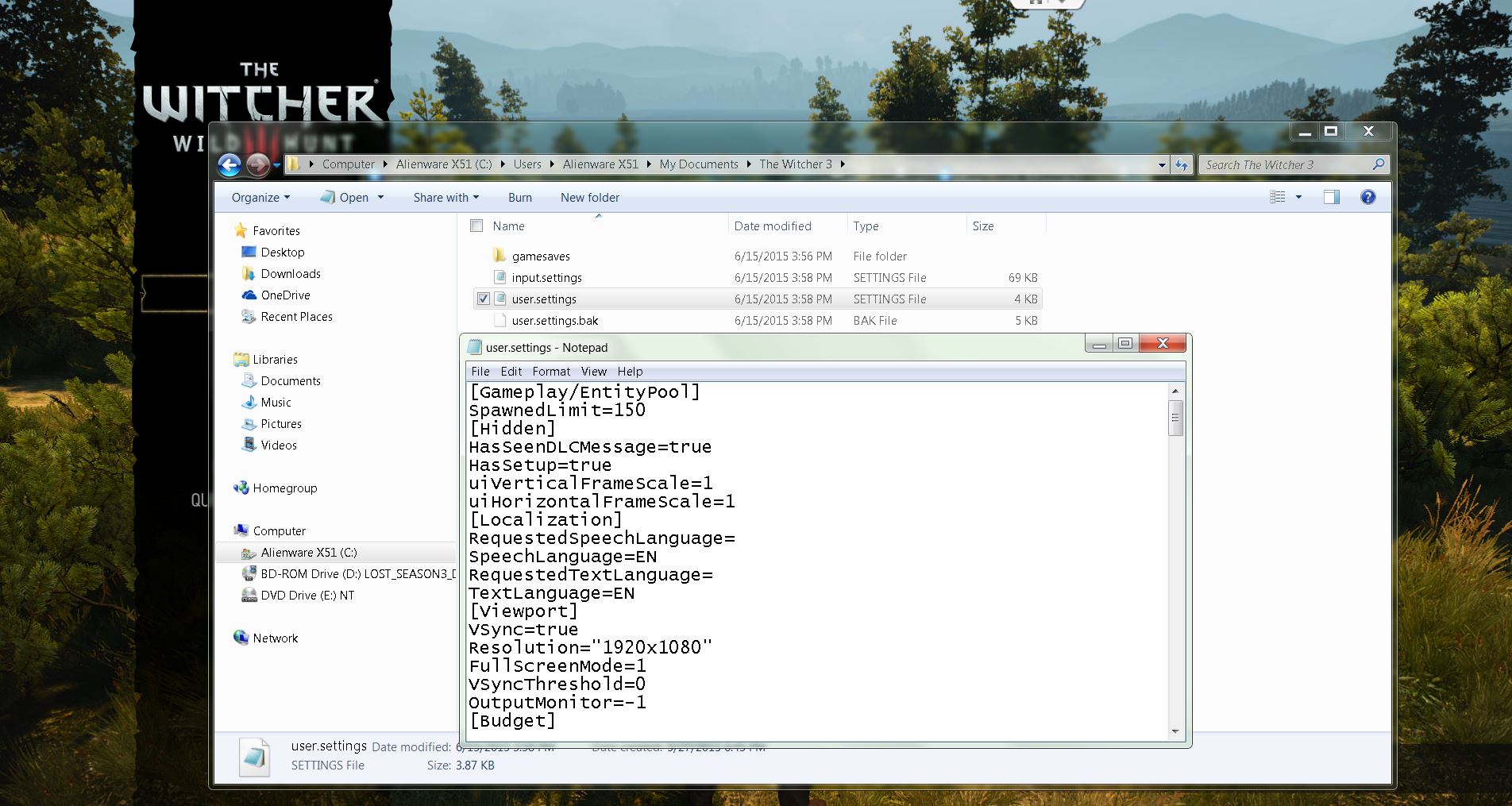
First, go to your user folder under “C:UsersUSERNAMEDocumentsThe Witcher 3”. Make a copy of the file “user.settings” and open it up with Notepad.

Witcher 3 Notepad

While a lot of these settings are still unexplained, users on the web have figured out the effect of some of these. First, jump to the line GrassDistanceScale and FoliageDistanceScale. This value defines the quality of every piece of nature you see on screen, such as grass, trees or bushes and the distance at which you can still see them.

If you go with the games Ultra setting, this setting will be at 1.5. If you’ve got a powerful rig, try cranking it up to 3 to get a noticeable improvement in The Witcher 3’s beautiful environment.

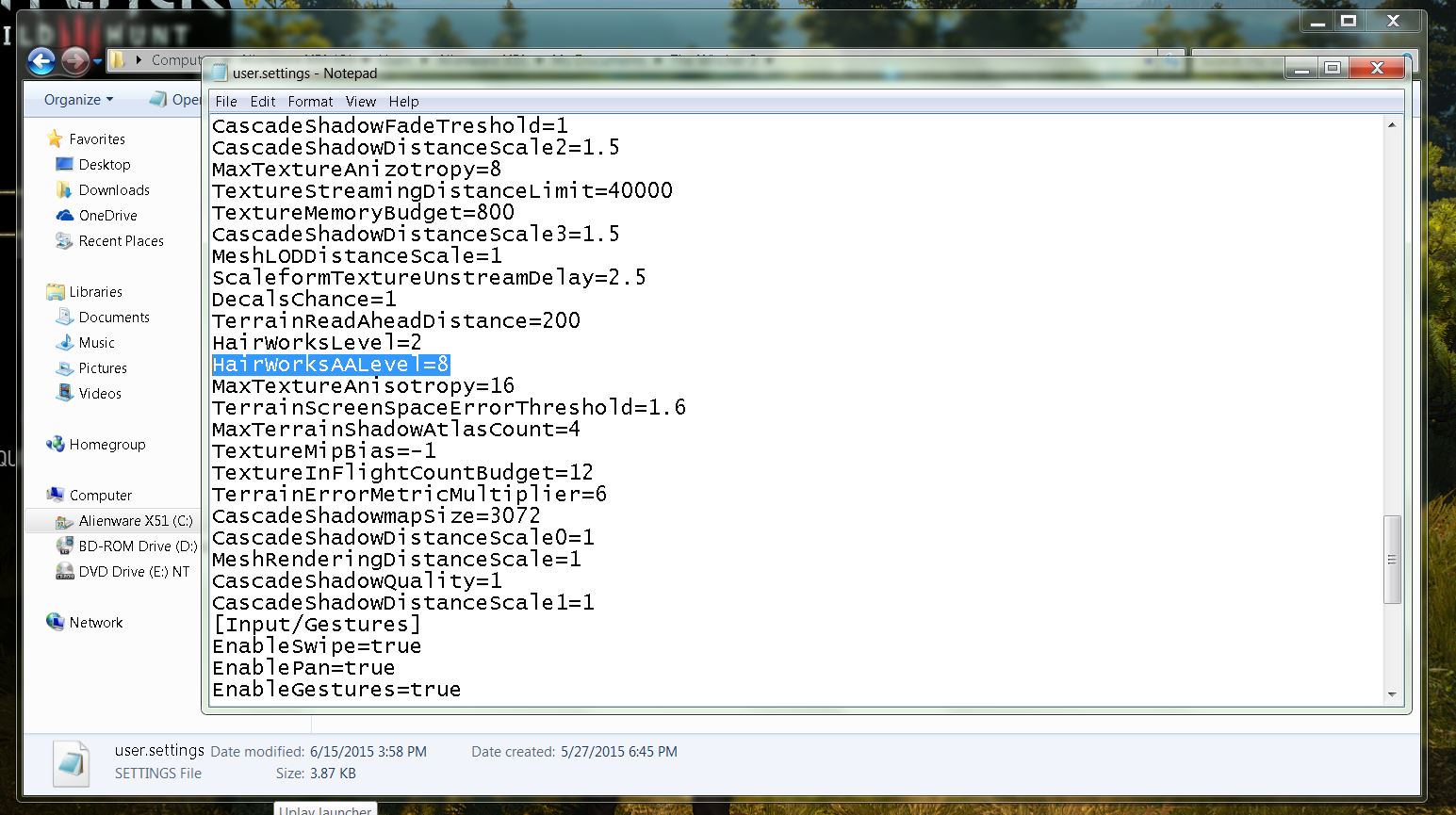
Witcher 3 Hairworks

Next, we recommend adding a new entry under the [Rendering] section called HairWorksAALevel. This setting determines the level of anti-aliasing on hair on NVIDIA graphic cards. If you set this to 8, hair will render without jaggies or other strange artifacts at the cost of just a few frames per second.

Done with all the settings? Save the file! But here comes the important part: To prevent the game from changing the settings back to its default, you have to make the file ready-only. To do that, right-click on the user.settings file and select Properties. Check Ready-only and hit OK to write-protect it! Hint: In addition to that, AMDs support pages recommend setting the EnableTemporalAA setting from True to False on multi-GPU systems (AND CrossFire: More than one AMD/ATI card in one system).


#5 – Make Sure Your NVIDIA & AMD card is set up properly

If The Witcher 3 is stuttering when you’re roaming about in towns, there is a specific setting you have to make within your NVIDIA or AMD cards control panel:

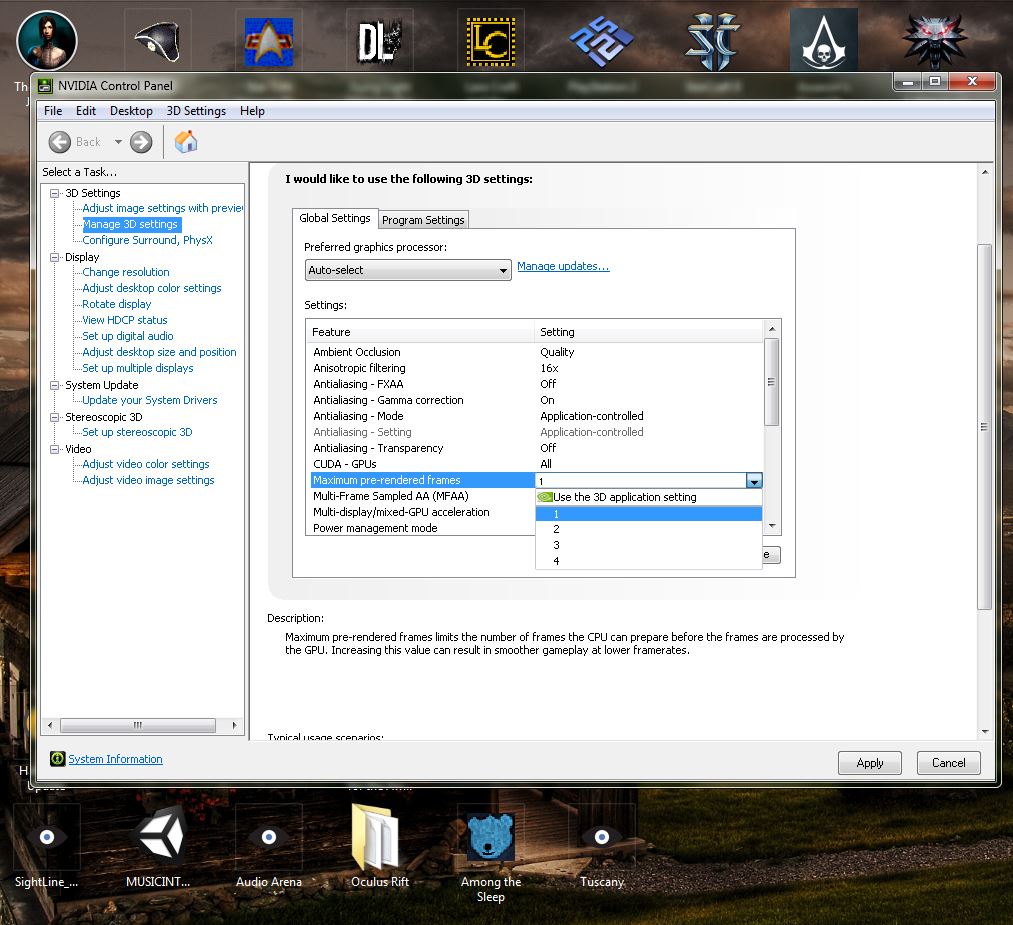
  • NVIDIA: Go to Manage 3D settings and scroll to the Maximum Pre-rendered Frames.

Witcher 3 Pre render


  • Set this to 1 to reduce any stuttering.
  • AMD: Under Radeon Pro, create a new profile for The Witcher 3 and set the Flip Queue Size to 1.

We hope you can enjoy The Witcher 3 thanks to our gameplay tweaks and remember, these are only recommendations based on my own tests.

AVG opens new Tel Aviv Center of Excellence for mobile

It gives me great pleasure to tell you about AVG’s latest office in Israel, spanning three floors in the brand new Adgar Tower in Tel Aviv.

The view from the large windows on the 23rd floor is impressive, and light pours into every room.

Adgar Tower

The office is set to become AVG’s global center of excellence for mobile and the headquarters for our mobile development and product teams. As the world looks ahead to the Internet of Things and an increasingly mobile future, the AVG office in Tel Aviv is the perfect breeding ground for innovation and growth.

As you would expect from such an important locale, a huge amount of planning went into the office, built with AVG’s core values at its heart:

Transparency

AVG has long held the belief that everything we do should be transparent. In our products, this manifests itself through pioneering projects such as the Short Privacy Notice but in the new Tel Aviv office, it is exists in a wonderful mixture of glass and light.

transparent office

I firmly believe that collaboration is key to the success in a company of any size, and with my background in startups, it was a principle we wanted to ingrain in our new office space. Glass walls and doors of glass ensure that everyone is visible, reachable and approachable. To me, it feels more like an incubator than a corporate office.

Execution

Like any AVG office around the globe, the engineers and workers in the Tel Aviv office pride themselves on attention to detail and high quality execution. Continuing this ethos was something we was certain needed to be done when planning for the future.

Every room houses a team of product and engineering experts all working together with a common purpose, to provide value to over 100 million users of AVG’s mobile products.

We never stop trying to help and protect our users, and the vibrant and collaborative atmosphere in Tel Aviv is the perfect environment to make it happen!

Shaul

Respect

Naturally, any office gets its character from its staff and we wanted to make sure that the new Tel Aviv office felt like home from the word ‘go’.

Work Life Balance

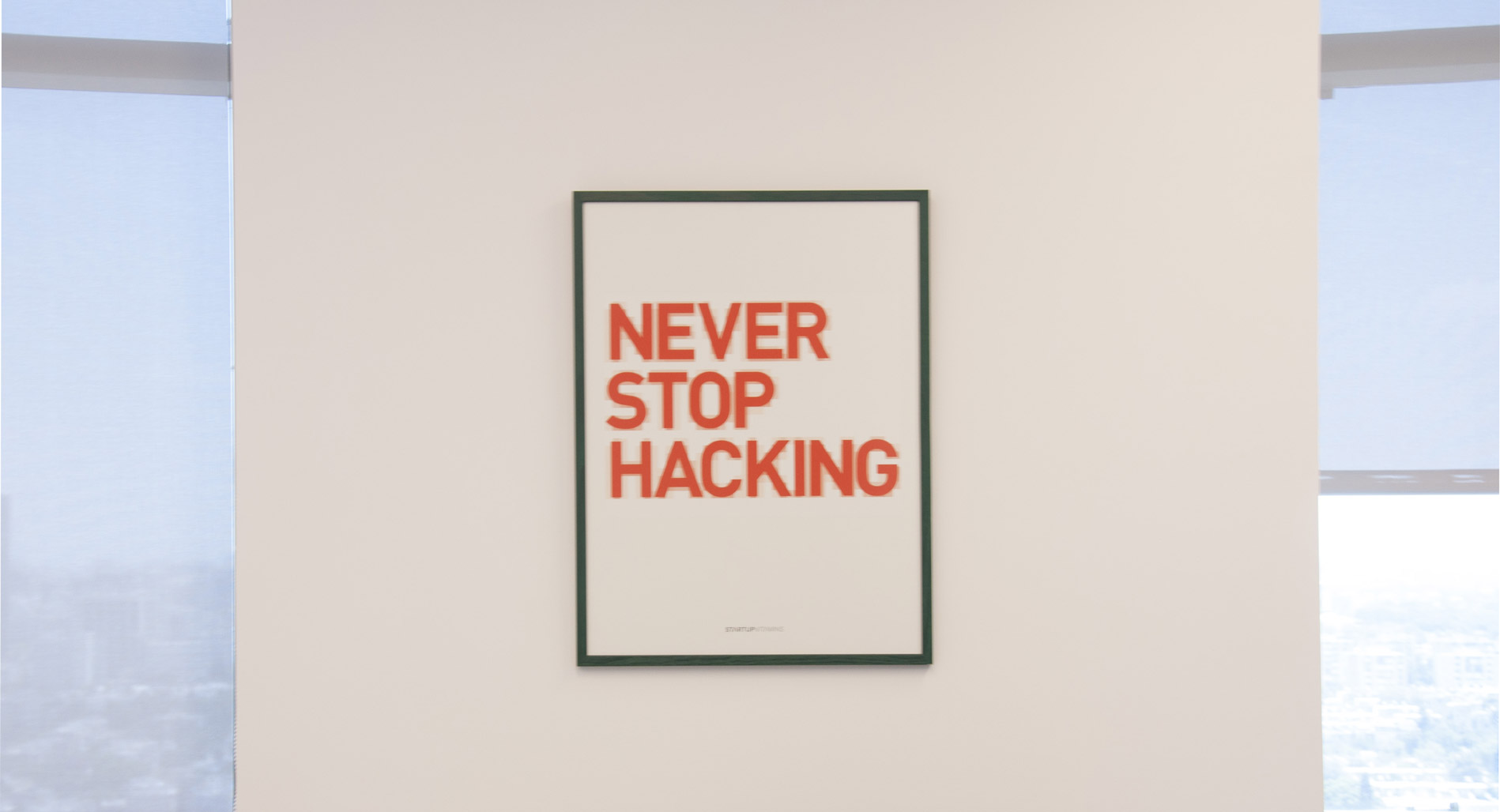
Each team customized the layout and finish of their office, down to choosing their own posters. Like in any business, motivated and impassioned people perform better, feel more rewarded and the office benefits from this.

Never stop hacking

Work-life balance has always been important to me, so we felt it was important that staff in Tel Aviv were able to express themselves for their talents and abilities outside of work. The AVG Talents initiative is the perfect reflection of that.

AVG Talents

Throughout the office, the walls display the artwork, photography and pets of AVG Tel Aviv staff. It doesn’t just make the office look great, but creates a sense of trust and familiarity. It encourages us to value each other not just as colleagues, but as talented and diverse people from all walks of life.

AVG Talents was in full swing this week as the staff band, The Showstoppers, helped us celebrate the new office with a concert, attended by the whole team.

Show Stoppers

Crowd


Beware of phishing scams after the LastPass breach

In a blog post , LastPass revealed that they “discovered and blocked suspicious activity on our network”  and that it found “no evidence that encrypted user vault data was taken”.

LastPass seem to be transparent in sharing information about this security breach.  They have provided what appears to be good technical detail about the information potentially compromised, along with the type of cryptography used to secure their user’s “Master” passwords.

The actual compromise of the ‘server per user salts’ and the ‘authentication hashes’ would allow the attackers to brute-force a targeted user’s password, but LastPass is claiming this information has been created using what is known as a ‘key derivation function’ called PBKDF2, considered best practice.

This makes it extremely difficult for attackers to brute-force the passwords in bulk and instead limit attackers to cracking one password at a time – meaning they would have to target a particular user (or use many computers to target multiple users).

However, the weakest link here is the compromise of ‘email addresses’ and ‘password reminders’.  Two likely scenarios come to mind that may arise as a result of this compromised information:

(1) Phishing attacks to LastPass users is now very likely, if the attackers choose to send email pretending to be from LastPass to trick them into divulging their Master passwords.

(2) The password reminders may give the attackers clues when attempting to brute-force a password. Some users are known to provide password reminder clues that are very easy to interpret that almost reveal the password in full immediately.

Worse, the addition of the password reminder information to a phishing email may increase the success of that type of attack.

LastPass is right to advise all their users of this compromise, and hopefully all LastPass users are able to heed the warning and change their Master password, plus activate multi factor authentication options.

The positives in this case, however, appear to be the best practice use of cryptography in their storage of master passwords (i.e. PBKDF2) and the failure to access ‘encrypted data’ (stored passwords and Master Passwords). This is potentially down to LastPass having separate systems for this sensitive data.

If the attackers had been able to compromise the ‘encrypted user data’ then LastPass would surely be advising their users to not only change their Master password, but every other password stored within their accounts – and this would be a monumental task for all concerned.

Google rolls out a new password manager

Unveiled at its 2015 I/O developer conference, Google has begun to roll out a new security feature to all Chrome browsers and virtually all Android devices: the Smart Lock Password manager.

From now on, any website login details that you save in your desktop Chrome browser will be accessible via any Android device signed in with your Google account. So, if you’ve saved your login details for, say, Facebook or Netflix, you will be automatically signed in when accessing them from the Chrome browser on your Android device, and vice-versa.

In addition, if you were to install the Facebook or Netflix apps on your phone, they will also be able to automatically retrieve your login details from your Google account and sign you in.

The last feature requires individual app developers to include the newly released API codes from Google, but it’s a relatively simple matter, so we expect to see this feature rolling out across a variety of apps soon.

How to feel about Google managing your passwords for you is for you to decide. If you’re already saving these accounts in your Chrome browser, chances are you will enjoy this feature. However, you’re now putting more of your eggs in the same basket, so make sure that your main Google Account is locked down with strong passwords and two factor authentication.

So given our recent post about the fragmented nature of Android update deployments, when can you expect this feature? Well, for the last few years, Google has been using the Google Play Services app to get around this roadblock and send out major system updates to Android users, regardless of brand or make (but that’s a story for another time).

Any device running Android 2.3 or above will be receiving the update to Google Play Services 7.5 and be able to use the feature.


How to turn on or off Smart Locks Passwords

Interested in using the feature, or just want to make sure it’s turned off and Google isn’t vacuuming up all your passwords?

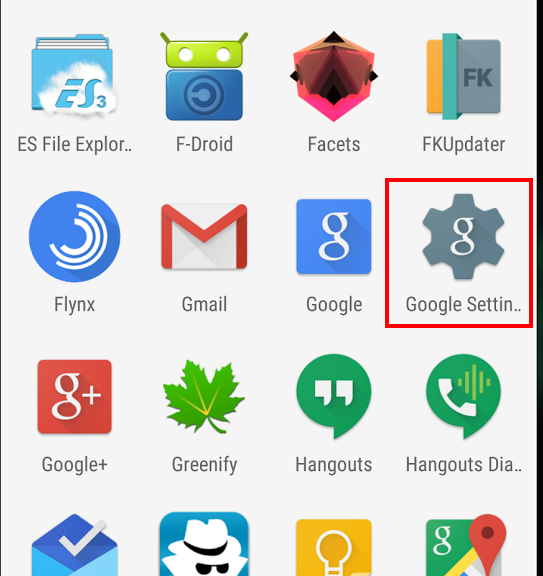
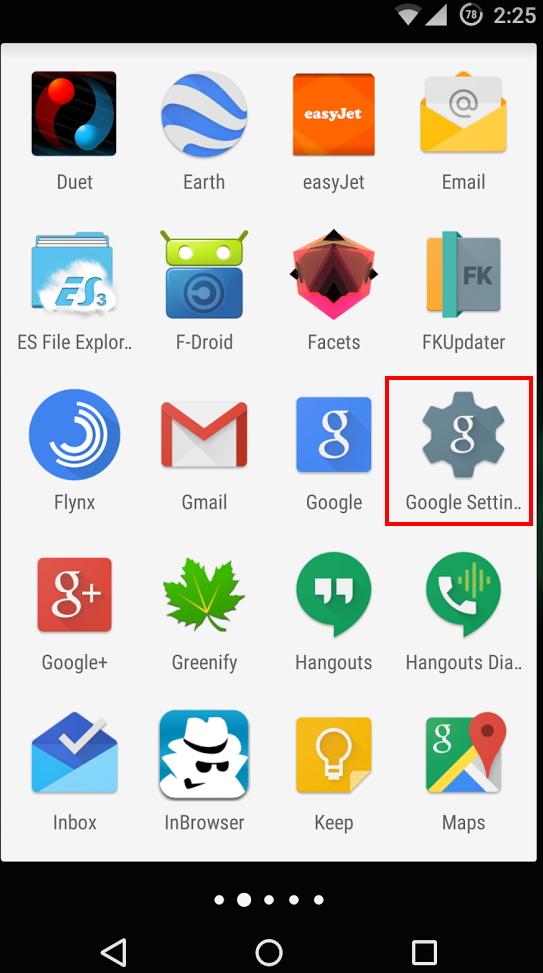
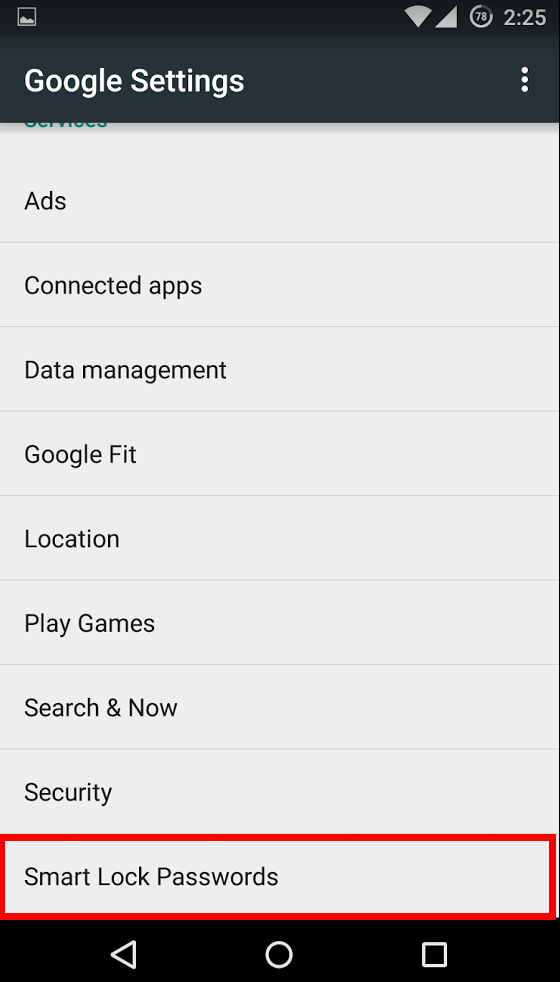
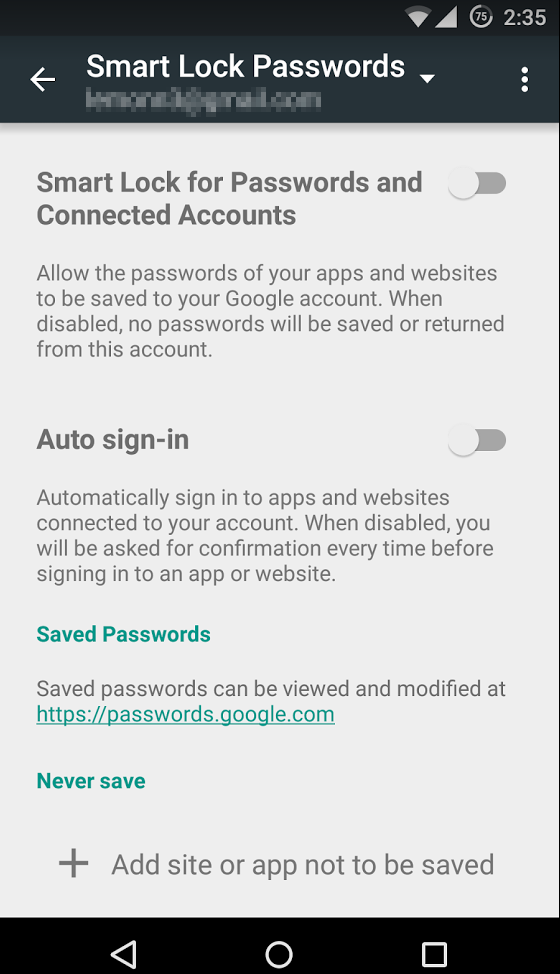
In your Android device, open the Google Settings app. This where all the details concerning your Google Account reside. You’ll find the Smart Locks setting at the bottom of the main menu in the Google Settings app. From there, you can select to turn on or off the password manager, allow auto-sign ins, and add exceptions to certain sites or applications.

Google settings

Smart Lock

Smart Lock options


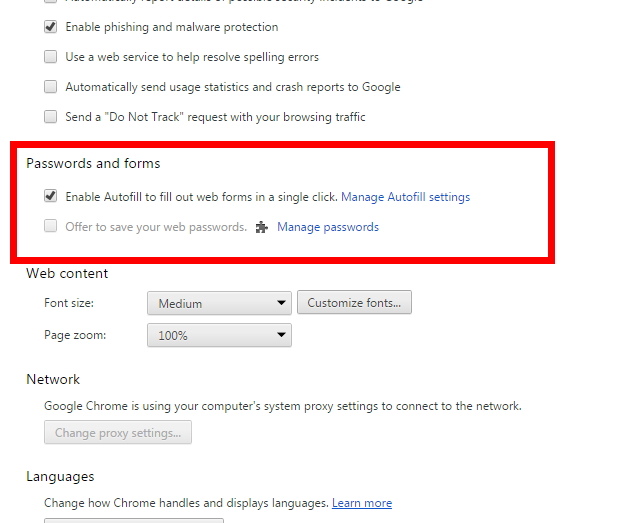
From your Chrome Browser, you won’t find the Smart Locks name per say, but you will find where to manage the passwords saved in your browser. Just click on the menu in the top right corner of the browser, and select settings.

Chrome Settings

Chrome password save


At the bottom of the settings page click on “Show advanced settings”. From there, you can scroll down to “Passwords and forms”. Any passwords you’ve saved can be found here.

If you feel the convenience isn’t worth the privacy tradeoff, you can delete them and also set the browser to no longer automatically sign you into websites. Just keep in mind: you will regularly be asked if you want Chrome to save your logins when you sign in to websites. Remember to say “no” and “Never ask for this website again”.

As always, stay safe out there.

Snapchat rolls out two-factor authentication

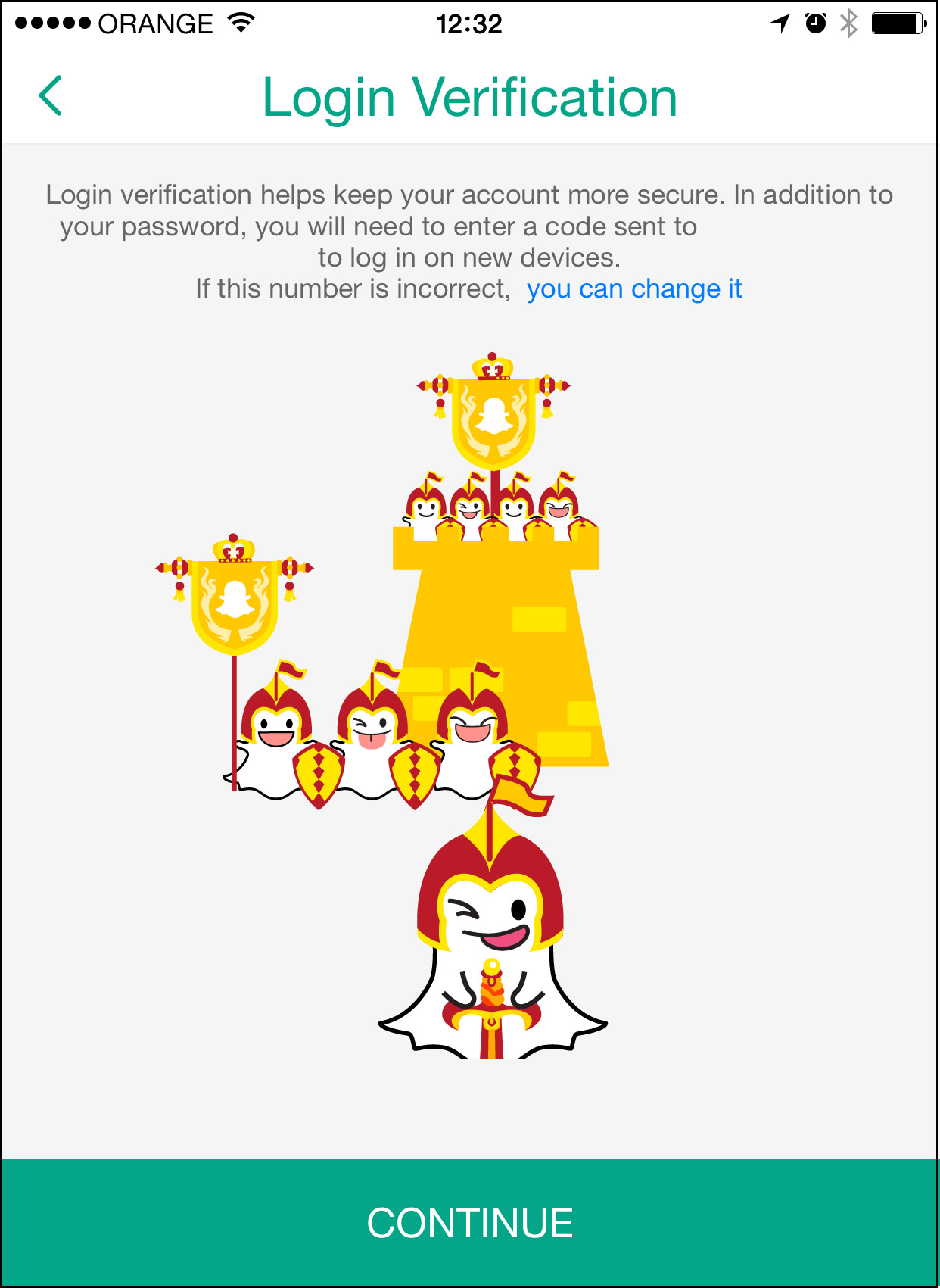
The feature, known as ‘login verification’, is a way that users can help protect the privacy of their Snapchat accounts.

Two Factor Authentication is a way to help secure your online accounts by adding another step when you login. With Two-Factor Authentication, your regular password won’t be enough to gain access to your account. You will also need a code which is sent to your mobile device, either in form of a text message or via an app.

In Snapchat’s case, the first time an account is accessed from a new device, Snapchat will require a code sent via SMS to the mobile number registered on the account. This code can then be used to access Snapchat normally. Afterwards, the authorization will not be required on that device again (unless you instruct Snapchat to ‘forget’ the device.)

Login


For more information on two-factor authentication, check out the video below from AVG Academy.

Video

Two Factor Authentication


How to enable login verification on Snapchat

As detailed in Snapchat’s support page, here’s how to enable login verification in the app:

  1. Tap the ghost icon at the top of your camera screen
  2. Tap the Settings gear in the top right hand corner of your Profile screen
  3. Tap ‘Login Verification‘ under the ‘My Account’ section
  4. Tap the ‘Continue‘ button
  5. Enter the verification code sent to your mobile phone and tap ‘Continue

Once you have completed the login verification process, your device will remain a verified device until you elect to forget it.


AVG Technologies Establishes Worldwide Center of Excellence for Mobile in Israel

AMSTERDAM – June 16, 2015 – AVG® Technologies N.V. (NYSE: AVG), the online security company™ for more than 200 million monthly active users, announced today the establishment of its global Center of Excellence for mobile in Tel Aviv, Israel. The new office comprises a 3,200 square meter facility, supporting more than 120 employees working across state-of-the-art mobile innovation, emerging mobile threats research, and Internet of Things technology development.

“Israel has emerged as a hotbed for mobile innovation, resulting in unparalleled opportunities to partner with innovative start-ups and develop cutting-edge mobile technologies. AVG’s rapidly growing mobile customer base makes this a critical time to build robust, future-proof offerings, supporting the multiple mobile platforms and services that are so popular today,” said Harel Tayeb, AVG Israel Country Manager. “The historical success of our investments in this market have laid a strong foundation for the development of our signature AVG Zen platform, growing our global mobile user base, and delivering on our mobile monetization strategy.”

The development of AVG’s most popular mobile product, AVG AntiVirus for Android™, was driven by the acquisition of Israeli start-up, DroidSecurity, and quickly became the first mobile security product to enter the 100-500 million downloads category on the Google® Play™ store. With over 100 million mobile users worldwide today, and growing, AVG is focused on enhancing and innovating on its mobile portfolio through a dedicated program of industry partnerships, top talent recruitment and discerning investment.

On the back of the new office opening, AVG commenced a roadshow on Monday, June 15, in which fifteen innovative Israeli start-ups were invited to meet with AVG’s global senior management team, including Todd Simpson, AVG’s Chief Strategy Officer, and Judith Bitterli, AVG’s Chief Marketing Officer, to discuss and debate Israel’s hottest innovations in the mobile market.

AVG’s Country Manager, Harel Tayeb, will lead the program of mobile momentum for Israel. An entrepreneur himself, who has founded and run several mobile-oriented start-ups in this market, Tayeb also previously served as Vice-President of Conduit’s Mobile Business Unit, and headed up its spin-off, Como, prior to becoming a start-ups advisor.

Women Gamers Celebrated and Encouraged

Games are playing an increasingly large role in the tech industry. An estimated 59% of Americans play computer games according to the Entertainment Software Association  — and we’re talking about an industry creating tens of billions in revenue, with some estimates reaching $100 billion overall.

Interesting fact: Did you know that recent studies show that almost half (48%) of the users of games are women?  Or that women over the age of 18 also represent a significantly greater portion of the game-playing population (36 percent) than boys age 18 or younger (17 percent)?

This particularly noteworthy, because this is a sector where women have appeared to be relatively absent – at least in terms of women characters being represented. Lara Croft’s character in Tomb Raider is one exception.  The lack of female protagonists stirred controversy at last June’s Electronic Entertainment Expo (E3), the big industry gathering.

While the “dudebros” perception is that only guys make and play video games, this is clearly not the case in games. And game developers, like all companies, would be wise to really take a look at their consumer base and act accordingly.

Women also have made some of the most influential and important games, going back to the early days of Atari.

This is in evidence at the Oakland, CA Museum of Art and Digital Development (MADE), where they are trying to help change perceptions of reality by increasing awareness regarding women’s contribution to games. An interactive exhibit at the Museum is celebrating six important and pioneering women in games development and displaying work from their careers.

I’m sure some of these honorees will be more than familiar to gamers out there:

  • Roberta Williams, who co-founded Sierra Entertainment and pioneered graphic adventure games like Kings Quest 1
  • Carol Shaw, an early Atari and Activision designer, whose credits include River Raid
  • Rieko Kodama, a Sega designer, credited with the high-profile Phantasy Star series
  • Yoko Shimomura, a video game music composer, whose work includes Street Fighter II
  • Danielle Bunten Berry, who is famous for Seven Cities of Gold
  • Amy Henning, a video game director whose work includes the Legacy of Kain series


MADE’s appreciation of women in games comes at a perfect time, when there is positive change occurring:

The number of women in game development has nearly doubled since 2009, according to a report from International Game Developers Association (IGDA). (Women now make up 22% of the workforce in game development.) And the IGDA with the support of Intel announced earlier this year it is working to double the number again and bring more women and other diverse talent to the tech and games industries. Also in Europe, Women in Games Jobs (WIGJ) announced it plans to help double the number of women working in the industry in the UK and Europe over the next ten years.

In another sign of the times, Ubisoft’s Assassin’s Creed will reportedly get a female protagonist, and EA Sports has just announced it will include 12 female teams in “FIFA 16″. Read more here.

Meanwhile another symbol of the change also occurred last weekend across the San Francisco Bay from the MADE exhibit, where another inspiring event was taking place to promote interest of girls in games.  The brand-new San Francisco chapter of national nonprofit ChickTech held a pop-up educational event with as many as twenty young women from local high schools participating in a session on game programming around Unity 5 game development tool.

ChickTech: High School is an arm of the ChickTech nonprofit that revolves around creating events that will get high schoolers interested and excited about technology.  ChickTech’s mission is to reach the girls who would make great engineers, but because of stereotypes and a lack of opportunity, may not realize it until they are already doing something else.

It definitely will be interesting to watch what happens at this year’s E3 Expo 2015 taking place June 16-19 in LA and whether we will see women in games continue to make strides!

Securing a Heterogeneous Internet of Things

Analyst firm IDC predicts that the number of Internet of Things (IoT) devices—from home appliances to commercial applications such as door locks and sensors—will grow into a $7.1 trillion market by 2020, compared to $1.9 trillion in 2013.

This rapidly growing market is giving rise to a land grab of sorts: companies are vying to build the one IoT platform that will link all devices, and by linking them make them “smarter” as they communicate with one another.

So it may come as no surprise that at its developer conference last week, Google announced Brillo, a new Android-based operating system (OS) for the Internet of Things. The connected OS promises to use as little as 32 or 64 MB of RAM to run, making it power-efficient and light enough for “things” such as light bulbs, keys or door locks.

By offering a familiar, widely used (Android) OS as the basis for its IoT platform, Google is offering a solution that is already familiar to developers worldwide. However, by offering yet another OS for Things, it also compounds the fragmentation of the space. There are a wide array of vendors and consortiums now offering operating systems, connectivity platforms and discovery protocols.

With each vendor and approach come security threats and attack vectors. These threat surfaces are multiplied by the connectivity and discovery protocols and by the routing of data. There is a trend to route data from each device to the cloud, even when, intuitively, this should not be necessary. This enables device manufacturers to utilize hardware, services and data business models. It is not a trend that is likely to slow down by itself.

Securing this spider web of technology and data is a challenge and a necessity. When a smart lock knows when people are home, or when your security camera sees where you put your valuables, they contain very valuable information for criminals. Less obviously, but just as worrisome, is the aggregate data about you that travels the airwaves in your home and beyond.

Brillo, being built on the mature Android platform, has the advantage of being hardened for security over time, and the disadvantage that nefarious players already know its ins and outs. Other, less widely deployed platforms will go through their own maturity evolution as developers and hackers dig through them.

Because of the vast number of suppliers of Things, and the wide variance of the platforms and protocols, a full security solution is unlikely to come from one of these players. The answer to the IoT security dilemma will more likely come via third-party security companies who’ll play a major role in providing secure, safe digital environments for users across connected devices.

To keep the Internet of Things from devolving into the Internet of Threats or the “Illusion of Trust,” the industry needs to shore up standards on privacy and security. Today, the IoT is still evolving rapidly, and its standards and regulations are just being developed. We’re at a moment in time that’s similar to the birth of the World Wide Web 25 years ago. This time, however, we can build a hyper-connected world based on safety and trust and the principles of protection and privacy—literally, we can build security into the foundation of the IoT infrastructure.

One of the fathers of the modern Web, Vince Cert, once said he regrets not building more security into the architecture of the Internet. It was difficult at the time to anticipate the level of cybercrime, cyberwarfare and cyberespionage that would emerge. The promise of the IoT is exciting, with many business and consumer applications, including the connected car and the connected home. But for our vision to come to fruition, let’s learn the lesson of our predecessors and design the IoT and its devices by prioritizing privacy and security as central features.

An area we are passionate about is what we call the “law of least data.” This encapsulates the desire for data to be routed as directly between agents as possible. Two devices in your home should not have to send data to the cloud – even if they are from two different vendors – when they are talking to each other. Your next generation smartwatch should not have to talk to the cloud in order to read data out of your pacemaker. Of course some setup, or discovery metadata, may be required upon installation, but thereafter data should be kept personal whenever possible.

By agreeing on some defining principles, such as the law of least data, we can build a better Internet of Things.