Category Archives: AVG

AVG

AVG Study Reveals Top 10 Apps That Ruin Your Smartphone’s Mojo

In AVG’s latest “App Performance Report” for Q4, we’re looking again at the anonymous data from over one million AVG users, compare it to our first report, and reveal what apps are the most resource-hungry on their phones.

When looking at one million of our users, we found many interesting trends that might just surprise you:


Spotify is now the No 2 resource consuming app overall:

Out of our total user base, 638,716 users had the music streaming service Spotify installed: what they perhaps didn’t know is that Spotify is now the second most resource-consuming app in the store (up from rank 5 in Q3).

Spotify

If you’re low on battery, space or data, keep that streaming to a minimum!


The changing gaming landscape

In our previous report, uber-popular FarmVille and Puzzle & Dragons topped the charts for the most resource-hungry games for Android. However, they were nowhere to be found in our Q4 roundup. A closer look shows Puzzle & Dragons and FarmVille suffered from a 50% and 43% decline respectively in installed user base in Q4 when compared to the beginning of the year (Q1/Q2).

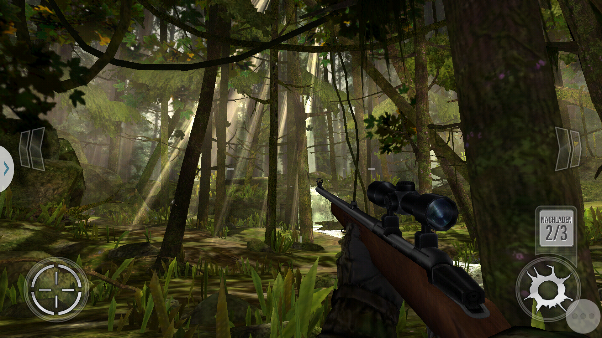
New games such as Boom Beach and Deer Hunter 2014, however, appeared out of nowhere and secured the top spots in both usage and resource usage (not surprisingly, they’re games after all!).

Farmville

Deer Hunter 2014

[SUBLINE] Massive decline for Farmville and a rise of Deer Hunter 2014.


Samsung’s New Updates

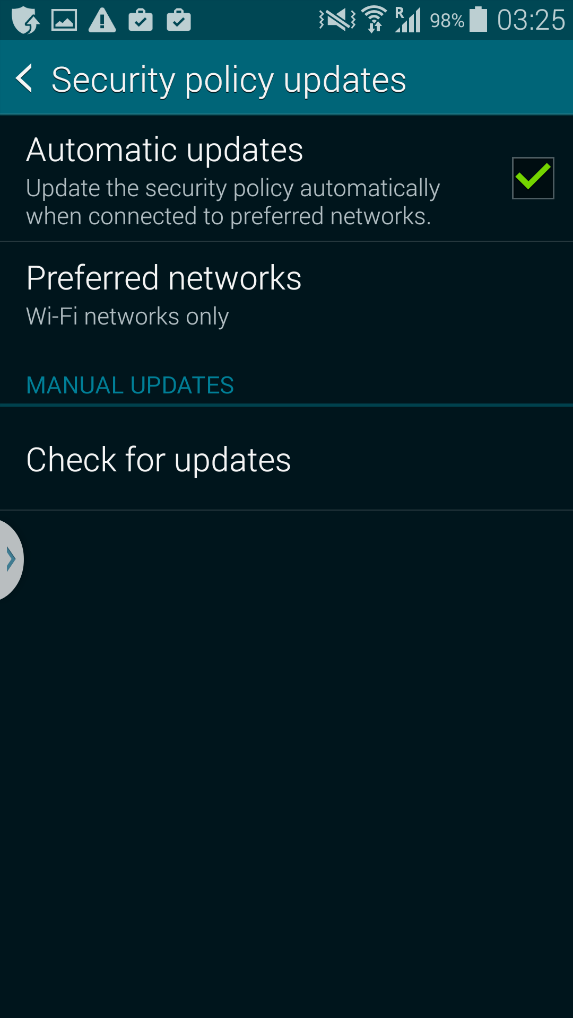
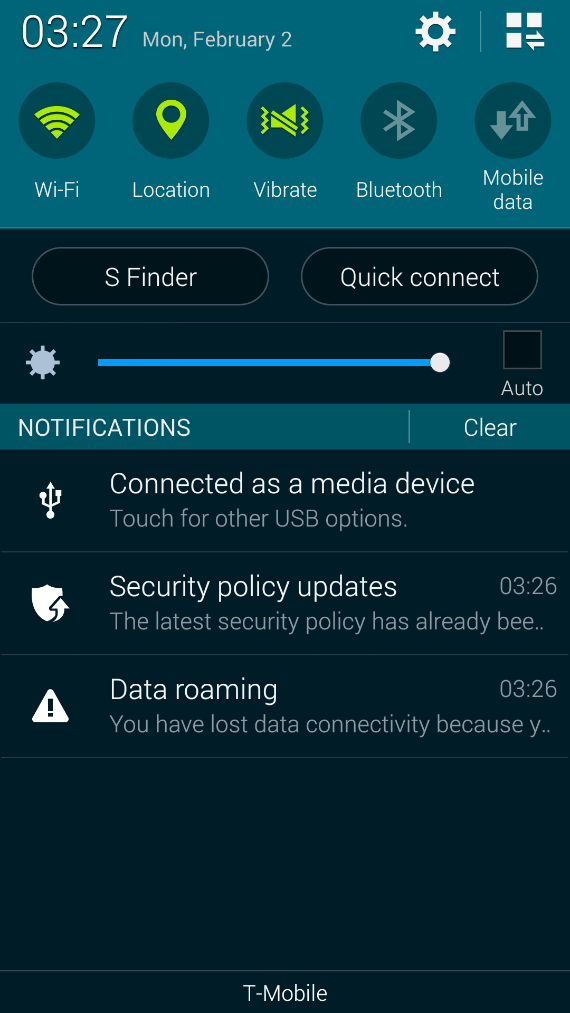
After the rollout of Android 4.4.2 (October 2014), we noticed a new entry in our top battery drainers that run immediately at start up. Samsung’s Security Policy Update service, officially named Samsung KNOX™, automatically checks for security updates and downloads these automatically. While Knox is a great addition to having a full-featured antivirus product installed, a number of users and even journalists have publicly complained about not just the amount of notifications shown but also a 30-40% drop in battery life.

As mentioned in this ZDNet article, this feature cannot be turned off as mentioned by the Samsung Technical Support: “To ensure that your device always has the latest security to protect you and your data, Samsung will occasionally send security updates to the device as needed. I’m sorry to inform you that there is no option to disable these updates”.
Policy Update

Notifications


While we can’t stress enough that security on mobile device is critical, handset makers need to ensure their product does not reduce battery life or impact overall performance drastically.


Self(ie) awareness

Selfie

Taking selfies was “the” cool thing to do in 2014: selfie sticks, selfie apps, selfie phones all flooded the market. Unfortunately, some of these apps can be quite draining on a device’s battery. A new app called Candy Camera – Selfie Selfies crept up to number 7 in the top battery hungry apps that run in the background. We suggest avoid apps like these as they only should drain battery when you’re actively running them!


Maps & Navigation

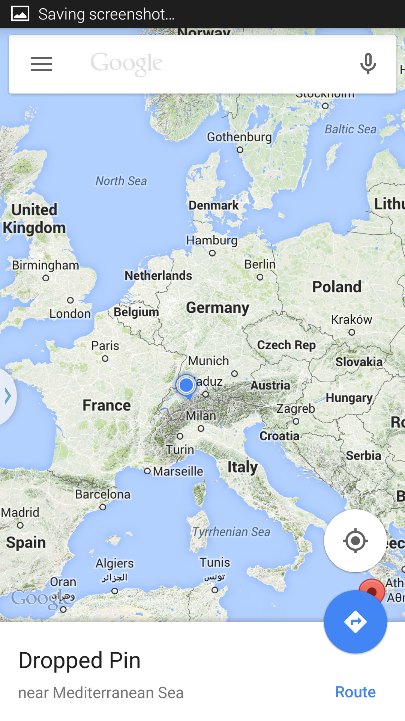
Did we spend more time navigating and looking at maps? With more time off over the festive period, both Waze (Social GPS Maps & Traffic) and also Google Maps climbed into the Top Usage Chart:
Google Maps


Less gaming, more talking

Another seasonal effect: compared to Q2 and Q3 of 2014, we spend much more time on social networks and communicating through messenger apps instead of gaming. While we still spend most 49% of our time gaming on our Android devices compared to 62% in the previous quarter, social and communication apps rose to 11% and 10.3% of our total usage (compared to 6% and 3% respectively before)


Again, find a full list and all the data in our app report here. 

So what are you supposed to do if you’ve got one or even many of our resource drainers installed? Find out in our top tips in the next blog!

AVG’s CEO Gary Kovacs Advocates Human Rights in the Digital World at Mobile World Congress

AMSTERDAM and SAN FRANCISCO – February 24, 2015 – AVG Technologies N.V. (NYSE: AVG), the online security company™ for 197 million active users, today announced that company CEO, Gary Kovacs, will deliver a keynote address on digital rights at Mobile World Congress 2015 in Barcelona, Spain.

By 2020, most of the global population will be connected to the Internet. These estimates suggest that two billion people will come online in the next few years. As we increasingly live our lives online, what we often hear is that privacy is not a social norm or even a realistic expectation anymore. AVG believes that people should not have to give up their personal rights and freedom in the Digital Age. Moreover, AVG believes that businesses can gain a strong competitive advantage by protecting people’s privacy.

To prompt a serious debate on data protection, privacy, and the economy of the Internet at Mobile World Congress, Mr. Kovacs will call on the mobile industry to work together to frame the rights of both consumers and businesses in a connected world.

“The unprecedented surge of cybercrime in the last few years has made cyber security a multi-billion-dollar industry, not to mention a matter of national security. We have developed, and continue to develop, products that help protect all kinds of devices and data from external and internal threats. However, what the tech industry often overlooks is that it is the users, everyday people, who ultimately need to be protected. Neglecting their rights for any reason is not an option,” said Mr. Kovacs.

Mr. Kovacs will also discuss the ways in which consumers are taking back control of their privacy in the digital age, along with how businesses can also benefit from this trend. “Recent consumer studies clearly show that by violating users’ privacy in more and more ways, companies are undermining their trust. As a result, the penetration and adoption of new technologies face significant barriers – from hardware to software to services,” said Mr. Kovacs. “We are witnessing the most amazing technological revolution in the history of mankind, but it has brought us to the point where we also need a ‘revolution of trust’. My mission at the Mobile World Congress this year is to send a wake-up call to the industry on this topic.

We have to enable this revolution through three main avenues: by providing people with more powerful, simple and integrated security tools; by committing to transparency and responsibility in the way we work with users’ data; and by educating users on how to keep themselves and their families safe in the digital world, to make them smart users of smart devices.

We must change the dismissive attitude many companies have towards user privacy rights on the Internet and pledge to provide a basic level of security and privacy to everyone in the world. Trust is the only foundation through which we can offer new services and products, and further support the development of societal frameworks for services like e-Government and m-Health.”

The keynote address will take place on March 4 at 9:15am as part of the Keynote session 5, “The New Mobile Identity”. Other speakers present for the session will include: Brian M. Krzanich, CEO of Intel Corporation; Patrick Gelsinger, CEO of VMWare; Dr. Hans Wijayasuriya, Group CEO of Dialog Axiata PLC; and Siret Schutting, MD of e-Estonia.


About Gary Kovacs, CEO AVG Technologies

For more than 25 years, Gary Kovacs has held leadership positions at a number of technology companies, including IBM, Sybase, Adobe, and Zi Corporation. Prior to joining AVG in July 2013, he was the CEO of Mozilla Corporation. He has been a passionate advocate of digital rights and online privacy throughout his long career.

In recent years, he has developed and launched a number of projects that help people protect themselves and their families from cyber threats, and that help them take better control their digital identities overall. Fierce Wireless named Kovacs one of the Rising Stars in Wireless for 2013, which recognized the mobile innovation and privacy initiatives that he drove during his tenure as CEO of Mozilla.

He is a frequent public speaker and panel member. His 2012 TED talk, “Tracking the Trackers,” explored issues of Internet privacy in an increasingly connected world. At the World Economic Forum Annual Meeting of the New Champions in 2012, he presented strategies for creating a resilient cyber economy amid economic, security, and privacy obstacles. He was a keynote speaker at the Mobile World Congress 2013. In December 2014, he addressed EU policy officials at the GSMA Mobile 360 event in Brussels where he shared his view that the industry has a responsibility to help educate new users on the matters of staying safe and protecting their privacy online.


About AVG Technologies (NYSE: AVG)

AVG is the online security company providing leading software and services to secure devices, data and people. Over 197 million active users, as of December 31, 2014, use AVG´s products and services. AVG’s Consumer portfolio includes internet security, performance optimization, and personal privacy and identity protection for mobile devices and desktops. The AVG Business portfolio – delivered by managed service providers, VARs and resellers – offers IT administration, control and reporting, integrated security, and mobile device management that simplify and protect businesses.

All trademarks are the property of their respective owners.

www.avg.com


Contacts:

US

Katie Han

Waggener Edstrom for AVG

[email protected]

+ 1 (212) 551 4807

UK

Samantha Woodman

Waggener Edstrom for AVG

[email protected]

+ 44 (0)20 7632 3840

Games, Music and Shopping Apps Hit Smartphones Hardest

AMSTERDAM and SAN FRANCISCO – February 24, 2015 – Music lovers, smartphone shoppers and mobile gamers around the world could find their favorite apps are the ones eating up most of their battery life, data plan and phone storage. The results of the latest app performance research from AVG Technologies, N.V. (NYSE: AVG), the online security company™ for 197 million active users, rank the popular music streaming service Spotify, new games like Deer Hunter 2014, and even the Amazon shopping app as among the most resource hungry apps globally.

The quarterly AVG Android App Performance Report analyzes aggregated, anonymous data from over one million AVG Android app users to discover the top performance-affecting apps worldwide. Installed on over 600,000 devices across AVG’s user base, popular Spotify has moved up two places from where AVG had ranked it in Q3 to take second position behind the social networking app from Facebook, whose constant background notification checks still have the greatest impact on overall Android device performance, consistent with last quarter’s findings.

There were also four major new trends among AVG users, as identified in the latest report:

  • Game On: demonstrating the ever-changing gaming landscape, last quarter’s gaming chart toppers, FarmVille and Puzzle & Dragons, showed major declines in their installed user base, contributing to the reason they dropped out of the AVG Q4 performance rankings. They are replaced by new entrants, Boom Beach for overall impact and Deer Hunter 2014 for storage consumption.
  • Seasonal Shopping Fever: over the holiday shopping and sales period, the official Amazon for Android app entered the charts this quarter, ranked number five in the top 10 list of most all-round resource-consuming apps.
  • Home Cinema Gets Smart: previously listed in the top three battery draining apps, Netflix this quarter no longer appears in the tables at all following a November update that has resulted in significantly less battery drain. Good news for film fans!
  • Helping Hands that Hinder: tools like Clean Master or background apps like Samsung’s Security Policies designed to help keep smartphones secure and smooth, actually rank among the highest drainers of battery, storage and data plan.

“In this quarter’s app report we saw some expected seasonal changes in the app landscape, such as uplift in usage of social, purchasing and GPS-based location apps,” said Yuval Ben-Itzhak, Chief Technology Officer, AVG Technologies. “What surprised us, however, was that some of those tools and security updates aimed at improving your phone experience, were in fact impacting it quite heavily. This is not something most people would expect so we hope our report will encourage people to understand how to manage their apps to prevent them impacting negatively on their favorite mobile past-times.”

The full report, which breaks down the performance impact further according to battery drain, storage consumption and data traffic, can be downloaded from AVG Now.

Overall Performance Impact Rank App Name Category Developer
1 Facebook Social Facebook
2 Spotify Music & Audio Spotify Ltd.
3 Instagram Social Instagram
4 Path Social Path Inc.
5 Amazon Shopping Retail Amazon


###

About AVG Technologies (NYSE: AVG)

AVG is the online security company providing leading software and services to secure devices, data and people. Over 197 million active users, as of December 31, 2014, use AVG´s products and services. AVG’s Consumer portfolio includes internet security, performance optimization, and personal privacy and identity protection for mobile devices and desktops. The AVG Business portfolio – delivered by managed service providers, VARs and resellers – offers IT administration, control and reporting, integrated security, and mobile device management that simplify and protect businesses.

All trademarks are the property of their respective owners.

www.avg.com


Yuval Ben-Itzhak

Yuval Ben-Itzhak, CTO, AVG Technologies


Contacts:

US

Katie Han

Waggener Edstrom for AVG

[email protected]

+ 1 (212) 551 4807


UK

Samantha Woodman

Waggener Edstrom for AVG

[email protected]

+ 44 (0)20 7632 3840

All roads lead to Barcelona

I’m excited about attending Mobile World Congress (MWC) in Barcelona in a couple of weeks’ time. Not only is Barcelona a great city to visit, but also if, like me, you love getting a new smartphone, take a quick look at this set of predictions as to what the handset manufacturers will be showcasing there.

MWC has quickly grown to be the world’s premier mobile industry event and I am looking forward to hosting AVG Business’s “Mobile Security Forum” on March 3rd with our Chief Technology Officer, Yuval Ben-Itzhak.

The session also features three guest speakers who will give their views on the importance of mobile security for smaller businesses – Shreyas Sadalgi, SVP Business Development at Centrify, Ronen Sasson, CEO of Communitake and George Georgiou, Sales Director at TIG.

Yuval and I will be making a major AVG announcement for small business at the Mobile Security Forum – we’ll be unveiling a simple, affordable way for small businesses to help keep company confidential data safe, private and within their control even when it’s shared with employee-owned mobile devices (such as smartphones and tablets) and externally hosted cloud services.

Why’s this important? Take, for example, Dropbox, Gmail and Skype which are popular with small businesses, indicating that small businesses want easy-to-use and ultra-effective cloud-hosted business tools. These sorts of services are often used outside a company’s formal IT set-up and the general lack of appropriate protection is putting small firms at risk of data breaches. According to research by PwC, a breach costs smaller firms between £65,000 and £115,000 on average.

Our solution will be taken to market via our partner network and I encourage all of our partners to act as enablers for this to support their small business customers. Our goal is to enable small businesses to use this new breed of business tool safely and securely, giving them the confidence to concentrate on their core business.

I look forward to seeing you in Barcelona.

For more information on our solutions for small business visit our new webpage.

Title image courtesy of  TechRadar

Lenovo and the Superfish

This sounds like the title of a children’s book, but unfortunately the issue highlighted in the press this week is more concerning than a story. The pre-loading of the SuperFish software on the Lenovo machines introduced a vulnerability to users even before they unboxed their new laptop.

There are several issues with the pre-installed application, one is that it is an ad-injector which inserts adverts into your browser based on what you are searching for, and without being an expert at identifying these you might be directed to sites to purchase things without understanding why.

To do this more effectively, Superfish also installs a root certificate which allows them to see traffic on encrypted websites, like your banking website, that you might have considered private and secure.

This is a bit like me giving out the keys to your house and could be abused by other malicious people and used to capture passwords and other personal information.

AVG detects and removes the Superfish add-on. If you have attempted to download something it was bundled with then AVG would have detected and blocked it advising the user it was an ‘unwanted application’ and potentially harmful.

This means no part of it was ever installed – good for existing AVG users, but what about if you have purchased a Lenovo and then installed an anti-virus product, the risk here is that full removal of some parts are difficult to remove as they are embedded into the system.

This week Lenovo has been re-active to this and developed a removal tool which you can download here. There are also manual instructions available should you want to do this yourself.

There is a much wider issue for consumers though, it’s becoming very difficult to know which products and manufacturers to trust and who is doing what with our data.

There are discussions in the tech industry on improving transparency so that consumers can once again have confidence in brands.

I believe that over the next few months we will see progress in a more coordinated effort by the security industry to protect users from these types of applications.

If you are at all concerned then be sure to run a full system scan from you Anti-Virus product and ensure that the updates have been run. If you’re running an expired product then either renew it or download the AVG AntiVirus Free solution here.

Follow me on twitter – @tonyatavg

Cybersecurity is a “Shared Mission”

In his speech, before a hall full of business and tech leaders, students and professors, the President again emphasized the importance of the government and private sector working together.

He pointed out, “So much of our computer networks and critical infrastructure are in the private sector, which means government cannot do this alone.  But the fact is that the private sector can’t do it alone either, because it’s government that often has the latest information on new threats.  There’s only one way to defend America from these cyberthreats, and that is through government and industry working together, sharing appropriate information as true partners.”

Clearly this is a president who recognizes the dangers and complexities of cybersecurity, and equally wants digital safety to be a cornerstone of his legacy.

As he said elsewhere in his speech, “…. it’s one of the great paradoxes of our time that the very technologies that empower us to do great good can also be used to undermine us and inflict great harm…  The same social media we use in government to advocate for democracy and human rights around the world can also be used by terrorists to spread hateful ideologies.” We are fortunate to have a president who “gets it”.

In his speech, the President outlined four basic principles for cybersecurity:

  • First, the shared mission, between private and public, mentioned above.
  • Second, both sides (public and private) need to focus on their individual strengths. As the President acknowledged, “it’s not appropriate or even possible for government to secure the computer networks of private businesses.” Likewise, private companies don’t have the wherewithal, bandwidth, or responsibility to alert other companies or industries to a cyberattack.
  • Third, cybersecurity needs to constantly evolve. As the President said, “We’ve got to be just as fast and flexible and nimble [as hackers] in constantly evolving our defenses.”
  • Fourth, and the most important, going about these protective measures in a way that protects the rights and privacy of American citizens. President Obama stressed, “When government and industry share information about cyberthreats, we’ve got to do so in a way that safeguards your personal information.”

(See a full transcript of the President’s speech here.)

The President followed his speech by signing an Executive Order that encourages and promotes the sharing of cybersecurity threat information within the private sector and between the private sector and federal government. As he stated, it will also “…encourage more companies and industries to set up organizations – hubs – so you can share information with each other.”

It’s no surprise that the President picked Stanford for his cybersecurity summit.

Besides being in the cradle of information technology and in the heart of Silicon Valley, Stanford announced a major Cyber Initiative in November that will address, through an interdisciplinary (and campus-wide) focus, the “crucial and complex opportunities and challenges raised by cyber-technologies.”

As regards the President’s speech, I like the practical realization that the government and business must work together; but most of all I like the fact that the President recognizes that the privacy of the individual is paramount. As a security firm our mission is to protect your data, but beyond that, it is to make sure that you, and your privacy, and the privacy of your loved ones, is secure. As we move forward, we’ll keep our eye on these policies and initiatives with that in mind.

7 Essential Tips When Transferring To A New PC

Before you decommission that old XP, Vista or Windows 7 machine, you must first make sure that you’ve saved everything you need and prepared it to be out of action.

In this guide, I’ll show you what you need to do to get all your stuff backed up and set up.


Don’t forget your files!

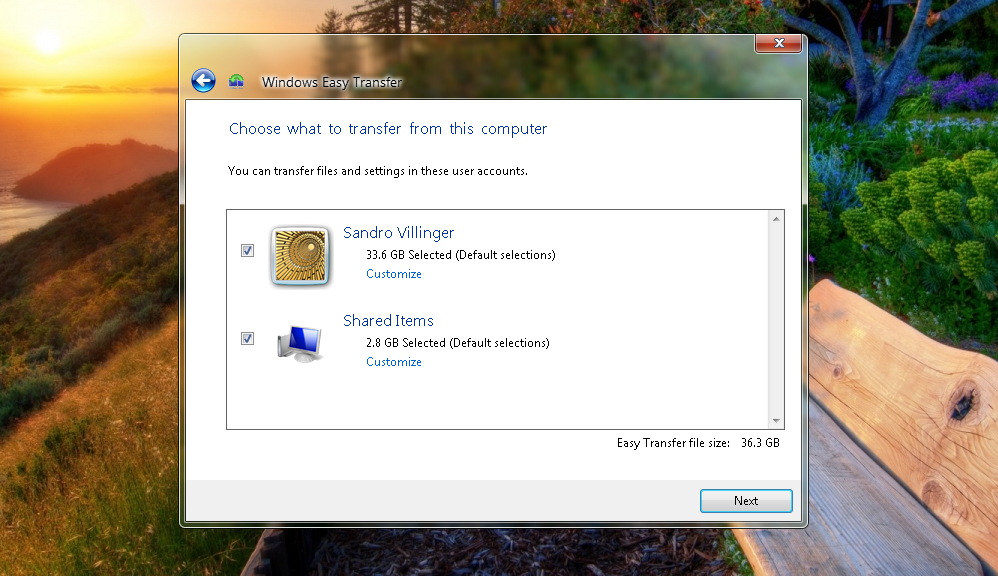
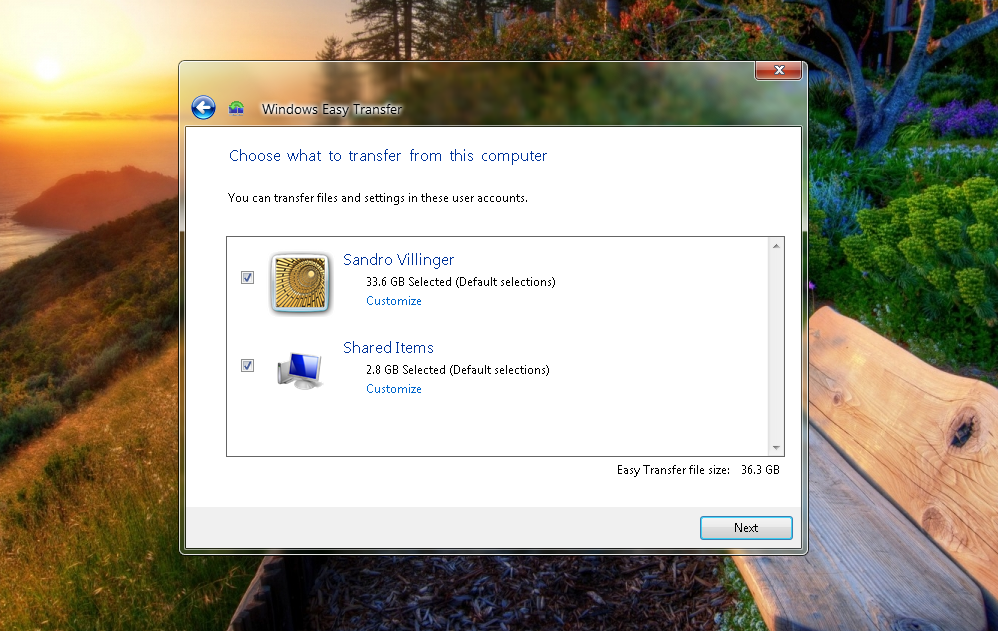
Windows has a great tool called “Windows Easy Transfer” which helps you easily move stuff from your old PC to the new one. Using an external drive, it collects files, emails, user accounts, and settings from your old PC. Here’s how it works:

Windows Easy Transfer


Windows Vista and Windows 7:

  • Insert a USB thumb drive or hard disk into your old PC.
  • Click on the Start menu and type in “Windows Easy Transfer” in the search box. You’ll end up with a pretty big “Windows Easy Transfer File from Old Computer.mig” file, which you need to save on to your USB.


Windows XP

If you’re old machine is Windows XP you will need to copy “Windows Easy Transfer” from your new PC. Here’s how:

  • Insert a USB thumb drive or hard disk into your new PC.
  • Select “An External Hard Disk or USB Flash Drive”. Go to “This is My New Computer” and click on “No”
  • Select “I Need to Install it Now”. This will copy Windows Easy Transfer to the to the USB drive so you can use it on your old XP machine.)


Save Your Bookmarks!

If you’ve had your old machine for a while, you’ve probably built a massive library of browser bookmarks or favorites. Make sure you take these with you by backing up your bookmarks.

Moving your Bookmarks

  • Internet Explorer: Go to “Computer” and simply open up C:UsersYOUR_USERNAME_HEREFavorites. Copy the entire folder on to your new PC! XP users will find it under C:Documents & SettingsYOUR_USERNAME_HEREFavorites.
  • Google Chrome: Chrome syncs your bookmarks once you’ve signed into your Google account. If you haven’t done so, sign into your Chrome browser on your old PC – and it will upload your bookmarks to the cloud. Do the same on the new PC to download the bookmarks again. Voilá!
  • Firefox: The fastest way is to use Firefox Sync, which backs up all your browser settings – including bookmarks – to the cloud and gets it to your new PC easily once you’ve signed in. Here’s how it works.


Clean Up Your Old PC!

When migrating to a new PC, you don’t want to transfer any unwanted files, so it’s important to give it a good clean up before you make the switch.

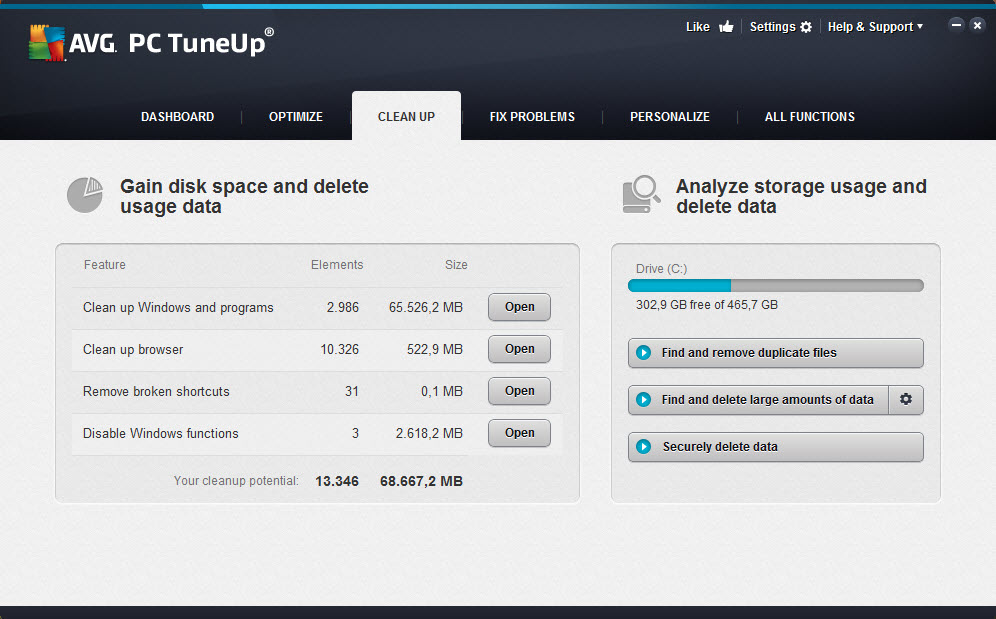
Probably the best way is to use AVG PC TuneUp’s Disk Cleaner which is part of our AVG Performance bundle – you can also try it out for free here. Disk Cleaner removes unwanted and junk files from over 200+ applications and Windows features, definitely things you don’t want on your new machine.

Click here for a step by step guide on how to clean up your PC with Disk Cleaner.

PC TuneUp Clean Up


Find Those Hidden Files!

Even if you’re super-organized and painstakingly keep your files and folders in order, there’s always that odd folder or file that floats somewhere hidden or deep on your hard disk.

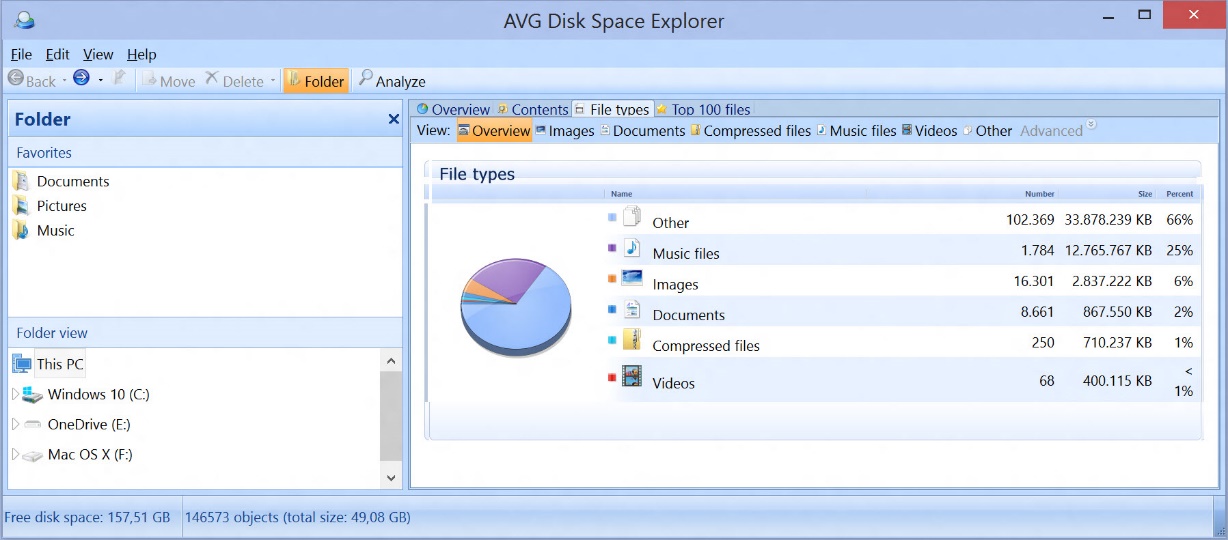
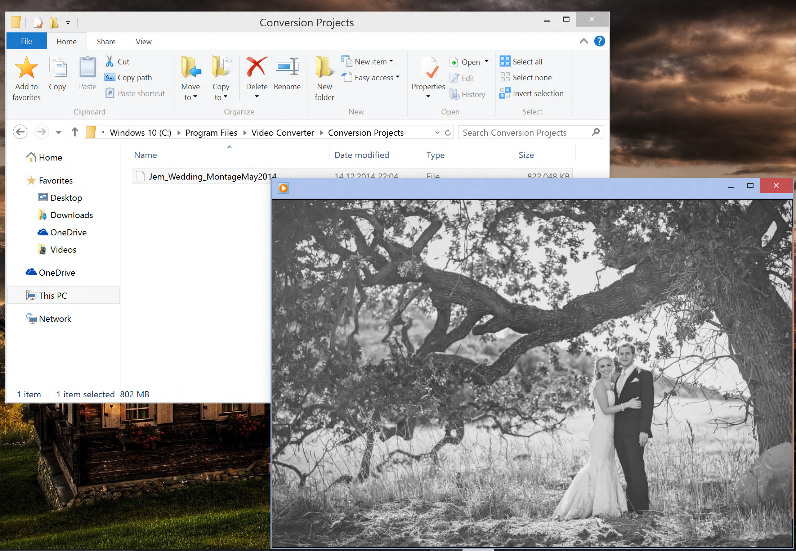
Case in point: I recently save my best buddy’s wedding montage, but the tool I used stored it under “C:Program FilesVideo ConverterProjects”.  I would have totally forgotten about it, had I not used AVG Disk Space Explorer to get an overview of where music, videos, photos and more are stored on my disk….

AVG Disk Space Explorer


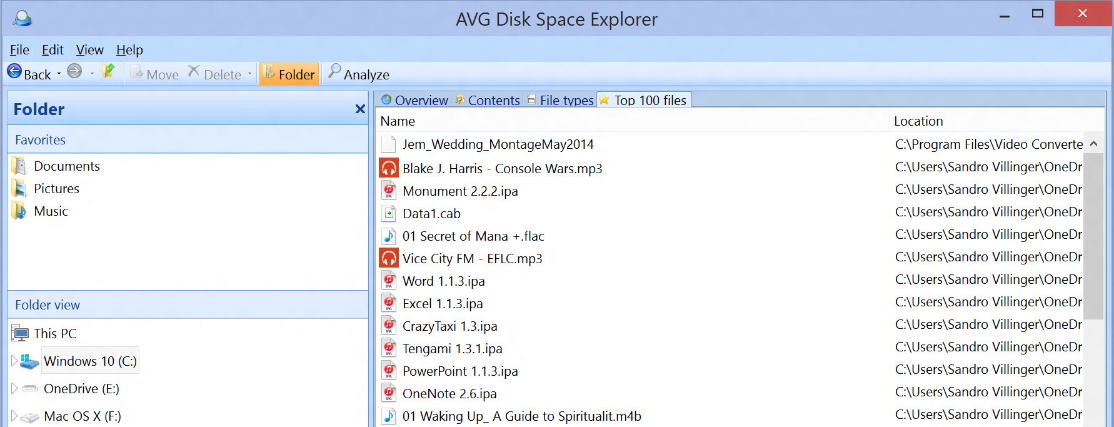
…but also where the “Top 100 files” are on my disk:

AVG Disk Space Explorer


And there it was, sitting hidden on a old laptop I was ready to completely wipe clean…

AVG PC Tune Up


Deauthorize your programs!

Some programs are tied to the computer they’ve been installed on, so you may not even be able to use them on a new PC unless you deactivate them on your old one.

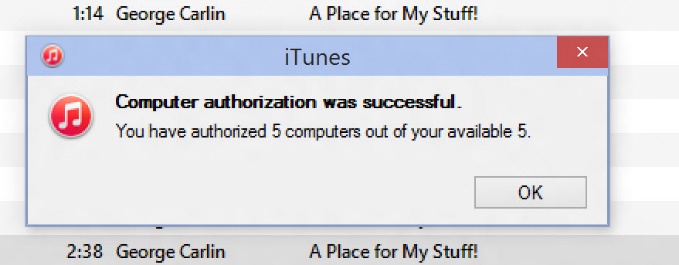
Popular example: iTunes! It allows you to activate up to five PCs to play (protected!) content. If you forget to deactivate an account on a PC and wipe it clean or give it away, it’s gone and you’ll soon end up seeing this:

iTunes

To deactivate an old PC, simply open up iTunes and press the “CTRL” key. This will bring up the classic menu bar. Click on “Store” and “Deauthorize this computer”. Done!

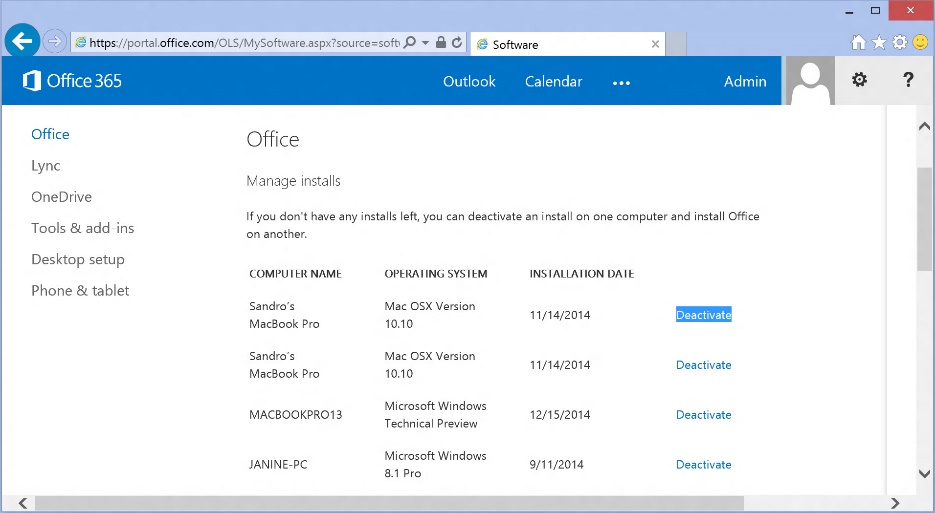
Another example is the Microsoft Office 365 subscription, which allows you to install Office 2013 on up to five PCs or Macs, so you need to log in and go to your dashboard to deactivate the Office installs on your old PCs:

Microsoft Office 365


Don’t worry, many programs don’t have a limited number of licenses but it’s always worth checking – and keeping the old PC around for a few days while you’re setting up your old one.


Take a snapshot of your programs settings!

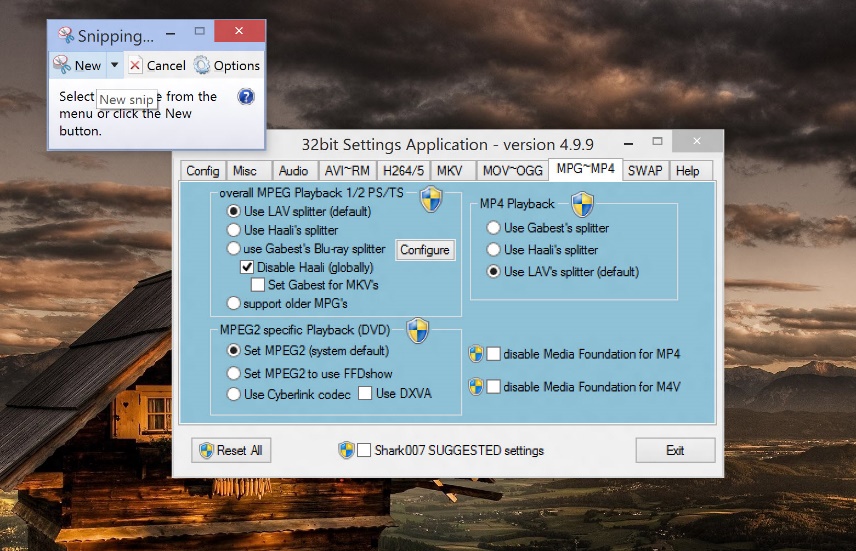
Got a complex program, such as Adobe Photoshop or Excel, perfectly set up for your needs? Then it’s a true pain to set it up and figure out your favorite settings. Here’s what I do: I just take a screenshot of my favorite settings and simply apply them to the new one.

For example, I just took a screenshot of my favorite settings in the video codec configuration tool Shark007 which I use to playback pretty much all audio and video files imaginable – and it’s complicated! So I just use Windows’ built-in Snipping Tool (just use the Start menu search and you’ll find it) to take a screenshot of the settings and apply them later. Sure, a bit crude and manual, but it works: 

Windows Snipping Tool


Don’t forget your savegames!

I recently wiped an old PC which had a 97% complete gamesave from my favorite game of 2011, Super Meat Boy. If you know the title, you’ll know just how frustrating that is!

That save game is gone and I never made it through the final stages. While many modern games save the gamestats under your “DocumentsMy Games” folder or synchronize them with the cloud (Steam, Origin), many games still hide the savefile in their program folder.

Game Sales PC TuneUp

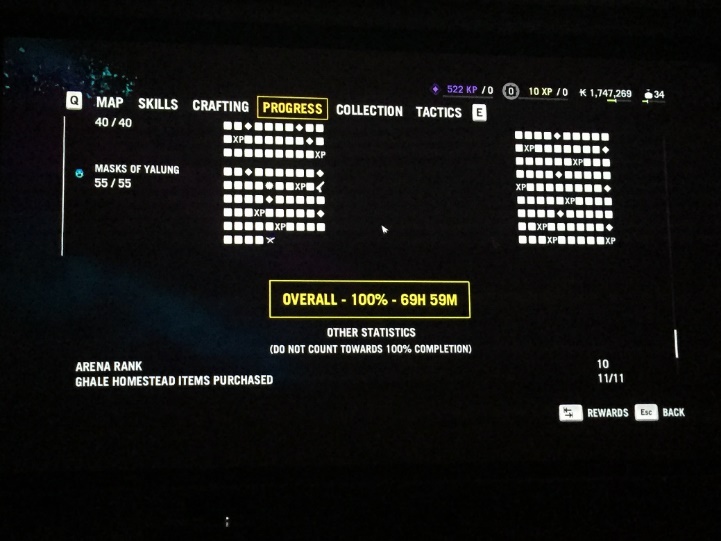
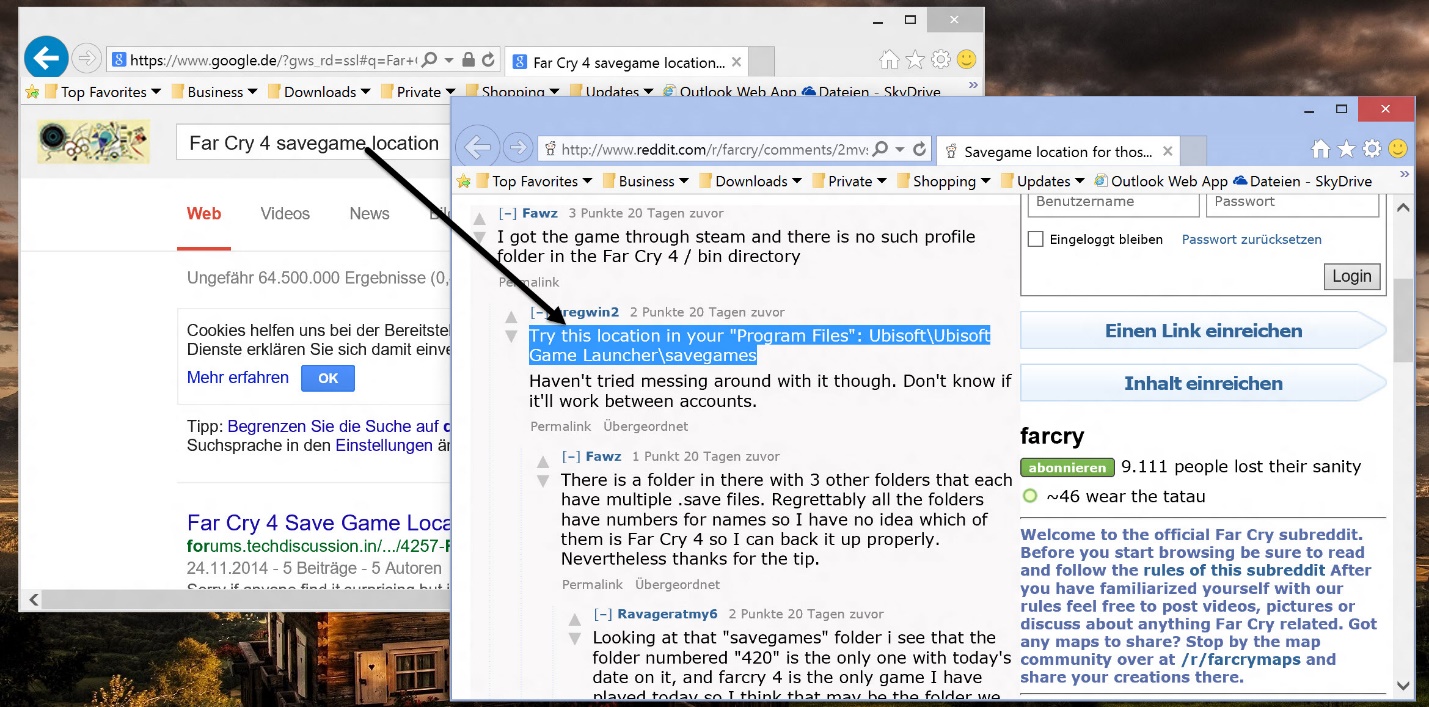
If you spend 69 hours completing Far Cry 4 or any other game, you better make sure you don’t lose that savegame.  My advice if you can’t find the savefile: Google the games name and add “savegame location” and you will find a blog, a forum thread or a wiki that’ll show you where to look:

Far Cry 4 Save Game

If you follow these simple steps you can be sure that you’re not leaving anything behind on your old machine and that your new system will have that personalized, familiar feeling.

Next week we’ll look at breathing new life into your old PC.

The Internet of Things Made Simple

The Internet of Things is one of the hottest terms in the technology industry. It seems that hardly a week goes by without hearing about our connected world or the Internet of Things.

So what does the Internet of Things really mean and how can we explain it in a way that everyone can understand?

I was recently asked how I would explain the Internet of Things to a five year old and I came up with the following:


We all like to talk to our family and friends, our electronic devices (TVs, tablets, cameras) like to speak to each other too. They speak a different language – their own computer language, called the Internet of Things.

Just like when your parents ask you to tidy your room, or you ask them for help with your homework, our devices speak to each other to solve problems and get things done.

For example, if a bad guy came in to steal your toys, the burglar alarm would tell the police to come over and stop them, or the smoke detector could call the fire engine if there was a fire at home.

By talking to each other through the Internet of Things, our computers work together as a team to help us – just like we help our families and friends.”


While this is of course simplistic, it is the fundamental function of the Internet of Things, our connected devices sharing information over the Internet.

What kind of connected devices are we talking about? The Internet of Things is made up of all sorts of connected devices including:

  • Smartphones
  • Televisions
  • Alarm Systems
  • Fitness Trackers
  • Games Consoles

Any Internet connected device has the potential to be part of the Internet of Things, all that is required is that they connect and communicate with each other in order to fulfil a wider function.

If you’d like more information on the Internet of Things and the challenges that it presents, read my recent blog on Privacy and The Internet of Things.

Five permissions to check when installing Android apps

Apps are what make our smartphones truly useful. They help us stay in touch with family and friends, guide us, educate us and sometimes simply entertain us. With the average person having nearly 30 apps on their device, it’s clear that we’re no strangers to downloading and installing apps.

However a word of caution. You should always check the permissions that an app requests while installing.

In this video I have outlined five permissions that you should be aware of and give careful consideration when granting it to an app.


Five permissions to check when installing Android apps

1. Access to Internet: be careful that the permission being asked for is appropriate to the app

2. Access to phone and call information: apps will be able to view your call history, send text messages and incur additional costs without you knowing.

3. GPS & precise location: does the app really need your precise location or even access to your GPS?

4.Access to photos/media/files: ensure you only give access to trustworthy apps, with this permissions they have the ability to access a lot of data on your phone.

5. Camera & Microphone access: Apps can access them at anytime and take photos or record audio without you knowing. Make sure you provide access to apps you trust.

If you’re unsure about why the app is asking for you to provide a particular permissions, you can always contact the developer and ask them to clarify.