Category Archives: AVG

AVG

Newsweek’s Cover Art Controversy

It’s interesting to parse the controversy stirred up by the cover of Newsweek magazine’s February 6, 2015 issue.  But it’s the art illustrating the story “What Silicon Valley Thinks of Women,” not the article itself that is causing all the stir.

The cover is a drawing of a faceless woman in a mini-skirt and heels, with her hemline being lifted up – and, some would say poked –with a cursor.

Reaction to the illustration was immediate (at least in Silicon Valley) and has been on-going. Divided opinions have been aired on blogs, social media and the Today show.

The article itself illustrates some well-documented facts about how working women fare in the tech world in Silicon Valley. Chief among them: the enormous gender gap in tech jobs and how difficult it is for women-led businesses to find funding from VCs, underscored by a dearth of women VC partners.  This thesis is supported by the recent findings of research by Babson College, among others, that I’ve also written about previously.

In a very informal polling of some of my Silicon Valley women friends, four out of five thought the cover accurately characterized the article.

For some, the woman without facial features – besides red lipstick – proved a compelling example of misogyny. For another camp, the cover illustration perpetuated a stereotype and the gender problem in tech.

The cover’s designer, Edel Rodriguez, defended himself and talked about what he was trying to achieve in an interview on the industry website, GigaOM.

“The subject of the article is how women are treated in Silicon Valley. It details the sexual harassment, jokes and treatment that women put up with in the industry. The image represents this harassment. A woman should have the right to dress however she pleases without this happening to them. These men have grown up around technology and video games their entire lives. They see women as objects that they can mistreat. The image conveys the exact moment when the harassment is symbolically taking place.” The full article/interview with Rodriguez can be found here.

Many agree on one thing: the cover art has fulfilled its mission of drawing attention and getting people to read the piece on an important topic!

My thoughts: First, I was happy that Newsweek focused on this important topic and ran a cover story on the challenges of women in tech.  Second: Art is always a matter of personal preference. But in this case, I’m in the camp of don’t blame the art. It’s art imitating real life.

But I do want to say that from my experience there are many companies in Silicon Valley who don’t participate in the harassment depicted in the article and there are many people who advocate for women. As proven with this article, there’s growing momentum in the tech world to address the gender gap. And that’s very good news.

As anyone who has followed my blog posts knows, I am a strong advocate of advancing this discussion.  It’s the basis for a conversation I look forward to leading during my session “Boardroom or Baby” at SXSW 2015.

Speak_IA

Lack of Trust Hampering App Downloads

4th February 2015: MEF, the global community for mobile content and commerce, today announced the results of its third annual Global Consumer Trust Report.

The report, supported by AVG Technologies N.V. (NYSE: AVG), analyses data from 15,000 mobile media users in 15 countries across five continents.

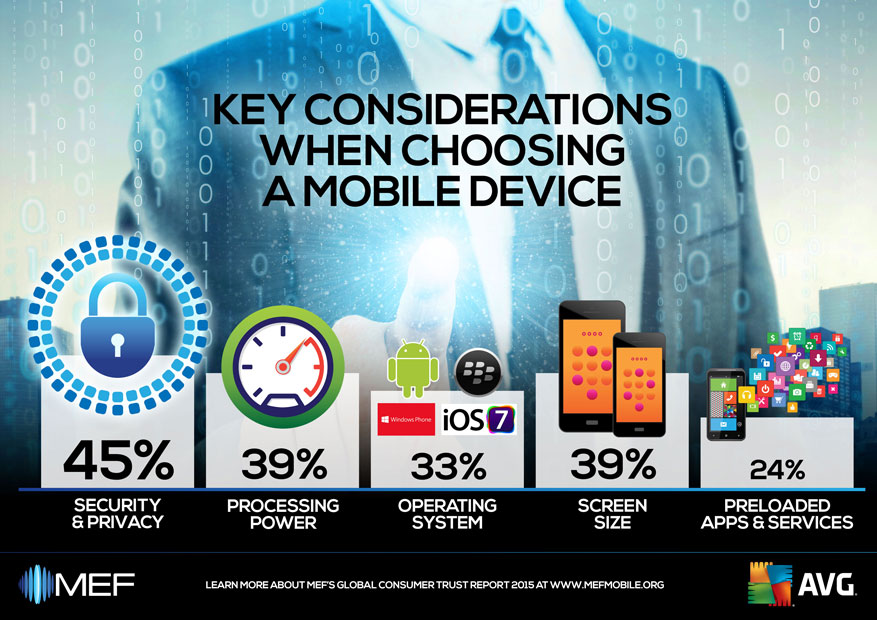
The study explores the key areas of trust, privacy, transparency and security to identify their impact on mobile consumers globally from purchasing a new device to downloading apps or paying for goods and services.

Key findings:

  • Half of all consumers surveyed (49%) say a lack of trust limits the amount of apps they download, compared to 37% last year
  • 72% of mobile consumers are not happy sharing personal data such as location or contact details when using an app
  • A third (34%) say trust prevents them from buying more goods and services using their mobile device


The impact of trust

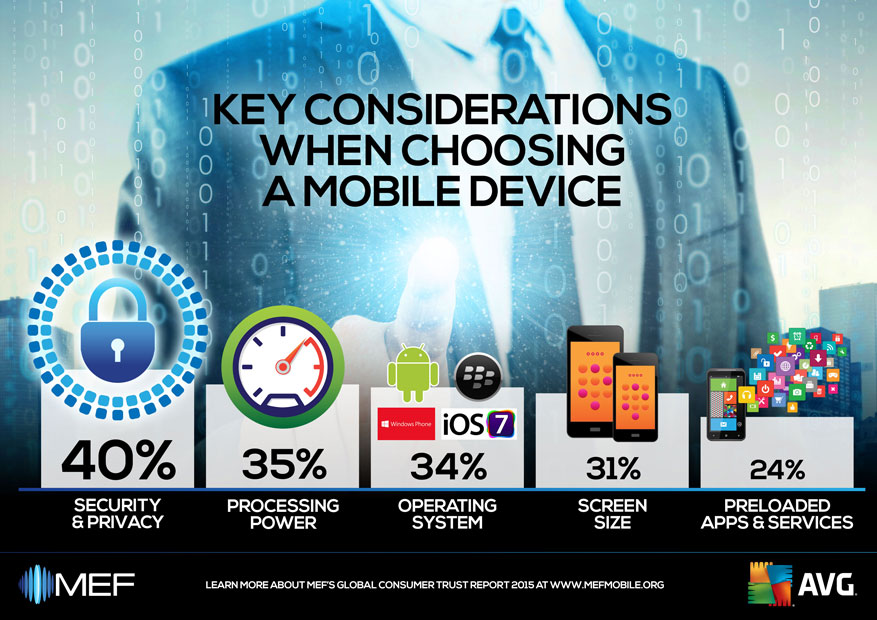
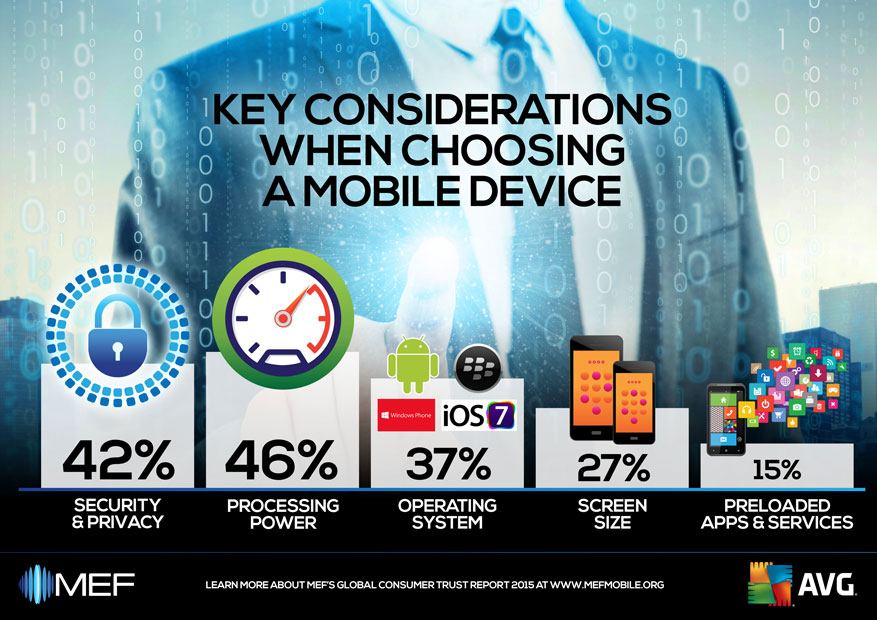
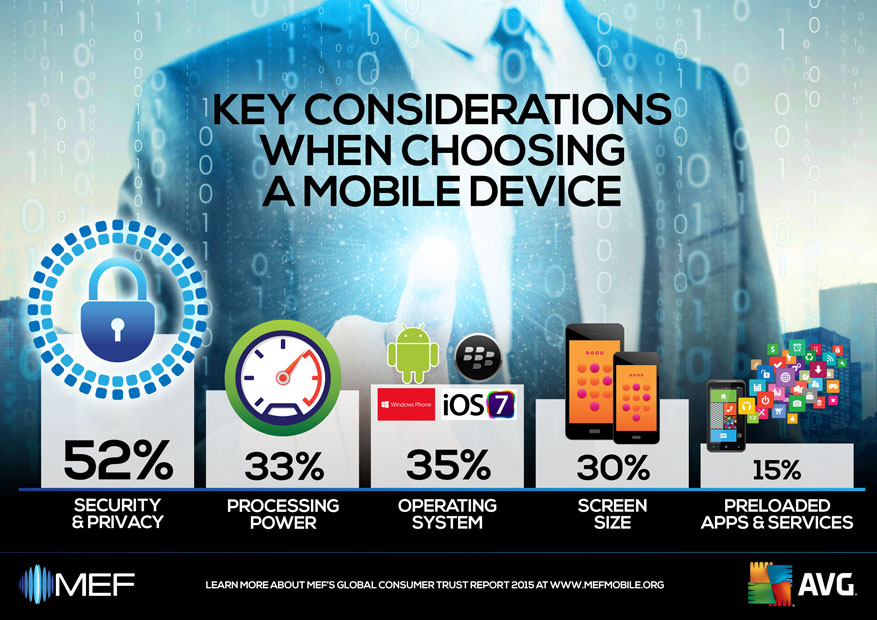
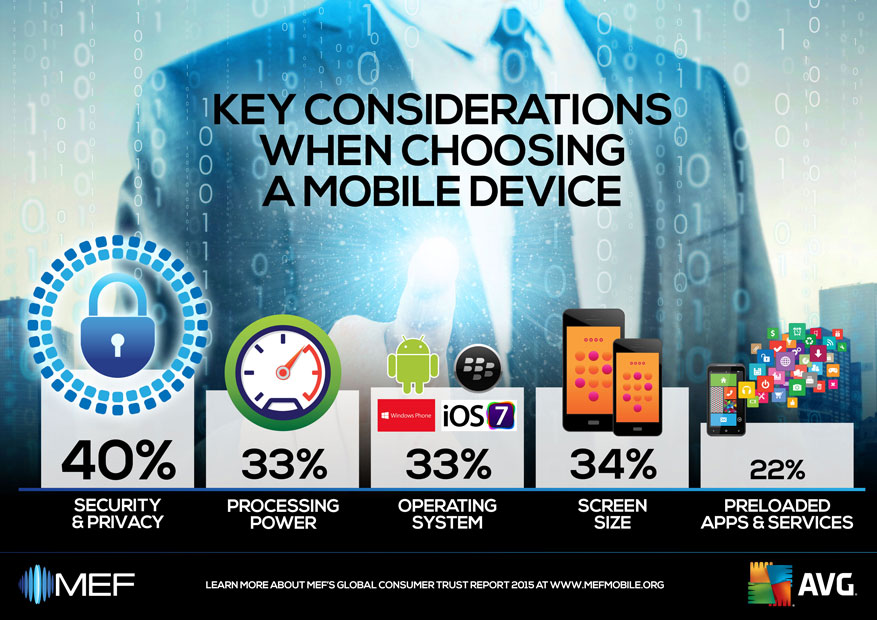
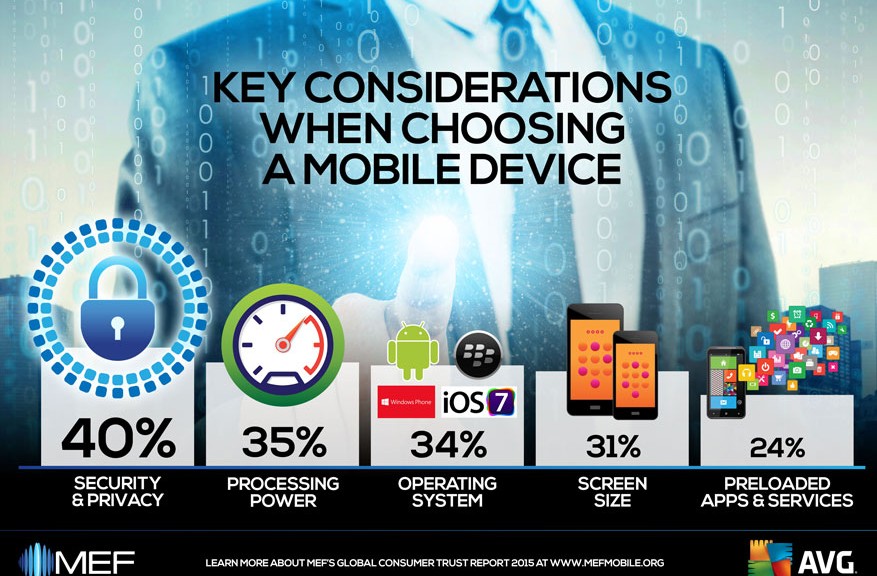
Trust remains the largest single obstacle to growth in the mobile content and commerce industry. 40 per cent of respondents indicated that a lack of trust is the number one factor that prevents them from downloading items more often.

This is particularly the case with apps – where almost half of respondents (49 per cent) said that trust prevented them from downloading apps or using them once they are installed. Over a third (34 per cent) said it stopped them buying any mobile apps and services. The US experienced the largest increase in a lack of trust of the markets studied, at 35 per cent (up nine per cent year-on-year).


App privacy expectations

Alongside this growing mistrust, the study also revealed an increase in resistance to sharing personal information such as location, address book details or health records, with apps. 72 per cent of mobile users said that they are not happy sharing such information and almost two in five (39 per cent) claimed never to do so.

Linked to this unease, is the need to improve the way apps communicate about the data they collect. Many consumers feel that app stores and device manufacturers should take greater responsibility for protecting their personal information. 30 per cent of respondents said this would foster greater trust in the mobile platforms and 63 per cent said that they considered transparency important or extremely important (compared to 49 per cent last year).

Methods of self-protection have also decreased across the board – with less people taking the time to read app store descriptions, long privacy documents or ask friends and family for advice. The most popular method for self-protection was ‘downloading a privacy protection app’, at 31 per cent.


The need to protect devices

While the results showed that the threat of malware is rising in consumers’ consciousness – with most people acknowledging that it is likely to affect them – caution around malware has decreased. Only 48 per cent of respondents said malware would make them think twice when downloading apps compared with 74 per cent last year.

“Andrew Bud, MEF Global Chair, said: “Trust is the most important asset of any business, and consumer confidence must underpin the mobile ecosystem.  The sustainability of the mobile industry depends on it. As mobile devices and services evolve, consumers will hold business ever more accountable.

“MEF’s 2015 Consumer Trust Report highlights how trust issues are impacting consumer behaviours in different markets.  It is absolutely clear that the mobile industry must create equitable, informed partnerships with consumers, putting trust at the centre of the relationship. Consumer trust must be earned by consistently applying high levels of transparency, security and privacy to every mobile interaction.”


Judith Bitterli, Chief Marketing Officer at AVG Technologies, added: “Building consumer trust is an integrated process. While the mobile industry across the board must step up and take responsibility for increasing transparency across user privacy policies, it is equally important that consumers take their own steps to educate and protect themselves in order to better protect their rights and understand their choices online. This research shows that while consumers are taking certain proactive steps towards greater protection there is still some way to go in order to ensure their privacy and security are not at risk.”

Part of MEF’s ongoing activities to champion and advance consumer trust in the mobile industry, the annual Global Consumer Trust Report is now in its third year and provides vital data, analysis and insights on how consumers consider the efforts of the mobile industry in tackling the trust issues that affect their ongoing participation in every aspect of mobile content and commerce.  


About MEF

MEF is the global community for mobile content and commerce and the leading international trade association for companies wishing to monetize their products and services via mobile. Headquartered in London with operational chapters and offices in Asia, EMEA, Latin America, the Middle East, Africa and North America, MEF is a member network with international reach and strong local representation, ideally placed to drive market growth.

Established in 2000, MEF represents the total mobile ecosystem, providing an impartial and powerful voice for pioneering companies from across the mobile content and commerce value chain. On 17th – 19thNovember, MEF will host its 2nd annual MEF Global Forum in San Francisco where the findings of this join report will be discussed as part of a 3-day agenda looking at innovation, global growth and monetization.

www.mefmobile.org

Passwords aren’t enough for small business security

From Target to Sony Pictures, security breaches at businesses of all sizes were in the headlines throughout 2014. We are only in February but the data breach stories show no sign of abating.

Whether it’s a specific hacking attack on a British shoe retailer or hacktivism at companies with millions of online members, the loss or compromise of passwords is frequently a common factor.

Ever since they emerged in the late ‘90s, passwords have been our primary security measure. Fast forward to today and we often find that employees are still routinely using the same style of basic password  – except now these passwords are required to protect smartphones and tablets  carrying sensitive company-related data, as well as social media and cloud-based applications used regularly in the workplace.

It’s clear that conventional password use is no longer fit for 21st century purpose and businesses must adopt additional measures to ensure their passwords are up to the task.

Extra levels of authentication are needed to verify the identity of employees using their passwords, and businesses should start to enforce these as standard within their organization especially if they have in place bring your own device (BYOD) policies.

AVG has created this short eBook to help you develop a BYOD policy that fits your business:

 
In my view, many of the user identity breaches reported in the news could have been prevented with better password practices and stronger, multi-factor authentication methods.
 

Five top tips for more effective password management in 2015:


  1. Make sure security measures include formal staff training on password best practice. Passwords need to be strong, long and as secure as possible – complicate them by using “passphrases” rather than individual words – e.g. rather than “spotthedog” use “5p0tth360g”
  2. There is no harm in turning on “two-step authentication”. Most services are offering this now and is a simple code based system that send you a numeric password by SMS/Text to secure you login credentials
  3. Create a single profile for all corporate log-ins, with segmented privileges for individual employees within the same profile. This way, when someone leaves the company, they can be removed automatically.
  4. Some mobile phones now provide both identity and access management capabilities. Encourage employees to adopt these and incorporate them as part of your BYOD policy.
  5. To aid productivity, make it easier for employees to work anywhere, anytime with mobile technology by moving to a single sign-on environment where every employee has one-click to access to a secure area in the cloud containing all of their work accounts and applications.


This constant flow of data breach stories in the media has done much to raise awareness of the issues around passwords. Education is positive, of course, but action must be taken to foil the hackers.

If your business is supported by a mobile workforce equipped with either work or personal devices which provide ready access to company-sensitive systems and information, ask yourself that important question: what password practices do I need to implement to keep those devices and that data secure?

Don’t take it for granted that your people have the knowledge to handle this themselves. Instead make sure you equip them to help protect your company.

Should Kids Be Using Facebook?

Kids can put a lot of pressure on parents to let them use Facebook. However there are several important things that parents should know before making a decision either way.

Did you know?

  • Facebook has a minimum required age to create an account, and for good reason – children can be exposed to inappropriate content.
    For example: Kids may have older Facebook friends or family (perhaps friends of their friends) that post content to their timeline that isn’t appropriate for them to see.
  • Kids themselves may be unknowingly posting inappropriate content or giving away too much of their families private information.
  • When a Facebook account is created for an underage child using a fake date of birth, this gives Facebook a false impression of the child’s real age. This can result in young children being incorrectly targeted by Facebook advertisers and exposed to inappropriate products and services.
  • Kids could also lose all of their Facebook data at any time. Facebook has a whistleblower policy that allows anyone to nominate an account that they think is being used by someone under the required age. If that happens, the account will be shut down and become inaccessible.


So do you still think kids should be using Facebook?

Toy drones continue to cause problems

The latest incident involving a drone has more serious implications than buzzing a neighbor’s yard. In January, a drone crashed into a tree on the South Lawn of the White House.  Apparently, the drone was small enough to avoid detection by the White House security radar.

The man who was operating the drone is an employee of the National Geospatial-Intelligence Agency. After seeing the story on the news the following day, he contacted officials to confess. He later admitted that he had been drinking.

The point is that drone adventures are getting increasingly (and literally) out of control.

The White House incident comes just days after the Department of Homeland Security held a conference in Arlington, Va., on the dangers that such drones pose to the nation’s critical infrastructure and government facilities.

The New York Times reported that the conference exhibited a DJI Phantom drone — the same type of drone that reportedly crashed at the White House.

Image courtesy of gizmag


However, the drone on display at Homeland Security’s conference had three pounds of fake explosives attached to demonstrate how easy it would be to weaponize. Frightening.

The President said in an interview with CNN that he has instructed federal agencies to examine and address the broader problem and the need for regulations on drone technology.

As the President wisely noted, regarding drones, “We don’t yet have the legal structures and the architecture both globally and within individual countries to manage them the way that we need to.”

Part of the idea for legislation or enforcement, the President said, “is seeing if we can start providing some sort of framework that ensures that we get the good and minimize the bad.”

Legislation and regulation needs to happen soon. Even though it is illegal to fly drones in Washington DC, that appears to be a small deterrent.

Let’s see how this unfolds. There are privacy and security hazards with drones that everyone needs to be aware of, and this incident might spur some real action.


How to protect yourself from phishing attacks

Phishing emails and instant messages attempt to lure you with bait, just like with fishing in the real world, which is where the term phishing originated.

Just like a real fish, as you learn to identify the types of phishing bait being used, you’ll drastically reduce your chances of getting caught.

Successful phishing scams utilise three tricks to catch victims:

Urgency

Threatening you with a consequence if you don’t act.
e.g. “A request to terminate your account, or a claim that it’s about to be suspended.”

Curiosity

Offering you some juicy bait, tempting you to act.
e.g. “Attached is a company report that contains the salary information of your colleagues.”

Familiarity

Tricking you into acting thinking it’s from someone you know.
e.g. “There’s an important message from someone waiting for you online.”
 

Armed with this knowledge you’ll be more alert to suspicious emails and messages when they land in your inbox.


#1: Check the facts before acting

Verifying the authenticity of a message can be a challenge- especially if the sender’s email or social media account has been hacked.

Here are two easy ways to check whether or not the message is a scam.

  • If you know the sender, contact them using another service (email, social, phone etc) to check that their message is legitimate.
  • If not, enter the subject line or some other small part of the message into your favourite search engine.

If your search reveals others who have reported this message, or are asking questions about its authenticity then you’ve proven two things – first, you’re not alone and second, it probably is a phishing, scam or hoax email.


#2: Make sure it is safe

A phishing email or instant message typically contains a web link (URL) to click on, and in the case of an email possibly even an attachment of some kind.

Check out this video to learn how to tell if it’s a bad link or not:

Video

Video: How To Tell If A Link Is Safe


However, it’s worth emphasising that knowing if a link is truly “bad” before you click isn’t a perfect science, and often security professionals can’t even tell until they visit it.

If there’s an attachment on the email you need to be particularly careful NOT to open it.  Believe it or not, even PDF and Word files can be infected!  If you weren’t expecting the file, don’t open it.  No exceptions.

A great way to help with these safety checks is to protect your devices with antivirus software which will scan all files and attachments for malware and even scan links to check they are safe.


#3: Report it

Lastly, if you do spot a phishing email, be a good online citizen and consider taking the time to help out by immediately reporting it directly to the legitimate organisation or person that’s being impersonated.

Many large companies, particularly banks, have websites dedicated to providing further resources and information about how to stay safe from phishing, along with ways to report phishing cases to them, and also examples of recent scams that are circulating.

Each and every one of us has the ability to improve the lives each other online, so make sure you share this information on how to stop phishing with those you care about.


Until next time, stay safe out there.


How To Boost Your Home Wi-Fi Signal (Part 2)

Is your Wi-Fi network still going slow even after our first bunch of tips? Are you even experiencing occasional drop-outs and disconnects?

In part two of our Wi-Fi optimization series, we’ll show you how to boost the signal strength of your Wi-Fi network even further. If you missed part one, go check it out!

Set up a wireless repeater

If your property has thick walls or is so large that your router cannot simply broadcast a good signal from one end to the other, it’s probably wise to get a wireless repeater:

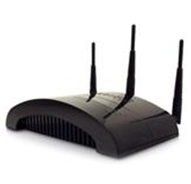
Repeater


These look very similar to a router and pick up your Wi-Fi signal and rebroadcast it with renewed strength. The repeater connects to your wireless router as a regular client, getting an IP address over DHCP much like your regular laptop or PC.

  • Position: I suggest following our first tip of part 1 of this guide to determine weak spots of your wireless router. Place the repeater close to this spot but make sure that it’s able to pick up a good signal (80% or more) from your main router. Otherwise it won’t be able to repeat a good quality signal.
  • Hardware: When choosing a repeater, don’t be confused by the different names – some companies tend to name their repeaters as ‘Range extenders’ while others call them ‘Wi-Fi expanders’ or something similar. They are all the same. Simply make sure to pick one that rebroadcasts your 802.11n or ac signal and make sure that it’s compatible.
  • Set up: Every manufacturer has different setup procedures but in general all that is needed is your network name and password.


Tip: Check out these resources for a general overview or this huge guide on how to use your router as a universal wireless repeater.


Optimize the Wi-Fi settings

There are many complicated settings on your router which can help you optimize the signal in your home. Unfortunately, every manufacturer offers different options under a different name, so we’ll just give a handful of hints that explain where to look and what to look for. Also there are some settings that you should check to see if they are set at their default values:

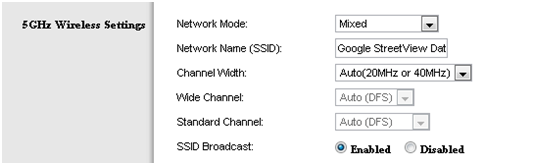
  • 5 Ghz Wireless Mode: If your router and adapter uses it, I’d recommend setting up a 5 Ghz Wi-Fi network instead of the regular 2.4 Ghz. Devices that support this mode are known as ‘Dual-band’.

Since most Wi-Fi routers communicate at a frequency of 2.4 Ghz, using the less common 5 Ghz mode might give you a better throughput.

 5GHz settings

To enable a 5 GHz connection, go to your router configuration page (normally shown on the device) and find your wireless settings. If you can see an option for  a 5 GHz connection, enable it!


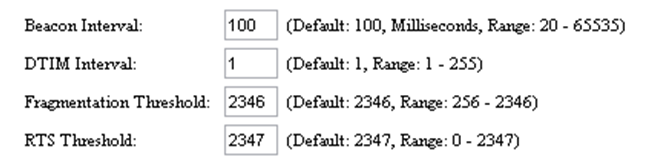
  • RTS Threshold: RTS stands for ‘Request to send’ and is send by the client to the access point – it essentially asks for permission to send the next data packet. The lower the threshold, the more stable your Wi-Fi network, since it essentially asks more often when sending packages. However, if you don’t have problems with your Wi-Fi you should make sure that the RTS Threshold is set to the maximum allowed:

RTS Threshold

To do this, go to your router configuration and try to find the ‘RTS Threshold value’ in the wireless settings and set it to 2347.  Lower this value only if you are experiencing problems with your network (drop outs etc).

  • Fragmentation Threshold: This value is used to set the maximum size of packet a client can send. Smaller packets improve reliability, but they will decrease performance. Unless you’re facing problems with an unreliable network, reducing the fragmentation threshold is not recommended. Make sure it is set to the default settings (usually 2346).
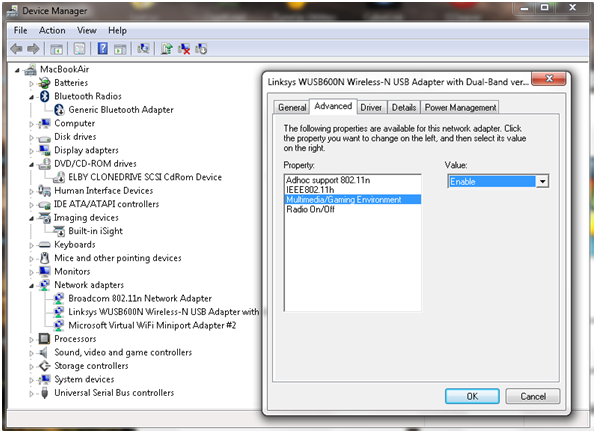
  • Enable Multimedia/Gaming settings: Some wireless adapters can either be configured either for regular use or for gaming/multimedia. If you’re streaming video or playing games, enabling this will make sure that network packets for these are prioritised! In other words: If you’re watching a video file over your network, the video will get most of the traffic.

Advanced Settings


Benchmark and diagnose your Wi-Fi

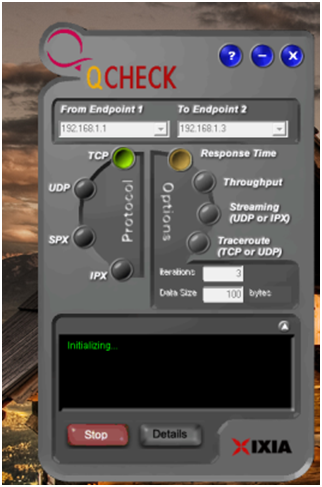
This tip is not an optimization technique per se but it’s a great way to determine if our tips so far have had a positive effect on your network. Free ‘QCheck’ is a great tool that will show you the response time, throughput and streaming performance of your wireless setup. You can easily get it from this website after you filled out a short form.

QCheck

Enter your IP address under ‘Endpoint 1’ and another IP address in your network under ‘Endpoint 2’ to test the speed. This will give you important information when trying to optimize your Wi-Fi with our tips.


Replace your antenna!

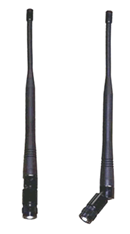
Some router manufacturers sell external antennae that are much stronger than the router’s built-in antenna. If your signal is weak in places (and all our other tips have failed), then you’ll need to check if your manufacturer sells either omnidirectional or directional antennae:

  • Omnidirectional: Sends out a signal into all directions. By default, most built-in antennas are omnidirectional. If an omnidirectional antenna is your choice, make sure to look out for a longer one with ‘high gain’.

Antenna


  • Directional antenna: This kind of antenna sends a good wireless signal in a certain direction instead of spreading it in all directions, improving the performance in the target area. It’s like pointing a flashlight in a certain direction instead of using your regular ceiling lamps!

To connect a new antenna, you’ll usually use the SMA connector or MMCX. For more on wireless antennae, I can highly recommend the ‘Do-It-Yourself Wireless Antenna Update’ website by BinaryWolf. You’ll find great how-to guides and hardware recommendations that’ll help you pick the best antenna and the right setup!


That’s it! Using these tips and tricks will definitely improve your Wi-Fi performance and experience –  if you’ve got another tip that you use to boost your wireless network let us know!

25 Passwords You Should Avoid

As we approach February, and look forward to a year of stronger cybersecurity, there is still time to give your passwords a refresh and resolve to do so regularly.

Password protection is more important than ever, especially with so many devices, which provide ready access to so much of our personal information.

AVG’s own Tony Anscombe noted in his Safer Internet Day 2015 post recently, “Protecting your online world starts with devices and setting a passcode…”

It was interesting to find that in the annual list of Top 25 most common passwords on the Internet, as researched by the password management provider SplashData, the easy targets like “123456″ and “password” continue to hold the top two spots!


Other favorites in the research conducted by analyzing passwords that had been leaked in 2014: QWERTY and football.  Their popularity makes them notoriously some of the “worst” passwords to use and the “easiest” for hackers to figure out.


Creating a strong password

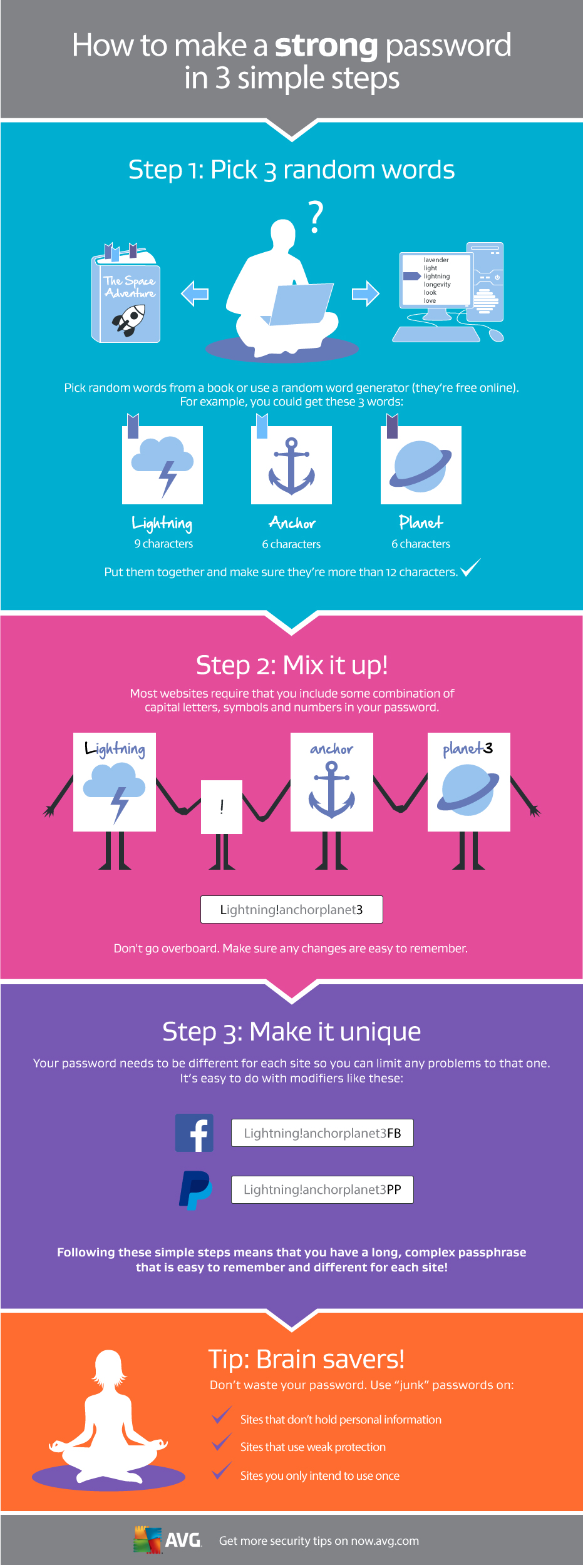
Picking a strong password doesn’t need to be difficult. We recently published an infographic on how to create a strong password that is also easy to remember.


Celebrity hacks – why do they continue?

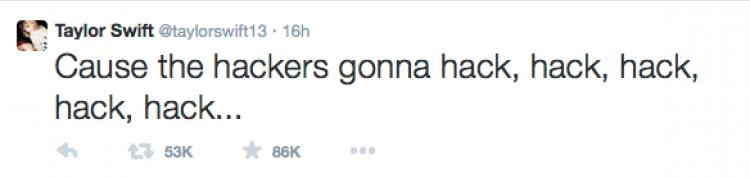
This week we saw yet another hack of a top celebrity, this time the Twitter account of pop star Taylor Swift.  The bad guys, whoever they are, hacked the account sent out messages, distributed personal information and claim to have personal pictures.

Taylor Tweet


Its not uncommon for accounts to be hacked, especially when the security is reliant on just a password, but Twitter offers users much more than this.

Most online services today offer two factor authentication as an additional layer of security. The concept of this is very simple as to login you need to have something and know something. The most common use of this authentication is your ATM card, you need the card and you need to know the number.

The same theory applies on online accounts. You enter your login and password, and then the service waits for you to type in a verification number that is automatically sent to your phone. The phone is something you have and the code is something you know. Of course your phone is protected with a pin which adds yet another layer of security.

Video

Video: What is Two Factor Authentication


Hacking a celebrity’s account would be difficult if they switched on this two factor authentication. Here lies the problem, celebrities may tweet some things themselves, but it’s likely that they have a team managing their social media accounts for them.

Having multiple people running an account prevents the use of two factor authentication as the code can be only sent to one phone.

I am sure I just upset many celebrity fans who thought that celebrities actually managed their own social accounts.  The reality is that celebrities are busy people and social networks are marketing tools that their teams use to keep them in the news.

In the case of Taylor Swift, the hack may of course be more complex and someone could have cloned her phone. This would take effort, access to the device and would have put the hackers in a much riskier environment. I hope that they have secured the data and account and that the damage is limited as no one should be hacked. Having the right security settings is the best protection.

How to set up two factor authentication

  1. Login in to Twitter and go to settings. If you’re on a PC then this entered by clicking on your picture in the top right corner.
  2. In the left hand menu select ‘Security and Privacy’
  3. There are a few options, SMS to a phone or using the app. Select the one of your choice.
  4. Scroll down and save the changes

I use the text to a phone option but either of the SMS or app options require you and your phone to be together to access your account so both offer effective protection.

Now that you have successfully enabled two factor authentication, your account should be a lot more secure.

Follow me on twitter @tonyatavg

Title image courtesy of billboard.com