Category Archives: Antivirus Vendors

Antivirus Vendors

How To Boost Your Home Wi-Fi Signal (Part 2)

Is your Wi-Fi network still going slow even after our first bunch of tips? Are you even experiencing occasional drop-outs and disconnects?

In part two of our Wi-Fi optimization series, we’ll show you how to boost the signal strength of your Wi-Fi network even further. If you missed part one, go check it out!

Set up a wireless repeater

If your property has thick walls or is so large that your router cannot simply broadcast a good signal from one end to the other, it’s probably wise to get a wireless repeater:
Repeater


These look very similar to a router and pick up your Wi-Fi signal and rebroadcast it with renewed strength. The repeater connects to your wireless router as a regular client, getting an IP address over DHCP much like your regular laptop or PC.

  • Position: I suggest following our first tip of part 1 of this guide to determine weak spots of your wireless router. Place the repeater close to this spot but make sure that it’s able to pick up a good signal (80% or more) from your main router. Otherwise it won’t be able to repeat a good quality signal.
  • Hardware: When choosing a repeater, don’t be confused by the different names – some companies tend to name their repeaters as ‘Range extenders’ while others call them ‘Wi-Fi expanders’ or something similar. They are all the same. Simply make sure to pick one that rebroadcasts your 802.11n or ac signal and make sure that it’s compatible.
  • Set up: Every manufacturer has different setup procedures but in general all that is needed is your network name and password.


Tip: Check out these resources for a general overview or this huge guide on how to use your router as a universal wireless repeater.


Optimize the Wi-Fi settings

There are many complicated settings on your router which can help you optimize the signal in your home. Unfortunately, every manufacturer offers different options under a different name, so we’ll just give a handful of hints that explain where to look and what to look for. Also there are some settings that you should check to see if they are set at their default values:

  • 5 Ghz Wireless Mode: If your router and adapter uses it, I’d recommend setting up a 5 Ghz Wi-Fi network instead of the regular 2.4 Ghz. Devices that support this mode are known as ‘Dual-band’.

Since most Wi-Fi routers communicate at a frequency of 2.4 Ghz, using the less common 5 Ghz mode might give you a better throughput.
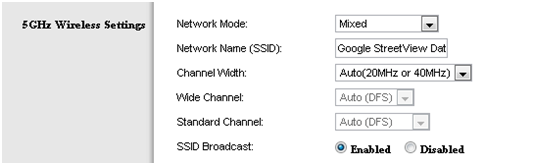
 5GHz settings

To enable a 5 GHz connection, go to your router configuration page (normally shown on the device) and find your wireless settings. If you can see an option for  a 5 GHz connection, enable it!


  • RTS Threshold: RTS stands for ‘Request to send’ and is send by the client to the access point – it essentially asks for permission to send the next data packet. The lower the threshold, the more stable your Wi-Fi network, since it essentially asks more often when sending packages. However, if you don’t have problems with your Wi-Fi you should make sure that the RTS Threshold is set to the maximum allowed:
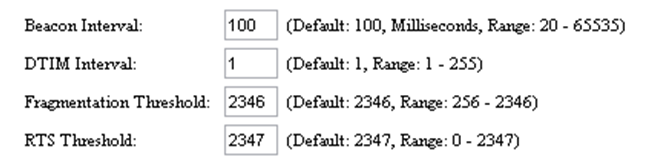
RTS Threshold

To do this, go to your router configuration and try to find the ‘RTS Threshold value’ in the wireless settings and set it to 2347.  Lower this value only if you are experiencing problems with your network (drop outs etc).

  • Fragmentation Threshold: This value is used to set the maximum size of packet a client can send. Smaller packets improve reliability, but they will decrease performance. Unless you’re facing problems with an unreliable network, reducing the fragmentation threshold is not recommended. Make sure it is set to the default settings (usually 2346).
  • Enable Multimedia/Gaming settings: Some wireless adapters can either be configured either for regular use or for gaming/multimedia. If you’re streaming video or playing games, enabling this will make sure that network packets for these are prioritised! In other words: If you’re watching a video file over your network, the video will get most of the traffic.
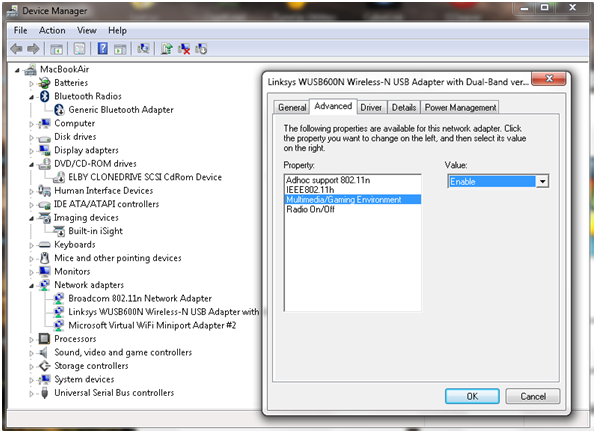
Advanced Settings


Benchmark and diagnose your Wi-Fi

This tip is not an optimization technique per se but it’s a great way to determine if our tips so far have had a positive effect on your network. Free ‘QCheck’ is a great tool that will show you the response time, throughput and streaming performance of your wireless setup. You can easily get it from this website after you filled out a short form.
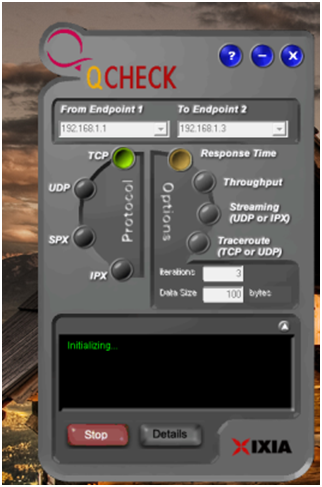
QCheck

Enter your IP address under ‘Endpoint 1’ and another IP address in your network under ‘Endpoint 2’ to test the speed. This will give you important information when trying to optimize your Wi-Fi with our tips.


Replace your antenna!

Some router manufacturers sell external antennae that are much stronger than the router’s built-in antenna. If your signal is weak in places (and all our other tips have failed), then you’ll need to check if your manufacturer sells either omnidirectional or directional antennae:

  • Omnidirectional: Sends out a signal into all directions. By default, most built-in antennas are omnidirectional. If an omnidirectional antenna is your choice, make sure to look out for a longer one with ‘high gain’.
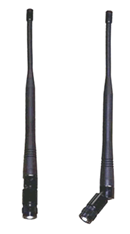
Antenna


  • Directional antenna: This kind of antenna sends a good wireless signal in a certain direction instead of spreading it in all directions, improving the performance in the target area. It’s like pointing a flashlight in a certain direction instead of using your regular ceiling lamps!

To connect a new antenna, you’ll usually use the SMA connector or MMCX. For more on wireless antennae, I can highly recommend the ‘Do-It-Yourself Wireless Antenna Update’ website by BinaryWolf. You’ll find great how-to guides and hardware recommendations that’ll help you pick the best antenna and the right setup!


That’s it! Using these tips and tricks will definitely improve your Wi-Fi performance and experience –  if you’ve got another tip that you use to boost your wireless network let us know!

Is Lack of Security Holding Back Mobile Wallets?

Yet the uptake of mobile wallets to pay for offline goods is significantly lower – Javelin Strategy Research found that mobile POS (Point of Sale) proximity payments made up just 0.01 percent of total retail volume.

So people will use a mobile device to shop at Amazon, but not to pay for items right in front of them. Is the lack of security holding back the adoption of mobile wallets?

Apple’s Apple Pay is now pre-installed on iPhone 6 and 6+ devices, and is accepted in 220,000 stores and by dozens of major banks. Lagging behind, Google Wallet is accepted by 158 of the top online retailers as well as scores of offline merchants such as coffee houses and grocery stores (source: Internet Retailer). Softcard (Isis Wallet) rolled out a pilot in mid-2012 that attracted even fewer users. All three of these mobile wallet solutions use the NFC (Near Field Communication) chip in the mobile device to communicate to the POS system that accepts payment. Security is obviously compromised if the phone were to be stolen, but hackers can also intercept the NFC transmission and capture the wallet information without even touching the device.

To add an extra layer of security, mobile wallet designers are requiring some type of additional authentication to complete a payment transaction. One of the secure authentication methods that is gaining traction is biometric authentication — like a finger-print reader. Biometric identification techniques also include facial recognition, voice recognition, and the most sci-fi of all, eye-scan recognition. Biometric identification is by its nature unique and difficult to copy or steal — unlike knowledge-based identification such as passwords and PIN codes.

Although biometric authentication technology has been available for many years, it took the launch of Apple iPhone’s finger print reader in 2013 to bring the technology mainstream. Now other mobile device makers including HTC and Samsung are including finger print readers as well. Uniform standards are beginning to take shape in order to allow a payments ecosystem to form around these authentication methods and to bring down the costs for merchants to accept them.

If mobile payment methods are made sufficiently secure, mobile wallets may ultimately find adoption far beyond purchases at the café. A secure (and easy) authentication method for mobile wallets would allow them to be used for electronic ticketing like bus fares and parking garages, for larger purchases like home furnishing, and even for official government IDs like driver licenses and passports.

Solving the security challenge will allow mobile wallets and mobile payment apps to finally flourish.

The post Is Lack of Security Holding Back Mobile Wallets? appeared first on Avira Blog.

25 Passwords You Should Avoid

As we approach February, and look forward to a year of stronger cybersecurity, there is still time to give your passwords a refresh and resolve to do so regularly.

Password protection is more important than ever, especially with so many devices, which provide ready access to so much of our personal information.

AVG’s own Tony Anscombe noted in his Safer Internet Day 2015 post recently, “Protecting your online world starts with devices and setting a passcode…”

It was interesting to find that in the annual list of Top 25 most common passwords on the Internet, as researched by the password management provider SplashData, the easy targets like “123456″ and “password” continue to hold the top two spots!


Other favorites in the research conducted by analyzing passwords that had been leaked in 2014: QWERTY and football.  Their popularity makes them notoriously some of the “worst” passwords to use and the “easiest” for hackers to figure out.


Creating a strong password

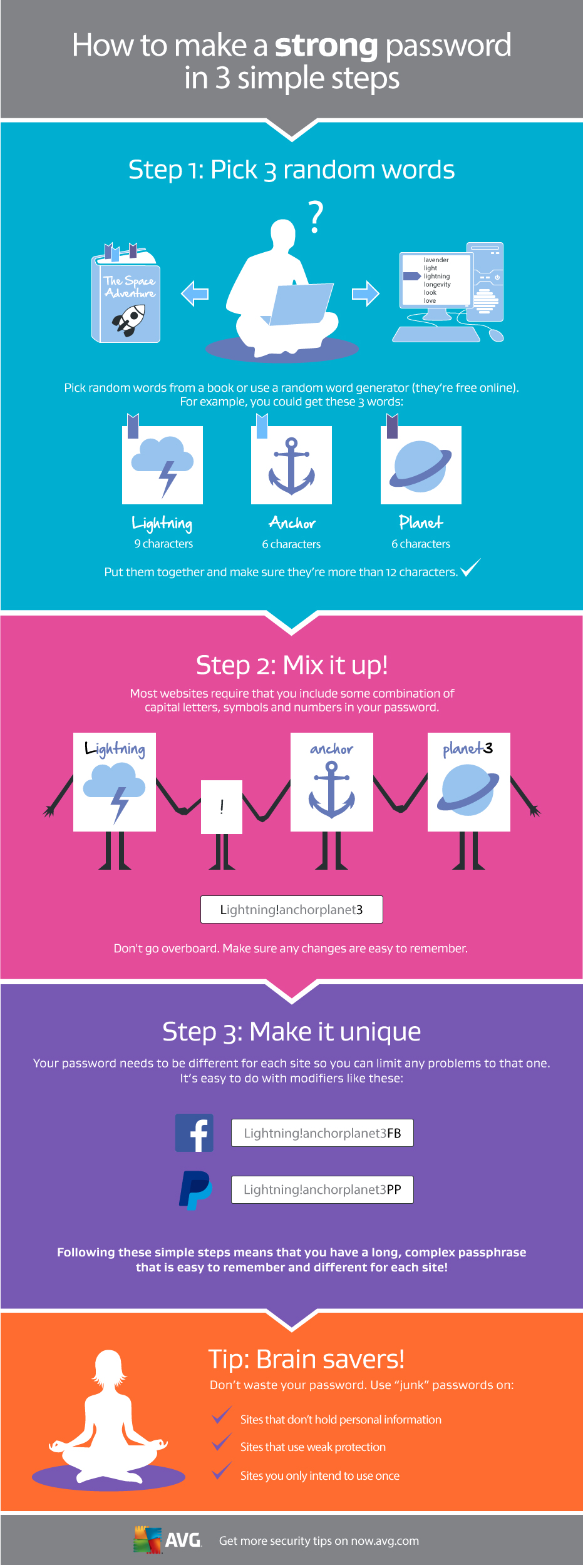
Picking a strong password doesn’t need to be difficult. We recently published an infographic on how to create a strong password that is also easy to remember.


Celebrity hacks – why do they continue?

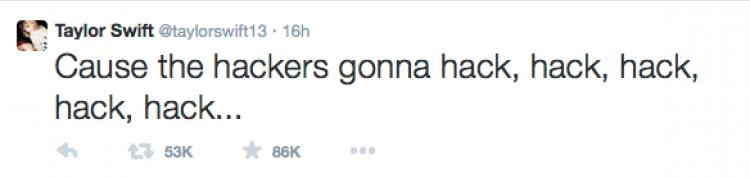
This week we saw yet another hack of a top celebrity, this time the Twitter account of pop star Taylor Swift.  The bad guys, whoever they are, hacked the account sent out messages, distributed personal information and claim to have personal pictures.

Taylor Tweet


Its not uncommon for accounts to be hacked, especially when the security is reliant on just a password, but Twitter offers users much more than this.

Most online services today offer two factor authentication as an additional layer of security. The concept of this is very simple as to login you need to have something and know something. The most common use of this authentication is your ATM card, you need the card and you need to know the number.

The same theory applies on online accounts. You enter your login and password, and then the service waits for you to type in a verification number that is automatically sent to your phone. The phone is something you have and the code is something you know. Of course your phone is protected with a pin which adds yet another layer of security.

Video

Video: What is Two Factor Authentication


Hacking a celebrity’s account would be difficult if they switched on this two factor authentication. Here lies the problem, celebrities may tweet some things themselves, but it’s likely that they have a team managing their social media accounts for them.

Having multiple people running an account prevents the use of two factor authentication as the code can be only sent to one phone.

I am sure I just upset many celebrity fans who thought that celebrities actually managed their own social accounts.  The reality is that celebrities are busy people and social networks are marketing tools that their teams use to keep them in the news.

In the case of Taylor Swift, the hack may of course be more complex and someone could have cloned her phone. This would take effort, access to the device and would have put the hackers in a much riskier environment. I hope that they have secured the data and account and that the damage is limited as no one should be hacked. Having the right security settings is the best protection.

How to set up two factor authentication

  1. Login in to Twitter and go to settings. If you’re on a PC then this entered by clicking on your picture in the top right corner.
  2. In the left hand menu select ‘Security and Privacy’
  3. There are a few options, SMS to a phone or using the app. Select the one of your choice.
  4. Scroll down and save the changes

I use the text to a phone option but either of the SMS or app options require you and your phone to be together to access your account so both offer effective protection.

Now that you have successfully enabled two factor authentication, your account should be a lot more secure.

Follow me on twitter @tonyatavg

Title image courtesy of billboard.com

AVG Technologies to Announce Financial Results

AMSTERDAM, January 29, 2015 – AVG Technologies N.V. (NYSE: AVG) today announced it will report its fourth quarter and fiscal year 2014 financial results for the period ended December 31, 2014 following the close of market on February 18, 2015.

On that day, management will hold a webcast and conference call at 5:00 p.m. ET/2:00 p.m. PT/ 11 PM CET to review and discuss the Company’s results.

  • What: AVG Technologies N.V. Fourth Quarter and Fiscal Year 2014 Financial Results Conference Call
  • When: Wednesday, February 18, 2015
  • Time:  5:00 p.m. ET/2:00 p.m. PT/ 11 PM CET


Live Call:  Participant Access: Dial in 5-10 minutes prior to the start time using the phone numbers and Conference ID below:

+1 646 254 3363 (USA)

+1 416 216 4141 (Canada)

+44 (0)20 3427 1909 (UK)

Conference ID: 5098060


Live/ replay webcast:  AVG Investors Page


About AVG Technologies (AVG)

AVG is the online security company providing leading software and services to secure devices, data and people.  AVG has over 188 million active users, as of September 30, 2014, using AVG’s products and services including Internet security, performance optimization, and personal privacy and identity protection.  By choosing AVG’s products, users become part of a trusted global community that engages directly with AVG to provide feedback and offer mutual support to other customers.

All trademarks are the property of their respective owners.

The most cyber-attacked city is a model town

cibercityThere’s a city in a secret place in the state of New Jersey where the public services are always a mess. Power cuts, water supply problems and even Internet outages. Then add to that banks, stores, hospitals, schools and public transport that can’t operate normally on a daily basis because their security is continually compromised. In this city however no human being has to suffer any of the consequences. Nobody lives there: the city is just 1.8m wide by 2.4 m long.

CiberCity is a model city created by the Sans Institute, an organization that brings together over 165,000 IT security professionals. Its aim is to show the US army how to hack every corner of a modern city. It’s a 1:87 scale training camp designed to ensure the military is properly prepared for a cyber-war.

Ed Skoudis is the director and instructor of this unusual project aimed at teaching the latest cyber-security techniques. “A lot of computer security over last 10 years has really focused on computers themselves and the data on them… or it’s focused on spying and espionage”. Now there are other types of attacks. “But the threat is changing. It’s still that, but adding to that, it’s now people hacking into computers to cause real-world physical damage“, explains this expert in IT security.

If CiberCity existed in real life, it would have 15,000 inhabitants. It’s a city that has all the typical amenities and features of a real town: garden plants, swings in the parks, urban traffic, bars with WiFi and even a chemical plant have all been recreated in this mini city.

cibercity hacker

Five cameras monitor CiberCity so students have a live stream of everything happening there, and can carry out remote cyber-attacks, thereby learning how to attack and defend a city by hacking its security systems.

In one of the training missions, these security experts assume the role of hackers to cause a complete blackout of the city then reconfigure the power company’s computers so utility workers can’t access them. A city can’t live without power, so the challenge is how to get the system up and running again.

Another scenario asks students to work out how to simultaneously turn all traffic lights in the city to red, to prevent terrorists from escaping from the city. Derailing a train hurtling towards the town and laden with radiological weapons; reprograming a rocket launcher aimed at a hospital and hacking a water treatment plant so that clean water appears to be dirty are just some of the entertaining challenges that students will have to tackle.

According to Skoudis, the fact that the model is so realistic makes the project more meaningful to military leaders than if the missions were simply in virtual environments. “They want to see physical things. They want to see the battle space, and what’s happening there”.

Some 70% of Americans say they fear cyber-attacks from other countries, and would no doubt approve of their military acquiring such advanced system hacking skills in order to be better prepared to defend them. And it’s a fair bet that the students enjoy themselves too. Who wouldn’t with such a realistic Lego set?

The post The most cyber-attacked city is a model town appeared first on MediaCenter Panda Security.