Category Archives: Antivirus Vendors
Antivirus Vendors

How to make sure Adobe Flash is up to date
Follow these simple steps to make sure your Adobe flash player is up to date and to avoid any potential cyber attacks.
The post How to make sure Adobe Flash is up to date appeared first on We Live Security.

5 tips to help you stay safe on Instagram
Instagram has many settings to make sure your photos are kept safe and secure. Start with these top five tips/
The post 5 tips to help you stay safe on Instagram appeared first on We Live Security.

Politicians and journalists stung by fake open Wi-Fi protest
Delegates were left red-faced after connecting to an open Wi-Fi network set up to protest mass digital surveillance.
The post Politicians and journalists stung by fake open Wi-Fi protest appeared first on We Live Security.
The easiest way to get your hands on sensitive data
Two thoughts come to mind when I read reports about data security and the protection of personal data: the responsibility of those who collect and store our data but also everyone’s duty to handle their own data responsibly.
Let’s start with the first thought:
Anyone storing someone else’s data must ensure that this data is protected against unauthorized access and that the owner of the data knows what is happening to it. In plain English: Why and for what purpose is data being stored and used? Technical countermeasures can be taken against many of the threats mentioned above. Among them, companies can ensure servers, networks, and data are reliably protected. While no security solution will ever be perfect, options and technologies exist which make it extremely difficult for hackers to achieve their objective.
To me, however, the second thought is the more fascinating of the two as the media pay considerably less attention to it than the first one. Many people now protect their devices by using antimalware software and keeping their apps and programs updated on all their devices. It’s a good start, but is it enough?
How responsibly do we handle our own sensitive data?
This question alone is so fascinating as everyone has his or her own take on where the boundaries lie between private and public data. While some people won’t even allow their name to be listed in a telephone directory, others put their whole lives on show for all to see on social networks. In addition, when it comes to protecting their own data the majority of people only think about the data stored someplace else other than on their devices. But just how carelessly do we give away our information?
I witnessed something interesting a few days back. On a regular flight I had chance of being allocated the middle seat of the row. The biggest disadvantage of the middle seat is that you sit squashed between two other travelers. That being said, the seat also has also a really entertaining plus-point: you can easily see what the travelers are reading to the left and right of you in the row in front. They often read the usual magazines and newspapers – in other words, completely harmless reading matter. However, this time, I saw the person to my left in the row in front going through emails on a notebook. Normally an incredibly boring activity to strangers were it not for a few key terms in an email that grabbed my attention. What I saw caused my eyes to momentarily stay glued to the email. How should I put it: I now know who this person is, which company the person works for, the person’s position there, that the person is advising a major German corporation on behalf of this company, who the person’s points of contact are at this corporation, that the person is working on a still secret project with this German corporation, and what this project is about. I gathered this huge amount of information all within 30 seconds at most. It’s a good thing I’m not interested in using such information and that I had forgotten most of it by next day anyway.
Things got even more astonishing on the return flight. I saw the person to my right checking recent bank balances. The statements had been downloaded to a notebook and the person spent the entire flight going through each account and transaction. Without any effort at all I could not only see the names of his contacts, but also the names of the banks, sort codes, account numbers, account balances, and additional payment details. This is nothing short of sheer carelessness!
On the one hand, there are now infinite options for users to publish, view, and manipulate data on a wide range of devices. On the other hand, there are countless, smart options to protect devices, networks, and data. Certainly, some allegations levied at companies and organizations which handle our data carelessly are completely justified. But nobody can absolve us of our obligation to handle our own data responsibly.
Think about this the next time you’re sitting in an airplane reading highly confidential emails or checking your bank statements. Or at least make sure nobody’s sitting in the middle seat of the row behind you.
The post The easiest way to get your hands on sensitive data appeared first on Avira Blog.

Park ‘N Fly and OneStopParking suffer card breaches
Park ‘N Fly and OneStopParking are the latest companies to reveal data breaches, potentially exposing the card details of customers who used either service
The post Park ‘N Fly and OneStopParking suffer card breaches appeared first on We Live Security.
Guess what’s here? Here again? A new version of Avast Mobile Security is here, tell a friend!
In November, we called on our awesome advanced mobile beta testers to test the latest version of Avast Mobile Security. We listened to their feedback carefully and are proud to announce that the latest version of Avast Mobile Security is now available to everyone!

What’s new in Avast Mobile Security?
First and foremost, we have completely redesigned the virus scanner, making it faster than ever (up to 50% faster!). Then we improved support for Intel-based devices, optimizing the virus scanner for the best performance possible.
Finally, we added a referral program, so you can recommend Avast Mobile Security to your friends and family. Not only can you recommend the best mobile security app available on Google Play, but you will be rewarded for doing so; you can earn up to three months of Avast Mobile Premium for free!
Here is how it works: For every five friends you send an SMS to recommending Avast, you get one free month of Avast Mobile Premium.
In summary:
The new features in Avast Mobile Security are:
- A redesigned and faster than ever virus scanner (50% faster!)
- Improved support for Intel-based devices
- An awesome new referral program that rewards you for spreading the word about Avast Mobile Security!
How can I get the latest version of Avast Mobile Security?
If you don’t already have Avast Mobile Security, what are you waiting for?! Download it on Google Play now! Already have Avast Mobile Security? If you have enabled automatic updates in your Google Play settings, you are all set  If you don’t have automatic updates enabled in your Google Play settings, you can visit our app on Google Play and upgrade manually!
Have fun using Avast Mobile Security – we look forward to hearing your feedback!
We would like to extend a special thanks to our beta testers, your feedback plays an extremely important role in developing our products!
Avast Software’s security applications for PC, Mac, and Android are trusted by more than 200-million people and businesses. Please follow us on Facebook, Twitter and Google+.
Fobus, the sneaky little thief that could
One small Android application shows lots of determination and persistence. Too bad it’s evil.

Mobile malware, Fobus, acts like this famous little engine. “I think I can, I think I can!”
The year 2014 was significant with a huge rise in mobile malware. One of the families impacting our users was malware Fobus, also known as Podec. This malware poses as a more or less useful application, but for sure it won’t be what the user expects. This malware usually has two language versions, English and Russian, and applications seem to be generated automatically.
All that, and a bag of chips
From the permissions in the manifest, we can see that once Fobus is installed on the victim’s device it cannot only send SMS and call premium numbers, which may cost a lot of money, but it also works as Spyware and can steal personal data from the infected device. That’s a lot of bad stuff packed into one small application.
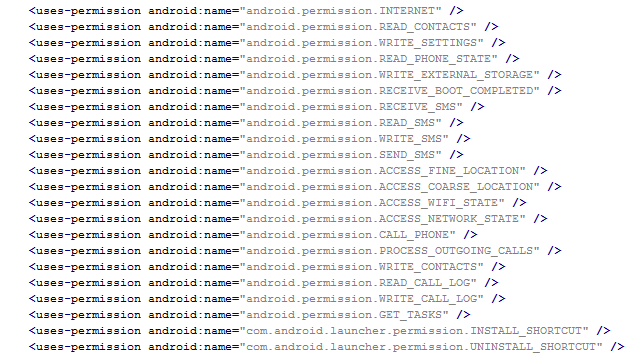
Next up is a bit more technical stuff. If you are really eager, skip to Me thinks that something is amiss section to see how it works.
Inspecting the manifest file provides the clues of the automatic modification of the application files. As you can see in the following picture, service names are randomly generated. Going through samples in our database we were able to identify some similarities, which helped us categorize this malware as the Fobus family.
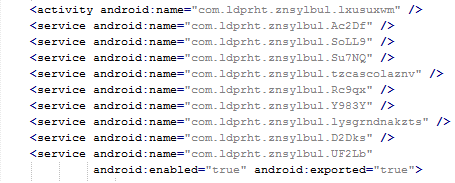
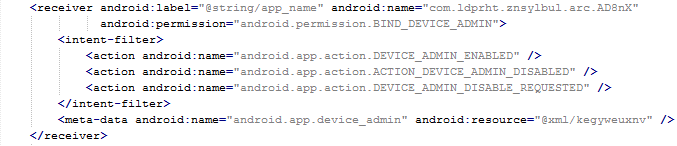
The manifest also includes several receivers which are indicators that the malware is able to spy on the device. It can also protect itself against uninstallation.
This receiver provides persistence of Fobus.

These receivers are able to check the outgoing calls and received SMS.


The receiver pictured here helps to protect the malware against removal.
Me thinks that something is amiss
During installation, the Fobus permissions already show that something might not be in order. But, we all know, that most people fly through this step without much thought.


The Great Pretender
Fobus pretends to be an Ad Block but permissions to make phone calls, send messages, system tools, and services that cost money should not really be needed for an Ad Block application, nor for most legitimate applications. That is, unless you hope it will block unsolicited calls and marketing SMSs. Our advice: The user should always take great care when an application requires these types of permissions and try to link them to the expected app functionality. Inadequate permission requirements are often the first indicator of something fishy.
When the user accepts all these permissions nevertheless, Fobus installs as any other application would.


Here comes trouble!
The real trouble, however, begins when the user runs this application and grants Fobus device administrator privileges.


Once the user activates the device administrator, the application icon disappears from the device.

But in fact, Fobus is still in the device and starts doing what it was build for – SPYING on the device! The user is not able to Stop or Uninstall this application by standard means. Why? Because they gave permission for the app to do all these things in the previously accepted device administrator policy!


Well, just deactivate the device administrator and uninstall this application… That shouldn’t be so hard, right? But it is! The application is easily visible in the device administrator along with the deactivation button. So what is the problem?

Blink and you’ll miss it…
The sneaky Fobus has a receiver which checks for calls on device_admin_disable_request. The moment the user tries to deactivate the device administrator, this receiver catches the request and forces the device to lock the screen with a call to the Lock Now function. This function prevents the user from confirming the deactivation.
Afterwards, the application attempts to relock the screen with any unlock attempt. The confirmation box is visible for just a moment before the application forces the lock screen, however the user will never be able to confirm it in time because the device is not able to capture the user click on screen. The screen locking usually lasts for a while until the confirmation box simply disappears. Sometimes users are required to push one of the hardware buttons on their device to activate the screen. When they finally manage to unlock the device the application is still there and happily running. By now, the person who installed this sneaky little thief, is not a happy camper.

Empty threats
Should the user have lightening-fast reflexes and be able to get past the locking screen mechanism, the authors have another trick up their sleeves. This time, they try to scare the users from disabling the device administrator privilege by threatening to perform a full factory reset.

Fobus shows the user a fake warning about a full factory reset during which the user will lose all data stored on their device. “Heavens, NO!”, most users will say, as they choose the cancel button. But when user is brave and pushes the OK button, the device administrator privilege will be successfully removed and theuser will also able to uninstall the malicious application from the mobile device.
This is a pretty strong uninstall prevention, isn’t it?
It can be very difficult to circumvent this type of protection, especially, since the application cannot be uninstalled by any other means, like ADB or the safe-mode. In ADB, the uninstalling operation finishes as failure and even though the safe-mode disables user-installed applications, in this case the malicious application is still protected by the device administrator privileges and therefore cannot be uninstalled.
How to remove this persistent malware
Affected victims can use third party software to remove this malicious application from their mobile device or actually perform the suggested factory reset.
The removal itself is a two-phase process.
First, you need to deactivate the device administrator privilege.


Then, uninstall Fobus itself.


The little malware that could…
What makes the Fobus so special is not that it can spy on victims devices, send SMSs, or call on premium numbers; there are loads of malicious apps that can do that. Just like The Little Engine That Could, Fobus never gives up. Usually users are able to remove bad apps from their devices easily by themselves by simply uninstalling them. Fobus, though, doesn’t give up so easily, it’s strong removal protection can frustrate even the most experienced users.
Acknowledgement
Thanks to my colleague, Ondřej David, for cooperation on this analysis.
The Litttle Engine That Could image is from Hero Wikia.
Source
Here is a sample connected with the analysis
011a379b3f81dbfb4f6fb4f5c80b5ba4cf9f0677f0ee30c3a8d41711ade2d226

Obama to call for longer hacking prison sentences with revised Computer Fraud and Abuse Act
President Barack Obama intends to persuade Congress to increase the sentence for hackers, as well as widen the definition of what hacking means, according to Ars Technica.
The post Obama to call for longer hacking prison sentences with revised Computer Fraud and Abuse Act appeared first on We Live Security.